 Deng MingXi
Why We Chose to Evaluate the RV1126B
When exploring how to build an AI camera, the first step is to define its application scenarios—different use cases determine completely different technical approaches. AI cameras can be widely applied in visual detection fields such as smart surveillance and precision agriculture, and this article will focus on a key technical aspect of embedded visual detection: the model conversion toolkit.
The smart surveillance industry is currently facing a core challenge: when migrating visual models from training frameworks like PyTorch/TensorFlow to embedded devices, there are widespread issues of significant accuracy degradation (caused by quantization compression) and dramatic increases in inference latency (due to hardware-software mismatch). These technical bottlenecks directly lead to critical failures such as false alarms in facial recognition and ineffective behavior analysis, making the efficiency of the model conversion toolkit a key factor in determining whether AI cameras can achieve large-scale deployment.
It is precisely against this industry backdrop that we decided to conduct an in-depth evaluation of the RV1126B chip. The RKNN-Toolkit toolkit equipped on this chip offers three core advantages:
- Seamless conversion between mainstream frameworks
- Mixed-precision quantization that preserves accuracy
- NPU acceleration to enhance performance
These features make it a potential solution to the challenges of deploying AI cameras, warranting systematic validation through our resource investment.
About "How to make an AI camera", one must first clarify its intended use—different applications require fundamentally different technical approaches. AI cameras can be utilized across numerous vision-based detection domains such as smart surveillance and precision agriculture, and this article will focus on a crucial technical element in embedded vision detection: the model conversion toolkit.
In the smart surveillance sector, the effectiveness of the model conversion toolkit has become a core technical threshold determining whether AI cameras can truly achieve scalable deployment—when transferring visual models from frameworks like PyTorch/TensorFlow to embedded devices, issues frequently arise such as drastic accuracy drops (from quantization compression) and surging inference latency (due to insufficient hardware operator adaptation), leading to critical failures like false positives in facial recognition and dysfunctional behavior analysis. These problems stem both from precision loss challenges caused by quantization compression and efficiency bottlenecks from inadequate hardware operator support.
The RV1126B chip, with its mature RKNN-Toolkit ecosystem, provides three key advantages: seamless conversion between mainstream frameworks, mixed-precision quantization that maintains accuracy, and NPU acceleration for enhanced performance. These make it a pivotal solution for addressing AI camera deployment challenges. This article will conduct rigorous testing of this toolkit's real-world performance throughout the complete model conversion workflow. We will focus on evaluating two key aspects: the compatibility of the model conversion toolkit and the detection speed of converted models. From a compatibility perspective, the RV1126B's RKNN-Toolkit demonstrates clear strengths—supporting direct conversion of mainstream frameworks like PyTorch, TensorFlow, and ONNX, covering most current AI development model formats and significantly lowering technical barriers for model migration; however, our testing revealed that certain complex models with special architectures (such as networks containing custom operators) may require manual structural modifications to complete conversion, posing higher technical demands on developers. Regarding detection speed, empirical data shows that the YOLOv5s model quantized to INT8 achieves a 31.4ms inference latency on RV1126B, fully meeting the 30fps real-time video processing requirement.
In summary, the RV1126B completely satisfies requirements for both detection speed and model compatibility. Based on these findings, we have selected the RV1126B as one of the core processing unit options for our AI Camera Version 2.
The model conversion toolkit and examples can be downloaded from the following links:
# Examples
git clone https://github.com/airockchip/rknn_model_zoo.git

# Model conversion toolkit
# Note: Please use Python 3.8 environment for installation
conda create -n rknn python=3.8
git clone https://github.com/airockchip/rknn-toolkit2.git

# Then navigate to the rknn-toolkit2-master/rknn-toolkit2/packages/x86_64 folder. First install the required dependencies by running:
pip install -r requirements_cp38-2.2.0.txt

# Next install rknn-toolkit2
pip install rknn_toolkit2-2.2.0-cp38-cp38-manylinux_2_17_x86_64.manylinux2014_x86_64.whl
The RKNN conversion environment setup is now complete.
Open the prepared rknn_model_zoo folder and navigate to the examples/yolov5/python folder.
Download the yolov5s.onnx model file and place it in that folder.
yolov5s.onnx
View the convert.py file to modify the test folder and output path.
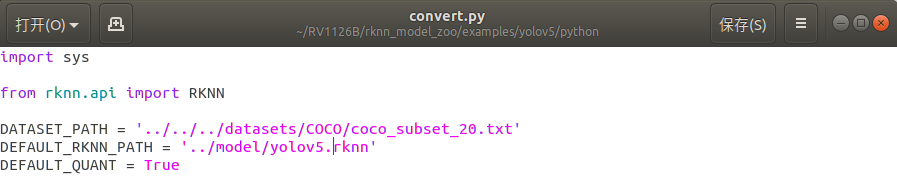
Run convert.py in the terminal to complete the conversion.
python convert.py yolov5s.onnx rv1126b
The model quantization is now complete, resulting in a .RKNN file.
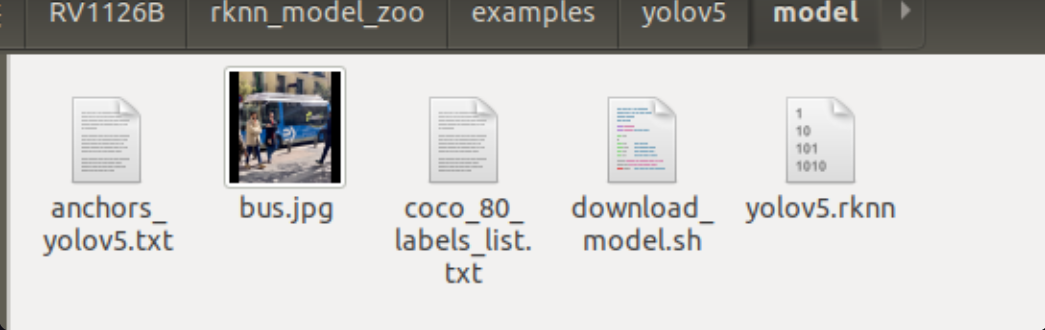
When the target device is a Linux system, use the build-linux.sh script in the root directory to compile the C/C++ Demo for specific models.
Before using the script to compile the C/C++ Demo, you need to specify the path to the cross-compilation tool through the GCC_COMPILER environment variable.
Download cross-compilation tools
(If cross-compilation tools are already installed on your system, skip this step)
Different system architectures require different cross-compilation tools. The following are recommended download links for cross-compilation tools based on specific system architectures:
aarch64:
armhf:
armhf-uclibcgnueabihf(RV1103/RV1106): (fetch code: rknn)
Unzip the downloaded cross-compilation tools and remember the specific path, which will be needed during compilation.
The SDK materials that come with your purchased development board will typically include the compilation toolchain, which you will need to locate yourself.
Compile the C/C++ Demo
The commands for compiling the C/C++ Demo are as follows:
# go to the rknn_model_zoo root directory
cd <rknn_model_zoo_root_path>

# if GCC_COMPILER not found while building, please set GCC_COMPILER path
export GCC_COMPILER=<GCC_COMPILER_PATH>

#It's my pathw
export GCC_COMPILER=~/RV1126B/rv1126b_linux_ipc_v1.0.0_20250620/tools/linux/toolchain/arm-rockchip1240-linux-gnueabihf/bin/arm-rockchip1240-linux-gnueabihf


./build-linux.sh -t <TARGET_PLATFORM> -a <ARCH> -d <model_name>

chmod +x build-linux.sh

# for RK3588
./build-linux.sh -t rk3588 -a aarch64 -d mobilenet
# for RK3566
./build-linux.sh -t rk3566 -a aarch64 -d mobilenet
# for RK3568
./build-linux.sh -t rk3568 -a aarch64 -d mobilenet
# for RK1808
./build-linux.sh -t rk1808 -a aarch64 -d mobilenet
# for RV1109
./build-linux.sh -t rv1109 -a armhf -d mobilenet
# for RV1126
./build-linux.sh -t rv1126 -a armhf -d mobilenet
# for RV1103
./build-linux.sh -t rv1103 -a armhf -d mobilenet
# for RV1106
./build-linux.sh -t rv1106 -a armhf -d mobilenet

# for RV1126B

./build-linux.sh -t rv1126b -a armhf -d yolov5

# if need, you can update cmake
conda install -c conda-forge cmake=3.28.3
The generated binary executable files and dependency libraries are located in the install directory.
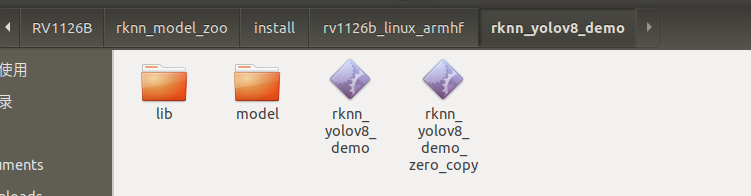
Transfer the generated binary executable files and dependency libraries to the target device via ADB connection.
### Get the IP address of the EVB board
adb shell
ifconfig
# Assume the IP address of the EVB board is 192.168.49.144

adb connect 192.168.49.144:5555

### adb login to the EVB board for debugging
adb -s 192.168.49.144:5555 shell

### From the PC, upload the test-file to the /userdata directory on the EVB board
adb -s 192.168.1.159:5555 push test-file /userdata/

### Download the /userdata/test-file file from the EVB board to the PC
adb -s 192.168.1.159:5555 pull /userdata/test-file test-file
Navigate to the board's folder and execute the detection experiment with the program file
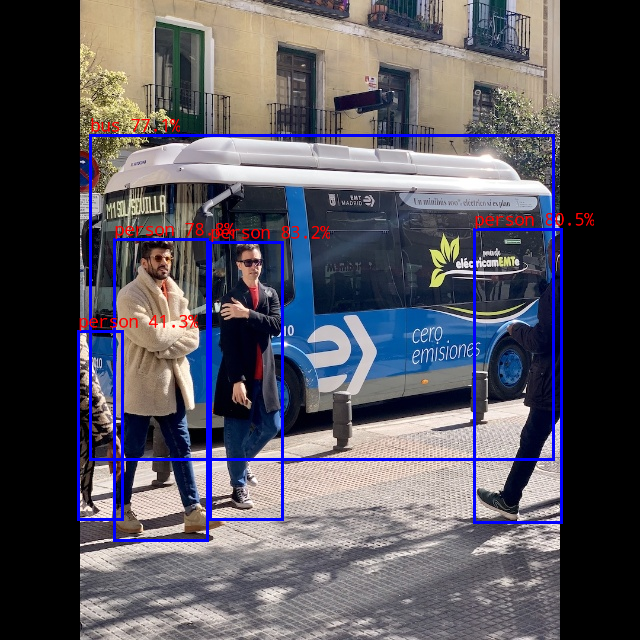
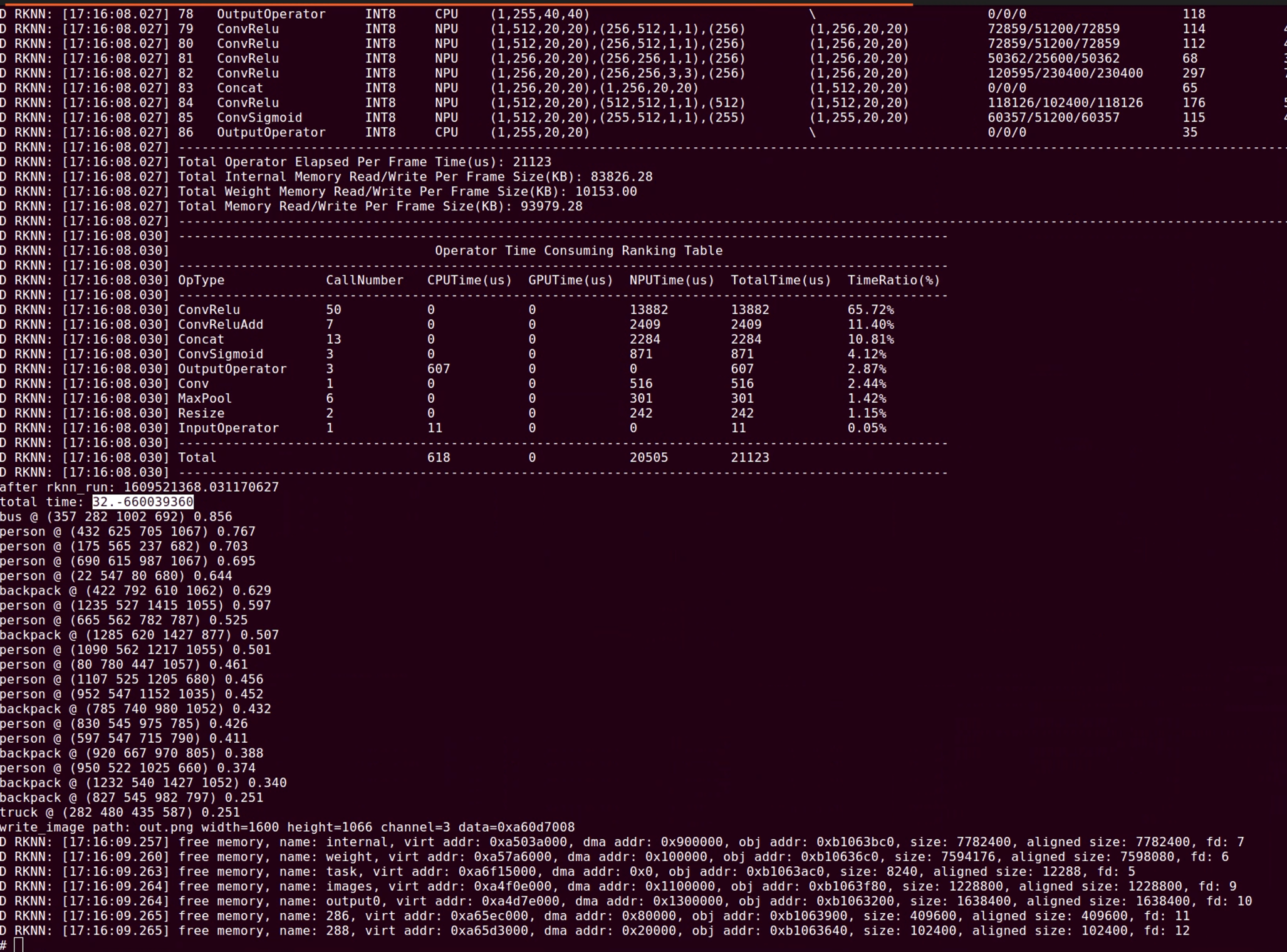
./rknn_yolov5_demo model/yolov5.rknn model/bus.jpg
The detection results are as follows:
Inference Time:
For the YOLOv5s model quantized to INT8, the inference time for 640x640 resolution, including data transfer + NPU inference, is about 31.4ms, which can meet the requirement of 30fps video processing;
For the YOLO world model quantized to INT8, the inference time depends on the number of objects to be detected. The inference time is divided into two parts: the clip text model and the YOLO world model. For example, when detecting 80 types of objects, the time consumption is 37.5x80 + 100 = 3100ms; if only one object is detected, the time consumption is 37.5 + 100 = 137.5ms;
Model Conversion Toolkit Support Table
Model files can be obtained through the following link:
https://console.zbox.filez.com/l/8ufwtG (extraction code: rknn)
| Model Name | Data Type | Supported Platforms |
|---|---|---|
| MobileNetV2 | FP16/INT8 | RK3562/RK3566/RK3568/RK3576/RK3588/RV1126B RK1808/RK3399PRO RV1109/RV1126 |
| ResNet50-v2 | FP16/INT8 | RK3562/RK3566/RK3568/RK3576/RK3588/RV1126B RK1808/RK3399PRO RV1109/RV1126 |
| Model Name | Data Type | Supported Platforms |
|---|---|---|
| YOLOv5 (s/n/m) | FP16/INT8 | RK3562/RK3566/RK3568/RK3576/RK3588/RV1126B RK1808/RK3399PRO RV1109/RV1126 |
| YOLOv6 (n/s/m) | FP16/INT8 | RK3562/RK3566/RK3568/RK3576/RK3588/RV1126B RK1808/RK3399PRO RV1109/RV1126 |
| YOLOv7 (tiny) | FP16/INT8 | RK3562/RK3566/RK3568/RK3576/RK3588/RV1126B RK1808/RK3399PRO RV1109/RV1126 |
| YOLOv8 (n/s/m) | FP16/INT8 | RK3562/RK3566/RK3568/RK3576/RK3588/RV1126B RK1808/RK3399PRO RV1109/RV1126 |
| YOLOv8-obb | INT8 | RK3562/RK3566/RK3568/RK3576/RK3588/RV1126B RK1808/RK3399PRO RV1109/RV1126 |
| YOLOv10 (n/s) | FP16/INT8 | RK3562/RK3566/RK3568/RK3576/RK3588/RV1126B RK1808/RK3399PRO RV1103/RV1106 RK1808/RK3399PRO RV1109/RV1126 |
| YOLOv11 (n/s/m) | FP16/INT8 | RK3562/RK3566/RK3568/RK3576/RK3588/RV1126B RK1808/RK3399PRO RV1103/RV1106 RK1808/RK3399PRO RV1109/RV1126 |
| YOLOX (s/m) | FP16/INT8 | RK3562/RK3566/RK3568/RK3576/RK3588/RV1126B RK1808/RK3399PRO RV1109/RV1126 |
| PP-YOLOE (s/m) | FP16/INT8 | RK3562/RK3566/RK3568/RK3576/RK3588/RV1126B RK1808/RK3399PRO RV1109/RV1126 |
| YOLO-World (v2s) | FP16/INT8 | RK3562/RK3566/RK3568/RK3576/RK3588/RV1126B RK1808/RK3399PRO RV1109/RV1126 |
| Model Name | Data Type | Supported Platforms |
|---|---|---|
| YOLOv8-Pose | INT8 | RK3562/RK3566/RK3568/RK3576/RK3588/RV1126B RK1808/RK3399PRO RV1109/RV1126 |
| Model Name | Data Type | Supported Platforms |
|---|---|---|
| DeepLabV3 | FP16/INT8 | RK3562/RK3566/RK3568/RK3576/RK3588/RV1126B RK1808/RK3399PRO RV1109/RV1126 |
| YOLOv5-Seg (n/s/m) | FP16/INT8 | RK3562/RK3566/RK3568/RK3576/RK3588/RV1126B RK1808/RK3399PRO RV1109/RV1126 |
| YOLOv8-Seg (n/s/m) | FP16/INT8 | RK3562/RK3566/RK3568/RK3576/RK3588/RV1126B RK1808/RK3399PRO RV1109/RV1126 |
| PP-LiteSeg | FP16/INT8 | RK3562/RK3566/RK3568/RK3576/RK3588/RV1126B RK1808/RK3399PRO RV1109/RV1126 |
| MobileSAM | FP16 | RK3562/RK3566/RK3568/RK3576/RK3588/RV1126B RK1808/RK3399PRO RV1109/RV1126 |
| Model Name | Data Type | Supported Platforms |
|---|---|---|
| RetinaFace (mobile320/resnet50) | INT8 | RK3562/RK3566/RK3568/RK3576/RK3588/RV1126B RK1808/RK3399PRO RV1109/RV1126 |
In the hands-on practice of "How to make an AI camera", the most challenging part is model conversion - after all, getting a model trained in PyTorch/TensorFlow to run in real-time on an RV1126B chip is like forcing an algorithm accustomed to five-star hotels to live in a compact embedded space, where precision crashes and inference delays can be brutal lessons.
Our real-world tests have provided the answer: with the RKNN-Toolkit toolkit, we achieved an inference speed of 31.4ms for the YOLOv5s model on RV1126B (solidly maintaining 30fps video streaming). Even more impressively, this toolkit directly supports the full range of models from MobileNetV2 to YOLOv11, and can seamlessly adapt to advanced requirements like pose estimation and image segmentation.
If you also want to build an AI camera that can "see and understand" the world, model conversion compatibility and detection speed will become critical metrics you can't ignore.
Stay tuned for more updates on our project, as we continue to expand the "How to make an AI camera" content series.
Discussions
Become a Hackaday.io Member
Create an account to leave a comment. Already have an account? Log In.