Close
0%
0%

An outdoor lab in our family vineyard

An experimental space for open DIY technology, sustainable agriculture, creative community, art, and connection between people and land

Similar projects worth following
This is my attempt to reimagine my family’s vineyard — not just as a place of wine production, but as a living testbed for sustainable technology, robotics, art and community creativity. The project starts small:

Solar-powered ESP32 nodes to measure soil moisture and temperature.
Raspberry pi as a central unit for wireless local data collection
Camera for time-lapsing and monitoring

But that’s just the beginning.
In the long run, I want to explore:

Robots for navigating and assisting in the vineyard
Art installations powered by nature and data
Workshops to teach others (locals, kids, travelers) how tech can serve land, not exploit it

This project lives between tradition and experimentation — it doesn't have all the answers but lives within community. It starts locally, but it hasn't to stay here. It's for anyone who wants to build something meaningful and real. For those who get the "why?". This is a white canvas.

An outdoor lab in a vineyard — an experimental space for open DIY tech, sustainable agriculture, collective learning, and deeper connection with nature.

This project reimagines a traditional vineyard as more than farmland — as a place of experimentation, creativity, and shared curiosity. It begins with building low-cost, solar-powered devices to monitor and care for the land. But beyond the hardware, it’s about forming a community — of learners, makers, artists, and farmers — who explore new ways of living and working together.

We're not aiming for a polished blueprint or a perfect system. We’re embracing the unknown, learning as we go, and enjoying the process of building something with others. The goal is to reconnect with nature through technology — not to dominate it, but to observe, adapt, and collaborate with it.

Whether it’s kids discovering electronics in the field, or friends hacking robots in a repurposed pig shed, this vineyard-lab is a platform for exploration. A quiet rebellion against isolation, complexity, and overconsumption — and a small experiment in making the future feel more human.

First milestone:

Build and test a solar-powered ESP32 node that can wirelessly send sensor data to a Raspberry Pi base station.

Later, the Pi will be solar-powered as well and connected to the cloud via cellular network for remote monitoring.

This first step is well within reach — and once it's working, it opens the door to much more ambitious experiments in automation, robotics, and creative use of outdoor tech.
IMG_20250712_135402.jpg

Our grandpa's old restored bicycle in our house yard

JPEG Image - 5.61 MB - 07/22/2025 at 06:06

Preview

IMG_20250712_200507.jpg

Our old tractor on front of the vineyard rows and the sunset.

JPEG Image - 2.82 MB - 07/22/2025 at 06:06

Preview

IMG_20210912_143700.jpg

Harvest 2021. After all the hard work, we took this photo with everyone who helped—family and friends.

JPEG Image - 1.81 MB - 07/22/2025 at 06:06

Preview

  • Raspberry Pi zero solar powered server

    sotiris barlakas07/21/2025 at 13:49 0 comments

    After managing to have a sensor node based on ESP32 running using solar power and battery during nights and constantly gathering data, the next step is to set up a "brain" for our vineyard. A central server that can gather data from one ore more distributed sensor nodes and store that data or upload them to the cloud. As the vineyard hasn't internet access, for now the server will just save data locally in order for them to be accessed directly by reading the SD card.

    The current endeavour is split in these parts:

    1) Setup Raspberry Pi (initially AC powered)

    2) Create a python server script that receives and saves data 

    3) Create code for the ESP32 to connect to the server and send data from the sensor connected to it.

    4) Finally, power the Raspberry Pi using solar power

    Raspberry Pi Setup 

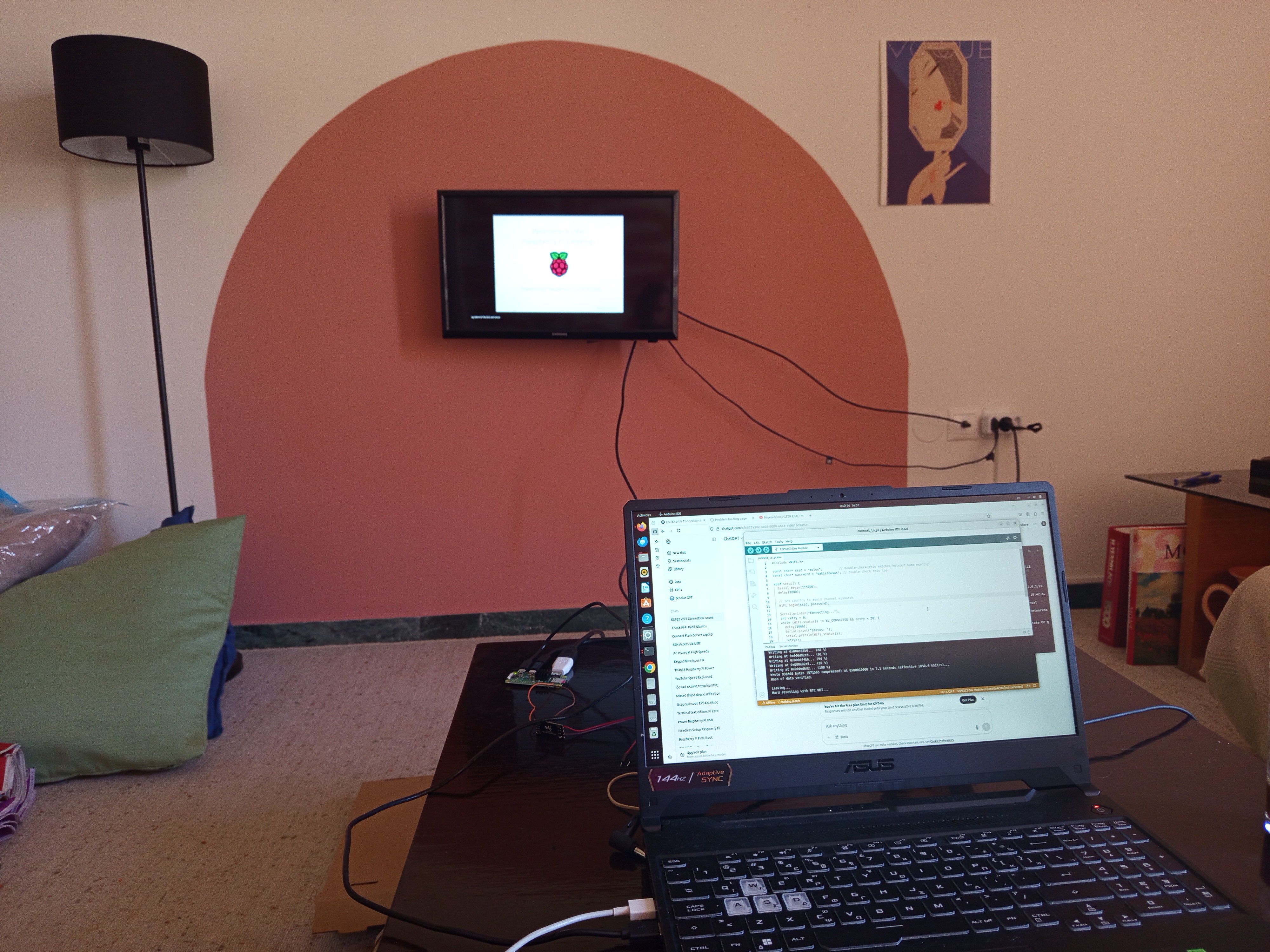
    I had never worked with a raspberry before so my first goal was to set up a raspberry pi zero by installing an operating system to am SD card, and boot into it.  To my embarrassment and surprise I realized quickly that you can't just buy a raspberry pi alone, press a button and begin working with it. You need some peripherals. 

    1) An hdmi cable to access it through a monitor. 

    2) An micro hdmi adapter (because the hub in the pi is micro HDMI type)

    3) An SD card to install the OS

    4) An SD card USB adapter to plug in a laptop, and upload the downloaded OS to the SD card

    5) Keyboard and mouse

    6) USB hub because raspberry pi zero has only 2 micro-usb  ports (and one is taken for powering)

    So after purchasing the parts and following an online tutorial to install the OS, I was finally in. 

    To be sincere I didn't have a spare keyboard and I didn't want to buy one so I needed to find an alternative.

    At first I activated from the settings the display keyboard function but writing code with that keyboard would soon turn my life into hell. So after a bit of searching I decided to set up a headless (meaning remote) connection to the raspberry that would enable me to control the raspberry from any device. In Linux this is commonly done after establishing a SSH connection. To do so, the raspberry pi and the device that you try to connect should be on the same Wi-Fi  network.  Alternatively the device must be connected to the Wi-Fi hotspot of the raspberry pi. I found that more generic and straightforward to implement so I started creating a hotspot from the raspberry pi.

    This is very straightforward from the GUI of the pi, and all you have to do is to set a name, a password, and activate it. 

    Then from another device, I connected to that Wi-Fi hotspot. Then, in order to connect to the raspberry pi and gain access to it, we have to find its IP address.  As we have access to the Pi from the monitor and mouse, we can find its IP by opening a terminal and typing:

    hostname -I

     Then we can connect to the raspberry pi by entering in the terminal of the other device:

    ssh {pi_username}@{ip_address}

    We are in!!

    Now we can use terminal commands to do whatever we want with the Raspberry Pi. We don't longer need the mouse and the monitor! 

    But first we have to make sure that the Pi will activate the hotspot after every boot. We can set this up easily from the settings of the hotspot.

    Create a python server

    Now that the raspberry pi is set up and we can access it from any device to program it or inspect we are ready to actually start using it. 

    First thing that we are going to try is to create a very simple python server using the Flask library. The functionality of the server initially will be a simple Hello World message print. Later, the server must be able to accept data from the connected client (aka the ESP32) and save them locally.

    The code for the basic server setup is this:

    from flask import Flask
    
    app = Flask(__name__)
    
    @app.route('/')
    def hello():
        return "Hello, World!"
    
    if __name__ == '__main__':
        app.run(host='0.0.0.0'...
    Read more »

  • First solar powered ESP32 Node

    sotiris barlakas06/24/2025 at 09:18 0 comments

    Introduction

    In this log, I’ll document my first real hands-on step in bringing the vineyard project to life: creating a solar-powered ESP32 node. It's a small but essential milestone that will teach me the fundamentals of powering electronics off-grid — and help me better understand the challenges ahead.

    Goal

    Build and test a standalone ESP32 microcontroller powered by a solar panel and battery system. The node should be able to operate continuously and send data to the central control unit. In our first project, it will send a message with the current battery voltage.

    The primary goal is not just to succeed, but to learn through each failure and iteration.

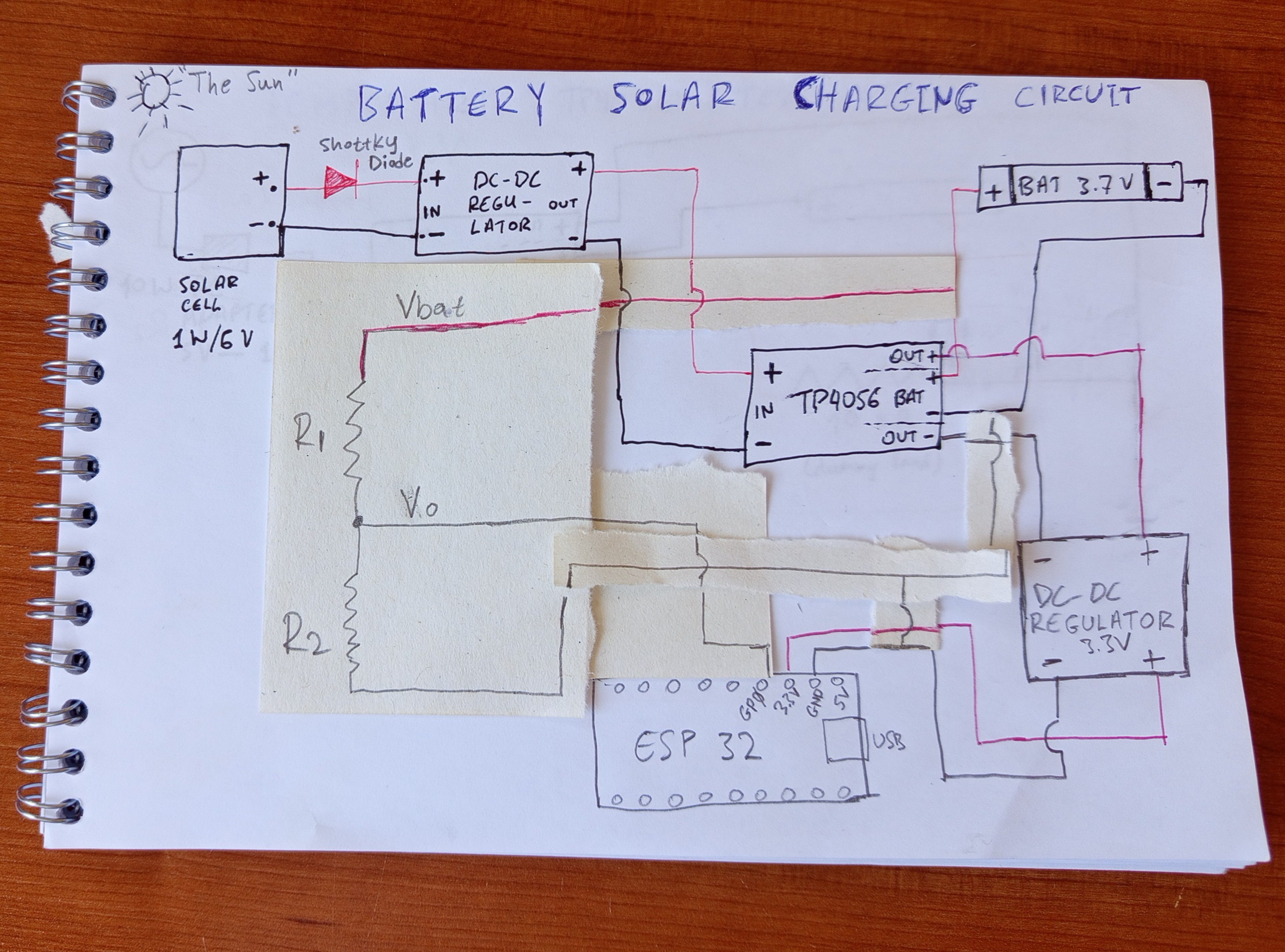
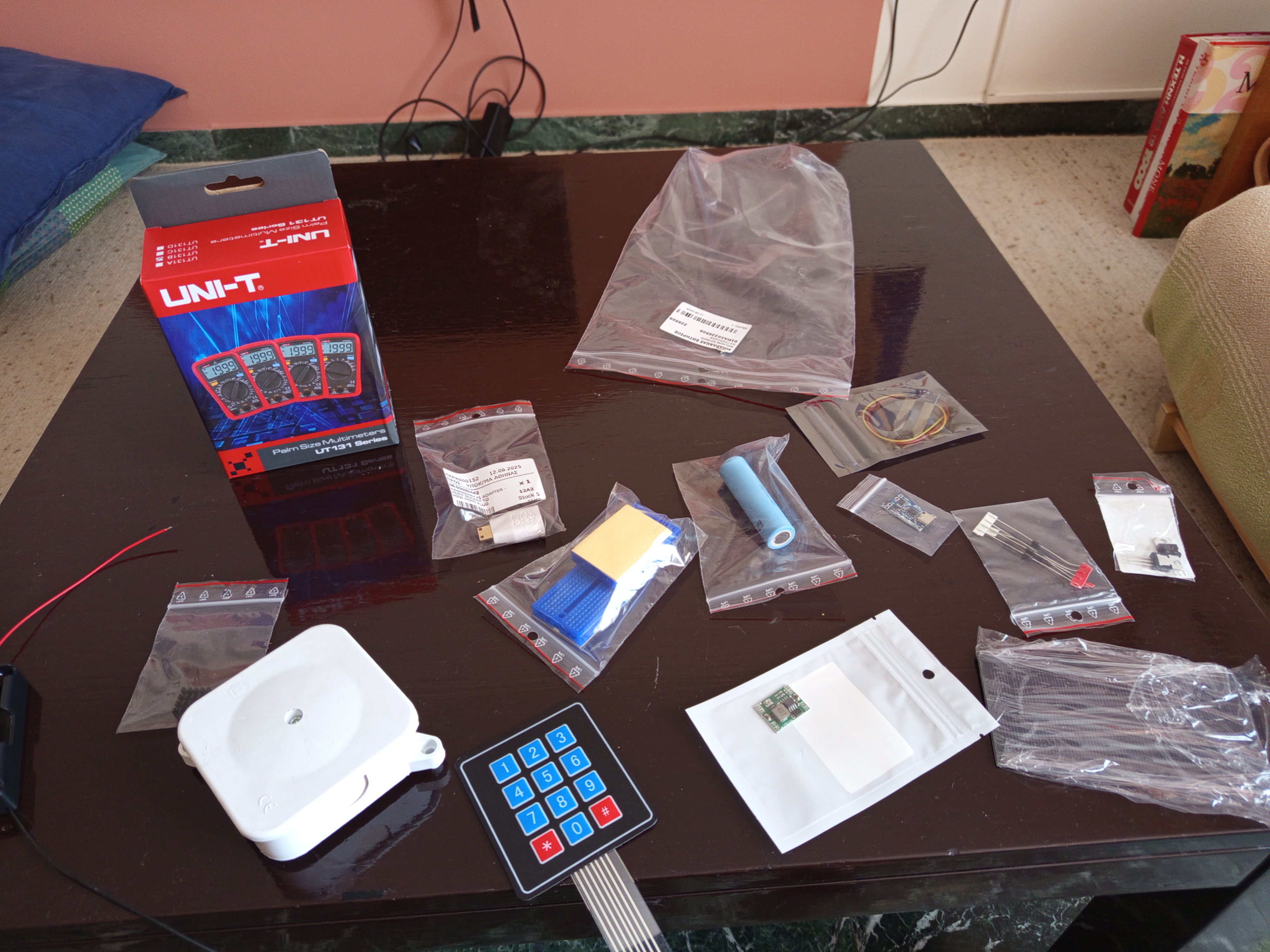
    After a bit of searching (there are a lot of similar projects online) I found out that the main components of a solar powered microcontroller are the following:

    Microcontroller (obviously... ESP32-C3 mini is the cheapest I managed to find, is compact and works perfectly)

    Solar panel (1 watt is enough to begin with)

    TP4056 charging module (super important to manage the safe charging of our battery, it is a BMS actually

    18650 lithium-ion battery (very common rechargeable battery. 2-3 mAh is good to begin with)

    A voltage regulator (buck/boost converter) module to regulate voltage input from solar panel before feeding it to TP4056. The reason for this is that the TP4056 input voltage must be 4.5-5.5V and the solar panel outputs a variable voltage depending on the sunlight 

    A voltage regulator (buck converter) to regulate voltage from the TP4056 to the ESP32 because it accepts 3.3V but TP4056 outputs something between 4.2 and 3.5 (the voltage of the battery)

    A Shottky diode to prevent current from returning to the solar panel during night

    Breadboard + jumper wires (of course)

    Multimeter (very important for testing and learning)

    The development of the project was split in discrete steps to gain experience with the individual components and learn their behaviour.

    3 Demos were planned:

    D1: Measuring of battery voltage with the microcontroller 

    D2: Charge the battery with the TP4056 using AC adapter 

    D3: Combine D1 and D2 in a single circuit and connect to solar panel

    Demo 1

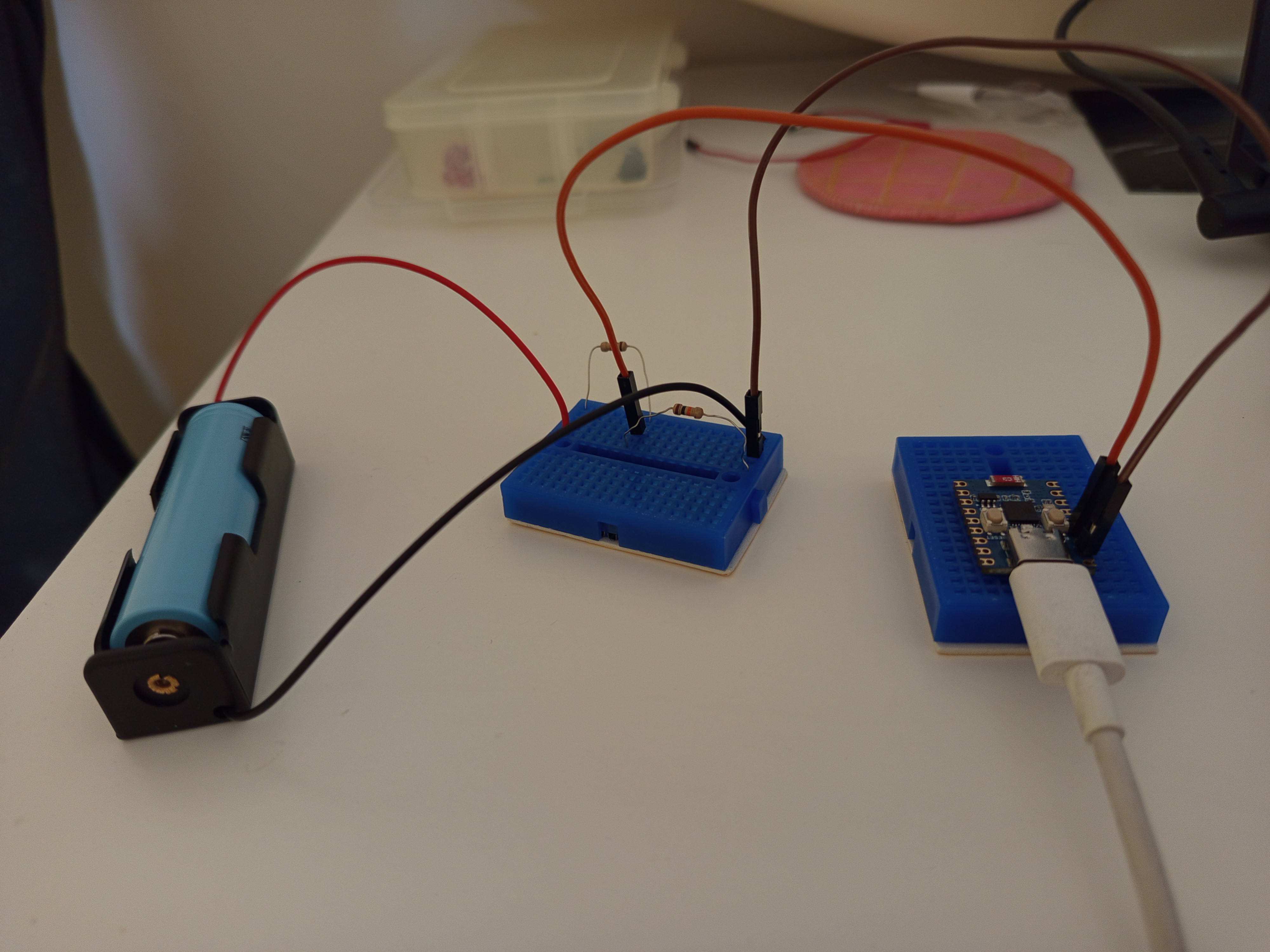
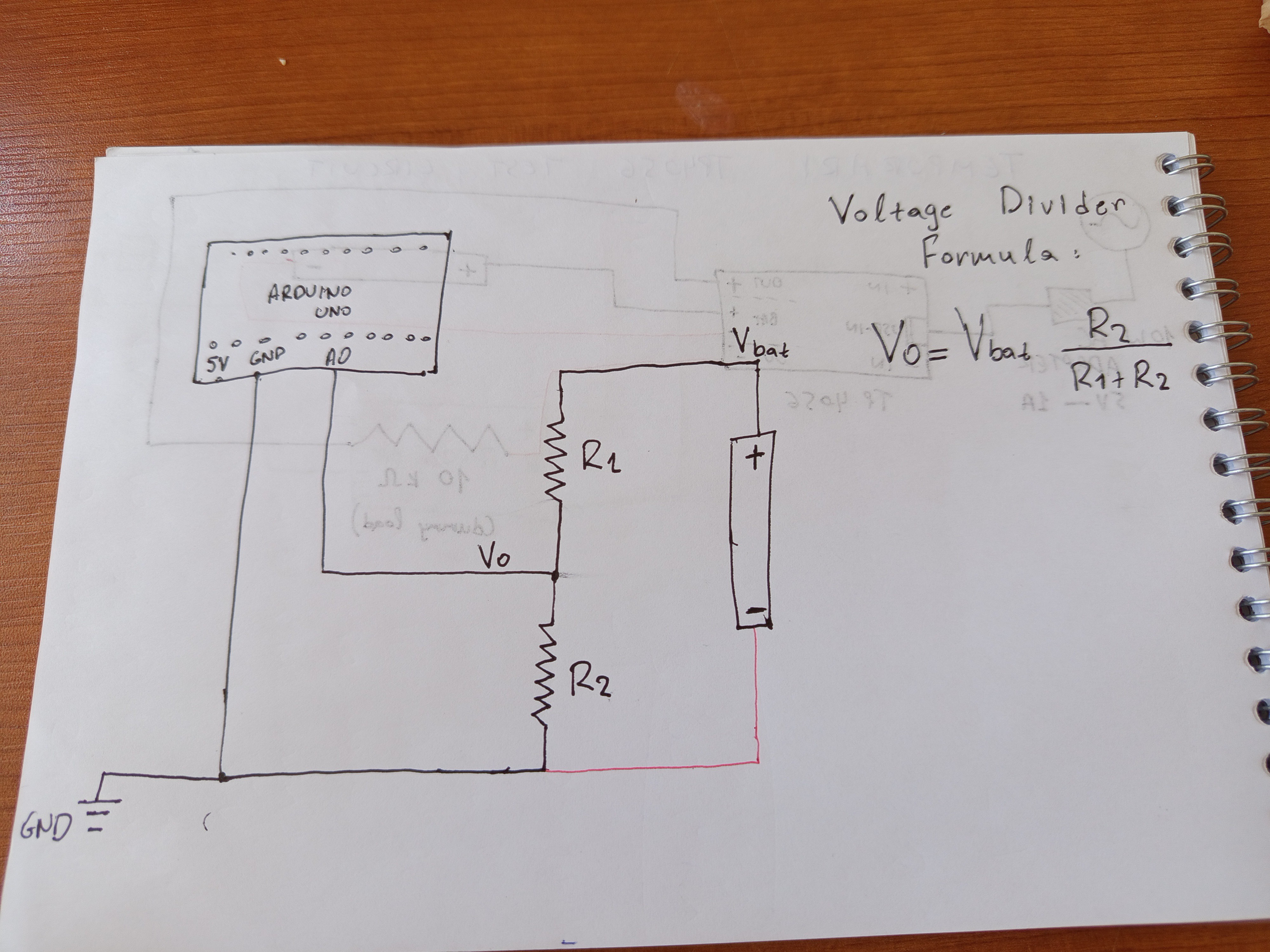
    The goal here is to get the voltage of the battery in the analog pin of ESP32.  The voltage divider circuit is necessary because ESP32 accepts maximum voltage of 3.3 while the battery voltage is between 3.3 and 4.2. the voltage divider helps us reduce the voltage in a known amount, measure the reduced safe voltage and estimate the real voltage of the battery.

    A photo of the circuit is shown in the image below:

    Demo 2

    The second demo was about getting TP4056 to work and manage the charging of the battery. For simplification, the TP4056 was charged using an AC wall adapter and not solar panel.

    The circuit is shown in the image below:

    Demo 3

    Finally, the third demo was to connect the two partial circuits, to try measuring the voltage of the battery while it charges.

    The combined circuit is this:

    During this step a problem was realised. When the battery charges its voltage variates according to the charging voltage, but it usually is approximately 4.2volt. So measuring its voltage is pointless. When the battery discharges it's voltage stabilises at its true value.

    Lesson learned:

    Measuring battery voltage during charging is pointless.

    Another problem here was the voltage regulator I bought.

    The voltage regulator (mp1584) I bought is not suitable for regulating voltage between battery and esp32 because it has an Input voltage range between 4.75V-23V which is high. The battery will output something between 4.2 and 3.3. And the regulator must regulate this to 3.3 V exactly to power the esp32 safely. So input voltage is lower than the threshold so the voltage regulator shuts down, and the ESP32 doesn't receive any power.  

    Lesson re-learned (as I have been there before): 

    When purchasing electronics, look...

    Read more »

  • Vision, values and conceptual design

    sotiris barlakas06/23/2025 at 12:58 0 comments

    In this log, I want to lay out the rough roadmap that came to mind — a path that I hope will help kickstart the dream of:

    a) Making our family vineyard smart and remotely monitored, to reduce repetitive and laborious tasks
    b) Building an outdoor lab where, one day, kids can learn and connect with nature
    c) Creating a small, futuristic space inspired by the 2014 movie Transcendence (without the evil side)
    d) Making the vineyard resilient — a sustainable place that could survive a brutal, resource-scarce, post-apocalyptic world... like Bill and Frank’s sanctuary in The Last of Us

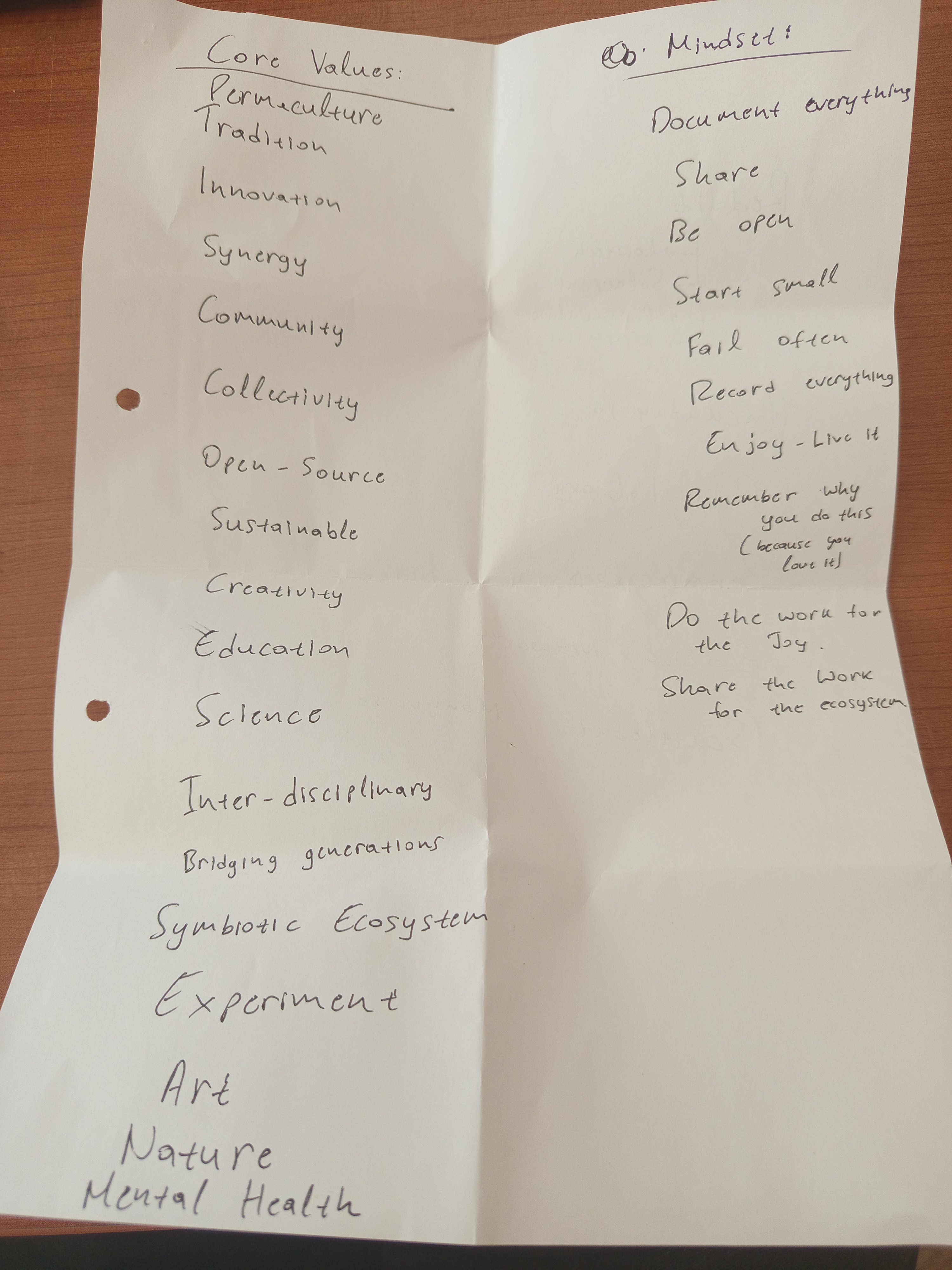
    All of these visions excite me. But I’m not sure which one is the ultimate goal. What I do know is this: I have a few core values that will guide me through this unmapped journey. I’m writing them down here to serve as a compass for myself — and maybe, as a lighthouse for you, reader — in case something here speaks to you, and you want to walk a little of this road with me.

    If any of these resonated with you, I can't wait to meet you and walk this road together.

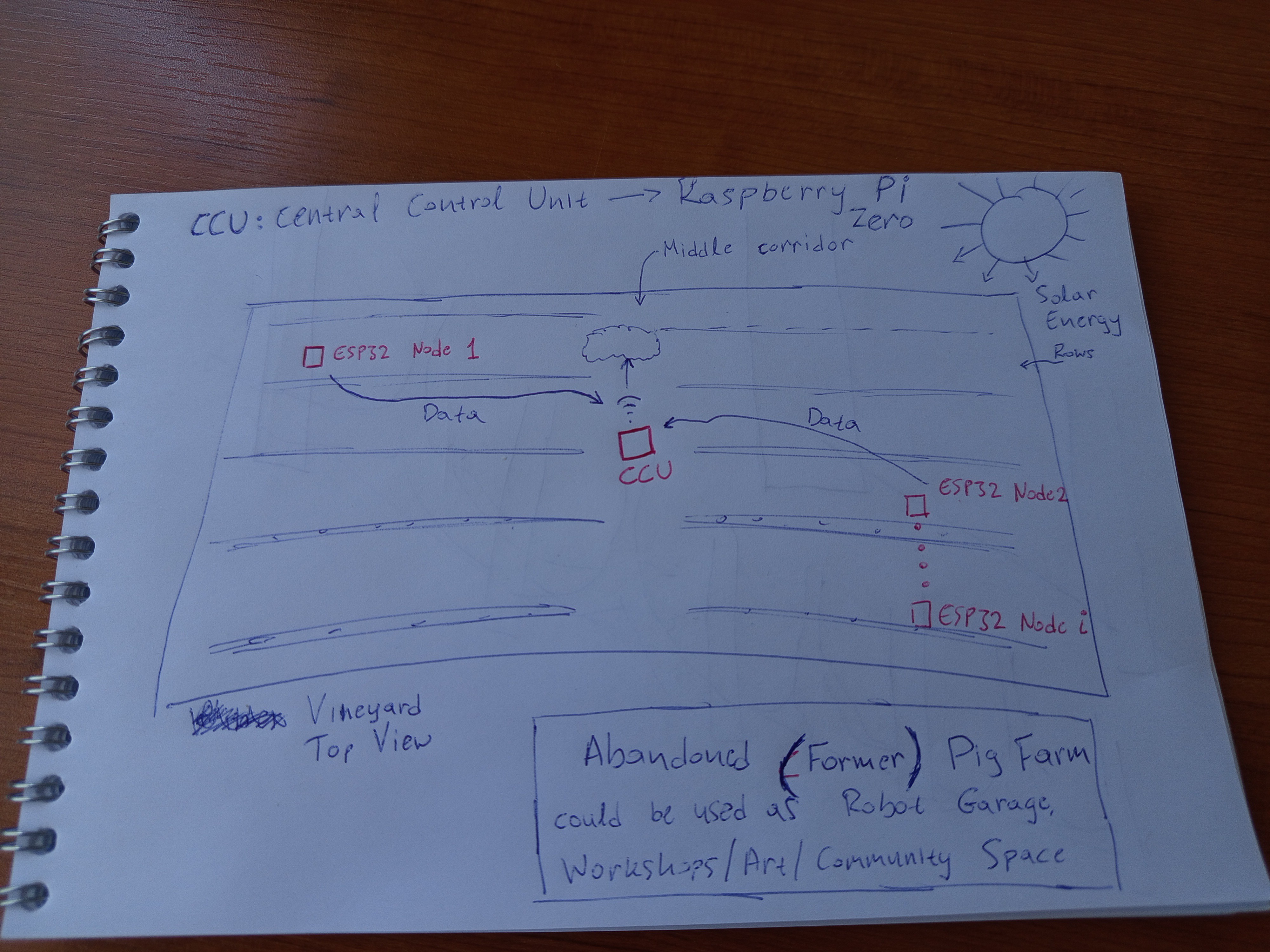
    Let me show you how I imagine the vineyard:

    As you can see there's a central control unit, a Raspberry pi zero 2w, which gathers data from distributed IoT sensors using ESP32 microcontrollers. As the vineyard is off-grid, both the Raspberry Pi and the ESP32s will be solar powered and will have battery for continuous operation. The raspberry pi may then be connected to the internet using cellular network (no WiFi available) to upload the data to a cloud database in order to monitor the vineyard from anywhere. If we manage to set this up, then sky is the limit. We could build a DIY mobile platform for fertilizing or monitoring of the vineyard. There's an abandoned pig farm nearby which we could use as a garage to park the robot safely. This could also serve as a multi-purpose area for events workshops etc etc...

    But as in every ambitious plan, we need to take this step by step.

    The project begins as an abstract idea, but it starts with buying some electronics, haha.  Our rule is always one: 

    Buy the cheapest you can find!

    So, how do we begin? 

    I am thinking of two clear steps that require effort but will give us a lot of valuable knowledge and insights and really sky-rocket the project:

    1) build and test a solar and battery powered esp32

    2) build and test solar powered raspberry pi 

    The reason why we start with the esp32 is that it requires less power than the raspberry pi, which will be more challenging to power using sun.

    Moreover, my experience with solar panel project is zero, so it will be a great chance to familiarise myself with that and learn from the problems that will definitely arise.

    Stay tuned, and feel free to get in touch

View all 3 project logs

Enjoy this project?

Share

Discussions

Similar Projects

Does this project spark your interest?

Become a member to follow this project and never miss any updates