Achieve long exposure times at high frame rates using a cheap synchronized dual camera setup in time interleaved mode.
To make the experience fit your profile, pick a username and tell us what interests you.
We found and based on your interests.
In a recent post in my other project lalelu_drums, I describe how I can fuse the data coming from the two cameras to a single consistent stream at a rate of 100 fps. I am very happy with the result.
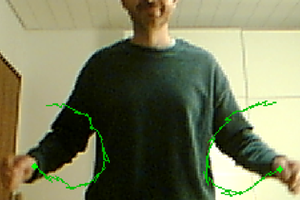
After the successful verification of the synchronized dual camera shown in the last log entry, I will finish the highrate_longexp project and integrate the dual camera into my other project lalelu_drums. The following video shows a preview. In the foreground, the new dual camera can be seen, that is used to capture the gestures of the player. The percussion sounds are triggered from the gestures in real time. Due to the longer exposure times that are now possible, the illumination of the scene can be reduced compared to the arrangement with a single camera. I will cover the details of the integration in an upcoming log entry for lalelu_drums.
While the camera is already well usable, there are three points that have potential for improvements.
1) Integrate trigger generation into camera housing
In the current implementation, the two trigger signals are generated by a raspberry pi outside of the camera housing and are transmitted to the two camera PCBs via 5m cables. This arrangement allows to flexibly reconfigure the trigger signals since the raspberry pi computer can be reprogrammed for example via ethernet connection.
If the frame rate is fixed, it should be possible to generate the trigger signals with a microcontroller (e. g. raspberry pi pico) that could be placed inside the camera housing. The microcontroller could be powered from the 5V USB supply of the cameras. This arrangement would reduce complexity and make the cabeling more lightweight.
2) Bring camera objective lenses closer together
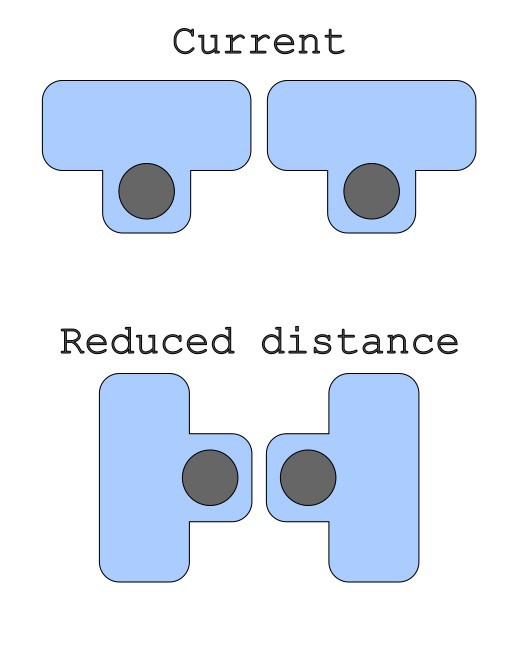
The lower the distance of the camera lenses, the less compensation of the parallax and offset is necessary. If the camera PCBs are rotated as shown in figure 1, the distance can be reduced compared to the current implementation. However, it would be necessary to check how much latency the rotation correction in software creates.
Figure 1
3) Add sheath wave filters
Very rarely, the cameras show frame drops during live acquisition, that I could not observe in the single camera case. I assume these are related to the longer cables. It is hard to test since the rate at which the drops occur is in the order of one in six hours of streaming. I observed that the original cable has a sheath wave filter at the end of the connector. It would be easy to add one to the longer cables (e. g. this one).
In this log entry I show the analysis of the data recorded in the previous log entry. The data contains timestamps of the recorded camera frames and also the camera frames themselves. In a first step, I will analyze the timestamps and in a second step I will look at the image data.
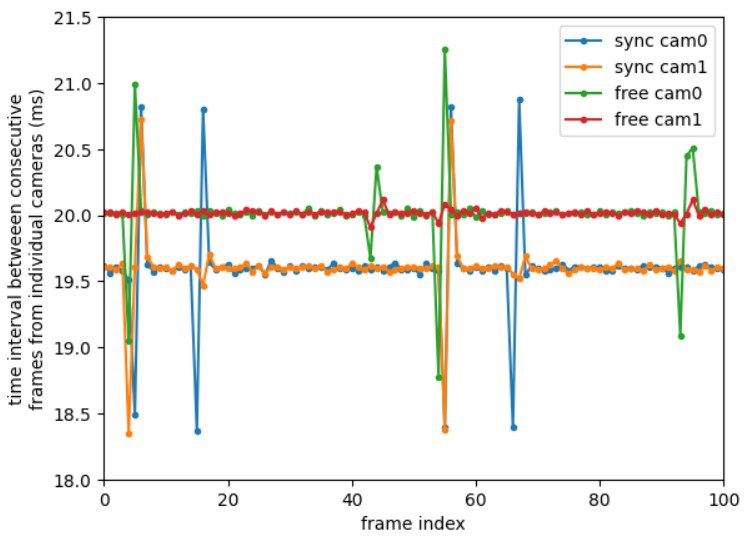
The timestamp data can be analyzed in various ways. A basic approach is to determine the time interval between consecutive frames of each camera. Figure 1 shows this data for the four cases (cam0 / cam1 and free-running / synchronized with external trigger). For the free running case the time interval is 20ms, which is expected for a nominal frame rate of 50Hz (1/50Hz = 20ms). For the synchronized case, the time interval is 19.6ms, which is also expected, since the trigger signal has a frequency of 51Hz (1/51Hz = 19.6ms). So this analysis is a first verification that the external triggering works.
Figure 1: time interval between consecutive frames from individual cameras
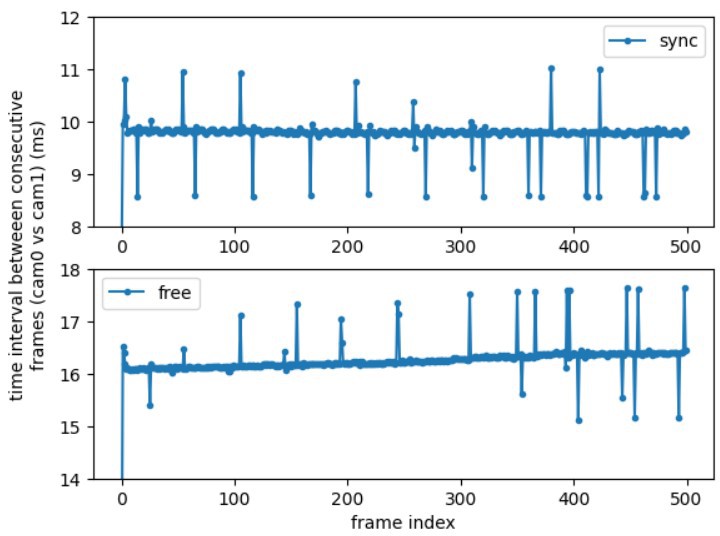
Another way to analyze the timestamp data is to determine the time interval between frames taken with camera 0 vs frames taken with camera 1. Figure 2 shows this data for the synchronized case and the free-running case. In the synchronized case, the time interval is 9.8ms, which is expected because the trigger signals were phase shifted so that each camera starts its acquisition in the middle of the acquisition of the other camera (19.6ms / 2 = 9.8ms). In the free-running case, the time interval has a drift over the 500 acquisitions (10s) that are shown in the figure. The drift is probably caused by the fact that both cameras are running on their own individual clocks. The time interval is around 16ms which shows that the start of the acquisitions of the two cameras is not precisely controlled.
Figure 2: time interval between consecutive frames of both cameras
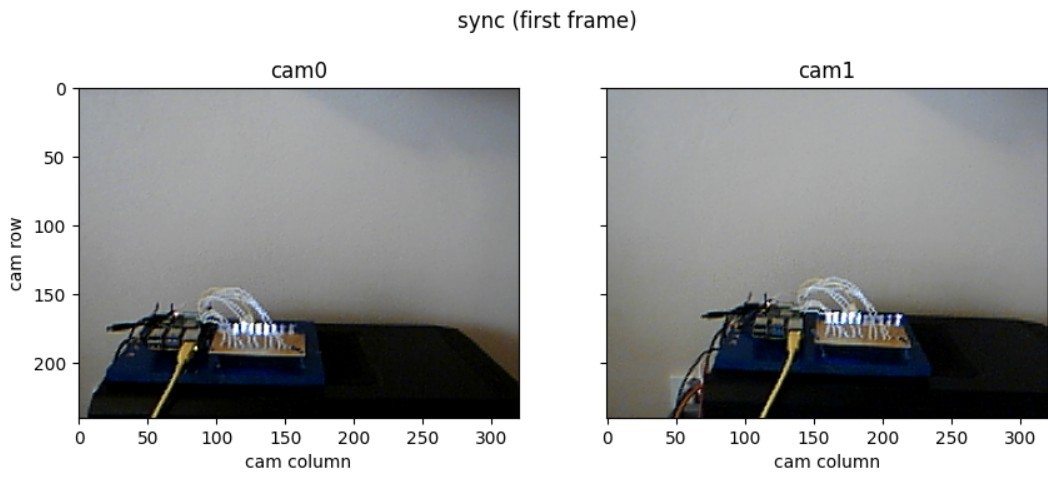
While the analysis of the timestamp data is straight forward, it is still an indirect measurement. Only the actual image data can proof that the two cameras are acquiring in a synchronized, time-interleaved way. Figure 3 shows two example frames from the two cameras. It can be seen that there is an offset and a parallax between the two frames. Still, they both contain the running light setup. The running light has a repetition rate of 25.5 Hz and contains 10 LEDs. So the transition time from one LED to the next is 1/(25.5Hz * 10) = 3.92ms.
Figure 3: example frames from both cameras
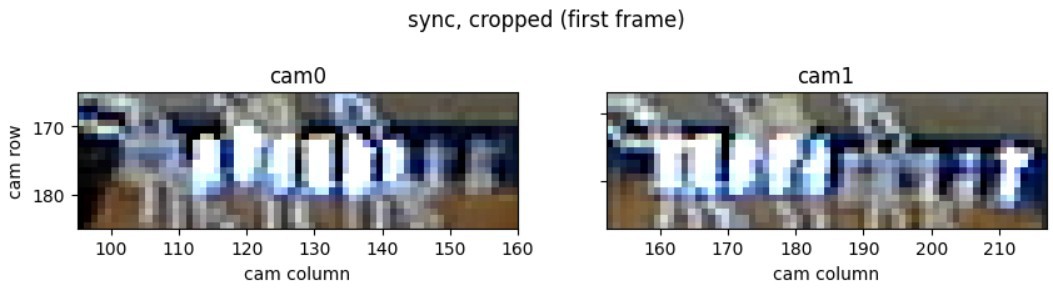
For the further analysis the images are cropped around the ten LEDs that are driven as a running light. Figure 4 shows two example frames for camera 0 and camera 1. In both cases, five or six LEDs are lit, showing that the exposure time is approximately at the expectation of 19.6ms (19.6ms / 3.92ms = 5).
Figure 4: cropped images from both cameras
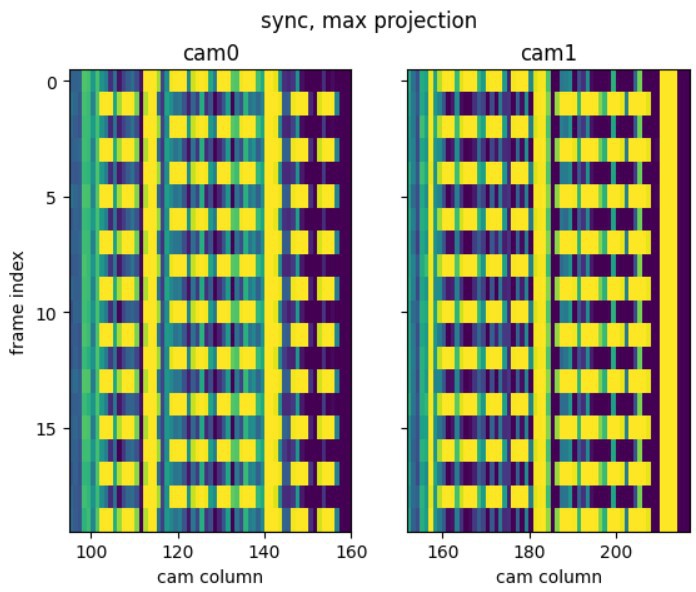
To evaluate the synchronization of the cameras, the cropped images are max-projected and a kinograph is created that shows the projection vs the frame index (Figure 5). It can be seen that both cameras alternate between two states of the running light, as expected because the exposures are phase locked to the running light by the external trigger. Additionally, it can be seen that the two cameras cover interleaving time intervals, as it is expected from the phase shifted trigger signals.
Figure 5: kinographs showing the interleaved exposure of the two synchronized cameras
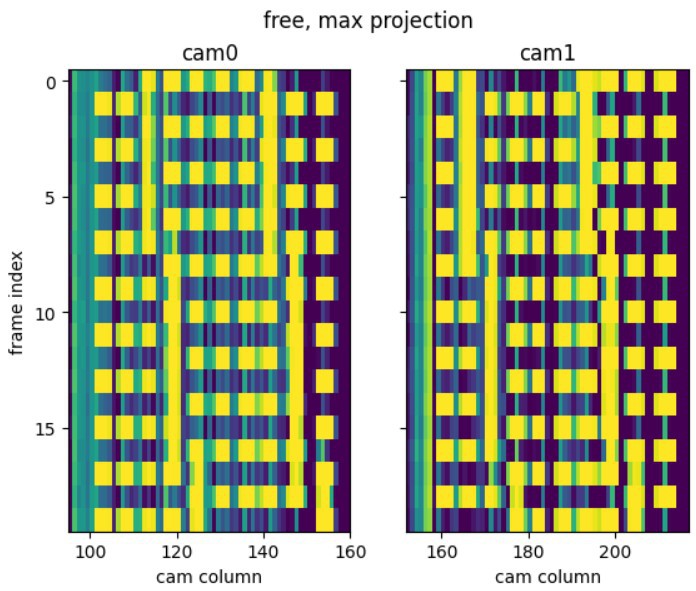
In contrast, for the free-running case, the kinograph is shown in figure 6. Here, the exposures are not phase locked but they show a progression as expected by the difference of the frequency of the running light (25.5Hz) and the frame rate of the cameras (50Hz).
Figure 6: kinographs of the free-running cameras
In conclusion, it has been shown that the external triggering works and the cameras are driven in a time-interleaved fashion, maximizing the exposure time.
To verify the synchronized operation of the dual camera, I performed two acquisitions of a running light arrangement, that I built specifically for this purpose. The first acquisition is in the planned operation mode with external triggers while for the second acquisition the external trigger signal is switched off to show the effect.
The running light arrangement consists of ten white LEDs that are connected to GPIO pins of a raspberry pi. The pigpio library is used to drive them with precise timing. The LEDs are positioned in a straight line and are switched on sequentially, with only one active at a time. The same raspberry pi is used to create the external trigger signals for the two cameras. Video 1 shows the course of the measurement.
Video 1: measurement procedure
For the measurement I chose a nominal framerate of 50 frames per second (fps) for both cameras, because I want to use the dual cam of highrate_longexp as a replacement for the single camera running at 100 fps in my other project lalelu_drums. I set the frequency of the external trigger to 51 Hz to show the difference between the two cases with and without external trigger.
To generate the trigger signals and control the running light, the following script was used. Since the trigger signals and the running light are generated from the same clock, it is expected that the acquired images are phase locked to the pattern of the running light.
import pigpio
import time
pi = pigpio.pi()
pins = [26, 16, 20, 21, 19, 13, 12, 6, 5, 7]
triggerPinA = 2
triggerPinB = 3
for pin in pins + [triggerPinA, triggerPinB]:
pi.set_mode(pin, pigpio.OUTPUT)
# camera fps: 50
# exposure = 20ms
# period of complete pattern = 40ms
# 10 LEDs but 20 'pulses' to support trigger at 2.5 LED steps
# pulse-delay = 40ms / 20 = 2ms
# detune from 50fps to 51fps:
# 2ms * 50 / 51 = 1.96ms
delay = 1960
pulses = []
for i in range(2 * len(pins)):
onMask = 0
offMask = 0
if i % 2 == 0:
j = i // 2
p0 = pins[j]
p1 = pins[(j+1) % len(pins)]
onMask = onMask | 1<<p1
offMask = offMask | 1<<p0
if i in [0, 10]:
onMask = onMask | (1<<triggerPinA)
if i in [1, 11]:
offMask = offMask | (1<<triggerPinA)
if i in [5, 15]:
onMask = onMask | (1<<triggerPinB)
if i in [6, 16]:
offMask = offMask | (1<<triggerPinB)
pulses.append(pigpio.pulse(onMask, offMask, delay))
pi.wave_clear()
pi.wave_add_generic(pulses)
wave = pi.wave_create()
pi.wave_send_repeat(wave)
try:
while True:
time.sleep(1)
except KeyboardInterrupt:
print('stopping')
pi.wave_tx_stop()
pi.wave_clear()For the acquisition of the camera images, the following script was used. It makes use of a gstreamer appsink that allows to retrieve the image data in a python callback function (onNewSample). The script records 500 frames and corresponding timestamps for each camera, yielding a recording duration of ~10s. The data is stored in a hdf5 file.
import gi
from time import sleep, monotonic
import tables
from datetime import datetime
import subprocess
gi.require_version('Gst', '1.0')
gi.require_version('GstVideo', '1.0')
from gi.repository import Gst, GstVideo
import numpy as N
Gst.init(None)
def setExposureTime(deviceIndex, exposureTime):
subprocess.run(['v4l2-ctl', '-d' f'/dev/video{deviceIndex}', '-c', 'auto_exposure=1'])
value = int(N.round(exposureTime / 100e-6))
subprocess.run(['v4l2-ctl', '-d' f'/dev/video{deviceIndex}', '-c', f'exposure={value}'])
def setGain(deviceIndex, gain):
subprocess.run(['v4l2-ctl', '-d' f'/dev/video{deviceIndex}', '-c', 'gain_automatic=0'])
subprocess.run(['v4l2-ctl', '-d' f'/dev/video{deviceIndex}', '-c', f'gain={gain}'])
class PipelineAppSink:
def __init__(self, deviceIndex, width, height):
self.height = height
self.width = width
pipelineDescription = f'v4l2src device=/dev/video{deviceIndex}'
pipelineDescription += f' ! video/x-raw,width={self.width},height={self.height},framerate=50/1'
pipelineDescription += ' ! queue max-size-buffers=1 leaky=downstream'
pipelineDescription += ' ! videoconvert...
Read more »
In this log entry, I describe how a highrate_longexp dual camera can be built, following the concept detailed in the previous log entry.
For the two camera sensors necessary I chose to use the Playstation 3 Eye camera for the following reasons:
- available second-hand for a few euros
- usb connectivity and video-for-linux driver (v4l2) make the integration easy
- can be triggered externally, which is required for synchronizing two camera sensors
- different frame rates higher from 15 to 187 frames per second can be configured
See also my earlier project highratepose for considerations.
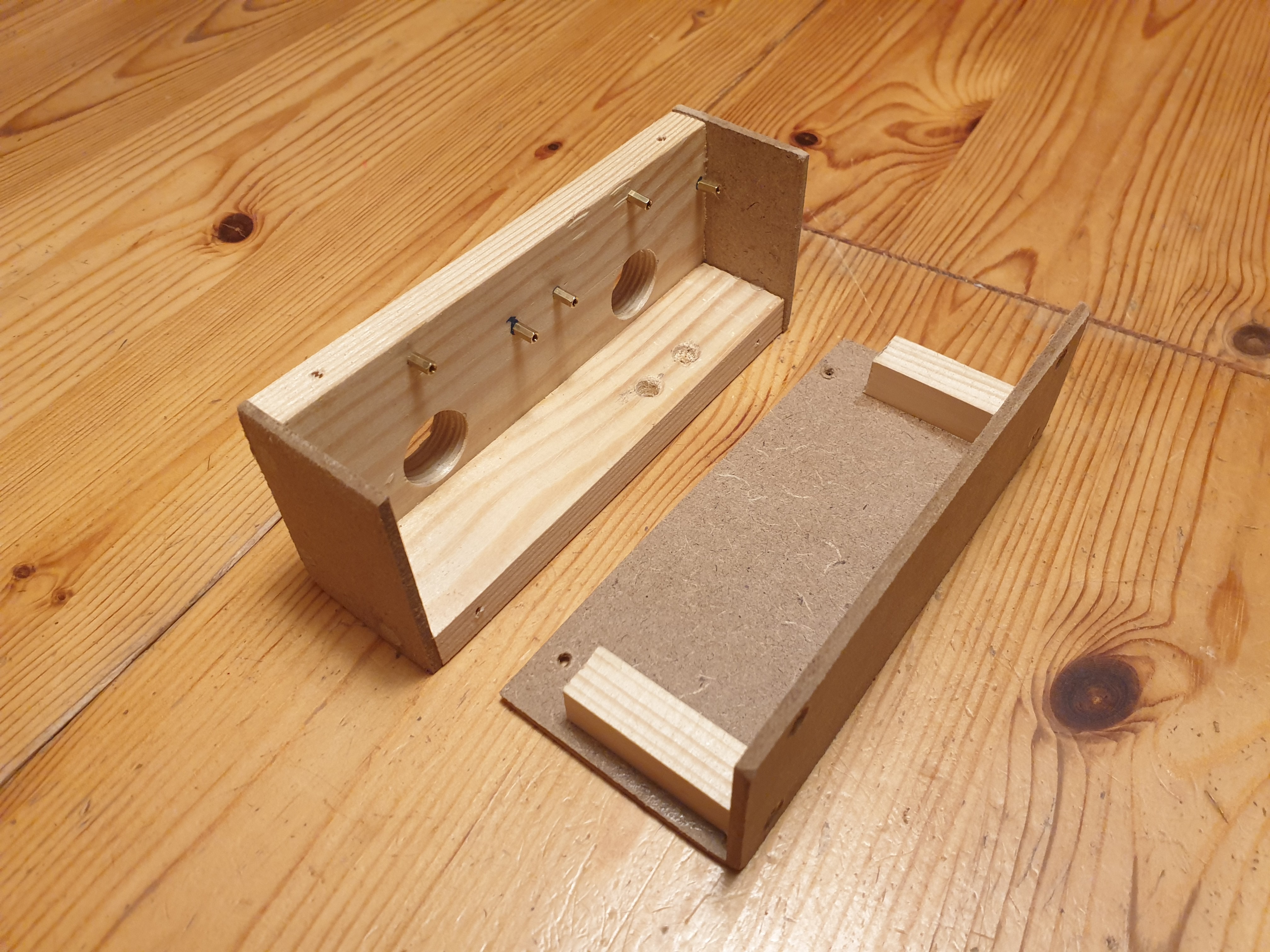
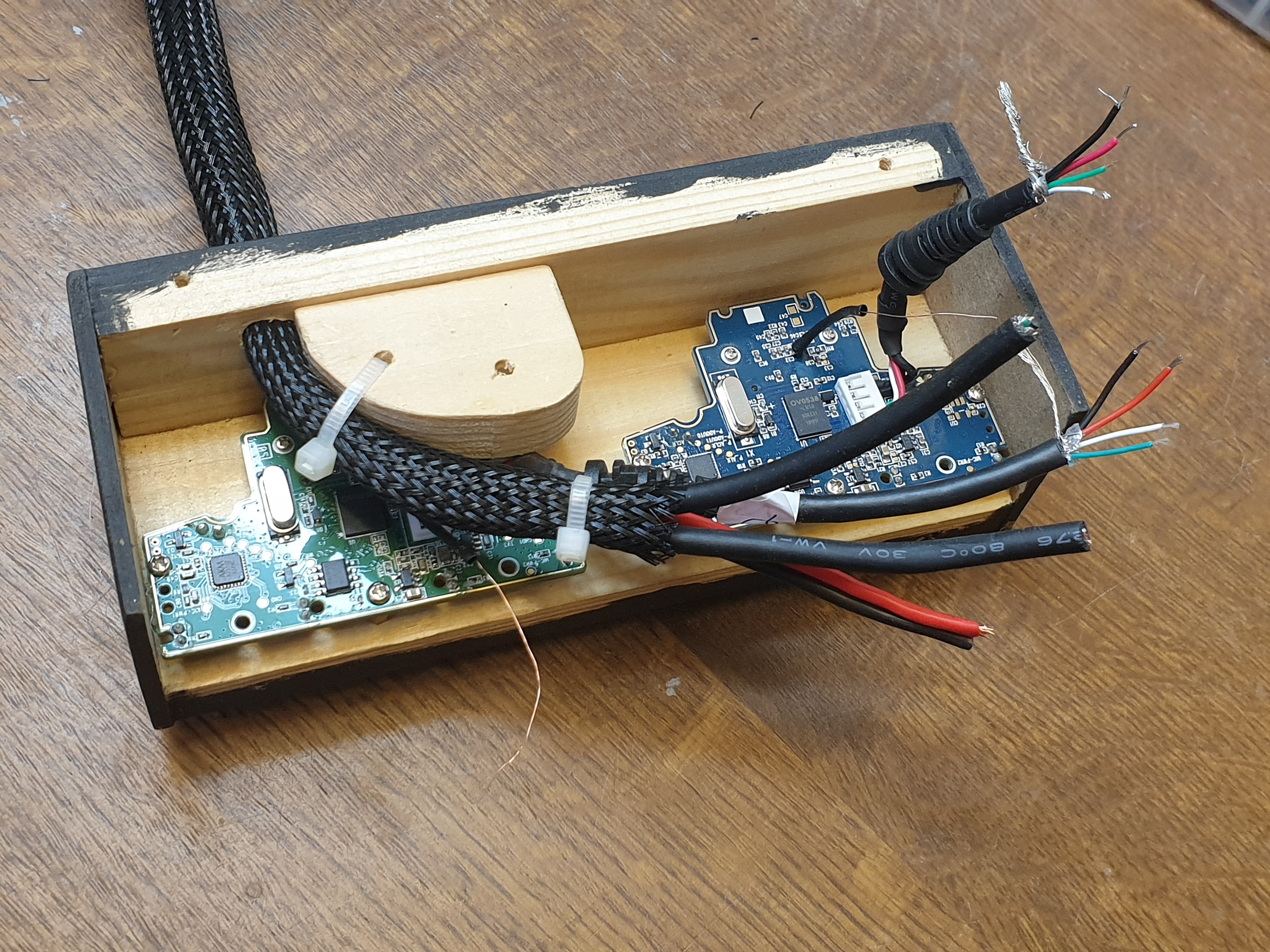
To achieve a stable relative position of the two camera sensors I removed the camera PCBs from their housing and integrated them side-by-side into a self made box made from wooden strips and MDF boards.
Figure 1: wooden housing
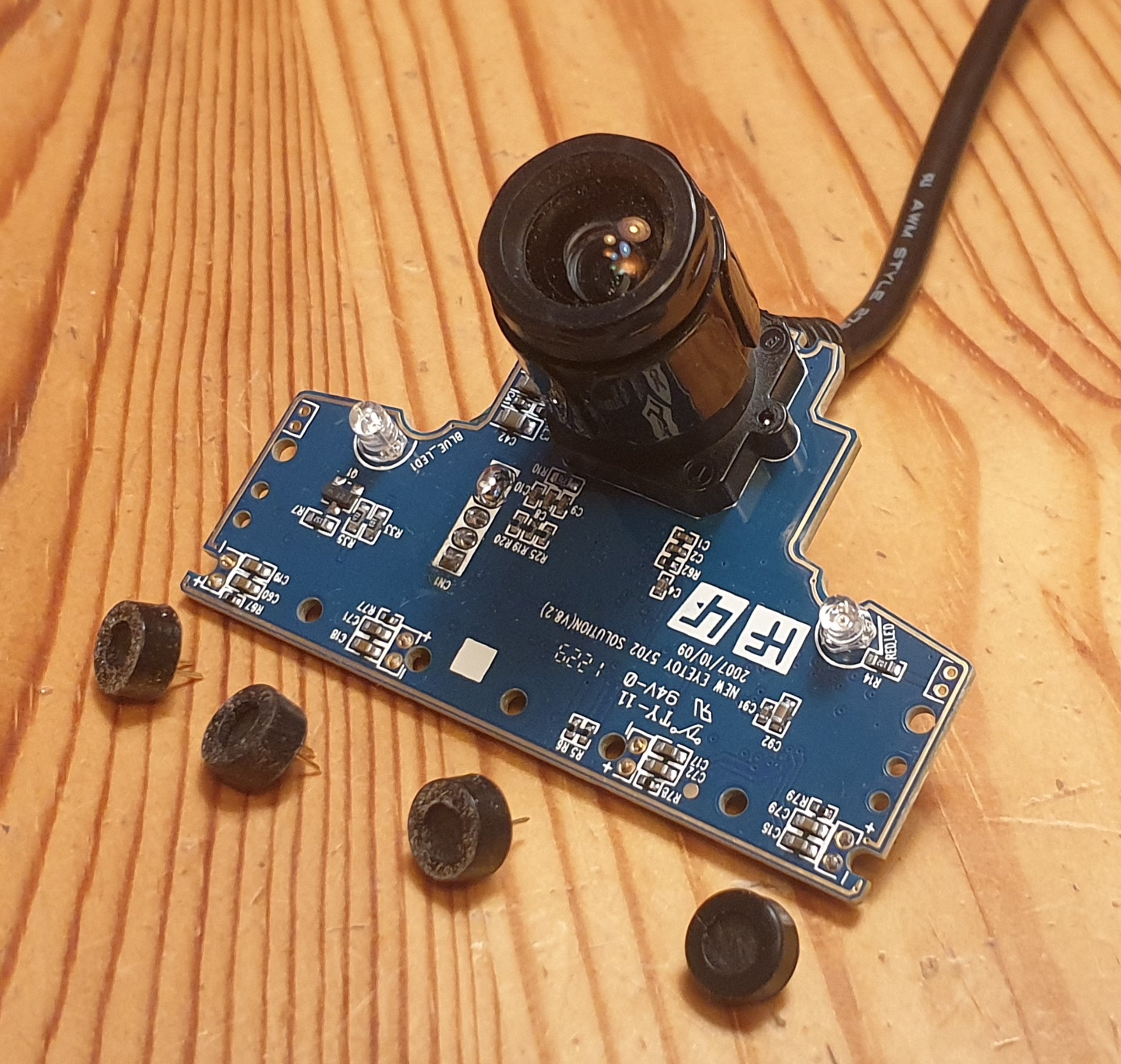
Aiming at a minimal size of the new housing, I removed the microphones from the camera PCBs, because they are not used in my application and they take quite a lot of space.
Figure 2: remove microphones from PCB
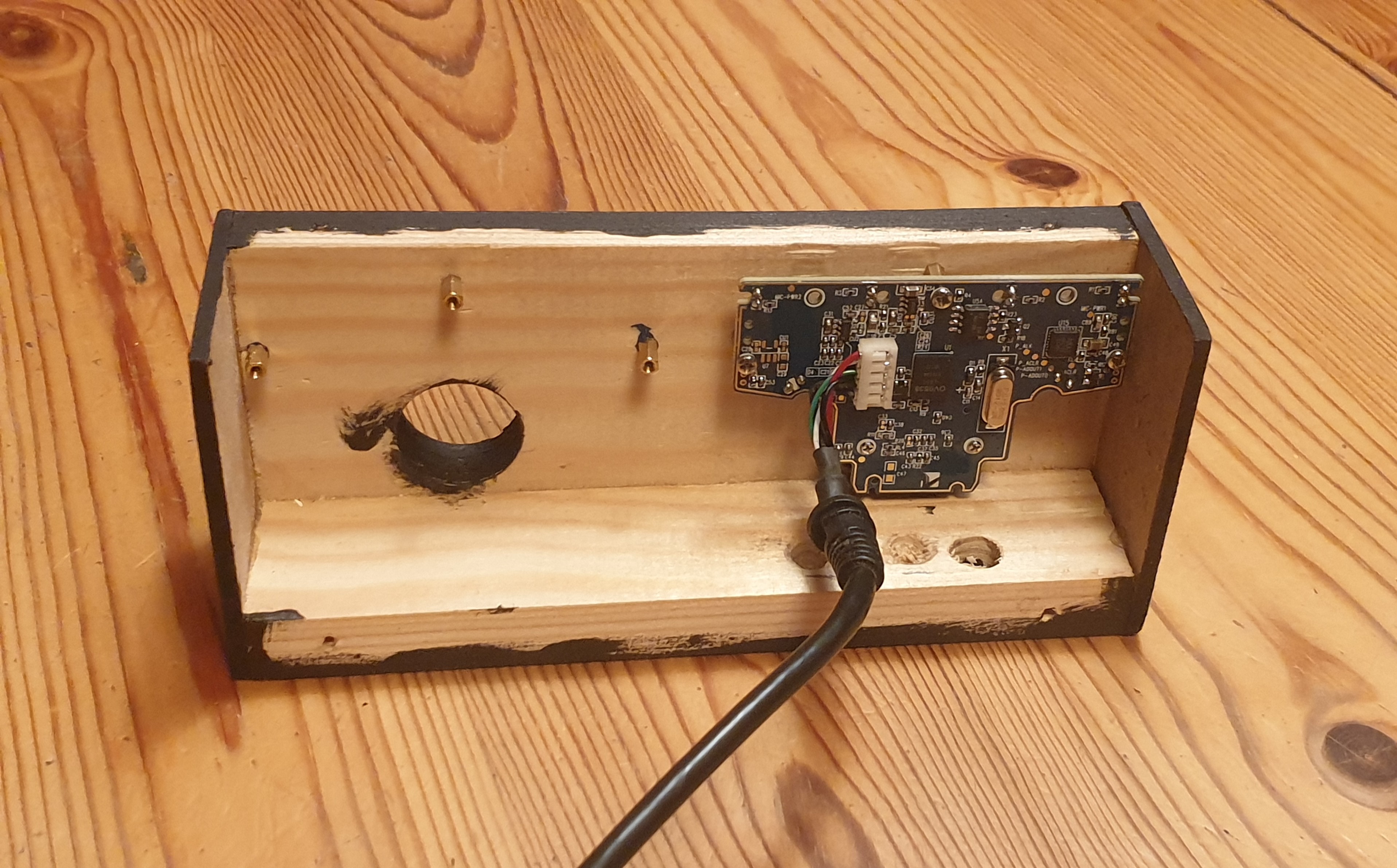
I used matching PCB board spacers to mount the camera PCBs to the housing. To enable attachment to a microphone tripod, I included a screw-in sleeve to the bottom of the box.
Figure 3: single camera PCB mounted
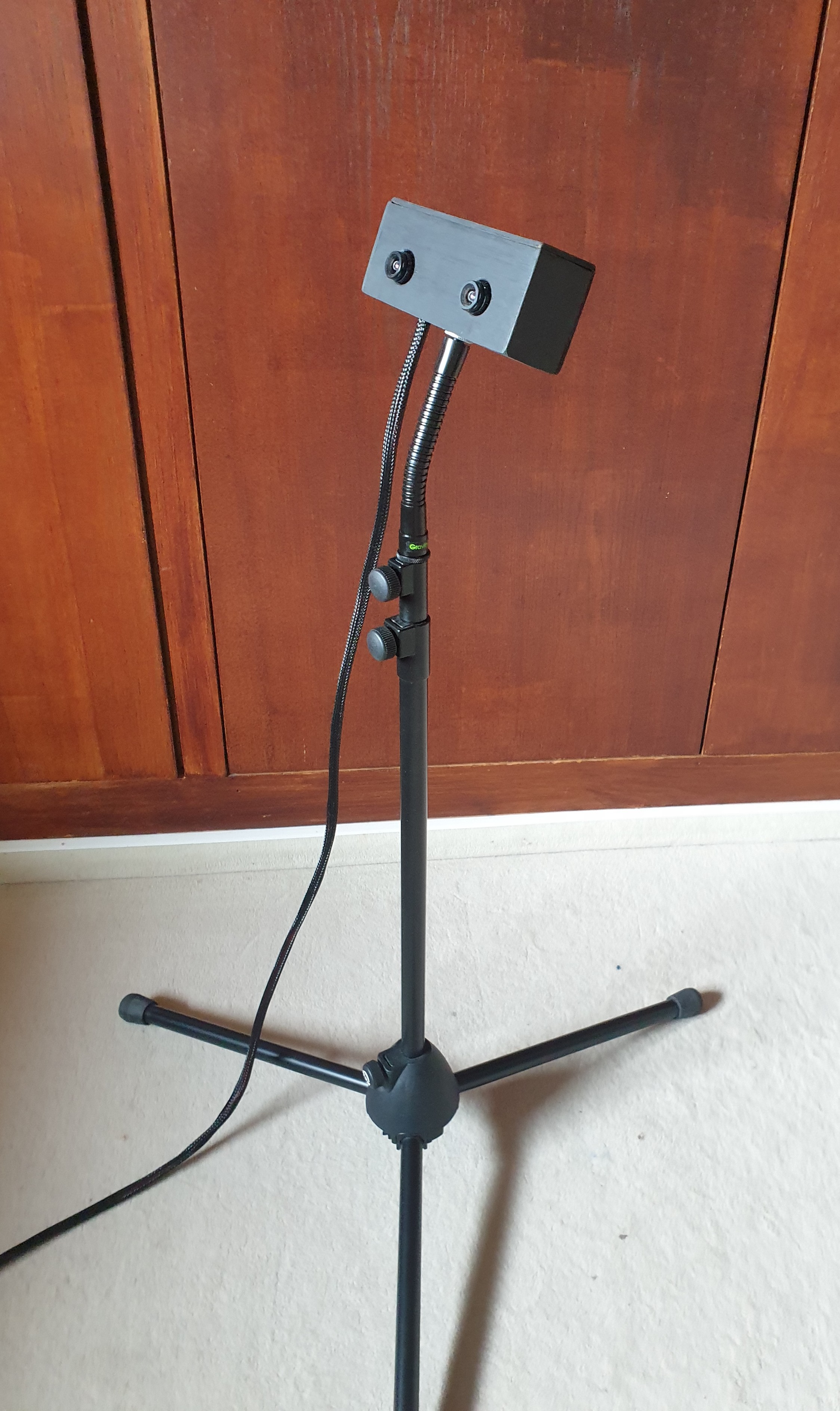
For alignment of the dual camera I use a gooseneck adapter. The outer dimensions of the final enclosure are 14.5cm x 6.5cm x 4cm.
Figure 4: mounting on tripod + gooseneck adapter
To make the two camera sensors follow a time interleaved exposure scheme as described in the concept, it is necessary to synchronize the two sensors. The synchronization is achieved by triggering the sensors from two phase locked signals, generated by a raspberry pi. The external triggering becomes possible because a specific SMD solder pad on the cameras' PCBs can accept a trigger-IN signal, as described here. In highrate_longexp, the trigger-IN of each camera PCB is connected to one GPIO of a raspberry pi, that supplies a rectangular waveform. The raspberry pi is powered via USB from the same PC as the camera PCBs, so they all share a common GND.
Figure 5: both camera PCBs mounted; external trigger pads connected with single thin copper wire
The original cable of the Playstation 3 Eye camera is 2m long. For the use in my other project lalelu_drums, it is desirable to have a longer cable. Additionally, it would be nice to have a single cable instead of two USB cables plus the trigger lines.
I experimented with the use of an ethernet cable (which has eight wires plus shielding) to guide the two USB connections and the two trigger lines. USB has four wires, but +5V and GND can be shared for the two cameras. At first it seemed that it is working well for a 5m connection. But then I had to learn that the Playstation 3 Eye camera has at least two versions and that my succesful first test using version A could not be reproduced with version B. Therefor, I stopped the experiments with the ethernet cable and found a different solution. (version A and B can be seen in figure 5; not the slightly different appearance of the PCBs, greenish vs blueish)
The current solution is to replace the original USB cables of the cameras with 5m long USB cables and to use cable stockings to combine the USB cables and two separate wires used for triggering. The triggering wires are connected via a XLR connector to the raspberry pi. The original USB cables feature a ferrite bead to suppress high frequency noise. So far highrate_longexp worked for me without this filter for the 5m cables.
For a video camera, the frame rate and the exposure time are two separate parameters. The frame rate is the frequency at which images are recorded. The exposure time is the duration for which the sensor collects light to build up a single image. For a given frame rate, different exposure times can be configured, but the exposure time has a physical upper limit, because the exposures of consecutive frames can not overlap. For example, for a frame rate of 100 fps (frames per second), the maximum exposure time is 10ms.
The brightness of an image recorded by a camera depends directly on the exposure time. The longer the exposure time, the more light can be collected, the brighter becomes the image. In the regime of high frame rates, the maximum possible exposure times becomes so low, that it can be challenging or undesirable to increase the illumination of the scene to a level that yields a usable brightness of the images.
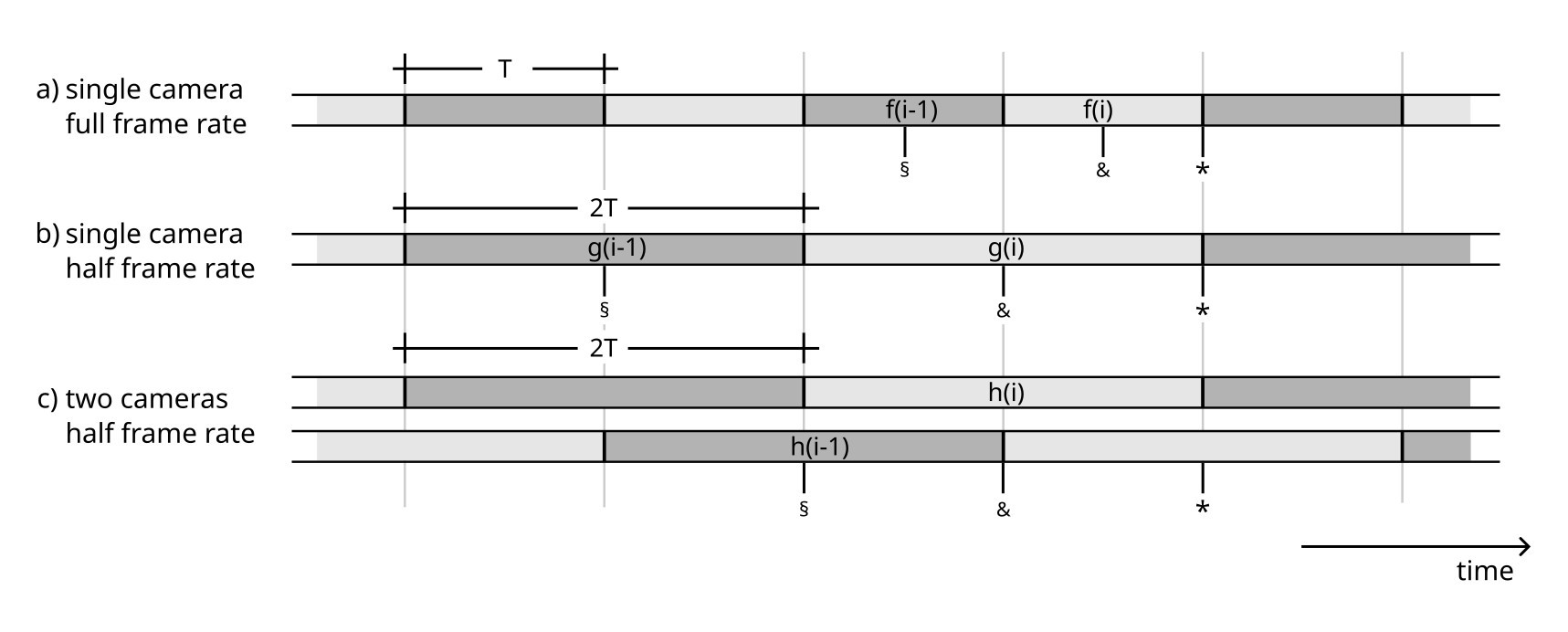
highrate_longexp makes use of two cameras to overcome the limitation of the exposure time that a single camera has for a given frame rate. Figure 1 shows timing diagrams to illustrate the idea. (a) shows the sequence of frames f(i) that are acquired with a single camera for a desired frame rate. The exposure time is T, making use of the full duration between two frame exposure starting points. (b) shows the sequence of frames g(i) that are acquired with half the desired frame rate. The exposure time is 2T, so in this scenario, the images become brighter by a factor of two. However, any downstream image analysis will now receive images only at half the update rate, so it has a less precise view of what is happening in the observed scene. (c) shows the concept of highrate_longexp. Two cameras are used with an exposure time of 2T. So the image brightness is the same as in (b), but since the cameras start and stop their acquisition in a time interleaved fashion, the total output of frames h(i) has the same update rate as in (a).
If an application makes use of a camera to react fast on changes in an observed scene, not only the update rate is relevant, but also the latency. Here, latency means the time difference between the scene changing from one state to another and the camera system providing a frame that reflects this change. (For an example latency measurement see lalelu_drums // Log #17: Latency) To provide a theoretical estimate for the latency in the described scenarios, the time at which the frames f(i), g(i) and h(i) are provided to downstream image analysis is marked with an asterisk (*) in figure 1.
The latest possible time the observed scene can change so that the change is reflected in the frames f(i), g(i) and h(i) is marked with an ampersand symbol (&). In all scenarios, this is at half the respective exposure time before the frame is completely recorded. If the scene changes later, the change can have an influence on the frame, but the frame is dominated by the older state of the scene, since this state was recorded during more than half of the exposure time. The latest possible time the observed scene can change so that the change is reflected in the preceding frames f(i-1), g(i-1) or h(i-1) is marked with a section sign (§). It is half an exposure time before the preceding frame is completely recorded.
The mean latency for the three scenarios can be estimated by taking the average between the duration from (&) to (*) and from (§) to (*), assuming there is no correlation between the frame triggers and the time of the change of the scene. The results are
| (a) | T |
| (b) | 2 T |
| (c) | 1.5 T |
This means that highrate_longexp (c) is superior to the case of reduced frame rate (b) not only in terms of the update rate, but also in terms of latency. Still, the latency for highrate_longexp is larger than for the case with the original frame rate and a single camera (a).
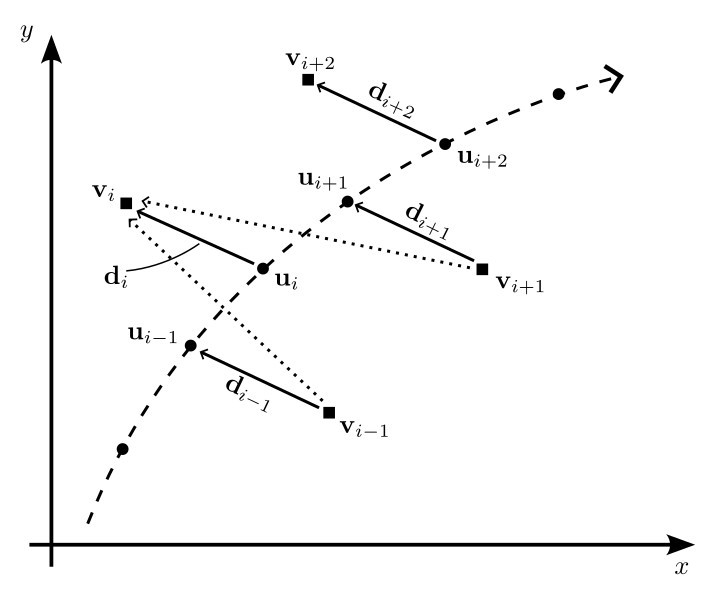
Another aspect of highrate_longexp is that due to the difference in the position of the cameras, there is...
Read more »
Create an account to leave a comment. Already have an account? Log In.
Become a member to follow this project and never miss any updates
By using our website and services, you expressly agree to the placement of our performance, functionality, and advertising cookies. Learn More