• Success! Good Easily Identifiable Output for Different Vowels

    Robert Morrison08/24/2025 at 23:42 0 comments

    I worked on this voice recognition quite a bit (free time since they scrubbed the Starship launch until tomorrow :)  and got it to work surprisingly well! Now I need to analyze the false-positive, false-negative rate. The pattern recognizer only works on frequency/phase sets, but my goal is to figure out a consonant (chaotic noise) pattern recognizer.

  • Simulating the Voice Analysis Code

    Robert Morrison08/24/2025 at 17:09 0 comments

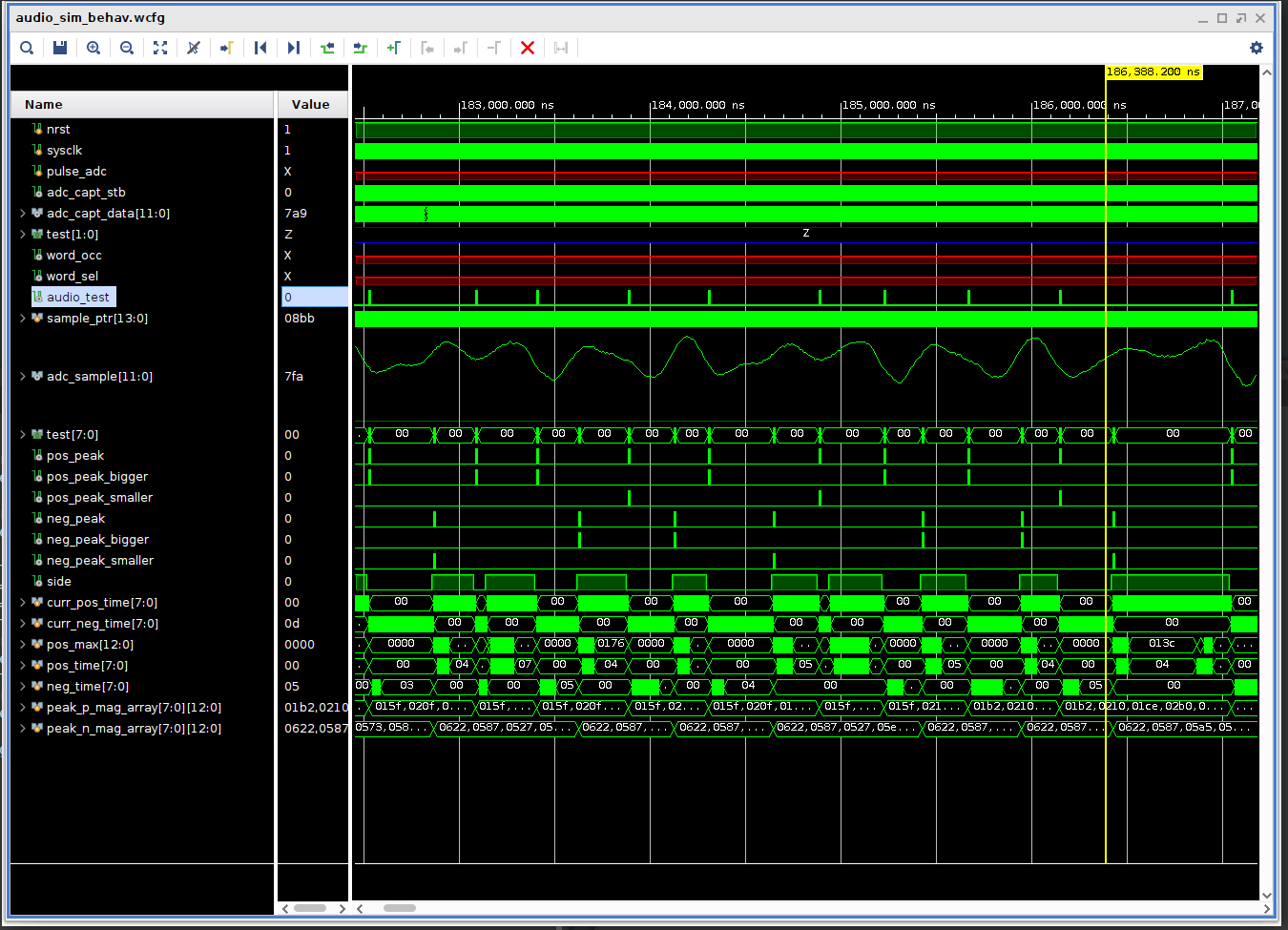
    I am writing the voice detection code. I set up a nice simulation environment that allows me to visualize the incoming audio and see the analyzed results. This is especially cool because I modified the microphone/ADC diagnostic data converter to also output to an FPGA ROM load file, thus allowing me to simulate what the FPGA will do on actual voice data from the microphone.

    Conventional methods for voice analysis use FFT conversion code and AI to train responses. This is extremely compute intensive even for inference generation and isn't really practical for putting into this logic probe hack. Yes, Nicla and similar ilk come close, but I want to try a more directed approach. I am not doing an FFT (even though the FPGA has the capacity to do that). Instead, I am doing a comparative peak detection method which generates recognition codes, sort of like pre-parsing a high level language for compiling efficiency. I will then compare these recognition codes to known valid voice codes to recognize what the microphone hears. 

    I don't know if this will work, but it's so far doing a nice job of generating unique codes for simple vowel detection. Here's a simulation pic, the test values show when positive and negative peaks are detected and whether the current peak is bigger or smaller than the last one.

  • Improving the Microphone ADC Performance

    Robert Morrison08/20/2025 at 21:22 1 comment

    I thought this contest was over last week, but it actually finished yesterday (Tue Aug 19). If I'd known that, maybe I would have gotten this function finshed in a last-minute effort, but as it was, I took my time and made a nice set of improvements to the microphone/FPGA ADC path.

    I always thought putting in an analog circuit like an ADC into an FPGA was a pretty questionable circuit design idea, so I was really pleased to see that the Altera MAX10 actually delivers some pretty nice results. At first I did not hold out much promise for it with really dirty waves. However, as you can see in the gallery images, after I did some managing of the opamp gain and working with grounding and isolating the signal path, I ended up with some very workable signals recorded by the FPGA and sent out the diagnostic UART. I'm impressed that an FPGA can do this well!

    Best wishes for the contest participants!

    My "most Gnarly thing to waste a significant portion of your life on" prize is a tie between the "Most complex blinking light in the world" and the "no-Silicon digital clock". 

    My "you are nuts" prize goes to the Deriving 1 Hz from Candle Flame Oscillations. I want the math for *why* we get 10Hz...

    My "Now that is novel" prize (and the one I hope wins) is the "Hopefully Hertz" project. Very interesting, I envision an experimental physicist...

    And finally my "I really hope you lose" prize (just kidding) goes to the Metronalmost project. As a trained piano player, I hate you! But then again, I'm not really good friends with one that *does* keep good time, they can be pretty aggravating for ensuring good rhythm...

  • Microphone, FPGA ADC, Audio Wave Dump all Working!

    Robert Morrison08/16/2025 at 23:46 0 comments

    Pretty cool! I got the microphone and the FPGA ADC working well, and created a diagnostic UART in the FPGA that dumps the wave file information to putty. Then I wrote an app to convert the log file info to a .wav file format, and used Audacity to view it and generate spectral data. I can say OH, AH, OOH, EEH and change the pitch and see how the spectral data varies.

    Too bad the contest is over, I wont have the recognition function working in time. Oh well, life in the big city.. But this has been a lot of fun.

    Ciao all, maybe next time!

  • Looking at Voice Recognition Options

    Robert Morrison08/06/2025 at 21:27 0 comments

    I'm looking at various options for voice or sound command control of the logic probe to overcome the limited two buttons currently on the probe. Not only are the buttons hard to push without disturbing the probe contact to surface mount pins, I have upwards of 30 commands I want to have for probe control functions. I don't want to add weight or size to the probe, so some of the older voice recognition modules won't work.

    I looked at the Arduino Nicla solution, a new AI driven module that is small enough that I wouldn't be too unhappy adding it to the probe, but the impression I get from reading online experiences with it, is that it doesn't work very well. The one working example I saw online was recognition of three words, and most others said the training was difficult to make work at all.

    In addition, it looks like an arduino cloud account is required to do the AI training computation. After my experience with cloud based devices such as Insteon and Google Nest, they only work for as long as the company stays solvent and wants to keep the servers running, so I have nothing more to do with such things.

    So, since my logic probe only has to work with my voice, and I will be satisfied with just producing vowel sound recognition, I'm back to my idea of using a MEMS microphone and the onboard FPGA ADC. I wrote a voice recognition simulator in C which computes FFT, derivative, second derivative, peak points, and so on. 

    I think the big flaw with current unreliable, inefficient AI efforts is not preprocessing the audio or video before training. Rather than AI train the time domain audio/video, do AI training on peak intervals and magnitude. A lot less data to try to train, where the signal-to-noise should be dramatically better than using raw data.

    I wired up the microphone-amp to the probe FPGA--that was tiny work! 1mm contact spacing. Looks good now, and I added an ADC sample diagnostic UART to dump 1 second voice samples and see what I can come up with for algorithms, AI or otherwise.

  • Going to Try Adding Some Simple Sound Recognition

    Robert Morrison08/01/2025 at 18:49 0 comments

    I need a flexible user interface (see last log), but didn't like any of my ideas for adding buttons or other mechanical devices. I have created previous iterations of a logic probe (it's a tool I use extensively) but they were all too bulky and difficult to probe tiny signal traces. Modifying the HP logic probe has been the perfect solution, but I am loathe to festoon it with yet more gizmos that make the probe awkward to use.

    So--I'm going to try something very different-- I have not done this before. I realized that this FPGA design so far has a lot of unused circuitry (15 % utilization) and some good unused computing power (24 DSP multipliers). And, it has an ADC. That's a recipe for a small FFT, so what if I put a tiny MEMS microphone/amp on the probe and did some rudimentary sound pitch recognition as a basis for controlling the probe functions?

    This gives me a lot of degrees of freedom for multiple control functions without gnarfing up the comfortable physical handling of the probe.

    The big question is, of course, is how well can I make this idea work. It's not going to be SIRI, but I'm thinking I could come up with some easy to remember vocalization scheme that gives me the control I need. I still have to really think about the user interface, and how to make the sound commands easy to figure out or remember (the hidden action problem of poor interfaces like IPhone touch or an OS command line interface).

    It really ties in with the contest goals--look at what can the probe do with 1 second utterances of sounds. I wonder what my wife will think when she hears strange grunting sounds coming from my office... :)

  • UART buffer display (finally) working. Now--What to do for the User Interface

    Robert Morrison08/01/2025 at 16:23 0 comments

    Finally got the UART buffer display working correctly--FPGA SRAMs are pipelined, so setting up correct read cycles in between the OLED display's I2C interface character writes turned out to be a challenge to start and stop. This took a lot of simulation and FPGA iterations. But it is working nicely now.

    Now I need to create a button controller to manipulate the character display. I have two buttons mounted on the probe, and need to come up with a good user interface that isn't frustrating. 

    Pet peeve--the IPhone touch interface, which I absolutely hate. You never know how to swipe or tap to get it to do what you want, there is no way to know beforehand what swipe is going to do what,  every app is different, and it changes on every update. It's like the old command line interface on Unix--you get a prompt, but have to memorize the commands, there is no way to know before you hit return what a typed command (rm -fr /*) is going to do. When I write an app, I always provide a visible legend of what commands are available at any time (see the gallery picture of my logic analyzer display), and I want to do the same here. I really don't want the logic probe to be frustrating to use--but I have very limited screen space. I want to give careful thought about what types of button presses to use (tap, double tap, hold, for example) and what to show on the screen.

    I need to have these modes:

    init stats for probe 1 or 2

    display stats for either probe 1 or 2

    choose operating mode (for example, display min/max times, edge counts, analysis trace mode, UART display mode, UART character mode or hex mode for binary serial data.

    execute commands:  move forward or back in the UART buffer, start UART collection, stop UART collection, start analysis trace, dump and scale/move about the trace display, and so on.

    How in the world can I get two buttons to do all this without making the logic probe user interface frustratingly bad? 

    It's becoming clear that I'm trying to do too much with two buttons. Distributors have things like a tiny little "joystick" or a rotary knob, going to research these and see if there's something practical that can be added without making the logic probe bulky or heavy. Right now, it is balanced nicely and not too heavy.

  • UART Detector is Working!

    Robert Morrison07/23/2025 at 21:14 0 comments

    What a great amount of fun this has been!

    I set up a test environment for the new automatic UART detector and logger, and as expected, it didn't work like the sim at all!

    I did a lot of work upfront to create a good analysis setup for monitoring the FPGA UART detector design--see the analysis screen capture in the gallery. It is showing a 460800 baud signal RX and TX, and below it are internal FPGA test signals from the UART detector. You can see the 8X baud rate pulses, the pulse counter, the incoming signal edge detector (with metastable handling on the front end) and the last signal is the module detecting a 460800 baud rate. 

    It didn't work at first for the obvious reason (obvious to anybody but me until I saw it, anyway)--any double hi or low serial bit at 460800 baud will look like 230400, so the detector was constantly getting contradictory outputs. Easy to fix--the highest detected baud rate is always accepted, and from then on, no lower baud rates are allowed. The serial polarity indicator worked like a champ from the get go--by determining whether the high level or low level had the longest time between edges I was able to set the polarity. More testing to do, but it's looking really nice!

    Now I need to work on the serial character stream display--it's not working yet.

  • UART monitor sim is working!

    Robert Morrison07/16/2025 at 18:24 0 comments

    I added the UART monitor to the logic probe FPGA code, and got the simulation to correctly detect the baud rate and polarity, allowing it to automatically fill a UART character buffer regardless of baud rate or polarity. I thought it was a clever circuit! I will verify real world operation (it's a famous fail to assume a sim means the work is done 8-| ). I'll post code after cleaning it all up and adding comments. There's a lot of work to be done to document all this stuff.

    I also modified the ground pin of the logic probe to act as a second logic probe input (requiring a plug-in probe cable with a grabber). Obviously, the ground connection had to be cut, then I wired to a free inverter on the 74ALVC04 buffer IC inside the probe. This will enable monitoring I2C transactions, so now I will start writing the i2c monitor code (it will feed the same FPGA buffer that I used for the UART).

    I added a couple of buttons to the logic probe--while the principle of this logic probe design is for automatic monitoring without user intervention, there are many signal monitors and some can get confused while probing. I need to have a way to reset the monitor registers if that happens, and I need to have a way to move about the UART/I2C buffer (it holds 2048 characters). The buttons detect short and long clicks, where the long clicks will switch between various logic probe modes such as UART/I2C/SPI. 

    I also have added simple 2-bit wide 800Mhz logic analyzer code to the FPGA for eventual turnon and debugging. Once again, buttons will be necessary to select analyzer modes and triggers, initiate traces, scale the traces, and move through the trace buffer. This will take quite a while to implement but has been very fun to implement!

  • Adding UART/I2C/QWIIC/STEMMA support

    Robert Morrison07/09/2025 at 15:02 0 comments

    Now debugging the UART monitor. This works automatically (so you don't have to select baud rate) by monitoring the minimum low and high pulse width registers. The baud rate speed and polarity is chosen from a valid interval list stored in FPGA ROM.

    There's no CPU here, so an FPGA state machine does all the analysis and number display. The number display has to also work automatically so larger numbers are shown in floating point.

    There is a handy GND pin on the logic probe which I never use, so it is going to be repurposed as a second input for the probe to monitor. Shortly I will route that to another 74ALVC04 buffer input and send it to the FPGA--then I will have an I2C/QWIIC/STEMMA protocol analyzer. I actually have enough 74ALVC04 buffer inputs that I can also do SPI protocol analysis, but haven't figured out how to easily provide those additional connections to the logic probe hack cleanly yet...