 silver2row

I have been working on adding motor movement to the BeagleY-AI board which is a beagleboard.org family of boards.
Outside of that...one issue I came across is without amplifying 3.3v to 5v or more current, I cannot drive the OPTO pin on the DM332T driver (no matter what anyone says)...
I was told I could drive this pin or other pins with 3.3v logic CMOS. I have been unable to understand exactly how to drive it as so. So, without further ado, I would like to showcase some data in source code format for driving this specific motor from the BeagleY-AI:
// Thank you Ben and Beagleboard.org for the help
// This is to control either a LED or Motor via a driver

#include <stdio.h>
#include <stdlib.h>
#include <signal.h>
#include <unistd.h>
#include <libgen.h>
#include <gpiod.h>

#ifndef CONSUMER
#define CONSUMER    "consumer"
#endif

#define DIR_PIN 38
#define STEP_PIN 14

struct gpiod_chip *chip1 = NULL;
struct gpiod_chip *chip2 = NULL;
struct gpiod_line *dir_pin = NULL;
struct gpiod_line *step_pin = NULL;

int setupGPIO(char* consumer) {

    int ret1, ret2;
    chip1 = gpiod_chip_open_by_name("gpiochip1");
    if (!chip1) {
        perror("The opening of Chip0 is failing...\n");
        return -1;
    }

    chip2 = gpiod_chip_open_by_name("gpiochip2");
    if (!chip2) {
        perror("Not opening Chip1...\n");
        return -1;
    }

    dir_pin = gpiod_chip_get_line(chip1, DIR_PIN);
    if (!dir_pin) {
        perror("Get dir_pin failed\n");
        return -1;
    }

    step_pin = gpiod_chip_get_line(chip2, STEP_PIN);
    if (!step_pin) {
        perror("Get step_pin failed\n");
        return -1;
    }

    ret1 = gpiod_line_request_output(dir_pin, consumer, 0);
    if (ret1 < 0) {
        perror( "Request dir_pin as output failed\n" );
        return -1;
    }

    ret2 = gpiod_line_request_output(step_pin, consumer, 0);
    if (ret2 < 0) {
        perror("Request step_pin as output failed\n");
        return -1;
    }

    return 0;
}

void releaseGPIO(void) {
    if (dir_pin) {
        gpiod_line_set_value(dir_pin, 0);
        gpiod_line_release(dir_pin);
    }

    if (step_pin) {
        gpiod_line_set_value(step_pin, 0);
        gpiod_line_release(step_pin);
    }


    if (chip1) {
        gpiod_chip_close(chip1);
    }

    if (chip2) {
        gpiod_chip_close(chip2);
    }
}

void stepMotor(int dir, int steps, int delay) {
    gpiod_line_set_value(dir_pin, dir);

    for (int i = 0; i < steps; i++) {
        gpiod_line_set_value(step_pin, 1);
        usleep(delay);
        gpiod_line_set_value(step_pin, 0);
        usleep(delay);
    }

}


void intHandler(int) {
    fprintf(stderr, "\nintHandler called\n");
    releaseGPIO();
    exit(0);
}


int main(int argc, char** argv) {

    __sighandler_t rc;

    rc = signal(SIGINT, intHandler);  // catches ctrl c
    if (rc == SIG_ERR) {
        perror("SIGINT error");
    }

    rc = signal(SIGTERM, intHandler);  // catches kill commands
    if (rc == SIG_ERR) {
        perror("SIGTERM error");
    }


    if (argc < 3) {
        puts("you must supply direction and steps when running the program");
        puts("e.g");
        puts("\tto step 100 steps CW:    prog 0 100");
        puts("\tto step 500 steps CCW:   prog 1 500");
        puts("an optional 3rd argument can be added to overide step delay");
        exit(0);
    }

    char* progname = basename(argv[0]);
    fprintf(stderr, "running - %s\n", progname);

    int dir = atoi(argv[1]);
    int steps = atoi(argv[2]);
    int delay = 500;
    if(argc == 2) {
        delay = atoi(argv[3]);
    }

    printf("DIR: %d STEPS: %d DELAY: %d\n", dir, steps, delay);

    if (setupGPIO(progname) == 0) {

        stepMotor(dir, steps, delay);
    }

    releaseGPIO();

    return 0;
}
So, you can see in the source code, C/C++, that I get to the end of the source by it turning off and/or another set of methods like in the beginning of the main() function.
So, like the source says, just change the delay for smoother motion or exchange out your source for this specific board and driver...
If you want you can add the EN pin on the driver for accessing the enable mode and pin. Extra source is needed but it is simple enough as you can tell from reading the source. Outside of this small source code example with the BeagleY-AI, I have been trying to fix up the DSP to run the R5F cores from the MAIN core and not from the BOOT...
Read more »
 SrRubio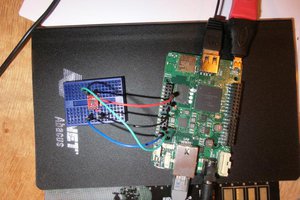
 Jaded Hobo
 Tauno Erik
 Alex
Alex