Close
0%
0%

Home Plant Watering System Based on the PIC10F202

A home plant watering device based on a simple 8-pin PIC microcontroller and 74HC chips.

Similar projects worth following
This is a device for watering indoor plants based on the 8-pin PIC10F200-IOT microcontroller.

The goal is to try to make a project on this small MCU and learn how to deal with the limitations of such a small chip, as well as to learn the PIC MCU family ecosystem.

Features

  • Sensing soil humidity using a cheap capacitance sensor
  • Display of actual soil humidity and low-level soil humidity when the watering is started. What is presented on the display is selected by a button, and an additional two LEDs indicate the current reading shown on the display
  • Possibility to change the quantity of water that is dispersed when the soil is detected as dry; the level can be modified via a button and the current setting is shown on a 10-segment LED bargraph
  • Possibility to select the moisture level when the soil is considered dry and the watering should be started via a potentiometer

Device Description

The device is simple and contains:

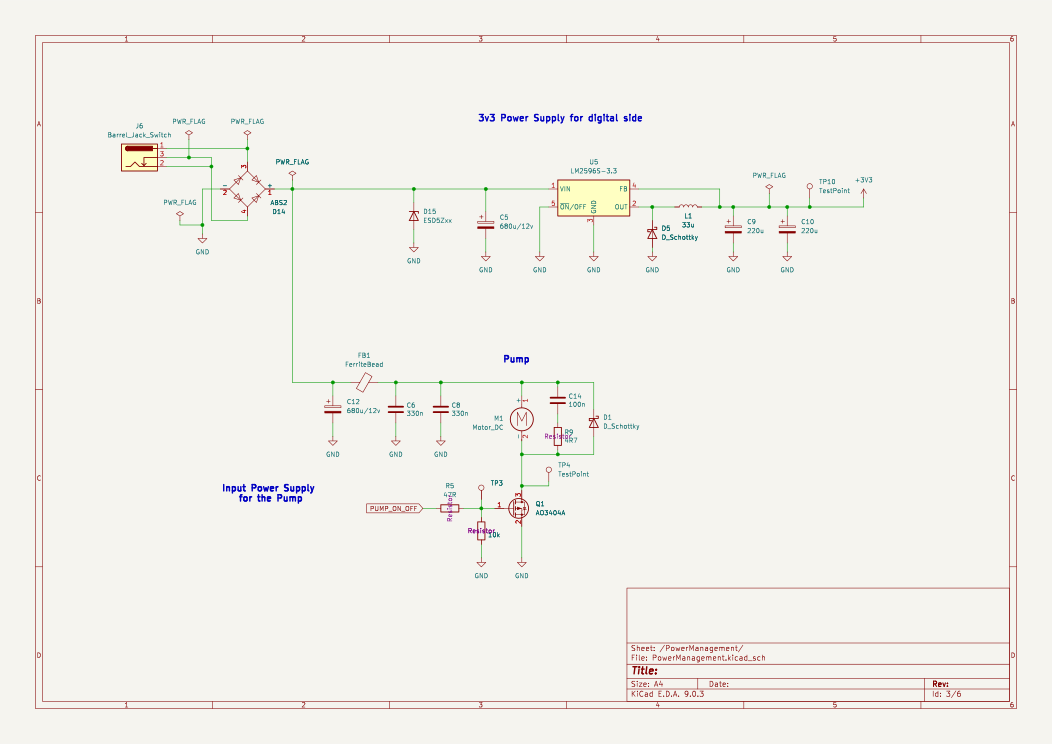
  • A water pump driven by a MOSFET
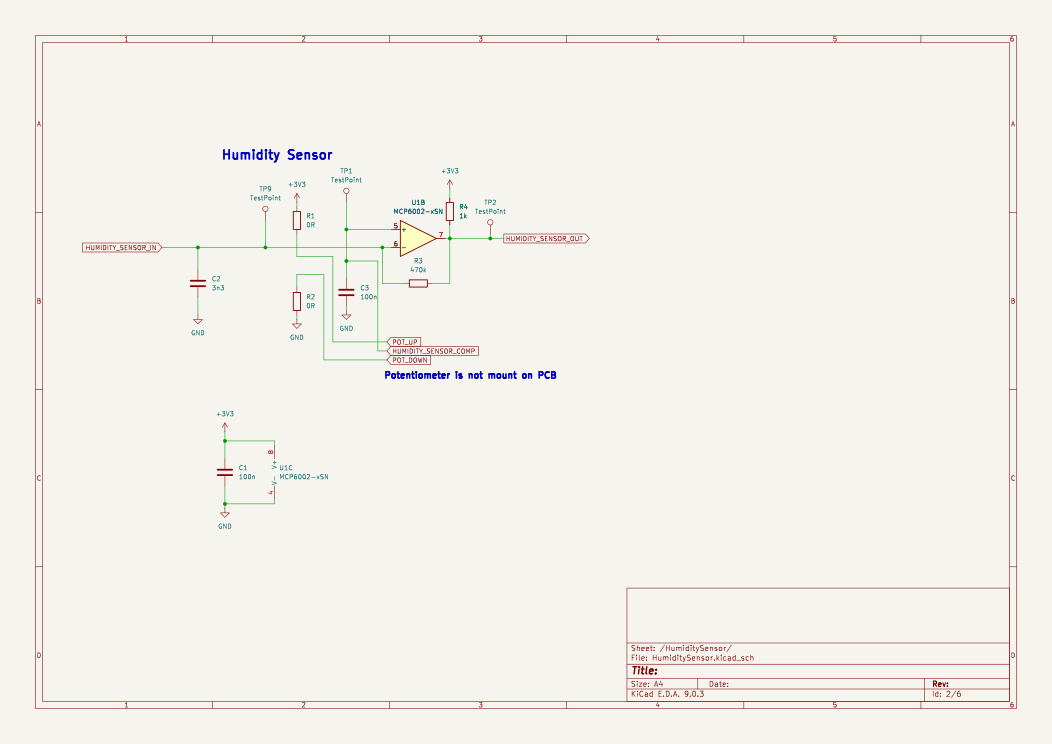
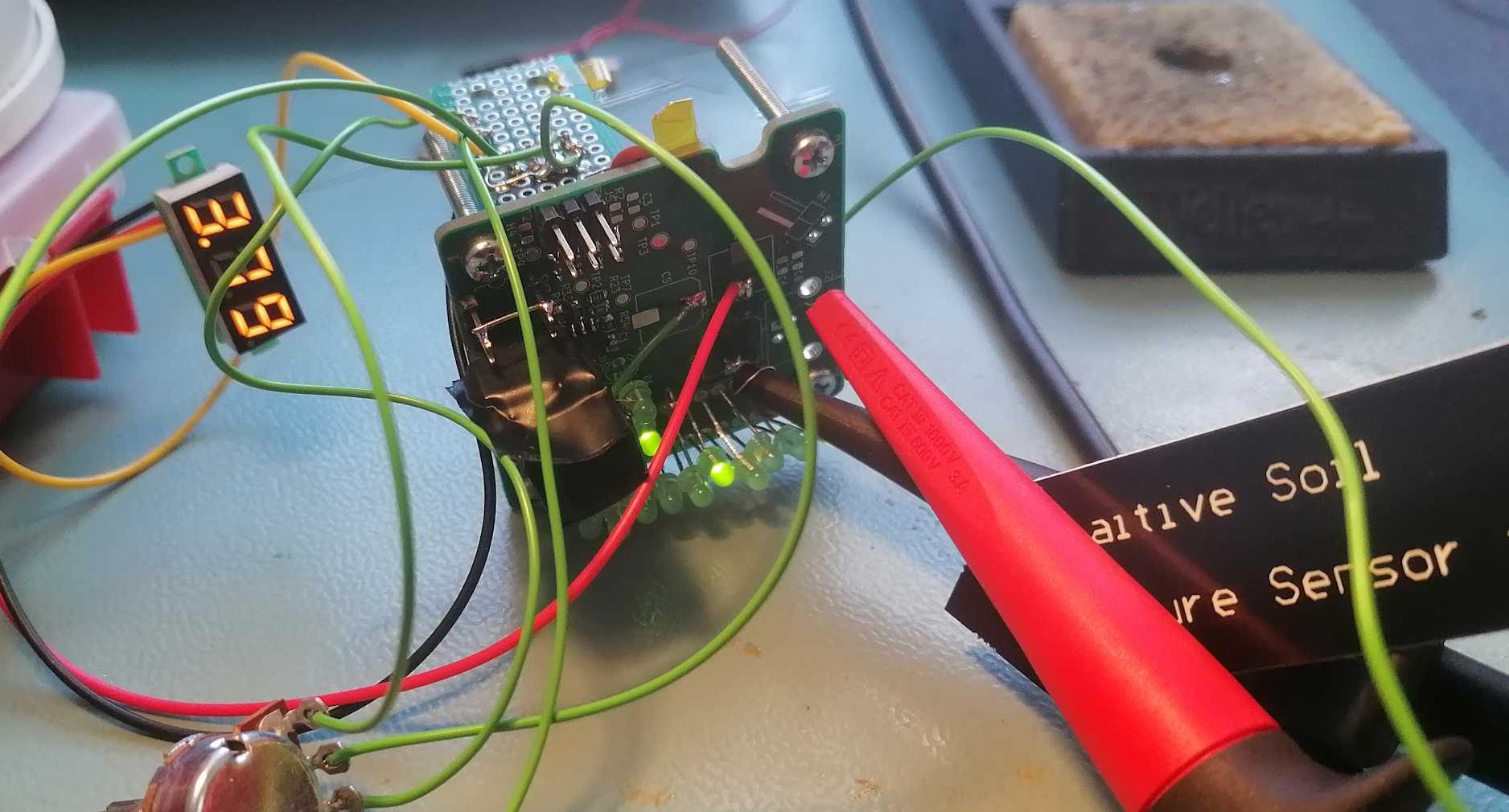
  • A soil moisture capacitance sensor (from AliExpress). Using a capacitance-based sensor over a resistance one has the advantage of avoiding probe corrosion due to electrolysis.
  • An LCD display showing the current humidity level and the humidity threshold to start watering, and a button to change what is displayed.
  • A bargraph showing how long the watering should take, and a button to change this value. Also, a potentiometer to select the level when soil is considered too dry.

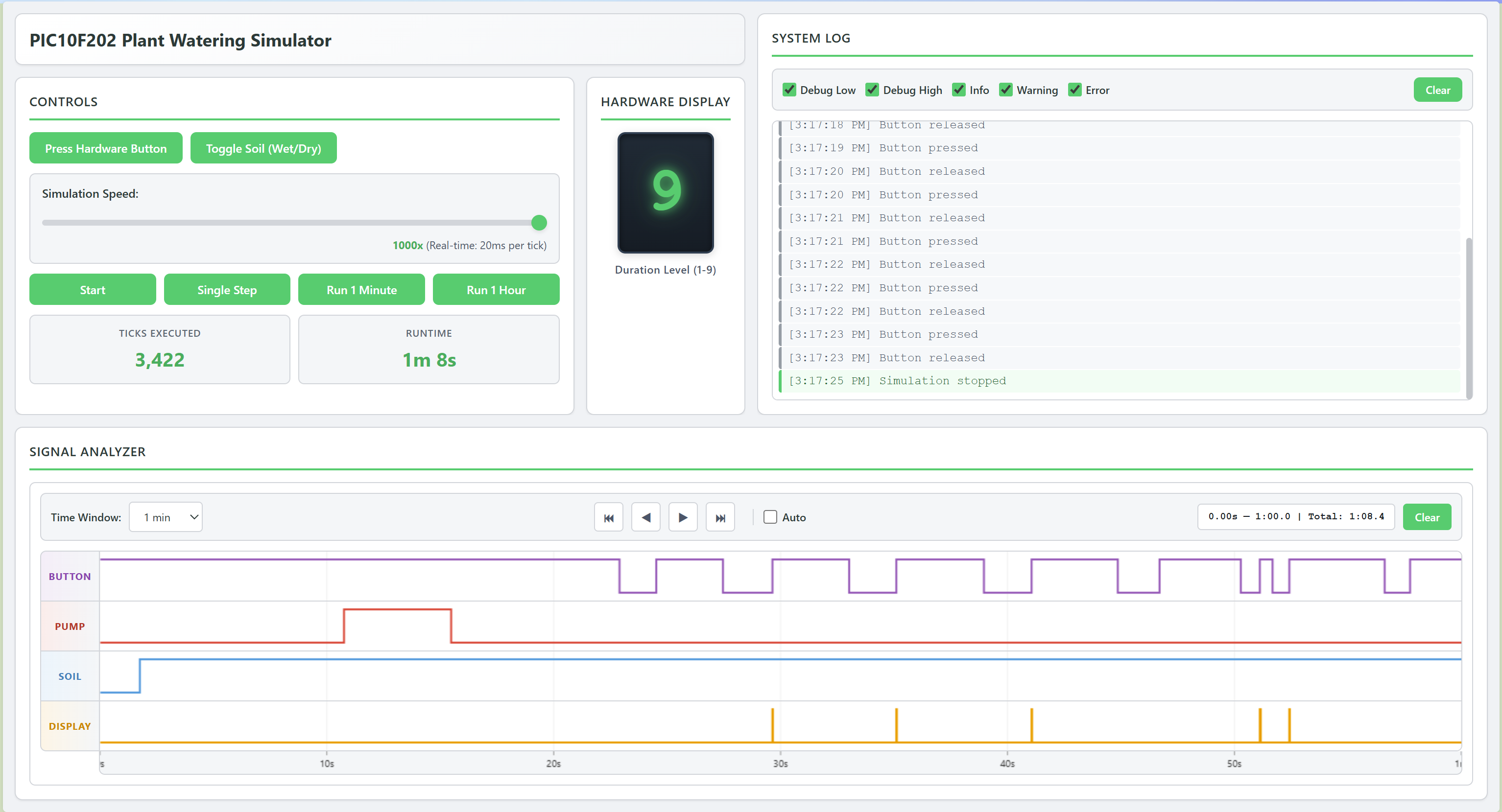
I was thinking that water won't disperse immediately into the entire soil volume when the pump starts, so the sensor might still report that it's dry if checks are too frequent. This could cause the device to water the plant multiple times in a short period.


To fix this, I think the firmware will check every hour if the soil is dry and only then start watering. One hour should be enough for the water to dissipate.


Other problem is that the PIC10F200 by itself doesn’t have enough pins to make something usable with it. 

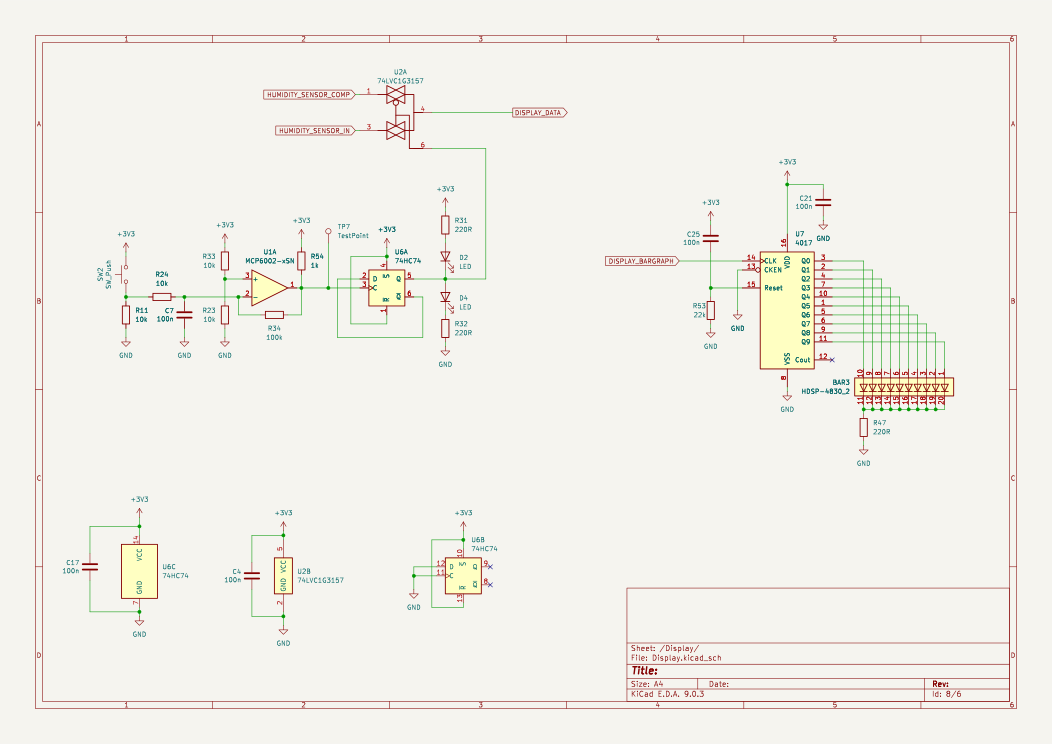
In the first version (never built) to fix that I've used the 74HC595, which is a serial-to-parallel output chip, and the 74HC4052, which is a multiplexer (many inputs to one output). The PIC10F200 would drive the 74HC595, and the 74HC595 would set the needed output pins and also configure the 74HC4052. I found this idea really cool, but after thinking about it, it might be too much work for such a small chip. I don't know.

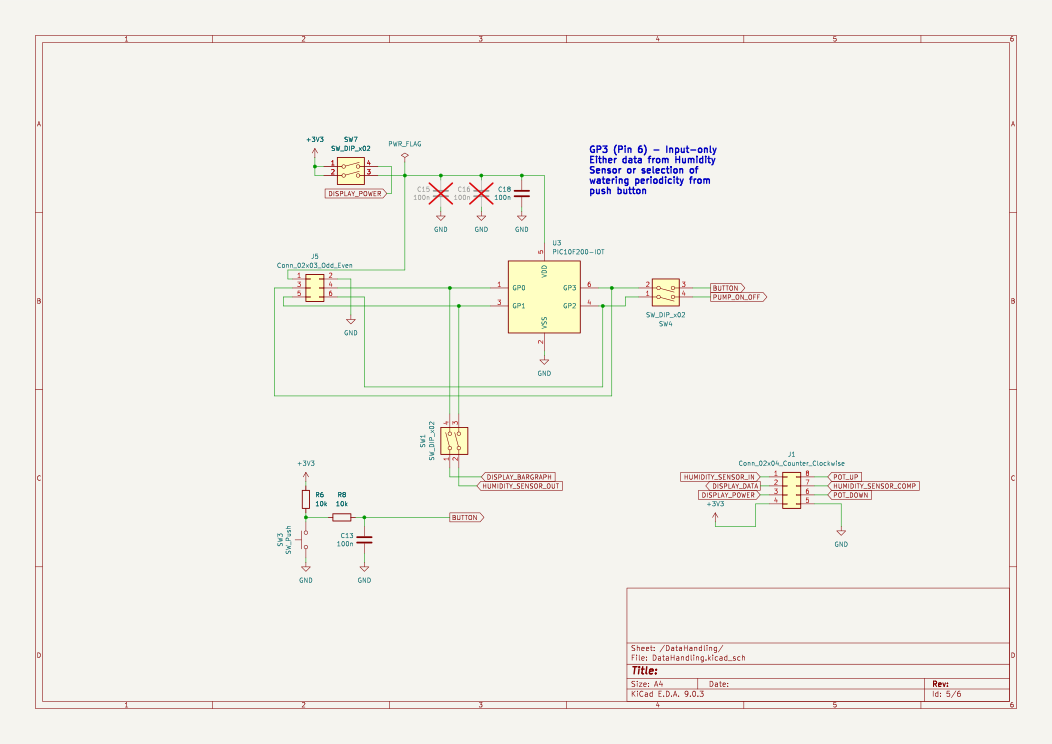
Second version (built and presented here) is much simpler. Selecting what is shown on the LCD display is done using a button connected to a 74HC74D (D-type flip-flop) and then to a 74LVC1G3157DW (analog switch) - all done outside of the microcontroller, no code needed.

The bargraph is driven by a CD74HC4017 (decade counter), which is much easier to control (need only one pin from PIC microcontroller). There is only one button connected to the PIC10F200 for selecting how long the pump runs when the soil is dry. When the user pushes it, the duration increases; when it reaches the maximum, it rolls over to the minimum value.

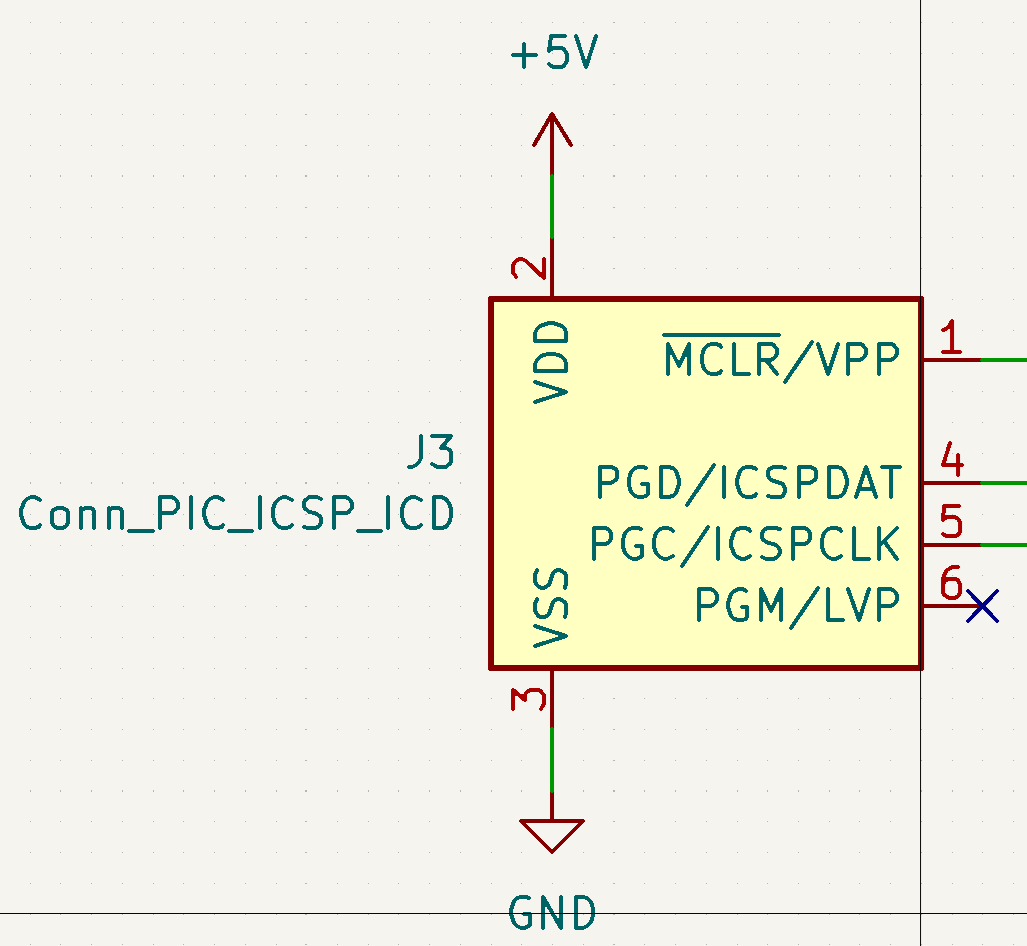
Circuit
Software

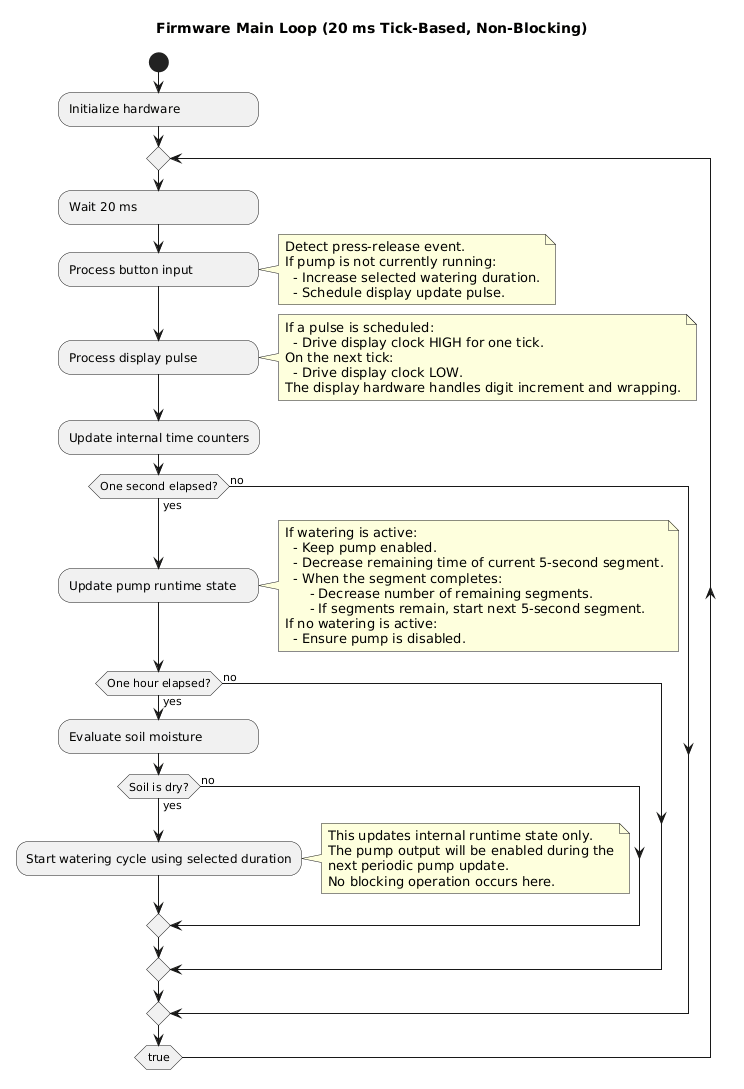
Software is written in PIC-AS assembler dialect.

Flow diagram is shown below.
Mechanic

A chassis to hold all elements together was modeled using OpenSCAD and FreeCAD; more info can be found in this project log entry.
PlantWateringDevice.pdf

Electronic circuit

Adobe Portable Document Format - 373.11 kB - 01/27/2026 at 17:15

Preview

water_pump.png

Water pump

Portable Network Graphics (PNG) - 914.83 kB - 01/27/2026 at 17:16

Preview

sensor.png

Soil humidity sensor (capacitance based to avoid corrosion)

Portable Network Graphics (PNG) - 1.21 MB - 01/27/2026 at 17:16

Preview

lcd_front.png

Front of the LCD used

Portable Network Graphics (PNG) - 350.31 kB - 01/27/2026 at 17:16

Preview

lcd_back.png

Back of the LCD used

Portable Network Graphics (PNG) - 504.96 kB - 01/27/2026 at 17:16

Preview

View all 9 components

  • First steps with PIC microcontrollers

    Robert Gawron3 天前 0 comments

    I'm soldering/programming this device and things I've learned so far about PIC microcontrollers:

    • Those low-end chips can be programmed in many variants of assembler dialect. There is at least MPASM, PIC-AS, GPASM. I've chosen PIC-AS because it's available in MPLAB IDE (environment by Microchip for writing software for PIC microcontrollers) and seems to be more modern. I don't get why they created a new version of assembler dialect, what was wrong with the older MPASM?
    • MPLAB IDE has dropped support for AFAIK the most popular hobbyist level programmer - PICKit3. There is some added/kept support for it in MPLAB IPE tool, but for me PICKit3 doesn't enumerate in available devices there.
    • There is an open source alternative for flashing those chips (PICkit tool) and it works fine.
    • Microchip provides their IDE based on NetBeans (NetBeans=Java=slow), but they also created a bunch of plugins for VS Code. The project needs to be once created in MPLAB IDE and then it can be imported and built in VS Code. Nice.
    • The mentioned PICkit tool has a command line version, so I think it's possible to script it from VS Code to flash the chip automatically.
    • VS Code AFAIK doesn't have a nice plugin to color PIC-AS dialect of assembler for those chips, the best what I've found is this plugin.

  • A 3D Model Made Using OpenSCAD for Parametric Design and FreeCAD for Finishing Touches

    Robert Gawron09/14/2025 at 13:57 0 comments

    I tried to make a 3D printable holder using only open-source CAD tools: FreeCAD and OpenSCAD. While the model is simple, the tools are not easy to use, but I finally made it, and I think it's quite interesting how to do 3D modeling without needing paid tools. In this post, I will share how to use FreeCAD and OpenSCAD, using their strong sides and avoiding their weak ones.

    First, OpenSCAD: it's a programming language to create 3D models. Everything starts from simple 2D shapes like rectangles and circles. They can be added, subtracted, or moved to create more complex shapes. Then, those shapes can be extruded (we give them size in the Z-axis), and the resulting 3D shapes can again be added, subtracted, or moved to create even more complex shapes. Because it's a programming language, it's easy to parametrize the design - like any language, it has variables.

    It's a great tool but has its limitations and weird behaviors. By default, if a variable is not initialized, the compiler will try to ignore it and continue, but this leads to incorrect models (if the variable was there, it had some purpose, like shifting the shape a bit in some direction, etc.). Fortunately, this can be changed in the settings.

    Another thing I found is that it's easy to make messy models with a lot of duplication - it's a language so it's easy to write bad code. Fortunately, the project can be split into separate files and linked later using the include directive. Also, it's good to use the module directive to split the design into separate parts instead of doing everything directly with built-in primitives like rectangles and circles.

    Other limitations is that it's impossible to add dimensions to rendered objects, so it's hard to visually check if everything is modeled correctly. In FreeCAD, it's simple - all you need to do is select an edge, click the dimension tool, and the length is visualized.

    Last but very annoying: it's hard to model fillets (rounded corners), while in FreeCAD, again, it's trivial.

    My idea was then to make a model in OpenSCAD and import it to FreeCAD, and that's what I did. Why not do everything in FreeCAD? Well, FreeCAD's user interface is horrible. There are so many weird things in it that I could make an entirely new post just about it, but I’ll just mention a bit of what annoys me the most.

    FreeCAD’s GUI is bad regarding how it handles parametrization. I will add that the idea of parametrization is that instead of hardcoding dimensions in designs, a parameter can be used - one parameter can be used in many places, making changes easier to make. It’s a great idea but poorly implemented. It’s not possible to add comments explaining what the parameter represents, no option to link to a datasheet where it comes from, etc.

    But let's get back, once the model in OpenSCAD is done, even if it renders perfectly in OpenSCAD, it can fail to import into FreeCAD. I found that FreeCAD doesn’t like it when the OpenSCAD "mirror" directive is used on 2D objects. FreeCAD, of course, won’t say where the problem is during the import. Again, horrible software! By the way that also when it's a good to split the OpenSCAD design into separate files/modules, each file split into modules, to be able to temporarily comment out the code and see where the problem is.

    The import of the OpenSCAD project has a trap, too. FreeCAD has workbenches (kind of like perspectives in Eclipse), and there is a workbench dedicated to OpenSCAD, but the import fails if an OpenSCAD file includes other OpenSCAD files. However, it works when importing by File -> Import. No need for OpenSCAD workbench.

    Then, the fillets. Some are impossible because FreeCAD will crash :) But most are possible. Fillets  can be added either in the "Part" or "Part Design" workbenches. The "Part Design" workbench can’t directly work with imported OpenSCAD projects, so the fillets don’t work (at least not easily). Fortunately, the "Part" workbench works. Also, the "Part" workbench has a dimension...

    Read more »

View all 2 project logs

Enjoy this project?

Share

Discussions

Does this project spark your interest?

Become a member to follow this project and never miss any updates