 Paul
Paul

Quick Start (≈1 minute)
You don’t need to compile anything.
- Download the ready-to-flash firmware from the Releases.
- Run FlashTool.exe (included).
- Open the Setup desktop tool → send your Wi-Fi credentials over USB (no typing on the touchscreen).
- Reboot → tap Speak → enjoy the first fully offline weather report spoken by TinyTTS.
That’s your first “wow” moment — the moment the screen becomes a voice.
What You’re Building
A clean, modern weather station with a three-day outlook, a clock, and a rotating inspirational quote — all displayed on the CrowPanel.
But with one twist:
Every piece of information can be spoken aloud with natural neural speech generated directly on the TinyTTS module.
- No MP3 files.
- No cloud APIs.
- No licensing servers.
- Just your device speaking text you send to it.
This makes the project both a finished build and a perfect template for your own voice-enabled ideas.
Voice Samples (What You’ll Actually Hear)
The lines below are real examples the device can speak:
- “Today’s temperature is 23 degrees, partly cloudy.”
- “Expect light rain in the next hour.”
- “Humidity 42 percent. Pressure 1016 millibars.”
- “It’s 18:45. Enjoy your evening.”
- “Quote of the day: Courage is a habit.”
TinyTTS speaks any UTF-8 text the firmware sends.
You’re not limited to fixed phrases — this is real generative speech on an MCU.
Why This Build Feels Special
- Instant builder payoff — it talks immediately after flashing.
- Fully offline neural speech — privacy by design, zero cloud dependency.
- Simple architecture — ESP32-S3 for data/UI, TinyTTS for voice.
- Effortless extensibility — change the text templates, add new triggers, or feed new data sources.
- A “gateway project” — once you hear the voice, ideas start multiplying fast.
Hardware & Software Requirements
This project uses only a few components — a display module, the TinyTTS kit, and a speaker.
Hardware
- ELECROW CrowPanel Advance (5" or 7", ESP32-S3 with built-in touchscreen display)
- TinyTTS Kit (neural TTS module with the model and software preinstalled)
- Small speaker or amplified speaker
- USB-C cable for flashing and power
- 4-pin UART cable (CrowPanel ↔ TinyTTS)
Software
- ESP-IDF 5.4 (toolchain and idf.py)
- Python 3.8+ for the Wi-Fi setup tool
How the Voice Pipeline Works
TinyTTS is a compact neural text-to-speech module — a small microcontroller-based board with embedded TTS software — designed to bring natural, on-device speech to hardware products and DIY projects.
Unlike systems that rely on prerecorded audio files or cloud APIs, TinyTTS generates speech fully offline, in real time, directly on the module.
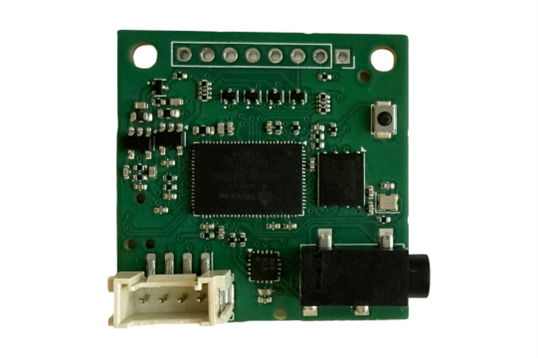
It receives short text messages over UART and outputs natural speech in real-time.
Because the voice is generated dynamically, the device can speak anything the firmware provides: updated weather data, different forecast patterns, localized time phrases, or custom messages you design. There’s no need to store or manage audio files, and no internet connection is required for speech.

UART Protocol
- 115200 baud, 8N1, UTF-8
- Format: SPEAK:<text>\n
- Recommended max phrase length: ~200 characters
- Typical latency for short phrases: tens of milliseconds until playback
TinyTTS does not require an internet connection.
Only the weather/quote fetch uses Wi-Fi; all speech synthesis runs locally.
Connecting the Hardware
Connecting the hardware is simple and takes only a few minutes.
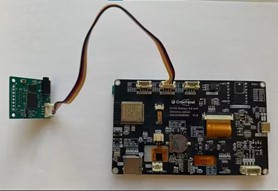
- Use the 4-pin UART cable to link the CrowPanel to the TinyTTS module
- (TX → RX, RX → TX, 5V, GND).
- Plug your speaker into the TinyTTS audio output.
- Power the CrowPanel through USB-C.
- After flashing the firmware and sending the settings from the desktop Setup tool, the device will automatically communicate with TinyTTS and start generating speech.

 Scott Hasse
 Raymond
 Roman V
 mircemk