Nick Sayer

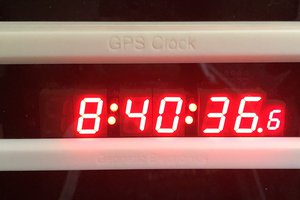
Going back to the first iterations of the GPS clock, the display is managed by a MAX6951. The SPI pins are connected up to the default SPI interface pins of an ESP32-C3-MINI-1 (pin 0 CLK, pin 3 DIN, pin 10 !CS). The boot selector pin (pin 9) goes to a solder jumper. To place the ESP32 in the sketch upload mode, you short that jumper out while applying power (I find a piece of solder wick braid best for this. Just hold it on the pads while plugging it in). The barrel connector for power has been replaced with a USB-C socket. This allows the same connector to be used for firmware updates as well as normal power. The only other addition is a single button that goes to pin 4. This button puts the clock in the setup mode.
On the firmware side, I needed to find a high-precision NTP client implementation. The ones that sort of come with Arduino are only good to the second and I wanted to display tenths and for them to be reasonably accurate. There is, of course, NTP built-in to the ESP32 firmware, but the problem with that is that there is no fix quality feedback mechanism, and I want to stop displaying time rather than let a drifting time get displayed. To do that, I turned to the ESPNtpClient library. But that library has a crash bug in it, so I found this fork that works properly. You'll want to install that version in your IDE if you want to build the firmware yourself.
When the clock boots up, it uses the preferences API to load the WiFi, NTP and feature configuration. The clock will show a brief LED test and then show "no ntP" until the clock is synchronized with the NTP pool.
At any time, you can push the setup button. The display will show "SEtuP" and the board will go into WiFi AP mode with the SSID "ESPClock". Once connected, open a web browser and you should find a captive portal that will redirect you to a setup UI where you can put in the correct WiFi SSID and password (WPA2 and WPA3 personal are supported), override the default NTP server if you wish, change the display brightness, set 12 or 24 hour mode, enable or disable the tenth of a second digit, set the mode for the colons (off, on or blink) and select your time zone (or enter your own time zone string). Once you submit that page, the preferences will be updated and the clock rebooted.
 Jonathas Barbosa
 Francesco Comi
 Ken Yap