Close
0%
0%

Pocket Power Pack

Model railroading on the go. A battery operated power pack (DCC and DC) gives you the opportunity to take your model railroad with you.

Similar projects worth following
0 followers
Model railroading on the go. A battery operated power pack gives you the opportunity to take your model railroad with you. No mess with outlets and cables. Build your Pocket Power Pack, get some sectional track, a locomotive (DCC or DC) and a few cars and you are in business.

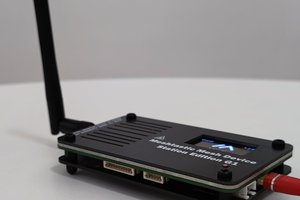
From the DCC point of view the Pocket Power Pack combines Throttle, Command Station, and Booster in the same hand held unit. No power supply is required as long as the battery lasts. You can recharge the battery with a standard smart phone charger.

Features


General

  • Max. current 0.5 A (limited by the DCDC-converter Purecrea MT3608)
  • Short circuit proof
  • Adjustable rail voltage between 5 V and 20 V
  • With 1000 mA LiPo battery, Operating time
    • Small HOe or N-scale locomotive (50 mA): 5 h 
    • Small HO locomotive (100 mA): 2.5 h
    • Medium HO locomotive (250 mA): 1 h
    • Charging time about 2 h (micro USB charger, 500 mA)
  • Display shows
    • PWM duty cycle 0 .. 100 % (DC) or speed 0 .. 126 (DCC)
    • Direction
    • Current consumption
    • Rail voltage
    • Battery voltage
    • Menu

DC-Mode

  • PWM frequencies: 250 Hz, 500 Hz, 1 kHz, 2 kHz, 4 kHz, 8 kHz, and 16 kHz
  • Brake mode (fast/slow decay mode)

DCC-Mode

  • 4 locomotive slots (address range 0 .. 9999), similar to the DCC-EX reminders
  • Speed 0 .. 126
  • Direction
  • Light (F0), bell (F1), airhorn (F2), mute (F8)
  • 8 programmable functions (out of F0 .. F28)

Bluetooth Remote Control (Throttle)

  • Use your smart phone as a additional remote throttle
  • DCC-EX commandsover BLE
  • [JMRI Engine Driver Throttle](https://enginedriver.mstevetodd.com/)

DCC-EX serial (USB CDC)

How to Use the Pocket Power Pack

It could not be simpler. Connect the power to the rails and turn the knob. Change direction with the arrow buttons ← →. 
Choose the menu line with the ↓ ↑ buttons, select the option with the button A, B, C, or D.

pocket_power_pack.svg

Schematic

svg+xml - 3.88 MB - 01/25/2026 at 13:16

Preview

pocket_power_pack.kicad_sch

KICAD schematic

kicad_sch - 4.60 MB - 01/25/2026 at 13:11

Download

pocket_power_pack.kicad_pro

KICAD project

kicad_pro - 11.01 kB - 01/25/2026 at 13:11

Download

overlay.svg

svg+xml - 38.88 kB - 01/25/2026 at 13:10

Preview

ppp.bin

Binary file for the Firefly SBC.

octet-stream - 768.00 kB - 01/25/2026 at 13:07

Download

View all 6 files

  • 1 × Firefly BLE STM32WB55 Development Board available from tindie
  • 1 × Perfboard square grid of 0.1 inches, pads on both sides (plate-through holes), 3" x 2"
  • 1 × OLED display 128x64 pixels, SSD1306, Octopus PIS-1277, Grove - OLED Display 0.96"
  • 8 × push buttons, fit in 0.4" grid
  • 1 × LiPo battery e.g. Lithium Ion Polymer Battery - 3.7v 1200mAh, Reely 1000 mAh

View all 12 components

  • 1
    Build the Hardware

    Schematic

    kicad schematic

    Cut the perfboard for the Base Board

    Cut the perfboard to 3" x 2" (76.5 x 51.5 mm) dimension or 30 x 20 pads. Cut out corners (3 x 3 1/10"),

    Cut the perfboard for the Key Board, Solder and Wire Push Buttons

    Solder the 8 push buttons to the perfboard. Each button is in the middle of 4 x 3 pads, the grid is 0.4". Wire the buttons.

    Mount the Firefly SBC

    Solder the Firefly to the perfboard.

    Mount USB Charger

    Solder the Adafruit Micro-Lipo Charger to the perfboard. I shortened the board on the USB end and on the battery connector end. If the battery has a JST connector, no wiring/solderin is required.

    Mount the DCDC Converter

    The DCDC coinverter stays on the long edge on base board. You can use wires to connect and fix the PCB to the base board.

    Mount the Current Sensor

    Remove the screw terminal.

    Mount the Motor Driver

    Remove the screw terminals. Capacitor

    Wire the buttons to the SBC

    Wire the button to the SBC.

    Place the Resistors

    Mount the OLED Display

    Glue the OLED Display to the underside .

  • 2
    Make the Overlay

    1. Print the keyboard overlay on heavy weight white paper
    2. Cut out the overlay
    3. Laminate the overlay
    4. Cut out the laminated overlay
    5. Cut holes for the push buttons, I use a leather puncher (4 mm holes)


  • 3
    Flash the PPP Firmware

    Flash the Mecrisp-Cube binary MecrispCubeFirefly.bin or better the fs-binary MecrispCubeFireflyFS.bin to the Firefly BLE STM32WB55 Development Board. The Firefly does not have a SWD/JTAG connector but the SWD pins are available on the Arduino connector (see JTAG/SWD Pinout). If you do not have a STLINK you can use the built-in USB DFU bootloader, for details see Flash Mecrisp-Cube to the Target.

    1. Connect the Firefly Board to the STLINK and the STLINK to the USB PC
    2. Copy binary (MecrispCubeFirefly.bin or better the MecrispCubeFireflyFS.bin) to the USB mass storage NODE_WB55RG

    Update BLE Stack (optional)

    You can find the BLE Stack and FUS in STM32CubeWB or from GitHub, in the directory Projects/STM32WB_Copro_Wireless_Binaries. At time of writing the FUS is Version 1.2.0, the stack v1.19.1. The STM32CubeProgrammer is v2.16.0.

    1. For programming the switch SW2 has to be in position BOOT0.
    2. Connect the dongle USB with the computer.
    3. Flash the firmware with STM32CubeProgrammer, either with the CLI (see below) or the GUI (use the firmware upgrade service, start address usually 0x080CE000)
    4. Disconnect dongle from the computer.
    5. Set the switch SW2 to position 0.
    $ alias cubepgmcli='/opt/STMicroelectronics/STM32Cube/STM32CubeProgrammer/bin/STM32_Programmer_CLI'
    $ cd STM32Cube_FW_WB_V1.19.1/Projects/STM32WB_Copro_Wireless_Binaries/STM32WB5x
    $ cubepgmcli -c port=USB1 -fwupgrade stm32wb5x_BLE_Stack_full_fw.bin 0x080CE000 firstinstall=0
    

View all 3 instructions

Enjoy this project?

Share

Discussions

Does this project spark your interest?

Become a member to follow this project and never miss any updates