 Prashant Sinha
I finally got around to implementing the initial version of tool alignment. As I mentioned in a previous post, it'd require extra effort to align each pen manually at true zero. Instead we opted for an RFID tag affixed to the tools. The tag currently contains XYZ offsets and a tool identifier. In future for tools such as paint markers we can also store attributes to inform the plotter to purge the pen at a given interval, or for cutting tools, the blade angle and cutting depth.
To read the tag and apply tool parameters during print run on Klipper, I came up with a method as described below:
1. Reading Tool Data when docking
A klipper module is created that allows us to execute arbitrary shell commands. The output of this command would contain the "result" enclosed in a known heredoc style pattern. The gcode can read this result using the `printer` variable. Then we can apply the XYZ offset using `SET_GCODE_OFFSET` command. Of course this is a potential security vulnerability if we run unknown gcode, but something to be improved later (quite easily).
[gcode_macro _RFID_HOME]
gcode:
  G1 X130
  G1 Y3
  G1 Z7
  M400

[gcode_macro RFID_READ]
gcode:
  # Home to Reading Position
  _RFID_HOME
  EXECUTE_AND_STORE COMMAND="/home/pi/.local/bin/uv run --directory /home/pi/limn rfid.py read-tag"
  M400
  APPLY_RFID_DATA

[gcode_macro APPLY_RFID_DATA]
gcode:
  {% set output_buff = printer["shell_output sh_output_buffer"].output %}
  {% if "||" not in output_buff %}
    # Do nothing
    M118 No tag found.
  {% else %}
    {% set comps = output_buff.split('||') %}
    SAVE_VARIABLE VARIABLE=tool_offset_x VALUE={comps[0]}
    SAVE_VARIABLE VARIABLE=tool_offset_y VALUE={comps[1]}
    SAVE_VARIABLE VARIABLE=tool_offset_z VALUE={comps[2]}
    SAVE_VARIABLE VARIABLE=tool_name VALUE='"{comps[3]}"'
    M118 Stored offsets for tool.
  {% endif %}
In short, we use the saved variables to pass the tool information between macros.
The potential security issue stems from the fact that if an attacker is aware of `EXECUTE_AND_STORE` command, they are able to add it within their own crafted Gcode. So caution should be taken (as always) when plotting unknown gcode.
2. Applying tool offsets
We override move commands (G1, G2, G3) so that when instructed, we apply the tool offsets before moving. Any moves not containing `ALIGN1` parameter would not be affected by gcode offset -- this is a feature, as we can choose to only align certain moves.
[gcode_macro _APPLY_OFFSETS]
gcode:
  {% set align = params.ALIGN|int %}
  {% set svv = printer.save_variables.variables %}
  {% set offset_x = svv.tool_offset_x|default(0)|int %}
  {% set offset_y = svv.tool_offset_y|default(0)|int %}
  {% set offset_z = svv.tool_offset_z|default(0)|int %}

  {% if align == 1 %}
    SET_GCODE_OFFSET X={offset_x} Y={offset_y} Z={offset_z}
  {% else %}
    SET_GCODE_OFFSET X=0 Y=0 Z=0
  {% endif %}

[gcode_macro G1]
rename_existing: G1.1 # Rename the existing G1 command to G1.1
gcode:
  {% set p_x = ' X' ~ params.X if 'X' in params else '' %} # Extract only the move commands we care about.
  {% set p_y = ' Y' ~ params.Y if 'Y' in params else '' %}
  {% set p_z = ' Z' ~ params.Z if 'Z' in params else '' %}
  {% set p_f = ' F' ~ params.F if 'F' in params else '' %}
  {% set act = params.ACT|int if 'ACT' in params else 0 %}
  {% set align = params.ALIGN if 'ALIGN' in params else 0 %}

  _APPLY_OFFSETS ALIGN={align}
  {% if act == 1 %}
    # PEN DOWN
    {% set p_z = " Z0.2" %}
  {% elif act == 2 %}
    # PEN UP
    {% set p_z = " Z5" %}
  {% elif act == 3 %}
    # TRAVEL
    {% set p_z = " Z7" %}
  {% endif %}
  {% set ps = p_x + p_y + p_z + p_f %}
  G1.1 {ps}
3. Applying tool offsets only when drawing (and other moves)
Since the toolhead interacts with the machine physically (eg. docking, rfid read) we need to selectively apply the offsets only when it's needed. Currently the only place it's needed is when drawing. Therefore I modified slicer config to append parameter `ALIGN` on each travel and draw moves. If a tool doesn't specify any parameter, there is no effective offset.
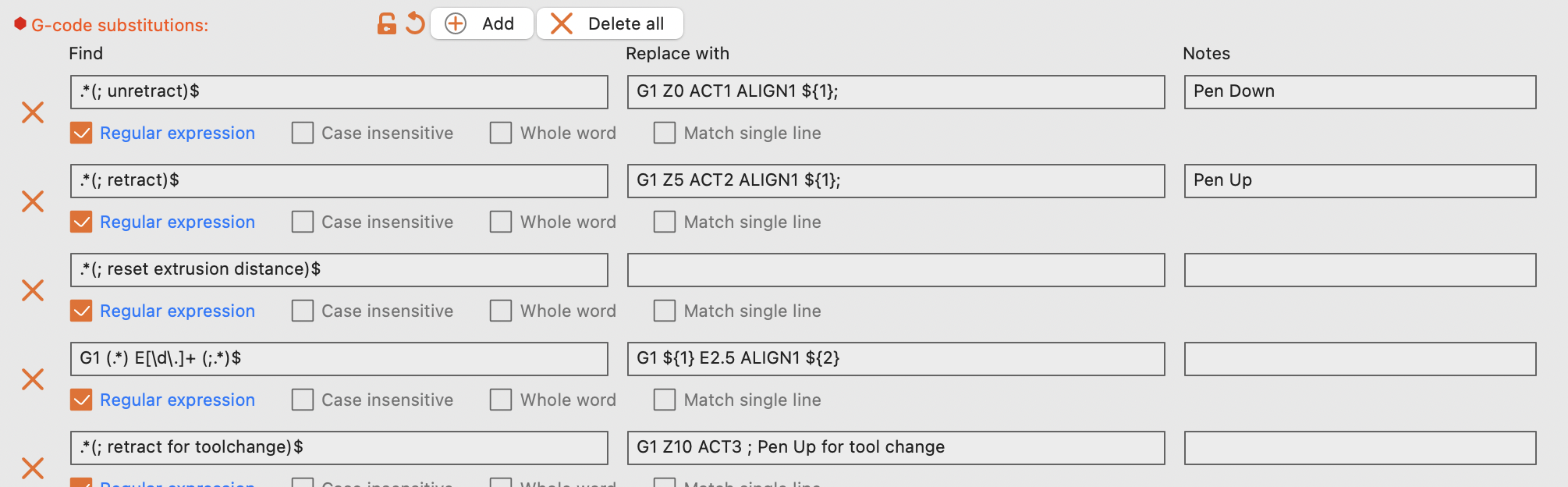
Additionally I wanted the printer to control pen-up/down movements, but still see preview in the slicer. Fun fact: the slicer preview is 1:1 reconstruction of the gcode. Therefore I added another parameter `ACT` to G* commands. So, eg. ACT1 would be pen_down, and any Z specified in the slicer is ignored. This is illustrated in above code example. The modification in the slicer is shown below:
 4. Writing/updating tool parameters
The rfid script is a typer cli, so we can simply call it from a Gcode macro to update tool info. The macro auto homes to correct location where the tag can be read, and echoes the written data back to the user.
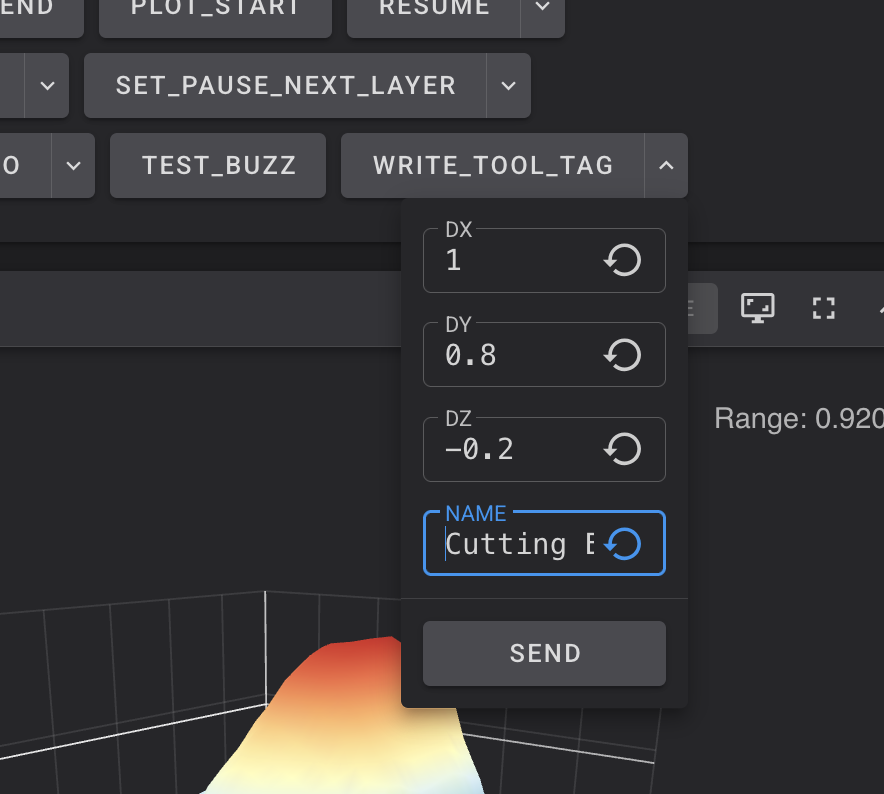
I discovered a neat trick in klipper here. If we use dot notation (params.dx) to access the parameter (instead of index notation, eg. params['dx']), fluidd would auto generate a mini UI to input the values:
It's quite handy!
---
In a sort of a gimmick (for now) I tried docking a tethered tool (tool with a physical connection elsewhere) and it works as expected. I put a little UVC camera on it for the demo on Youtube. Normally this would not be gimmicky since a tool-changer 3D Printer would obviously need tethered tools, but I don't think Limn is gonna be able to dock a tool with PTFE tube (such tool would also be heavy) on it yet!
--
So this is how I got the alignment to work. I can finally take a small break and plot some multi-ink designs! I'll update the github repo shortly with new printer config -- I just need to first do some more actual plotting to see if things are stable.
Discussions
Become a Hackaday.io Member
Create an account to leave a comment. Already have an account? Log In.