Close
0%
0%

PumpPilot

Cloud-Based Smart Water Pump Automation Platform Using ESP32

Public Chat
Similar projects worth following
129 views
0 followers
PumpPilot is a cloud-connected smart water pump automation platform built using ESP32. It allows remote control, runtime management, RFID-based access, multi-user support, and real-time monitoring through web and mobile dashboards. The system prevents electricity waste, protects motors from damage, and resolves shared-user conflicts with features like smart queue management, runtime limitation, and safety protection. Designed for apartments, rural communities, irrigation systems, and commercial buildings, PumpPilot integrates hardware, cloud software, and IoT automation into a scalable and efficient infrastructure solution.

Live Demo: https://pp.mechatronicslab.net/
Free Ebook: https://sarful.gumroad.com/l/PumpPilotEbook
Product Live: https://pumppilot.mechatronicslab.net/

PumpPilot

Cloud-Based Smart Water Pump Automation Platform Using ESP32

Project Overview

PumpPilot is a cloud-connected smart water pump automation platform built using ESP32, cloud software, and web/mobile technologies. The project was developed to modernize traditional water pump systems by introducing remote control, smart automation, runtime management, RFID-based access, and real-time monitoring.

The platform is designed for:

  • Apartment buildings
  • Shared community water systems
  • Smart irrigation
  • Rural infrastructure
  • Commercial buildings
  • Industrial motor control

PumpPilot combines embedded systems, IoT communication, cloud infrastructure, authentication systems, and safety automation into a single scalable ecosystem.

The Problem

Traditional water pump systems still depend heavily on manual operation.

This creates several common real-world problems:

  • Users forget to turn OFF the pump
  • Electricity gets wasted
  • Motors overheat because of long runtime
  • Shared users fight over pump access
  • No runtime tracking system exists
  • Unsafe restart after load shedding
  • No centralized monitoring system

These issues are very common in shared buildings, rural communities, and irrigation environments.

The Solution

PumpPilot solves these problems using:

  • ESP32-based motor control
  • Cloud-connected monitoring
  • RFID-based user access
  • Smart queue management
  • Runtime limitation
  • Real-time monitoring
  • Multi-user management
  • Safety protection logic

The goal was to build more than a simple smart relay switch.

Instead, PumpPilot was designed as a complete smart infrastructure ecosystem.

How PumpPilot Works

The system uses an ESP32 controller connected to relays/contactors that control the motor or water pump.

Users can interact with the system through:

  • Web dashboard
  • Mobile application
  • RFID authentication

When a user requests pump access, the cloud server validates:

  • Queue availability
  • User permissions
  • Runtime balance
  • Device status
  • Safety conditions

If everything is valid, the server sends a command to the ESP32 controller.

The ESP32 then activates the relay and starts the motor.

The platform continuously monitors runtime and system activity. After the allocated runtime expires, the pump automatically turns OFF and logs are stored in the cloud database.

Core Features

Multi-Role Management System

PumpPilot supports:

  • Master accounts
  • Admin accounts
  • User accounts

Each role has different permissions and dashboard access.

Real-Life Example

A building owner can use the Master account, maintenance staff can use Admin accounts, and residents can use User accounts.

RFID-Based Access and Runtime Identity Flow

The platform supports RFID-based authentication and runtime tracking.

Features

  • RFID card scanning
  • User identification
  • Runtime identity mapping
  • Secure access management

Real-Life Example

Users can tap an RFID card near the control unit to start a runtime session automatically.

Minute Balance and Runtime Control

PumpPilot includes minute-based runtime management.

Features

  • Runtime allocation
  • Automatic minute deduction
  • Session timeout
  • Runtime limitation

Real-Life Example

Each apartment resident can receive monthly runtime minutes for fair water usage.

Motor Control Workflow with ESP32 Integration

ESP32 works as the intelligent hardware controller.

Features

  • Cloud communication
  • Relay activation
  • Runtime synchronization
  • Device status reporting

Real-Life Example

A user activates the pump from the mobile app, and the cloud server instantly sends commands to the ESP32 controller.

History, Logs, and CSV Export Support

PumpPilot stores detailed runtime and activity records.

Features

  • Runtime history
  • User activity logs
  • Device event records
  • CSV export support

Real-Life Example

Administrators can export monthly runtime reports for maintenance tracking and usage analysis.

Email Verification and Password Reset Flow

The platform includes secure authentication systems.

Features

  • Email verification
  • Password reset workflow
  • Secure account recovery
  • Authentication management

Real-Life...

Read more »

pumpPilot.ino

ESP32 Programming

ino - 8.13 kB - 05/23/2026 at 07:20

Download

  • 1 × ESP32 Development Board
  • 1 × Relay Module
  • 1 × DC Power Supply Module
  • 1 × Water Pump / Motor
  • 1 × RFID Reader Module (MFRC522 or similar)

View all 6 components

  • Suggested Project Logs for PumpPilot

    Mr. Sarful hassan05/23/2026 at 07:24 0 comments

    Project Log 1 — Project Idea & Planning

    Title

    Getting Started with PumpPilot

    Content

    Started designing PumpPilot to solve real-world water pump management problems using ESP32, cloud software, and IoT automation. The goal is to build a smart and scalable platform for remote pump control, runtime management, RFID authentication, and safety monitoring.

    Project Log 2 — ESP32 Hardware Setup

    Title

    ESP32 Pump Controller Prototype

    Content

    Completed the first ESP32-based hardware prototype for controlling water pumps using relay and contactor integration. Initial testing for remote ON/OFF control and cloud communication was successful.

    Project Log 3 — RFID Integration

    Title

    RFID-Based User Authentication System

    Content

    Integrated RFID-based access control into PumpPilot. Users can now authenticate using RFID cards, and runtime sessions are linked with individual user identities for better monitoring and access management.

    Project Log 4 — Cloud Dashboard Development

    Title

    Building the PumpPilot Web Dashboard

    Content

    Developed the cloud-connected dashboard using Next.js and React. The dashboard supports device monitoring, user management, runtime tracking, and activity logs.

    Project Log 5 — Runtime & Queue System

    Title

    Implementing Runtime and Queue Management

    Content

    Added smart runtime limitation and queue management features to prevent multiple users from operating the same pump simultaneously. The system can automatically stop motors after allocated runtime expires.

    Project Log 6 — Safety Protection Logic

    Title

    Adding Safety Protection Features

    Content

    Implemented safety features including load shedding recovery protection, unauthorized access prevention, runtime auto cutoff, and device validation logic to improve system reliability.

    Project Log 7 — Logs & CSV Export

    Title

    History Tracking and CSV Export Support

    Content

    Added runtime history, user activity logs, and CSV export functionality for monitoring and reporting. Administrators can now analyze system usage and maintain records more efficiently.

    Project Log 8 — Live Demo Deployment

    Title

    PumpPilot Live Demo is Online

    Content

    Successfully deployed the live PumpPilot demo platform with multi-role access, cloud-connected monitoring, and remote motor control features.

    Live Demo: https://pp.mechatronicslab.net/

    Project Log 9 — Documentation & Free Ebook

    Title

    Free PumpPilot Ebook Released

    Content

    Published a free ebook covering the PumpPilot architecture, ESP32 workflow, RFID integration, cloud communication, and IoT automation concepts to help beginners understand the project.

    Ebook: https://sarful.gumroad.com/l/PumpPilotEbook

    Project Log 10 — Future Improvements

    Title

    Future Roadmap for PumpPilot

    Content

    Planning future improvements including MQTT support, AI predictive maintenance, sensor automation, solar integration, GSM backup communication, and advanced analytics dashboards.

View project log

  • 1
    Build Instructions

    Build Instructions

    Step 1: Prepare the Hardware

    Collect the main components: ESP32, relay module, contactor, RFID reader, power supply, and water pump/motor.

    Step 2: Connect ESP32 with Relay

    Connect the ESP32 output pin to the relay module input. The relay will work as the switching control signal for the motor contactor.

    Step 3: Connect Relay with Contactor

    Connect the relay output to the contactor control circuit. The contactor will safely handle the high-power motor load.

    Step 4: Add RFID Reader

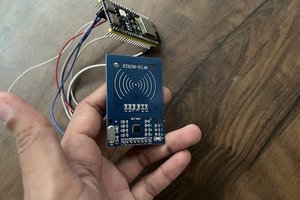
    Connect the RFID reader module to the ESP32 using SPI communication. This will allow users to start a session by tapping an RFID card.

    Step 5: Upload ESP32 Firmware

    Open the firmware in Arduino IDE or PlatformIO, configure WiFi credentials, API endpoint, device ID, and upload the code to the ESP32.

    Step 6: Setup the Cloud Backend

    Install the backend dependencies, configure MongoDB, environment variables, authentication settings, and start the Node.js server.

    Step 7: Setup the Web Dashboard

    Install frontend dependencies, configure the backend API URL, and run the Next.js dashboard.

    Step 8: Create User Roles

    Create Master, Admin, and User accounts. Assign proper permissions for device management, runtime control, and pump access.

    Step 9: Register Device and RFID Cards

    Add the ESP32 device in the dashboard and register RFID cards for users.

    Step 10: Test Pump Control

    Test remote ON/OFF control from the dashboard and verify that ESP32 activates the relay and contactor correctly.

    Step 11: Test Runtime Control

    Assign minute balance to a user and check whether runtime is deducted automatically while the pump is active.

    Step 12: Check Logs and Reports

    Verify runtime history, device activity logs, user logs, and CSV export features.

    Step 13: Safety Testing

    Test runtime auto cutoff, unauthorized access prevention, load shedding recovery behavior, and device status validation.

    Step 14: Final Installation

    Mount the circuit inside a safe electrical enclosure and connect the system to the real pump setup through a qualified electrician.

View all instructions

Enjoy this project?

Share

Discussions

Similar Projects

Does this project spark your interest?

Become a member to follow this project and never miss any updates