 Ken Yap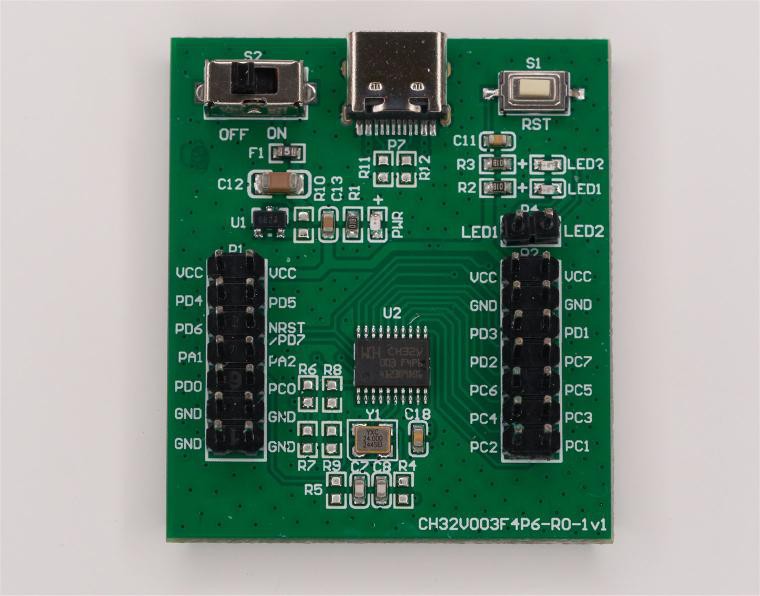
So now it's time to try to get a Rust/Embassy blinky working on my target MCU. This is the evaluation board I got just over 2 years ago, together with a WCH-LinkE flashing dongle. I got a C blinky working on that easily and then put it aside until I got a round tuit.
Searching reveals that there is a Rust/Embassy HAL for the WCH32 line of MCUs and it's a work in progress. Like the STM32 HAL, it caters to a wide range of MCU models by the use of a metapac, which is a database of MCUs and their characteristics. So I cloned the git repo and started looking through the examples, which are arranged by MCU model. The ones I want are under examples/ch32v003. There is a prototype cargo project there with the usual Cargo.toml which specifies the dependencies and build.rs which generates the build script. The src/ directory has a subdirectory called bin/ where all the example Rust apps are found. (This is an alternate structure for cargo projects, instead of a single src/main.rs, there is src/bin/ containing multiple apps to build.) In there I find src/bin/embassy_blinky,rs. So I copy Cargo.toml, build.rs, the hidden file .cargo/config.toml, and embassy_blinky.rs to a new project of mine, created by:
$ cargo new ch32v003-rust-blinky
What is the target tuple for this MCU though? The ESP32C3 was a riscv32imc-unknown-none. There is a file called riscv32ec-unknown-none-elf.json in the example project. What does it do? So the CH32V003 has a riscv32ec ISA? I try:
$ rustup target list
but this target doesn't exist. I try various cargo invocations using the JSON file, including the -Z flag but nothing works. What's going on?
At this point I found another useful resource, Getting Started with CH32V003 Firmware in Rust. In it I discover ch32-hal needs to be built with a nightly release of the toolchain because riscv32ec is not an accepted ISA yet. So a JSON file specifies the ISA characteristics and this feature exists only in the nightly toolchains.
$ rustup install nightly
$ rustup override set nightly
override changes the toolchain just for this project. .cargo/config.toml clarifies a few things:
[build]
target = "riscv32ec-unknown-none-elf.json"

[target.'cfg(all(target_arch = "riscv32", target_os = "none"))']
# runner = "riscv64-unknown-elf-gdb -q -x openocd.gdb"
# runner = "riscv-none-embed-gdb -q -x openocd.gdb"
# runner = "gdb -q -x openocd.gdb"
# runner = "wlink -v flash --enable-sdi-print --watch-serial"

# Flash and debug chip with probe-rs. https://probe.rs/
runner = "probe-rs run --chip ch32v003"

[unstable]
build-std = ["core"]
# build-std = ["core", "compiler_builtins"]
# build-std-features = ["compiler-builtins-mem"]
json-target-spec = true

[target.riscv32ec-unknown-none-elf]
#rustflags = [ "-C", "-Tlink.x" ]
At this point I run into a few glitches, not very enlightening, so what you see is the final config I ended up with. I tried enabling rustflags, but it turns out it's correct to leave it out, as the llvm-lld linker gets the option -Tlink.x elsewhere and specifying this option more than once causes an error. The other change I made is to use probe-rs as the flashing program. wlink does work but probe-rs is better. It's a very useful Swiss Army Knife for flashing that can be used even for non-Rust projects, as it knows a lot of flashing methods.
Now I try to build the blinky which looks like this:
#![no_std]
#![no_main]

use ch32_hal as hal;
use hal::Peri;
use embassy_executor::Spawner;
use embassy_time::Timer;
use hal::gpio::{AnyPin, Level, Output};
use hal::println;

#[embassy_executor::task(pool_size = 2)]
async fn blink(pin: Peri<'static, AnyPin>, interval_ms: u64) {
    let mut led = Output::new(pin, Level::Low, Default::default());

    loop {
        led.set_high();
        Timer::after_millis(interval_ms).await;
        led.set_low();
        Timer::after_millis(interval_ms).await;
    }
}

#[embassy_executor::main(entry = "qingke_rt::entry")]
async fn main(spawner: Spawner) -> ! {
    hal::debug::SDIPrint::enable();
    let mut config = hal::Config::default();
    config.rcc = hal::rcc::Config::SYSCLK_FREQ_48MHZ_HSI;
    let p = hal::init(config);

    println!("CHIP signature => {}", hal::signature::chip_id().name());
    println!("Clocks {:?}", hal::rcc::clocks());

    // let mut led = Output::new(p.PC4, Level::Low, Default::default());

    spawner.spawn(blink(p.PD6.into(), 110).unwrap());
    spawner.spawn(blink(p.PA2.into(), 270).unwrap());

    loop {
        Timer::after_millis(1000).await;
        println!("tick");
    }
}

#[panic_handler]
fn panic(info: &core::panic::PanicInfo) -> ! {
    let _ = hal::println!("\n\n\n{}", info);

    loop {}
}
When I tried to build this it couldn't find ch32-hal as it isn't a registered crate yet. It turns out that you can specify its location with the dependency option git= to specify the git repo, or the option path= to a local copy. I point it to my clone of the ch32-hal repo with:
...
[dependencies]
ch32-hal = { path = "../ch32-hal", features = [
    "ch32v003f4p6",
    "memory-x",
    "embassy",
    "time-driver-tim2",
    "rt",
] }
...
When I try to build this with cargo build, it tells me it won't fit in the 16 kB flash of the MCU. Is this MCU too small to handle Rust/Embassy? Damn, do I have to go back to C/C++?
I try various options to reduce the binary size. One that worked was to build for release rather than debug. But that still only leaves a tiny amount of flash space and I'll need the space for app features. Then, remembering that formatted output is a memory hog, I remove the println statements from the code. At the same time I simplify the code to be comparable to the other blinkies. The one above runs 3 tasks: 2 LED blink tasks and one wait task. This is the final code:
#![no_std]
#![no_main]

use ch32_hal as hal;
use embassy_executor::Spawner;
use embassy_time::{Duration,Timer};
use hal::gpio::{Level, Output};

#[panic_handler]
fn panic(_info: &core::panic::PanicInfo) -> ! {
    loop {}
}

#[embassy_executor::main(entry = "qingke_rt::entry")]
async fn main(_spawner: Spawner) -> ! {
    let mut config = hal::Config::default();
    config.rcc = hal::rcc::Config::SYSCLK_FREQ_48MHZ_HSI;
    let p = hal::init(config);

    let mut led = Output::new(p.PD0, Level::Low, Default::default());

    loop {
        led.set_high();
        Timer::after(Duration::from_millis(500)).await;
        led.set_low();
        Timer::after(Duration::from_millis(500)).await;
    }
}
$ cargo run
    Finished `dev` profile [optimized + debuginfo] target(s) in 0.08s
     Running `probe-rs run --chip ch32v003 target/riscv32ec-unknown-none-elf/debug/ch32v003-rust-blinky`
      Erasing ✔ 100% [####################]   4.00 KiB @   9.80 KiB/s (took 0s)                                                  Finished in 2.36s
I connected up the PD0 pin to one of the LED pins on the evaluation board, and the blue LED flashes, as expected.
How big is the binary?
$ cargo size
   text    data     bss     dec     hex filename
   3642      32     344    4018     fb2 target/riscv32ec-unknown-none-elf/debug/ch32v003-rust-blinky
Much better. This gives me over 10 kB for more application code. Incidentally I also had to do a rustup component add llvm-tools to be able to do a cargo size, as this is a nightly toolchain, different from the stable toolchain the other MCU blinkies used.
Great, now I know that I can develop with Rust/Embassy for the tiny board shown in this project's header.
Discussions
Become a Hackaday.io Member
Create an account to leave a comment. Already have an account? Log In.