 superdog
A fingerprint key that accepts forged firmware is worthless, so the OTA pipeline is where immurok's security model either holds or collapses. This is how ours works: the .imfw package format, AES-CTR encryption, on-device verification, the migration from HMAC to ECDSA P-256 signatures, anti-rollback — and what it takes to run P-256 on a chip with 26KB of RAM and a 512-byte stack.
The immurok key is a sealed device. There’s no USB port, no debug header a user can reach, no recovery button — after it leaves the factory, the only way firmware gets onto it is over Bluetooth LE, pushed by the companion app. That’s convenient. It’s also the single most dangerous interface the device has.
immurok’s entire value is that the device tells the truth: a real finger touched me, and here’s a cryptographic statement to prove it. If an attacker can load their own firmware, every other guarantee — on-device fingerprint matching, keys that never leave the hardware, authenticated notifications — evaporates. Firmware update is where the security model either holds or collapses.
So this post is about how our OTA actually works: what’s in a firmware package, what the device checks before it agrees to run new code, how we migrated the signing scheme on devices already in the field, and what it costs to do real public-key cryptography on a $1 microcontroller.
The .imfw package
Firmware never travels as a raw binary. The build machine packages it into a .imfw file: a fixed 128-byte header followed by the firmware body encrypted with AES-128-CTR.
The header is where the security lives. In the current (v2) format it carries:
- magic, format version, and a hardware ID — so a package for a different board revision is rejected before anything is written;
- the plaintext firmware size and the AES-CTR IV;
- a security version number (SVN) — a monotonic counter, separate from the human-readable semver, used purely for anti-rollback;
- the SHA-256 of the plaintext firmware;
- an ECDSA P-256 signature over the first 64 bytes of the header.
That last field does more than it looks. Because the signed region includes the firmware hash, the signature transitively covers the entire firmware body: you can’t swap the payload without breaking the hash, and you can’t fix the hash without breaking the signature. One 64-byte signature chains the whole package.
Signing happens on the build machine; the private key never ships. The device holds only the corresponding public key, which is enough to answer the one question it cares about: did this package come from us? The encryption layer, to be clear about roles, is not what makes forgery hard — that’s the signature’s job, and the scheme is published in our security model precisely because none of it depends on secrecy. Encryption keeps the plaintext image from being trivially harvested off the air or from update files, and that’s all we claim for it.
What the device checks, and when
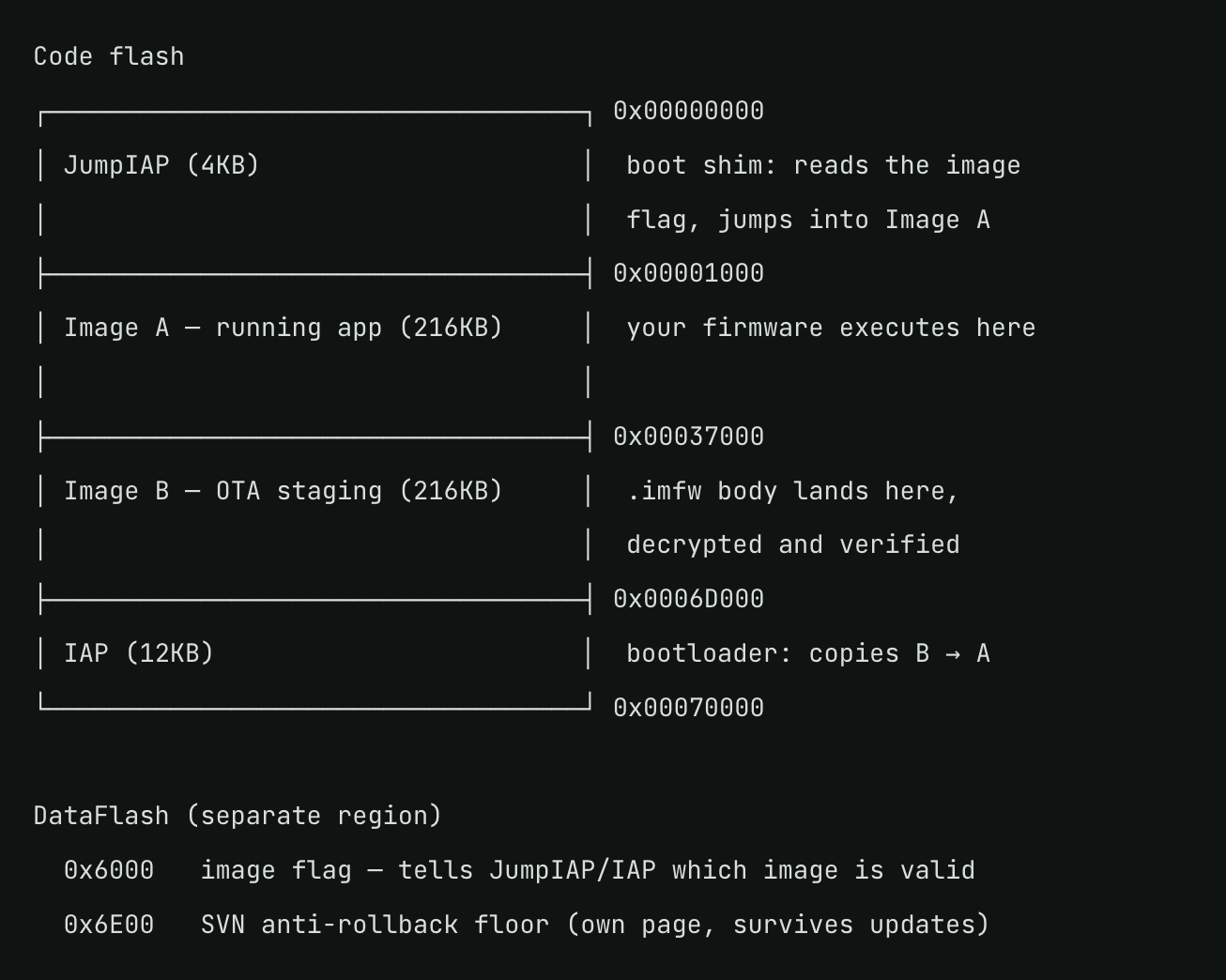
The push protocol is a short command sequence over an authenticated GATT session: an info handshake, an erase of the staging image, the header, a stream of 240-byte data chunks, and an end command. The device uses an A/B flash layout — the running firmware (Image A, 216KB) is never touched during transfer; everything lands in Image B.
The ordering of checks is deliberate:
The header is judged first, before a single firmware byte is transferred. Format version, hardware ID, ECDSA signature, and the SVN against the device’s persisted floor. A forged, mismatched, or rollback package dies in the first second, not after a two-minute transfer. Each failure returns a distinct error code — signature invalid, version rollback, bad format, low battery — because “update failed” with no reason is how you end up unable to debug field reports.
The body is decrypted and hashed in flight. The device streams AES-CTR decryption and a running SHA-256 as chunks arrive, writing plaintext to Image B as it goes. There’s no “download, then verify” phase for a simple reason: the image is 216KB and the chip has 26KB of RAM. Everything on this device is streaming or it doesn’t happen.
The end command verifies what’s actually in flash. Not the bytes we received — the bytes that landed. The device reads Image B back and compares the SHA-256 against the header’s value, catching flash write errors as well as transfer corruption. Only after that match does it set the image flag that tells the bootloader to copy B over A on the next boot.
An interrupted or failed update at any stage leaves Image A untouched and the flag unset. The worst case of a botched OTA is a wasted minute and roughly 0.2% of the battery — not a bricked key. The device also hard-refuses to start an update below 5% battery, independent of the app’s own softer 30% gate: the app gate is UX, the firmware gate is the safety boundary.
The migration: from HMAC to ECDSA, over the air
The v2 format above is not what we shipped first, and the migration is the part most worth writing down.
Early firmware (v1 packages) authenticated updates with HMAC-SHA256 — a symmetric scheme. It’s fast, tiny, and easy to get right on a constrained chip, which is why we started there. But symmetric authentication has a structural flaw for a fleet: the same secret that verifies a package can create one, and that secret has to live inside every device. Extract it from one unit and you can sign firmware for all of them. For a hobby gadget, maybe acceptable. For a device whose whole job is security, it was a debt we always intended to pay before it mattered.
ECDSA fixes the asymmetry: devices carry only a public key, and no amount of hardware extraction on a shipped unit yields the ability to forge. The problem is the fleet in the field. Devices running v1 firmware verify HMAC and know nothing about ECDSA — you can’t just start publishing v2 packages, because old devices would reject them.
The answer is a bridge release — firmware 1.6.0, the hinge between eras. It is the last release delivered as a v1 package, so old devices accept it — and the first whose own verifier accepts only v2. Installing the bridge closes the door behind itself: from that moment the device demands ECDSA, and rejecting v1 outright doubles as the guard against being downgraded back into the symmetric era.
Two more pieces make the migration stick:
- The SVN floor. The device persists the highest security version it has ever run in its data flash, in a dedicated page that survives updates. Any package with a lower SVN is rejected at the header stage — so even a genuine, correctly-signed old v2 release can’t be replayed onto a device once a security fix has raised the floor. Semver is for humans; the SVN exists so that “downgrade to a vulnerable version” is not an attack.
- Two-hop orchestration in the apps. A device on old firmware now needs two sequential updates — bridge first, then latest. Both the macOS and Linux apps reduce this to one pure planner function (up-to-date / direct / bridge-only / two-hops) and present it as a single continuous update with one progress bar, resumable across the mid-flight reboot. The app-side plumbing had its own crop of bugs — lying four-segment version strings, resume state persisted too early, a progress bar that jumped backwards — but they’re a story for another post.
P-256 on 26KB of RAM and a 512-byte stack
The reason we didn’t start with ECDSA is worth being honest about: on this class of hardware, it hurts.
The CH592F gives us 26KB of RAM, of which the stack is 512 bytes, and no crypto acceleration for elliptic curves. A single P-256 signature verification with a software implementation (we use micro-ECC) takes on the order of two seconds at the chip’s clock. Two seconds is an eternity in embedded land, and it stepped on two rakes immediately:
- The watchdog. Our window watchdog times out in ~559ms. The first ECDSA verify test didn’t fail — it rebooted the device, which is a much more confusing symptom. micro-ECC provides a hook exactly for this, and the fix is to register a callback that feeds the watchdog from inside the computation.
- The BLE stack. Two seconds of not servicing the radio flirts with the connection supervision timeout. The tempting fix — pumping the BLE event loop from inside the crypto callback — is a trap: it nests an event dispatch on top of a deep call stack that’s already brushing against those 512 bytes, mid-computation. We feed only the watchdog from the callback and instead rely on connection parameters generous enough to absorb the stall. Getting that wrong doesn’t fail loudly; it corrupts state and fails somewhere else, later.
Add the usual embedded miseries — an endianness mismatch between micro-ECC’s native little-endian word order and the big-endian convention of every crypto standard ever written, buffers declared static because a 64-byte stack array is a meaningful fraction of your entire stack — and “just verify a signature” becomes a respectable engineering line item. It’s still worth it. Every one of these costs is paid once, at update time, on the device — and in exchange, the ability to sign firmware lives nowhere except the build machine.
The shape of the whole thing
Zoomed out, the pipeline is: sign and encrypt on the build machine → distribute as .imfw → app plans the hop(s) and streams the package over an authenticated BLE session → device judges the header, streams decrypt-and-hash into the staging image, verifies the flash readback, and only then commits → bootloader swaps on reboot → app confirms by reconnecting and reading the new version, because “push succeeded” and “device now runs the new firmware” are different claims.
Nothing in that chain is exotic, and that’s the point. The scheme is documented, the packaging and update tooling and both companion apps are on GitHub, and the security rests on exactly one secret: a private key that has never been inside any device we’ve shipped.
Bring your own firmware
One last thing, because the verification chain above locks the OTA path to our signing key — but it doesn’t lock you out of hardware you own.
The board exposes serial flashing test points. Over those you can write your own firmware image directly — including your own OTA public key, generated with the same generate_ota_keys.py tooling we use. From that point on the official companion apps will happily push .imfw packages you built and signed: the device verifies them against your key instead of ours, and the whole pipeline — header checks, streaming decrypt, SVN floor, flash readback — works exactly as described above, just under your ownership.
For anyone going down that road, here’s the flash map your firmware has to live in:
A sealed update path and a hackable device are not in conflict. The signature check keeps firmware we didn’t sign from arriving silently over the air; the test points keep the hardware yours.
Discussions
Become a Hackaday.io Member
Create an account to leave a comment. Already have an account? Log In.