Rohan Barnwal

Introduction
The Internet of Things (IoT) has transformed the way embedded devices communicate with cloud platforms. Today, even a simple microcontroller can collect information from sensors, communicate over Wi-Fi, and store data online in real time.
One technology that is widely used in IoT applications is RFID (Radio Frequency Identification). RFID provides a simple and contactless way to identify people, products, access cards, inventory items, and many other physical objects.
If you've ever used an employee ID card, a student ID card, a metro card, or an access badge to unlock a door, you've already interacted with RFID technology.
Although reading RFID cards is relatively straightforward, beginners often struggle with one common question:
"How can I save the scanned RFID data online without setting up a complicated database?"
"How can I save the scanned RFID data online without setting up a complicated database?"
Many tutorials immediately introduce cloud databases such as Firebase, MQTT brokers, SQL servers, or custom APIs. While these are excellent solutions for large projects, they also introduce additional complexity that can overwhelm beginners.
Instead of taking that route, this project demonstrates a much simpler approach.
We'll use Google Sheets as our cloud database.
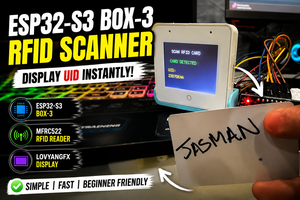
Every time an RFID card is scanned, the ESP32-S3-BOX-3 automatically sends the card's UID over Wi-Fi to Google Apps Script, which instantly stores the information inside a Google Sheet.
The result is a lightweight, cloud-connected RFID logger that anyone can build without purchasing cloud services or configuring a dedicated server.
Because Google Sheets is already familiar to most users, all logged data can immediately be viewed, searched, filtered, exported, or shared without installing additional software.
The entire project relies only on free Google services and can be completed in less than an hour.
Why ESP32-S3-BOX-3?
For this project, I chose the ESP32-S3-BOX-3, which combines powerful processing capabilities with built-in peripherals, making it an excellent development platform for IoT projects.
Some of the reasons for selecting this board include:
- Dual-core ESP32-S3 processor
- Built-in Wi-Fi and Bluetooth connectivity
- Integrated capacitive touch display
- USB Type-C programming interface
- Excellent Arduino IDE support
- High processing performance
- Large Flash and PSRAM
- Perfect for Human Machine Interface (HMI) applications
Instead of connecting an external OLED or TFT display, the built-in display allows us to instantly show the scan status, making the project cleaner and much easier to debug.
Why Use Google Sheets?
Whenever cloud storage is mentioned, most people immediately think of Firebase, AWS, Azure, or SQL databases.
While these platforms are extremely powerful, they usually require authentication, database configuration, security rules, APIs, and additional setup before a single piece of data can be stored.
For beginners, this can become frustrating.
Google Sheets provides an incredibly simple alternative.
Using Google Apps Script, the ESP32 can communicate directly with a spreadsheet using nothing more than a standard HTTP request.
This provides several advantages:
- Completely free
- Accessible from anywhere
- No database installation
- No server maintenance
- Easy to share with teammates
- Automatic cloud backup
- Export to Excel or CSV
- Perfect for IoT prototypes
For projects involving data logging, RFID testing, inventory tracking, or classroom demonstrations, Google Sheets offers more than enough functionality while remaining incredibly simple to set up.
What We Are Building
In this tutorial, we will build a simple RFID logging system.
The workflow is shown below.
RFID Card │ ▼MFRC522 RFID Reader │ ▼ESP32-S3-BOX-3 │ ▼Wi-Fi Network │ ▼Google Apps Script │ ▼Google Sheets
Whenever an RFID card is brought close to the reader:
- The MFRC522 reads the RFID card's UID.
- The...

 chelewynneshuart2023
 CiferTech