 Rohan Barnwal

The Idea
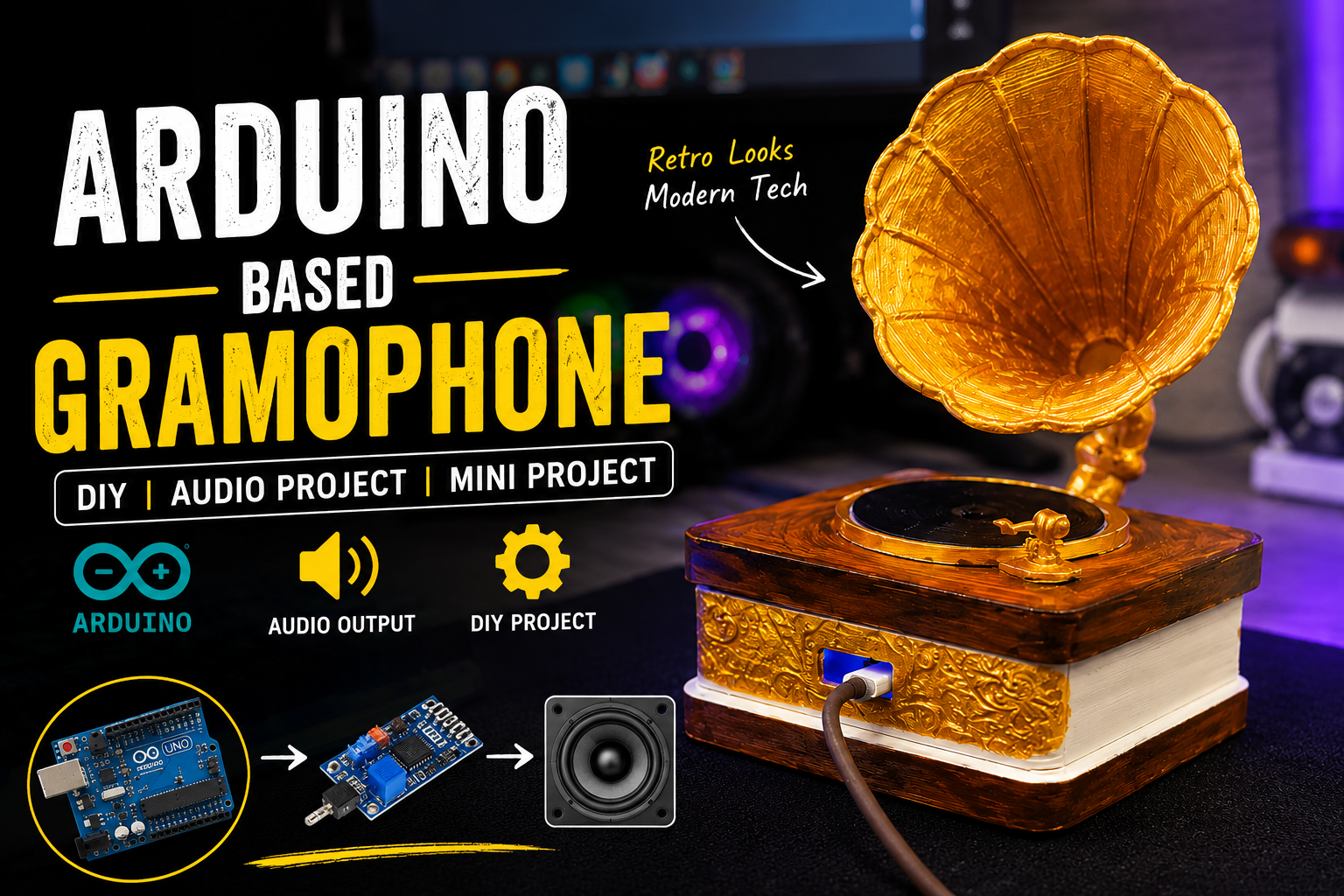
Every smart speaker on the market looks like it cam from the same design meeting: a cylinder, a mesh grille, a glowing ring. I wanted to build something you'd glance at and assume was decorative, until you noticed the faint hum of music coming from inside a hand-painted brass horn.
That's the project: a miniature gramophone, built from scratch, with a real Arduino UNO R4 WiFi and a DFRobot MP3 Player module hidden inside the base, driving a pair of cavity speakers tucked into the horn itself.
Hardware
- Arduino UNO R4 Wi-Fi: the brain of the build. I'm currently only using it for serial communication with the MP3 module, but the onboard WiFi leaves a clear upgrade path toward network-streamed audio later.
- DFRobot DFPlayer MP3 module: handles all the actual audio decoding from a microSD card, controlled via simple UART commands from the Arduino.
- Cavity Speaker: mounted directly inside the horn's cavity rather than the base, so the horn itself does real acoustic work instead of being purely decorative.
Design Philosophy
The hardest part of this build wasn't the circuit - it was the constraint of designing the electronics around a fixed aesthetic instead of the other way around. Most maker projects start with the components and build an enclosure to fit them. I flipped it: the horn shape and base size were locked in first, which meant the wiring, the speaker placement, and even the choice of MP3 module (small enough to fit, but with direct speaker output so I didn't need a separate amp board) all had to be reverse-engineered to fit inside a shape that was never designed with electronics in mind.
How the Circuit Works
The DFPlayer module talks to the Arduino over its dedicated hardware serial port, Serial1 - which on the UNO R4 Wi-Fi is broken out on pins D0/D1 completely separate from the USB serial connection:
DFPlayer VCC  → 5V
DFPlayer GND  → GND
DFPlayer RX   → Arduino D1 (Serial1 TX)
DFPlayer TX   → Arduino D0 (Serial1 RX)
DFPlayer SPK1/SPK2 → Cavity speakers directly
Because the DFPlayer can drive small speakers on its own, there's no separate amplifier stage — which mattered a lot here, since every extra component meant less room inside an already-tight gramophone base.
Right now, playback is controlled directly from the Serial Monitor at 115200 baud — type a track number (1–10) to play it, p to resume, s to stop:
#include "DFRobotDFPlayerMini.h"

DFRobotDFPlayerMini player;
int currentTrack = 0;

void setup() {
  Serial.begin(115200);
  Serial1.begin(9600);
  Serial.setTimeout(50);  // important
  delay(1000);

  Serial.println("Ready... (1-10, p, s)");

  if (player.begin(Serial1)) {
    Serial.println("DFPlayer Detected ✅");
    player.volume(20);
  } else {
    Serial.println("DFPlayer NOT Detected ❌");
  }
}

void loop() {
  if (Serial.available()) {
    String cmd = Serial.readStringUntil('\n');
    cmd.trim();   // removes \r and spaces

    if (cmd == "s") {
      player.stop();
      Serial.println("Stopped ⏹");
    }
    else if (cmd == "p") {
      if (currentTrack > 0) {
        player.start();
        Serial.println("Resumed ▶");
      } else {
        Serial.println("No track ❌");
      }
    }
    else {
      int trackNumber = cmd.toInt();
      if (trackNumber > 0 && trackNumber <= 10) {
        currentTrack = trackNumber;
        Serial.print("Playing: ");
        Serial.println(trackNumber);
        player.play(trackNumber);
      } else {
        Serial.println("Invalid ❌");
      }
    }
  }
}
Build Notes
Getting clean sound out of a horn that wasn't engineered for acoustics took several iterations of speaker placement — too deep into the horn's throat and the sound choked; too shallow and most of the horn's amplifying effect was wasted. The sweet spot ended up being just past the narrowest point of the throat, angled slightly toward the bell.
Heat management was a smaller but real concern — the Arduino and module sit in a fully enclosed wooden/foam base with no ventilation by default, so I added a small hidden vent in the base trim to avoid any heat buildup during longer play sessions.

 c.Invent
 Oskar
Oskar
 fcodiegomoreira