Close
0%
0%

Arduino Nano Tamagotchi

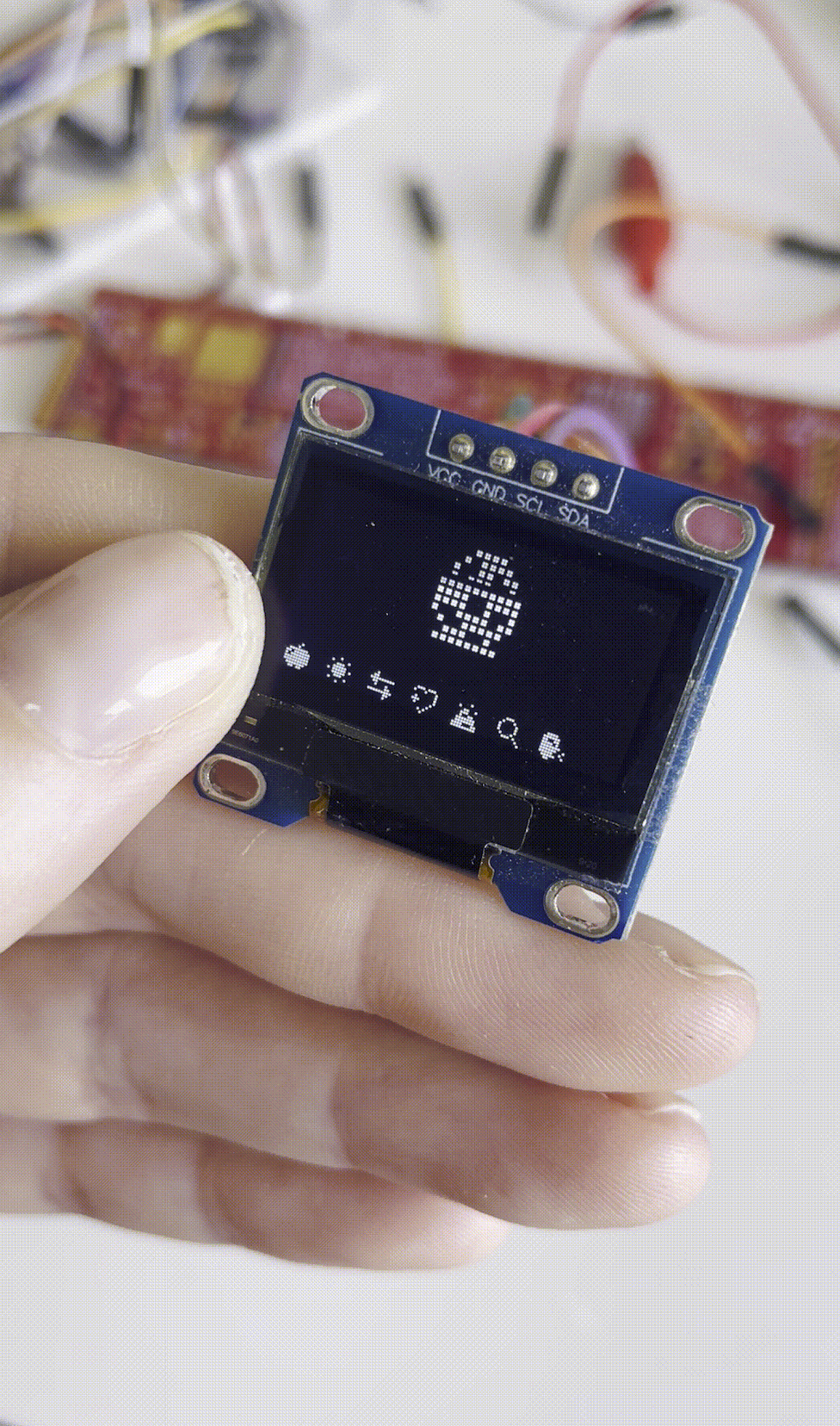
DIY Tamagotchi emulator with a 3D printed shell!

Similar projects worth following
Head back to the 90s by making your own Arduino-based Tamagotchi!
This is a Nano-adapted version of ArduinoGotchi, based on GPL-licensed firmware by Gary Kwok, modified for a compact handheld build.

Head back to the 90s by making your own Arduino-based Tamagotchi! 
This is a Nano-adapted version of ArduinoGotchi, based on GPL-licensed firmware by Gary Kwok, modified for a compact handheld build. 


This page is a short version of the full instructions, which can be found on Instructables.  The files for the project, components needed, and the accompanying instructions are all there! 
  • 1
    Step 1: The Code

    Gather the components you need.

    Follow the code only instructions on the ArduinoGotchi page (do not follow the circuit diagram).

    You can clone the repo from the page. If you're not familiar with how to do that, I've responded to a comment below with a step-by-step of the easiest way to download the code. I'm going to be evaluating how much of those instructions and in what form to put here.

    Replace the code on the main program (ArduinoGotchi.ino) with the following:

    /*
    * CassaGotchi (modified firmware)
    *
    * Based on ArduinoGotchi by Gary Kwok
    * Original project: https://github.com/GaryZ88/ArduinoGotchi
    *
    * Original license:
    * GNU General Public License v2 or later (GPL-2.0-or-later)
    * https://www.gnu.org/licenses/old-licenses/gpl-2.0.html
    *
    * Modifications by: Cass S. (Chaos Theory) (modifications done in 2025)
    * - Adapted for Arduino Nano
    * - Button system changed to INPUT_PULLUP (active LOW)
    * - Sound system removed for flash optimization
    * - EEPROM autosave interval adjusted
    * - Display rendering optimized for U8g2 page loop
    *
    * This firmware is free software; you may redistribute and/or modify it
    * under the terms of the GNU GPL as published by the Free Software Foundation.
    
    * This program is distributed in the hope that it will be useful,
    * but WITHOUT ANY WARRANTY; without even the implied warranty of
    * MERCHANTABILITY or FITNESS FOR A PARTICULAR PURPOSE. See the
    * GNU General Public License for more details.
    
    */
    
    
    #include <U8g2lib.h>
    #include <Wire.h>
    #include <EEPROM.h>
    #include "tamalib.h"
    #include "hw.h"
    #include "bitmaps.h"
    
    /***** U8g2 SSD1306 Library Setting *****/
    #define DISPLAY_I2C_ADDRESS 0x3C
    #define SCREEN_WIDTH 128 // OLED width
    #define SCREEN_HEIGHT 64 // OLED height
    /****************************************/
    
    /***** Tama Setting and Features *****/
    #define TAMA_DISPLAY_FRAMERATE 3
    #define ENABLE_TAMA_SOUND
    #define ENABLE_AUTO_SAVE_STATUS
    #define AUTO_SAVE_MINUTES 15
    #define ENABLE_LOAD_STATE_FROM_EEPROM
    /***************************/
    
    /***** Display orientation *****/
    #define U8G2_LAYOUT_NORMAL
    /****************************************/
    
    U8G2_SSD1306_128X64_NONAME_2_HW_I2C display(U8G2_R0);
    
    /**** TamaLib Variables ****/
    static uint16_t current_freq = 0;
    static bool_t matrix_buffer[LCD_HEIGHT][LCD_WIDTH/8] = {{0}};
    static bool_t icon_buffer[ICON_NUM] = {0};
    static cpu_state_t cpuState;
    static unsigned long lastSaveTimestamp = 0;
    
    /**** HAL Functions ****/
    static void hal_halt(void) {}
    
    static void hal_log(log_level_t level, const char* buff, ...) {
    Serial.println(buff);
    }
    
    static void hal_sleep_until(timestamp_t ts) {}
    
    static timestamp_t hal_get_timestamp(void) {
    return millis() * 1000;
    }
    
    static void hal_update_screen(void) {
    displayTama();
    }
    
    static void hal_set_lcd_matrix(u8_t x, u8_t y, bool_t val) {
    uint8_t mask;
    if (val) {
    mask = 0b10000000 >> (x % 8);
    matrix_buffer[y][x/8] |= mask;
    } else {
    mask = 0b01111111;
    for (byte i = 0; i < (x % 8); i++)
    mask = (mask >> 1) | 0b10000000;
    matrix_buffer[y][x/8] &= mask;
    }
    }
    
    static void hal_set_lcd_icon(u8_t icon, bool_t val) {
    icon_buffer[icon] = val;
    }
    
    static void hal_set_frequency(u32_t freq) {
    current_freq = freq;
    }
    
    static void hal_play_frequency(bool_t en) {
    // Disabled tone to save flash
    }
    
    static bool_t button4state = 0;
    
    static int hal_handler(void) {
    // Read buttons with internal pull-ups: LOW = pressed, HIGH = released
    hw_set_button(BTN_LEFT, digitalRead(2) == LOW ? BTN_STATE_PRESSED : BTN_STATE_RELEASED);
    hw_set_button(BTN_MIDDLE, digitalRead(3) == LOW ? BTN_STATE_PRESSED : BTN_STATE_RELEASED);
    hw_set_button(BTN_RIGHT, digitalRead(4) == LOW ? BTN_STATE_PRESSED : BTN_STATE_RELEASED);
    if (digitalRead(5) == LOW && button4state == 0) {
    saveStateToEEPROM();
    Serial.println("Manual save triggered!");
    button4state = 1;
    }
    
    #ifdef ENABLE_AUTO_SAVE_STATUS
    // Button 4 for manual save
    if (digitalRead(5) == LOW && button4state == 0) {
    saveStateToEEPROM();
    button4state = 1;
    }
    if (digitalRead(5) == HIGH)
    button4state = 0;
    #endif
    
    return 0;
    }
    
    static hal_t hal = {
    .halt = &hal_halt,
    .log = &hal_log,
    .sleep_until = &hal_sleep_until,
    .get_timestamp = &hal_get_timestamp,
    .update_screen = &hal_update_screen,
    .set_lcd_matrix = &hal_set_lcd_matrix,
    .set_lcd_icon = &hal_set_lcd_icon,
    .set_frequency = &hal_set_frequency,
    .play_frequency = &hal_play_frequency,
    .handler = &hal_handler
    };
    
    /**** Drawing Functions ****/
    void drawTriangle(uint8_t x, uint8_t y) {
    display.drawLine(x+1, y+1, x+5, y+1);
    display.drawLine(x+2, y+2, x+4, y+2);
    display.drawLine(x+3, y+3, x+3, y+3);
    }
    
    void drawTamaRow(uint8_t tamaLCD_y, uint8_t ActualLCD_y, uint8_t thick) {
    for (uint8_t i = 0; i < LCD_WIDTH; i++) {
    uint8_t mask = 0b10000000 >> (i % 8);
    if (matrix_buffer[tamaLCD_y][i/8] & mask)
    display.drawBox(i + i + i + 16, ActualLCD_y, 2, thick);
    }
    }
    
    void drawTamaSelection(uint8_t y) {
    for (uint8_t i = 0; i < ICON_NUM; i++) {
    if (icon_buffer[i])
    drawTriangle(i*16 + 5, y);
    display.drawXBMP(i*16 + 4, y+6, 16, 9, bitmaps + i*18);
    }
    }
    
    void displayTama() {
    display.firstPage();
    do {
    for (uint8_t j = 0; j < LCD_HEIGHT; j++) {
    drawTamaRow(j, j+j+j, j == 5 ? 1 : 2);
    }
    drawTamaSelection(49);
    } while (display.nextPage());
    }
    
    /**** EEPROM Functions ****/
    #ifdef ENABLE_AUTO_SAVE_STATUS
    void saveStateToEEPROM() {
    // Initialize EEPROM if needed
    if (EEPROM.read(0) != 12)
    for (int i = 0; i < EEPROM.length(); i++)
    EEPROM.write(i, 0);
    
    EEPROM.update(0, 12);
    
    cpu_get_state(&cpuState);
    
    // Save cpuState struct byte by byte
    uint8_t *statePtr = (uint8_t*)&cpuState;
    for (unsigned int i = 0; i < sizeof(cpu_state_t); i++)
    EEPROM.update(1 + i, statePtr[i]);
    
    // Save memory array byte by byte
    for (int i = 0; i < MEMORY_SIZE; i++)
    EEPROM.update(1 + sizeof(cpu_state_t) + i, cpuState.memory[i]);
    }
    #endif
    
    #ifdef ENABLE_LOAD_STATE_FROM_EEPROM
    void loadStateFromEEPROM() {
    cpu_get_state(&cpuState);
    u4_t *memTemp = cpuState.memory;
    EEPROM.get(1, cpuState);
    cpu_set_state(&cpuState);
    for (int i = 0; i < MEMORY_SIZE; i++)
    memTemp[i] = EEPROM.read(1 + sizeof(cpu_state_t) + i);
    }
    #endif
    
    void setup() {
    Serial.begin(9600);
    
    // Use internal pull-ups so buttons read LOW when pressed
    pinMode(2, INPUT_PULLUP);
    pinMode(3, INPUT_PULLUP);
    pinMode(4, INPUT_PULLUP);
    pinMode(5, INPUT_PULLUP);
    
    display.setI2CAddress(DISPLAY_I2C_ADDRESS*2);
    display.begin();
    
    tamalib_register_hal(&hal);
    tamalib_set_framerate(TAMA_DISPLAY_FRAMERATE);
    tamalib_init(1000000);
    
    #ifdef ENABLE_LOAD_STATE_FROM_EEPROM
    if (EEPROM.read(0) == 12)
    loadStateFromEEPROM();
    #endif
    }
    
    void loop() {
    tamalib_mainloop_step_by_step();
    
    #ifdef ENABLE_AUTO_SAVE_STATUS
    unsigned long now = millis();
    if ((now - lastSaveTimestamp) > (AUTO_SAVE_MINUTES * 60 * 1000UL)) {
    lastSaveTimestamp = now;
    saveStateToEEPROM();
    }
    #endif
    }
  • 2
    Step 2: Breadboarding

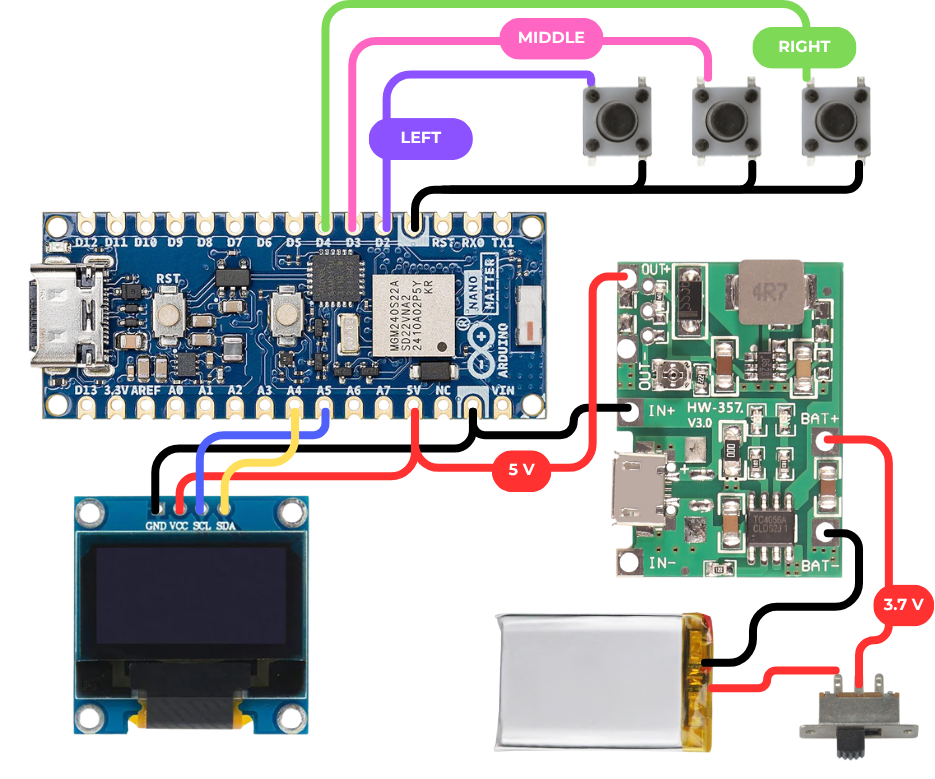
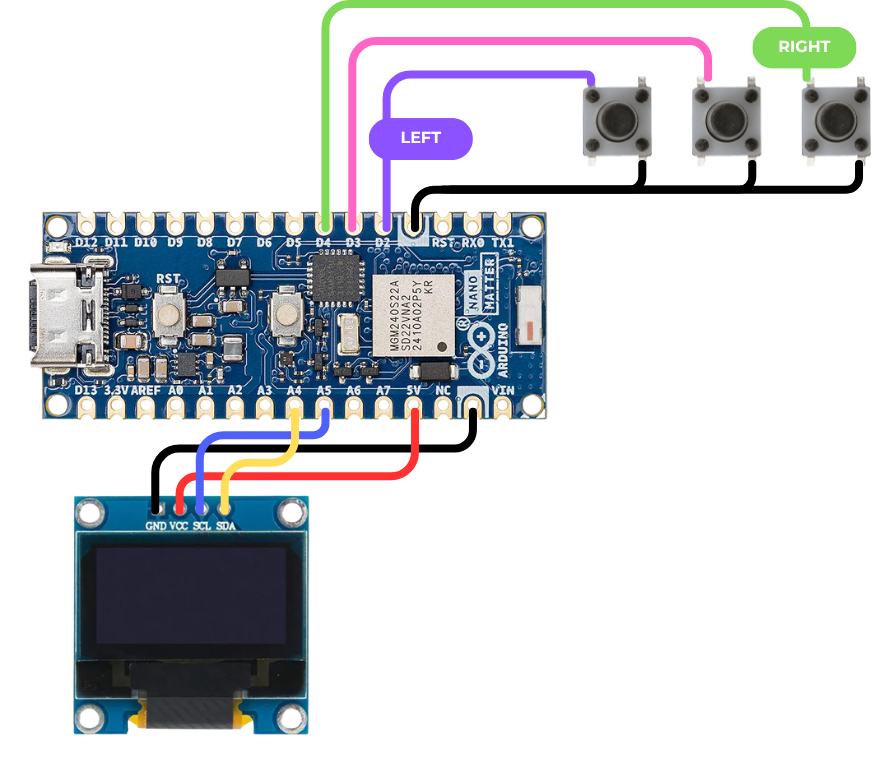
    Upload the code to your Nano. If it compiles successfully, test your circuit using this wiring diagram. Press the middle button to bring your screen to life.

  • 3
    Step 3: Power

    Disconnect your Nano from your computer.

    Once you've got your screen working, temporarily hook your circuit up to the battery, switch, and boost module.

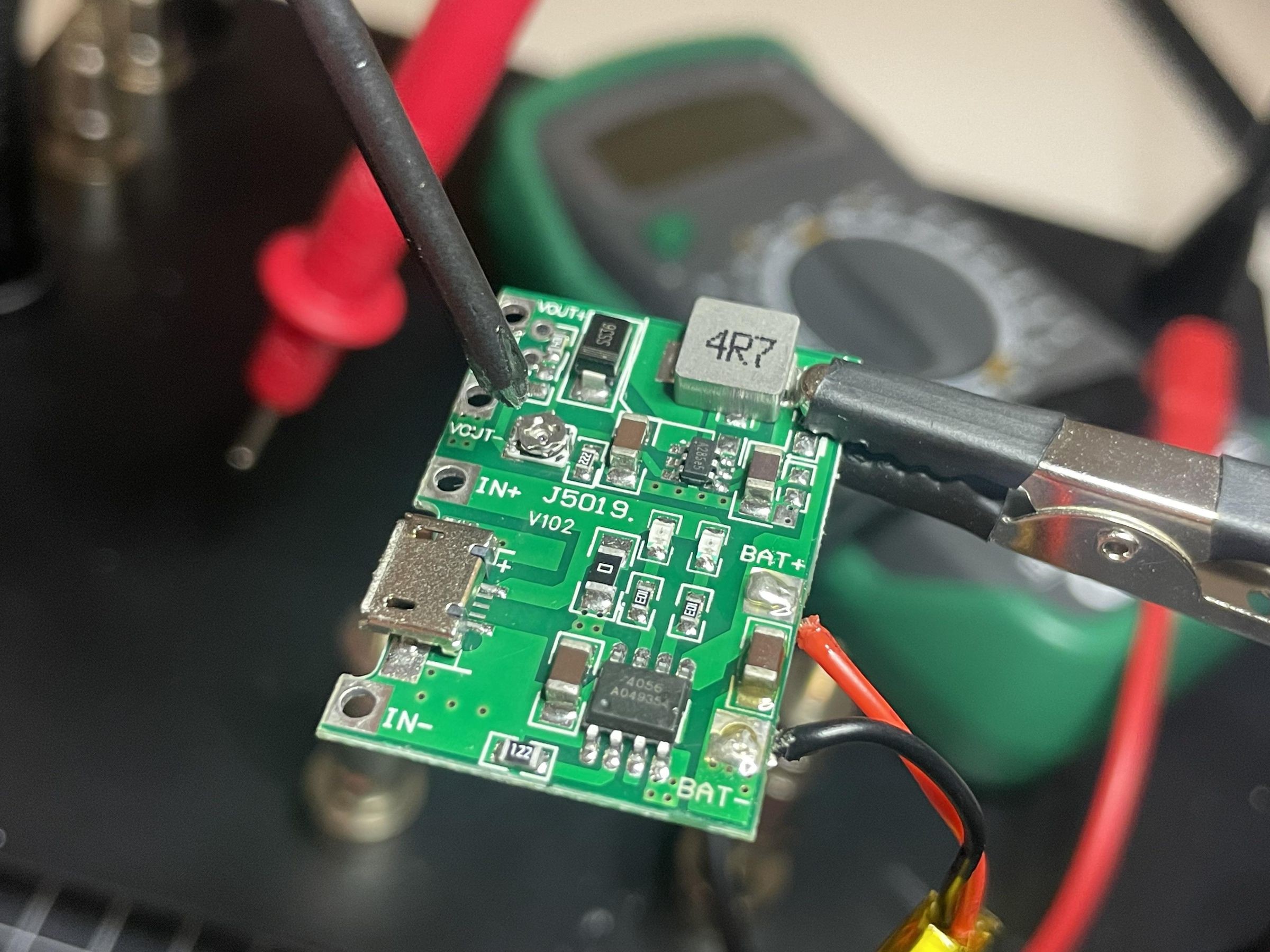
    Adjust the output of your boost converter to 5V.

View all 12 instructions

Enjoy this project?

Share

Discussions

Similar Projects

Does this project spark your interest?

Become a member to follow this project and never miss any updates