Close
0%
0%

VA5 — A $20 Voice Assistant With No Personality Un

A $20 ESP32-S3 voice assistant that ships with no personality. You write one from your phone — no code, no reflash.

Public Chat
Similar projects worth following
Most DIY voice assistants ship with a personality baked into firmware. VA5 ships with an empty one.

Hold the button, speak, release — it answers in a real conversation, and an animated face picks its own mood mid-reply. About $20 plus a 3D-printed case.

Everything that gives it a character lives behind a web page on your phone: a 12 KB system-prompt field, ten voices, a language picker, an emoji editor. No recompile, no cable.

It came from the classroom: students research a figure, write the persona, then talk to what they wrote.

A group wrote Jacob. The class interviewed him and decided he was far too nice to be the Jacob they'd been studying — the one who buys a birthright off his starving brother. So they wrote him again. Write a character, talk to it, find where your reading was thin, rewrite. It happens to be prompt engineering, except nobody has to call it that.

ESP32-S3 + OpenAI Realtime API, speech-to-speech. Breadboard or custom PCB.

Most DIY voice assistants ship with a personality baked into firmware. VA5 ships with an empty one.

Hold the button, speak, release — and it answers back in a real conversation, not a pre-recorded line. On the round display, an animated emoji face reacts in real time, and the model itself picks the mood via a function call. A NeoPixel tells you whether it's listening, thinking, or speaking. The whole build is about $20 plus a 3D-printed case.

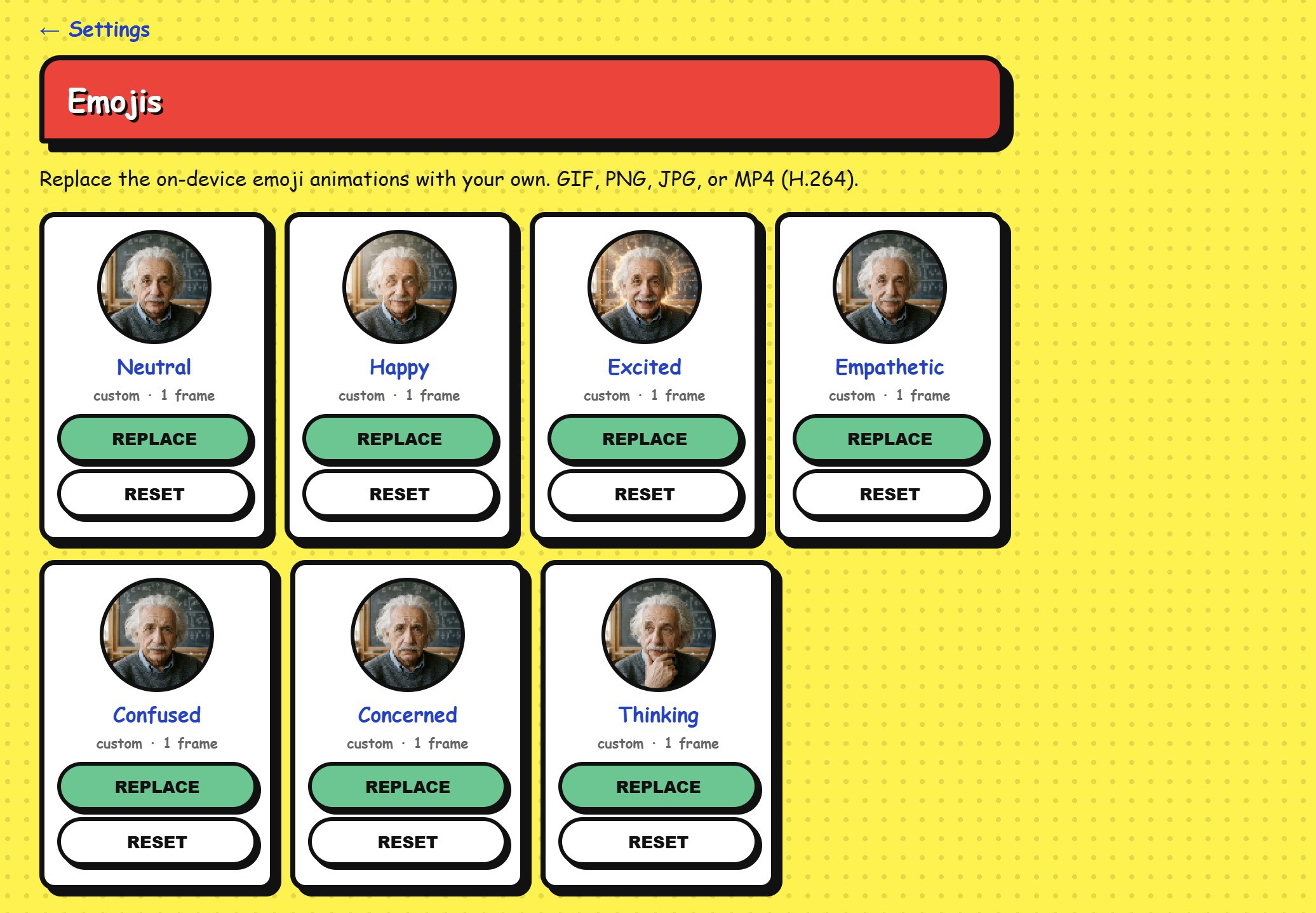
The part that makes it worth building: everything that gives it a character lives behind a web page on your phone. Connect once through the captive portal, then browse to voice-agent-XXYY.local and you get a 12 KB system-prompt field, ten OpenAI voices, a language selector, and an emoji editor where you drop in a GIF, PNG, JPG or MP4 and the face changes immediately. No recompile, no serial cable, no SD card. Settings persist in NVS. The shipped emoji set is stored separately and never overwritten, so there's no way to brick the thing by customising it.

That design decision came out of the classroom. VA5 is used in schools where students research a historical, philosophical or literary figure, write the persona themselves, and then have to hold a conversation with what they wrote.

A group wrote Jacob. The class interviewed him and decided he was far too nice to be the Jacob they'd been studying — the one who buys a birthright off his starving brother and impersonates him for a blessing. So the group went back and wrote him again. That's the whole thing in one story: write a character, talk to it, find out where your reading was thin, rewrite. It happens to be prompt engineering, except nobody has to call it that.

Thirty students can't each be flashing firmware, which is why all of it had to work from a phone. And because personas export as a .zip, one set of devices cycles between classes — each group loads their own characters at the start of the period and takes them away at the end.

UNDER THE HOOD

ESP32-S3 N16R8 (16 MB flash, 8 MB OPI PSRAM) talking to the OpenAI Realtime API for speech-to-speech over secure WebSockets. Dual-core FreeRTOS split: Core 0 owns WiFi, the WebSocket and Base64; Core 1 owns I2S in and out, the button and the display. They pass audio through PSRAM ring buffers with a 300 ms jitter buffer and a low-water rebuffer threshold.

Audio is an INMP441 I2S MEMS mic in and a MAX98357A into a small 4/8 Ω speaker out, both at 24 kHz PCM as the Realtime API requires. An optional PCM5102A DAC adds a 3.5 mm jack for headphones or a powered speaker, sharing the I2S bus and switched at runtime from the portal. The face is a GC9A01 240×240 round SPI TFT running seven moods × eight pre-rendered RGB565 frames at ~8 fps out of an 11 MB LittleFS partition.

The model can call three tools mid-response: set_display_emotion drives the face, set_volume means you can just say "quieter please" and have it stick across reboots, and show_network_info puts the IP and token count on screen.

WHAT WAS ACTUALLY ANNOYING

ArduinoWebsockets 0.5.3 can't make a WSS connection on ESP32 — SecuredEsp32TcpClient has no setInsecure(), and the ESP32 branch of upgradeToSecuredConnection() never falls back. Both fail silently, which cost real time. The library is vendored in src/ with both fixes applied and the patches documented. Anyone else pointing an ESP32 at a WSS endpoint will hit this.

TFT_eSPI was its own fight — v2.5.43 crashed on tft.init() with StoreProhibited, inside a global constructor, before setup() ran at all. Arduino_GFX_Library worked first try on the same pins.

BUILD IT TWO WAYS

Breadboard with jumpers, or the custom 2-layer KiCad board in pcb/ — gerbers and drill files exported and ready for JLCPCB or PCBWay, with a spare-GPIO expansion header broken out. That board has been ordered, assembled, and is the unit running here, not an unverified first spin. The 145 mm circular enclosure is a parametric build123d model with STLs pre-generated for both...

Read more »
  • 1 × ESP32-S3 N16R8 dev board, 16 MB flash, 8 MB OPI PSRAM
  • 1 × INMP441 I2S MEMS microphone
  • 1 × MAX98357A Audio ICs / Audio Amplifiers
  • 1 × PCM5102A (optional) Data Converters / Digital to Analog Converters (DACs)
  • 1 × Speaker 1–3 W, 4/8 Ω, up to 57 mm

View all 11 components

  • Six Networks, Because Teachers (obviously) Move

    Udi Tirosh09/01/2026 at 11:34 0 comments

    This one is by popular demand: teachers using VA5 in classrooms kept asking for it.

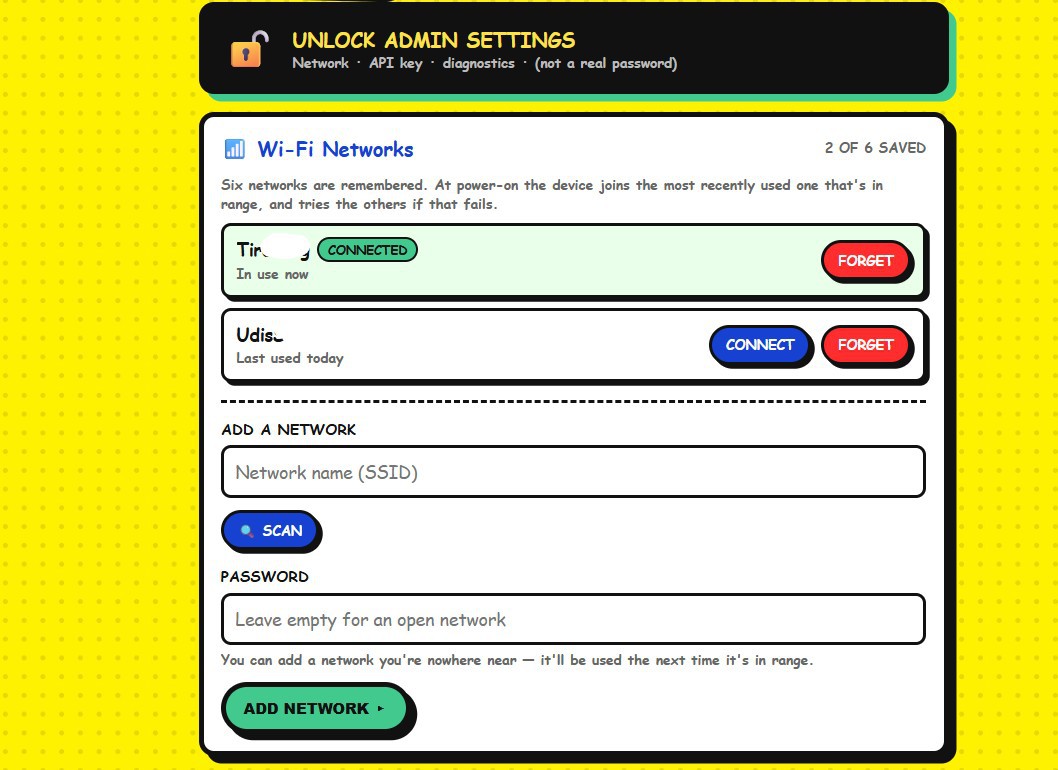
    VA5 remembered just one Wi-Fi network. That's fine on a bench. It is not fine when the device  moves between a classroom and a library on different access points, or goes home with a teacher for the weekend.

    Every move meant the same ritual — power on, wait fifteen seconds for the connect to time out, join VOICE-AGENT-XXYY from your phone, and retype an SSID and password with your thumbs. And because the old firmware erased the credentials it had just failed with, you did the whole thing again in the other direction on the way back. That erase was reasonable-looking code with a wrong assumption behind it: a failed connect almost never means a wrong password. It means the access point is rebooting, or you're out of range.

    So VA5 now remembers six WIFIs 

    (I was not sure about the numner and am still undecided on 6-7)

    At boot it scans, keeps the saved networks that are actually in range, and joins the one you used most recently. If that one doesn't answer it tries the next, and only opens the setup portal once they have all failed. Nothing is ever erased for failing — an access point that was switched off for a week is still in the list when you come back to it.

    Two things fell out of that which turned out to matter more than I expected.

    You can add a network you're nowhere near. Type in the staffroom SSID and password while you're still at home, and it gets used the first time it's in range. A device can be handed to somebody already knowing where it's going.

    (Plus) Holding the push-to-talk button while powering on jumps straight to the setup portal. No waiting on a device patiently working through six networks that aren't there.

    It's in v0.14: https://github.com/iollama/Voice-Assistant-5

  • Two One-Line Fixes, Or WSS Never Works On ESP32

    Udi Tirosh08/24/2026 at 09:43 0 comments

    If you use ArduinoWebsockets on an ESP32 and you need a secure connection, it does not work. Not "is fiddly" — does not work, and does not tell you why.

    What you see is a connection attempt that returns and then simply never becomes a connection. No exception, no useful error, no failed handshake to read. I re-checked the URL, the port, the certificate, the network and the API key before I went looking at the library, which is the wrong order and cost me a weekend.

    There are two bugs, and they interlock.

    One: SecuredEsp32TcpClient has no setInsecure().

    The class wraps WiFiClientSecure but never exposes the one method you need to tell it not to verify a certificate you haven't given it.

        class SecuredEsp32TcpClient : public GenericEspTcpClient<WiFiClientSecure> {
        public:
          void setInsecure() {          // <-- did not exist
            this->client.setInsecure();
          }
          void setCACert(const char* ca_cert) { ... }

    Two: the ESP32 branch of upgradeToSecuredConnection() never falls back.

    The ESP8266 branch has an else that calls setInsecure() when no key is configured. The ESP32 branch doesn't:

        #elif defined(ESP32)
            if(this->_optional_ssl_ca_cert) {
                client->setCACert(this->_optional_ssl_ca_cert);
            }
            if(this->_optional_ssl_client_ca) {
                client->setCertificate(this->_optional_ssl_client_ca);
            }
            if(this->_optional_ssl_private_key) {
                client->setPrivateKey(this->_optional_ssl_private_key);
            } else {
                client->setInsecure();   // <-- was missing
            }
        #endif

    Neither fix works alone. Add the else without adding the method and it won't compile — there's nothing to call. Add the method without the else and nothing ever calls it. That's why this survives casual inspection: each half looks like an oversight you could shrug at, and only together do they explain the silence.

    The net effect is that WiFiClientSecure sits in certificate-verification mode with no CA bundle loaded, so every WSS connection fails verification — and fails in a way that surfaces as nothing at all.

    Both bugs are still present in v0.5.4 and on master. The last upstream commit was June 2024. Bumping the version will not save you.

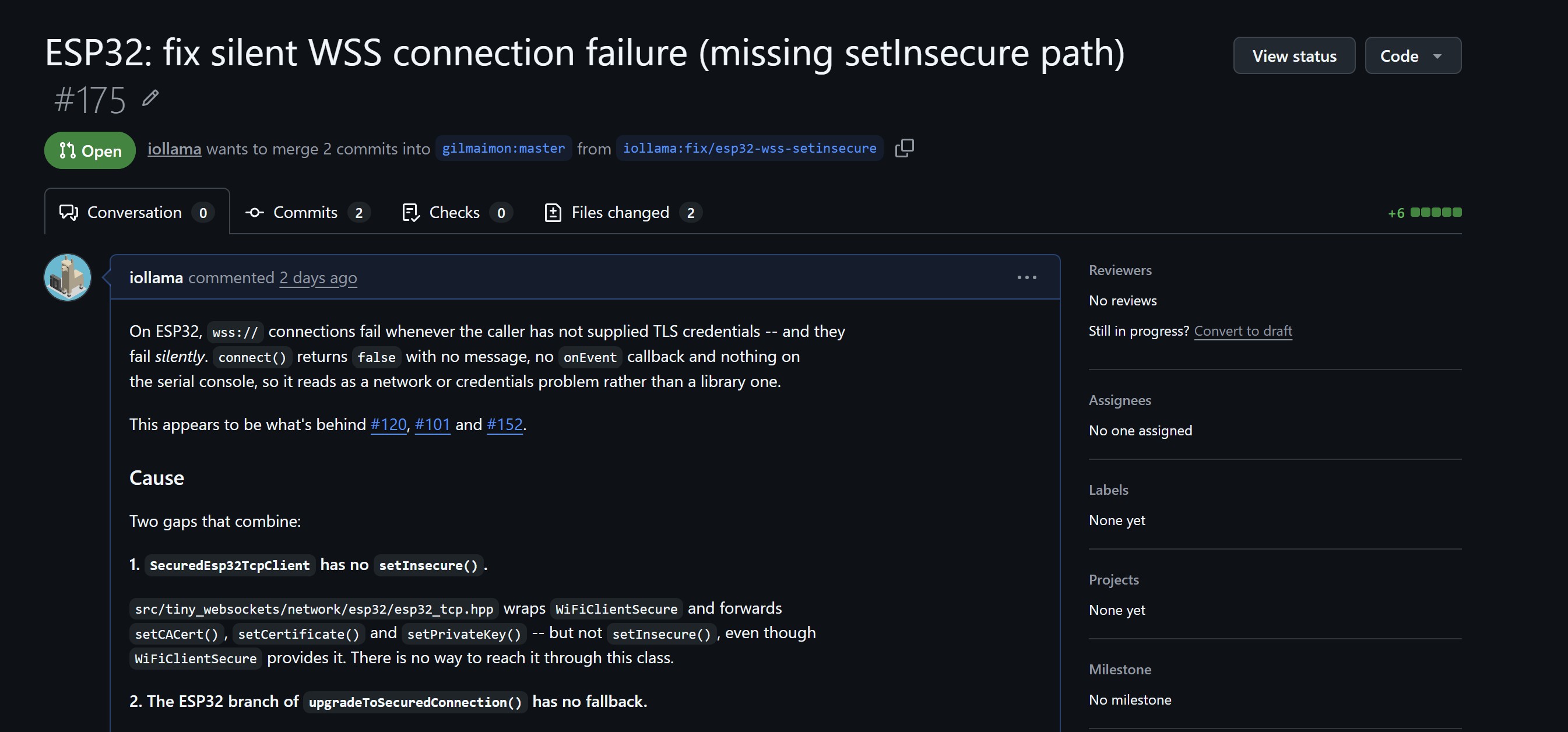
    The fixes are upstream as PR #175 — six lines across two commits, mirroring what the ESP8266 path already does, and only reachable when no credentials are supplied. If you've been staring at issues #120, #101 or #152, I think this is your bug.

    https://github.com/gilmaimon/ArduinoWebsockets/pull/175

    VA5 vendors a patched copy in src/, which is part of why the project is GPL-3.0 — the library is GPL-3.0, the change notices are in the modified files, and VENDORED.md records what was altered and why. If you'd rather patch your own copy, the two hunks above are the whole functional change.

    Two things to know if you vendor it yourself. The internal #include <tiny_websockets/...> angle-bracket includes need converting to relative "..." paths so the copy is self-contained. And if you delete the non-ESP32 platform directories, you must also trim the platform dispatch in ws_common.hpp to match — its ESP8266 and Teensy41 branches include headers from the directories you just removed, so skipping that step gives you a copy that doesn't compile.

    Full source: https://github.com/iollama/Voice-Assistant-5

  • Letting the browser do the heavy lifting

    Udi Tirosh08/24/2026 at 07:32 0 comments

    One of VA5's features that the students love most is its animated emojis. On the technical side, the emoji face is 150x150 RGB565 frames, up to eight per mood, seven moods. Any of them can be replaced with your own GIF, PNG, JPG or MP4 from a page the device serves.

    The obvious build is to upload the GIF to the ESP32 and decode it there. I didn't, and I'd push back on anyone who tries.

    All image work happens in the user's browser. GIF decode, frame extraction, resize to 150x150, RGB565 little-endian conversion, zip pack and unpack — all JavaScript, on the phone or the laptop. The ESP32 only ever receives raw frame bytes, N x 45,000 of them, and writes them to LittleFS. It never decodes an image format in its life.

    That buys three things: 

    1. no image codecs in firmware
    2. no PSRAM spent on decode buffers competing with a 1.4 MB audio ring buffer
    3. and when MP4 support arrived in v0.9, it was a JavaScript change rather than a firmware change.

    Two details that matter more than they look.

    • Staged atomic writes. Frames stream into /custom_stage/ and are renamed into /custom/ only once the whole upload validates. A dropped connection mid-upload can't leave a half-replaced mood on screen, and /custom_stage/ is swept on boot in case a previous upload died partway.
    • The defaults are untouchable. /default/ and /custom/ are a two-directory overlay — the loader probes /custom/ first and falls back. The shipped set is never overwritten, so no sequence of uploads can brick the display. Reset one mood or all of them, any time.

    The trade-off, stated plainly: customizing needs your browser online, because the page pulls omggif and JSZip from a CDN. The device itself stays local-only.

    Full source: https://github.com/iollama/Voice-Assistant-5

  • I Sketched The Layout On My Phone And Got Back OpenSCAD

    Udi Tirosh08/19/2026 at 12:23 0 comments

    The breadboard version lived in a laser-cut wooden box. It worked, and I like giving a project a decent box, but a wooden rectangle with a breadboard rattling around inside is not a thing you hand to thirty teenagers.

    So it needed a real enclosure: round, printable, with a mount for every module.

    I'm fine in Fusion 360 — that isn't the problem. The problem is that a box like this is about a day of work, and none of it is interesting. Calipers on six modules, transfer the dimensions, place the bosses, check clearances, discover the speaker fouls the display bracket, go back and move three things. Tedious, not hard.

    What made me try something else: Claude already knew this build. I'd been in VS Code with it for weeks on the firmware, so the component list, the pinout and the board dimensions were already in context. It wasn't starting from "design me a box" — it was starting from a project it had been reading for a month. That's the whole trick, and it's the part that doesn't transfer if you open a fresh chat and ask for an enclosure.

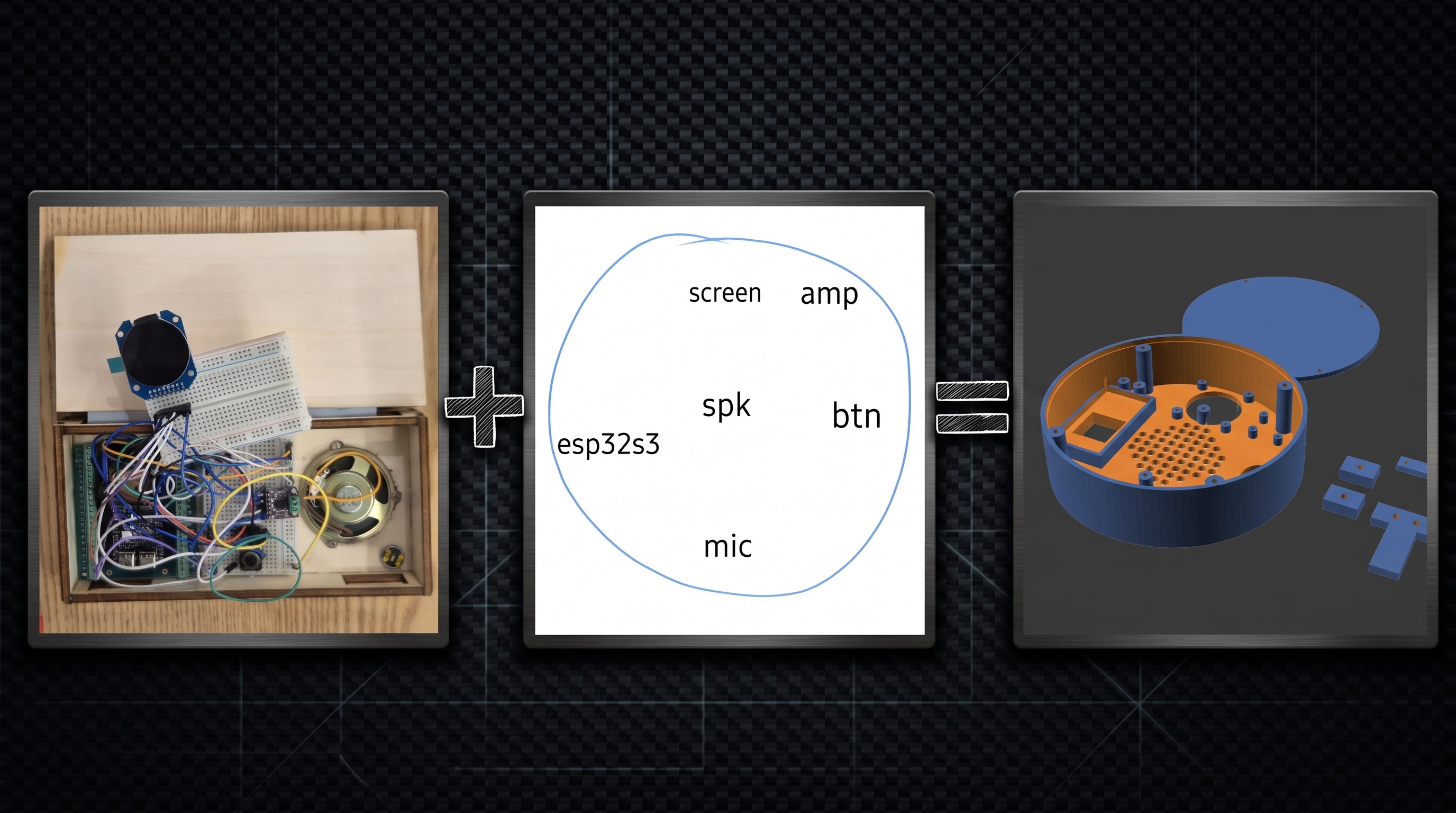
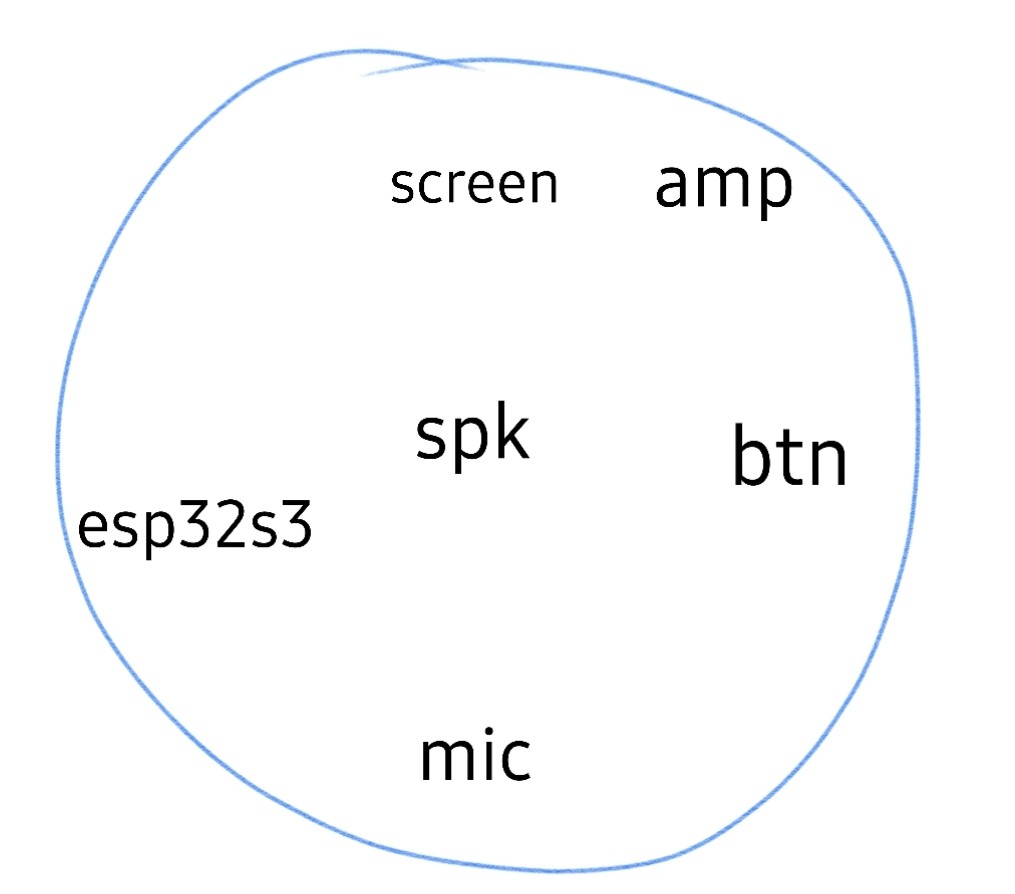
    So I drew this on my phone. A circle and six words. No dimensions, no scale, nothing measured — screen up top, amp beside it, speaker in the middle, button right, ESP32 left, mic at the bottom.

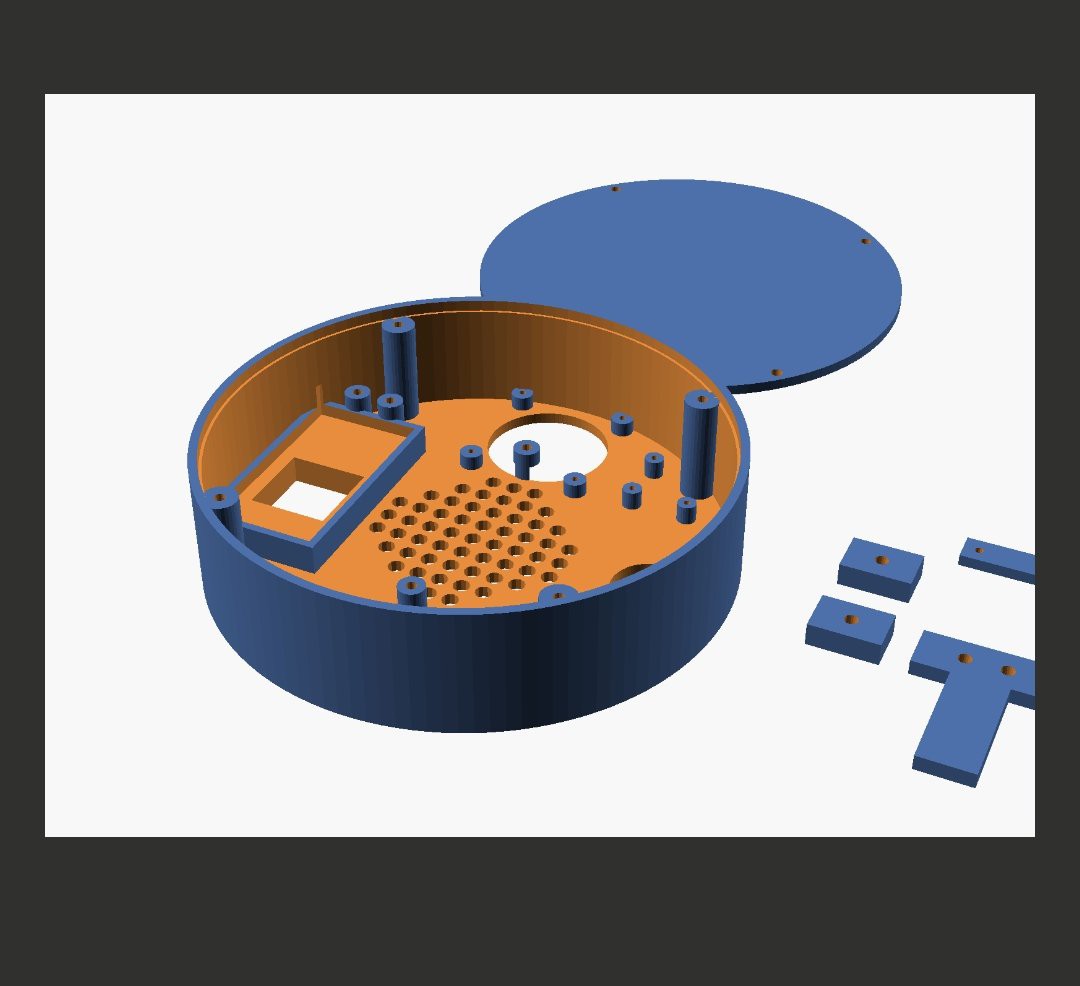
    What came back was a complete OpenSCAD script: mounting bosses sized per module, a speaker grille, and — the part I hadn't asked for — cantilever clips to retain the ESP32 and the speaker so neither needs a screw. Then it rendered the model and showed me a snapshot, which is what turned it from plausible-looking code into something worth spending filament on.

    It did need some fixing, mostly for the sizes of the full boards, and getting the rails and the ESP32 cantilever right. 

    Then off to the Bambu Lab P1S, and a few prints later, it was done. 

    Worth being straight about what this is. It isn't "AI designed my enclosure." It's that the boring 80% — measuring, placing, writing out boss coordinates — is exactly what a model with your BOM already in context can do, and OpenSCAD happens to be the right output format for it, because it's text. I could read the script before I printed it, diff it when it changed, and fix a number instead of re-clicking a timeline. I wouldn't have trusted a binary I couldn't inspect.

    This SCAD box isn't what ships now — once the custom PCB existed, I rebuilt the enclosure in build123d so the board and the case come from one parametric source. But that rebuild took an afternoon, because by then I knew exactly what the box needed to be. This version is what answered that question.

    Full source: https://github.com/iollama/Voice-Assistant-5

  • Two Libraries That Fought Me

    Udi Tirosh08/16/2026 at 17:29 0 comments

    Getting VA5 to build meant two separate fights with two libraries, and both failed in ways that pointed somewhere other than the cause.

    TFT_eSPI, on the display v2.5.43 crashed on tft.init() with StoreProhibited — inside a global constructor, before setup() was entered at all. I re-checked every pin, swapped the display, tried both SPI ports. It crashed regardless of port, and when it didn't crash outright it threw a heap assertion out of fragmented internal RAM.

    That fragmentation is the clue. On an ESP32-S3 the WiFi and TLS stack has already claimed a large slice of internal SRAM before the display driver initialises, and TFT_eSPI's allocation pattern doesn't survive it. I switched to Arduino_GFX_Library by moononournation — same pins, same hardware, no changes beyond the constructor. Worked first try, stable since.

    qrcode.h, on the info screen In v0.7 the Arduino IDE build started failing with 'QRCode' was not declared in this scope, while PlatformIO built the same source fine. arduino-esp32 3.x ships its own qrcode.h, which shadowed the ricmoo/QRCode library I had installed. The error named a symbol, not the collision.

    Fixed by deleting the dependency instead of fighting it — the board package already bundles an esp_qrcode API that does the job. One less library to install, and the Arduino IDE build now works out of the box.

    Worth naming the pattern: neither of these was a logic bug. One was an allocation-order problem and one was a header collision, and both produced errors that pointed at the wrong file. When an embedded error makes no sense in the file it names, suspect the environment before the code.

    This is the very first commit that had the GFX fix. Still in my private repo:

    Full source: https://github.com/iollama/Voice-Assistant-5

View all 5 project logs

  • 1
    WIRING

    Microphone - INMP441 (I2S)

    SD    -> GPIO 40
    WS    -> GPIO 41
    SCK   -> GPIO 42
    L/R   -> GND
    VDD   -> 3.3V
    GND   -> GND

    Amplifier - MAX98357A
    DIN   -> GPIO 17   (shared I2S data)
    BCLK  -> GPIO 47   (shared)
    LRC   -> GPIO 21   (shared)
    SD    -> 3.3V, or GPIO 38 if you fit the PCM5102A
    VIN   -> 5V
    GAIN  -> 3.3V      (6 dB)
    GND   -> GND

    Headphone DAC - PCM5102A (optional)
    DIN   -> GPIO 17   (shared)
    BCK   -> GPIO 47   (shared)
    LCK   -> GPIO 21   (shared)
    SCK   -> GND       (internal PLL mode)
    XSMT  -> GPIO 39   (HIGH = play)
    FMT / FLT / DEMP -> GND
    VIN   -> 3.3V
    GND   -> GND

    Display - GC9A01, 240x240 round SPI
    SCLK  -> GPIO 6
    MOSI  -> GPIO 7
    CS    -> GPIO 5
    DC    -> GPIO 4
    RST   -> GPIO 2
    BLK   -> 3.3V
    VCC   -> 3.3V
    GND   -> GND

    Button and LED
    PTT button -> GPIO 1, INPUT_PULLUP, active LOW
    NeoPixel   -> GPIO 48 (built in on most S3 boards)

    Power: the 3.3V rail feeds the mic, the display and the optional DAC.
    The MAX98357A wants 5V. Common ground throughout.

  • 2
    BOARD SETTINGS (Arduino IDE)

    ESP32S3 Dev Module - CPU 240 MHz - Flash 16 MB - PSRAM: OPI PSRAM - Upload 921600 - Partition scheme: custom, uses partitions.csv.

    Libraries: ArduinoJson, Adafruit NeoPixel, Arduino_GFX_Library.

    Do NOT install ArduinoWebsockets from the Library Manager. A patched copy is vendored in src/, because 0.5.3 cannot open a WSS connection on ESP32 and fails silently. That one cost me a weekend.

    PlatformIO: everything is pinned in platformio.ini.   pio run -t upload   pio run -t uploadfs

  • 3
    TWO FLASHES (Code and Emotions)

    The sketch and the emoji frames live in different partitions. Flash the sketch, then upload the LittleFS image separately - 56 pre-rendered RGB565 .bin files, about 11 MB. Serial prints "Display: loaded 8 frames for 'neutral'" when it worked. Skipping this is the usual way to end up staring at a blank screen.

View all 6 instructions

Enjoy this project?

Share

Discussions

Similar Projects

Does this project spark your interest?

Become a member to follow this project and never miss any updates