Close
0%
0%

The Arcade Cabinet That Runs Nothing

An arcade cabinet built around an M5Stack AtomS3R that plays 27 DOS games and DOOM, and runs a demo reel of 41 titles including full-motion

Similar projects worth following
0 followers
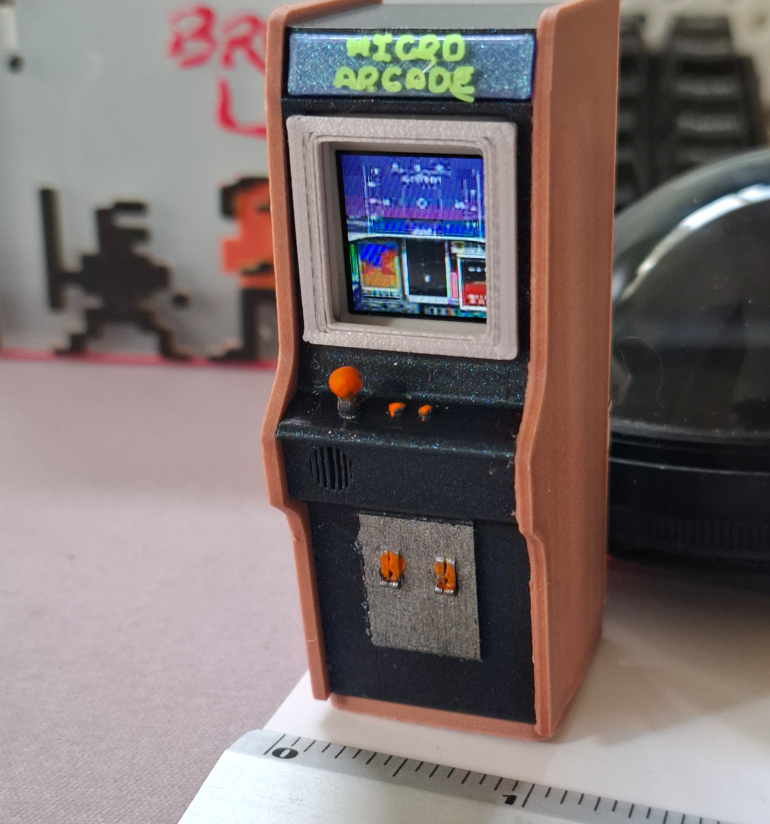
An arcade cabinet built around an M5Stack AtomS3R that plays 27 DOS games and DOOM, and runs a demo reel of 41 titles including full-motion video CD games. None of them run on the AtomS3R.

The board has a 128x128 screen, a motion sensor, WiFi and one button, which is the screen itself. Screen, input, communication. That is a terminal. So the games run on a PC and the device gets handed a picture: dirty rectangles over UDP, each encoding priced in client milliseconds, whatever the device can finish fastest. Back the other way go a tilt and a button, 30 times a second.

The device doesn't know what DOOM is, or what a game is. DOOM is a compiled binary, the DOS titles are headless DOSBox compiled to WebAssembly, run straight from eXoDOS zips. One entry in the reel is a video. The terminal can't tell the difference.

The cabinet is the demo. The point is the pipe. The board costs 15 dollars, and it's going in my daughter's dollhouse. https://youtu.be/D8STFnGjpT4

There was one dev board left on the desk I hadn't done anything with: an M5Stack AtomS3R. A capable little thing, but in earlier tests I kept hitting its limits fast. So I picked the laziest possible starting question. Can I get DOOM running on it.

Other people had already done this. I wanted to do it myself anyway.

But just running the executable would be boring, so I started reading what the board actually has. Natively, without touching a single GPIO pin, the AtomS3R has a 128x128 screen, a motion sensor, WiFi, and one button, which is the screen itself. Screen, input, communication. That's a terminal.

So I stopped trying to run DOOM on the device and started trying to run DOOM somewhere else and hand the device a picture.

That one decision is the whole project, and it took me until halfway through to admit what it meant. If the device only draws whatever arrives and sends back a tilt and a button, then it doesn't know what DOOM is. It doesn't know what any game is. DOOM was never the point. It's a dumb terminal at arcade scale, and the thing on the other end can be anything. It ended up being 28 games to play and a demo reel of 41, because the eXoDOS collection has more than 7,000 DOS titles sitting on my disk and a terminal doesn't care which one you pick.

The rest of this is how a 0.85 inch screen that computes nothing ended up being the best DOS arcade cabinet I own.

The stack, for the record:

wherewhat
deviceAtomS3R, UIFlow2 MicroPython v1.27, one main.py, no custom firmware build
serverPython 3 with numpy and Pillow, plus OpenCV for the one video
DOOMdoomgeneric, C, compiled with zig cc on Windows because it installs without admin
DOSjs-dos emulators 8.4.2: DOSBox compiled to WebAssembly, running headless in Node
gameseXoDOS, 7,629 zip archives on disk

The code and the full technical notes are on GitHub: apn201/Micro_Arcade, with the long version of every decision and bug in NOTES.md. No game data in it, you bring your own.

For the demo the server runs on my own PC. The plan was a Raspberry Pi, and it still can be one, but the eXoDOS library lives on the PC and a headless DOSBox on the Pi is a fight I didn't need to pick to prove the idea. Device and server talk over WiFi UDP. Nothing about the device changes based on which machine is sending.

What it's actually for

None of this is a new idea, and none of it is complicated. VNC has done remote screens since the nineties, and thin clients are a whole industry. What changed is the price of the thing on the receiving end. The Atom costs about 15 dollars. Put the pipe in front of it and it gets as much memory and compute as the machine on the other end has, which is as much as you want.

This started as a retrocomputing entry, and I decided it should be an arcade cabinet. But the arcade cabinet is the demo. The reusable part isn't the games, it's the pipe: once the device is a draw-only terminal that renders rectangles from a server, the device stops mattering and the server can drive anything.

A cheap screen that owns nothing fits anywhere a PC or a tablet would be overkill, or would get broken or walk off. An art gallery. A shop window. An info point nobody is watching. If it breaks, it's a 15 dollar part. If it gets stolen, someone stole 15 dollars and no data. In a lot of places it could replace a PC or a tablet outright, because all that box was doing was showing something and taking a tap back.

The screen doesn't need to be this tiny either. The server sends rectangles at whatever size the client asks for. A bigger panel works the same way, and for something that changes once a minute it could be e-ink.

Three more directions I keep thinking about.

The real one is industrial, and it's my day job leaking into a toy. Old control PCs get virtualized and contained, because you cannot have a Win95 box running on a plant floor. But the operator still, sometimes, needs to see a corner of that screen at a panel somewhere. A full thin client is cost and overkill for...

Read more »
  • 1 × M5Stack AtomS3R ESP32-S3R8, 0.85" 128x128 LCD, BMI270 IMU, WiFi. The whole computer on the device side. Stock UIFlow2 MicroPython v1.27, no custom firmware, no GPIO used.
  • 1 × USB-C cable Power. That is the only wire.
  • 1 × 3D printed cabinet shell Retromaker's arcade cabinet from Printables, modified to fit the Atom. Prusa M4S, sides in wood-toned PLA, the rest black.
  • 1 × PC or Raspberry Pi Runs the Python service and the games. A Pi can serve DOOM today; the DOS library lives on the PC because that is where the eXoDOS collection is.
  • 1 × Python 3, numpy, Pillow The streaming service. OpenCV only if you want video titles.

View all 8 components

  • The case

    Juha Liljaan hour ago 0 comments

    Once the pipeline worked, the last problem was making it look like an arcade cabinet instead of a dev board on a table. I found Retromaker's arcade cabinet on Printables and modified it to fit. Printed the shell on my Prusa M4S, sides in wood-toned PLA, everything else black. It's small enough to hold between two fingers.

    Since it's a dumb terminal, there's no ceiling on what it could show. So Skyrim is in the demo reel too. Not emulated, obviously. It's a video, decoded on the server and streamed through exactly the same pipe, centre-cropped to the square screen. The device can't tell a recording from a game, which was the point from the start. GTA, anything, same story, so long as it's hooked up on the sending end. Old DOS games ended up being the best fit for what this cabinet is actually good at, though, so that's most of what's in it.

  • Running straight from eXoDOS

    Juha Liljaan hour ago 0 comments

    At first every game was copied out of eXoDOS into a bundle next to the code. Fine for SkyRoads, silly for a 456 MB CD game already sitting on the disk.

    js-dos accepts a list of zips, so now a game boots from two: a few hundred bytes generated on the spot, then the eXoDOS zip itself, untouched. The generated one has the dosbox.conf and an entry for every folder, because eXoDOS zips have none and js-dos only creates a file's parent folder, not its grandparent. Without that Wolfenstein 3D never started. Everything else comes from the zip's file list and eXoDOS's own launch script: which CD image to mount, with the file name's real case (Guy Spy's cd\GuySpy.cue lives in CD/, and js-dos cares), which drive and folder to start from, whether call run means RUN.BAT or RUN.EXE.

    Memory is the limit. A game takes about five times its zip size while it runs. The Last Bounty Hunter's 194 MB ran in 1.1 GB, Space Ace CD's 541 MB in 3 GB. The 1 GB discs don't fit.

  • The demo reel

    Juha Liljaan hour ago 0 comments

    An arcade cabinet needs an attract mode. The menu only lists games that can actually be played with a tilt and a tap. The demo reel has its own list and runs it live, loading screens and all, one game after another. Nobody is holding the cabinet then, so it plays them too: holds forward and taps fire, which in Wolfenstein means charging down the corridor shooting. Racing games get throttle and a bit of steering, platformers run right and jump. Pick it up and your input takes over. Put it down and after six seconds the autopilot is back. Double click skips to the next game.

    The reel also has the games that can't be played here at all. Mad Dog McCree, Crime Patrol, Drug Wars, Who Shot Johnny Rock, Space Pirates: American Laser Games full-motion video, made for a light gun. Brain Dead 13, Rebel Assault, Los Justicieros.

    And Dragon's Lair, which my first audition scored as a demo and dropped. It turned out to be playable. ReadySoft's PC version wants V, N, N, N on a text setup screen, then Space, and every scene is a quick-time event: a direction or the sword. That is exactly a tilt and a tap. Space Ace is the same, except its fire button is numpad 0. Space, Enter, Ctrl, Alt and numpad 5 all did nothing. Dragon's Lair III and Space Ace II ask for a code from the manual, so they only run their intros.

  • Boot keys, or getting into the games at all

    Juha Liljaan hour ago 0 comments

    The annoying part turned out to be getting into the games at all. Nearly every DOS title from that era opens with a sound card prompt, a "press any key," sometimes a full menu before you even reach a pilot name screen. A cabinet has no keyboard, and on a 128x128 screen the menu text can't be read anyway. So each game in the library gets its own scripted boot sequence that has to go all the way into gameplay: car on the grid, plane in the air.

    In the library file it's just data. Indianapolis 500, abridged:

    "boot_keys": [  { "wait": 3500, "key": "1" },  { "wait": 3500, "key": "enter" },  { "wait": 2500, "key": "enter" },  ...  { "wait": 2500, "key": "esc" },  { "wait": 3000, "key": "enter" }
    ]
    

    The 1 answers the eXoDOS sound card launcher. The Enters walk through title screens, since most DOS menus open on the item you want. Indy 500 then sits in an attract loop that says PRESS ESCAPE TO DRIVE, and the menu behind it is already on PRACTICE. So Esc, Enter, and you're in the pit lane.

    Working these out by hand was slow, so I wrote a small tool, audition.py. It scripts the keys, then takes screenshots in two windows: three with no input, then four while a movement key is held down. The question isn't "did the picture move", because a car waiting on the start line doesn't move and an attract-mode demo moves beautifully. The question is whether the picture answered the controls.

    quiet = spread(frames[:len(quiet_at)])    # mean abs pixel change, no input
    react = spread(frames[len(quiet_at):])    # same, movement key held
    
    if w >= 640:    verdict = "TEXT"          # still at a DOS prompt
    elif react >= MOTION_THRESHOLD and react >= quiet * 2.0:    verdict = "PLAY"          # it answered the controls
    elif quiet >= MOTION_THRESHOLD:    verdict = "DEMO"          # busy, but not because of us
    else:    verdict = "STATIC"        # menu or title screen
    

    Real output: PLAY Stunts quiet 0.09 held-key 11.34, PLAY Test Drive III quiet 0.00 held-key 32.31, DEMO Dragon's Lair quiet 96.07 held-key 117.81.

    It also writes a filmstrip of the samples, and that's where the actual work happened. Look at the screen it got stuck on, add the keys that answer it, run again. Two or three rounds settles most games. Some things it taught me:

    • Holding one direction gives false negatives. Commander Keen was standing against scenery, and Jill of the Jungle was behind a door that said YOU NEED A GEM TO PASS. Both scored as dead. Now the probe cycles right, left and up across the hold window.
    • Tyrian's Enters opened its Data reader. The sequence has to Esc back out and press Down four times to reach Play Next Level.
    • Raptor's pilot registration happily took "ACE" as a name, and then led to mouse-only shareware screens.
    • Tyrian still scores DEMO because its background scrolls by itself. I checked that one and Crystal Caves by eye.

    Once a sequence worked I tried a faster cadence (1.5 s between Enters instead of 2.5 s). 16 of 18 games still landed in gameplay, so those boot in 18.5 seconds now.

    Curating which games belong here, I realized fast that driving and flying games fit the control scheme best. The only inputs on the finished device are the motion sensor and one clumsy button, and "clumsy" is generous: it's the screen itself, so pressing it puts your finger over the picture. Tilt works well as a steering wheel or a flight stick. A held button, a mouse, or anything that wants typing does not work at all.

    The current library: 28 titles in the menu, and a demo reel that runs those plus 13 more.

    >td >jump

    categorytitlewhy
    driveStunts (1990)polygonal 3D with a track editor, lean to steer
    Test Drive III (1990)full 3D open roads
    Stunt Driver (1990)loops, jumps, chase camera
    Indianapolis 500 (1989)Papyrus's sim, the lineage that ends at iRacing
    SkyRoads (1993)steer and jump, nothing held, the clearest picture at 128x128
    flyF-15 Strike Eagle II (1992)tilt is the stick
    shootWolfenstein 3D, Blake Stone, Catacomb 3-D, Heretic, Rise of the Triad, Major Stryker, Tyrian
    Duke Nukem, Commander Keen 4, Cosmo's Cosmic Adventure, Jill of the...
    Read more »

  • From one game to a library

    Juha Liljaan hour ago 0 comments

    The client didn't change. It still just connects and draws. First it was DOOM. Then it was a menu of 20-odd DOS titles, and picking one spins up a real DOSBox on the server, scaled down and streamed over, with input going back the other way. DOSBox itself could never fit on an ESP32-S3. A 6DOF flight sim and a DOS platformer are the same amount of "running on the ESP32," which is zero.

    The menu isn't a firmware feature either. It's just another frame source that draws a list at 128x128. When you pick a game the source swaps underneath, the picture changes shape from 128x128 to 320x200, and the server rebuilds its scaler and swaps in that game's control profile. The device gets rectangles the whole time.

    The DOS side is js-dos in Node, no browser. Each game is a separate Node process that grabs frames from the emulator and pushes them to the Python service. If the socket is backed up it drops the frame, because only the newest one matters:

    ci.events().onFrame((rgb, rgba) => {  sendFrame(rgb || rgba, width, height, rgb ? 3 : 4);
    });
    
    function sendFrame(buf, width, height, channels) {  if (!socketWritable) {    framesDropped++;    return;  }  // 16-byte header, then the raw RGB  socketWritable = sock.write(header) &&                   sock.write(Buffer.from(buf.buffer, buf.byteOffset, buf.length));
    }
    

    One trap there: ci.sendKeyEvent() wants GLFW key codes, not DOSBox's own key numbering. Left arrow is 263, Enter 257, Esc 256, left Ctrl 341. My first table used DOSBox's ordinals and nothing responded.

    Bundles get built straight from eXoDOS. from-exodos.py opens the game's zip, reads that game's own dosbox.conf, pulls the launch command and the cd into a subfolder out of [autoexec], and writes a .jsdos bundle with cycles=max. The zip writer is hand-rolled in under 90 lines of Node so the project doesn't need a zip dependency. That turned into a bug: I didn't write directory entries, and the emulator creates a file's parent folder but not its grandparent. So Wolfenstein 3D, which eXoDOS keeps two levels down in WOLF3D/WOLF3D/, died on load with WOLF3D/HELP: No such file or directory. The fix is to emit every parent directory before the first file:

    for (const f of files) {  const parts = f.rel.split("/");  for (let i = 1; i < parts.length; i++) {    const dir = parts.slice(0, i).join("/") + "/";    if (!seen.has(dir)) { seen.add(dir); dirs.push({ rel: dir, data: Buffer.alloc(0), dir: true }); }  }
    }

  • One button and a tilt sensor

    Juha Liljaan hour ago 0 comments

    The motion sensor is the joystick. Tilting left drives x to +0.85 g, tilting forward drives y to -0.70 g, and full tilt is about 700 mg of travel. Hands shake faster than 30 Hz, so the server smooths the readings (EMA, 0.4), captures "level" from the first half-second of packets instead of assuming a flat table, and puts 60 mg of hysteresis on the deadzone so a direction doesn't flicker on and off at the edge.

    The button is the whole screen, so three gestures come out of it:

    >td >long press (900 ms)

    gesturemeans
    clickfire, jump, throttle, whatever the game's main action is
    double click (400 ms)
    leave the game, back to the menu. No game is allowed to bind it

    The double click doesn't delay the first press. Waiting 400 ms to find out if a second press is coming would put that latency on every shot, and one wasted bullet at a door is the better trade.

    def double_click(self, buttons, now_ms):    fire = bool(buttons & P.BTN_FIRE)    if fire and not self._prev_fire:        if self._last_click and now_ms - self._last_click <= self.DOUBLE_CLICK_MS:            self._click_until = now_ms + self.CLICK_HOLD_MS            self._last_click = 0        # a triple-click is not two doors        else:            self._last_click = now_ms    self._prev_fire = fire    return now_ms < self._click_until
    

    For a while --run was set to 420 mg, which on a sensor that tops out around 700 meant every committed lean was also a sprint. At double speed, on a 0.85" screen. That's the walking into walls. Default is 0 now.

  • DOOM on the server, and a compiler that broke it

    Juha Liljaan hour ago 0 comments

    DOOM itself is doomgeneric with a small platform layer I wrote, which pushes each frame over loopback TCP to the Python service with a 16-byte header. It also sends the game state (menu, in level, dead), so the one button can mean ENTER in menus, USE when you're dead and FIRE in play.

    memcpy(hdr, "DGF1", 4);
    hdr[4] = (unsigned char)(DOOMGENERIC_RESX & 0xFF);
    hdr[5] = (unsigned char)(DOOMGENERIC_RESX >> 8);
    hdr[6] = (unsigned char)(DOOMGENERIC_RESY & 0xFF);
    hdr[7] = (unsigned char)(DOOMGENERIC_RESY >> 8);
    hdr[8] = 4;                       /* bytes per pixel, 0x00RRGGBB */
    hdr[9] = md_game_state();
    

    Building it with zig cc found two things. zig turns UBSan traps on by default, and DOOM does SHORT(patch->leftoffset)<<FRACBITS on a negative number during sprite init, which is undefined behaviour and has worked fine for 30 years. Trapped, it dies before the first frame. Then at -O1 and above clang miscompiles something and the game hangs in texture init with a corrupt hash chain. I never found which pass. gcc is fine, so the build script pins it:

    case "$CC" in  *zig*) OPT="${MD_OPT:--O0}" ;;  *)     OPT="${MD_OPT:--O2}" ;;
    esac
    CFLAGS="$CFLAGS -fno-strict-aliasing"
    case "$CC" in  *zig*|*clang*) CFLAGS="$CFLAGS -fno-sanitize=undefined" ;;
    esac
    

    At -O0 DOOM still renders 320x200 faster than the 35 fps it asks for. Windows also gave me a boolean typedef clash between DOOM and windows.h, and winsock defines s_host as a macro.

  • Four bugs that all looked like bad WiFi

    Juha Liljaan hour ago 0 comments

    It worked, and then it didn't. Sometimes smooth, sometimes frozen for half a second. Sometimes it jumped forward and I walked into a wall. Every one of these looked like a WiFi problem. None of them were the WiFi.

    1. Two animated blocks, the rest of the screen frozen. The encoder was diffing each new frame against the last frame it had encoded. Over UDP that's not the same as what the device has on screen. One lost update and those pixels are stale forever, because the server believes it already sent them. Only tiles that keep changing repair themselves, which on the device looked like two blinking lights animating on a frozen DOOM level for thirty seconds at a time.

    The fix was free: every input packet already carries last_frame_id, so the server diffs against the last frame the device acknowledged.

    def on_ack(self, frame_id):    if frame_id in self.pending:        self.ref_frame = self.pending.pop(frame_id)    for fid in [f for f in self.pending if not newer(f, frame_id)]:        del self.pending[fid]
    

    The regression test drops a quarter of all packets and checks that the screen converges. The first version of that test passed against deliberately broken code, because the periodic keyframe repaired the damage every 3 seconds and hid the bug. Keyframes are now switched off for that check.

    2. frags 12, lost 12. The device's diagnostics line said every fragmented update was lost and every single-datagram update arrived. The AtomS3R's UDP socket holds one datagram. Send two back to back and the second lands microseconds later with nowhere to go. So fragments are paced 3 ms apart:

    def pump_tx(self, now):    if not self.tx_queue or not self.client:        return    if now - self.last_frag_ms < self.cfg.frag_gap_ms:        return    pkt = self.tx_queue.pop(0)    self.sock.sendto(pkt, self.client.addr)    self.last_frag_ms = now
    

    On top of that there's flow control: no more than 2 unacknowledged updates in flight, and the ack timeout is 3x the smoothed round-trip time with exponential backoff. The frame rate settles at what the device can actually absorb instead of what --fps asks for.

    3. Smooth for a second, frozen for half a second. ESP32 WiFi modem sleep. By default the radio sleeps between DTIM beacons, so a downstream packet can wait 100-300 ms for the radio to wake up. That's the whole frame budget several times over, and it's most visible when the picture is nearly static.

    try:    wlan.config(pm=network.WLAN.PM_NONE)
    except Exception:    wlan.config(ps_mode=network.WIFI_PS_NONE)
    

    4. 'socket' object has no attribute 'recv_into'. UIFlow2's socket doesn't have it. Other MicroPython builds do, some only have the stream readinto(). So the firmware probes and keeps the first one that exists: recv_into, then readinto, then recv, then recvfrom. It prints what it picked. Also, readinto() reports "no data" as None instead of 0, which made the first version loop forever.

    The drawing side is short. drawJpg takes a memoryview slice, so a JPEG goes from the receive buffer to the decoder without a copy:

    def draw_rect(self, x, y, w, h, enc, off, n):    if enc == ENC_JPEG:        M5.Display.drawJpg(self.mv[off:off + n], x, y)    elif enc == ENC_SOLID:        v = (self.buf[off] << 8) | self.buf[off + 1]        rgb = ((((v >> 11) & 0x1F) << 19) |               (((v >> 5) & 0x3F) << 10) | ((v & 0x1F) << 3))        M5.Display.fillRect(x, y, w, h, rgb)    elif enc == ENC_RAW565:        M5.Display.drawRawBuf(self.mv[off:off + n], x, y, w, h, n, False)
    

    The whole firmware also runs on the PC with M5GFX, the IMU and time.ticks_* stubbed out, drawing into a PNG. That's how I debugged the protocol without flashing anything: every line of packet parsing is the firmware's own.

  • The wire protocol

    Juha Liljaan hour ago 0 comments

    I called it MDOOM/2 before I knew DOOM wouldn't be the point. It's UDP on port 20002, little-endian, every packet starts with the same 4 bytes:

    common header   magic 0x4D ('M') u8 | type u8 | session u16
    
    HELLO     0x01  ver u8 | caps u8 | width u16 | height u16 | token_len u8 | token
    INPUT     0x02  seq u32 | buttons u16 | ax i16 | ay i16 | az i16 | last_frame_id u16
    FRAME     0x82  frame_id u16 | frag_idx u8 | frag_count u8 | flags u8 | length u16  update        rect_count u8 | game_state u8 | pad u16  rect          x u16 | y u16 | w u16 | h u16 | encoding u8 | length u16 | payload
    

    The input packet is 18 bytes and goes up 30 times a second. It has raw button bits and raw accelerometer values in milli-g, and nothing else. The device doesn't know what a deadzone is, what game is running or what a key is. All of that lives on the server, so tuning the controls is a restart instead of a reflash.

    Four encodings: SOLID (one RGB565 colour), RAW565, DEFLATE565, JPEG.

  • Measure the device before designing the protocol

    Juha Liljaan hour ago 0 comments

    First pass mimicked VNC's approach to updating the screen: a frame is a list of rectangles, each encoded on its own, unchanged parts of the screen simply not sent. VNC's Tight encoder picks whatever makes the smallest payload, so that's what I did too. Deflate the flat bits, JPEG the busy bits.

    It was slow. So I wrote caps_test.py, ran it on the actual board, and got these:

    operation on the AtomS3Rmeasuredper pixel
    drawJpg, 128x128, decode + blit10.94 ms0.67 µs
    drawRawBuf, 128x32, blit3.68 ms0.90 µs
    deflate, 1066 -> 8192 bytes15.25 ms3.72 µs
    free heap8.29 MB

    zlib inflate on this firmware is about seven times more expensive per pixel than a JPEG decode. Picking the smallest payload was spending 61 ms per screen to save bytes on a link that was 5% utilised.

    So the encoder stopped asking "which is smallest" and started asking "which one does the device finish first". Every rectangle gets priced in client milliseconds: decode, plus the time for the bytes to arrive, plus a cost per UDP datagram because every recv in MicroPython costs something too.

    def cost_ms(self, enc, pixels, nbytes):    if enc == P.ENC_SOLID:        decode = self.solid_ms    elif enc == P.ENC_JPEG:        decode = self.fixed_ms + pixels * self.jpeg_us_px / 1000.0    elif enc == P.ENC_DEFLATE565:        decode = self.fixed_ms + pixels * self.deflate_us_px / 1000.0    else:        decode = self.fixed_ms + pixels * self.raw_us_px / 1000.0    frags = max(1, (nbytes + self.frag_payload - 1) // self.frag_payload)    return decode + nbytes * self.ms_per_byte + frags * self.frag_ms
    

    JPEG wins almost everywhere now. Deflate stays in because a device without a JPEG decoder can still use it, and the client says what it can decode in its HELLO packet, so the server just routes around whatever is missing.

    Dirty rectangles are a numpy one-liner on 32x32 tiles. If more than 60% of the tiles changed, it's cheaper to send the whole frame than eight small ones:

    diff = np.any(cur != ref, axis=2)
    tiles = diff.reshape(th, t, tw, t).any(axis=(1, 3))
    if tiles.mean() >= self.full_frame_ratio:    return [(0, 0, self.width, self.height)]
    

    Streaming DOOM E1M1 at 128x128 and 20 fps comes out at about 2,146 bytes per frame while moving, 42 kB/s. The link was never the bottleneck.

View all 10 project logs

  • 1
    Get the board

    An M5Stack AtomS3R and a USB-C cable. Nothing else, no soldering, no GPIO. Flash stock UIFlow2 MicroPython v1.27 if it is not already on it.

  • 2
    Measure what your board can do

    Copy `client/caps_test.py` to the device and run it once. It reports JPEG decode, raw blit and deflate costs per pixel, and the free heap. Those numbers are what the server's encoder uses to decide what to send. On an AtomS3R: JPEG 0.67 us/px, raw blit 0.90, deflate 3.72.

  • 3
    Install the server

    `pip install -r requirements.txt` on a PC or a Pi. Add `pip install opencv-python-headless` only if you want video titles; without it they are dropped from the menu.

View all 9 instructions

Enjoy this project?

Share

Discussions

Does this project spark your interest?

Become a member to follow this project and never miss any updates