 Miles Carter

geomcheck: a mesh validity check in Python for AI-generated models
By Miles Carter · I work on modelfy.art. The six test models below were generated with Modelfy. Logged 3 October 2026.
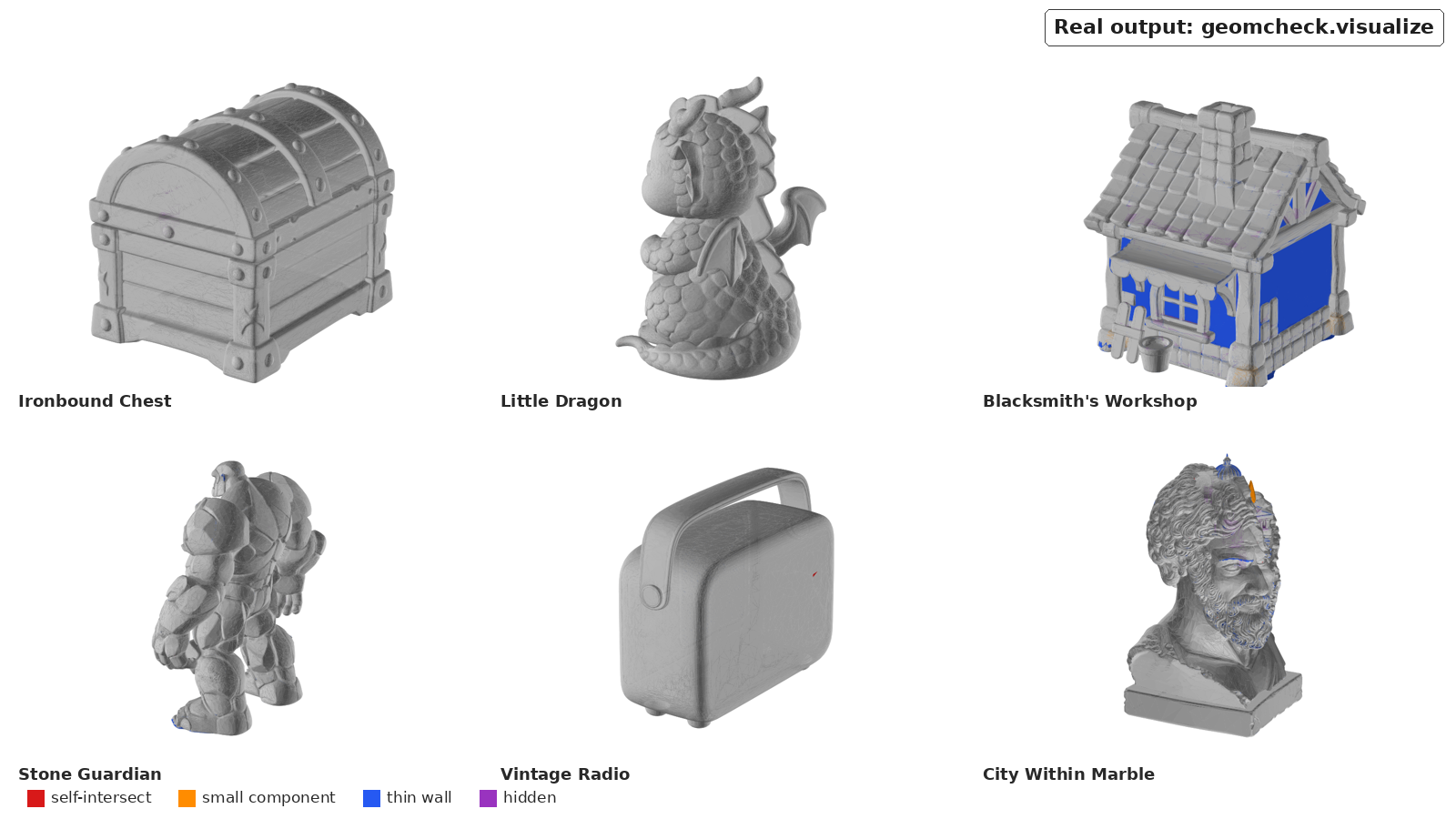
Real output: geomcheck's per-face flags on the six test models. Blue = thin wall, purple = hidden, orange = small separate piece, red = self-intersection.
What it is, in one paragraph
geomcheck answers concrete questions about mesh geometry: does it have holes, extra pieces, crossing faces, surface nobody can see, or walls too thin to print? Everything is computed on a copy scaled so the bounding-box diagonal is 1, so thresholds work at any model size. Random sampling uses a fixed seed. There is no learned model, no training and no GPU. It does not tell you whether a mesh looks good. The study it came from was built to measure exactly that gap (see "What it can't measure").
Log 1: install from a clean environment
The docs show pip install geomcheck, but when I checked on 3 October 2026 the package was not on PyPI yet (the PyPI simple index returned 404). Installing straight from GitHub works:
python3 -m venv .venv
.venv/bin/pip install "geomcheck[viz] @ git+https://github.com/Stark-Will/geometric-probes-3d"
In a fresh Python 3.13.5 venv this pulled in trimesh 5.1.1, PyMeshLab 2025.7.post1 and embreex 4.4.0, plus NumPy 2.5.3, SciPy 1.18.1 and Matplotlib (for the [viz] renderer). On a clone of the repository, pytest -q tests/ passed all 16 synthetic-mesh tests.
One Linux gotcha: PyMeshLab's decimation filter needs the system library libOpenGL.so.0 (sudo apt-get install libopengl0 on Debian/Ubuntu). No display or GPU is needed. geomcheck.decimation_available() returned True on my box. Without that library every probe still runs, but the optional decimation step raises a clear error.
Log 2: run it on six AI-generated models
Test set: six showcase models generated with Modelfy (its backend is Tencent Hunyuan 3D). All six are public on Sketchfab, so you can download the same files: the chest, the dragon, the workshop, the guardian, the radio and the marble bust. I used the Sketchfab-compatible copies, which have meshopt compression removed and PNG textures. Each is about 150k triangles.
The whole script:
import sys, time
from geomcheck import compute_all

for p in sys.argv[1:]:
    t = time.perf_counter()
    r = compute_all(p)                      # full resolution, default thresholds
    nm = round(r["nonmanifold_edge_frac"] * r["n_edges"])
    print(p, r["n_faces"], r["watertight"], nm, r["n_components"], r["n_small_components"],
          f'{100*r["self_intersect_face_frac"]:.3f}', f'{100*r["hidden_surface_frac"]:.2f}',
          f'{100*r["thin_frac_0.005"]:.2f}', f"{time.perf_counter()-t:.1f}s")
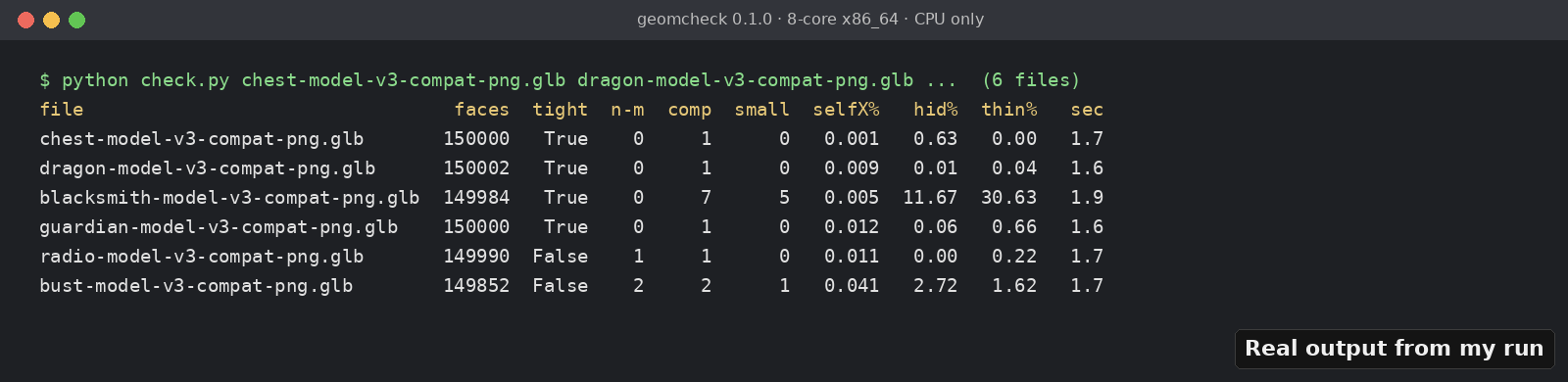
Real output from my run (formatted version of the script above), 8-core x86_64, CPU only.
| File | Closed solid? | Edges with 3+ faces | Parts / under 1% area | Crossing faces, full res → decimated | Never-visible surface | Surface under 0.005 diag |
|---|---|---|---|---|---|---|
| chest | yes | 0 | 1 / 0 | 0.001% → 0.000% | 0.63% | 0.00% |
| dragon | yes | 0 | 1 / 0 | 0.009% → 0.000% | 0.01% | 0.04% |
| workshop | yes | 0 | 7 / 5 | 0.005% → 1.170% | 11.67% | 30.63% |
| guardian | yes | 0 | 1 / 0 | 0.012% → 0.030% | 0.06% | 0.66% |
| radio | no | 1 | 1 / 0 | 0.011% → 0.020% | 0.00% | 0.22% |
| marble bust | no | 2 | 2 / 1 | 0.041% → 0.190% | 2.72% | 1.62% |
"Decimated" is the same run with decimate_to=10000 (Log 4). None had an open boundary loop. compute_all took 1.5–1.9 s per model in this first pass (Log 7 has cleaner timings). Running it a second time on the bust returned an identical dictionary.
Log 3: what it actually caught
A buried set of blocks in the workshop. "7 pieces, 5 small" sounds like floating debris, so I coloured each connected component. Piece #2 is the anvil: separate but intentional, 4,740 faces. Pieces #3–#7 are five small pad blocks at floor level under the wall corners. Then I crossed the component labels with the per-face visibility flags from geomcheck.visualize.face_flags. All 2,412 faces of those five blocks are hidden, and none of them self-intersects. They sit completely inside the walls. You could delete them and...