Close
0%
0%

Tweacman: a sample scrubber

A pocket-sized digital reel-to-reel with exquisite tape-like control of sound over time

Similar projects worth following
0 followers
I love the sound of scrubbing tape and record scratch, that detailed tactile relationship with sounds it gives you. TWEACMAN is a pocket homage to my first Teac and my first Walkman. It's a music player-wither. Playback any part of any song at any speed, any pitch, any direction, with effects. It uses a nifty new kind of analog rotary encoder that translates subtle finger movements into digital sound on a budget.

Lately I'm really enamored of these RV112-FF dual 360-degree potentiometers from Taiwan Alpha. Really they are analog rotary encoders; they give a really precise and subtle finger interface to digital instruments. Most rotary encoders this precise cost a lot more and are big complicated weird components. These look just like normal pots, and they almost are. Each unit has two separate potentiometers arranged 180 degrees apart. By combining A/D readings from those two pots with a bit of trigonometry, you can calculate the absolute angle of the shaft around a complete rotation. (If you hate trig, don't worry; my AI intern Claude has just written a nice Arduino library for reading the RV112-FF.) Just like a standard rotary encoder -- but unlike a standard potentiometer -- you can spin the RV112-FF around and around forever. No matter where you twist it, the reading is reported as an absolute floating-point angle from 0 to 360 degrees.

To show off these nifty knobs I made TWEACMAN, a two knob pocket-sized sample scrubbing toy. Like an old-school reel-to-reel tape deck TWEACMAN plays WAV files from a SD card speeds from 0.001x to 1000x, forward or backward, or you can twist a knob to scrub your recording back and forth across a virtual play head. There's a few other audio tricks available as well, and a handy Bluetooth interface you can use from your phone.

I built this project around SparkFun's ThingPlus RA6M5 board, which features a Renesas RA6M5 MCU. In 2026 we've got a crazy number of options for miniature ARM-based dev boards! The Think Plus RA6M5 has a handy feature set for the kinds of musical toys I like to make: the board exposes six of the RA6M5's 12-bit A/D converters, with which I can read up to three RV112-FF knobs. (An ESP32 can only read one RV112-FF with its two A/D channels.) The RA6M5 also has two 12-bit D/A converters with their own integrated output amplifiers; together they make a respectable medium-fi stereo audio output. It's also got an onboard capacitive touch controller, with two touch pins exposed on this board so I can give my circuit board two buttons without extra parts. There's a FPU so I can do all my audio work in floating-point with no performance penalty. And there's another Renesas chip on this Thing Plus board, THE BLE ONE WHATS IT CALLED, with which I can serve up a more sophisticated wireless interface. The board also includes a complete battery management system so my device can be powered by a single 3.7v LiPo cell, rechargable by a standard USB cable.

Renesas provides a complete development kit for the RA6M5, but I often prefer the Arduino environment for my MCU projects because of its vast set of open-source libraries and its great online community. SparkFun provides a port of the official Arduino Renesas core that adds support for this particular board. All my code from this project is open-source and Arduino-compatible.

But the truth is, I can't really call this "my" code because my AI intern Claude did all the heavy lifting. I mainly wrote specs, reviewed Claude's work, made the major decisions and did QA. Working this way is a profound change from how I've developed technology for most of my life. It's both humbling and empowering. Claude and I are doing work in days that used to take me months to complete by myself. It's a rush!
  • 1 × Thing Plus RA6 SparkFun mini development board hosting the Renesas RA6M5 MCU and DA14531MOD BLE transciever
  • 2 × Taiwan Alpha RV112FF Lovely hi-res analog rotary controller in the form of a dual 360-degree potentiometer

  • Initial setup

    Mykle • a day ago • 0 comments

    My development setup: my M1 Mac Mini running MacOS 26 with the command line developer tools installed. I installed Claude Code and the latest Arduino release (2.3.10), then asked Claude to install SparkFun's Arduino core for the Thing Plus. That two-step process is explained here: first get the official core for the Portenta through the board manager, then download the RA6M5 package from Sparkfun and move it into place.

    I also gathered all the datasheets into a directory where Claude and I could read them: That includes the RV112-FF pots, the RA6M5 MCU datasheet and user manual, the bluetooth chip, and Renesas' capacitive touch design guide. Because I don't really like to use the Arduino GUI I had Claude set up a Makefile-based command line build system for me that uses arduino-cli under the hood to compile and upload firmware. We still used the app for its built-in Serial Monitor and Serial Plotter.

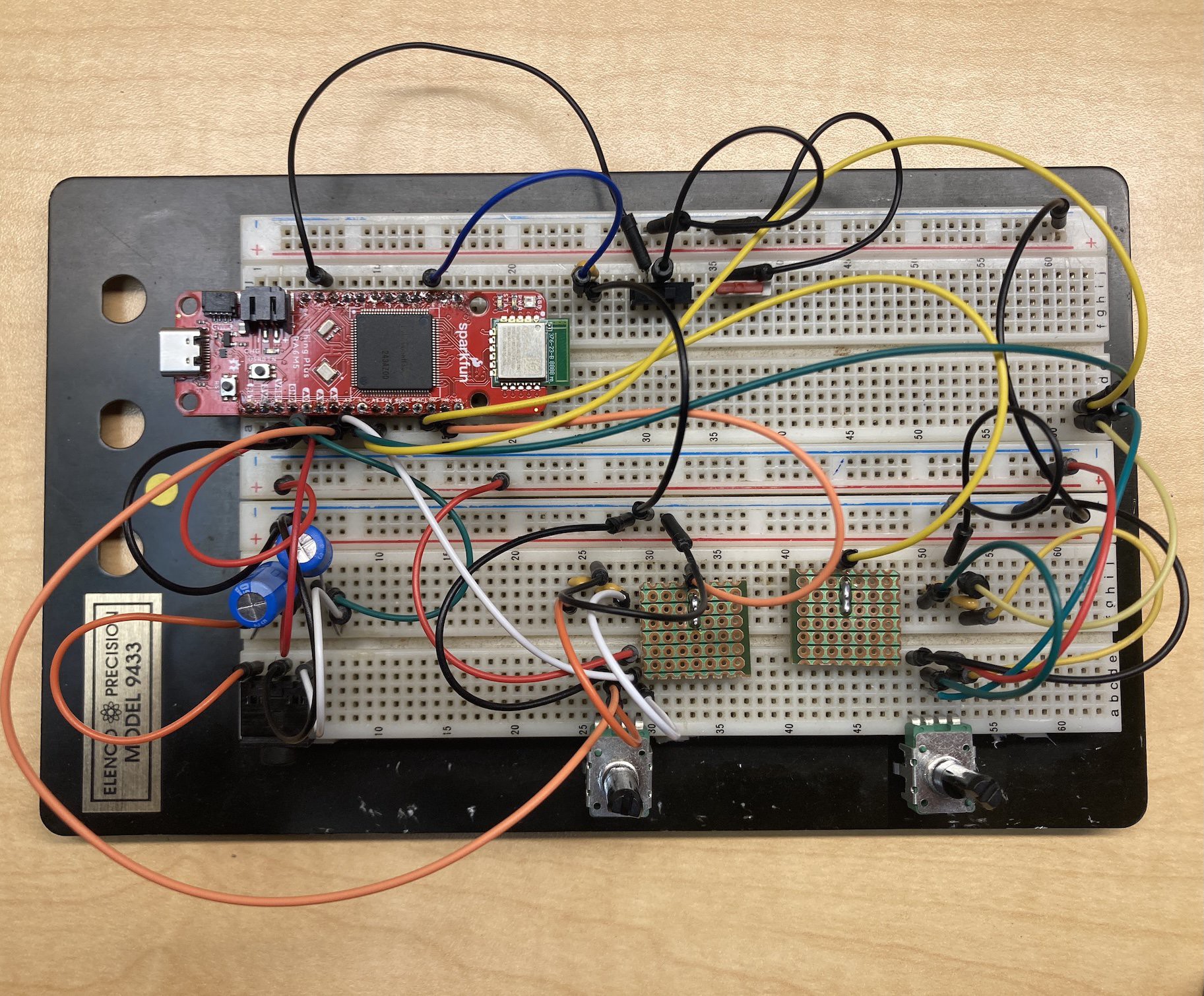
    Here's how I plugged it together on the breadboard: 

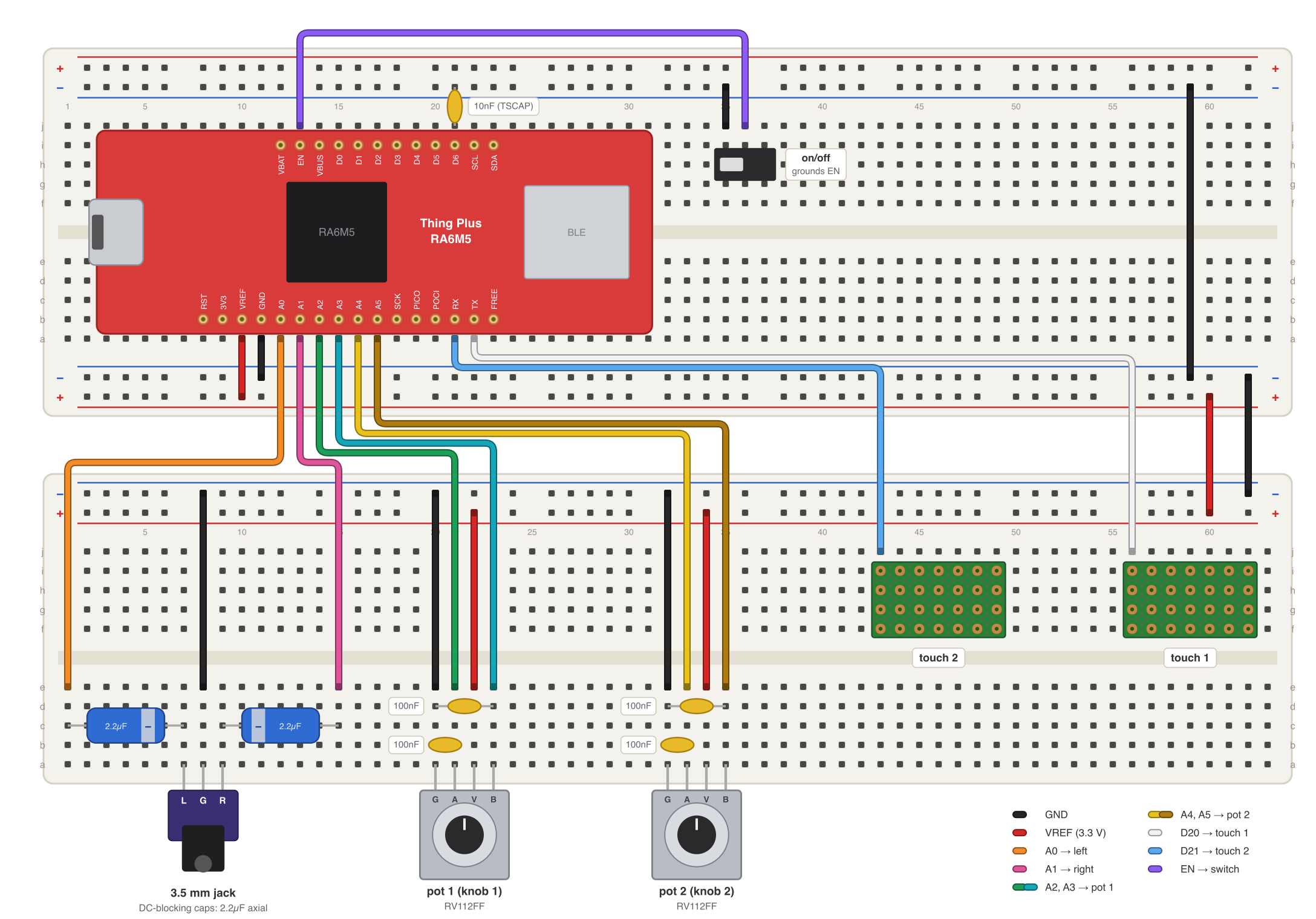
    Eech, what a salad. The four A/D pins are wired to the wipers of two RV112-FF dual pots, the two D/A pins to a STX-3120-3B audio jack, and the two touchsense pins into two thrown-together touch probes made from scraps of header and perfboard.  (Before I made those I used slices of carrot as touch sensors; they worked perfectly on the first day, but they slowly dried up and stopped working at all by day 4.) 

    I had to pry the bottom +- power rail off of my breadboard to be able plug these pots in, because they have little PCB-clutching toes on them which don't want to be added to the circut and don't line up with the breadboard holes anyway. With that rail out of the way they hang over the bottom edge of the board as shown. One could maybe bend their toes back with a needlenose plier instead, and then return them to position at build time, if one needed to plug them into the breadboard at some other position.

    What else? There's a power switch to ground the EN pin, which shuts down the board (mostly). There's power and ground to the tracks of the pots, and some 100nF caps between the pot wipers and ground, optional but recommended, which filter out high-frequency noise to get more precise readings. There's also an unused second power switch and a bunch of excess spaghetti I should have maybe cleaned up before the photo shoot. Below is a much clearer diagram you can follow to set up the same circuit on your own breadboard:

    With all of this hooked up and installed, we were ready to plug in the USB cable and say Hello World ...

View project log

Enjoy this project?

Share

Discussions

Similar Projects

Does this project spark your interest?

Become a member to follow this project and never miss any updates