 Mykle
MykleFor starts, we wrote the RV112FF decoding library for Arduino and an AudioKnobsDemo to test it. In that demo the two knobs on our breadboard sweep two audio oscillators across the audible range. When they get close together you can hear a beat frequency between them.
ATTENTION: when you install and run this sketch (and plug in some speakers) you will have to crank the knobs a few times before you hear anything at all on the audio jack. That's because the sketch first needs to calibrate them. These low-cost pots have some manufacturing variations and aren't always perfectly as described in the datasheet. They might have a slightly shorter range than all the way from 0 to 10k ohms, and the two tracks might not be perfectly 90 degrees apart, and you might have other circuitry between the pots and your pins that alters the range. So before the library can give an accurate reading on a RV112FF it needs to measure the maximum, minimum and true offset angle. We can measure all that in two turns of the knob, and calibrate around it.
KnobsDemo.ino gives an example how to manage this in your sketch. Until the knobs are calibrated their angle will read -1, but don't test for that. Instead call isCalibrated(), and ignore the results of read() until isCalibrated() returns true. Once a knob is calibrated it will stay that way until power-off. (The smart thing will be to save that calibration info to non-volatile RAM and load it at startup; we'll get to that soon.)
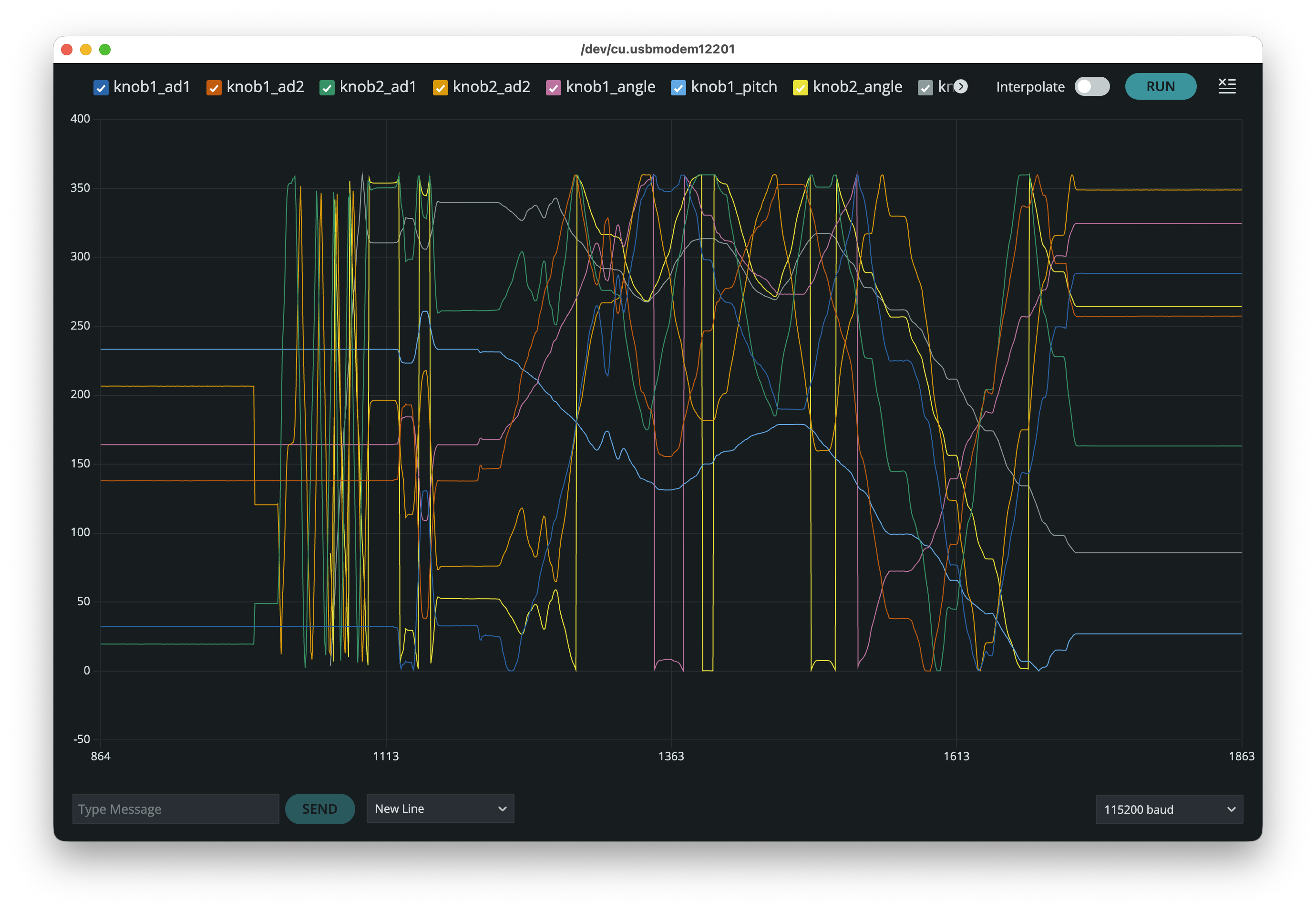
This sketch doesn't just make audio waves -- it can also make squiggles on your screen! If you turn on the Arduino Serial Plotter you'll see it plot a bunch of signals. For each pot (knob1 & knob2) we plot the raw A/D value for both wipers, the calculated angle in degrees, and the calculated pitch. Eight values in all. Above you can see a plot of all of them at once. It's kind of pretty, but hard to read. The next plot is simpler:
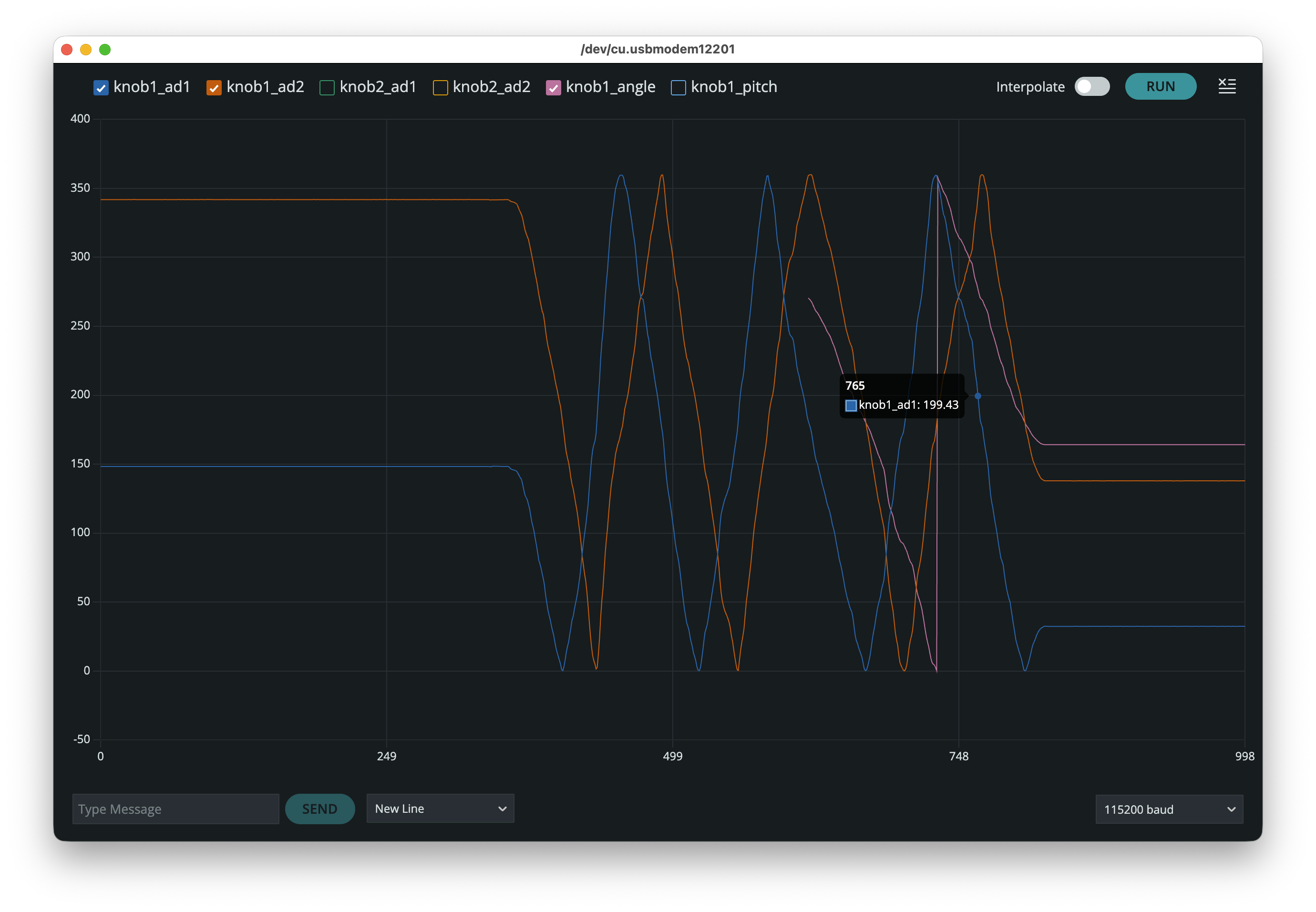
This is a plot of just the two wiper readings in knob 1 (blue and red), showing some details of these signals as I turn the knob slowly by hand right after a reboot. You can see that the two pots' readings are 90 degrees apart, and each pot sweeps a value from 0% to 100% and back. (Inside the pot, on each track the supply current is fed to the center of the track and grounded at both ends, unlike a standard pot which feeds current at one end of the track and grounds the other end.) Notice how the sketch starts to report the angle measurement (pink) once isCalibrated() returns true, which happens after the shaft has turned a bit less than two full rotations. That's one complete turn to find the maximum values, and a second time around just to be sure.
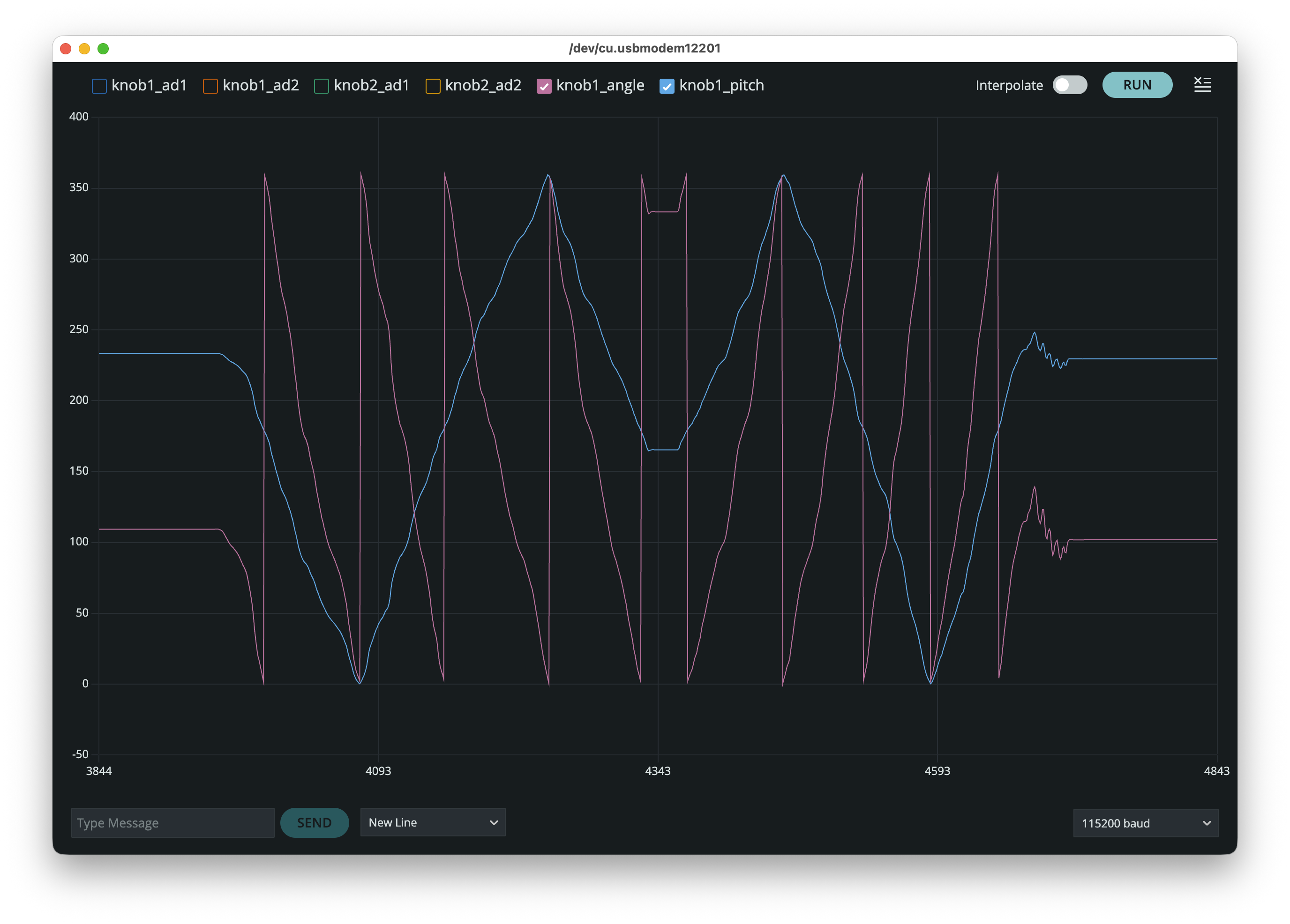
Our RV112FF library reports the absolute position of these rotary encoders as an angle from 0 to 360 degrees. Sweep past 360 and you're back to 0. But sometimes we might want more degrees than that! Our MultiTurnKnob library built on top of RV112FF lets us count how many degrees the rotor has spun since the count was reset, similar to how Arduino's PJRC Rotary Encoder Library counts turns of a rotary encoder. The accumulated angle is a signed float, where negative values are counter-clockwise. With this, we can map our accumulated angle onto any other parameter. For instance, we can map four complete twists of the knob (pink, above) to an oscillator sweep up and down the audible frequency range (blue).
(The slight wiggly-ness in this plot is due to slight wiggly-ness in my fingers; it's not due to noise or the components.)
RA6M5 TRICK: The RA6M5 datasheet reveals that there are two output amplifiers on its D/A pins. These reinforce the low-impedance analog signals from the D/A pins, making the output louder and cleaner when pugged into a line-level audio input. We packaged this trick in our RA6M5AnalogTuning library. See the sketch for how to activate those amps on this MCU.
(Please know that this signal probably can't drive your nice headphones; you'd need a higher output impedance than these amplifiers can provide. For that you'd probably disable these output amplifiers and roll your own using discrete op-amps, or discrete transistors or vacuum tubes or servo-controlled carbon arc lamps if you're that kind of audiophile.)
ARDUINO TRICK: why don't your plots look as dense as my plots? Well, the Arduino Serial Plotter only saves 50 data points by default. I guess that's so you can run it on a GameBoy. Ask Google (or Claude!) how to increase that number to 1000 or more. It's a cool hack! But it's far too hacky to fit here! (Or maybe the developers will have added an actual interface for adjusting this very-useful-to-adjust number by the time you read this.)
Discussions
Become a Hackaday.io Member
Create an account to leave a comment. Already have an account? Log In.