 Xavi Paz
Getting a computer connected to a BBS over WiFi is relatively easy.
Making that connection feel like a modem is much harder.
RetroBox is not intended to be just a transparent serial-to-WiFi bridge. A large part of the project is about recreating the little behaviors that made dial-up modems recognizable: dialing, handshakes, result codes, carrier states, LEDs, delays and sound.
The firmware currently includes several modem personalities, from V.22bis through V.90, together with a separate pacing system that controls how quickly data is delivered to the terminal.
This allows the same BBS to be experienced at very different speeds. One of my favorite tests is connecting to the same system first at 300 bps pacing and then again at 56K. The difference is dramatic, even when the destination is exactly the same.
Audio has turned out to be one of the hardest parts of the project. Different modem standards did not all sound the same, and simply playing a generic “dial-up sound” is not enough if the goal is to make the experience believable.
I am still refining the handshake and carrier audio and experimenting with how closely the sound should follow the selected modem personality and data speed.
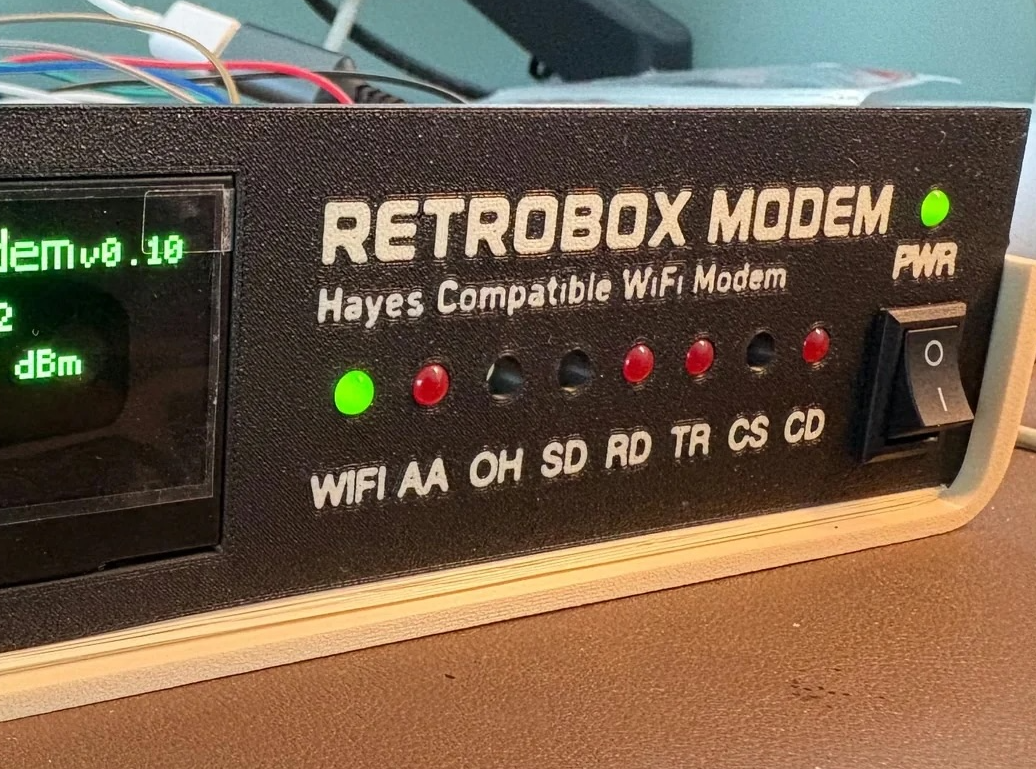
The front-panel LEDs are also part of that experience. WIFI, AA, OH, SD, RD, TR, CS and CD provide visible feedback while the OLED shows the current state, network information and connection details.
This part of RetroBox is still evolving, but it is probably the part I enjoy working on the most.
Discussions
Become a Hackaday.io Member
Create an account to leave a comment. Already have an account? Log In.