 Denis
Denis-
First preview of encoder support
01/28/2017 at 16:59 • 0 commentsI uploaded a new video about first implementation of encoder support in firmware and your feedback is highly appreciated:
-
External/Remote voltage programming and YT view
01/20/2017 at 07:57 • 0 commentsAnother two videos are available that covering the topic of external/remote voltage programming function:
... and YT view, a fourth way of monitoring up to two output values like voltage, current and power (delivered energy in Wh and Ah will be added into future):
-
Thank You and Stretch Goal Survey
01/18/2017 at 07:42 • 0 commentsThanks to everyone who helped us reach our funding goal on the CrowdSupply in less than two weeks! We still have over a month left in the campaign, so there’s plenty of time to exceed our initial goal and hit some stretch goals.
There are a lot of features we’ve been thinking about and we’d like to hear your opinion. Please take our survey to help determine our stretch goals.
We’ll likely make decisions about stretch goals within the next few days, so please take the survey as soon as you can.
-
System protection mechanisms
01/11/2017 at 22:33 • 0 commentsI’d like to present you a few additional protection mechanisms that could save your day from simple mistakes caused by fatigue, doing something in hurry, or just trying to do too many things at once. The protections shown in the video below can prevent damage to load connected to the EEZ H24005 during mains power brown outs and other unpredictable circumstances.
-
Channel tracking and coupling
01/10/2017 at 09:23 • 0 commentsA new video about channel tracking mode:
... and coupling (in series and parallel) is now available:
I'd also like to thanks everyone who decided to follow us (500+), like us (almost 50) and join us on the group buy that is started a few days ago. I hope that power supply will meet your expectations.
-
Crowdfunding is started!
01/06/2017 at 21:18 • 0 commentsDear all, please note that campaign is now live.
-
How fast is SCPI remote control?
01/04/2017 at 16:34 • 0 commentsI tested today how fast is remote control using SCPI commands via serial (USB port). It's initiate by question got by email from guy who would like to know is it possible to generate square wave signal faster then 10 Hz. He has another brand power supply that cannot offer more then 5 Hz.
Without any optimization and with selecting most demanding viewing mode (bar graphs) that we are refreshing as soon as any change is detected (but not faster then ~300 samples/s) I got the following:
Display is ON (that means display will be frequently refreshed):
- 18 Hz, if connected load does not cause changing of mode operation (or CV only)
- 12 to 14 Hz depending of the selected viewing mode, and when mode operation is changing (CV-CC)
Display is OFF (option DISPLAY_OPTION=0 in conf.h file):
- 36 Hz regardless if the mode of operation is changing or not!
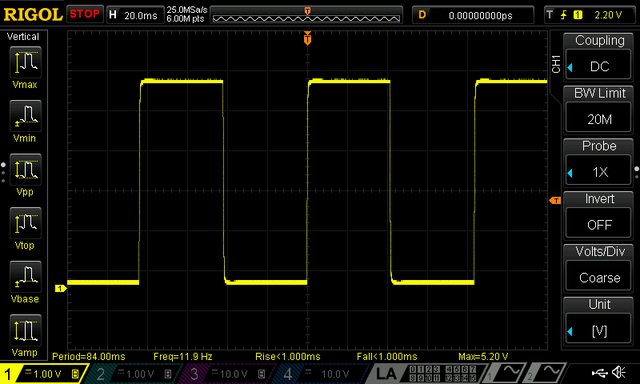
Here is a screenshot for 12 Hz SCPI VOLT 0.1 - VOLT 5.1 changed in the loop on the both channel (PSU is in the TRACking mode of operation):
![]() In firmware M4 we are planned to add SCPI LIST subsystem when you'll be able to load waveform shape that will be internally executed in the loop. Our goal is to reach 120 Hz (sine wave generation) in that way, but we'll see.
In firmware M4 we are planned to add SCPI LIST subsystem when you'll be able to load waveform shape that will be internally executed in the loop. Our goal is to reach 120 Hz (sine wave generation) in that way, but we'll see.Apart to digital (SCPI) remote programming it's already possible to achieve much higher speed using so-called remote voltage programming (VOLT:PROG). In this case the PSU can easily survive much faster changes, e.g. 500 Hz as shown in next couple of screenshots (square and sine, yellow trace is output, cyan is controlling analog signal produced by signal generator):
![]()
![]()
-
M3 firmware is released...
12/29/2016 at 12:45 • 0 commentsThe firmware M3 is released today. We had some interesting time when for the first time a more then one interrupt is used and spent almost a month trying everything to make operation stable and predictable. Finally we found that Arduino's SPI transactions doesn't masks interrupts properly and we have to see what Arduino team will say. Another interesting thing was related to coupling channels outputs in series and parallel. It's not so straightforward as one can think because this power supply has down-programmer circuit that can make some problem when channels are coupled in series and enters CC mode or when coupled in parallel and enters CV mode. I'll prepare a video to show what could be happen as we solved that successfully.
With this firmware we covered almost everything on hardware level (only digital input, and load/batter NTC are not addressed). Please find below the main features of this release. Shown screenshots are from software simulator. All yellow painted text represents enabled/"clickable" options (in a "follow the yellow brick road" manner).Channel coupling
Allows doubling of max. output voltage (up to 80 V) or current (up to 10 A). Outputs are wired internally thanks to two MCU managed power relays. Presentation and programming of output values and protections are unified/centralized.![]()
![]()
![]()
![]() Tracking mode
Tracking mode
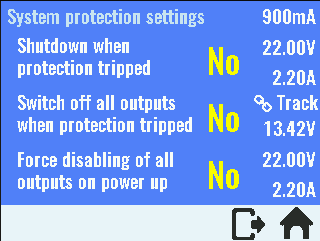
Presentation and programming of output values and protections are centralized. When any protection tripped on one channel it will shut off both channel. Output enable/disable function is also unified.![]() Additional system protections
Additional system protections![]() AUX temperature sensor settings
AUX temperature sensor settings![]() Lock local console (touch screen)
Lock local console (touch screen)
When locked only unlock icon is enabled. Lock can be protected with system password.![]() Sound control
Sound control![]()
-
Crowdfunding as a group buy for the EEZ H24005
12/11/2016 at 09:20 • 4 commentsI was successfully completed an "experimental" group buy (small qty) for bare PCBs, TFT display and customized metal enclosure. That encourage me to start thinking about another group buy but this time for assembled modules and all other parts. But PCBA service makes sense only for larger quantity that means more people needs to be involved and I decide to run new group buy as a crowdfunding campaign.
The campaign will be conducted on the CrowdSupply and I'd like to hear your opinions about pledge levels. First please note that I'm not going to offer a completed solution. Also please note the campaign is conceived as a group buy to achieve few goals:
- Manufacture assembled modules (combined they have almost 800 items and that is far too much for many DIYers/makers despite the fact that DIY-friendly SMD packages are solely used)
- Manufacture compact metal enclosure to mount safely all parts and
- Decrease the cost per unit
Again, this is a group buy, not a new product production kick start, because it's not a profit driven (I have another source of money for living). Therefore prices of all pledges will be set to cover without loss the cost of manufacturing, packaging, transportation and campaign fullfilment cost, crowdfunding platform and payment gateway fees.
I was thinking about the following pledge levels (the final number and contents will be set in accordance with your wishes):- Set of bare PCBs only (4 of them, 2 layer)
- As above + metal enclosure (with other metal parts such as TFT display support, AC/DC modules support, channel's heatsinks)
- Set of assembled PCBs only
- As above + metal enclosure set + wire harness
- As above + TFT display + AC/DC modules (2 of them)
- As above + Arduino Due
The latest one include all what is needed to assembly a fully functional unit that can be ready to run after firmware is uploaded. In essence you'll need a screwdriver for that operation and PC with Arduino IDE for uploading. Of course, you also need multimeter to calibrate it using built-in calibration wizard.
Thanks in advance for your valuable inputs.
-
Remote control
11/02/2016 at 09:00 • 0 commentsPlease find below a new video about EEZ PSU H24005 remote control using SCPI commands send via serial (USB) or Ethernet. Establishing connection with SCPI controller application (Keysight Connection Expert) is also demonstrated.
DIY programmable (SCPI) bench power supply
Bridging the gap between professional and DIY/hobbyist bench power supply
 In firmware M4 we are planned to add SCPI LIST subsystem when you'll be able to load waveform shape that will be internally executed in the loop. Our goal is to reach 120 Hz (sine wave generation) in that way, but we'll see.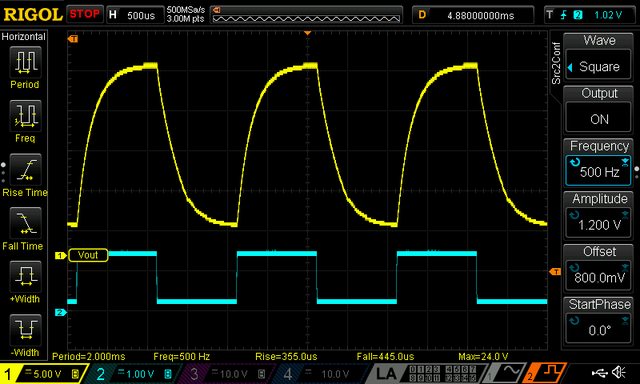


 Tracking mode
 Additional system protections
 AUX temperature sensor settings
 Lock local console (touch screen)
 Sound control