
 JP Michon
-
The uCompute Ecosystem: Three Years of Evolution
11/11/2026 at 14:44 • 0 commentsOriginally, my goal was never to develop a unified hardware platform. It happened by accident—or rather, out of necessity. Since I manufacture my PCBs strictly for personal use, I only order two or three units of each revision. Over time, whenever a design met my needs, I naturally began standardizing the layout across newer boards.
![]()
The Genesis: "BareMetal" (Early 2023)
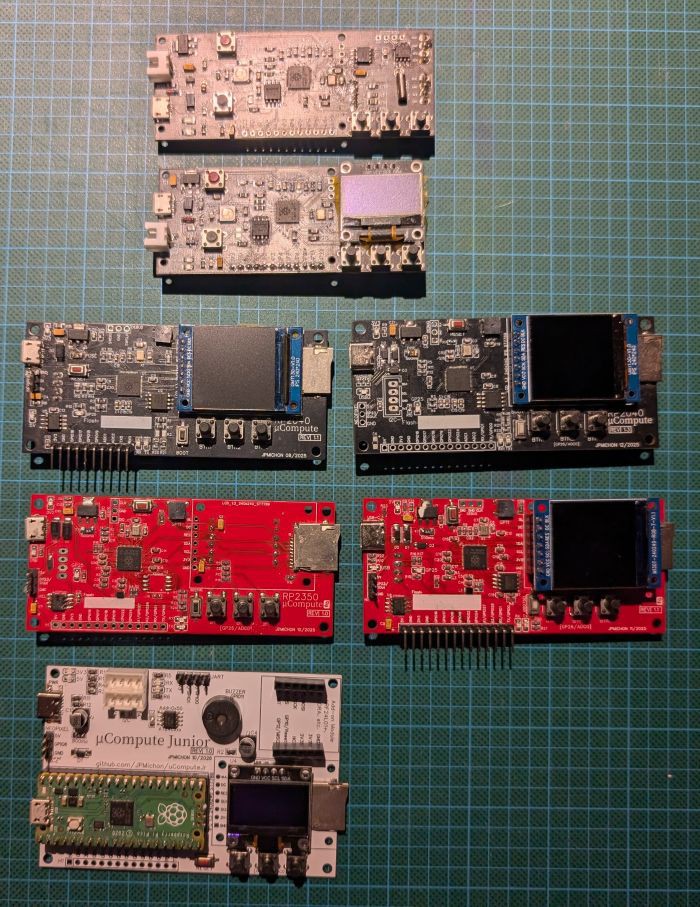
It all started with the "BareMetal" board in early 2023. This prototype gave birth to the first generation of the uCompute, establishing the signature user interface layout that remains to this day: an onboard display with three tactile buttons positioned right underneath.
Enter the RP2350: uCompute 2 (Fall 2025)When the RP2350 microcontroller became available through suppliers in mid-2025, it paved the way for the uCompute 2 in the fall of 2025. Sharp-eyed makers will notice a few key hardware upgrades on this red board, including the transition to a USB-C port and smaller 0603 surface-mount components.
Back to Basics: uCompute Classic v1.3 (December 2025)
In December 2025, I released version 1.3 of the original RP2040-based uCompute. This revision adopted the standardized I/O header configuration and USB-C connector introduced on the uCompute 2. I also added a handy option to mount an OLED screen (SSD1306) as an alternative to the standard IPS display.
Accessible to All: uCompute Junior (November 2026)The latest addition to the family, the uCompute Junior, born in November 2026. It is essentially a "bring your own Pico" version of the uCompute. Designed to be much easier to hand-solder, it uses larger 0805 components and features dedicated headers to plug in an official Raspberry Pi Pico (Pico, Pico W, Pico 2, or Pico 2 W).
I created this board after realizing that assembling my dense, fine-pitch PCBs wasn't accessible to everyone. My goal is to make the ecosystem approachable for schools, fablabs, or hobbyists looking for a low-cost experimentation module without getting locked into proprietary ecosystems.A Color-Coded Lineup
Looking at the full family portrait from top to bottom, you can also see an intentional color-coding scheme take shape across the generations. Black represents the original RP2040-based uCompute Classic—the baseline standard that started it all. Red highlights the high-performance uCompute 2 powered by the RP2350, signaling a step up in processing power and hardware density. Finally, white was chosen for the uCompute Junior to emphasize its educational, beginner-friendly "bring your own Pico" philosophy—making the black silkscreen labels crisp, clear, and effortless to read while hand-soldering. Plus, for a maker like me with a workbench overflowing with circuit boards, it makes it way easier to spot the different PCB generations at a glance without having to reach for my glasses!
A Modular Add-On Ecosystem
The uCompute ecosystem is more than just mainboards; it also includes a growing family of plug-in modules. Originally, the uCompute was designed to host a W5500 Ethernet module via a connector on the back of the PCB, right under the screen. Because that header uses an SPI bus, it opened the door to creating adapters for all kinds of hardware:
- Wireless & Radio: An nRF24L01+ (2.4 GHz) module, a LoRa RFM95W module, and an ESP-12F Wi-Fi module running AT modem firmware over UART.
- Video Output: A VGA adapter module that takes advantage of the ST7789 display pinout.
I am skipping a few specialized add-ons for now, as those will be introduced alongside their own dedicated projects!
Dive Deeper into the Ecosystem
Want to build your own board, explore the hardware schematics, or check out our MicroPython guides? Visit the centralized uCompute Ecosystem Wiki for full assembly instructions, hardware comparisons, and example projects.
-
My Journey: From the Z80 Era to the Pi Pico
11/04/2026 at 02:16 • 0 commentsMy Journey: From the Z80 Era to the Raspberry Pi Pico
Welcome to my maker space! My background in electronics dates back to the late 1980s—an era dominated by the Z80 and 8031 microcontrollers, where assembly code was the norm and the Texas Instruments TTL Data Book was literally my bedside reading material.
![]()
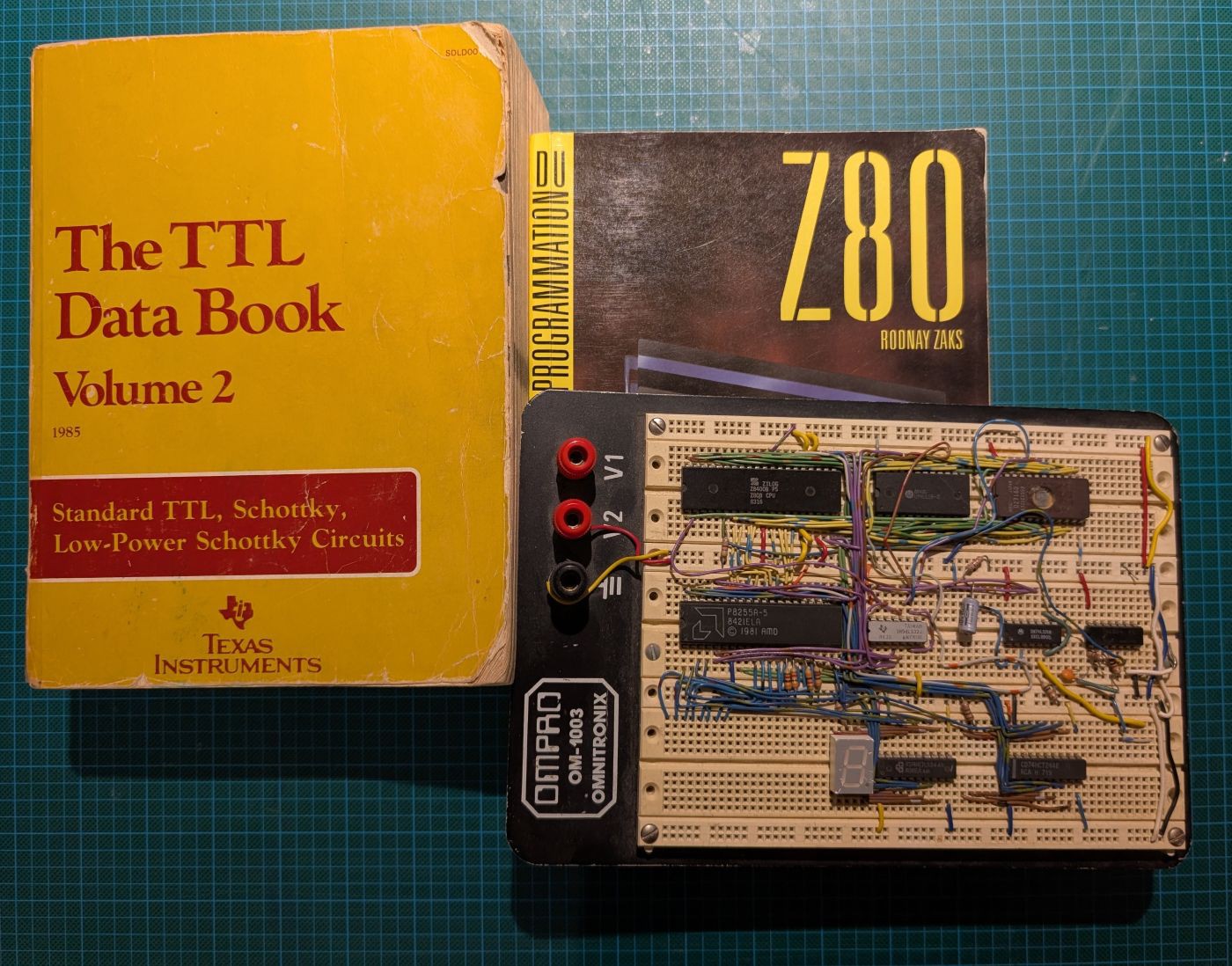
Where it all started: My original Z80 breadboard computer alongside the 1985 TI TTL Data Book and Rodnay Zaks' programming bible (sharp-eyed viewers will notice my copy is the classic French edition!).
A true anthology piece from over 40 years ago. Let's not be too nostalgic, though—we live in wonderful times. Just hand-soldering a QFN-56 package on a custom PCB is pure euphoria... and no, it’s not because of the flux fumes!Although life led me straight into an IT career right after graduation, meaning I never officially worked in hardware design, the passion never truly faded. In the mid-2010s, the maker movement caught my eye, and I started tinkering again with Arduino and 3D printing.
The turning point came during the pandemic lockdowns. I discovered the Raspberry Pi Pico and dove headfirst into MicroPython. It was love at first sight. It inspired me to dust off my soldering iron, upgrade my workbench, and start designing custom multi-layer PCBs.
I am here to share the various projects that have occupied my free time over the last few years. I hope these designs will spark interest and inspire other passionate makers like me!📜 Philosophy
All my projects are shared open-source under the Creative Commons (CC BY-NC-SA 4.0) license. They are purely educational, hobbyist, and hand-assembled. Feel free to explore the repositories, check the schematics, or reach out for collaborations!
🌍 Language Note & AI Collaboration
As a native French speaker who spent almost my entire IT career working in a French-speaking environment, English is my second language. To ensure all my complex hardware nuances, assembly guides, and technical explanations are clear and accessible to makers and educators worldwide, I collaborate with an AI assistant to refine and polish my documentation into professional English. Every PCB design and prototype, however, is 100% hand-crafted on my workbench!
My Projects
My Pages
Things I've Built
RetroPico
A compact development board based on the RP2040, featuring a VGA port, Wi-Fi via an ESP-01 module, I2C connectivity, a MicroSD card slot, and more. Designed for retro emulation, vintage video/audio projects.
 Lutetium