 ogdento
-
1Tap into to the keypad buttons
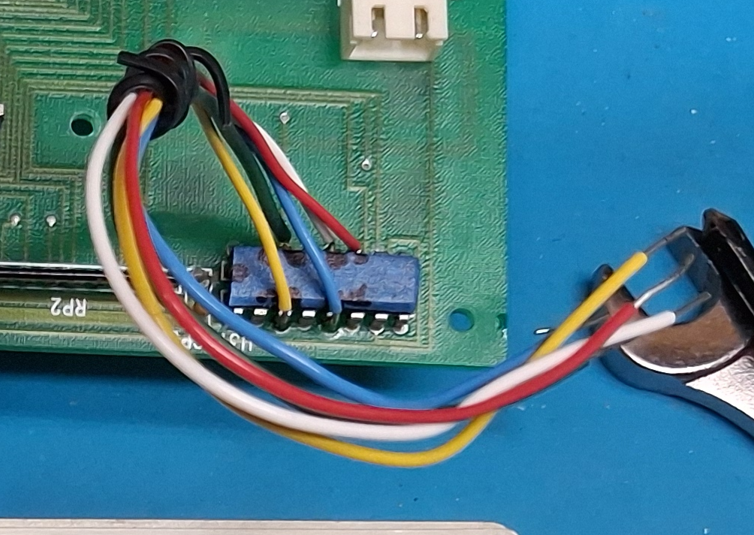
You'll need to connect wires from the Arduino input pins to the keypad button signals. The keypad button signals are most easily tapped at the 74166 shift register that's on the front panel board. The schematic in the details section shows which connections are for which keypad signals - and they are in the code comments above - but I've also included them here:
KEY_ONOFF signal goes to Arduino Digital pin 12 - comes off 74166 F/pin 11
KEY_VI signal goes to Arduino Digital pin 6 - comes off 74166 B/pin 3
KEY_RIGHT signal goes to Arduino Digital pin 7 - comes off 74166 D/pin 5
KEY_LEFT signal goes to Arduino Digital pin 11 - comes off 74166 C/pin 4
KEY_UP signal goes to Arduino Digital pin 8 - comes off 74166 G/pin 12
KEY_DOWN signal goes to Arduino Digital pin 9 - comes off 74166 H/pin 14
Here are 5 of the keypad signals tapped from the 74166. KEY_LEFT is not yet connected, but will go to pin 4, between the yellow and blue wires:
![]()
-
2Connect the rotary encoder
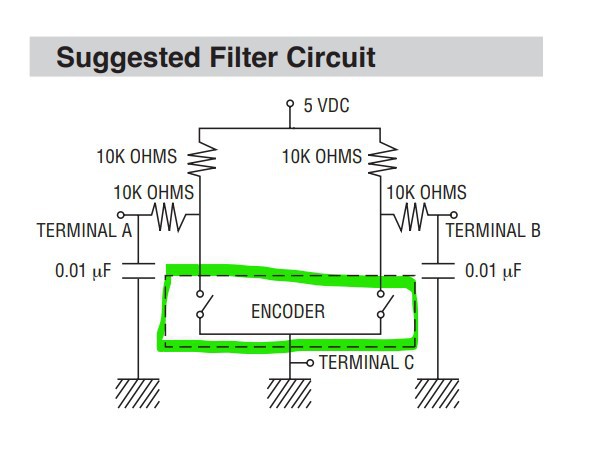
The rotary encoder is a Bourns pec11, and I mounted it on a small bit of pc board using the filter circuit suggested in the datasheet. The datasheet can be found here: https://www.bourns.com/docs/Product-Datasheets/PEC11R.pdf, and here's the circuit:
![]()
Bourns didn't do a great job with the circuit diagram... the encoder itself is what I highlighted in green, and all the other components are external and need to be added. Terminals A and B on the encoder are the two switches inside the green highlighted rectangle, and terminal C connects to GND. The pushbutton signal is not shown in this diagram.
The circuit has 5 signal lines that need to be connected to the Arduino - Vcc (5v), GND, Button and the A and B signal lines for the encoder position. The connections to the Arduino are as follows (there are also comments in the Arduino code):
Vcc and GND are connected to the corresponding Vcc/GND pins on the Arduino
The PEC-11 button signal connect to Arduino Digital pin 3 (this is Interrupt INT1)
The PEC-11 A signal goes to Arduino Digital pin 4
The PEC-11 B signal goes to Arduino Digital pin 5
If you get this together and find that the encoder direction is going the wrong way, swap the A/B signal lines.
-
3Upload Arduino code to device
I used a pro-mini that does not have an on-board USB controller, so I needed a separate board to program the device. You may not need that depending on which board you choose to use.
Here's the code:
/*
 * Amrel Encoder (started as pro_mini_encoder)
 *  * Revision Info:
 * 1.00 rotate to change current setting. click to enter v/i selection mode and rotate to choose v/i,  *      then click to set digit 1, click again to set next digit
 * 1.10 adding extra input to detect keypad presses.  need to move PIN_BT_INT to another pin
 *
 * Add an encoder to the Amrel LPS-30x power supply to control setting voltage/current
 *  * Present Operation:
 *  There are 6 buttons on the Amrel unit to set the value of output current and voltage and to
 *  enable/disable the output
 *  V/I Set Mode
 *   - 'V/I' is pressed to enter voltage/current set mode and subsequent presses toggle between  *     'set voltage' and 'set current'
 *   - The right '>' key moves focus to the first digit, and the value (0-9) is set using the
 *     'up' and 'down' keys
 *   - Once the focused digit is set, pressing '>' goes to the next digit (five total)
 *   - Once the last digit is set, pressing '>' will set the supply to the current value
 *   - If V/I mode is entered by mistake, the only way to get out of it is pressing the right
 *     button to get through each digit
 *  Output ON
 *   - The up/down buttons are used to set the output value starting from the rightmost digit
 *   - The left/right buttons can be used to first select a digit, at which point the up/down buttons  *     will set the digit's value
 *   - Changes are immediate
 *  Output OFF
 *   - The left/right buttons do nothing
 *   - The up/down buttons are used to set the output value starting from the rightmost digit
 *   - Changes are immediate
 *  * Encoder Operation:
 *  V/I Set Mode
 *   - A short-press on the encoder button sends a 'V/I' keypress to enter V/I set mode
 *     A long-press will exit V/I set mode and set the supply to the current value (it sends however  *     many 'right' keypresses are needed to exit)
 *   - If in v/i set mode, rotating the encoder (cw or ccw) sends a 'V/I' keypress to selects voltage  *     or current (will continually send 'V/I' keypress if the encoder is continually rotated)
 *   - When the desired mode is shown, pressing the button sends a 'right' keypress to switch from 'V/I'  *     select mode to digit set mode
 *   - Rotating the encoder now selects 0-9 for the current digit (cw sends 'up', ccw sends 'down' keypress)
 *   - Pressing the button sends a 'right' keypress to save the digit value and move to the next digit
 *   - After the last (fifth) digit is set, the final button press sends a final 'right' keypress and
 *     sets the supply to the current value
 *   - Once V/I mode is entered, it can be exited by pressing the encoder button to get through each digit,  *     OR by long-pressing the encoder button, OR by doing nothing for 4 seconds
 *  Normal Operation (not in V/I set mode, and output is ON or OFF)
 *   - Rotating the encoder sets the output value starting from the rightmost digit (cw sends 'up', ccw  *     sends 'down' keypress)
 *   - Changes are immediate
 *  * Considerations:
 *   - send only one pulse at a time (and let each pulse finish, with some padding)
 *   - the encoder does not currently send 'left' keypresses
 *    * Debug Defines:
 *   - DEBUG will enable debug statement output on serial port
 *   - DEBUG_PULSE will output a square wave with same duration as key pulses on DEBUG_PIN
 *  * Rotary encoder routines thanks to Brainy-Bits "Best code to use with a KY-040 Rotary Encoder? Let's find out!"
 * Timer code thanks to Adafruit "https://learn.adafruit.com/multi-tasking-the-arduino-part-2/timers"
 *
 * For faster speed, use direct port access techniques ("http://www.arduino.cc/en/Reference/PortManipulation"), per
 * Adafruit encoder example at: "https://learn.adafruit.com/pro-trinket-rotary-encoder/example-rotary-encoder-volume-control"  *
 * Modified checkEncoder to read the clock and data once rather than for every if... is this ok??
 */

// debug defines
//#define DEBUG_PULSE
#define DEBUG
#ifdef DEBUG
  #define Debug_println(s) Serial.println(s)
  #define Debug_print(s) Serial.print(s)
#else
  #define Debug_println(s)
  #define Debug_print(s)
#endif

// encoder pins
#define PIN_KP_INT 2   // Interrupt INT0 used to detect keypad button presses (the keypad buttons we want to scan will be and'ed together)
#define PIN_BT_INT 3   // Interrupt INT1 used to detect a press of the encoder button
#define PIN_DT 4
#define PIN_CLK 5      // change from 2 to 5 (move 5/KEY_ONOFF to 12 and use 2 for PIN_KEYPAD interrupt input)
#define ARDUINO_PIND PIND

// digital output pins
#define INPUT_MODE INPUT_PULLUP // INPUT_PULLUP or INPUT (use INPUT_PULLUP when not using Amrel's pullups)
#define KEY_ONOFF 12  // red (74166 F, pin 11) moved from 5 to 12
#define KEY_VI 6      // yellow (74166 B, pin 3)
#define KEY_RIGHT 7   // blue (74166 D, pin 5)
#define KEY_LEFT 11   // black (74166 C, pin 4)
#define KEY_UP 8      // black/white (74166 G, pin 12)
#define KEY_DOWN 9    // green (74166 H, pin 14)
#define DEBUG_PIN 10

// operating modes
#define MODE_NORMAL 0
#define MODE_VISET 1

#define DEBOUNCE_DELAY 10
#define KEYPRESS_LENGTH 60
#define KEYPRESS_PADDING 20
#define LONG_PRESS_LENGTH 600

#ifdef DEBUG
  char strUp[3] = "UP";
  char strDown[5] = "DOWN";
  char strRight[6] = "RIGHT";
  char strLeft[5] = "LEFT";
  char strVI[4] = "V/I";
  char strONOFF[6] = "ONOFF";
#endif

// state variables
static int displayCounter = 4;
byte mode = 0;
volatile bool keypadPressed = false;
volatile bool buttonDown = false;
volatile bool timingButtonPress;
volatile int buttonTimer = 0;
volatile int timeoutTimer = 0;

// new checkEncoder
static uint8_t enc_prev_pos   = 0;
static uint8_t enc_flags      = 0;
static char    sw_was_pressed = 0;

byte keyPressed = 0;
byte nextKeyPressed = 0;
volatile byte keyPressTime = 0;
bool keyPressActive = false;
byte viSetDigitIndex = 0;
bool viSetLongPressExit = false;

#ifdef DEBUG_PULSE
bool debugPulseVal = false;
volatile byte debugPulseTime = 0;
#endif

void setup() {
  // init state vars
  mode = MODE_NORMAL;
  keypadPressed = false;
  buttonDown = false;
  buttonTimer = 0;
  timingButtonPress = false;
  timeoutTimer = 0;

  // get an initial reading on the encoder pins
  if (digitalRead(PIN_CLK) == LOW) {
    enc_prev_pos |= (1 << 0);
  }
  if (digitalRead(PIN_DT) == LOW) {
    enc_prev_pos |= (1 << 1);
  }

  keyPressed = 0;
  nextKeyPressed = 0;
  keyPressActive = false;
  keyPressTime = 0;
  viSetDigitIndex = 0;
  viSetLongPressExit = false;

  // setup pins
  pinMode(PIN_KP_INT, INPUT_PULLUP);
  pinMode(PIN_BT_INT, INPUT_PULLUP);
  pinMode(PIN_CLK, INPUT_PULLUP);
  pinMode(PIN_DT, INPUT_PULLUP);
  pinMode(KEY_VI, INPUT_MODE); // use INPUT if you have external pullups
  pinMode(KEY_RIGHT, INPUT_MODE);
  pinMode(KEY_LEFT, INPUT_MODE);
  pinMode(KEY_UP, INPUT_MODE);
  pinMode(KEY_DOWN, INPUT_MODE);
  pinMode(KEY_ONOFF, INPUT_MODE);

#ifdef DEBUG_PULSE
  pinMode(DEBUG_PIN, INPUT_MODE);
#endif

  #ifdef DEBUG
    Serial.begin (115200);
  #endif
  Debug_println("Amrel Encoder");

  // Timer0 is already used for millis() - we'll just interrupt somewhere
  // in the middle and call the "_int1_ButtonDOWN" function
  OCR0A = 0x7F;
  TIMSK0 |= _BV(OCIE0A);

  // EIFR = bit (INTF0);  // clear flag for interrupt 0
  EIFR = bit (INTF1);  // clear flag for interrupt 1
  // attachInterrupt(digitalPinToInterrupt(PIN_KP_INT), _int0_KeypadPressed, FALLING);  // keypad presses on interrupt 0 = pin 2
  attachInterrupt(digitalPinToInterrupt(PIN_BT_INT), _int1_ButtonDOWN, FALLING);  // encoder pin on interrupt 1 = pin 3
}

// Interrupt is called once a millisecond, to update the pulse timing(s)
SIGNAL(TIMER0_COMPA_vect) {
  if (keyPressActive)
    keyPressTime ++;
  if (timingButtonPress)
    buttonTimer ++;
  timeoutTimer ++;
#ifdef DEBUG_PULSE
  debugPulseTime ++;
#endif
}

void _int0_KeypadPressed() {
  detachInterrupt(digitalPinToInterrupt(PIN_KP_INT));
  keypadPressed = true;
}

void _int1_ButtonDOWN() {
  detachInterrupt(digitalPinToInterrupt(PIN_BT_INT));
  buttonDown = true;
}

void loop() {
  // encoder rotation sends different key presses depending on mode
  checkEncoder();

  // to detect a short or long encoder press... if the button is pressed for > long duration it's a long
  // press, otherwise it's a short press.  when a FALLING ext interrupt occurs, detach the interrupt, set   // buttonDown and start counting milleseconds while the button is still low.  re-attach the interrupt   // after the short or long press is processed.
  // **sometimes, a short was occuring immediately after a long press.  not sure if this was caused by   // bouncing on the button up or an interrupt that was queued - but ignore any short press with a   // duration less than 10 milliseconds or so   if (buttonDown) {
    buttonDown = false;
    timingButtonPress = true;
    Debug_print("down ");
    timeoutTimer = 0;
  } else if (keypadPressed) {
    keypadPressed = false;
    // do the keypad press stuff here
    Debug_print("keypad pressed ");
    // clear interrupt flag and re-attach
    // EIFR = bit (INTF0);  // clear flag for interrupt 0
    // attachInterrupt(digitalPinToInterrupt(PIN_KP_INT), _int0_KeypadPressed, FALLING);  // keypad presses on interrupt 0 = pin 2
  } else if (timingButtonPress) {
    if (digitalRead(PIN_BT_INT) == 1 || buttonTimer > LONG_PRESS_LENGTH) {
      // button is no longer pressed, determine if it was long or short
      Debug_print("up ");
      Debug_print(buttonTimer);
            if (buttonTimer > LONG_PRESS_LENGTH) {
        Debug_println(" LONG");
        doEncoderLongPress();
      } else if (buttonTimer > DEBOUNCE_DELAY) { // ignore short press if it's immediately after a long
        Debug_println(" SHORT");
        doEncoderShortPress();
      } else {         Debug_println(" IGNORE");
      }

      buttonDown = false;
      timingButtonPress = false;
      buttonTimer = 0;

      // clear interrupt flag and re-attach
      EIFR = bit (INTF1);  // clear flag for interrupt 1
      attachInterrupt(digitalPinToInterrupt(PIN_BT_INT), _int1_ButtonDOWN, FALLING);  // encoder pin on interrupt 1 = pin 3
    }
  } else if (timeoutTimer > (LONG_PRESS_LENGTH * 7) && mode == MODE_VISET) {
    Debug_println(" TIMEOUT");
    // on a timeout, exit the viSet mode (can do this by calling doEncoderLongPress as long as
    // the current mode == MODE_VISET)
    doEncoderLongPress();
  }
  // manage key presses...   // - if keyPressActive, keep pulse low for KEYPRESS_LENGTH, but don't allow another keypress
  //   to start until KEYPRESS_LENGTH + KEYPRESS_PADDING (or supply won't detect the press)
  // - if !keyPressActive, handle long press exit from viSet and check for any key to send
  if (keyPressActive) {
    // if there's an active keypress, kill output when pulse time elapses
    // (but don't start another keypress when one is already active)
    if (keyPressed > 0 && (keyPressTime > KEYPRESS_LENGTH)){
      // stop keypress pulse but keep it active until pad time elapses
      pinMode(keyPressed, INPUT_MODE);
      //Debug_println("end pulse");
      keyPressed = 0;
    } else if (keyPressTime > (KEYPRESS_LENGTH + KEYPRESS_PADDING)) {
      // set keypress inactive when keypress_length + padding has elapsed
      //Debug_println("keyPress done");
      keyPressActive = false;
      keyPressTime = 0;
    }
  } else {
    // process the next key press.  first, check to see if we're supposed to be exiting viSet     // mode from a long press... if so, let doShortKeyPress set up the next key press
    if (viSetLongPressExit) {
      doEncoderShortPress();
    }
    // process next key press
    if (nextKeyPressed > 0) {
      // pull the associated key pin low for x duration
      //Debug_println("start pulse");
      keyPressed = nextKeyPressed;
      nextKeyPressed = 0;
      Debug_print("sending keyress ");
      Debug_println(getKeyName(keyPressed));
      keyPressActive = true;
      keyPressTime = 0;
      digitalWrite(keyPressed, LOW);
      pinMode(keyPressed, OUTPUT);
      // let main loop delay for KEYPRESS_LENGTH ms
    }
  }
  // debug output square wave on DEBUG_PIN
#ifdef DEBUG_PULSE
  if (debugPulseTime > KEYPRESS_LENGTH + KEYPRESS_PADDING){
    if (debugPulseVal){
      digitalWrite(DEBUG_PIN, LOW);
      pinMode(DEBUG_PIN, OUTPUT);
    } else {
      pinMode(DEBUG_PIN, INPUT_MODE);
    }
    debugPulseVal = !debugPulseVal;
    debugPulseTime = 0;
  }
#endif
}

void queueKeyPress(byte key) {
  // there is no queue... this just sets the next key to be processed by the main loop
  Debug_print("queue keypress ");
  Debug_println(getKeyName(key));
  nextKeyPressed = key;
}

#ifdef DEBUG
char * getKeyName(byte key) {
  if (key == 5) {
    return strONOFF;
  } else if (key == 6) {
    return strVI;
  } else if (key == 7) {
    return strRight;
  } else if (key == 8) {
    return strUp;
  } else if (key == 9) {
    return strDown;
  }
}
#endif

void doEncoderShortPress() {
  timeoutTimer = 0;
  displayCounter = 0;
  Debug_println(displayCounter);

  // a short press in mode_normal switches to mode_viset, and a short press in mode_viset   // selects v or i, then continues setting digits and finally goes back to mode_normal
  if (mode == MODE_VISET) {
    viSetDigitIndex ++;
    if (viSetDigitIndex == 1) {       Debug_println("Set Digit 1");
    }
    if (viSetDigitIndex > 1) {       // v or i set was selected, need to enter/continue digit set mode - send 'right' key
      Debug_print("Set Digit");
      Debug_println(viSetDigitIndex);
      queueKeyPress(KEY_RIGHT);
    }
    if (viSetDigitIndex >= 6) {
      // this occurs when the last digit is set - clear mode, digit index and longPressExit
      Debug_println("NORM");
      viSetDigitIndex = 0;
      viSetLongPressExit = false;
      mode = MODE_NORMAL;
    }
  } else { // (mode == MODE_NORMAL)
    // if we're in mode_normal, go to mode_viset
    // once in viSet mode, any encoder rotation toggles v/i
    viSetDigitIndex = 0;
    mode = MODE_VISET;
    // send 'v/i' keypress
    queueKeyPress(KEY_VI);
  }
}

void doEncoderLongPress() {
  timeoutTimer = 0;
  if (mode == MODE_VISET) {
    // a long press in v/i set mode kicks off the process to exit the operation.  the main     // loop takes care of sending however many 'right' keys are required
    if (viSetDigitIndex < 6) {       Debug_println("viSet exit");
      viSetLongPressExit = true;
    }
  } else { // (mode == MODE_NORMAL)
    // a long press in normal mode sends ONOFF to enable the power supply output
    // send 'on/off' keypress
    queueKeyPress(KEY_ONOFF);
  }
}

void doEncoderRight() {
  timeoutTimer = 0;
  if (mode == MODE_VISET && viSetDigitIndex == 0) { // selecting v or i set - not setting a digit
    // send 'v/i' key press to toggle v/i
    queueKeyPress(KEY_VI);
  } else {  // setting a digit - increment value
    // send 'up' key press
    queueKeyPress(KEY_UP);
  }
}

void doEncoderLeft() {
  timeoutTimer = 0;
  if (mode == MODE_VISET && viSetDigitIndex == 0) { // selecting v or i set - not setting a digit
    // send 'v/i' key press to toggle v/i
    queueKeyPress(KEY_VI);
  } else {  // setting a digit - decrement value     // send 'down' key press
    queueKeyPress(KEY_DOWN);
  }
}

void checkEncoder() {
  int8_t enc_action = 0; // 1 or -1 if moved, sign is direction

  // note: for better performance, the code will use
  // direct port access techniques
  // http://www.arduino.cc/en/Reference/PortManipulation
  uint8_t enc_cur_pos = 0;
  // read in the encoder state first
  if (bit_is_clear(ARDUINO_PIND, PIN_CLK)) {
    enc_cur_pos |= (1 << 0);
  }
  if (bit_is_clear(ARDUINO_PIND, PIN_DT)) {
    enc_cur_pos |= (1 << 1);
  }

  // if any rotation at all
  if (enc_cur_pos != enc_prev_pos) {
    if (enc_prev_pos == 0x00) {
      // this is the first edge
      if (enc_cur_pos == 0x01) {
        enc_flags |= (1 << 0);
      } else if (enc_cur_pos == 0x02) {
        enc_flags |= (1 << 1);
      }
    }

    if (enc_cur_pos == 0x03) {
      // this is when the encoder is in the middle of a "step"
      enc_flags |= (1 << 4);
    } else if (enc_cur_pos == 0x00) {
      // this is the final edge
      if (enc_prev_pos == 0x02) {
        enc_flags |= (1 << 2);
      } else if (enc_prev_pos == 0x01) {
        enc_flags |= (1 << 3);
      }

      // check the first and last edge
      // or maybe one edge is missing, if missing then require the middle state
      // this will reject bounces and false movements
      if (bit_is_set(enc_flags, 0) && (bit_is_set(enc_flags, 2) || bit_is_set(enc_flags, 4))) {
        enc_action = 1;
      } else if (bit_is_set(enc_flags, 2) && (bit_is_set(enc_flags, 0) || bit_is_set(enc_flags, 4))) {
        enc_action = 1;
      } else if (bit_is_set(enc_flags, 1) && (bit_is_set(enc_flags, 3) || bit_is_set(enc_flags, 4))) {
        enc_action = -1;
      } else if (bit_is_set(enc_flags, 3) && (bit_is_set(enc_flags, 1) || bit_is_set(enc_flags, 4))) {
        enc_action = -1;
      }
      enc_flags = 0; // reset for next time
    }
  }

  enc_prev_pos = enc_cur_pos;

  // enc_action > 0 is cw/right, < 0 is ccw/left
  if (enc_action > 0) {
    // TrinketHidCombo.pressMultimediaKey(MMKEY_VOL_UP);  // Clockwise, send multimedia volume up
    displayCounter ++;
    doEncoderRight();
  } else if (enc_action < 0) {
    // TrinketHidCombo.pressMultimediaKey(MMKEY_VOL_DOWN); // Counterclockwise, is multimedia volume down
    displayCounter --;
    doEncoderLeft();
  }
}
Amrel Power Supply UX Mod
Add a rotary encoder to an Amrel programmable power supply to improve the user interface.
Discussions
Become a Hackaday.io Member
Create an account to leave a comment. Already have an account? Log In.