Close
0%
0%

lalelu_drums

Gesture controlled percussion based on markerless human-pose estimation with an AI network from a live video.

Similar projects worth following

What is it?

lalelu_drums is a system (hardware + software) that can be used for live music performances in front of an audience. It consists of a camera recording a live video of the player, an AI network that estimates the body pose of the player from each video frame and algorithms that detect predefined gestures from the stream of pose coordinates and create sounds depending on the gestures.

Video 1: Example video showing basic drum pattern

Why?

This type of drumming allows to incorporate elements of dancing into the control of the drum sounds. Also, the drummer is not hidden behind the instrument. Both aspects should promote a more intense relation and interaction between the musician and the audience.

The pose estimation yields coordinates of many different landmarks of the human body (wrists, ellbows, knees, nose, eyes,...) and I envision that there are intriguing options how to create music from gestures with these.

Compared to other forms of modern electronic music control, lalelu_drums can be played with a minimal amount of tech visible to the audience (i. e. the camera in front of the player). It is therefor especially well suited to be combined with acoustic instruments in a low-tech setting.

With this kind of atmosphere in mind and in order to foster a good contact to the audience, I would like to design the system in a way that the player has no need to look at any display while playing. For checking basic parameters like illumination or camera positioning or for troubleshooting, I think a display will be necessary. But it should not be needed for the actual musical performance so that it can be installed in an unobstrusive way.

An interesting application of lalelu_drums is to augment other instruments with additional percussive elements. In such a hybrid setting, the gestures need to be defined taking into account the normal way of playing the instrument.

Video 2: Acoustic cajon and egg shaker augmented with snare drum and two bells

While it is certainly possible to use the arrangement of lalelu_drums to control other types of instruments apart from percussion (e. g. Theremin-like), I chose percussion for the challenge. If it is possible to design a gesture controlled percussion system with acceptable latency and temporal resolution, it should be straight forward to extend it for controlling other types of sounds.

Prior art

There are examples of gesture controlled drums using the kinect hardware:
https://www.youtube.com/watch?v=4gSNOuR9pLA
https://www.youtube.com/watch?v=m8EBlWDC4m0
https://www.youtube.com/watch?v=YzLKOC0ulpE
However, the pose estimation path of the kinect has a frame rate of 30fps and I think that this rate is too low to allow for precise music making.

Here is a very early example based on video processing without pose estimation:
https://www.youtube.com/watch?v=-zQ-2kb5nvs&t=9s
However, it needs a blue screen in the background, and since there is no actual pose detection it can not react on complex gestures.

There is a tensorflow.js implementation from 2023 of a pose estimation based drumming app, but it seems to be targeting rather a game like application in a web browser than a musical instrument for a live performance:
https://www.youtube.com/watch?v=Wh8iEepF-o8&t=86s

There are various 'air drumming' devices commercially available. However, they either need markers for video tracking (Aerodrums) or they use inertia sensors so that the drummer still has to move some kind of sticks (Pocket Drum II) or gloves (MiMU Gloves) and can not use gestures comprising ellbows, legs or face.

One other interesting commercially available device is the Leap motion controller. It uses infrared illumination and dual-camera detection to record high-framerate (115fps) video data of the user's hands from below. The video data is processed by some proprietary algorithm to yield coordinates of the hand and finger joints + tips. Here is a project using the device for making music:
https://www.youtube.com/watch?v=v0zMnNBM0Kg...
Read more »

  • Log #24: MIDI out (again)

    Lars Friedrich03/14/2026 at 16:37 0 comments

    The approach to create low latency MIDI output that was used so far in lalelu_drums is shown in an early log entry. Unfortunately, this approach recently stopped working. In the following, the problem is explained and an alternative solution is presented. 

    the problem

    The original approach relied on a PCI card based COM port that was used with a specific linux driver provided by the manufacturer. With the help of this driver it was possible to configure the specific baud rate that is required for MIDI (31250).

    At some time between November 2025 and January 2026 an automatic update brought the system based on ubuntu server 22.04 into a state where the driver was not working any more. It was not possible to make it work again (see below for a list of attempts).

    The PCI card based COM port can be used with the linux kernel builtin driver, but in this mode it only supports standard baud rates that do not include the one required for MIDI. 

    the solution

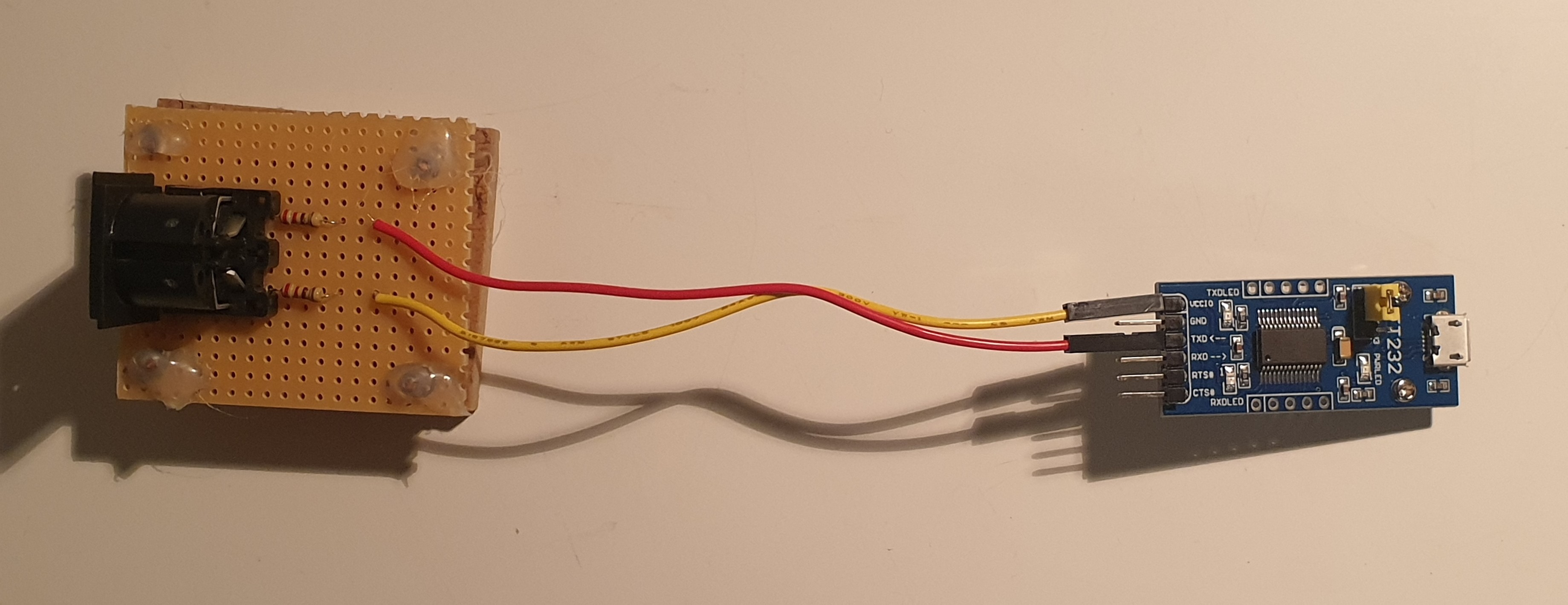
    As an alternative approach to create MIDI output, a USB-UART bridge is used. It can be used without special drivers and supports the MIDI baud rate.

    Figure 1: As an adaption to the MIDI definition, two 220 Ohm resistors are used and the jumper on the device is configured to output 5V signals. 

    With this configuration a total system latency in the range of 20-22ms could be confirmed, similar to the results obtained with the earlier approach.

    the rest of the story

    The following attempts were taken to make the driver for the PCI card based COM port work

    • install ubuntu server 20.04 from scratch and compile drive
    • install ubuntu server 22.04 from scratch and compile driver
    • install ubuntu server 24.04 from scratch and compile driver
    • compile custom kernel for ubuntu 24.04, that has the kernel driver PCI support disabled to avoid the card being blocked by the kernel driver
    • ask on the manufacturer's forum: registration of a new forum user account was not possible

    In conclusion, the automatic updates that are active by default for a ubuntu server system create a risk for the system not to work that is not acceptable if it is planned to be used for live performances. Since the lalelu_drums backend is much less exposed to the internet than a typical server, it seems to be the better choice to disable automatic updates, for example using the following command.

    dpkg-reconfigure --priority=low unattended-upgrades

    Before switching to the USB-UART bridge, a different workaround was implemented to restore the MIDI out function. The PCI card based COM port was used with the kernel driver at a high baud rate (115200) and a raspberry pi pico was used as a baud rate translator. It was nice to see how easy this application could be implemented using micropython:

    from machine import UART, Pin
    
    uartIn = UART(1, baudrate=115200, tx=Pin(4), rx=Pin(5),
                  bits=8, parity=None, stop=1)
    
    uartOut = UART(0, baudrate=31250, tx=Pin(0), rx=Pin(1),
                   bits=8, parity=None, stop=1)
    
    while True:
        c = uartIn.read(1)
        if c:
            uartOut.write(c)

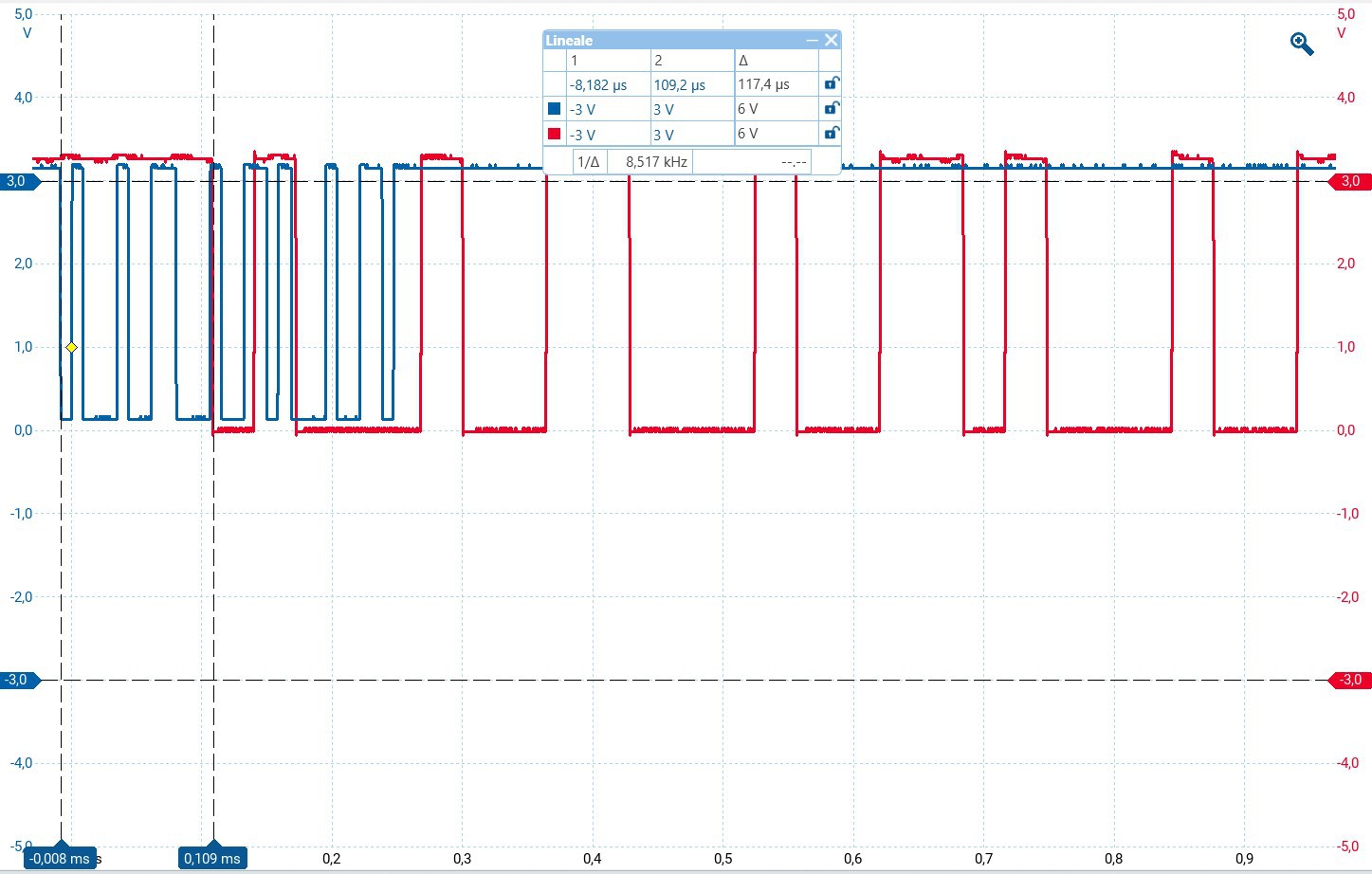
    An oscilloscope measurement shows that the translation introduces as little as 109µs of additional latency, which is negligible for this usecase.

    Figure 2: Input and output of the baud rate translator. Vertical cursors show latency.

    However, the solution with the USB-UART bridge is significantly less complex and also cheaper.

    A final hurdle before reaching the original latency was that the default configuration of the fresh ubuntu server system (22.04) lead to a significant reduction of the CPU frequency compared to its upper limit of 3.9GHz. While the lalel_drums application was running, cpupower frequency-info reported values between 1.39GHz and 3.86GHz To achieve optimal results the following command restores full CPU speed:

    cpupower frequency-set -g performance

    In this case the reported actual frequency was in the range of 3.86GHz to 3.89GHz.

  • Log # 23: No roots

    Lars Friedrich01/09/2026 at 18:38 0 comments

    Due to the low latency of lalelu_drums (around 20ms, see Log #17 for a measurement), it is possible to play along with other musicians. In this log entry, a demonstration is given, in which lalelu_drums is used to play a bass line for a pop song, performed together with a drummer and a singer.

    The pitches of the notes of the bassline are predefined for the selected song (No roots, Alice Merton), but the trigger times are solely generated from the live video stream of the player.

    Thanks go to Andreas for singing and video editing, Bent for drumming and Jonas for camera handling. There is also a full-length video available here.

  • Log #22: Sensor fusion

    Lars Friedrich10/15/2025 at 18:02 0 comments

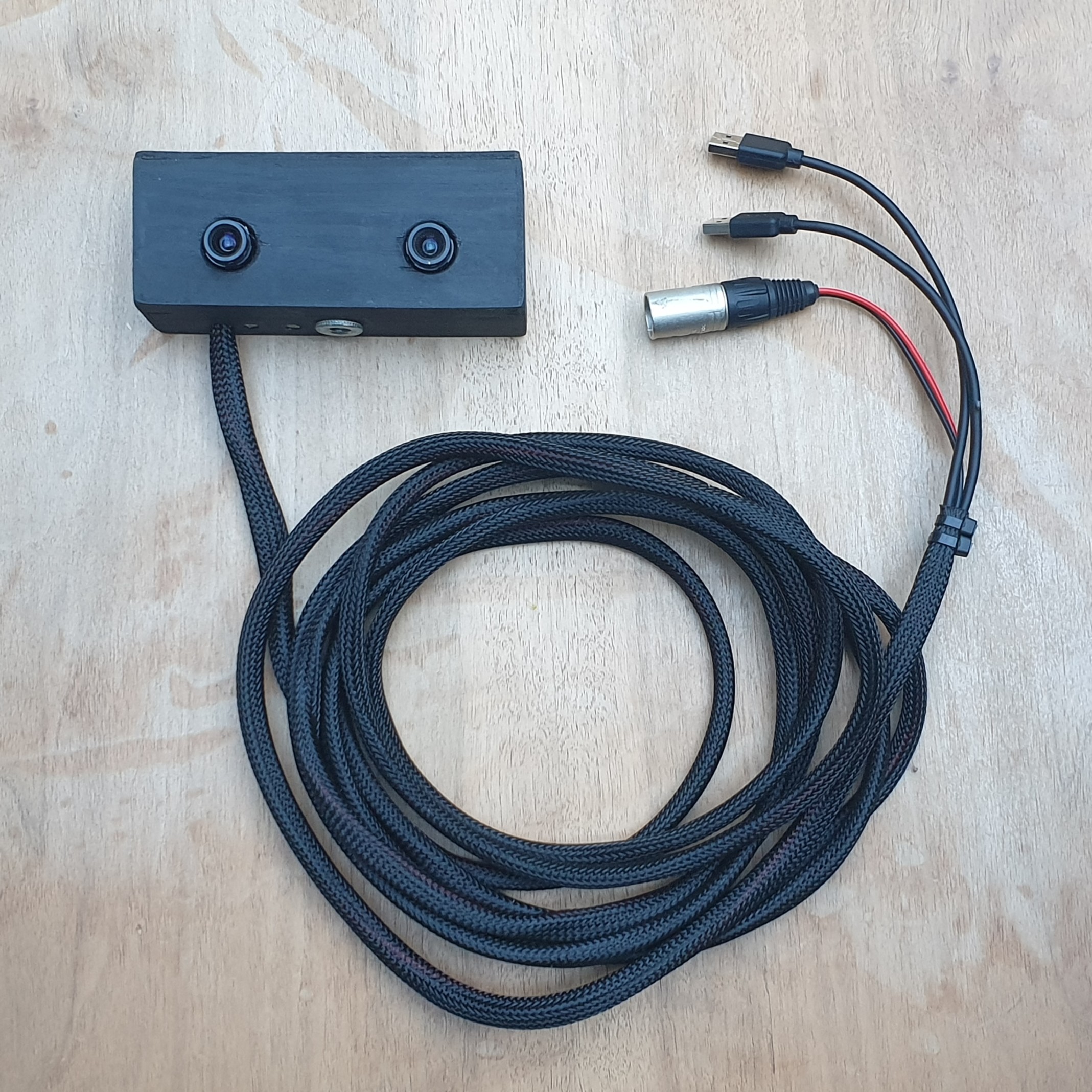
    The side project highrate_longexp is finished, so that there is now a synchronized dual camera available that can be used for lalelu_drums. The benefit of using two cameras is that for a given frame rate (100 Hz) a long exposure time (20 ms) can be realized, reducing the illumination requirements. The two cameras are running at 50 frams per second and are synchronized to acquire frames in a time interleaved fashion.

    The two cameras are mounted side-by-side to minimize the distance of the sensors. Still, there is an offset and a parallax between the viewpoints. Here, I present an algorithm that solves the problem to fuse the two camera streams into a single consistent stream of pose estimations at a rate of 100 Hz. 

    The first step is to run a human pose estimation model on each camera frame regardless of which camera it comes from. Here, blazepose is used, but movenet would also work. These models do not have a memory, so they treat each frame completely for its own. The result is a stream of pose estimations that jump back and forth between the two viewpoints.

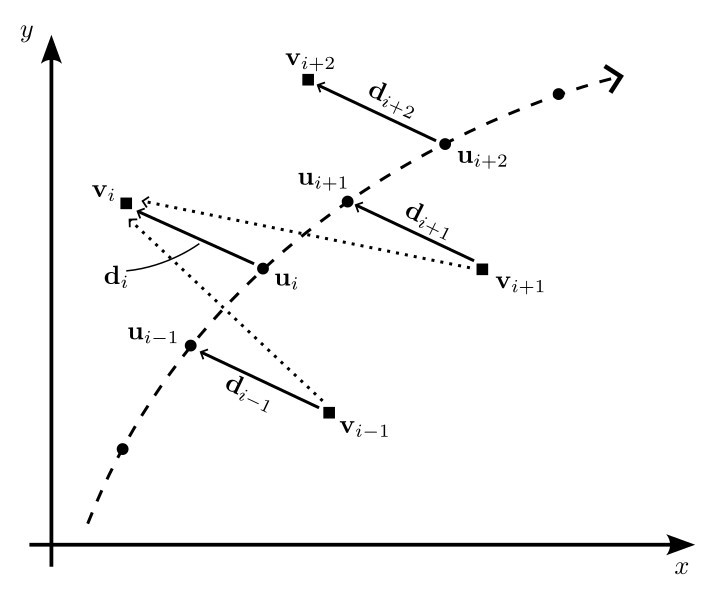
    The situation is shown in figure 1 for a single keypoint. For each time point i there is a true position u of the keypoint, the true positions forming a trajectory (dashed line). The observed positions v can be modeled by adding a displacement vector d, that can be different for each time point. 

    Figure 1: Model

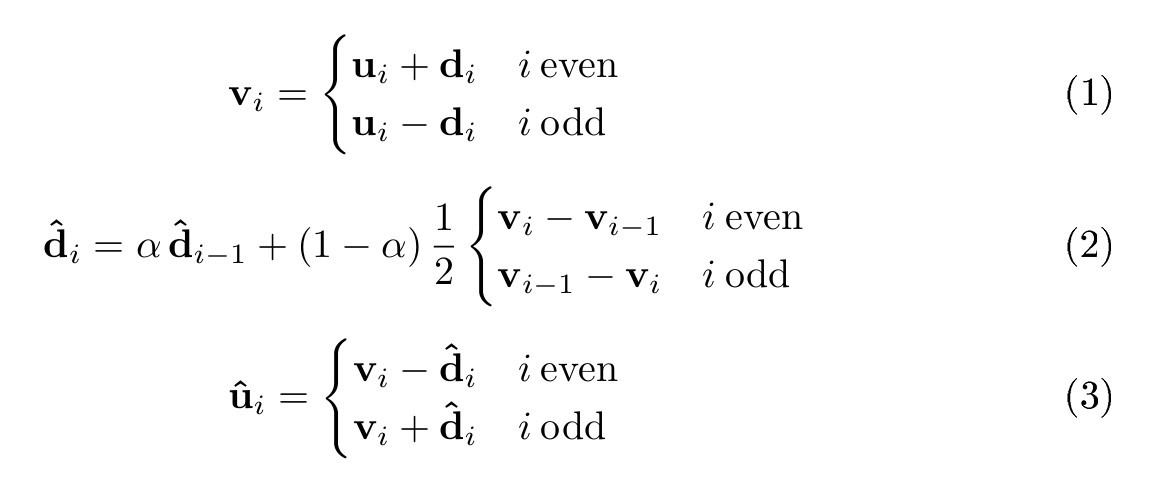
    To allow the sensor fusion, we assume that d varies only slowly. In other words, if the keypoint does not move, we assume a constant d and if the keypoint moves, d may change, but it does not change abruptly. With this assumption, the following update rules can be used to find estimates d_hat for the time varying displacement d and u_hat for the true positions of the keypoint u.

    Figure 2: Formulas

    The central idea is to use a running average of the difference between consecutive observations v (dotted vectors) to find d_hat (formula 2). alpha controls the amount of averaging and was set to 0.8 for the example videos. d_hat can be initialized from a single observation v at the very beginning of the measurement.

    Video 1 shows the behaviour of the sensor fusion algorithm for a single keypoint. The pose estimations for the two different camera viewpoints are drawn in green, forming two separate trajectories. After activating the sensor fusion algorithm, the fused trajectory is drawn in red.

    Video 1: Explanation

    In the video, the original rectangular frames were cropped to a quadratic shape so that they can be used as input to blazepose. By cropping the frames from the two cameras differently, the offset could be further reduced (not shown).

    In conclusion, this sensor fusion strategy relies strongly on the performance of the pose estimation network, that does the heavy lifting of interpreting the different camera viewpoints in a consistent way. It is much easier to fuse the keypoint vectors than the original frames.

    Finally, video 2 shows a demonstration of the use of the highrate_longexp camera together with the described algorithm in the lalelu_drums application for playing a bossa rhythm.

    Video 2: Bossa rhythm

  • Log #21: highrate_longexp

    Lars Friedrich07/01/2025 at 16:10 0 comments

    I created highrate_longexp as a side project where I develop an improved camera solution for lalelu_drums.

  • Log #20: more on RaspberryPi latency

    Lars Friedrich05/06/2025 at 13:27 0 comments

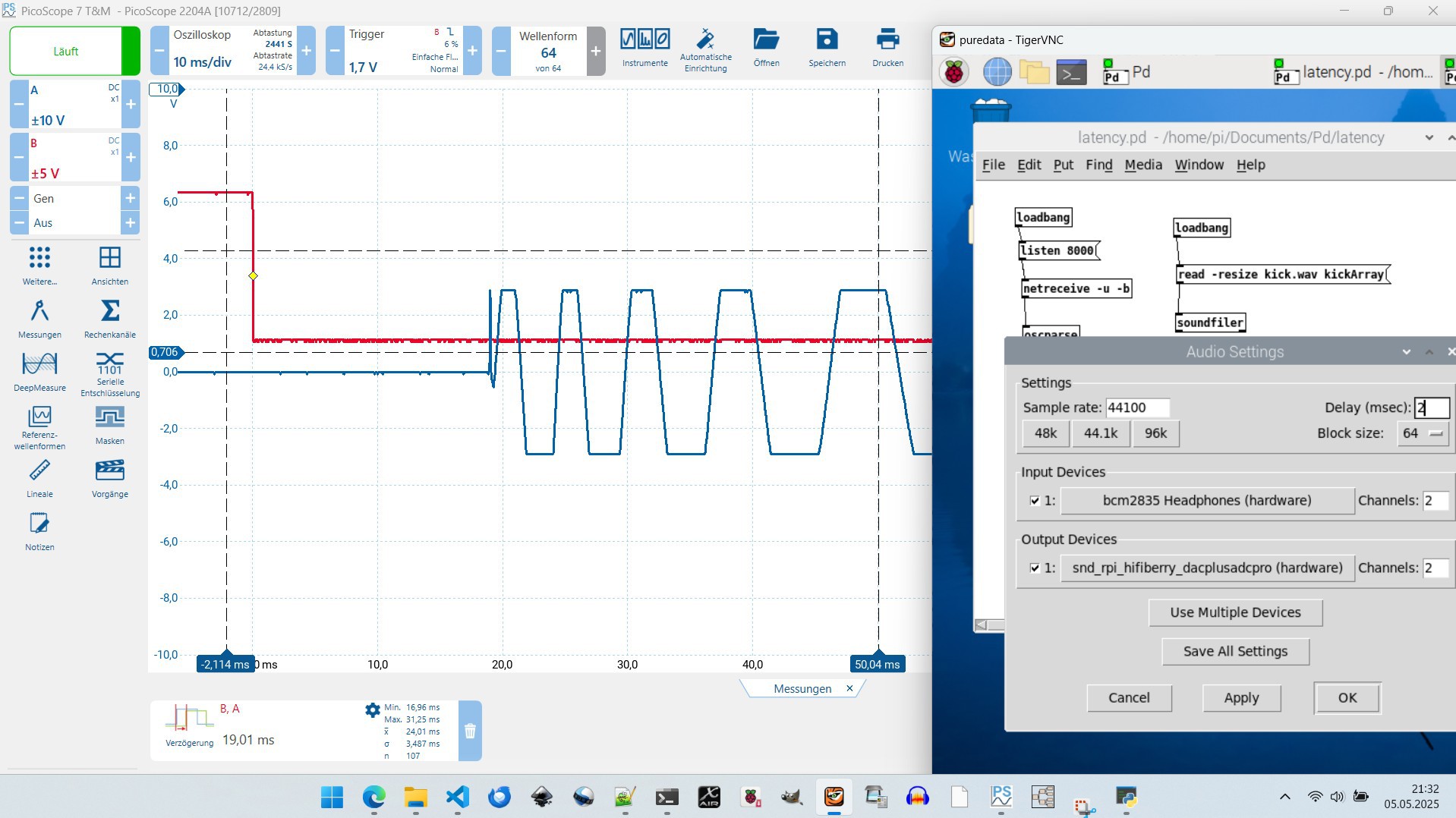
    Following up on my previous latency measurement covering the setup with OSC messages sent to puredata running on a RaspberryPi, I tested the HifiBerry DAC+ ADC pro as an audio output device.

    With the HifiBerry the latency was reduced compared to the earlier result:

    latencyHifBerry DAC+ ADC proMackie Onyx Artist 1.2
    mean 24.01 ms29.61 ms
    standard deviation3.487 ms4.048 ms
    min16.96 ms15.20 ms
    max31.25 ms38.46 ms

    Here is a screenshot of the measurement:

  • Log #19: blazepose

    Lars Friedrich04/24/2025 at 18:37 0 comments

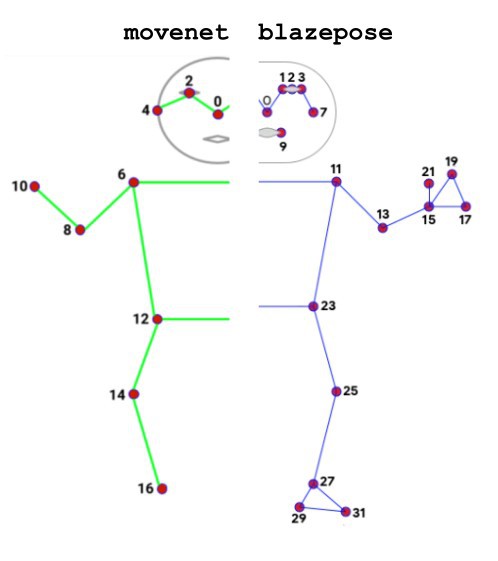
    The movenet pose estimation model, that was used for lalelu_drums so far, has the drawback that it provides keypoints for the wrists and for the ankles but no more details on the pose of the hands or the feet. In contrast, the blazepose pose estimation model provides additional keypoints for the pinky knuckle, index knuckle and thumb knuckle as well as for the heel and the foot.

    While there is a pretrained tensorflow model for movenet available from kaggle, for blazepose there is only a tensorflow.js model. Therefor, blazepose could not be used for lalelu_drums so far, since a tensorflow model is required as input for the TensorRT conversion (see log entry #01).

    Fortunately, I now found a way to convert the blazepose tensorflow.js model to a tensorflow model and compile it for fast inference using TensorRT. The conversion could be done using the tfjs-to-tf converter by Patrick Levin.

    In the following video you can see the keypoints related to the feet, tracked with 100 fps (green dots). An average of the knee, ankle and heel keypoints for each leg is computed and visualized in the puredata patch ('right_y_plot' and 'left_y_plot'). This value is used to create trigger events, that are visualized by bang items in puredata and eventually trigger the rimclick and basedrum sounds that can be heard.

  • Log #18: puredata latency

    Lars Friedrich04/11/2025 at 19:30 1 comment

    In the last log entry, I presented a measurement of the latency of the system for the case of MIDI output and sound generation with a standalone MIDI sound generator device. Since the flexibility and lower cost of a programmable sound generation based on puredata is desirable, I repeated the measurement for this scenario.

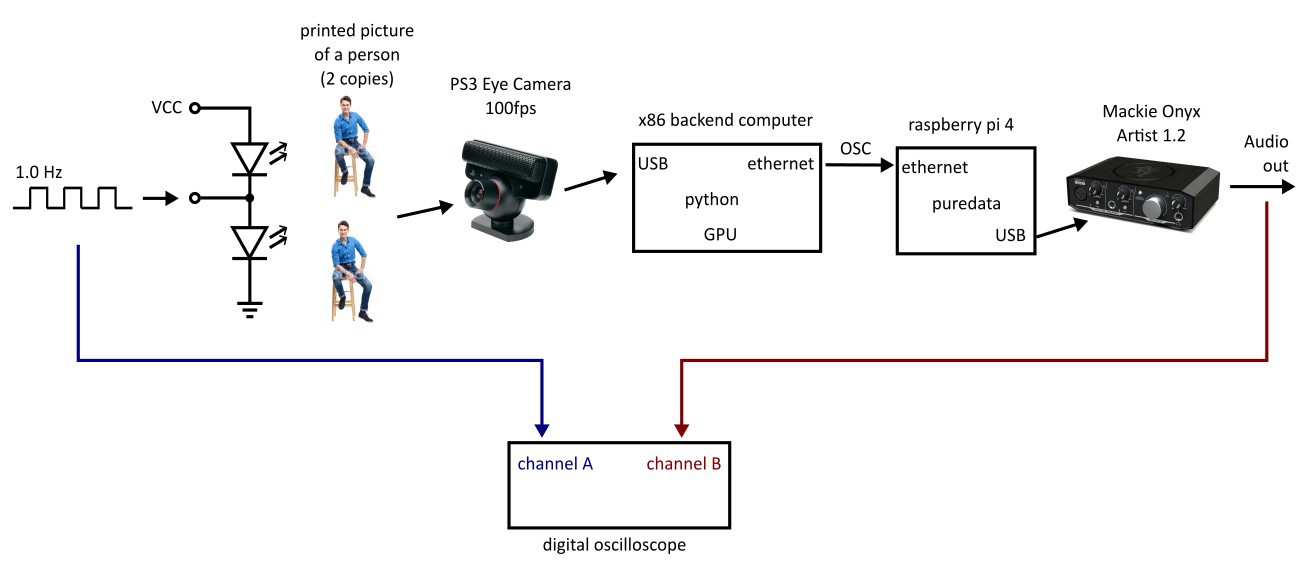
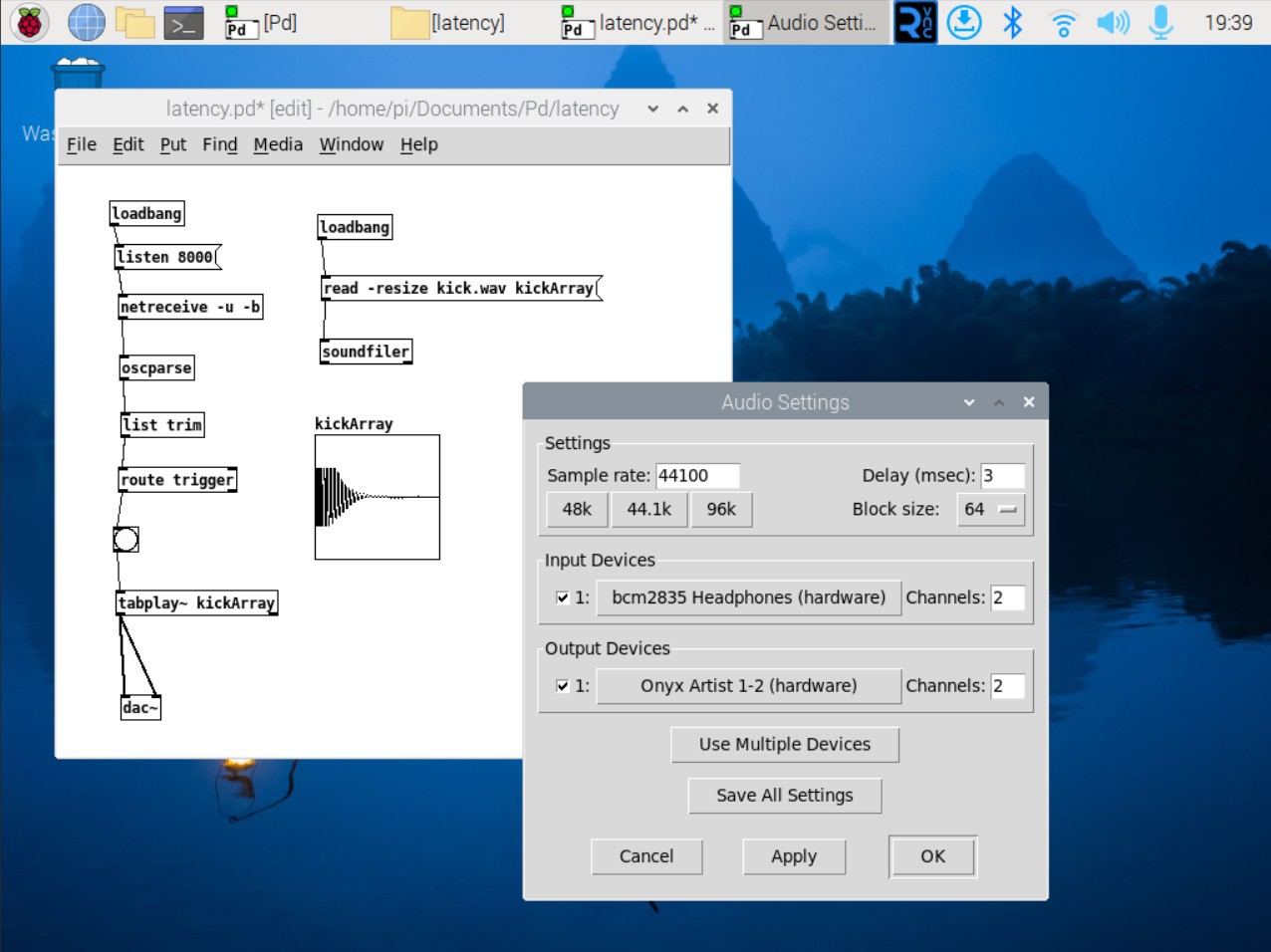
    The setup is basically the same, but the backend is now outputting open sound control (OSC) messages via ethernet instead of MIDI messages via serial port. The OSC messages are received by a puredata instance running on a raspberry pi 4. A Mackie Onyx Artist 1.2 device is used for sound output.

    The puredata patch and the audio settings are shown in the following screenshot. With this audio output device, it was possible to set the 'Delay' to 3ms without disturbances.

    The course of the measurement is shown in the following video. The mean latency is 30ms.

    I also ran the experiment with the raspberry pi onboard audio output device. In this case, I needed to set the 'Delay' parameter to 23ms to avoid disturbances in the audio output. The mean latency was 54ms for this setting.

    I found this page on audio latency for various audio devices. It lists 10.3ms for the Onyx Artist and minimum value of 3.1ms for a HifiBerry based system. So I expect that I could further reduce the latency by switching to a HifiBerry.

  • Log #17: Latency

    Lars Friedrich04/07/2025 at 19:52 0 comments

    In this log entry, I present a measurement of the latency of the lalelu_drums system. The measured latency covers the full pipeline from the optical input to the camera, AI pose estimation with the movenet network, signalling a MIDI message via the serial port of the backend and translating this MIDI message to an audio signal by a Roland JV1080 sound generator.

    The measurement scheme is as follows:
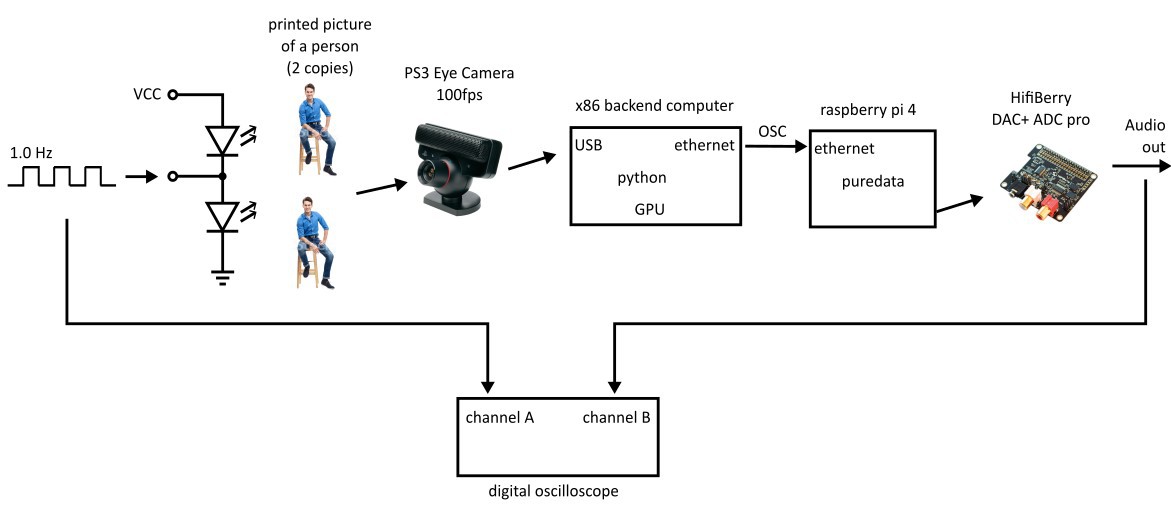
    A 1 Hz square wave signal is used to drive two white LEDs in an alternating fashion. Each LED is used to illuminate a printed picture of a person. The two pictures are presented to the camera of lalelu_drums and the pose estimation system is used to track the coordinate of the nose of the person. The system is programmed to output a MIDI "NOTE ON" message whenever the nose moves from the left half of the camera frame to the right half. The MIDI message is transferred to a sound generator. An oscilloscope is used to determine the delay between the switching of the LEDs and the appearance of the audio signal at the output of the sound generator.

    The video shows the course of the measurement. It can be seen that the average latency is approximately 20ms. The variation in the measured latency of +/-5ms is expected due to the exposure time of the camera of 10ms.

    This measurement does not cover the application of puredata to generate the audio output (see Log #15: puredata). I plan to investigate the latency of the puredata setup in a later log entry.

    Added 2025-06-29: Here is a video of the theater setup:

  • Log #16: Related work (4)

    Lars Friedrich02/21/2025 at 19:49 0 comments

    Today, I found Torin Blankensmith's youtube channel, where he shows connections between MediaPipe's hand tracking solution and the TouchDesigner software that he uses to create sounds and visual displays controlled from hand movements. I think it is very impressive and nice to watch.

    He even created a MediaPipe TouchDesigner plugin, that uses GPU acceleration. So I think it should have pretty low latency.

    Secondly, I would like to reference this youtube short, that I found by coincidence:

    I like it, because it has a similar idea like lalelu_drums: There is not necessarily a new, impressive kind of music involved. The attractive part is the performance that is connected to the creation of music. This video has 56 million views as of today, so it seems I am not the only one who finds this attractive.

  • Log #15: puredata

    Lars Friedrich01/30/2025 at 19:15 1 comment

    So, I linked it up to puredata...

    End of last year, I was pointed to a software called puredata, that can be used to synthesize sounds, play sound files, serve as a music sequencer and so on. In this log entry, I show that the gesture detection backend of lalelu drums can control a puredata patch via open sound control (OSC) messages.

    The screencast shows the desktop of my Windows development PC. The live video on the left is rendered by the frontend running as a python program on the PC. On the right, a VNC remote desktop connection shows the puredata user interface, running on a raspberry pi 4.

    The backend sends two different types of OSC messages to the puredata patch via cable based ethernet. The first type of messages encodes the vertical position of the left wrist of the player. It is used by puredata to control the frequency of a theremin-like sound. The second type of messages encodes triggers created from movements of the right wrist and elbow. The backend uses a 1D convolutional network to create this data, as it was shown in the last log entry. In puredata, these messages trigger a base drum sound.

    Here is the output of htop on the raspi4. It can be seen that there is significant load, but there is still some headroom.

    Thanks go to Matthias Lang, who gave me the link to puredata. The melody in the video is taken from Borodin, Polovtsian Dances. The basedrum sound generation was taken from this video.

View all 24 project logs

Enjoy this project?

Share

Discussions

Similar Projects

Does this project spark your interest?

Become a member to follow this project and never miss any updates