 WJCarpenter
My aim has always been to have the remote Atom Lite units blink yellow when the pump is running and stop blinking when the pump stops. Until now, I've been unable to do that, and I've just been using a simple timer that reflects the worst case value. It takes just slightly over 2 minutes for the NaviCirc cross-over valve to close when the water in my pipes starts out cool, so my timer was 2 minutes and 15 seconds. If the water is already hot, the cross-over valve stays closed and the pump hardly runs at all.
With these new RS485 reports, I still have not found a bit that definitively indicates that the pump is running. Some people have seen such a bit flip in one of the bytes, but they have different Navien units than I have (I think). That bit position does not change for me. There is a bit that I am using as a proxy for that. The bit indicates if hot water is flowing, which I call "Consumption active" in my sensors. There is also a report of the water flow rate. The bit for consumption active is set whenever hot water flows, which means it may or may not be due to the recirculation pump. If hot water is not actually flowing out of any faucet, shower, or appliance, then that bit is an accurate proxy for the pump.
I expect that, most of the time when the remote buttons are pressed, other hot water is not being used. Sometimes that expectation will not be met. If the dishwasher is running or if someone is washing their hands while waiting for the hot water, that consumption bit will not reset when the pump stops. For now, I'll just live with that.
My Home Assistant automation for starting the hot button cycle is pretty much as it was before. I merely substituted my new relay device in place of the prior relay device.
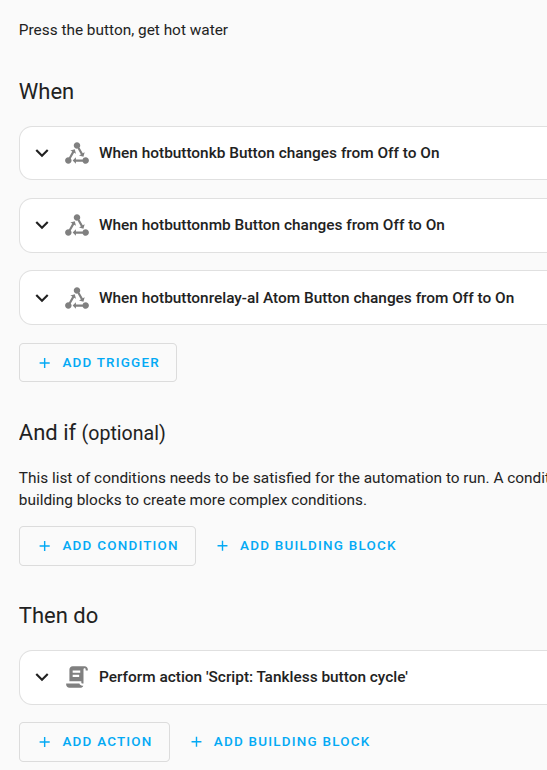
Here's the YAML for that:
alias: Tankless hot button
description: Press the button, get hot water
triggers:
  - entity_id:
      - binary_sensor.hotbuttonkb_button
    from: "off"
    to: "on"
    trigger: state
  - entity_id:
      - binary_sensor.hotbuttonmb_button
    from: "off"
    to: "on"
    trigger: state
  - trigger: state
    entity_id:
      - binary_sensor.hotbuttonrelay_al_atom_button
    from: "off"
    to: "on"
conditions: []
actions:
  - data: {}
    action: script.tankless_button_cycle
mode: parallel
max: 10
The script "tankless_button_cycle", on the other hand, did undergo some changes.
- As I mentioned previously, I made the Atom Lite RGB LED on the relay device give the same feedback as the LEDs on the remote buttons. That's in place of the simple mono LED on the board of the prior relay device.
- Instead of blindly waiting a fixed amount of time, I now wait for the consumption bit to reset. There's still a 2 minute timeout on that waiting. That's to handle the case where hot water is actually being used at the same time. So, worst case, after 2 minutes the LEDs will stop blinking. It's also possible that the recirculation pump will still be pumping at the end of the timeout. I haven't seen that so far, and the 2 minutes is based on actual timing of the plumbing in my house.
- There is a 5 second delay before the wait to watch the consumption bit. That delay serves two purposes, both related to race conditions. The less important reason is that it give me a chance to see the flash of green on the relay device when any of the buttons is pushed. The green is for the 500 ms of the relay simulating the button push. More important is that I might start waiting before the consumption bit has initially turned on. The consumption bit might be set for a very short time (or maybe not at all) if the cross-over valve is already closed because the hot water has already arrived. In that case, with the delay, the LEDs will blink during that 5 second delay and then stop.
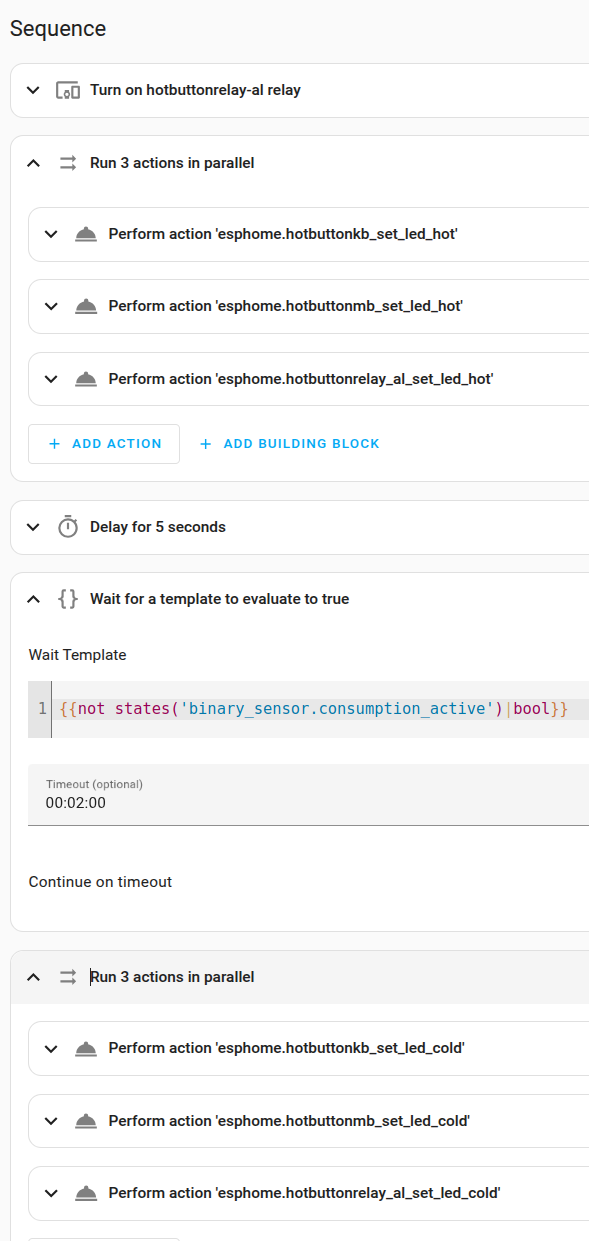
Here is the YAML for that script:
alias: Tankless button cycle
sequence:
  - type: turn_on
    device_id: 7c8657a0b747b7584ec3775223c14045
    entity_id: ea0d9e3eb5631aa2876a1112f6c8c8cc
    domain: switch
  - parallel:
      - data: {}
        action: esphome.hotbuttonkb_set_led_hot
        continue_on_error: true
      - data: {}
        action: esphome.hotbuttonmb_set_led_hot
        continue_on_error: true
      - action: esphome.hotbuttonrelay_al_set_led_hot
        data: {}
        continue_on_error: true
  - delay:
      hours: 0
      minutes: 0
      seconds: 5
      milliseconds: 0
  - wait_template: "{{not states('binary_sensor.consumption_active')|bool}}"
    continue_on_timeout: true
    timeout: "00:02:00"
  - parallel:
      - data: {}
        action: esphome.hotbuttonkb_set_led_cold
        continue_on_error: true
      - data: {}
        action: esphome.hotbuttonmb_set_led_cold
        continue_on_error: true
      - action: esphome.hotbuttonrelay_al_set_led_cold
        data: {}
        continue_on_error: true
mode: restart
icon: mdi:hot-tub
description: ""
Discussions
Become a Hackaday.io Member
Create an account to leave a comment. Already have an account? Log In.