 WJCarpenter
Things have kind of settled down for me on this effort, so I'm cleaning up and finalizing various sensor activity.
- Generally, I'm only reporting things that are actually interesting to observe.
- I'm not too interested in reports of water heater configuration items. For example, there is a bit that indicates whether the built-in display shows values in metric or imperial units. That doesn't affect the raw measurements, which are always in metric. If I wanted to change the built-in display panel to the other measurement system, I'd go to the water heater and do it there instead of via a Home Assistant action.
- I dropped the sensors for the controller and panel version numbers. I'm not sure they were being computed/represented correctly anyhow. In any case, there was nothing interesting to do with those constant values.
- There is a bit indicating if the water heater has power. I don't know how that could ever be reported false. If the water heater did lose power, my ESPHome device would also lose power (it's powered by the RS485 interface).
- There is a bit that some have interpreted as "recirculation is running". I have never observed that bit to be true for my unit. I'm leaving that sensor in place (in case I ever observe it turned on), but I'm changing the name to something more generic.
- Scheduled recirculation is mutually exclusive with Hot Button recirculation. A single bit indicates if a schedule is configured. I reduced the two previous binary sensors to just one. A separate bit indicates if recirculation is possible at all. I assume this means that the unit has the recirculation pump and circuitry. I'm leaving that sensor in place. (I'm not completely sure about this since the Navien has 4 different recirculation modes: always on, intelligent, weekly, and hot button. So, it's most likely that there are 2 bits dedicated to indicating which of those is in force. There is another thing called space heating. I don't know exactly what it is, but I think it's probably independent of those other states. The installation manual says you can't have recirculation and an air handler together.)
- For the sensors that report temperatures, I convert them to Fahrenheit using ESPHome sensor filters. (I also moved the divide-by-2 scaling to the same filters.) That's for my convenience and saves me needing to do it on the Home Assistant side. I also noticed that the inlet temperature value had a lot of jitter, so I added a throttle_average filter of 2 seconds to all of the temperature sensors. The set temperature for the water is a constant that can be changed via the display panel, but I'm leaving it in place as a convenient reminder. I changed the name to target temperature because "set temperature" can easily be confused with a command to set the temperature.
- Likewise, I used an ESPHome filter to convert the liters/minute value to gallons/minute.
- The relationships among kilocalories, BTUs, cubic meters, CCF, and therms for gas are a little more complicated than I knew before. Cubic meters and CCFs (hundreds of cubic feet) are mere physical measurements with only a difference in units. kcal, BTUs, and therms are measures of heat produced by burning the gas. The amount of heat you get out of a quantity of gas depends on the nature of what's actually in the gas. Like many gas companies, mine charges me based on therms even though the gas meter is measuring volume of gas. Each month's bill inlcudes a "BTU factor" for the conversion. That changes from month to month, which I assume depends on where they get the gas supply and their measures of the heat producing capacity of the gas that month(-ish). It's a bit of a bother to involve the monthly BTU factor into these sensor readings, so I'm going to continue tracking CCF for the time being. Here is part of a recent gas bill:
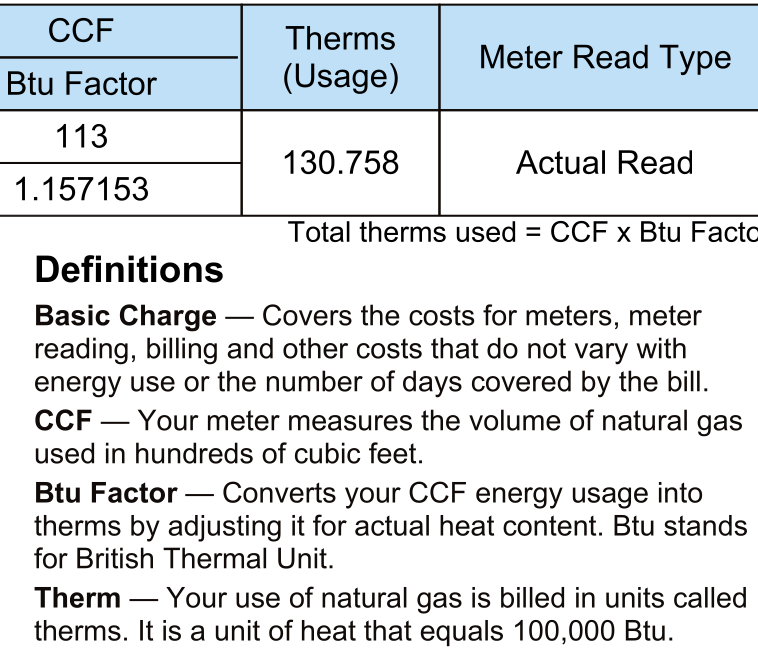
- I'm not sure about the conclusion of the Navien reporting current gas consumption in kcal as opposed to some scaled gas volume measurement, but I'm keeping it that way for now and simply converting to BTUs for my convenience. On the built-in display, there are monthly gas consumption values reported in therms, so maybe it does know about that.
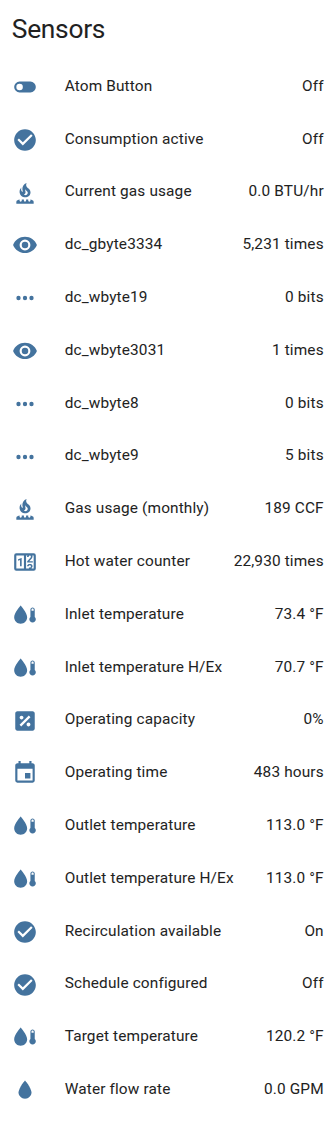
There are a few not-yet-understood values that I am continuing to report so that I can occasionally look at them in Home Assistant history to try to get clues about what they are.
- dc_wbyte19: Water byte 19. I suspect that this should be combined with water byte 18 in the typical lo/hi fashion to allow for larger water flow rates. In a home setting, you wouldn't see anything as large as 25.5 liters per minute, but in a commercial setting with multiple Navien units you could easily get up far enough to need that additional byte.
- dc_wbyte3031: Water bytes 30 and 31 are thought to be some kind of counter. For me, the combined value in 1.
- dc_gbyte3334: Gas bytes 33 and 34 are thought to be some kind of counter. For me, the combined value was 5220 and recently changed to 5231.
- dc_wbyte8: Water byte 8 is called "flow state" in some of the reverse engineering work. Things I'm seeing there don't agree with what others are seeing. Though I am picking out particular bits for binary sensors, I'm also keeping the overall byte value for exploratory purposes.
- dc_wbyte9: Water byte 9 is called "power state" in some of the reverse engineering work. Mine is always a constant value of 5.
Here is my current list of the sensors in Home Assistant:
And here is the current YAML configuration:
# https://hackaday.io/project/202744-calling-for-hot-water-the-recall
# Many details of the Navien RS485 packets from this thread:
# https://community.home-assistant.io/t/navien-esp32-navilink-interface/720567

substitutions:
  node_name: hotbuttonrelay-al
  RELAY:     'GPIO26'
  LED:       'GPIO27'
  BUTTON:    'GPIO39'
  UART_TX:   'GPIO19'
  UART_RX:   'GPIO22'
  log_level: 'INFO'
  # used in therm calculation
  BTU_FACTOR: '1.155563'

esphome:
  name: ${node_name}
  on_boot:
    then:
      # delay to allow other boot time stuff to settle down
      - delay: 5s
      - script.execute: set_led_cold

esp32:
  board: m5stack-atom
  framework:
    type: arduino


wifi:
  ssid:      !secret wifi_ssid
  id:        !secret wifi_ssid
  password:  !secret wifi_password
  power_save_mode: high
  fast_connect: on
  manual_ip:
    static_ip: !secret hotbuttonrelay-al_ip
    gateway:   !secret wifi_gateway
    subnet:    !secret wifi_subnet
    dns1:      !secret wifi_dns1
    dns2:      !secret wifi_dns2

logger:
   level: ${log_level}

globals:
  # We use these so that we don't have to share the UART receive
  # buffer among scripts.
  - id: water_packet_bytes
    type: std::vector<std::uint8_t>
  - id: gas_packet_bytes
    type: std::vector<std::uint8_t>

api:
  encryption:
    key: !secret hotbuttonrelay-al_apikey
  reboot_timeout: 60min
  services:
    - service: set_led_hot
      then:
        - logger.log:
            tag: 'hotbutton'
            level: INFO
            format: "service: set_led_hot"
        - script.execute: set_led_hot
    - service: set_led_cold
      then:
        - logger.log:
            tag: 'hotbutton'
            level: INFO
            format: "service: set_led_cold"
        - script.execute: set_led_cold
    - service: set_led_off
      then:
        - logger.log:
            tag: 'hotbutton'
            level: INFO
            format: "service: set_led_off"
        - script.execute: set_led_off

ota:
  platform: esphome
  password: !secret ota_password

switch:
  - platform: restart
    name: "${node_name} Reboot"

  - platform: gpio
    id: i_relay
    name: '${node_name} relay'
    pin: '${RELAY}'
    restore_mode: ALWAYS_OFF
    icon: mdi:hot-tub
    on_turn_on:
      - logger.log: "RELAY on"
      - light.turn_on:
          id: bright_light
          red: 0%
          green: 100%
          blue: 0%
      - delay: 500ms
      - switch.turn_off: i_relay
      - logger.log: "RELAY off"
      - light.turn_off:
          id: bright_light

light:
  - platform: fastled_clockless
    id: bright_light
    name: ${node_name} LED
    chipset: SK6812
    pin: '${LED}'
    num_leds: 1
    rgb_order: GRB # required
    default_transition_length: 0s
    icon: mdi:led-on
    effects:
      - pulse:
          name: fast_pulse
          transition_length: 0.25s
          update_interval: 0.25s
          min_brightness: 20%
          max_brightness: 99%

binary_sensor:
  # Local test button. This goes through the relay logic,
  # so it's not an analog press of the water heater button.
  - platform: gpio
    name: "${node_name} Atom Button"
    id: i_button
    icon: mdi:toggle-switch-off
    pin:
      number: '${BUTTON}'
      inverted: true
      mode:
        input: true
    filters:
      - delayed_on: 10ms
      - delayed_off: 10ms

  # real sensors after this
  - platform: template
    id: dc_consumption_active
    name: "Consumption active"
    icon: mdi:check-circle

  - platform: template
    id: dc_schedule_configured
    name: "Schedule configured"
    icon: mdi:check-circle

  - platform: template
    id: dc_recirculation_available
    name: "Recirculation available"
    icon: mdi:check-circle

sensor:
   - platform: template
     id: dc_set_temp
     name: "Target temperature"
     icon: mdi:water-thermometer
     filters:
       - lambda: return (x/2.0) * (9.0/5.0) + 32.0;
       - throttle_average: 2s
     unit_of_measurement: "°F"
     accuracy_decimals: 1

   - platform: template
     id: dc_inlet_temp
     name: "Inlet temperature"
     icon: mdi:water-thermometer
     filters:
       - lambda: return (x/2.0) * (9.0/5.0) + 32.0;
       - throttle_average: 2s
     unit_of_measurement: "°F"
     accuracy_decimals: 1

   - platform: template
     id: dc_outlet_temp
     name: "Outlet temperature"
     icon: mdi:water-thermometer
     filters:
       - lambda: return (x/2.0) * (9.0/5.0) + 32.0;
       - throttle_average: 2s
     unit_of_measurement: "°F"
     accuracy_decimals: 1

   - platform: template
     id: dc_inlet_temp_ex
     name: "Inlet temperature H/Ex"
     icon: mdi:water-thermometer
     filters:
       - lambda: return (x/2.0) * (9.0/5.0) + 32.0;
       - throttle_average: 2s
     unit_of_measurement: "°F"
     accuracy_decimals: 1

   - platform: template
     id: dc_outlet_temp_ex
     name: "Outlet temperature H/Ex"
     icon: mdi:water-thermometer
     filters:
       - lambda: return (x/2.0) * (9.0/5.0) + 32.0;
       - throttle_average: 2s
     unit_of_measurement: "°F"
     accuracy_decimals: 1

   - platform: template
     id: dc_operating_capacity
     name: "Operating capacity"
     icon: mdi:percent-box
     filters:
       - multiply: 0.5  # for scaling
     unit_of_measurement: '%'
     accuracy_decimals: 0

   - platform: template
     id: dc_flow_lpm
     name: "Water flow rate"
     icon: mdi:water
     # convert from liters to gallons (also divide by 10 for scaling)
     filters:
       - multiply: 0.0264172
     unit_of_measurement: GPM
     accuracy_decimals: 1

   - platform: template
     id: dc_accumulated_gas_usage
     name: "Gas usage (monthly)"
     icon: mdi:gas-burner
     # convert from cubic meters to CCF (also divide by 10 for scaling)
     filters:
       - multiply: 0.0353107345
     unit_of_measurement: 'CCF'
     accuracy_decimals: 0

   - platform: template
     id: dc_current_gas_usage
     name: "Current gas usage"
     icon: mdi:gas-burner
     # convert from kcal to BTU
     filters:
       - multiply: 3.965667
     unit_of_measurement: 'BTU/hr'
     accuracy_decimals: 1

   - platform: template
     id: dc_total_operating_time
     name: "Operating time"
     icon: mdi:calendar
     unit_of_measurement: hours
     accuracy_decimals: 0

   - platform: template
     id: dc_accumulated_domestic_usage_cnt
     name: "Hot water counter"
     icon: mdi:counter
     filters:
       - multiply: 10
     unit_of_measurement: times
     accuracy_decimals: 0

   - platform: template
     id: dc_wbyte8
     name: "dc_wbyte8"
     icon: mdi:dots-horizontal
     unit_of_measurement: 'bits'
     accuracy_decimals: 0

   - platform: template
     id: dc_wbyte9
     name: "dc_wbyte9"
     icon: mdi:dots-horizontal
     unit_of_measurement: 'bits'
     accuracy_decimals: 0

   - platform: template
     id: dc_wbyte19
     name: "dc_wbyte19"
     icon: mdi:dots-horizontal
     unit_of_measurement: 'bits'
     accuracy_decimals: 0

   - platform: template
     id: dc_wbyte3031
     name: dc_wbyte3031
     unit_of_measurement: times
     accuracy_decimals: 0

   - platform: template
     id: dc_gbyte3334
     name: dc_gbyte3334
     unit_of_measurement: times
     accuracy_decimals: 0

uart:
  id: uart_bus
  tx_pin: ${UART_TX}
  rx_pin: ${UART_RX}
  baud_rate: 19200
  data_bits: 8
  stop_bits: 1
  parity: NONE
  debug:
    direction: BOTH
    dummy_receiver: True
    after:
      delimiter: "\n"
    sequence:
      - lambda: |-
          UARTDebug::log_hex(direction, bytes, ' ');
          if (
              bytes[0] == 247
           && bytes[1] == 5
           && bytes[2] == 80
           && bytes[3] == 80
           && bytes[4] == 144
           && bytes[5] == 34) {
             id(water_packet_bytes) = bytes;
             id(decode_water_packet)->execute();
          }
          else if (
              bytes[0] == 247
           && bytes[1] == 5
           && bytes[2] == 80
           && bytes[3] == 15
           && bytes[4] == 144
           && bytes[5] == 42) {
             id(gas_packet_bytes) = bytes;
             id(decode_gas_packet)->execute();
          } else {
            // want to log these even if DEBUG is not turned on
            ESP_LOGI("rs485", "Navien OTHER packet, type %d-%d-%d, length %d", bytes[2], bytes[3], bytes[4], bytes[5]);
          }

script:
  - id: set_led_hot
    then:
      - logger.log: "set_led_hot"
      - delay: 600ms  # give the relay blink a chance to show
      - light.turn_on:
          id: bright_light
          red: 100%
          green: 60%
          blue: 0%
          effect: fast_pulse

  - id: set_led_cold
    then:
      - logger.log: "set_led_cold"
      - light.turn_on:
          id: bright_light
          color_brightness: 20%
          red: 0%
          green: 0%
          blue: 100%
          effect: none

  - id: set_led_off
    then:
      - logger.log: "set_led_off"
      - light.turn_on:
          id: bright_light
          color_brightness: 0%
          red: 0%
          green: 0%
          blue: 0%
          effect: none

  - id: decode_water_packet
    mode: parallel
    max_runs: 1
    then:
      - logger.log: "Navien WATER packet ^^^^"
      - lambda: |-

          std::vector<uint8_t>& bytes = id(water_packet_bytes);

          byte w_byte8 = bytes[8];
          byte w_byte9 = bytes[9];
          byte w_set_temp = bytes[11];
          byte w_outlet_temp = bytes[12];
          byte w_inlet_temp = bytes[13];
          byte w_system_status = bytes[24];
          byte w_operating_capacity = bytes[17];
          byte w_water_flow = bytes[18];
          // could byte 19 be a high byte that pairs with low byte 18?
          byte w_byte19 = bytes[19];
          byte w_recirculation_enabled = bytes[33];
          byte w_byte3031_lo = bytes[30];
          byte w_byte3031_hi = bytes[31];
          uint32_t w_byte3031 = (w_byte3031_hi << 8 | w_byte3031_lo);

          bool consumption_active = (w_byte8 & 0x20);
          float set_temp = w_set_temp;
          float outlet_temp = w_outlet_temp;
          float inlet_temp = w_inlet_temp;
          bool schedule_configured = (w_system_status & 0x2) ? true : false;
          float operating_capacity = w_operating_capacity;  // 0.5 increments
          float flow_lpm = w_water_flow;
          bool recirculation_available = (w_recirculation_enabled & 0x2) ? true : false;

          id(dc_wbyte8).publish_state(w_byte8);
          id(dc_consumption_active).publish_state(consumption_active);
          id(dc_set_temp).publish_state(set_temp);
          id(dc_outlet_temp).publish_state(outlet_temp);
          id(dc_inlet_temp).publish_state(inlet_temp);
          id(dc_schedule_configured).publish_state(schedule_configured);
          id(dc_operating_capacity).publish_state(operating_capacity);
          id(dc_flow_lpm).publish_state(flow_lpm);
          id(dc_recirculation_available).publish_state(recirculation_available);
          id(dc_wbyte9).publish_state(w_byte9);
          id(dc_wbyte19).publish_state(w_byte19);
          id(dc_wbyte3031).publish_state(w_byte3031);

  - id: decode_gas_packet
    mode: parallel
    max_runs: 1
    then:
      #- logger.log: "Navien GAS packet ^^^^"
      - lambda: |-
          std::vector<uint8_t>& bytes = id(gas_packet_bytes);

          byte g_set_temp = bytes[14];
          byte g_outlet_temp = bytes[15];
          byte g_inlet_temp = bytes[16];
          byte g_cumulative_gas_lo = bytes[24];
          byte g_cumulative_gas_hi = bytes[25];
          byte g_current_gas_lo = bytes[22];
          byte g_current_gas_hi = bytes[23];
          byte g_total_operating_time_lo = bytes[36];
          byte g_total_operating_time_hi = bytes[37];
          byte g_cumulative_domestic_usage_cnt_lo = bytes[30];
          byte g_cumulative_domestic_usage_cnt_hi = bytes[31];
          byte g_byte3334_lo = bytes[33];
          byte g_byte3334_hi = bytes[34];
          uint32_t g_byte3334 = (g_byte3334_hi << 8 | g_byte3334_lo);

          float set_temp = g_set_temp;
          float outlet_temp = g_outlet_temp;
          float inlet_temp = g_inlet_temp;

          uint32_t raw_gas = (g_cumulative_gas_hi << 8 | g_cumulative_gas_lo);
          float accumulated_gas_usage = raw_gas;
          float current_gas_usage = g_current_gas_hi << 8 | g_current_gas_lo;
          uint32_t raw_time = (g_total_operating_time_hi << 8 | g_total_operating_time_lo);
          uint32_t total_operating_time = raw_time;
          uint32_t raw_usage = (g_cumulative_domestic_usage_cnt_hi << 8 | g_cumulative_domestic_usage_cnt_lo);
          uint32_t accumulated_domestic_usage_cnt = raw_usage;

          id(dc_set_temp).publish_state(set_temp);
          id(dc_outlet_temp_ex).publish_state(outlet_temp);
          id(dc_inlet_temp_ex).publish_state(inlet_temp);
          id(dc_accumulated_gas_usage).publish_state(accumulated_gas_usage);
          id(dc_current_gas_usage).publish_state(current_gas_usage);
          id(dc_total_operating_time).publish_state(total_operating_time);
          id(dc_accumulated_domestic_usage_cnt).publish_state(accumulated_domestic_usage_cnt);
          id(dc_gbyte3334).publish_state(g_byte3334);
Discussions
Become a Hackaday.io Member
Create an account to leave a comment. Already have an account? Log In.