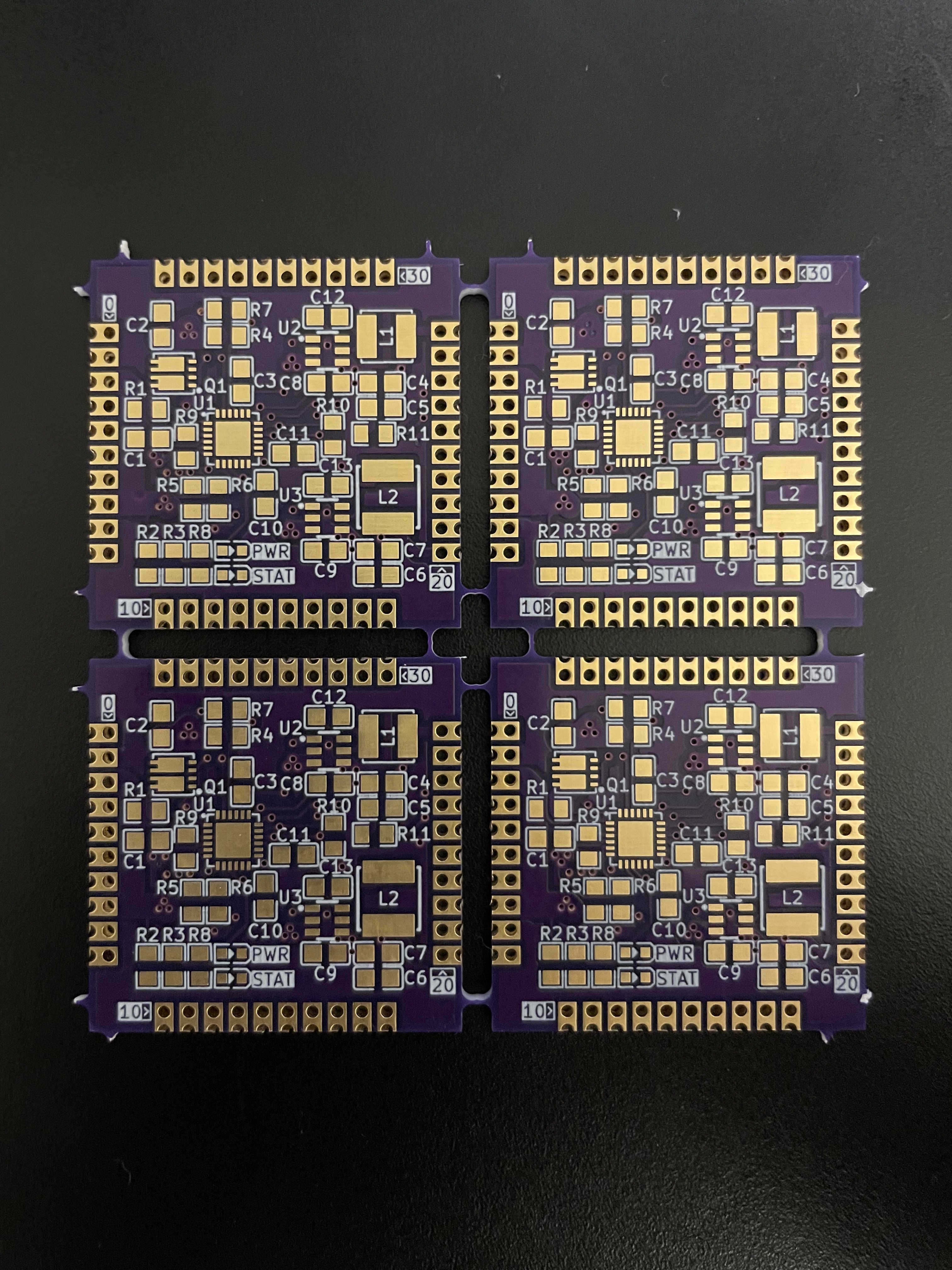
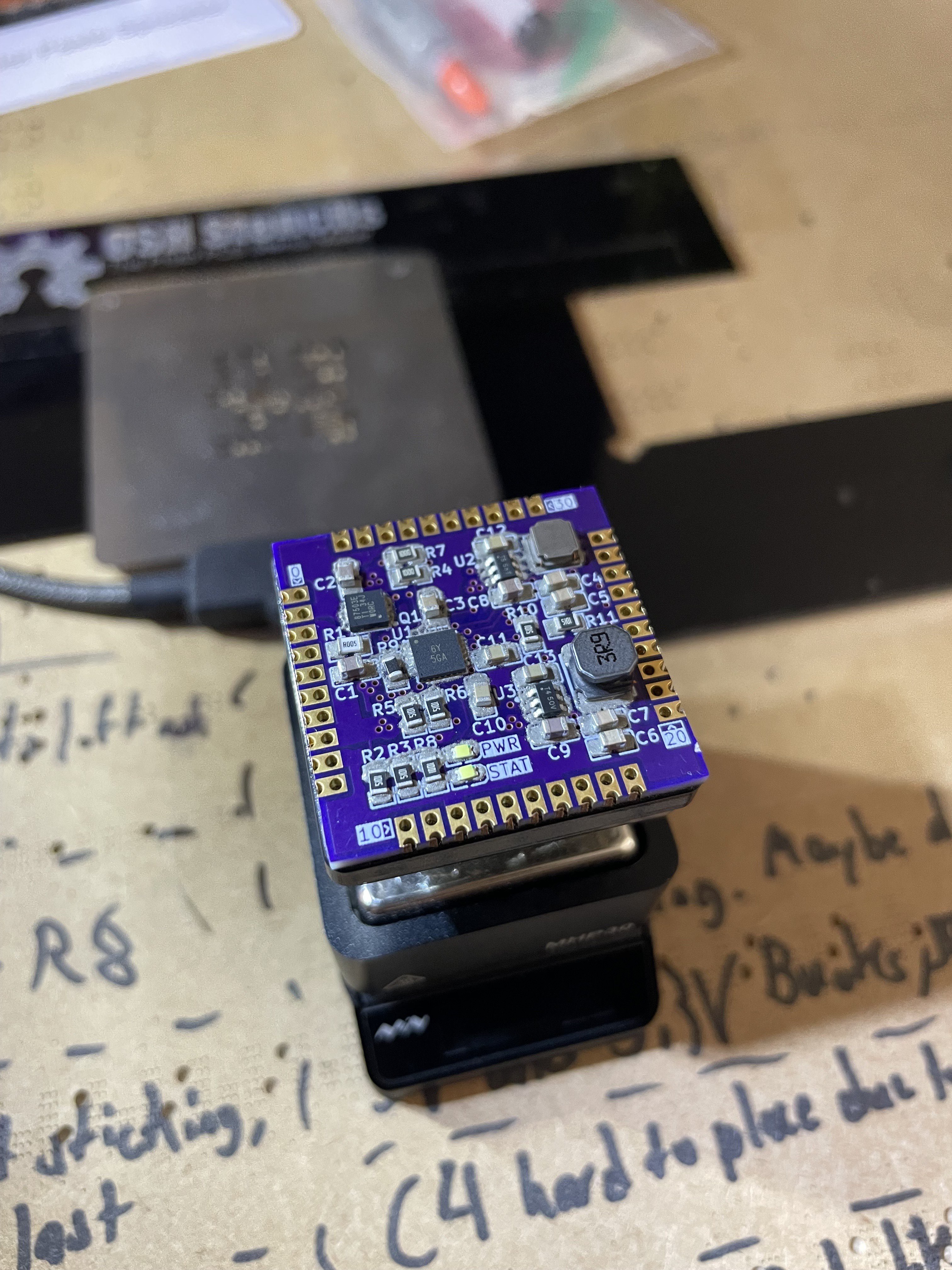
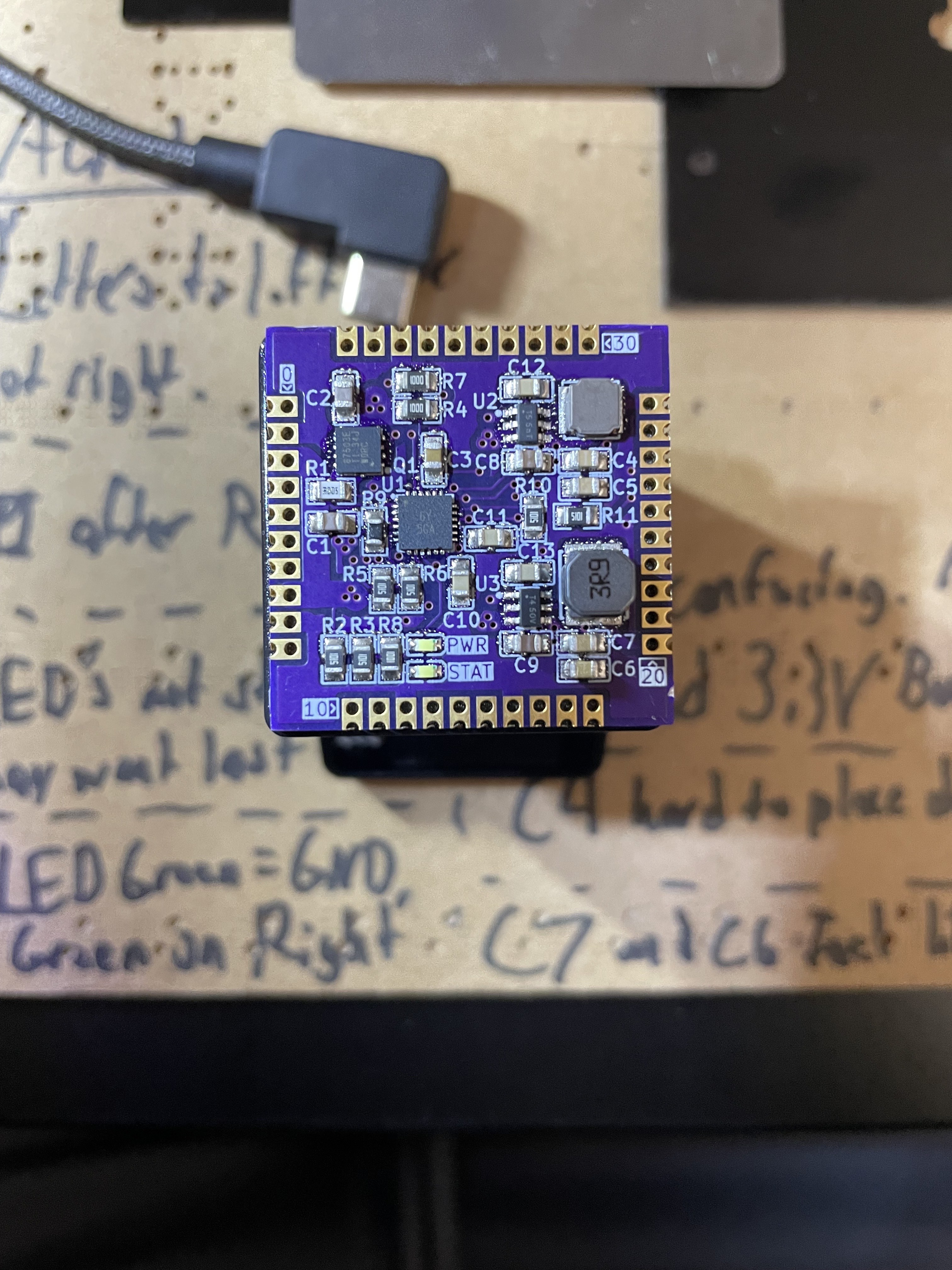
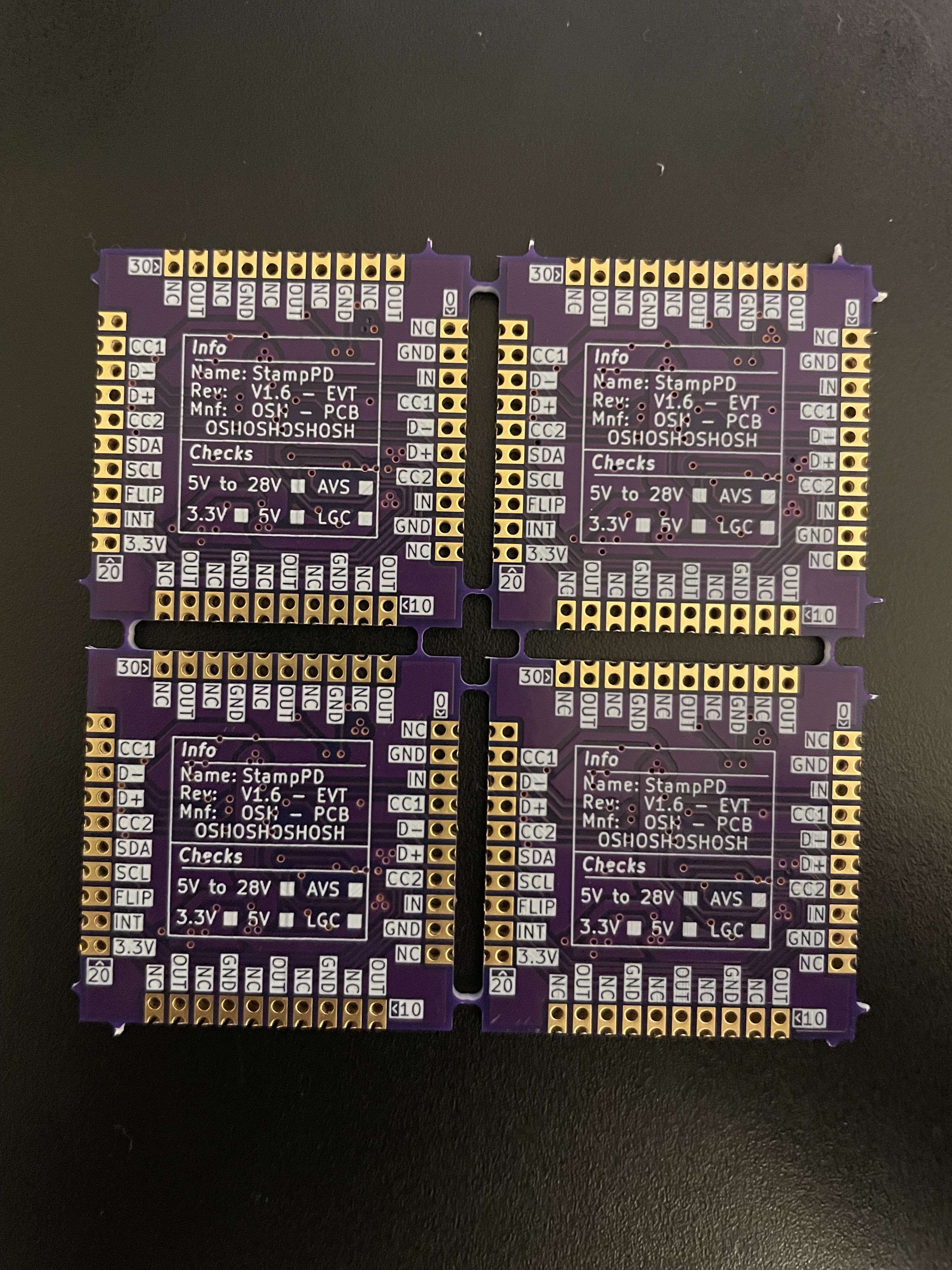
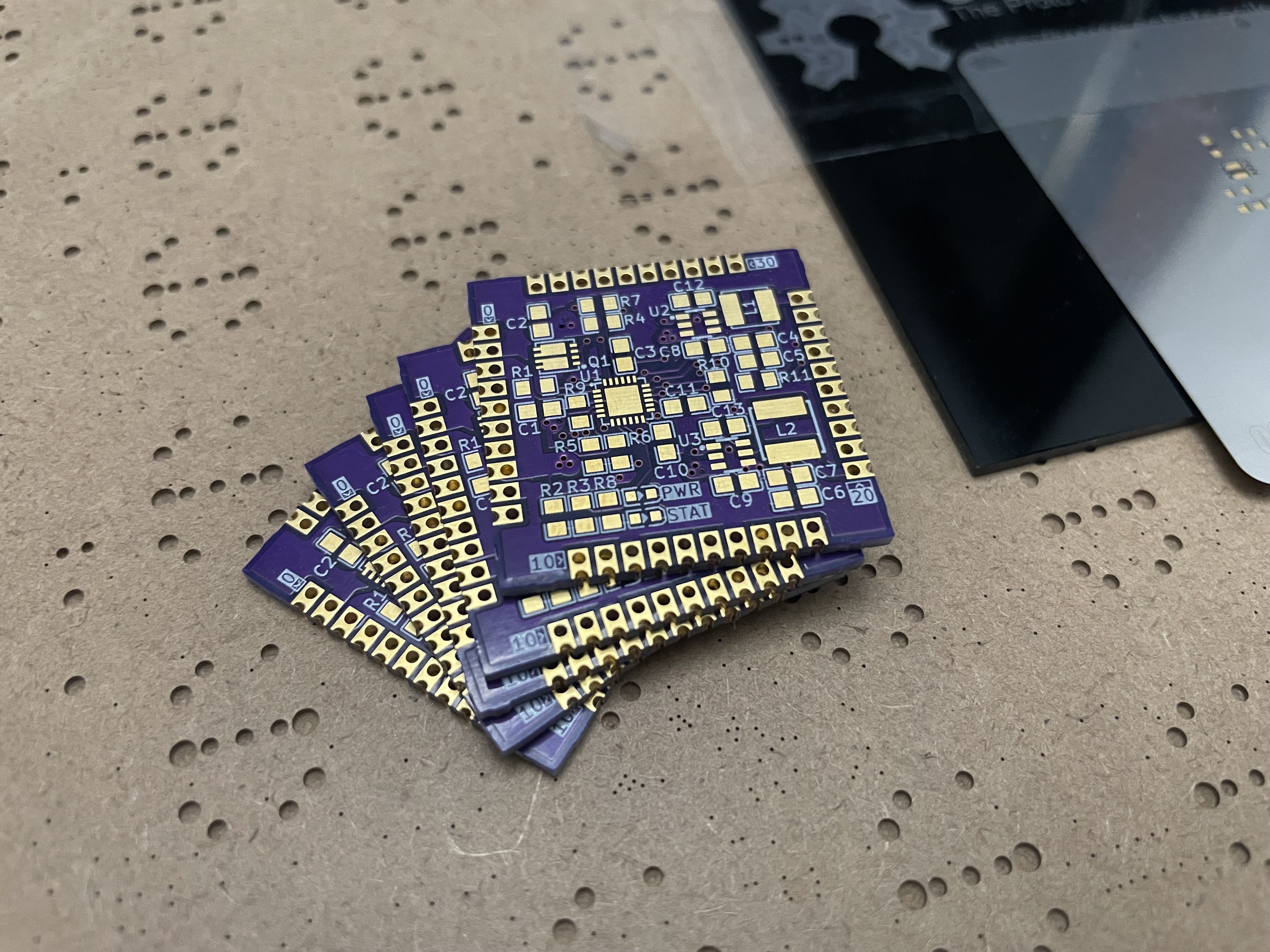
A PCB stamp to add 140W Power Delivery 3.1 (PD3.1) to any I2C capable microcontroller!
To make the experience fit your profile, pick a username and tell us what interests you.
We found and based on your interests.
Hi all,
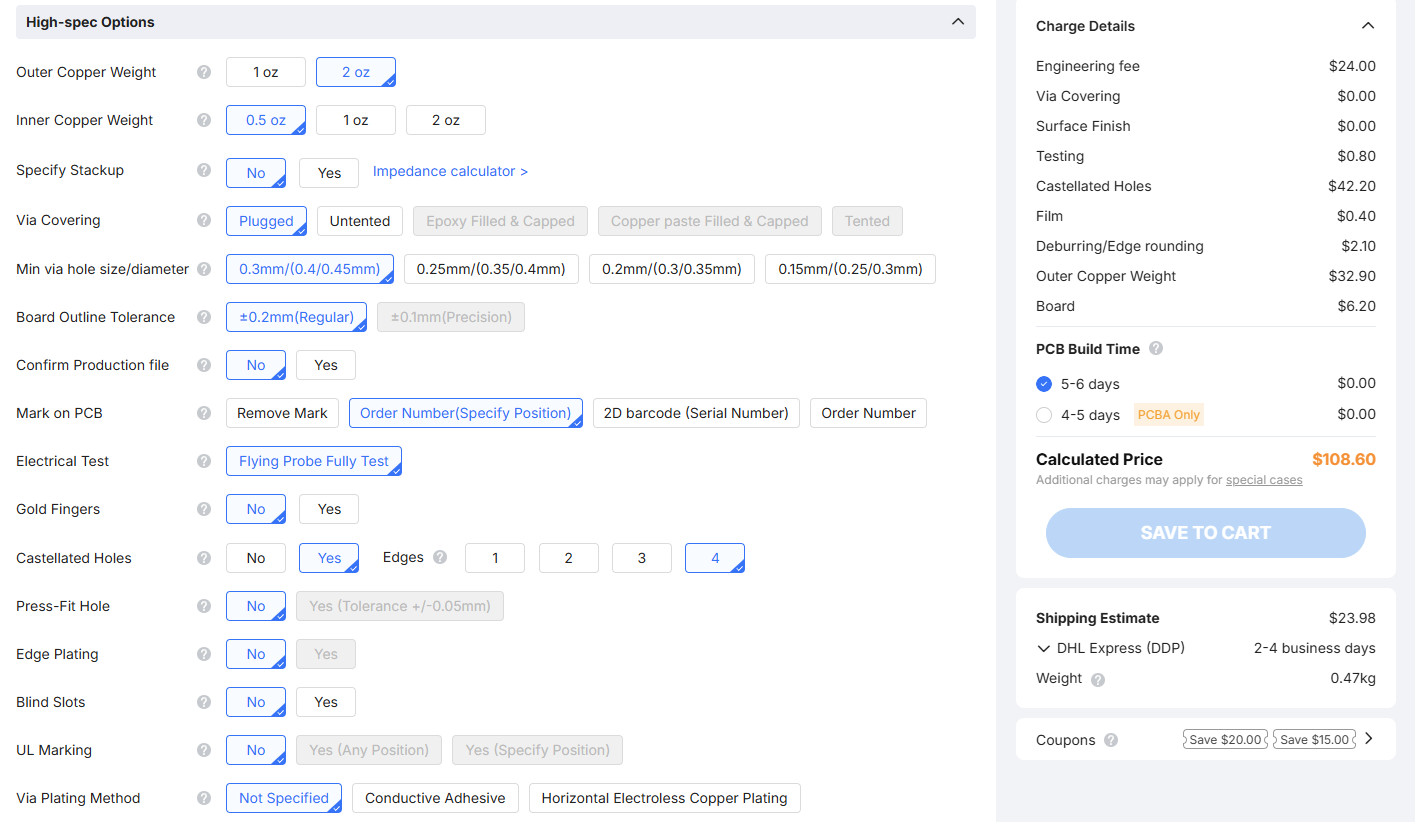
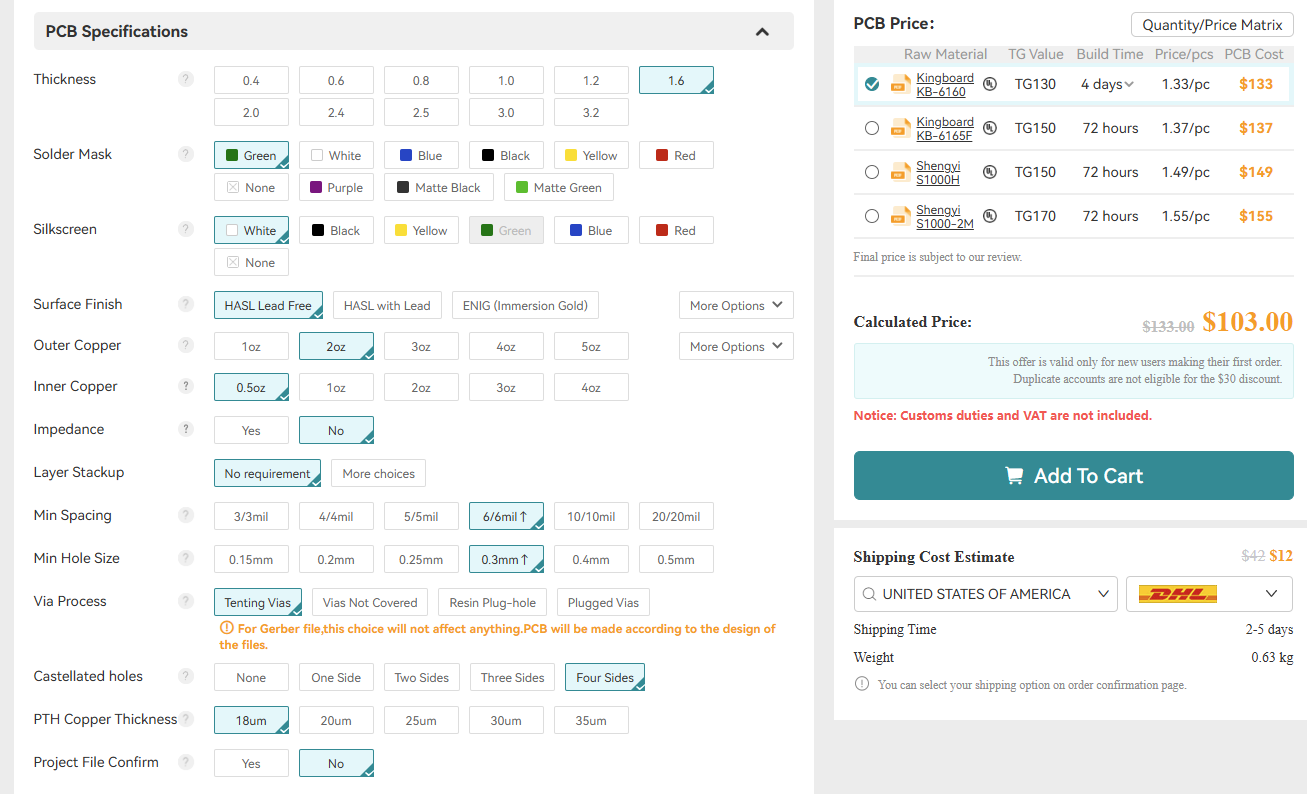
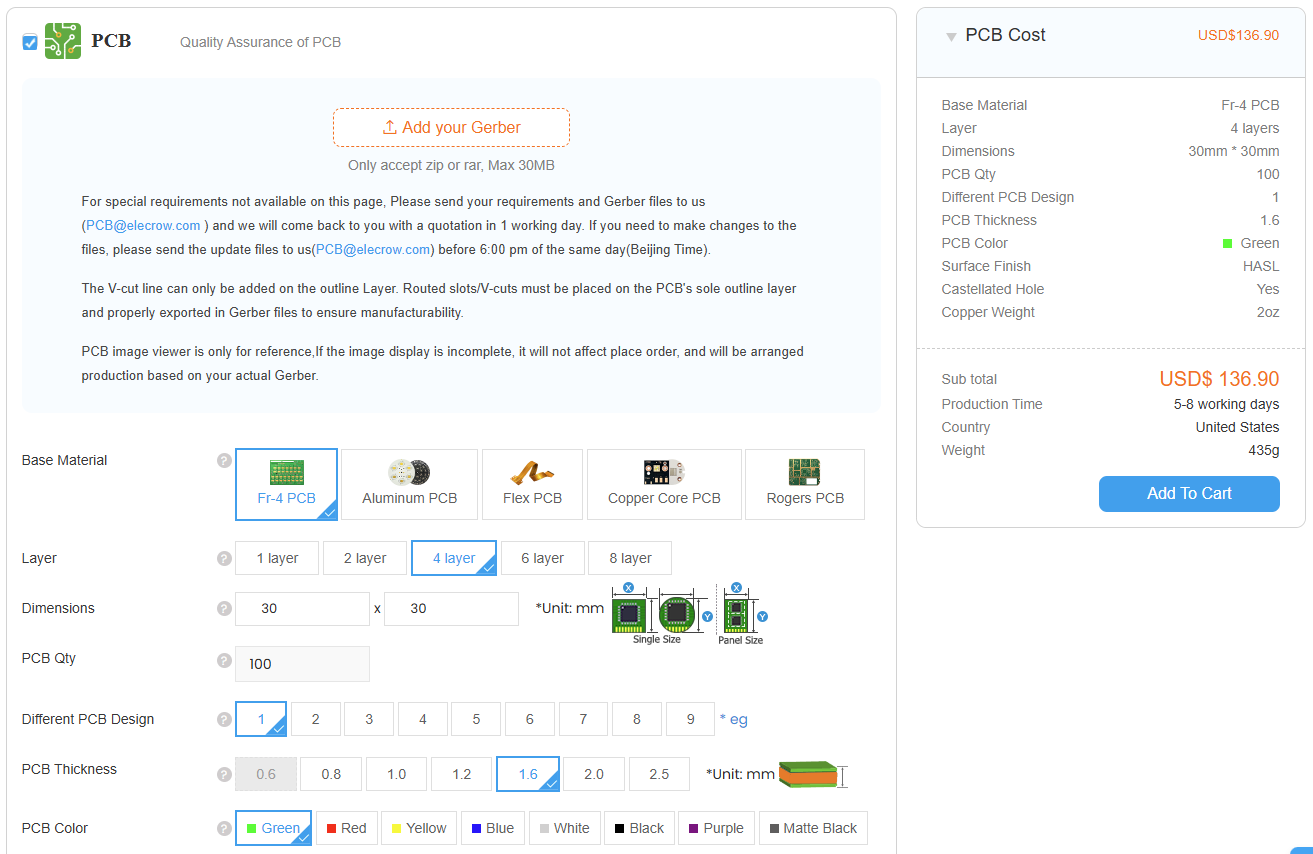
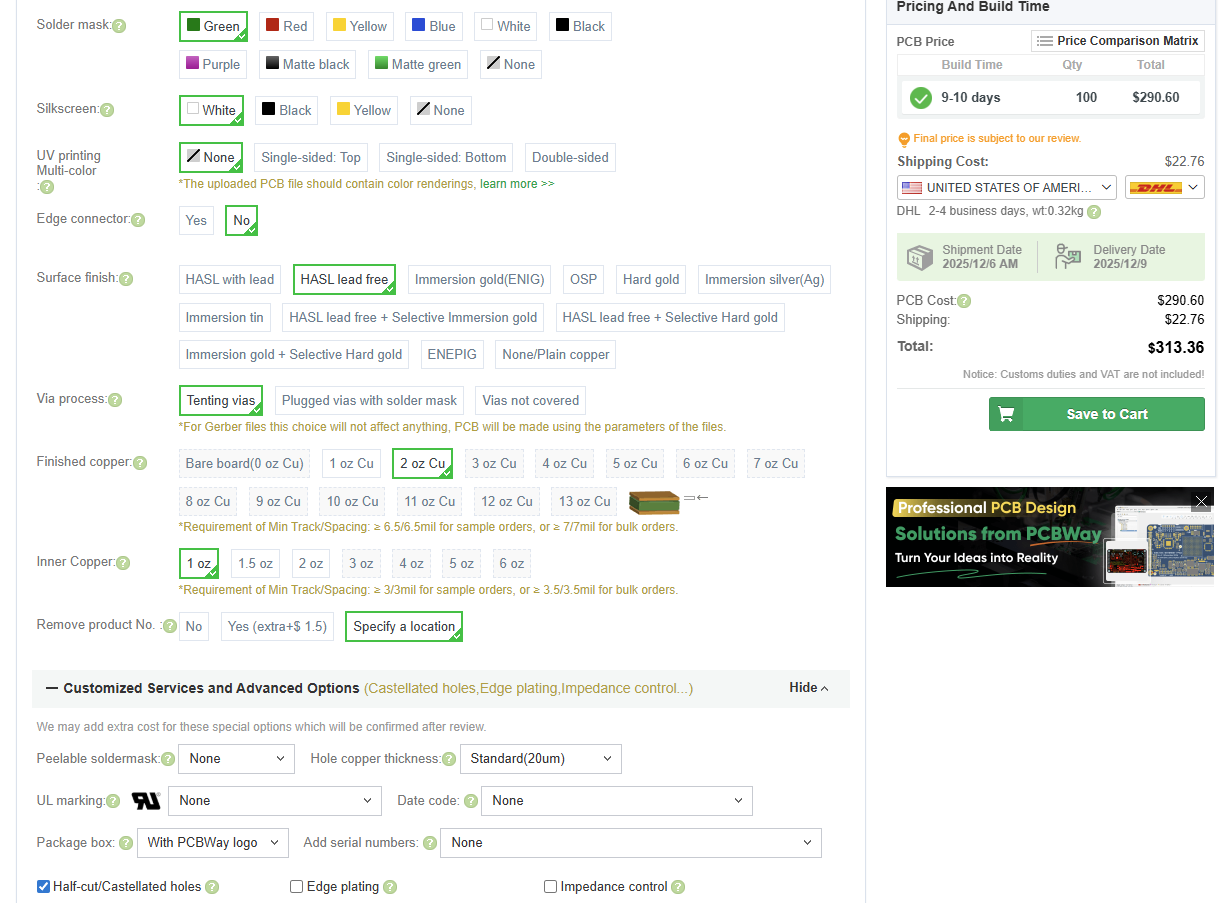
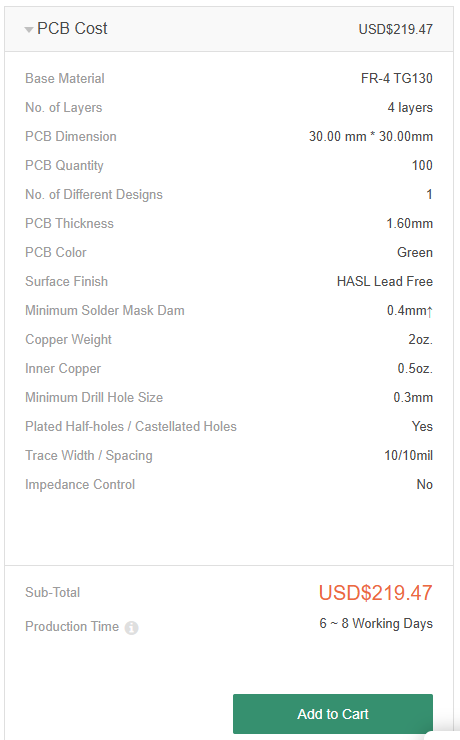
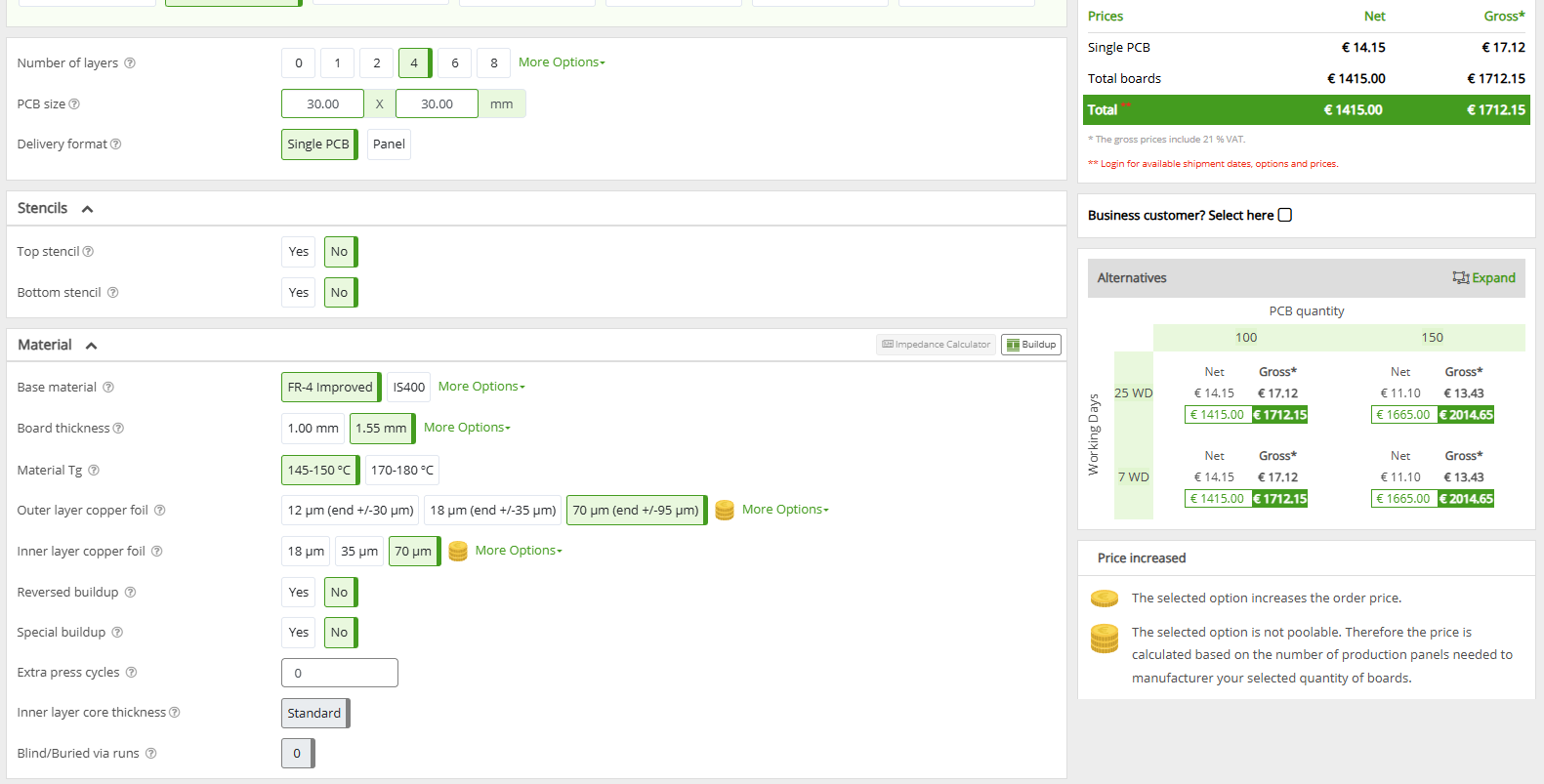
In this log I want to go through the cost estimates for a couple PCB fabs. The routing for the PCB is far enough along now that I can put in all the settings we need to get cost estimates. This helps to give me an idea of what costs to expect for the final product.
I am targeting 100 boards as it is an ideal target for hitting cost savings when buying components in bulk and seems like a reasonable amount of boards to make that they wouldn't sell out instantly.
StampPD is initially designed around JLCPCB as the PCB manufacturer. This is due to 2 reasons: I have experience with them in the past and I wanted to try JLCPCBA service. If any specs seem a bit arbitrary, it is likely that this is JLCPCB's default capabilities. For some specs like the Copper Weight, please see the last log. For all PCB Fab quotes, I will select the following specifications:
Any specifications not listed above are not very important to the StampPD design at this time. That means specs such as these will be selected to be as cheap as possible: Surface Finish, Layer Stackup, Via Process/Covering, PCB Thickness, PCB Color, Silk Screen Color, and Board Outline Tolerance.
A website which lists PCB fabs for small batch production can be found at BuildList.org. I filtered this list to Fabs that allowed me to select the above settings. This removed some Fabs, such as OSHPark, as they did not have settings for 2 oz/ft^2 Copper Weight for 4 layer boards or Castellated Holes. I also removed any discounts given as these may not be repeatable on subsequent orders. Note that prices may fluctuate depending on the time and place of your order. This leaves us with the resulting quotes as of 11/25/2025:
As you can see JLC, AllPCB, and Elecrow are the cheapest. PCBWay and SEEEDStudio are more expensive but still somewhat reasonable while Eurociruits is completely unreasonable. For now, I plan to stick with JLC unless prices change drastically.
Below are screenshots of the prices given above:
Hi all,
This log will go through the calculations required to size the traces and vias for the StampPD PCB as well as the decision to move from a 2 layer board to a 4 layer board.
We need to calculate what copper weights are required for the PCB based on the max expected current through traces and vias. For StampPD, we have 4 power domains that have significant current. These are:
While the buck converters for 3.3V an 5.0V can output up to 2A of current each, they require a different amount of input current. To calculate each buck converters input current, we multiply its Max Output Voltage by the Max Output Current then divide that by the Minimum Input Voltage times the Efficiency.
The minimum Input Voltage for both buck converters will be 5V as this is the minimum voltage defined by USB. The efficiency can be found in graphs for the AP63200 but no 5.0V input voltage line is given. For now I'm taking the 12V input voltage efficiency at 2A which is around 90% for both buck converters. The actual efficiency is likely higher than this as efficiency in a buck converter increases as the input and output voltages are closer in value. By replacing the equation values and adding both buck converters input current requirements together, we get the below solution:
This gives us 3.7A which I round up to 4A for safety margin.
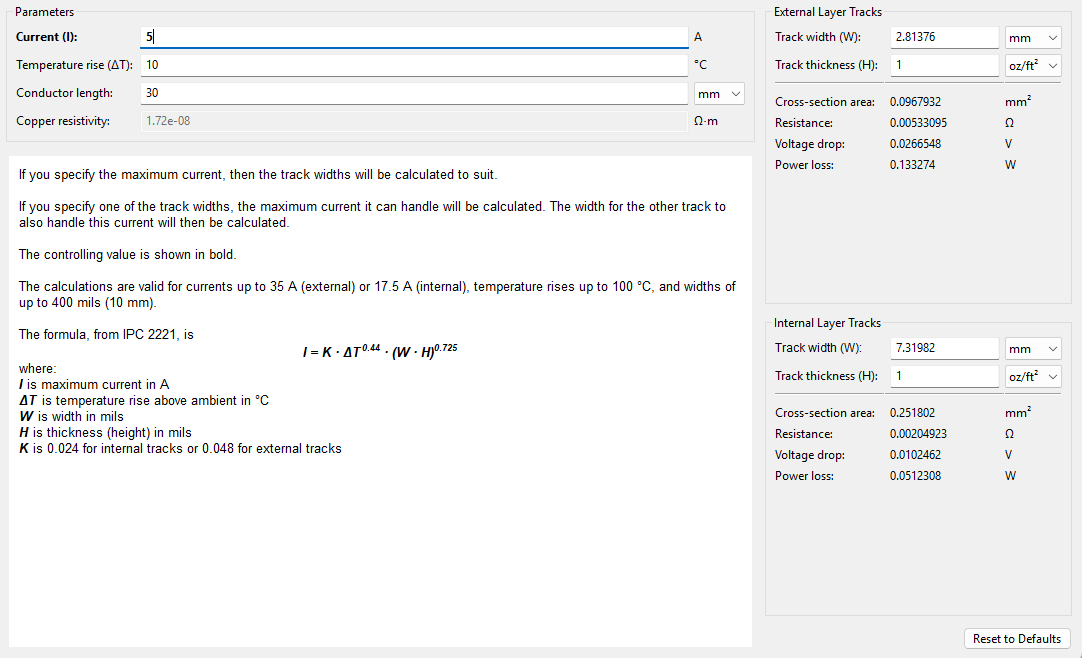
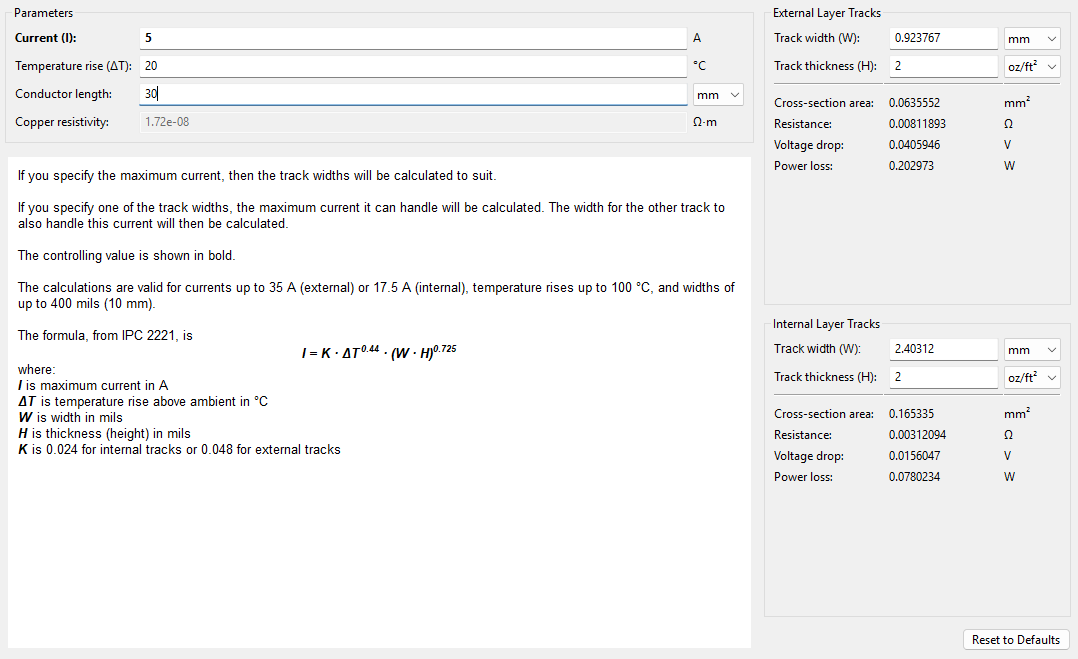
KiCAD has built-in "Track Width" and "Via Size" calculators that I'll show here. To start with, lets look at the 5A domain with default 1oz copper weight at 10C temperature rise for around 30mm conductor length ( length doesn't change track width much here so we'll default to 30mm since this is the length of the PCB ).
This gives us a 2.81mm trace width for external layers. For a 30mm x 30mm board, this is huge! This trace alone will take 1/10th of our board space in a single axis at a minimum! Reviewing the data sheets for all IC's, we can increase the temperature rise to 20C safely for all of our components with minimal loss in efficiency to get a trace width of 1.85mm. This is still quite large and doesn't provide enough routing flexibility. This leaves one last thing to change which is the Track Thickness, also known as Copper Weight. By changing this from 1 oz/ft^2 to 2 oz/ft^2, we get a track width of 0.92mm.
Rounding this trace width up to 1mm gives us a bit of a safety margin and is easier to keep track of. Increasing our Copper Weight to 2 oz/ft^2 will increase the price of the PCB but there isn't much choice if we want to support 5A. Note that a 1mm wide trace width for 5A is only valid for PCB layers that are external ( top and bottom layers ). Internal layers will need much thicker traces as they usually have lower Copper Weight, usually 0.5 oz/ft^2, and can't remove heat as easily.
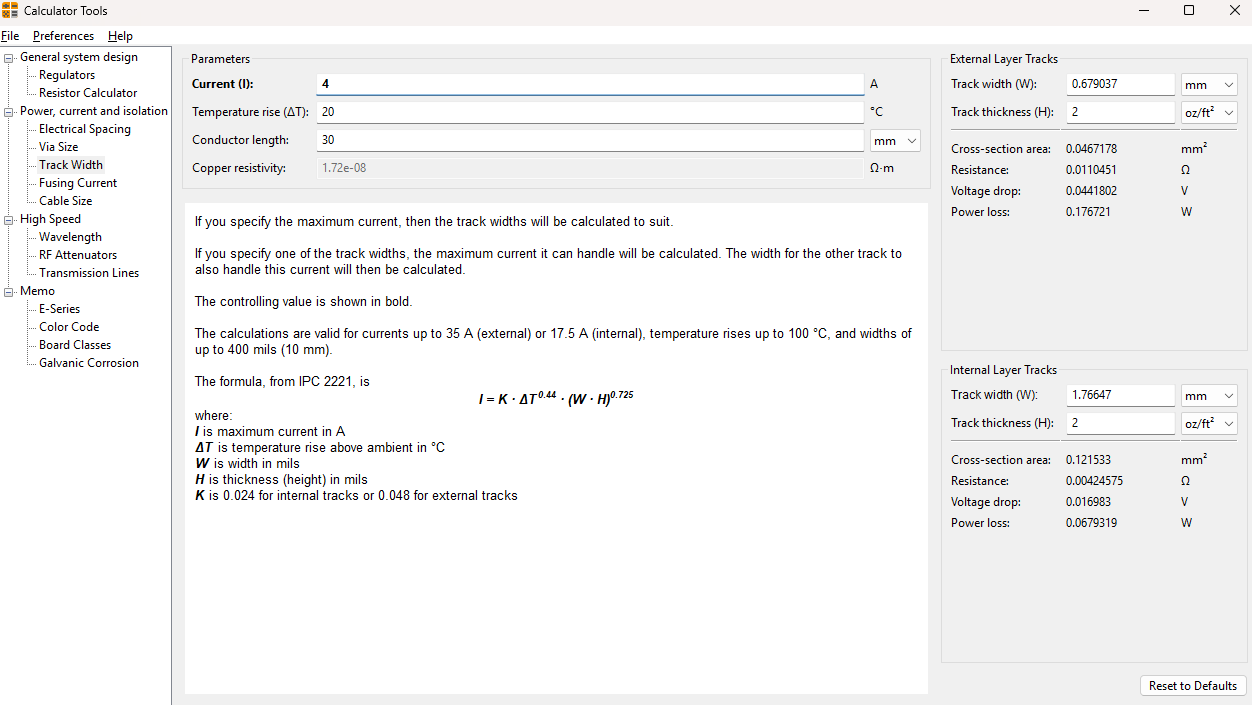
Since the temperature rise and copper weight are set by our 5A traces, we can calculate the trace widths needed for 4A and 2A as 0.7mm and 0.3mm as seen below:
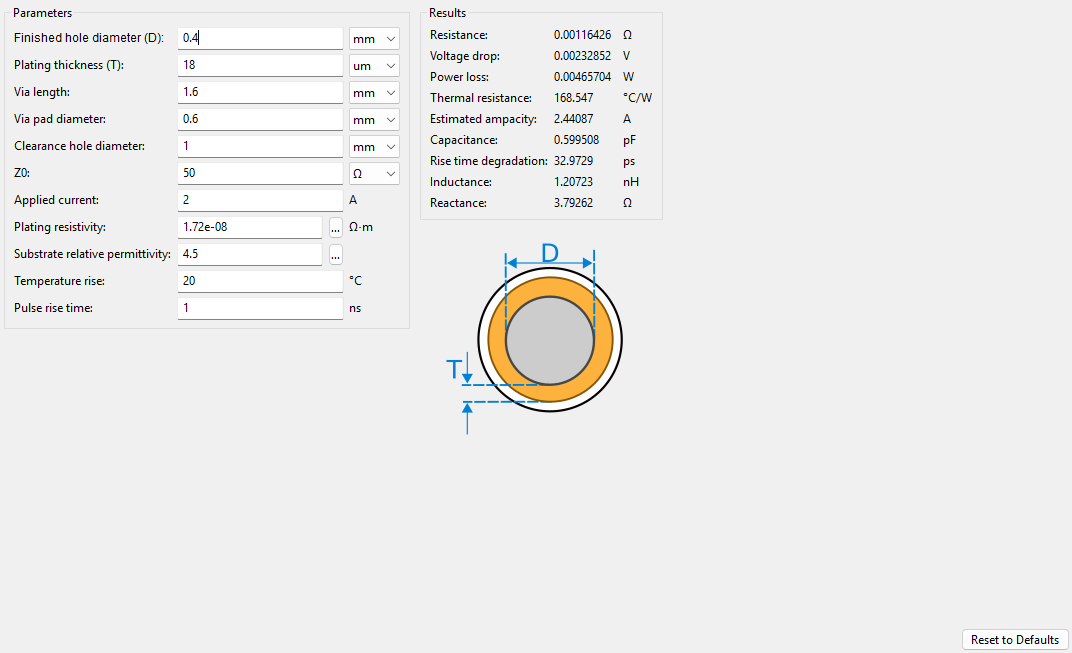
When calculating the Via Size, we can use the 20C temperature rise from the above calculations. We should be careful to not confuse the 2 oz/ft^2 copper weight with the plating thickness of the Via. Using JLCPCB's default capabilities, we can see that the "Average Hole Plating Thickness" is 18um. Keeping all other parameters default in KiCAD, including the default Via Hole Size of 0.4mm, gives us a Via that can support up to 2.4A:
While this will be sufficient for the buck converter 3.3V and 5.0V 2A output domains, the VBUS 5A domain will need larger Vias. Going up by 0.1mm steps, we can arrive at a 1.2mm Via Hole...
Read more »Hi all,
I was at Hackaday Supercon 2025 and did a quick 7 minute lightning talk about this project! You can watch it here, timestamp is exactly 1 hour into the video!
I'm continuing to finish the routing and have a couple of logs that will be forthcoming:
I'm planning for logs past these such as prototype feedback and software library implementation but those are further out. Once I order prototypes I plan to release the initial Gerber, Step, and BOM files for JLCPCB.
Note that I will be busier as the year comes to a close so this project will slow down until January 2026. I hope to order the prototypes before 2026 but that is up in the air.
Hi all,
This log will describe what pins we need to define for the PCB package. Below is a list of all inputs and outputs:
The logic used to determine which side of the PCB pins should be on is to go from left-to-right when looking at the PCB from top down. The logic/power input is on the left side while the logic and 5.0V/3.3V power output is on the right side. The variable USB-C Power output is on the top and bottom. You can see this in the schematic diagram below:
As this stamp will use USB-C for power and data input, the most logical pin input routing should match the expected pinout for a USB-C Female Receptacle. Based on the image below, you can see that this leads to ground on the outside, then power (VBUS), CC Pins, and finally USB D+/- .
The right side output pins on the stamp do not have a likely output order like the left side Input Pins do. As such, they are organized based on ease of routing and part placement. The 5.0V and 3.3V power output pins flank the top and bottom due to the placement of the buck converters for the associated voltages. Next are the communication pins for SDA and SCL and the PD Controller INT and FLIP logic pins. The SDA/SCL pins were placed on the top due to their necessary components needed for the SDA/SCL pins being located on the top while the INT and FLIP pins were closest to the bottom side of the PD Controller. Finally, the CC and USB D pins simply route from left to right across the PCB.
The top and bottom pin placement alternates between power output and ground pins, separated by a No Connect (NC) pin in-between. The NC pin was included to make it more unlikely that the power output pins and ground pins could be accidentally shorted when soldering StampPD. Its unclear if this is an optimal power pinout setup and would love feedback on this design choice.
Hi all,
In this log I'll go over the specific component selection for the USB PD Controller.
A USB PD Controller Sink is an IC that communicates with the USB PD standard to set a voltage and current from a USB PD source for downstream devices. The selected USB PD Controller for StampPD is the AP33772S. This IC comes in two variants , the AP33771C and the AP33772S. The C variant is a version which uses resistors to select the desired current and voltage while the S variant uses I2C to communicate with a microcontroller to select the voltage and current. In StampPD, we will use the S variant for its ability to change and request different voltages and currents. The controller selection was inspired by controller in the PicoPD which used an older version called the AP33772. This controller is Not Recommended for New Design (NRND) by the manufacturer, Diodes, and is only compatible with the USD PD3.0 standard. The AP33772S is compatible with the newer USB PD3.1 standard. I compared a couple differences between these two controllers in the Design Objectives log if you wish to see why this version was chosen. I attempted to research USB PD3.2 controllers that were similar to the AP33772S but was not able to find any, likely due to the standard being more recently released. Some reasons I've selected the AP33772S were:
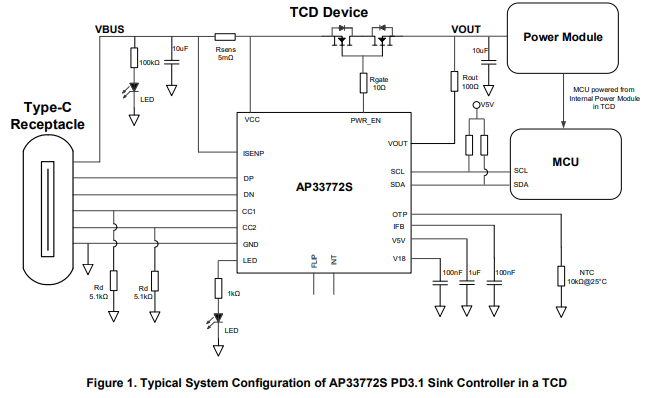
Below, an example circuit, called Figure 1, shows what an implementation of the AP33772S should look like with some specified component values. A table called Pin Descriptions describe the functions and voltage / current for pins of the AP333772S. Since the circuit diagram + table gives us a good idea of what to implement for this IC, I'll describe the more important/complicated components and only put component values in a list for the others.
This resistor sits between ISENP (Current Sense Pin) and VCC. It is used by the AP33772S to determine the amount of IR drop through VBUS for overcurrent protection. Since VBUS supports 5A and the recommended resistance is 5mOhm, this resistor needs to support at least 5A^2 * 5mOhm = 0.125W ( P = I^2 * R ). We'll want to give around a 50% power margin here so our target resistor power rating is 0.125W * 1.5 = 0.1875W. We should also limit the resistance tolerance to within 1% to reduce variability and power loss.
This pin is described as outputting up to 5.33V, 2mA. If we use the suggested 1000Ohm resistance value, we should look for a LED with a Forward Voltage (Vf ) = Voltage Source - Resistor * Forward Current. Vf = 5.33V - 1000Ohms * 2mA = 3.33V. This means if we keep the suggested 1000Ohm resistor and assume 2mA of Forward Current, we should look for a LED with a Forward Voltage of 3.33V. This will likely be a blue or white colored LED.
This resistor is used to detect the temperature around the IC. When NTC resistors heat up, their resistance decreases. This can be detected to determine overheating conditions. For this IC, it's calibrated for a NTC resistor that has a resistance of 10KOhm when the temperature is 25C.
For the VBUS LED and Resistors, I'm ignoring the values suggested in the circuit diagram. Instead,...
Read more »Hello all,
In this log I'll go over the specific component selection for the 5.0V and 3.3V Buck Converters. Since I am using the same IC for both 5.0V and 3.3V, most of the components will be duplicated between the IC's. Only the inductors will be different between the two implementations.
The main buck converter IC is the AP6300. This IC comes in a couple different flavors including a 3.3V ( AP63203 ) and a 5.0V ( AP63205 ) version which I've selected for StampPD. Some reasons I've selected this IC were:
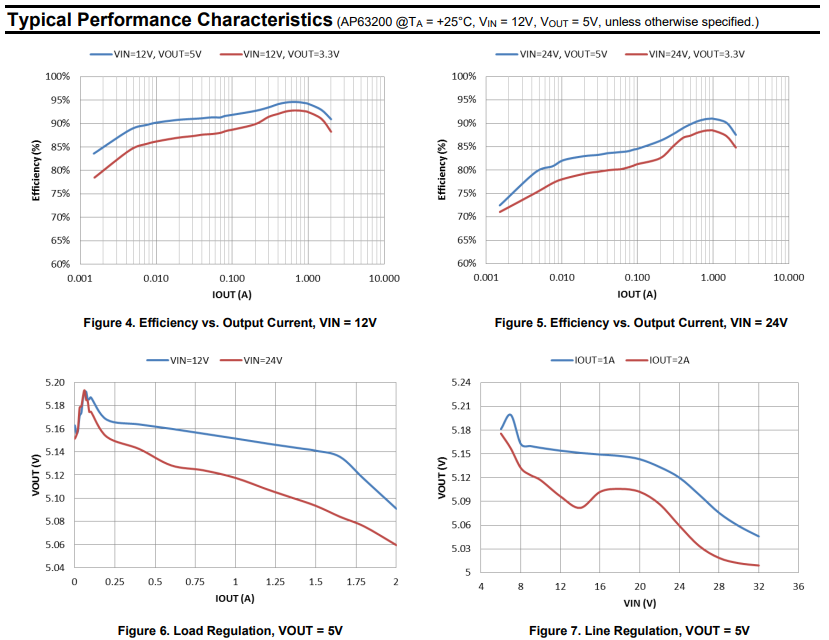
Below are the efficiency, load, and line regulation curves for the AP6300. Figure 4 shows the efficiency at different output current for 12V, Figure 5 shows the efficiency at different output currents at 24V. The blue line is 5.0V output, the red line is 3.3V output. Figure 6 shows the expected output voltage at different currents. The blue line is input voltage of 12V, the red line is input voltage of 24V. Figure 7 shows the expected output voltage with different input voltages. The blue line is output current of 1A, the red line is output current of 2A. From these we can take away a couple things:
I expect that for the 5.0V AP63205 I should see around 5.20V at low input voltage and low output current. As the input voltage and output current increase, I expect the output voltage to drop to just above 5.0V.
Using the efficiency trends in Figure 4 and Figure 5, I will guess that voltage for the 3.3V AP63203 will likely be worse (higher voltage at lower output currents and input voltages). Using the efficiency percentage difference of around 5% in Figures 4 and 5, and the voltage difference of around 0.2V from Figures 6 and 7, assuming this IC outputs 3.3V at around 2A 32V input, I calculate an output voltage around 3.3V + 0.2V * 1.05% = 3.51V.
I expect that for the 3.3V AP63203 I should see around 3.51V at low input voltage and low output current. As the input voltage and output current increase, I expect the output voltage to drop to just above 3.3V.
Below, an example circuit, called Figure 1, shows what an implementation of the AP63205 should look like. Two tables, called Table 2 and Table 3, show recommended component values....
Read more »Hi all!
In this log I'm going to go over my methodology for component selection. I will explain what subsystems I want to include on StampPD, component requirements, other influencing factors, and a summary of component restrictions. In the next couple logs I will go over each sub-system of the board component by component to explain my part choices. I hope to show how I went about component selection to give new PCB designers an idea of how I approached this this design as well as receive feedback from more experienced designers. I have minimal experience with power design so I'm sure I've made mistakes somewhere here!
There are 5 main parts of StampPD:
These 5 parts are combined together to create the stamp. Only two of these sub-systems are absolutely necessary, the PCB and the USB PD Controller. The USB ESD Protection is nice to have but is optional. Being only a single component (TPD4E5U06DQAR) it would be easy to remove. The 5.0V and 3.3V Regulators are also nice to have but could be removed if needed.
There are a couple requirements I've put on the design that influence what parts I want to select:
I have some personal external factors that also limit my part selection:
Here is a summary of the restrictions that I have put on component selection:
Hello everyone!
This is a quick update about my decision on the 5V and 3.3V regulators.
Last time I mentioned a couple methods for regulating the 5V and 3.3V which were:
I mentioned last time that I was planning to go with one of the Buck Booster options. However, I've changed my mind! Instead I'm going to just use Buck Converters
After thinking about these solutions for a while, I realized that the drop in voltage on the 5V pin when the input voltage is 5V is ok with my design choice for now. The reasons for this are:
For now I think simplicity and cost are more important than sacrificing a little bit of voltage here. I plan to test the 5V rail to see how much voltage drop we get and am leaving the door open on adding a Boost converter later. As a little bit of a sneak peak for next time, here's where the current KiCAD design stands!
Hello all!
In this log I'm going to go over my current progress on the regulator design for the 3.3V and 5V supplies. This design is a bit more complex than I expected for reasons that I'll get into here.
Originally I had been thinking that I would just use two LDO's set to 3.3V and 5V and call it a day. LDO's are very simple to use and setup, however, I ran into some issues when looking at this design choice.
Buck Converters are much more efficient than LDO's when the voltage difference is larger between Voltage Input and Voltage Output. That's good for our efficiency! However, using a Buck Converter has issues as well.
While a Buck Converter can't regulate our Voltage In = Voltage Out issue for 5V, we could step up the voltage to 5V with a Boost Converter. There are two options for this with some trade-offs:
Hi all!
This log is to define the goals for this project. I want to establish what the design objectives of the StampPCB will be.
This project was inspired by the PicoPD. This board adds USB-C Power Delivery to a RP2040. Want variability in the USB-C PD just like this board.
The stamp design is inspired by the RP2350 Stamp. Want a drop in component just like this stamp.
Current part choices are influenced by the PicoPD. Want to upgrade from the AP33772 to the AP33772S for a more up to date PD spec (PD3.0 vs PD3.1). This allows for an increase from 100W (20V, 5A) to 140W (28V, 5A) as well as a couple other features. The downside is that there is less fine grain control of the voltage and amperage (20mV vs 100mV increments and 50mA vs 250mA increments)
While StampPD is designed to be as microprocessor agnostic as I can make it, I do have a board I want to build with it in mind. That board currently uses the RP2350 Stamp with StampPD and a third USB-PD High Power GPIO Stamp to allow the RP2350 to control pins at the max power of StampPD. This project will come after StampPD is finished
Create an account to leave a comment. Already have an account? Log In.
Become a member to follow this project and never miss any updates
Kuba Sunderland-Ober
w_k_fay
W4KRL