Close
0%
0%

BZCard – Interactive Electronic Business Card

A credit-card sized electronic business card with OLED screen, capacitive touch, power management, and hidden retro games.

Public Chat
Similar projects worth following
Business cards are usually just paper, but I wanted mine to do something.

The idea first came to me in 2014, when I started sketching concepts for an interactive business card. In 2016-2017 I built the first prototypes, and after years of picking it up and putting it down, I finally finished it in 2025.

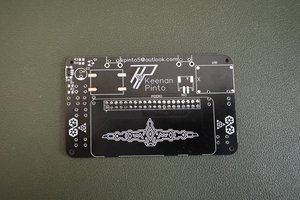
The result is the BZCard, a credit-card sized electronic business card with:
- OLED display for contact info, logo, and animations
- Capacitive touch buttons for navigation
- Smart power management with deep sleep and charging screen
- A custom 3D-printed enclosure to showcase and protect it
- And four hidden retro mini-games: Snake, Brick Breaker, Tetris, and Death Star

This has been a long-running personal project, just something I wanted to build and carry for myself.

  • OLED Display (128×64): Shows contact info, social media, logo, and menus.
  • Capacitive Touch Buttons (x5): Navigation and interaction without mechanical switches.
  • Menu System: Browse contact info, social media, settings, and games.
  • Four Retro Games: Snake, Brick Breaker, Tetris, and Death Star (hidden Easter eggs).
  • Smart Power Management: Auto sleep after ~30s, deep sleep after ~120s, charging animation on USB.
  • Custom Enclosure: 3D-printed case to protect and showcase the card, making it feel like a mini handheld.
  • Microcontroller: Microchip ATSAMD21G18A with Flash storage and RTC for low-power modes.
  • Battery: 3.7V LiPo rechargeable via charging IC.
  • Form Factor: true credit-card size PCB, portable and memorable.

Demo Video

After years of building and refining, here’s the BZCard finally working the way I always imagined it.


How It Works

  • On power-up, the BZCard displays a logo screen.

  • The main menu provides access to:

    • Contact Info

    • Social Media

    • Games (Snake, Brick Breaker, Tetris, Death Star)

    • Options/Settings

  • Capacitive touch buttons are used for navigation (up, down, left/enter, right/back, power).

  • After ~30 seconds of inactivity, the display powers down.

  • After ~120 seconds, the device enters deep sleep to save battery.

  • When connected to USB, a charging animation appears with a battery icon and progress effect.

  • Wake-up is possible by touching a button or pressing the power button.

  • The enclosure makes it possible to hold and showcase the card outside of a wallet, like a tiny handheld device.
  • 1 × Microchip ATSAMD21E18
  • 1 × OLED Display 64x128
  • 1 × LIR2025 Battery
  • 1 × Positive Linear Regulators (LDO)
  • 1 × Standalone Linear Li-Ion Battery Charger

  • 2025 – Final Build

    Diego Galue09/03/2025 at 14:36 0 comments

    In 2025 I finally finished the BZCard. The final version includes everything I envisioned: an OLED screen for menus and contact info, capacitive touch buttons, smart power management with sleep and charging states, and even four retro mini-games, Snake, Brick Breaker, Tetris, and Death Star. After years of returning to this project, it’s complete. I uploaded a demo video to YouTube to showcase it working at last.

  • 2025 – Designing the Enclosure

    Diego Galue09/03/2025 at 14:36 0 comments

    Up until this point the BZCard was just a naked PCB. In 2025 I designed and 3D printed the first custom enclosure. This gave the project a whole new feel: instead of something that had to be kept in a wallet, it could now be displayed, carried, and handled like a finished object. The enclosure made it feel much closer to a complete device.

  • 2019/2022 – Iterations and Pauses

    Diego Galue09/03/2025 at 14:35 0 comments

    Between 2019 and 2022, the project went through long pauses and bursts of activity. Work and life kept pulling me away, but each time I returned I made new progress, redesigning PCB layouts, improving the capacitive touch sensing, and testing different ways to manage power. It was slow progress, but it kept moving forward.

  • 2016/2017 – First Prototype

    Diego Galue09/03/2025 at 14:35 0 comments

    By 2016–2017 I managed to build the first prototype. It used a small OLED display and a microcontroller, and while it was very basic, it worked! Powering it on and seeing information appear on the screen was a big milestone. I even recorded some short clips of these early experiments, proof that the project was starting to take shape.

  • 2014 – The First Idea

    Diego Galue09/03/2025 at 14:34 0 comments

    I first sketched out the concept for an interactive business card in 2014. At the time, it was nothing more than doodles in a notebook and some wild ideas about making a card that could light up, display text, and maybe even react to touch. It felt far-fetched, but the seed of the project was planted.

View all 5 project logs

Enjoy this project?

Share

Discussions

Similar Projects

Does this project spark your interest?

Become a member to follow this project and never miss any updates