 mit41301
DOSBox environment BARCODE generator running on Windows 11 with scan examples.
QB64 environment BARCODE generator running on Windows 11 with all scan examples.
INTRO:
Can we write few lines of code and generate any useful barcode?
The answer is YES, we can.
Find the following simple code written in GW-BASIC or QBASIC for four types of commonly used barcodes.
- UPC/EAN barcode
- CODABAR
- Code39
- Code25 or ITF
1. UPC barcode generator
UPC barcode must be the most used and scanned type of barcode globally. Every product bears unique UPC or EAN-13 which is normally printed on the package of the product. During checkout at POS, the scanner quickly reads the barcode on the product and identifies the price and product description from the store database. It is also useful for inventory management.
Everyone must seen the EAN-13 code. But many people may not aware or appreciate the beauty of the barcode. If you are new to UPC or EAN-13 type barcode please refer to the detailed information at International Article Number - Wikipedia
International Article Number, also known as European Article Number (EAN), is a global standard that defines a barcode format and a unique numbering system used in retail and trade. It helps identify specific types of retail products based on their packaging and manufacturer, making it easier to track and manage products in international trade.
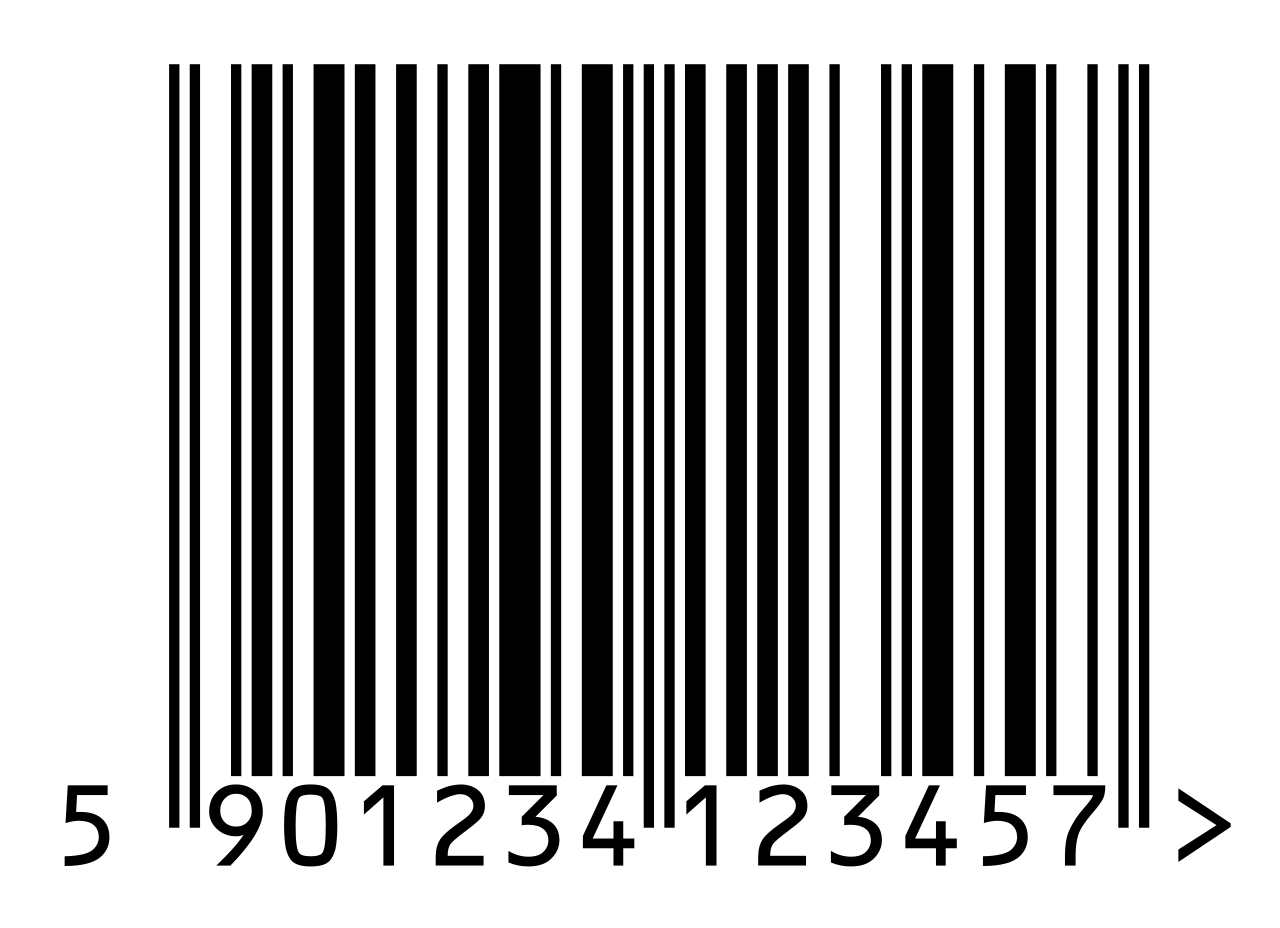
The EAN13 barcode usually encodes 12 digit numbers. After calculating the single digit checksum, the checksum will be appended as 13th digit. Since we are going to encode only 12 digits, the first digit of the original 12 digit number will be discarded.
While reading and decoding the barcode using the scanner, the scanner will generate the first digit after successful decoding of the barcode.
UPC codes with white baground with black lines, black background with white lines are valid. The scanner also capable of reading the code from left to right or right to left.
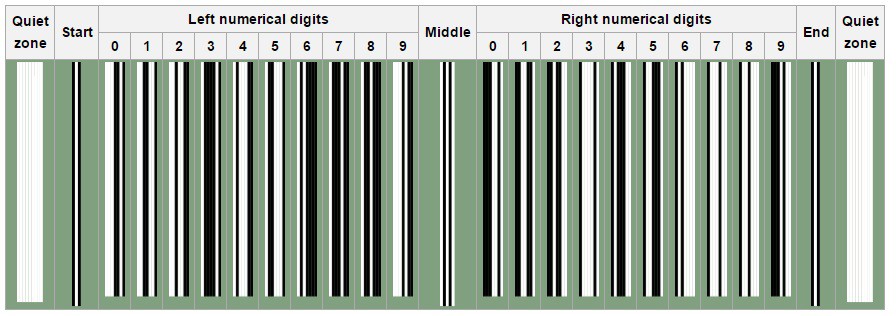
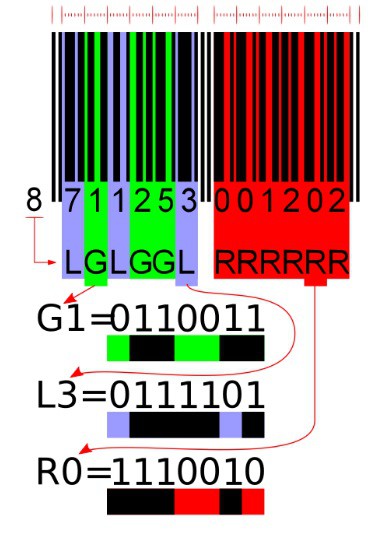
The above code is the example showing the encoding pattern. Each UPC code will have starting, ending and middle guard band. There are 12 digits in the UPC barcode. First 6 digits encoded in the left zone and the next 6 digits encoded in the right zone.
Left 6 digits element pattern comes from L-Code or G-Code depends on the very first digit of the barcode. Next 6 digits always comes from R-Code encoding.
The table below shows the 3 types of pattern used to encode from 0 to 9.
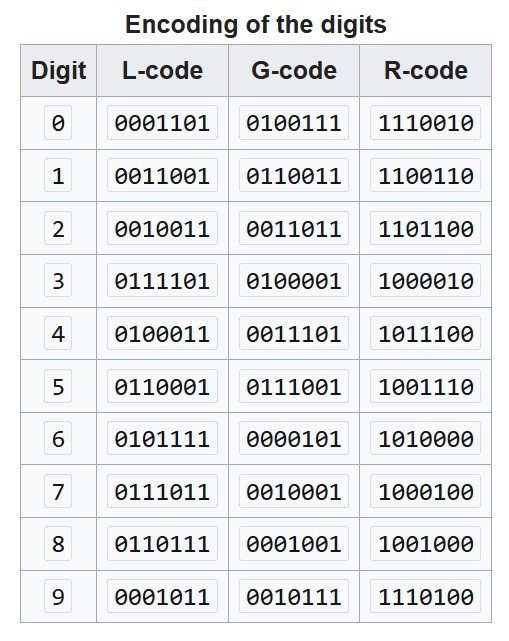
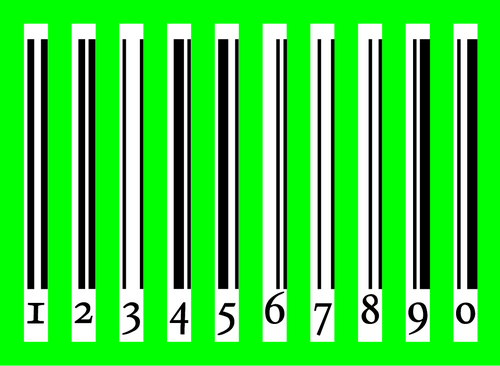
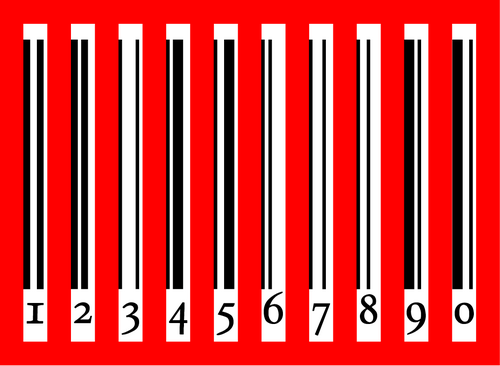
To encode the 13-digit EAN-13 number, the digits are split into 3 groups; the first digit, the first group of 6 and the last group of 6. The first group of 6 is encoded using a pattern whereby each digit has two possible encodings, one of which has even parity (denoted with letter G) and one of which has odd parity (denoted with letter L). The first digit is not represented directly by a pattern of bars and spaces, but is encoded indirectly, by selecting a pattern of choices between these two encodings for the first group of 6 digits, according to the table below. All digits in the last group of 6 digits are encoded using a single pattern RRRRRR, the one also used for UPC. If the first digit is zero, all digits in the first group of 6 are encoded using the pattern LLLLLL used for UPC; therefore, a UPC barcode is also an EAN-13 barcode with the first digit set to zero.
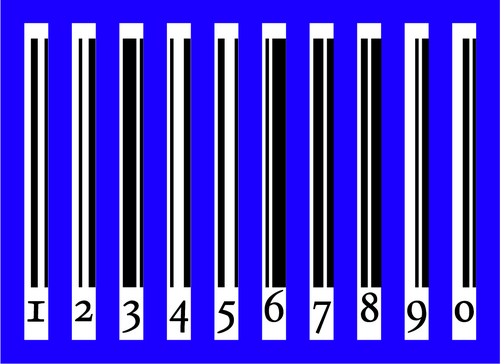
Entries in the R-column are bitwise complements (logical operator: negation) of the respective entries in the L-column. Entries in the G-column are the entries in the R-column in reverse bit order. See pictures of all codes against a colored background.
Left 6 digits and Right 6 digits encoding sequence
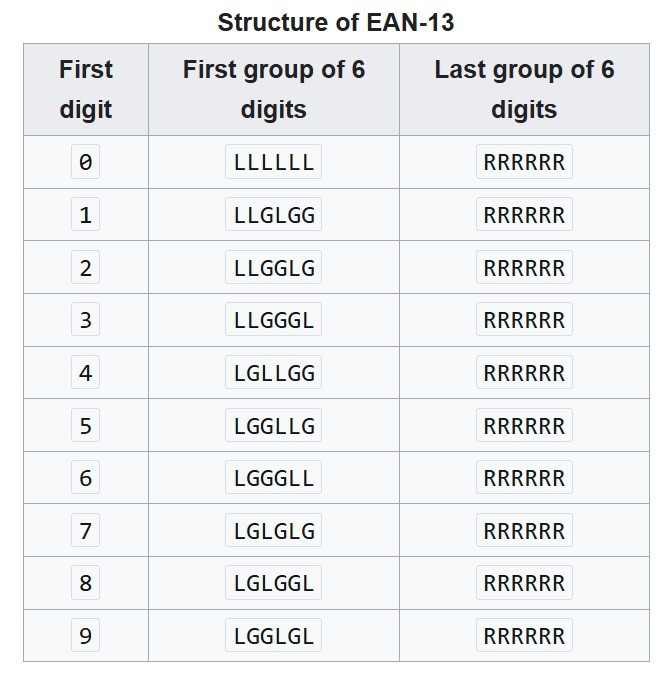
Digits 7 to 12 always encoded from the R-Code Table. But the First 6 digits will be encoded from L-Code and G-Code depends on the very first digit of the input number.
Example Code:
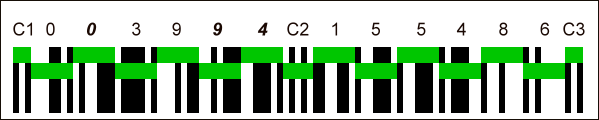
- C1, C3: Start/end marker.
- C2: Marker for the center of the barcode.
- 6 digits in the left group: 003994.
- 6 digits in the right group (the last digit is the check digit): 155486.
- A digit is encoded in seven areas, by two black bars and two white spaces. Each black bar or white space can have a width between 1 and 4 areas.
- Parity for the digits from left and right group: OEOOEE EEEEEE (O = Odd parity, E = Even parity).
- The first digit in the EAN code: the combination of parities of the digits in the left group indirectly encodes the first digit 4.
The complete EAN-13 code is thus: 4 003994 155486.
check digit calculation:
- For EAN-13 barcode 400638133393x, where x is the unknown check digit, (Stabilo Point 88 Art. No. 88/57), the check digit calculation is:
| position | 12 | 11 | 10 | 9 | 8 | 7 | 6 | 5 | 4 | 3 | 2 | 1 |
|---|---|---|---|---|---|---|---|---|---|---|---|---|
| first 12 digits of barcode | 4 | 0 | 0 | 6 | 3 | 8 | 1 | 3 | 3 | 3 | 9 | 3 |
| weight | 1 | 3 | 1 | 3 | 1 | 3 | 1 | 3 | 1 | 3 | 1 | 3 |
| partial sum | 4 | 0 | 0 | 18 | 3 | 24 | 1 | 9 | 3 | 9 | 9 | 9 |
| checksum | 89 |
The nearest multiple of 10 that is equal to or higher than the checksum, is 90. Subtract them: 90 - 89 = 1, which is the check digit x of the barcode.
Binary encoding of data digits into EAN-13 barcode:
Barcode structure:
The barcode consists of 95 areas (also called modules) of equal width. Each area can be either white (represented here as 0) or black (represented as 1). From left to right:
- 3 areas for the start marker (101)
- 42 areas (seven per digit) to encode digits 2–7, and to encode digit 1 indirectly, as described in the following section
- 5 areas for the center marker (01010)
- 42 areas (seven per digit) to encode digits 8–13
- 3 areas for the end marker (101)
SOURCE CODE in BASIC for WINDOWS output
10                      DIM p$(29), c%(12), q$(9), m%(100)
20                      INPUT "    Enter the Number : "; u$
30      FOR i% = 0 TO 9
40                      READ n$, s$
50                      n% = ASC(n$)
60                      s% = ASC(s$) XOR &H3F
70      WHILE n% <> 0
80             p$(i%) = RIGHT$(STR$(n% MOD 2), 1) + p$(i%)
90             p$(i% + 10) = RIGHT$(STR$(n% MOD 2 XOR 1), 1) + p$(i% + 10)
100            p$(i% + 20) = p$(i% + 20) + LEFT$(p$(i%), 1)
110             $(i%) = RIGHT$(STR$(s% MOD 2 + 1), 1) + q$(i%)
120                     n% = n% \ 2
130                     s% = s% \ 2
140     WEND
150     NEXT i%
160     FOR i% = 0 TO 11
170             c%(i%) = VAL(MID$(u$, i% + 1, 1))
180             X% = X% + c%(i%) * (((i% + 1) MOD 2) + (3 * (i% MOD 2)))
190     NEXT i%
200                     c%(i%) = (10 - X% MOD 10) MOD 10
210     FOR i% = 1 TO 6
220            l$ = l$ + p$(VAL(MID$(q$(c%(0)), i% + 1, 1)) * 10 + c%(i%))
230            r$ = r$ + p$(c%(i% + 6))
240     NEXT i%
250                     f$ = "606" + l$ + "06060" + r$ + "606"
260             KEY OFF: SCREEN 2
270             PRINT LEFT$(u$, 12) + RIGHT$(STR$(c%(12)), 1)
280                     GET (0, 0)-(13 * 8, 8), m%
290                     SCREEN 11: CLS
300                             PAINT (0, 0)
310                             PUT (15, 35), m%
320     FOR i% = 1 TO 95
330             b% = VAL(MID$(f$, i%, 1))
340             LINE (20 + i%, 5)-(20 + i%, 25 + b%), SGN(b%) XOR 1
350     NEXT i%
360             WHILE INKEY$ = ""
370             WEND
380                     KEY ON: SCREEN 0
390                     END
400     DATA    r,?,f,4,l,2,B,1,\,",",N,&,P,#,D,*,H,),t,%
EXPLANATION:
10 DIM p$(29), c%(12), q$(9), m%(100)
The above line just declares the variable for storage of array elemet size. Just memory allocation.
20 INPUT " Enter the Number : "; u$
The above line prompts the user to Enter the first 12 digit numbers of the desired barcode.
As we know, we need to generate 40 patterns for encoding the EAN-13 barcode. We need to generate the L-Code, G-Code, R-Code and first 6 digits sequence lookup table.
All the above 40 information is available in the following DATA !!!
400 DATA r,?,f,4,l,2,B,1,\,",",N,&,P,#,D,*,H,),t,%
If we are able to construct the L-Code, then from L-Code we can derive the G-Code and R-Code. By this we can save 20 data which is required for G-Code and R-Code. The following lines does the reading the 20 data and constructs the 40 barcode encoding pattern data base. As we know L-Code and R-Code are complemetry and G-Code is the Mirror or R-Code. This is done using Line 80, 90, 100 and 110 of the BASIC code.
30      FOR i% = 0 TO 9
40                      READ n$, s$
50                      n% = ASC(n$)
60                      s% = ASC(s$) XOR &H3F
70      WHILE n% <> 0
80             p$(i%) = RIGHT$(STR$(n% MOD 2), 1) + p$(i%)
90             p$(i% + 10) = RIGHT$(STR$(n% MOD 2 XOR 1), 1) + p$(i% + 10)
100            p$(i% + 20) = p$(i% + 20) + LEFT$(p$(i%), 1)
110            q$(i%) = RIGHT$(STR$(s% MOD 2 + 1), 1) + q$(i%)
120                     n% = n% \ 2
130                     s% = s% \ 2
140     WEND
150     NEXT i%
The user entered 12 digit number and we need to calculate the 13th check sum digit. This is very easily done with the following lines
160     FOR i% = 0 TO 11
170             c%(i%) = VAL(MID$(u$, i% + 1, 1))
180             X% = X% + c%(i%) * (((i% + 1) MOD 2) + (3 * (i% MOD 2)))
190     NEXT i%
200                     c%(i%) = (10 - X% MOD 10) MOD 10
In the above FOR-NEXT loop running for 12 times, counts the SUM of EVEN and ODD digit position numbers and multiply the ODD sum by 3 then finds the modulo remainder of 10 which gives the check sum for the first 12 digits. The calculated check sum will be appended to the 13th digit.
The very first digit, which will NOT actually encoded in the first 6 digits of the barcode. Instead the very first digit is used to encode the 2 to 7 digits of the barcode with the seqence of L-Code and G-Code dictated by the first digit. This is done by the following code
210     FOR i% = 1 TO 6
220            l$ = l$ + p$(VAL(MID$(q$(c%(0)), i% + 1, 1)) * 10 + c%(i%))
230            r$ = r$ + p$(c%(i% + 6))
240     NEXT i%
Above 4 lines of FOR LOOP code encodes the Left 6 digits and right 6 digits simultaneously.
Line 220 encodes first 6 digits from L-Code and G-Code based on the first digits sequence.
Line 230 just encodes all the 6 right digits from R-Code.
The final encoding including the Left, Middle and Right guard band looks like below
250 f$ = "606" + l$ + "06060" + r$ + "606"
Compared to normal barcode encoding, the guard bands will be slightly longer. That is achieved by adding 5 pixels for plotting the lines. That is why it is denoted as "606" and not as "101"
In basic we can not mix graphics and text. So, the number in Text is converted in to graphical pixel arrays as image using the following lines. Note the first 12 digits and the check sum digit at the 13th digit position are added while printing even though the first digit is discarded and never encoded in the first 6 digits in the left side.
260             KEY OFF: SCREEN 2
270             PRINT LEFT$(u$, 12) + RIGHT$(STR$(c%(12)), 1)
280                     GET (0, 0)-(13 * 8, 8), m%
Now we have both the line pattern which have total 95 elements(pixels) and the human readable Text with 13 digits. The 13 digit human readable numbers are printed using the following lines.
290                     SCREEN 11: CLS
300                             PAINT (0, 0)
310                             PUT (15, 35), m%
PS: Line 300 uses PAINT (0,0) which is required for white background images. For DOS type of images where the background is black, this line is NOT required and commented by REM
Now just we need to Plot the Lines or Space for 95 Elements.
320     FOR i% = 1 TO 95
330             b% = VAL(MID$(f$, i%, 1))
340             LINE (20 + i%, 5)-(20 + i%, 25 + b%), SGN(b%) XOR 1
350     NEXT i%
360             WHILE INKEY$ = ""
370             WEND
This routine just draws a LINE or SPACE for the total pattern size of 95 and repeates for 95 times. Since the guard lines have 5 more pixels, it appears longer than other encoded data lines.
This will produce the image like below.
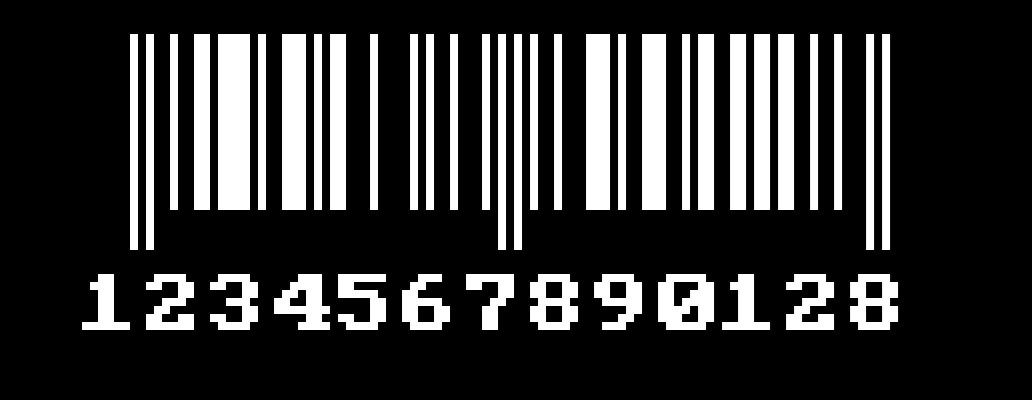
Or like this image
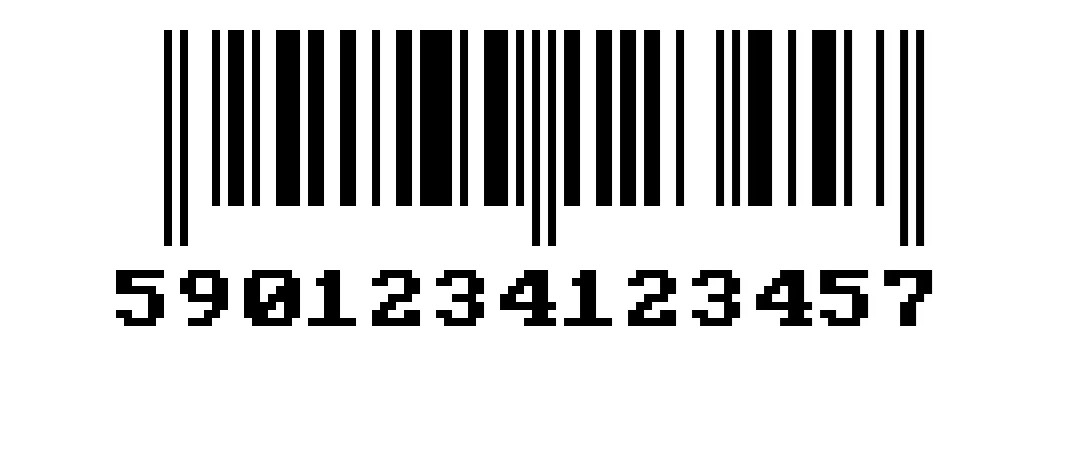
The source code for the above two images are the same except the line 300 and 340
For White background and black lines the BASIC code is
300  PAINT (0, 0)
340  LINE (20 + i%, 5)-(20 + i%, 25 + b%), SGN(b%) XOR 1
The PAINT (0,0) fills the screen with WHITE and XOR 1 in line 340 draws BLACK line
For Black background and white lines the BASIC code is
300 REM PAINT (0, 0)
340 LINE (20 + i%, 5)-(20 + i%, 25 + b%), SGN(b%) XOR 0
The REM PAINT (0,0) disable the fills and the screen looks BLACK and XOR 0 in line 340 draws WHITE line
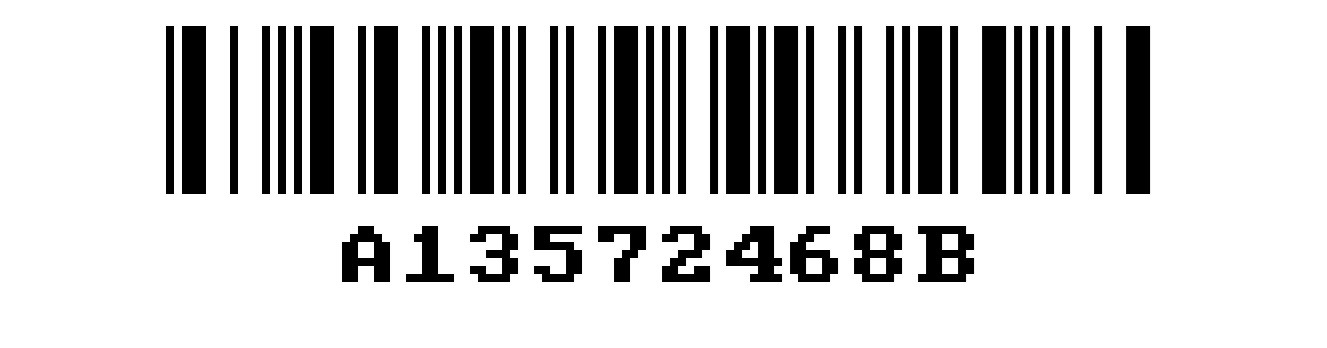
QBASIC code for CODABAR
Dim P$(20), A$(20), G%(999)
For I = 1 To 20
    Read X$
    A$(I) = Left$(X$, 1)
    X% = Val("&H" + Right$(X$, Len(X$) - 1))
    For N% = 1 To 7
        P$(I) = Right$(Str$(X% Mod 2), 1) + P$(I)
        X% = X% \ 2
    Next N%
Next I
Input " Enter The Number : "; U$
U$ = "A" + U$ + "B"
For I = 1 To Len(U$)
    For J = 1 To 20
        If A$(J) = Mid$(U$, I, 1) Then F$ = F$ + P$(J) + "0"
    Next J
Next I
Screen 2
Print U$
Get (0, 0)-(8 * Len(U$), 14), G%()
Put (0, 0), G%(), Xor
Paint (0, 0)
For X = 1 To Len(F$)
    S = S + 2 * Val(Mid$(F$, X, 1))
Next X
Z = 320 - .5 * (Len(F$) + S)
For I = 1 To Len(F$)
    For J = 0 To 2 * Val(Mid$(F$, I, 1))
        Line (Z, 5)-(Z, 25), I Mod 2 Xor 1
        Z = Z + 1
    Next J
Next I
Put ((320 - Len(U$) * 4), 30), G%()
Sleep
End ' codabar printer program.
Data 03,16,29,360,412,542,621,724,830,948
Data -c,$18,":45",/51,.54,+1f,A1a,Bb,C29,De
GW-BASIC code for Code39
10 Rem TITLE  :  BARCODE PRINTER PROGRAM - CODE 3 OF 9
20 Rem TESTED WITH WINDOWS 10 HOME AND WINDOWS 11 OS
30 Rem TESTED WITH QB64 and VERIFIED THE OUTPUT WITH CODE39 SCANNER
40 Dim C$(44), P$(44), G%(1000)
50 For I = 0 To 43
    60 Read C$(I), X$
    70 C% = Val("&H" + X$)
    80 For N% = 9 To 0 Step -1
        90 P$(I) = Right$(Str$(C% Mod 2), 1) + P$(I)
        100 C% = C% \ 2
    110 Next N%
120 Next I
130 Cls
140 Def Seg = &H40
150 K% = Peek(&H17)
160 Poke &H17, (K% Or &H40)
170 Locate 12, 20: Print "Valid Characters are 0-9,A-Z,.,-,+,/,$,% and SPACE"
180 Locate 13, 20: Print "To Add Check Digit Enter the Data Starting with -$"
190 Locate 14, 20: Input "Enter the String: "; U$
200 If Len(U$) >= 30 Then Print "Enter String with < 30 Characters": End
210 For I = 1 To Len(U$)
    220 For J = 0 To 43
        230 If C$(J) = Mid$(U$, I, 1) Then F$ = F$ + P$(J): S = S + J
    240 Next J
250 Next I
260 Y = (S - 75) Mod 43
270 If InStr(U$, "-$") = 1 Then U$ = U$ + C$(Y): F$ = F$ + P$(Y)
280 Screen 2
290 KEY Off: Cls
300 Print C$(43) + U$ + C$(43)
310 Get (0, 0)-(8 * (Len(U$) + 2), 14), G%()
320 Cls
330 Paint (1, 1)
340 For I = 1 To Len(F$) + 20
    350 For J = Val(Mid$(P$(43) + F$ + P$(43), I, 1)) * 2 To 0 Step -1
        360 Line (Z, 5)-(Z, 10 + Len(U$)), I Mod 2 Xor 0
        370 Z = Z + 1
    380 Next J
390 Next I
400 Put ((8 * (Len(U$) + 2)) / 2, 15 + Len(U$)), G%()
410 Poke &H17, K%
420 Def Seg
430 While InKey$ = ""
440 Wend
450 KEY On: Screen 0
460 End
470 Data 0,34,1,121,2,61,3,160,4,31,5,130,6,70,7,25,8,124,9,64
480 Data A,109,B,49,C,148,D,19,E,118,F,58,G,D,H,10C,I,4C,J,1C,K,103,L,43
490 Data M,142,N,13,O,112,P,52,Q,7,R,106,S,46,T,16,U,181,V,C1,W,1C0,X,91
500 Data Y,190,Z,D0,-,85,.,185," ",C4,$,A8,/,A2,+,8A,%,2A,*,94
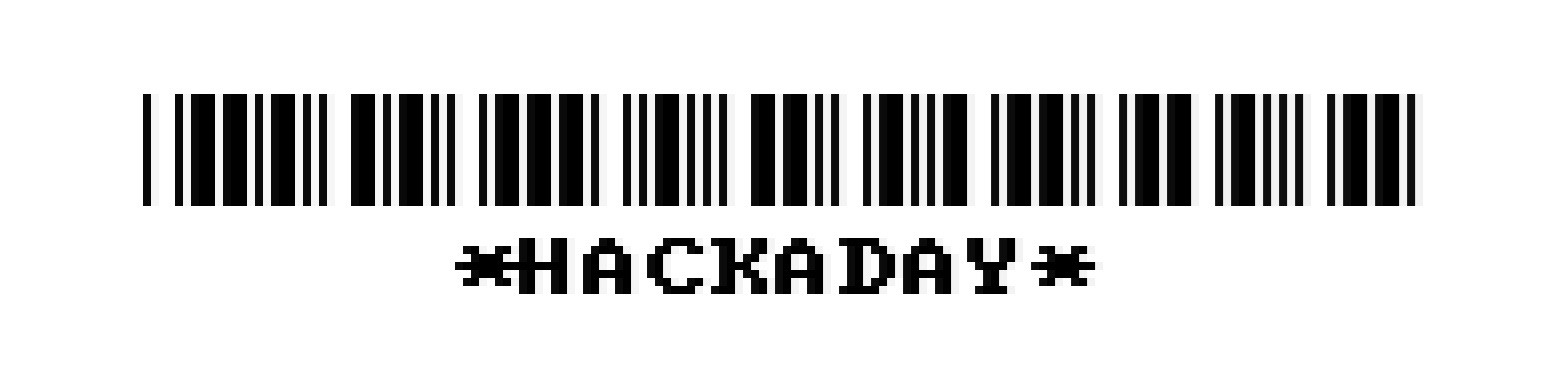
QBASIC program for CODE25(ITF)
                          DIM P$(0 TO 9), G%(&H3FF)
        FOR I = 1 TO 12
I = I + (I MOD 2 + I \ 2 MOD 2 + I \ 4 MOD 2 + I \ 8 MOD 2) \ 3
                N = I
                P = P XOR P
                Y = (1 + Y) MOD 10
        DO
                P$(Y) = P$(Y) + RIGHT$(STR$(N MOD 2), 1)
                P = P XOR N MOD 2
                N = N \ 2
        LOOP UNTIL LEN(P$(Y)) = 4
                P$(Y) = P$(Y) + RIGHT$(STR$(P), 1)
        NEXT I
        INPUT " Enter the No: "; U$
        U$ = RIGHT$(CHR$(&H30) + U$, LEN(U$) + LEN(U$) MOD 2)
                FOR K = 1 TO LEN(U$) STEP 2
                OP$ = OP$ + P$(VAL(MID$(U$, K, 1)))
                EP$ = EP$ + P$(VAL(MID$(U$, K + 1, 1)))
                NEXT K
        FOR L = 1 TO LEN(OP$)
                FP$ = FP$ + MID$(OP$, L, 1) + MID$(EP$, L, 1)
        NEXT L
                SCREEN 2
                PRINT U$
                        GET (0, 0)-(8 * LEN(U$), 14), G%
                        PUT (0, 0), G%
                PAINT (0, 0)
                Z = 320 - INT(((LEN(U$) * 9) + 9) / 2)
        FOR I = 1 TO 7 + LEN(FP$)
        FOR J = 0 TO VAL(MID$("0000" + FP$ + "100", I, 1)) * 2
                LINE (Z, 5)-(Z, 25), NOT I MOD 2 EQV 1
                Z = Z + 1
        NEXT J
        NEXT I
                PUT (320 - (LEN(U$) * 4), 30), G%
                        SLEEP
                        END
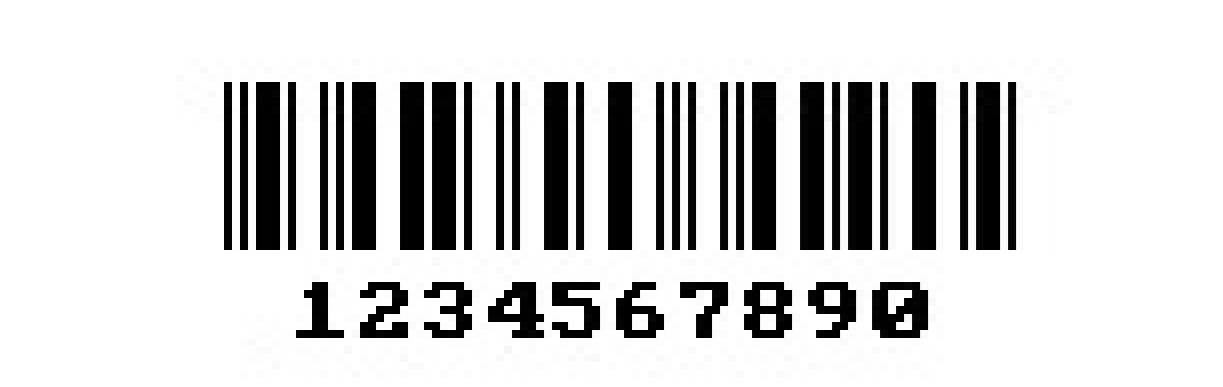
RESULTS:
The above code were tested with Windows 10/11 system with QB64 compiler. The generated output can be easily scanned by smartphone barcode scanner app for Android, iOS, etc.,
The program also works with DOSBox 0.74-3. I have tested it running from an IMATION Super Disk FDD.
While running with DOSBox, the output appears in 640x480 size while running full screen. So the barcode appears bigger and easy to read.
CONCLUSION:
These programs were developed by me as a hobby in the year Y2K. I have used DOS 6.22, Windows 95 platform using GW-BASIC and QBASIC V4.5 with compiler option provided by Microsoft.
We can easily develope any 1D barcode image generation if we know the encoding structure of the barcode.
This demonstrates the language is not a barrier and simple useful things can be still developed using GW-BASIC and QBASIC.
ISSUES:
In CODE39 the program accepts only UPPER CASE letters. We can easily change the lower case user input to UPPER CASE letters before processing. Instead I tried to play with hardware at BIOS. DOS keeps the CAPS LOCK key status at the memory location &H417
140 Def Seg = &H40
150 K% = Peek(&H17)
160 Poke &H17, (K% Or &H40)
When you run the CODE39 program it will automatically turn on the CAPS LOCK and after processing before exiting, the program CODE39 restores the CAPS LOCK
410 Poke &H17, K%
420 Def Seg
But this feature is no more working on Windows 64 machine due to may be change in CAPS LOCK status location or Windows does not allow to access the location with QB64
This feature works seamlessly with DOSBox and works fine. Tested and verified in DOSBox. There would not be any indication for CAPS LOCK status on keyboard. But it works fine in Windows 11. If your keyboard is not in CAPS LOCK, when running the CODE39 program, the CAPS LOCK will be turned ON automatically and after exiting the program, it turns off CAPS LOCK. Or it restore back to the previous state.
/* THANK YOU */
The Source Code, Output image and smartphone scanner results are available at my Github