O.A.Olsen
-
Scad and shell program
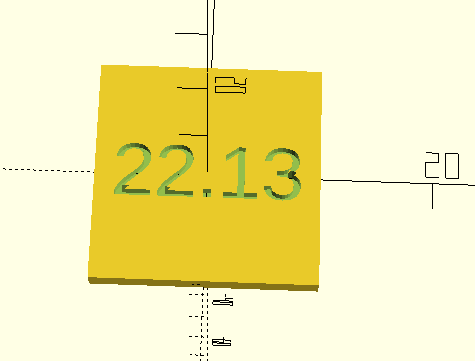
2 hours ago • 0 commentsAn Openscad program can read a file using either the include or use functionality. The program can then use the information read to dynamically modify the model. In my case I read a file containing a string representation of the present time and then include this as a engraved timestamp of my model. This example is a cube with an hour and minute time stamp.
![]()
use </tmp/scadtime.scad>;
hm= hourmin();
echo(hm);

difference( ) {
  cube([20,20,2], center=true);
  translate([0,0,1])
    linear_extrude(2, center=true)
    text(hm, size=5, valign="center", halign="center");
}
The use function reads the content of the scadtime.scad file. In this case the content is a function hourmin() returning a time string. As an example:
function hourmin()=str(22.21);where the number is the time. The rest of the program generate a cube and subtracts the text hm. A script program generates the scadtime file
#!/bin/sh
while true; do
    echo "function hourmin()=str($(date +'%H.%M'));" >/tmp/scadtime.scad
    sleep 60
done
The format string following the + command line option for date specifies how the time will be represented. Run man date to find all the format specifier. You can of course change this format string to include year, month etc.
After I start the above script the script will update the scadtime file every minute until killed. Thus the file will hold the present time with one minute resolution. The problem with this is that OpenScad sets notification on the file and will thus detect file changes and generate a new view of the model (like pressing F5). This is very inconvenient if you are at editing the model.
It is therefore better to increase the sleep time to e.g. 3600 seconds. A timestamp with one hour resolution will be fine if you do not reprint the model too often.
An alternative can be to remove the while loop and manually run the script fefore each new modl rendering (F6 press). Needs some discipline to ensure the scadtime file is up to date when needed.
OpenScad timestamp
I find a timestamp on printed models useful when iterating designs. I can then easily find the newest from a bunch of prints.