 gamadril.dev

The device I'm working on is an aftermarket LCD device with CarPlay and Android Auto support. There are a lot of them with different screens, additional cameras, other features depending on the price and each of them has its own name. I took the cheapest one with 7-inch LCD with no extra features based on an Allwinner F133/D1s CPU, 64 MB RAM , 16 MB flash and running Melis RTOS. Typical UI:
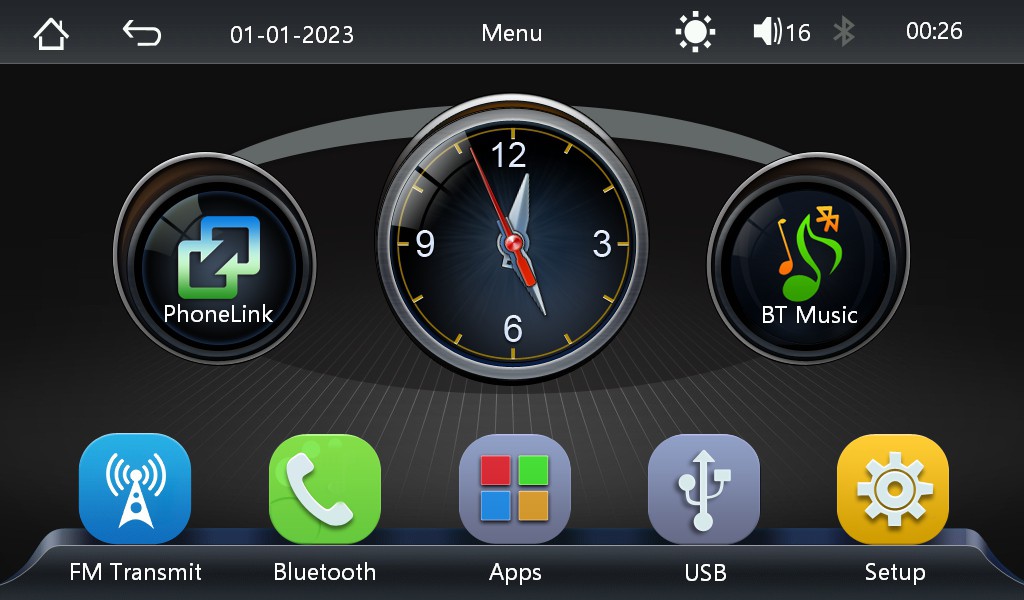
There are other devices which might look the same but are based on ARM CPUs - for those devices the tools used here are not helpful, but my work might give you an idea how to do the same. Maybe if I get such a device in my hands, I will also try to RE it...
Of course when I got the device the first thing I did was opening it and looking inside - because like Tim always says - it might need "more power"! The final target is to add CAN bus support to it and extend with custom UI screen to show vehicle data - either by patching the existing UI engine or replacing it completely with custom UI including own (Linux) kernel. The big challenge is to keep the CarPlay and AA functionality working.
If you wonder why there are pictures of two boards - my first device never made it into my car. After 2 weeks "hacking" the disassembled device on my table I realized that this is now a "dev board" and ordered another similar-looking device from another seller with same specs. I hoped it might give me more options for analyzing, but at the end the second device had same software and same board, but one revision lower.
The LCD is labeled as JC I07-031/B018AB12-1HD01. I could not find any info about it, but for sure it's a parallel LCD with gt968 I2C touch screen controller. Although there are no detailed specs for the LCD, the extracted sys_config.fex file provides enough information (like resolution 1024x600) about it's wiring and timings.
The first step in the firmware analysis is to get this firmware for analysis. I asked both sellers I got my devices from for firmware updates or recovery files but as expected got nothing. So dumping the flash was the only way to access the firmware. 16MB SPI NOR flash is not protected and easy to read out with common tools, however after digging deeper into the datasheets of F133/D1s CPU I was sure there must be a way to do it over USB and ideally without opening and modifying the device at all...
The USB-A port on the side of the device is an OTG USB port and can act as host and device. If the CPU does not find any bootable media, it will switch to FEL (Firmware Exchange Launch) mode and when connected to the development machine using a USB-A to USB-A cable will be detected as "
ID 1f3a:efe8 Allwinner Technology sunxi SoC OTG connector in FEL/flashing mode". With the xfel tool it is then possible to access the flash.
When I started reverse engineering that device I used a simple method to enter FEL - connecting MOSI flash pin to GND (that's why there is a button on the picture) so no boot media is found and FEL is entered automatically. Later I found out that SD card has a higher boot priority - makes sense to be able updating firmware from the SD card. Using a small boot image from the SD card makes it possible to enter FEL mode much easier without opening the device. Details about it are in the GitHub repository.
So after getting the full flash dump the next step was to analyze it using tools like binwalk, strings etc. For the analysis I found repositories on GitHub containing projects related to the D1s and parts of the Melis RTOS source code including the C tools used to generate images out of compiled binaries.
Final analysis result of the dump is a combination of bootloaders and partitions - something we can work with.
Based on the flash dump we have this map
| Image File | Offset | Size (Bytes) | Format | Description / Role |
|---|---|---|---|---|
| boot0.bin | 0x00000000 | 49152 | eGON.BT0 | Bootloader (SPL) |
| gpt.bin | 0x0000c000 | Variable | GPT Partition Table | Preamble (0_ppt.bin) + partitions 1_bootA, 2_ROOTFS, 3_UDISK |
| 0_ppt.bin... |
 David Kuder
 fjkraan
 Andrey Ovcharov
 Scott Hasse