Close
0%
0%

Optocam Zero

Optocam Zero is a Raspberry Pi Zero based compact digital camera made using off the shelf components.

Public Chat
Similar projects worth following
0 followers
I designed Optocam Zero to have a very compact, carry everywhere and have fun sort of camera. As I was inspired by Kodak charmera and similar toy cameras, I wanted it to be feel playful, enjoyable and be intuitive to use. I also aimed to make it relatively easy to build so that others can also build one and have fun with it. That's why all the case parts are easily printable and for the electronics it uses off the shelf components that are easy to find.

Optocam Zero is a fully open source, pocket sized digital camera built around the Raspberry Pi Zero 2W. It's designed to be simple to build, simple to use. All parts are off the shelf and the case is fully 3D printed.

Features

  • Compact enough to pocket, 51×71×18mm body (excluding camera and screen bump)
  • Autofocus camera module with 2592×2592px JPEG capture
  • 240×240px 1.4" LCD with a consistent 15–20 fps live preview
  • 8 built-in photo filters
  • Custom hotspot interface for fast image transfer that works on mobile and desktop
  • 22 second boot time, 70-80 minutes per charge on a standard 14500 Li-ion cell
  • Hot swappable battery
  • Screen dims automatically when idle to save power
  • TPU protective sleeve and lanyard design also available to print

Everything you need is in the GitHub repo:

In addition, I made the build guide and the BOM available on this hackaday project page for quick browsing.
  • 1 × Raspberry Pi Zero 2 W (without header)
  • 1 × Raspberry Pi Camera Module 3
  • 1 × Micro SD Card A2 Class Raspberry Pi or other high quality brands, minimum 16GB
  • 1 × Waveshare Li-ion Battery HAT for Raspberry Pi
  • 1 × Waveshare 1.3" IPS 240x240 LCD Display HAT for Raspberry Pi

View all 18 components

  • 1
    Before You Start

    Welcome to the Optocam Zero build guide!

    Make sure you have all the required parts, tools and 3D printed components ready before you begin. 

    Read through all the steps before starting. Some steps have a specific order that can't be reversed easily.

    This build requires basic soldering and desoldering. If you haven't soldered before, it's worth practicing on some scrap components first.

    Take your time, especially with the ribbon cable (order extras to be safe) and the header pin soldering/desoldering. These are the most delicate parts of the build and mistakes here are difficult to undo. Be patient with it. 

    The 3D print files and software can be found at: 

    github.com/dorukkumkumoglu/optocamzero/

  • 2
    Modify The LCD HAT

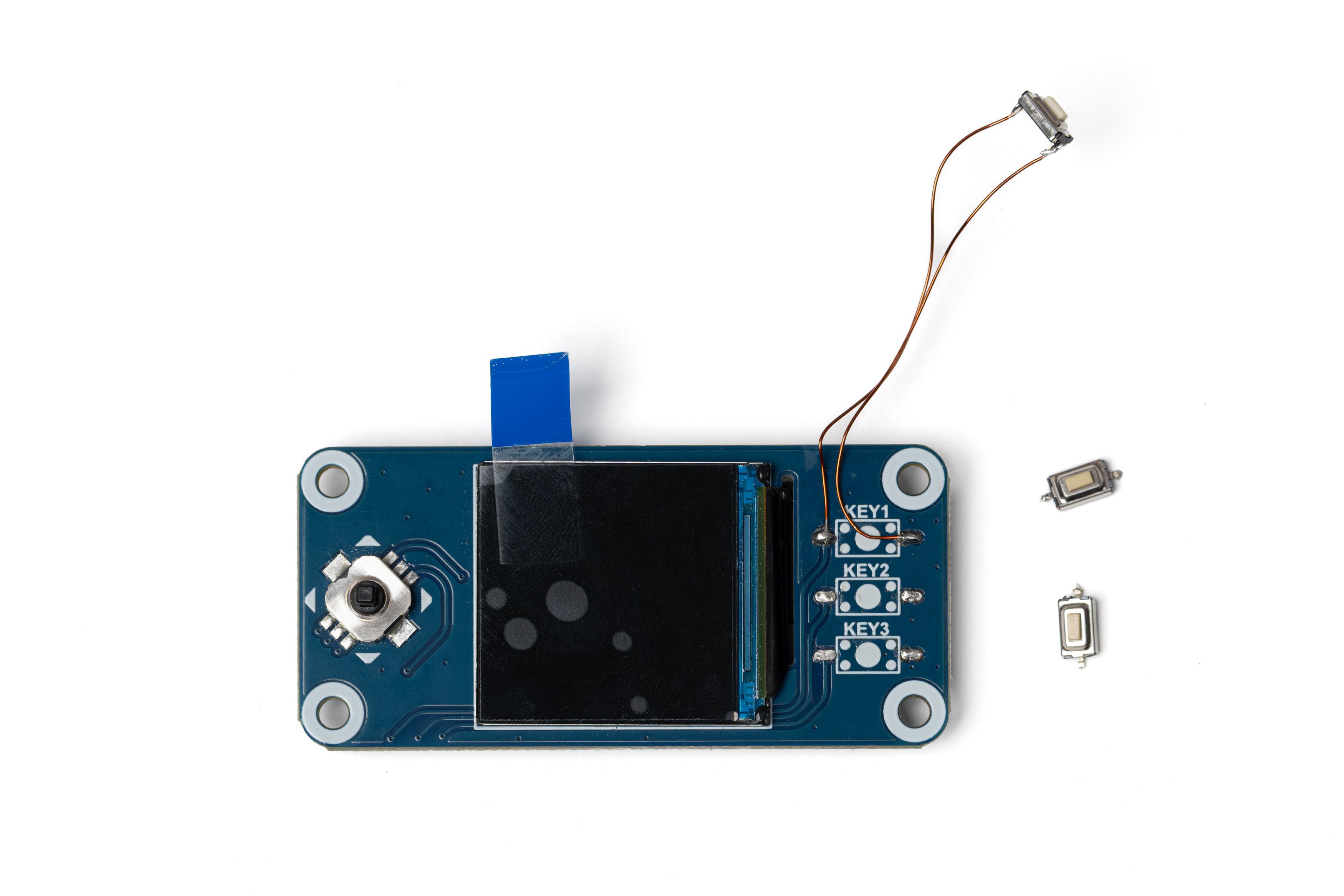
    Desolder 3 buttons on the right side of the LCD HAT.

    Cut two pieces of thin wire, around 4 cm each (I'm using 0.3mm enameled wire here). Bend the pins of one of the buttons inwards and carefully solder the wires to the pins.

    Solder the other ends of the wires to the topmost key pads on the LCD HAT.

    The soldered button will act as the shutter button. The remaining buttons will not be needed.

  • 3
    Make The Power Cable

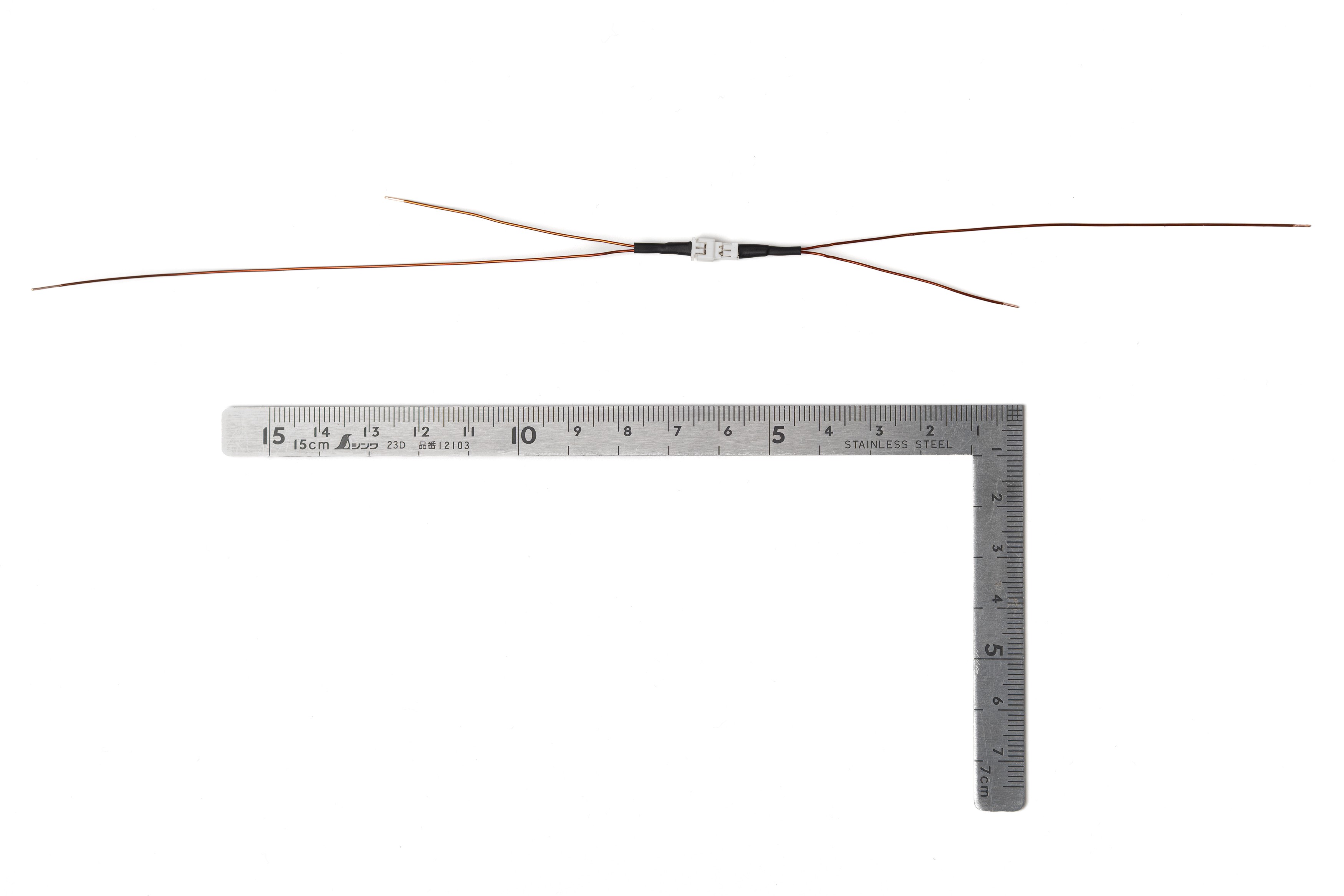
    Prepare the power cable using 24 AWG cable and a Micro JST 1.25 Pitch 2 Pin connector as shown in the photo. Estimate the required length from the ruler in the photo.

    This cable is for the connection between the battery HAT and the battery.

    The connector allows for easy disassembly. If you'd rather skip the connector, just cut two 15–20 cm pieces of cable and use those for the connection.

View all 27 instructions

Enjoy this project?

Share

Discussions

Similar Projects

Does this project spark your interest?

Become a member to follow this project and never miss any updates