Bruce Eisenhard

Three Pico W boards act as temperature sensors. Each runs a short BASIC program that wakes up once every few minutes, formats a reading as `/?lanai_f=82\r\n`, and transmits it over HTTP GET CGI to the main Pico 2W. . The Pico 2 W serves the dashboard page, and a `<?web lanai_f ?>` tag in the HTML substitutes the live value when any browser loads it. Two Shelly smart plugs are controled by HTTP CGI commands form the Pico 2W
The whole thing runs on your WiFi. No AWS, no Google, no subscription, no broker. It's also accessible remotely via a Cloudflare tunnel — no port forwarding, no static IP required.
| File | Runs on | Role |
| home_monitor.bas | Pico 2 W (RP2350) | WiFi web server — temps, light control, history graph |
| home_monitor.html | Pico 2 W (served) | Dashboard page with `<?web ?>` template tags |
| home_monitor.css | Pico 2 W (served) | Dashboard stylesheet |
| HTTP_temp_stub.bas | Pico W (RP2040) | HTTP temperature sensor — sends `key=value\r\n` over NUS ch 3 |
Getting the radio up
None of that works until the CYW43 WiFi/BT co-processor on the Pico 2 W is talking. That chip expects the Pico SDK runtime — clocks, DMA, PIO, an async context, a ~225 KB firmware blob streamed over SPI at startup. ARMbasic has its own hand-rolled startup and none of that. Getting the chip to cooperate meant reverse-engineering exactly which pieces of the SDK the radio actually needs and replaying them by hand.
It did not go quietly. Three genuinely nasty bugs: a linker change that shoved the vector table off `0x10000000` and silently killed USB enumeration; the WiFi PIO state machine landing on PIO2, which the custom startup left in reset, so every register write evaporated and the first SPI transfer hung forever; and — the sneakiest — the chip joining the network fine while the driver sat stuck at "JOINING," because the host-wake interrupt was stubbed out and the join-complete event was never delivered.
BLE on the sensor nodes had its own moment. The `TXD(ch) = value` statement in BASIC is supposed to send a byte to a specific serial channel — channel 3 is BLE NUS. The hardware worked, the connection was up, bytes were arriving from the phone. But nothing ever came back. After adding debug prints up the call chain, it turned out `TXD(ch) = value` had been silently calling `WAIT(value)` instead. The compiler's code-generation table had `OP_SET_TXD` falling through to `CMD_WAIT` — three opcodes sharing one handler, all routing to the wrong function. Nobody noticed because multi-channel serial was rarely exercised on targets where the channels did anything interesting. Sending `TXD(3) = 0xE8` was pausing the program for 15 seconds. One line fix, one recompile, it worked.
Drag-and-drop authoring
Pages are flash files authored by drag-and-drop. Plug the board in, a USB drive named *ARMbasic Pages* appears, drop your `.html` on it, eject — and it's live over WiFi a second later. The eject *is* the save gesture; it commits the RAM write-back buffer to flash. No FTP, no toolchain, no reflash just to change the page layout. Dynamic content uses a PHP-style template tag, `<?web … ?>`, embedded directly in the HTML. Tags can substitute a variable, call a BASIC function and inline its return value, evaluate a small expression, or branch with `if/else`. The dashboard uses them to show the four temperatures, render the light state badges, and conditionally color the on/off buttons. There's no on-chip compiler — the PC compiles the BASIC program; the chip keeps the symbol table (names and addresses) and a small template evaluator. Scripting in the page costs a few KB, not a language runtime.
The bigger picture
You can't win the board business anymore, so don't play it. The Pico ships by the million at a price...
Read more »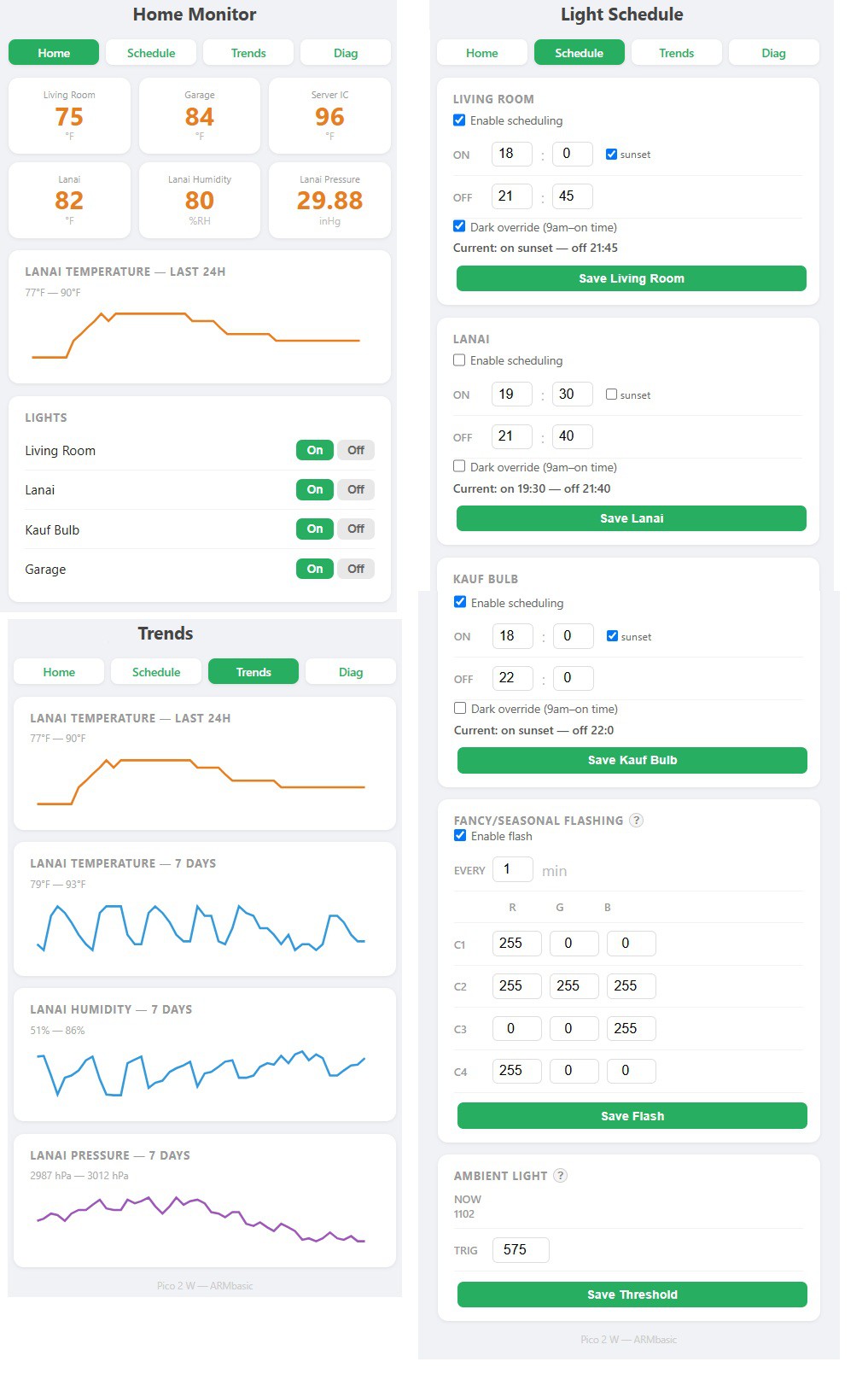
 Christopher.Scott
 Simon
Simon
 alberto nunez