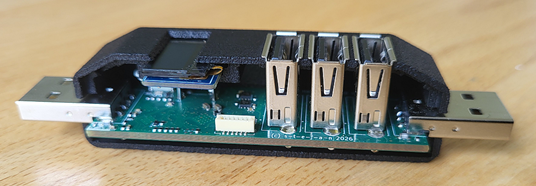
Tired of flimsy, black-box USB KVM switches with poor signal integrity, I engineered H₂H³—a robust, transparent desktop tool. It seamlessly toggles three USB 2.0 peripherals between two host PCs, backed by professional engineering rigor.
Technical Specs:
# Hardware: Clean, production-ready 4-layer board designed in KiCad 9.0, optimized for controlled impedance.
# Firmware: Modular, object-oriented C++ on an STM32 MCU.
# OLED Telemetry: Integrated screen displays live VBUS status and current consumption.
# The 4th Device: The STM32 hooks into the internal hub as a native peripheral, opening up native host-to-MCU desktop integration.
# Mechanics: Precision FreeCAD 1.0 enclosure optimized for industrial MJF (Nylon PA12) 3D printing, featuring a 100% screwless snap-fit design.
# The hardware is finalized. The C++ firmware is a highly stable, 95% functional prototype. 100% source-open—join the hack to polish the remaining 5% or invent a 100% new application!
It works!!! I have extended H₂H³ by a Rust background app which detects the mouse position at the edge of the display triggering the Host switch-over seamlessly. It feels like the movement via two virtual screens though being handed over from one host computer to the other.
That’s pretty awesome!
The clue is to plug mouse and keyboard into H₂H³'s Downstream Ports, and let them be switched from one host to the other by a control command via a backwards custom HID channel detected by the downstream STM32.
The trigger conditions are user configurable from a little systray app: left / right screen border, optional additional key press and an optional dwell time. The daemon app may be automatically started up at system boot.
Rust is used to have the code being set up completely OS agnostic for Windows, Linux and Mac OS. However, currently only tested successfully on Windows.
I could realize this within hours, never having programmed a app with Rust before, with Support from Gemini in chat and copy/paste mode 😀
I am working with my H2H3 STM32-based KVM switch every single day, connected to my two host computers. While I love the reliable, snappy, one-button physical switching of my keyboard and mouse from one machine to the other, I realized something was missing from the desktop experience.
It would feel significantly more natural and intuitive if simply moving the mouse pointer to the left or right edge of the screen automatically handed over control to the neighboring computer—simulating one continuous, unified workspace.
What do you think about this feature? Reply with your feedback!
My intended simple Computer vs. Charger differentiation works like a charm:
I am using the CDC USB drivers of STM configured in my vscode project (see latest commit on github.com/s-t-e-f-a-n/twinusb). My code detects the successfull enumeration of H2H3's STM32 as its 4th peripheral Hub device. If the enumeration doesn't take place though vbus voltage is applied to one of the Host Ports, then just a charger is most likely connected.
The OLED displays the type of connected device instantly. When I find some time I'll post some photos...
I am glad to be here and excited to hear what you think about H₂H³!
After some pure software-related homebrew projects (like my Home Assistant integrations and extensive web scraping for PDF retrieval to feed my Paperless service), I decided it was time for a hardware project again.
On my desk, two computers share a single keyboard/mouse pair, which I always had to reconnect manually whenever I wanted to switch. I knew there had to be a way to automate this! At first, I thought about a pure hardware-based solution—it couldn't be that difficult, right? Just two "break-before-make" switches and a little hub between hosts and peripherals. But then the feature creep kicked in: It should automatically switch over if a host disconnects, it needed to measure voltage and current (yes, I am an electrical engineer 😉), a display was required, and it had to be as small as possible—maximum USB stick form factor.
I quickly realized a microcontroller was needed to keep everything under control (and to brush up on my firmware skills). I drew up some concepts, dug for components, and chose JLCPCB for prototype manufacturing. Their standard 4-layer PCB design rules guided my layout in KiCad, which worked out beautifully. Quite early on, I decided not to assemble the PCBs myself. Instead, I used JLC's assembly service, combined with parts from DigiKey that I sent to their warehouse for global sourcing.
And then, while waiting for the electronics to arrive from China, I wanted a new challenge: exploring the possibilities of modern 3D printing to design an enclosure. I had never designed a mechanical case before, nor did I have any experience with 3D printing. The learning curve was steep: learning FreeCAD concepts (and learning to love it!), checking JLCPCB’s 3D printing design rules for miniature structures, and researching snap-fit matings because the case had to assemble without any glue or screws!
When the assembled PCBs arrived, I hand-soldered the 5 THT USB connectors and the switch button. Then, I hooked up an STLINK-V3MINIE (which I had never worked with before), installed the STM32 IDE, configured the toolchain with some AI assistance, and flashed the initial bring-up code. I was blown away: within 2 hours, the fresh hardware was running perfectly. Everything that had only existed in my imagination was actually working in practice!
A few days later, the Nylon printed enclosures were delivered. And again: the snap-fits worked perfectly with a satisfying CLICK! The enclosure is an almost perfect fit for the electronics, and even the loose I2C OLED slid right into place like a charm.
I want to share my enthusiasm and all the sources—from the KiCad and FreeCAD designs to the firmware codebase of this fully functioning twin USB switch and triple USB hub.
But to be completely honest: it’s actually a four-peripheral USB hub, because the STM32 is the fourth member on the bus. Doesn't that open up so many cool applications? Just think of the STM32 acting as a native keyboard to macro-control the connected host 😉