Andrea Ricci
-
Teaching the AI to see — honestly
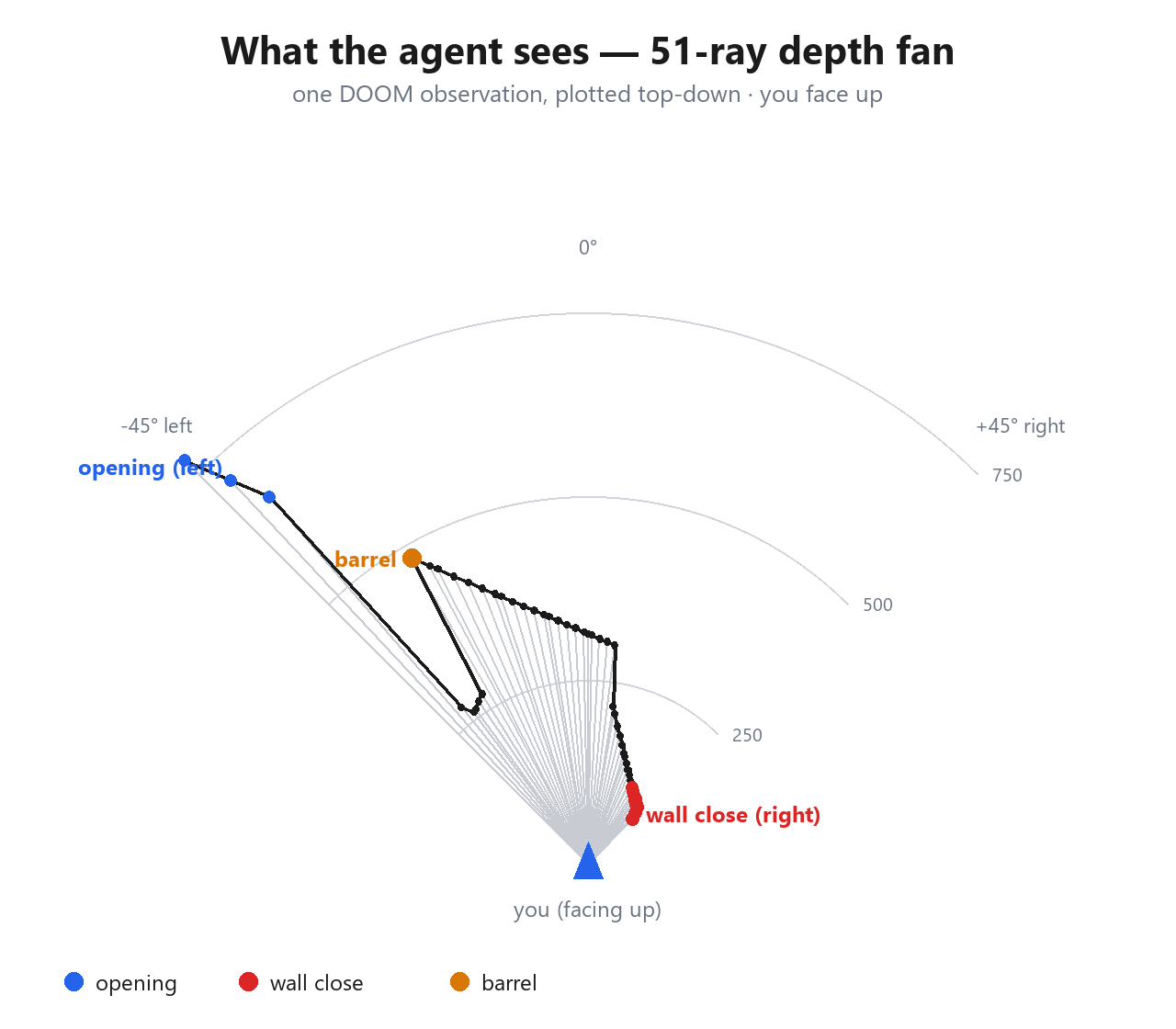
08/25/2026 at 21:21 • 0 commentsThe hard part wasn't the plumbing, it was the perception. The model gets only what a human sees on the screen — no reading enemy positions out of the map, no seeing through walls. Concretely, each observation carries: a fan of raycast wall distances across the field of view (the "depth" of the rendered image); the things actually on-screen and in line of sight, ordered left to right; an ASCII automap showing only the walls it has already discovered; and two hints — door_ahead (a closed door in view) and blocked (your last move made no progress).
We started with a coarse 7-ray depth fan, and the agent kept walking into things — doorways and wall edges fell between the rays and were simply invisible. Bumping it to 51 rays across the field of view made the world legible: a ray suddenly much longer than its neighbours is an opening.
![]()
The bug that taught us the most: the agent kept swapping left and right. It turned out our reported bearings were sign-inverted relative to the docs, and the facing angle used a different convention than the map. Once we made positive = right everywhere (things, walls, doors) and turned the heading into a compass aligned with the north-up automap, it stopped headbutting walls and started navigating. door_ahead got the same care — it points at the centre of a door, and reappears as "press use again" when a door has re-shut, instead of being mistaken for a solid wall. blocked was reworked too, projecting movement onto the facing axis so that sliding sideways along a wall still counts as "not getting where I'm pointing."
-
Letting an LLM play: a lockstep WebSocket and an MCP server
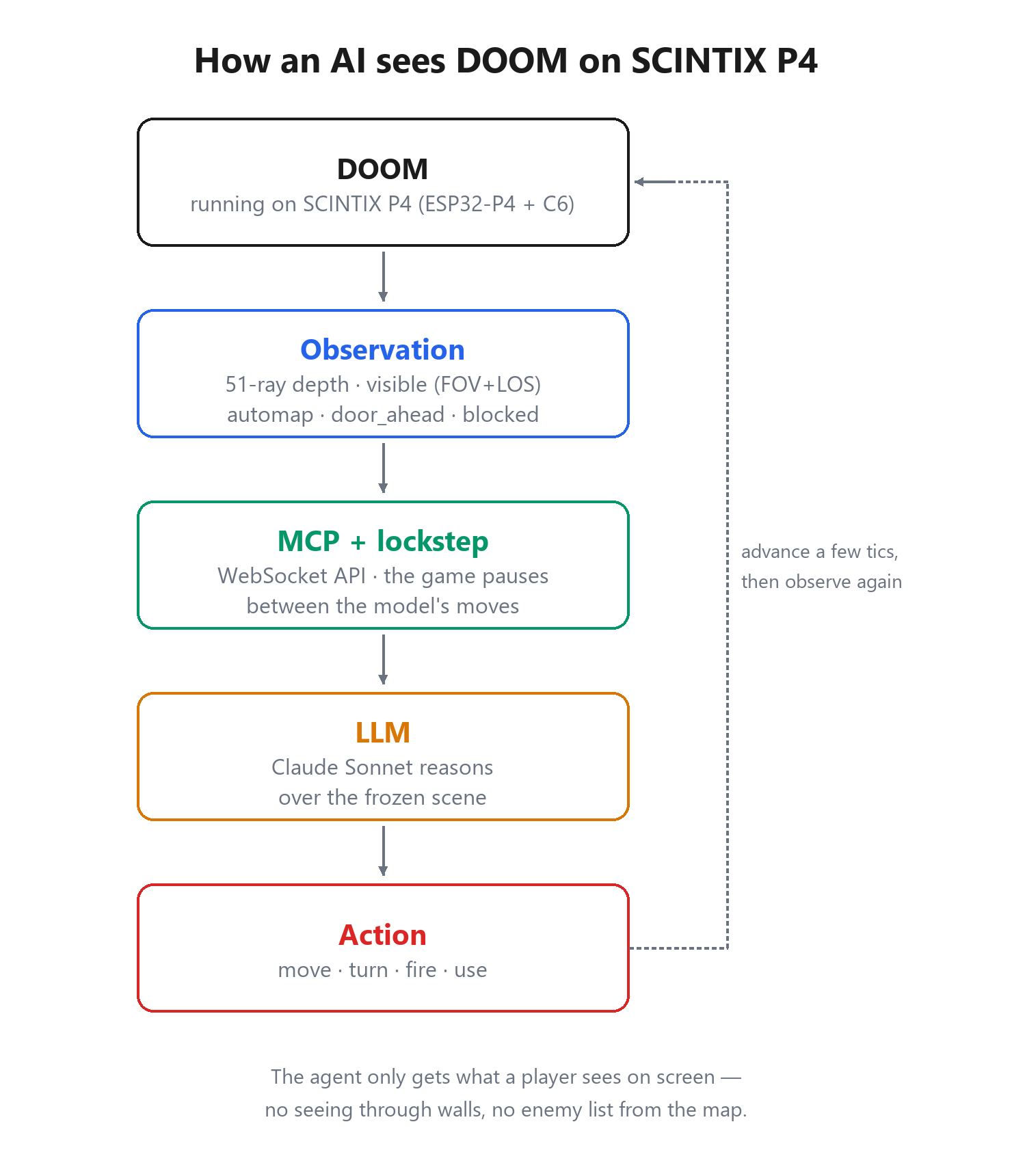
08/25/2026 at 21:18 • 0 commentsHere's where it gets weird. We wanted a large language model to actually play the game running on the board, so we gave the firmware a small control channel: a WebSocket /agent endpoint that runs the game in lockstep. You send one action, the game advances a few tics, and you get back a structured JSON observation — then the game pauses until the next action. That determinism is the whole point: the model always reasons about a frozen, coherent frame instead of a scene that keeps moving while it thinks. It's also why, in the video, the marine moves in little bursts — the game is literally paused between the model's moves.
On top of that we wrote a tiny MCP server. MCP (Model Context Protocol) lets any MCP-capable client — Claude Code, for instance — register external tools; ours exposes the game as observe, move_forward, move_back, turn_left, turn_right, strafe_left, strafe_right, fire, use, select_weapon, and get_map. Point the client at the board's IP, and the model can just play — no glue code, no screen scraping.
![]()
-
Going wireless: Wi-Fi through the C6 (and a BLE gamepad experiment)
08/25/2026 at 20:58 • 0 commentsThe ESP32-P4 has no radio of its own — the wireless lives on a companion ESP32-C6, reached over ESP-Hosted on a 4-bit SDIO link. For DOOM that means Wi-Fi comes up on the P4 as if it were local: on first boot it runs a captive portal (SSID SCINTIX-P4-xxxx) so you can hand it your network credentials, then it joins as a station. That same Wi-Fi link is what the AI uses to reach the game (see the next logs).
We're also experimenting with a native-BLE controller. Because the P4 has no radio, we bring up the NimBLE host on the P4 and let the C6 act as the BLE controller, with the HCI carried over the hosted VHCI transport — the goal being to pair an 8BitDo Micro without a USB dongle. That branch is a work in progress: the BLE scan already comes up through the C6; the HID-host side is next.
![]()
-
Real controls and sound: USB HID and an ES8311 codec
08/25/2026 at 20:58 • 0 commentsA DOOM port isn't much fun without a keyboard and some noise. The ESP32-P4 has a USB host, so we drive input straight off it: USB keyboards (boot protocol) mapped to the usual DOOM keys and generic HID gamepads. Keyboard and gamepad coexist — whichever enumerates just works.
One gotcha worth flagging for anyone doing USB host on the P4: a full-speed device behind a high-speed hub needs a Transaction Translator, and that isn't implemented in the IDF USB host stack we used — so a FS controller plugged into a HS hub simply won't enumerate. Connected directly, it's fine.
For audio we hung an external ES8311 codec (an M5 Atomic EchoBase) off I2S. The catch: the EchoBase has no external MCLK, so the codec derives its clock from the bit clock (use_mclk = false) — at 22050 Hz / 16-bit the internal multiplier lands on the right ratio. The onboard amplifier is un-muted through a little PI4IOE I/O-expander rather than a plain GPIO pin. SFX only (music off), and DOOM has its sound back.
-
DOOM at 30 FPS — letting the hardware scaler do the work
08/25/2026 at 20:56 • 0 commentsDOOM renders at 320x200, but our panel is 1024x600, so every frame has to be scaled up. Doing that on the CPU was the whole bottleneck: about 24 ms per frame just for the scale-and-blit, which capped us around 20 FPS.
The ESP32-P4 has a 2D Pixel-Processing Accelerator (PPA), so we handed the job to it. The PPA scales the 320x200 frame straight into the back framebuffer of the MIPI-DSI panel, and because that buffer is one the display driver already owns, presenting it is a zero-copy page-flip at the next frame boundary — no extra copy. Scale + flip dropped from ~24 ms to about 9 ms, and the frame rate settled at a steady 30 FPS. Above that, DOOM's own renderer and its 35 Hz game tick are the ceiling, which is fine.
One fun bug: the PPA quantizes its scale factor to 1/16 steps, so 3.2x becomes 3.1875x = 1020 px wide — it never writes the last 4 columns. With double buffering those stale columns held different leftover boot-pattern data in each buffer, so the right edge flickered every time we page-flipped. Fix: clear both framebuffers to black once at startup; the PPA never touches that strip again, leaving an invisible 4 px black edge.
Claude Sonnet plays DOOM on SCINTIX P4
An LLM plays real DOOM on a custom ESP32-P4 module — seeing only what a player sees on screen, through an MCP interface.