Close
0%
0%

Rożen (The Ryzen Mini-PC)

Turning a salvaged laptop motherboard into a portable mini-PC

Public Chat
Similar projects worth following
0 followers
What do you do with a modern, high-performance 8-core Ryzen 7 5700U laptop that has had its plastic chassis completely demolished? You strip it down to the bare silicon, throw out standard constraints, and turn it into a dedicated, silent yet powerful workhorse.

Project Rożen is an exercise in extreme thermal headroom optimization and structural minimalism. By utilizing an enterprise docking station, the entire machine has been reduced to just a handful of components inside its custom enclosure: the bare motherboard, a custom heat sink and fan, a power button and a coin-cell RTC fallback battery. The problematic laptop daughterboards, internal battery grids, speakers, camera and all that useless stuff have been discarded entirely.

The Engineering Framework:
• The Chassis: A tight, custom-designed, linear wind-tunnel enclosure generated via Boxes.py and modified in Inkscape. Constructed entirely from 3mm plywood stock with high-efficiency, laser-cut IP1x geometric honeycomb exhaust grids to drop structural backpressure down to absolute zero.
• The Aerodynamics: Driven by a large 5V 4-pin PWM centrifugal turbine blower harvested from an Intel NUC6 "Skull Canyon" platform. The blower sits flat at the intake channel, drawing ambient air from the chassis floor and projecting a high-velocity laminate sheet horizontally down the runway of the tunnel.
• The Thermal Stack: The restrictive, low-profile stock laptop assembly has been completely desoldered. The new thermal stack features the original pure copper lateral heat-spreading adapter layer, bedded with Honeywell PTM7950 phase-change material, topped by a massive aluminum heatsink for M.2 SSDs. Large thermal capacity coupled with extended surface area is hoped to help achieve lower temperatures and noise.
• The Firmware Exploit: Standard factory BIOS restrictions are bypassed using the EDK2-based Smokeless_UMAF (Universal AMD Form Browser) tool. VRAM will be vastly extended beyond stock 512MB. With enhanced APU thermal management, it may be feasible to un-throttle the long-term package power tracking (PPT) boundaries from 15W up to a sustained 25W–30W envelope. Fan control will also receive custom tuning.

  • First Boot and Thermal Considerations

    Tomek Szczęsny • 15 minutes ago • 0 comments

    I put the bare motherboard on my test bench, installed some spare DDR4 RAM, and booted it using a live Linux Mint USB drive. It worked perfectly!


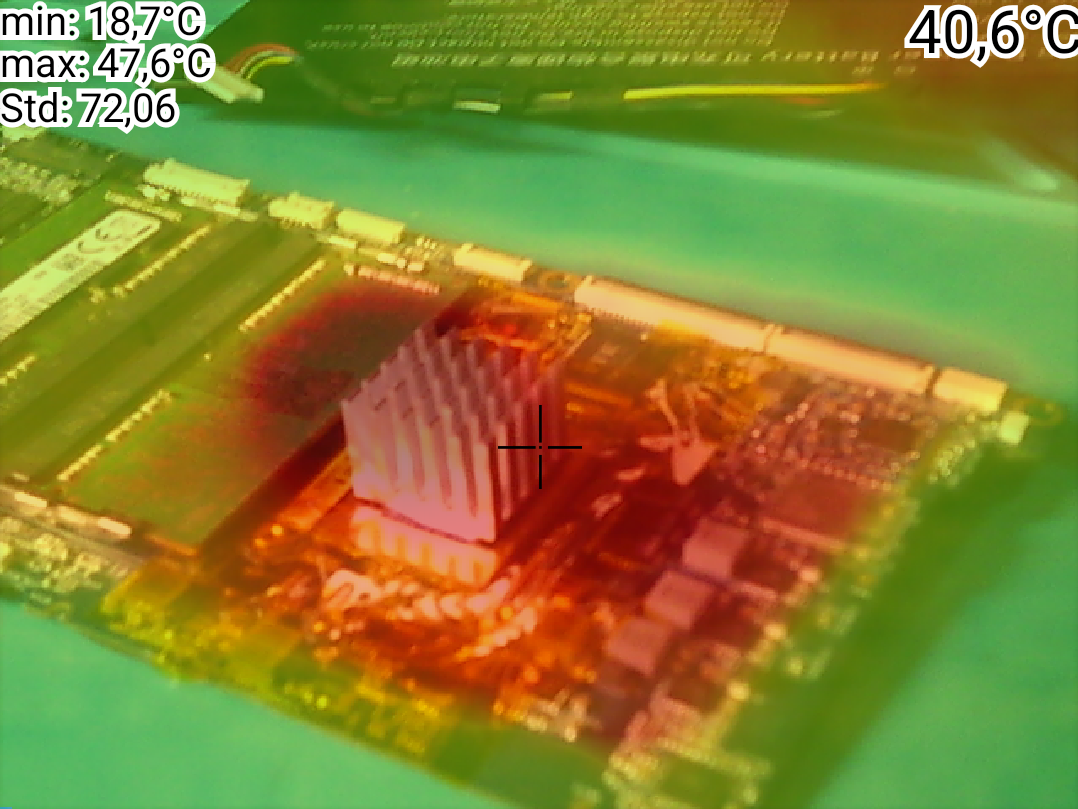
    However, during CPU stress tests with a temporary cooler, I noticed that the three power delivery components (VRM inductors) next to the processor quickly heated up to 60°C, even at idle. This means my new cooling system must cover these components too.

    Pardon this poor visualisation, my thermal camera clearly has an offset between visible and thermal images.


    I ran more tests using a Linux utility called stress-ng while watching the processor speeds and temperatures. The results were strange at first. When I loaded only 1 or 2 CPU cores, they boosted all the way to 4.34 GHz at around 65°C. But when I loaded all 8 physical cores at the same time, the speed dropped down to 2.7 GHz, and the temperature actually fell to a cool 60°C.
    Why would the chip get cooler when doing more work?

    This test revealed that the laptop was hitting a strict power throttling ceiling (TDP limit) set by the factory, not a thermal limit. The processor is physically locked at 15 Watts (long term mean power). When all 8 cores are busy, all cores receive severe clock speed penalty!

    Discovering that power constraints—not temperatures—were the biggest bottleneck changed everything. I learned that I can completely override these factory power limits and push the Ryzen chip from 15W up to a sustained 25W or 30W, using a specialized firmware tool called Smokeless_UMAF.
    But running at 30W means the tiny, high-pitched factory laptop fan would turn into a screaming hair dryer. To prepare for this massive performance boost, I decided to build a high-performance wind-tunnel cooling setup with a much larger heatsink.

  • Finding the Power Button (A Multimeter Trap!)

    Tomek Szczęsny • 29 minutes ago • 0 comments

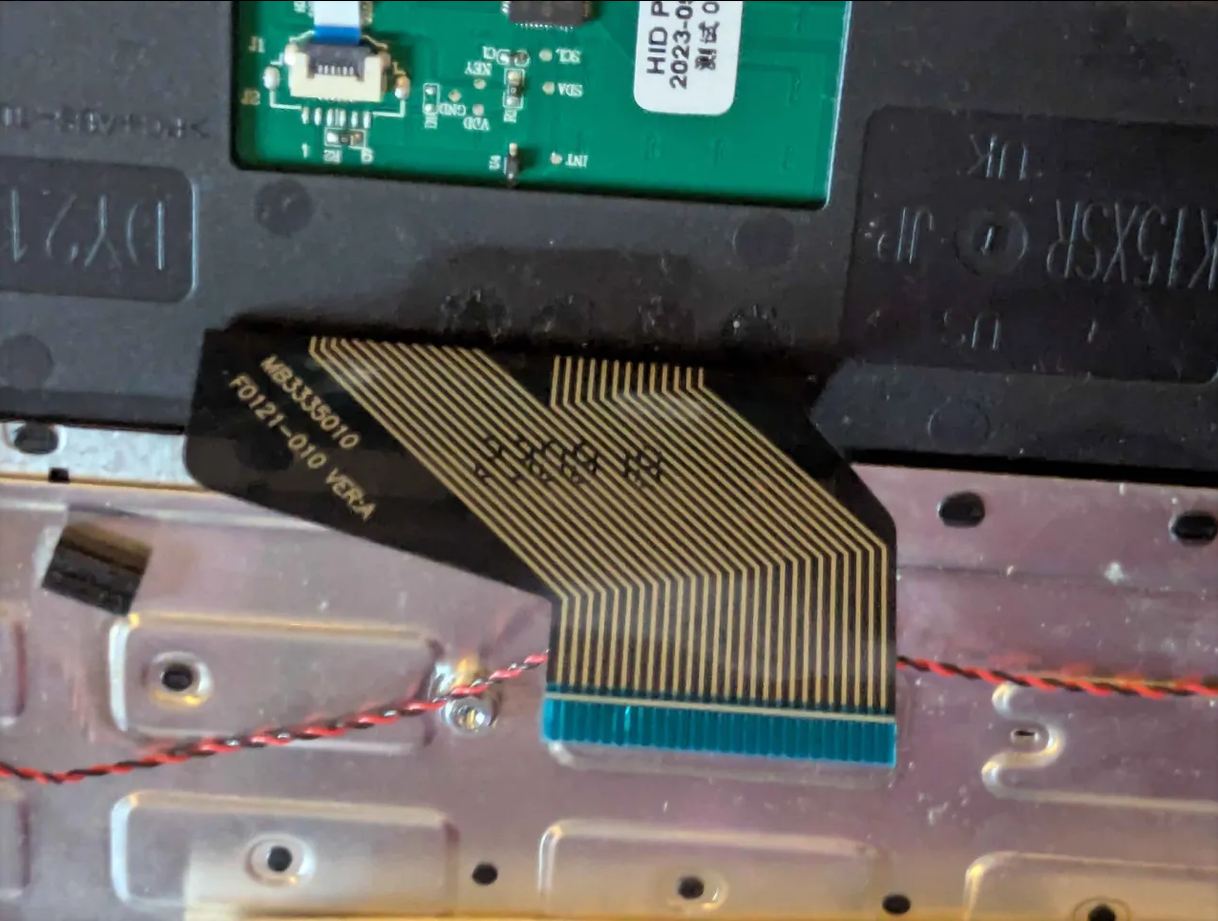
    Since I plan to build a custom wooden case and mount the computer under my desk, I needed a way to turn it on without the original laptop keyboard. I had to reverse-engineer the 26-pin keyboard ribbon cable to find the power button traces.


    This became an interesting electronics riddle.
    • At first, I used my digital multimeter (DMM) in standard "continuity beep" mode to scan the ribbon pins while pressing the power button.
    • It failed. The meter did not beep at all.
    • Why? Cheap laptop keyboards have poor membrane contacts. When you press a key, the resistance does not drop to 0 Ohms. Instead, it sits around 150 Ohms. Most standard multimeters only beep if the resistance is below 30 or 50 Ohms. They do not consider 150 Ohms a short circuit!

    I switched my multimeter to Diode Test Mode with a fast screen refresh rate. This mode easily detects the voltage drop across a 150-Ohm resistance. Using this trick, I successfully located the power trigger on pins 1 and 2. With help of a breakout board, I will emulate this key with a larger button mounted on the case at the later stage of the project.

    In the meantime, I have located a motherboard test point that acts as a power switch when shorted to GND, which I currently use for test launches.

  • The Donor Laptop

    Tomek Szczęsny • 34 minutes ago • 0 comments

    First, I had to find a cheap machine. I found a second-hand Cepter Cloud 15.6" laptop on a local marketplace. It cost me only 420 PLN (about $105 USD).
    When it arrived, it was in a truly sorry state. Many chassis screws were missing, and someone had replaced others with the wrong types. The plastic case was completely battered. However, inside sat a great heart: an 8-core AMD Ryzen 7 5700U processor with Radeon Vega 8 graphics. It was the perfect candidate for an e-waste rescue.


View all 3 project logs

Enjoy this project?

Share

Discussions

Does this project spark your interest?

Become a member to follow this project and never miss any updates