 Max.K
Max.K-
Software
2 hours ago • 0 comments![]()
One main inspiration for this project was the web interface of the GP2040-CE game controller firmware. I remember being surprised that I could access the interface with a browser after simply plugging the Raspberry Pi Pico into my computer's USB port. But how does this work without Wi-Fi? The RP2350 has full control over its USB interface and can act as basically any USB device, including a network adapter. An lwIP server handles incoming web requests for its IP address, just like opening the configuration interface of your Wi-Fi router. It took me a while to get this setup running using TinyUSB and lwIP inside the Raspberry Pi Pico SDK, but eventually I was looking at my first “hello world” website.
In order to host a website from the Pico, the entire content has to be stored within the SPI flash. Luckily, the CMake function pico_set_lwip_httpd_content can automatically convert raw files to C code during compilation. This way, all the HTML, JS, and CSS files for the web interface can be stored in a folder within the code project as plain text.
As a next step, I needed to figure out how to send and receive data between the web interface and the actual firmware running on the RP2350. The final firmware would need all kinds of data sent back and forth—for example, scope captures, trigger settings, and current telemetry. My first idea was WebSockets because they allow fast two-way communication over a single TCP connection. But WebSockets turned out to be too complex and CPU-heavy for such a small microcontroller. What I ended up using is a mix of simple HTTP GET/POST requests and Server-Sent Events (SSE). Unlike WebSockets, SSEs are unidirectional and only allow text-based data, but they require far fewer resources. Depending on the application, SSE is used for frequent tasks and HTTP for sporadic events or large transfers:
- Telemetry: The state of all 8 ADCs and 8 GPIO pins is continually streamed from the controller to the web interface. The eight 12-bit values plus 8 GPIO bits are combined into a 36-character uppercase hexadecimal string that gets sent via SSE at 100Hz. This consumes around 1% of the USB 1.1 bandwidth of 12 Mbit/s. But the telemetry gets a lot of use: it acts as a heartbeat signal to the web interface, showing if the Pico is connected or not. It also directly provides the data logger, GPIO control, and PSU apps with their data.
- Web interface controls: Pressing a button, entering a value, or moving a slider triggers actions with HTTP GET. The user cannot click the UI faster than the HTTP messages are delivered. The only optimization needed is for sliders, which get throttled to prevent flooding the server with HTTP requests.
- Big chunks of data: Once the Oscilloscope or Logic Analyzer triggers, the captured buffer is pushed from the Pico to the browser over SSE. To fit cleanly through the text-based SSE stream and lwIP buffers, oscilloscope samples are Base64-encoded, and logic analyzer samples are Run-Length Encoded (RLE) and sent in Base64 chunks. During these transfers, the background telemetry is paused so the waveform data gets full priority.
- Small data transfers: The UART Terminal uses HTTP GET for baud rate setup, HTTP POST for outgoing serial data, and SSE for incoming serial data. Similarly, the I2C Master, SPI Master, and About windows trigger actions via HTTP GET and receive their resulting data over SSE. For these small, event-driven transfers, bandwidth is negligible and the HTTP/SSE setup keeps the firmware simple.
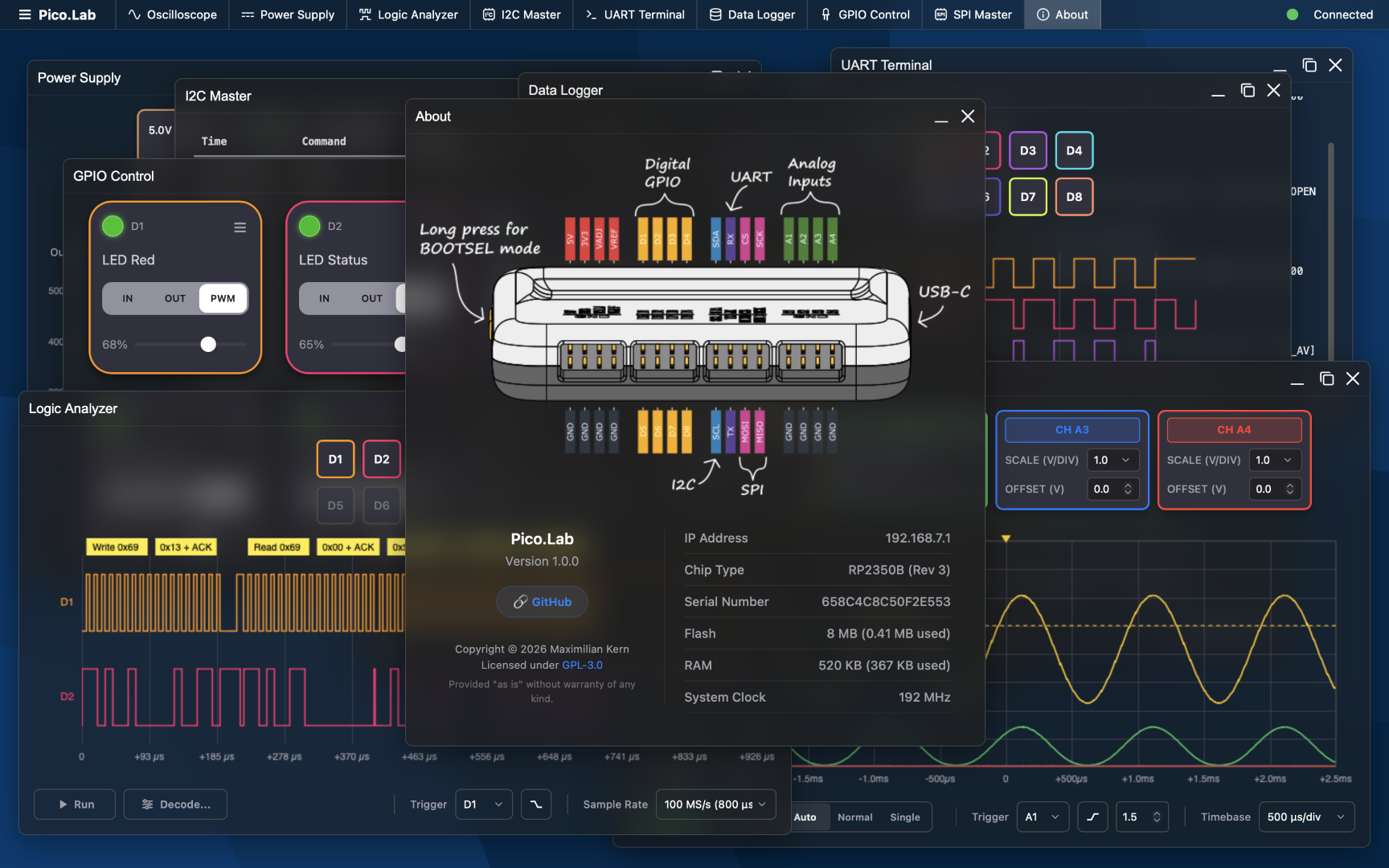
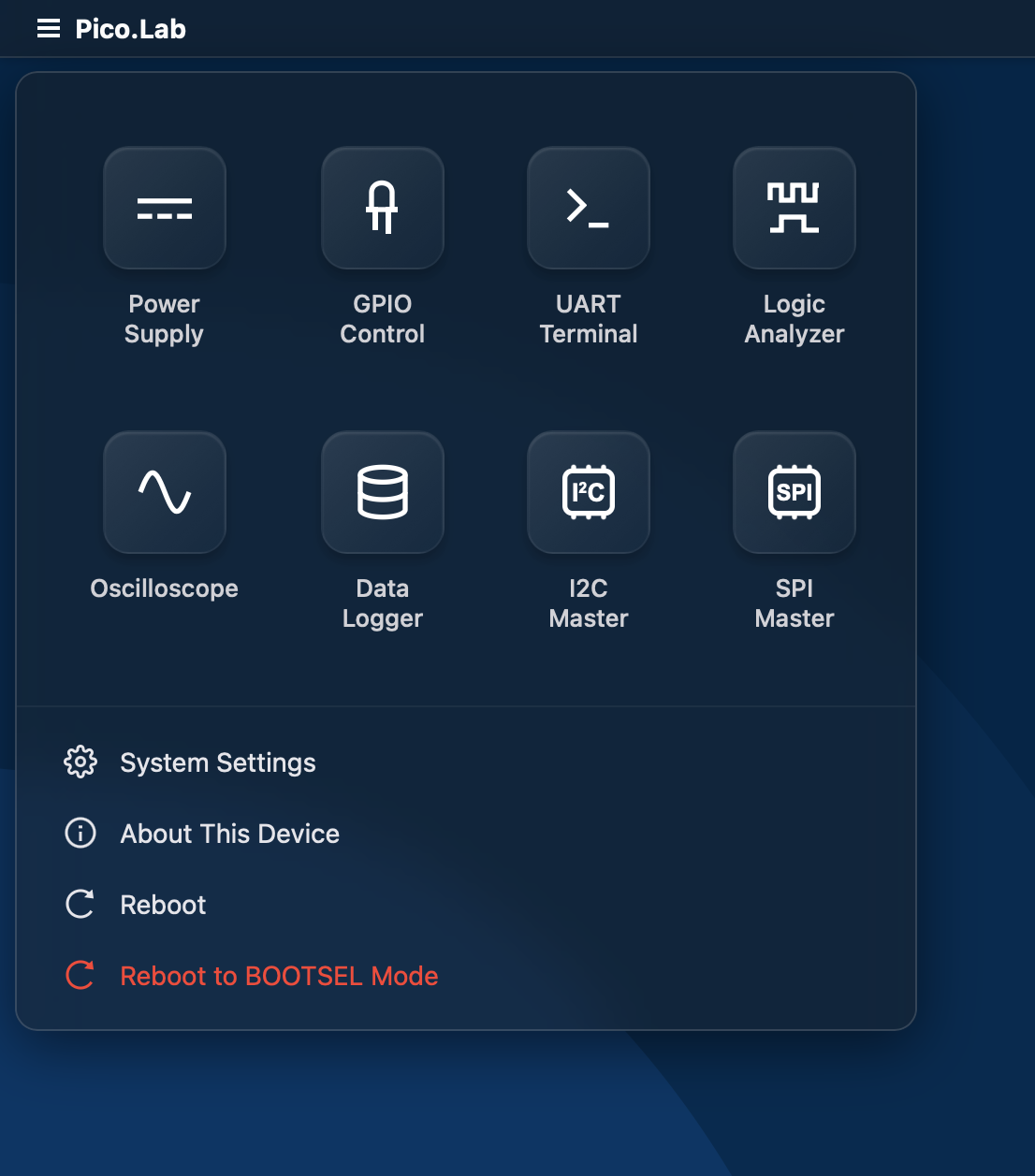
With the data sending and receiving figured out, I moved on to the UI design. My goal for the user interface was for it to be super easy to use while still providing all the controls you would get from a CLI-based tool. I decided to go with a window-based system where each of the tools or instruments is displayed as an app. Only the necessary apps need to be opened, and they can be viewed side by side if needed. I did not want to reinvent the wheel, so I looked for a window manager that would offer a similar experience to interfaces like Synology DSM. I found WinBox.js, which is an open-source, lightweight HTML5 window manager, and integrated it into my web interface as a starting point. Some modifications and additions were necessary to style the windows and display them in a taskbar, but all animations and logic are handled by WinBox itself. I also added an application launcher, similar to the Windows Start menu, in the top-left corner. The desktop itself is empty, only showing a wallpaper as a backdrop. Windows and menus have a frosted-glass look and a permanent dark mode.
![]()
From this point on, I started developing the apps for each tool one by one. Because of the complexity and my practically non-existent HTML skills, I used AI heavily for the user interface and also for large parts of the firmware. This usually consisted of me sketching the interface and then letting the AI implement it. This worked surprisingly well for most of the functionality. Still, tons of testing, bug fixes, and optimization were needed to make the apps robust and have them look consistent. After each new app was mostly done, I integrated it into the main web UI and had the code refactored.
![]()
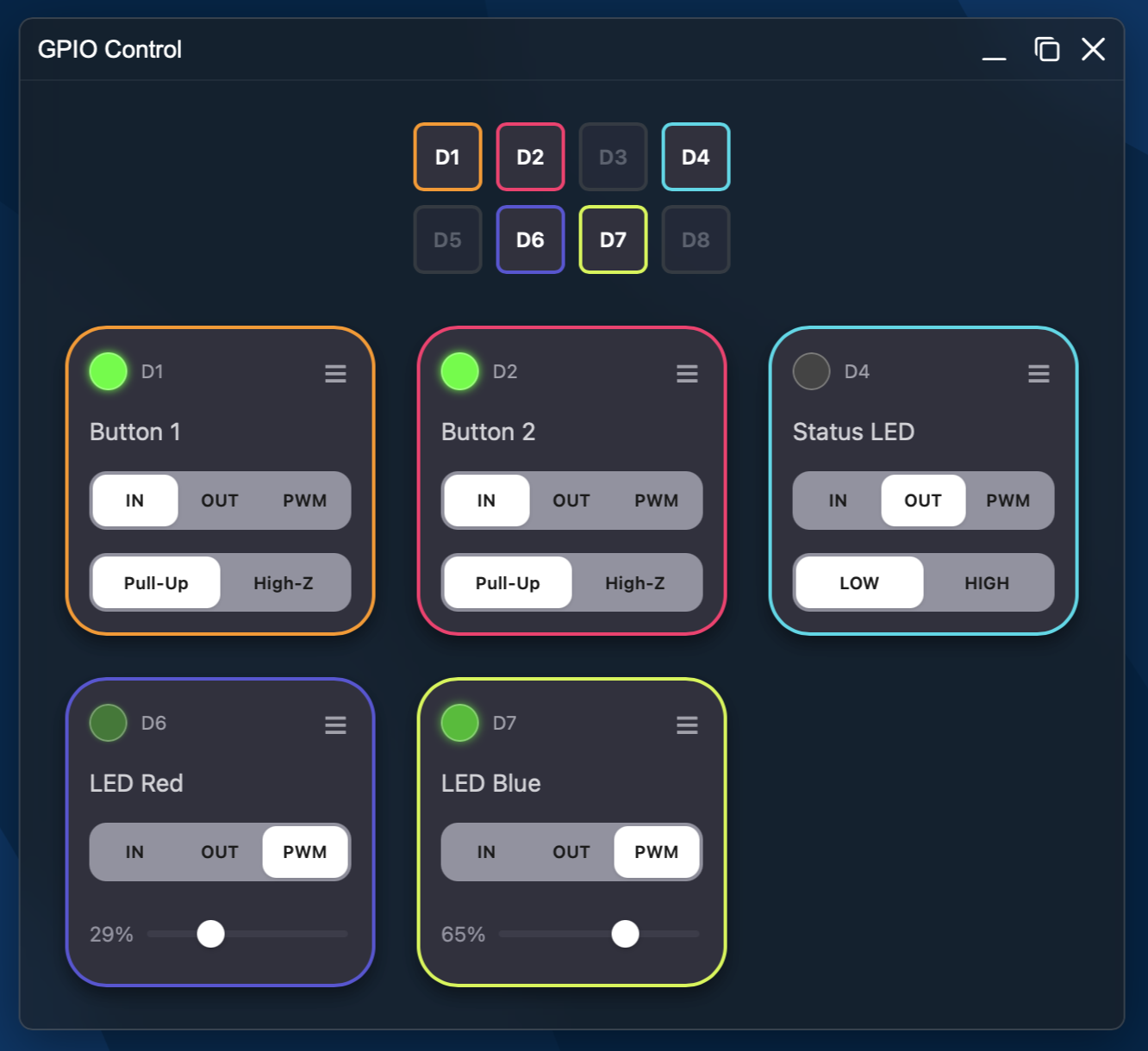
The first finished app was the GPIO controller. It uses HTTP GET to set pin states and modes. Only the necessary pins are displayed as cards, with a small map of the available GPIO pins at the top. Most other apps after this use the same or a similar-looking interface for picking pins and functions. The data logger was next. Since it uses the existing telemetry stream for its data, it’s quite simple. A graph of all selected pins is drawn in real time. What’s great about a web UI is that all the heavy lifting is done by the browser, so there are almost no limits on how the UI can look and what it can do.
![]()
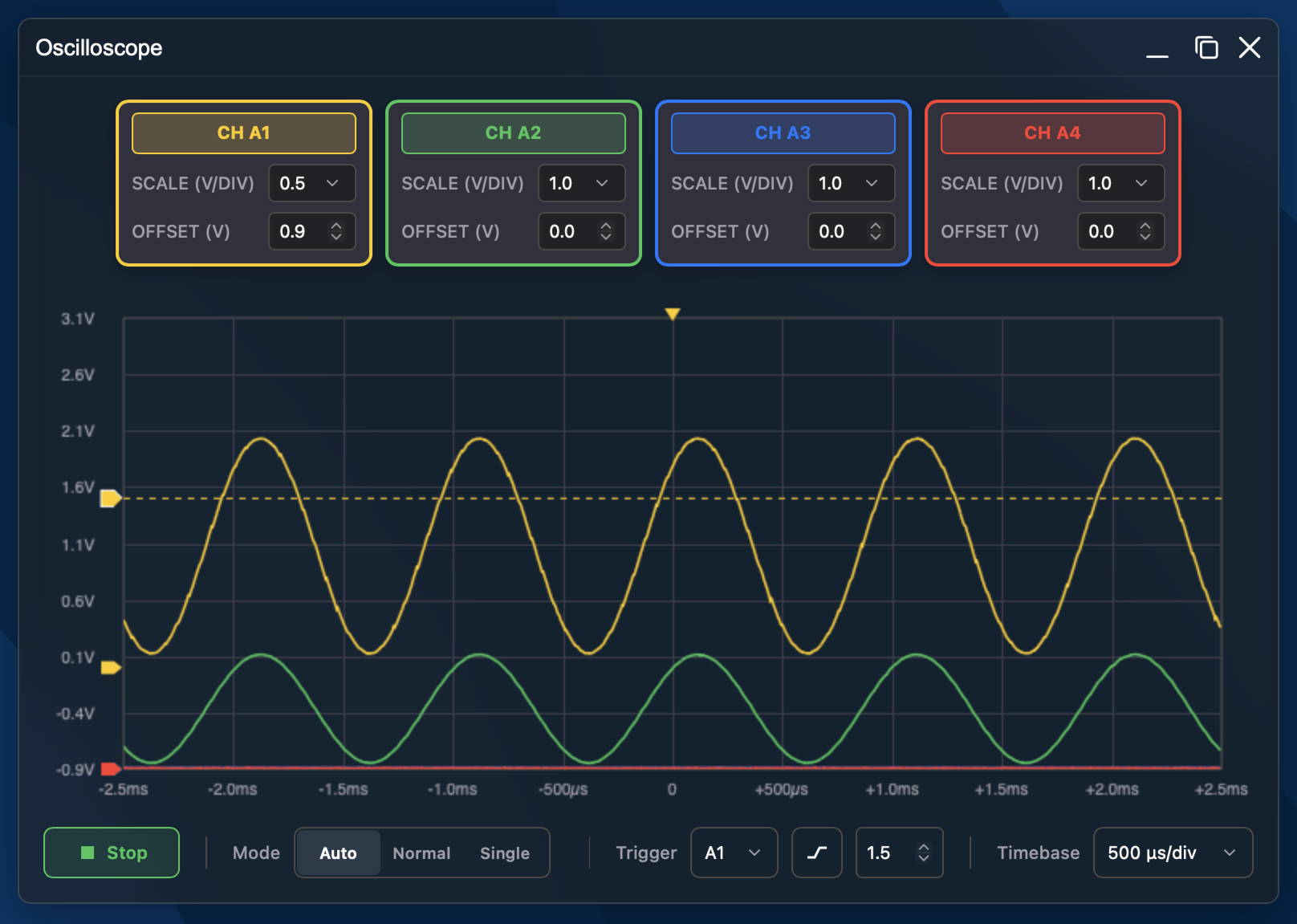
The oscilloscope was the first app that was really tricky and hit the limits of the server. Configuring trigger options is simple, but after the capture, a lot of data has to be sent to the browser. Streaming raw floats or heavy JSON objects over SSE immediately choked the lwIP stack and caused the telemetry to stutter. This was fixed by moving to raw binary buffers encoded in Base64. To keep the UI smooth at higher sampling rates without starving the USB stack, I made use of the RP2350's dual-core architecture. Core 0 handles all the network traffic, the lwIP HTTP/SSE daemons, and background telemetry. Meanwhile, Core 1 is dedicated entirely to high-speed data acquisition. It configures a Direct Memory Access (DMA) channel to stream round-robin ADC samples directly into a RAM buffer, freeing up the CPU to hunt for trigger conditions in real time. Once triggered, the buffer gets Base64-encoded and pushed out through SSE, making for a responsive oscilloscope view right inside the browser. I tried to pull all kinds of tricks to improve the bandwidth, but even with overclocked ADCs, it sits at around 400kHz. That is good enough for basic debugging of PWM signals, but not enough for looking at communication data from fast logic buses.
![]()
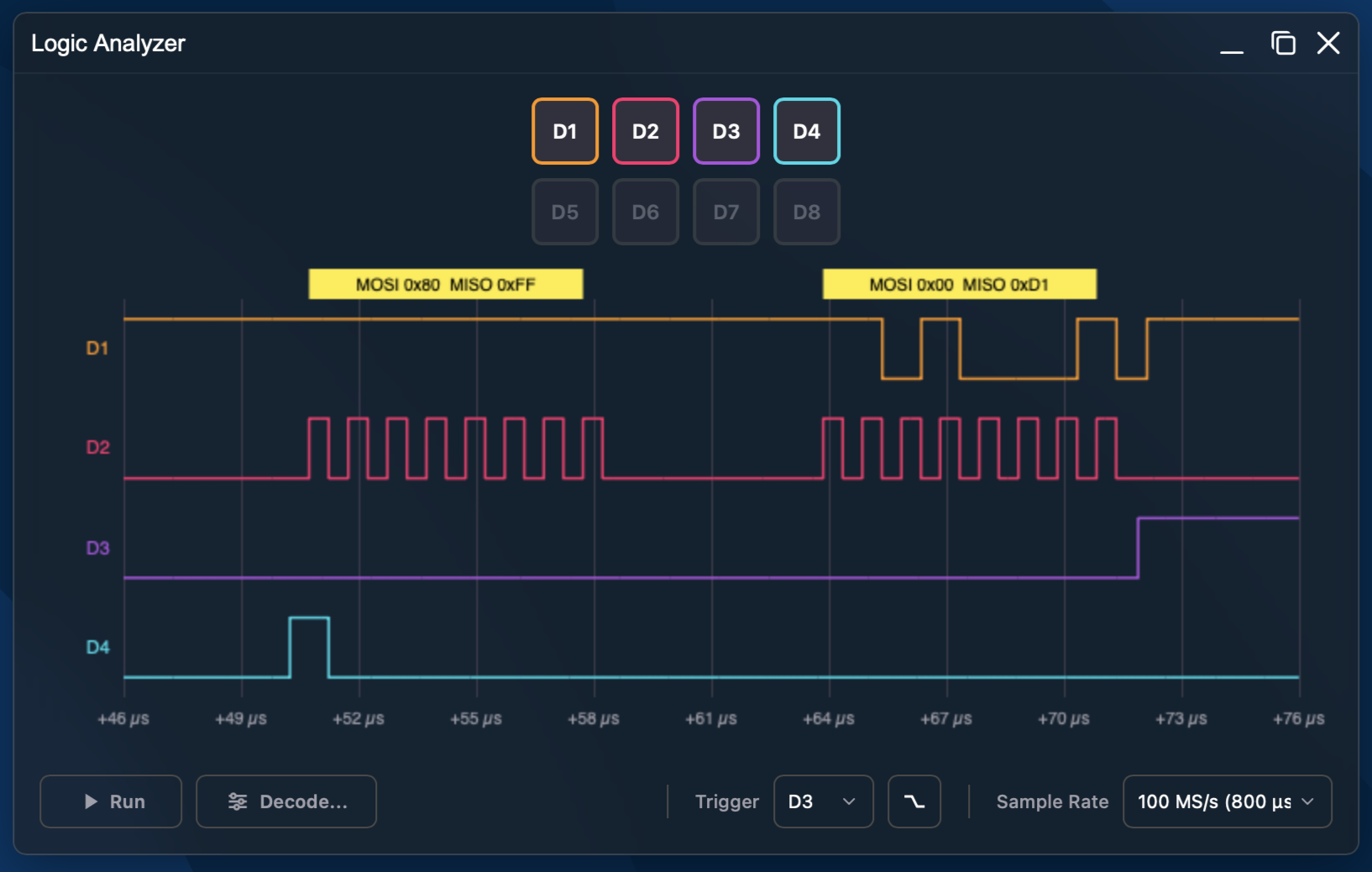
Next up was the Logic Analyzer. While the scope relies on analog ADCs, the logic analyzer needs to capture fast digital state changes across the GPIO pins simultaneously. Capturing thousands of digital samples at megahertz speeds generates massive blocks of data. Rather than trying to stream this live—which would instantly flood the 12 Mbps USB Full Speed bus—I went with a capture-then-download approach. The user sets the trigger conditions in the UI, the RP2350 captures the digital bus state into RAM, and then it compresses the data using Run-Length Encoding (RLE). The compressed blocks are sent over SSE in chunks, and the browser unpacks them locally to render them. The waveforms can then be zoomed in and panned. I am quite happy with the 100MS/s that the analyzer can achieve. However, since it is sampling into its internal RAM, the capture time is relatively small.
![]()
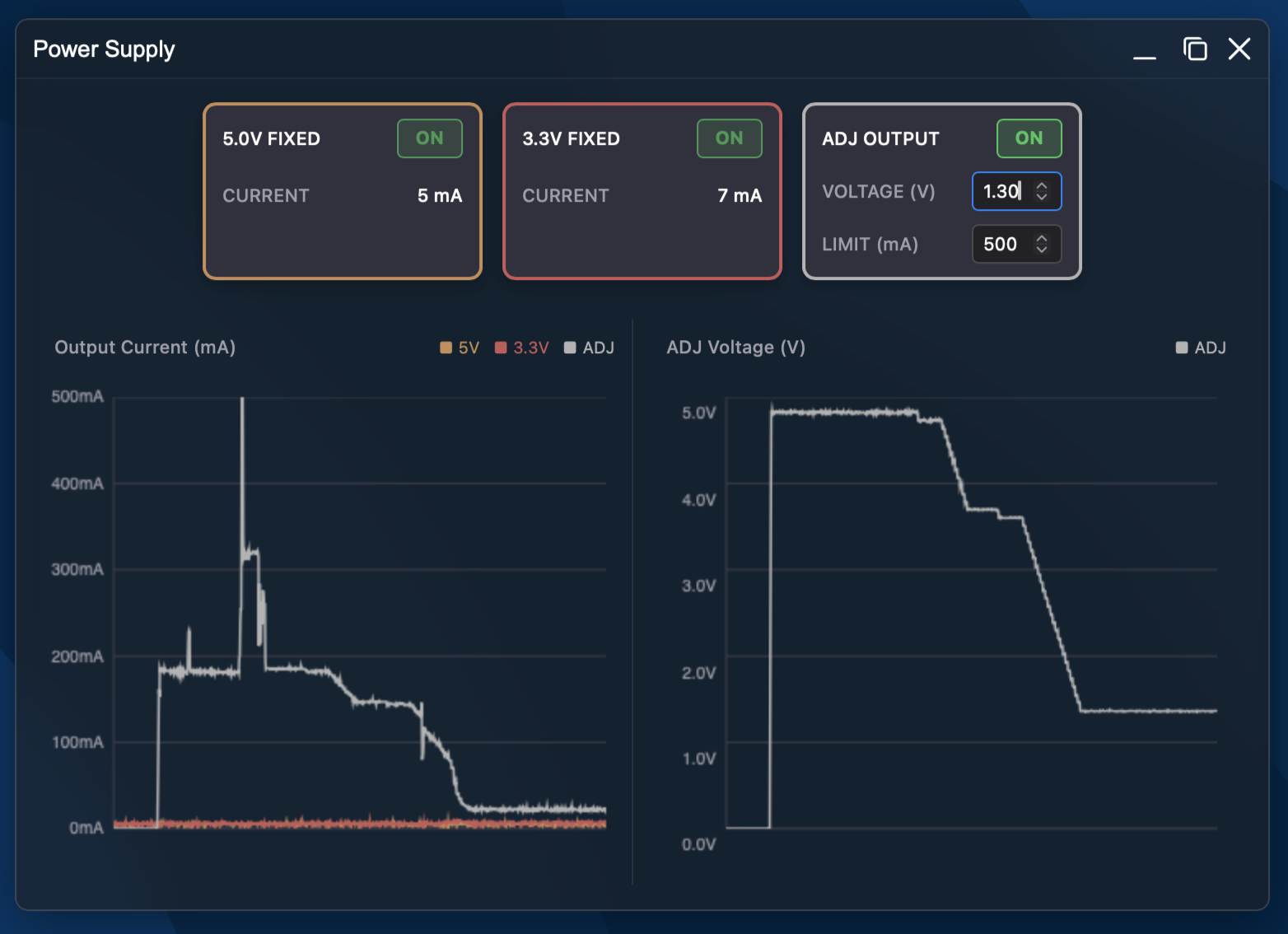
The PSU app mostly displays the telemetry data for the voltage rails. It also allows the user to set the voltage and current limit for the adjustable voltage rail. One problem that I had to fix was the MP28167 turning on by default. There is just no way in hardware to enable the converter without also turning on the output voltage. Of course, the voltage can be disabled via I2C once the converter is enabled. The firmware has to quickly turn on the converter, then bombard it with I2C messages telling it to turn off its output. I was not the first one to run into this exact problem: https://github.com/MisterHW/EVAL-MP8862
While I was adding more and more apps, the HTML and JavaScript files increased in size as well. The initial loading time for the website eventually increased to 10 seconds. Wireshark analysis revealed two main culprits: Windows waiting on a DNS timeout for Web Proxy Auto-Discovery (WPAD), and a sort of traffic jam caused by the telemetry filling up the tiny lwIP transmission queue during page reloads. By configuring the Pico's DNS server as a captive portal to instantly intercept and handle those background OS queries and expanding the TX buffer queue size, the connection bottleneck vanished, making the interface load almost instantaneously.
![]()
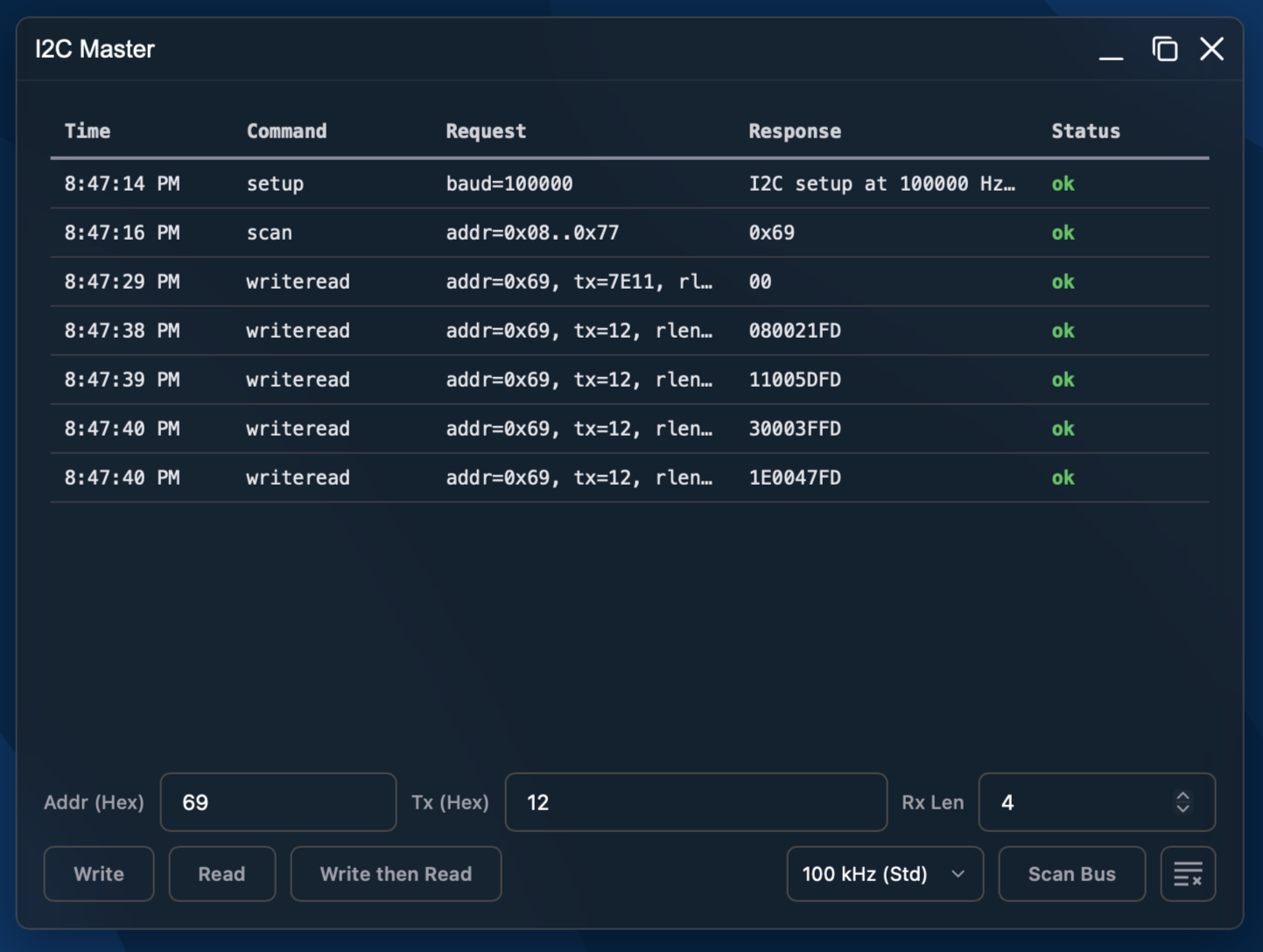
The final apps were the UART Terminal, I2C and SPI apps. The terminal uses HTTP POST requests for outgoing data, while incoming serial data streams back continuously via SSE.
![]()
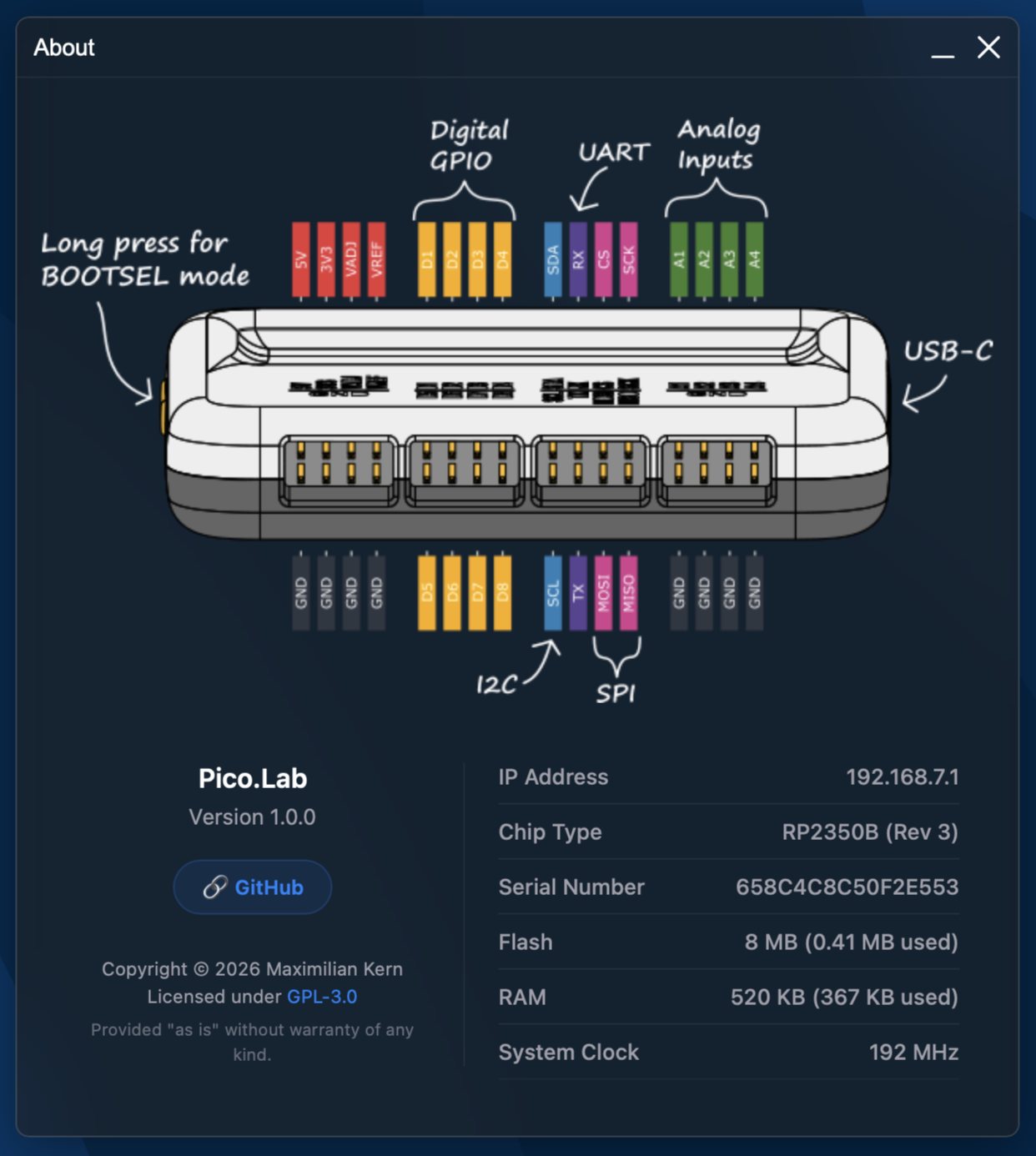
Overall, I tried to keep the memory and flash footprint of the firmware small enough so it works even on the original RP2040-based Raspberry Pi Pico. The wallpaper is a 3KB .svg file, and the pinout diagrams are stored as efficient .webp images at only 80KB. I hand-drew most of the icons as vector images and tried to keep them simple yet modern.
-
Hardware
2 hours ago • 0 comments![]()
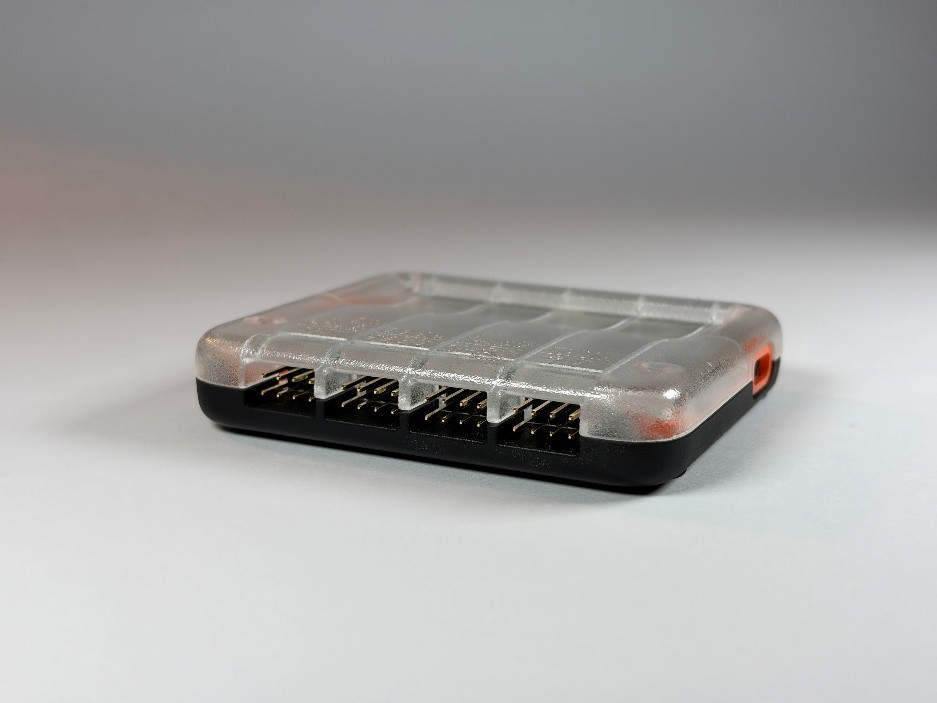
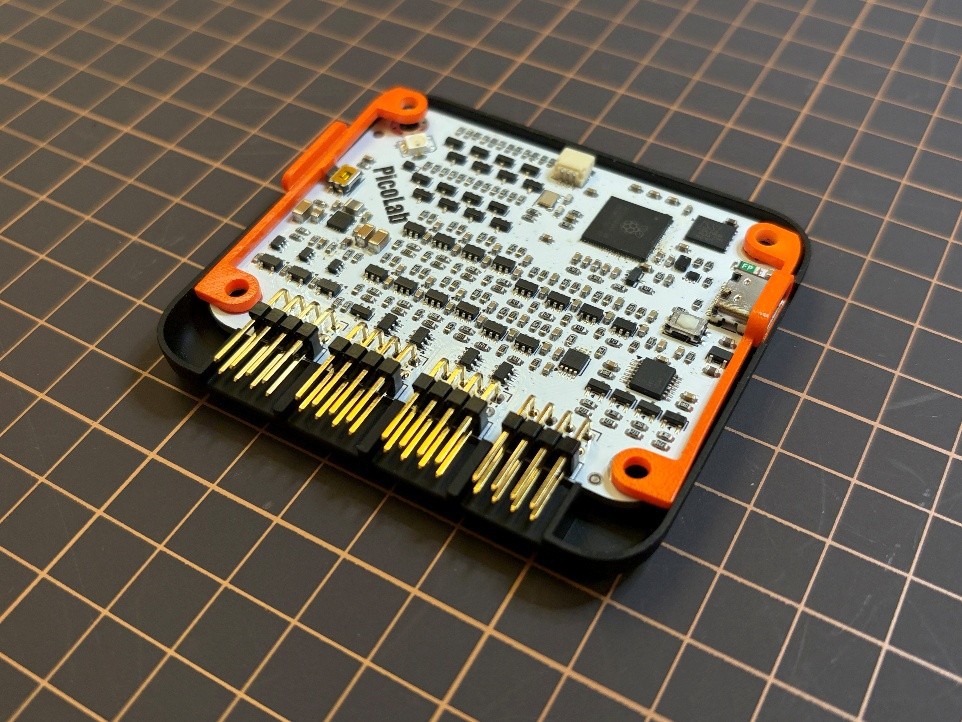
For the PCB’s enclosure, I went with a 3D-printed design. There is a top and a bottom shell, as well as two little brackets for the boot button and a ring around the USB-C port. The 3D-printed parts, as well as the PCB in the middle, are held together by four M3 screws.
![]()
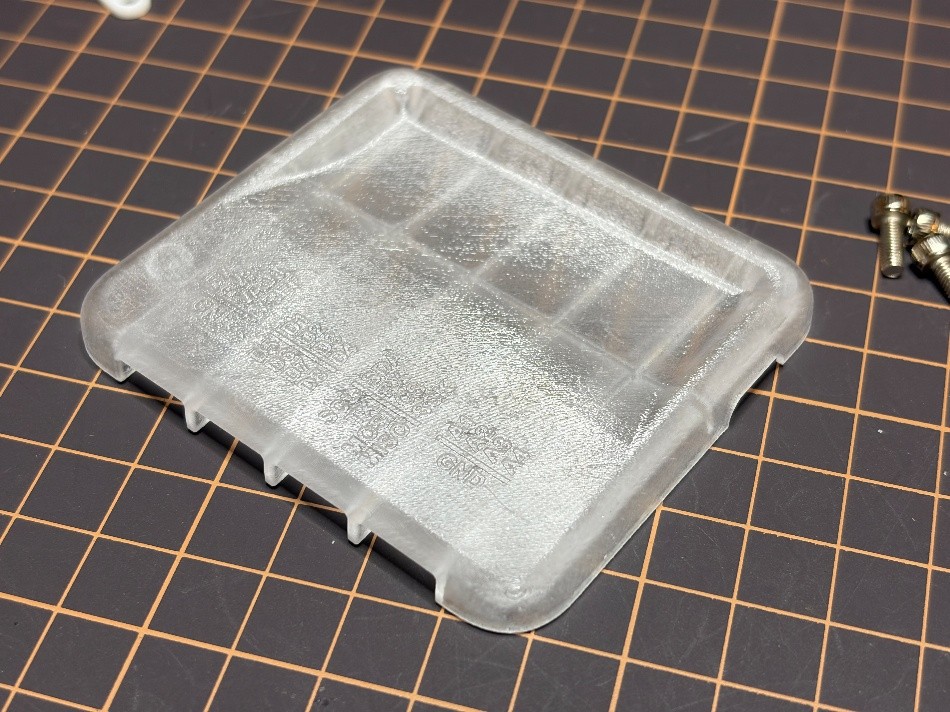
Instead of 3D-printing the parts myself, this time I went with JLC’s 3D-printing service. This was mostly because I don’t own a resin printer, and the pin labels are too small to be legible on an FDM print. Also, I love transparent electronics, so I went with a black lower half, a transparent top half, and colored brackets. I sanded and spray-painted the parts myself. This gave the transparent part a frosted-glass look, which was exactly what I was aiming for. Only the pin labels are not very easy to read. For a commercial product, the labels would probably have to be UV-printed. One downside of the resin prints is that it’s quite difficult to tap threads into them without the threads turning into dust. Heated inserts are also not an option, since the resin is not a thermoplastic and will just char. In the end, the tapped threads work, but only once or twice.
![]()
-
Electronics
2 hours ago • 0 comments![]()
One of my main goals from the start was to make the project accessible to anyone with an off-the-shelf Raspberry Pico. The RP2040/RP2350 controllers will function perfectly well as a simple oscilloscope and logic analyzer. But these boards lack protection and work only at 3.3V. To enable the full feature-set and add some robustness, I designed a custom PCB.
For the microcontroller, I selected the RP2350B, which offers more GPIO in a 48-pin package as well as 8 ADC channels vs the 4 channels on the more common RP2350A. Half the ADCs will be used for the oscilloscope, the others for current and voltage monitoring. To make analog measurements more accurate, I added a voltage reference (LM4040) to the VRef input. The Picos usually need a button to configure them for the USB bootloader mode. I included a 90° tactile switch on the board edge for this purpose. The button is also wired to a GPIO pin, so it can be used by the firmware at runtime.
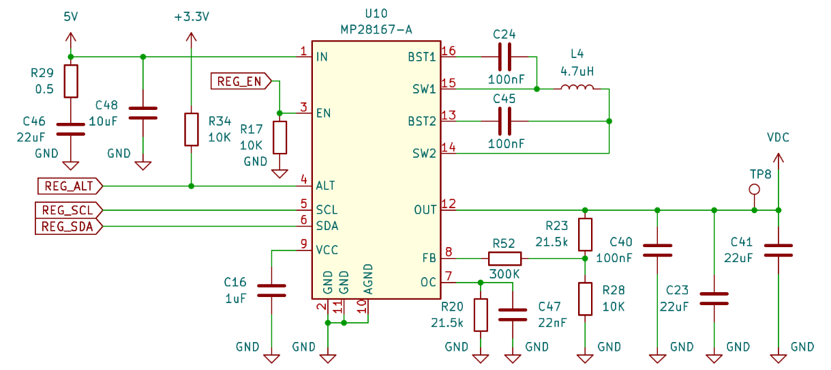
I really like the Nordic PPK2 for its software-adjustable output voltage and wanted to implement a similar feature for my project. The PPK2’s regulator works by combining an efficient buck-boost regulator with a low-noise LDO. Both are controlled by injecting analog control voltages into their feedback loops. While this works beautifully, the part count and overall complexity had me looking for easier solutions. This led me to the MPS MP28167-A, a buck-boost converter mainly designed for USB-PD applications. Instead of having to manipulate its reference voltage externally, it is fully controlled via I2C. The output voltage can be set in 0.8mV increments from around 1V to 5V, and even the current limit can be configured. Another great thing is that it decouples the voltage regulation completely from the Pico. Even a firmware reboot or crash won’t throw off the regulator’s voltage. It also only needs a few external components:
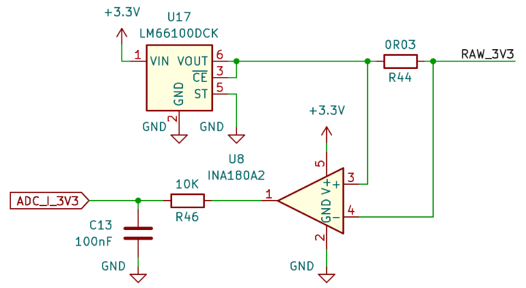
The MP28167 has no ability to read the actual output voltage and current from its registers, so I added a simple voltage divider and a current-sense amplifier. These are wired straight to the RP2350’s ADCs. Because there were 2 ADC channels left, I also added current sensing for the 3.3V and 5V output rails. This will be nowhere near as accurate as the PPK2’s auto-ranging current measurement, but it’s good enough to determine if, e.g., an RF module is working correctly. In addition, an ideal diode (LM66100) protects all output rails from reverse current.
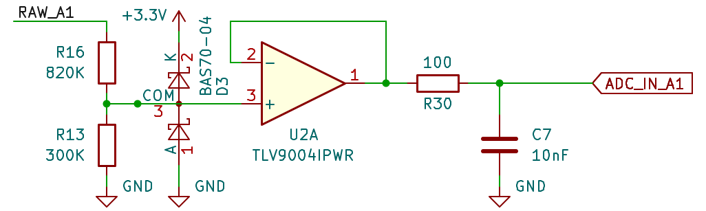
I added a basic analog front-end for the oscilloscope feature. It includes a high input impedance, an op-amp as a buffer amplifier, and an RC filter. This allows the RP2350 to sample voltages up to around 12V. In retrospect, a negative voltage range would have been a useful addition for measuring audio signals. I would definitely add this in a future revision of the PCB.
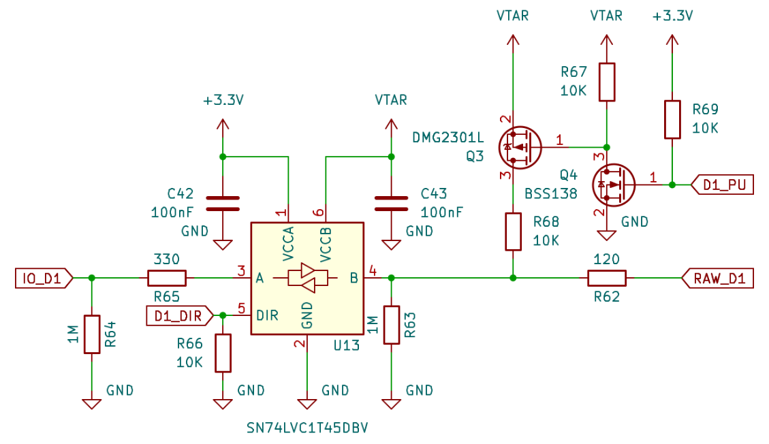
In addition to the 4 analog channels, the device has 8 digital GPIOs. These are used for the logic analyzer feature, as well as for directly controlling inputs and outputs. To make these GPIOs compatible with a range of target voltages, a level shifter is needed. I chose the SN74LVC1T45DBV because it has some nice protection features and is also used in the latest Bus Pirate boards. One side of this buffer is supplied by 3.3V, and the other by an external target voltage between 1.2V and 5V. One extra pin per buffer sets the direction (input/output). I also added a switchable pull-up resistor to each port. I was not sure if I could implement bus decoders in software, so I opted to include UART, SPI, and I2C on dedicated pins. They use the same circuit as the GPIO ports, but without the switchable pull-up and with fixed directions. Because I2C needs open-drain signals and I was too lazy to implement bit-banged I2C for the SN74 like the Bus Pirate does, I included a specialized level shifter: the PI4ULS5V202.
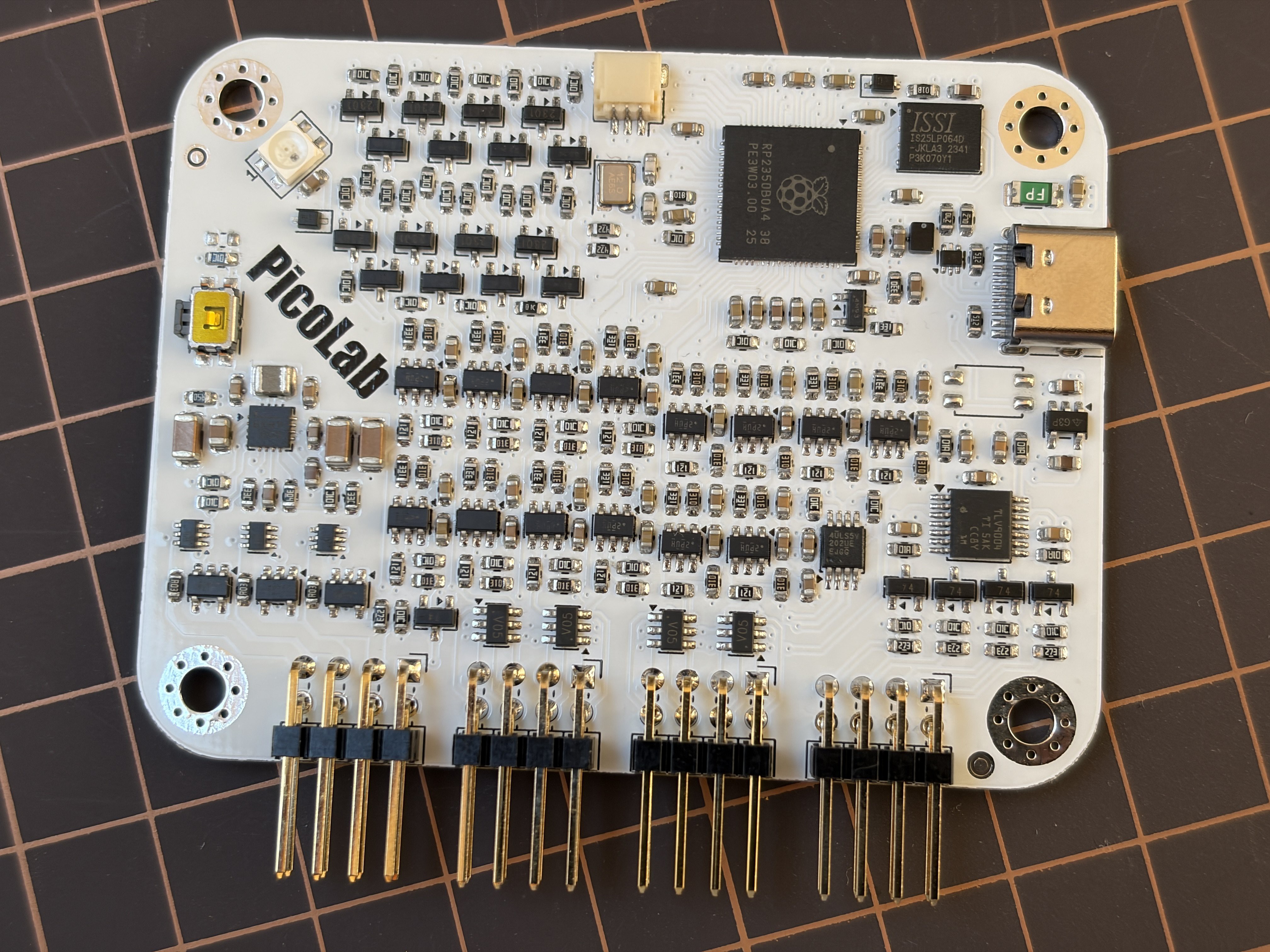
With a total of 16 digital channels, the component count on the board is quite high. I tried arranging everything as compactly as possible on a 4-layer PCB. On one edge of the board, I placed four rows of 4x2 pin headers for plugging in breadboard wires. The USB port and boot button are placed on the side edges. An SK6812MINI RGB LED serves as a status indicator. By adding a diode to its VCC input, it comfortably works with the 3.3V logic voltage and 5V supply. I ordered the PCBs from JLCPCB and assembled them by hand. After assembling 5 of these, I am seriously considering getting a pick-and-place machine to save my sanity.
Pico.Lab - Web-GUI Embedded Multitool
Open-Source Web-GUI Embedded Multitool based on Raspberry Pico
 The MP28167 has no ability to read the actual output voltage and current from its registers, so I added a simple voltage divider and a current-sense amplifier. These are wired straight to the RP2350’s ADCs. Because there were 2 ADC channels left, I also added current sensing for the 3.3V and 5V output rails. This will be nowhere near as accurate as the PPK2’s auto-ranging current measurement, but it’s good enough to determine if, e.g., an RF module is working correctly. In addition, an ideal diode (
 I added a basic analog front-end for the oscilloscope feature. It includes a high input impedance, an op-amp as a buffer amplifier, and an RC filter. This allows the RP2350 to sample voltages up to around 12V. In retrospect, a negative voltage range would have been a useful addition for measuring audio signals. I would definitely add this in a future revision of the PCB.
 With a total of 16 digital channels, the component count on the board is quite high. I tried arranging everything as compactly as possible on a 4-layer PCB. On one edge of the board, I placed four rows of 4x2 pin headers for plugging in breadboard wires. The USB port and boot button are placed on the side edges. An SK6812MINI RGB LED serves as a status indicator. By adding a diode to its VCC input, it comfortably works with the 3.3V logic voltage and 5V supply.
I ordered the PCBs from JLCPCB and assembled them by hand. After assembling 5 of these, I am seriously considering getting a pick-and-place machine to save my sanity.
With a total of 16 digital channels, the component count on the board is quite high. I tried arranging everything as compactly as possible on a 4-layer PCB. On one edge of the board, I placed four rows of 4x2 pin headers for plugging in breadboard wires. The USB port and boot button are placed on the side edges. An SK6812MINI RGB LED serves as a status indicator. By adding a diode to its VCC input, it comfortably works with the 3.3V logic voltage and 5V supply.
I ordered the PCBs from JLCPCB and assembled them by hand. After assembling 5 of these, I am seriously considering getting a pick-and-place machine to save my sanity.