Florian
-
Some basic analysis
06/13/2020 at 01:30 • 0 commentsBefore I realized it already a month has passed since my last log so here is a little update.
Because my old and trusty laptop is undergoing a huge transformation to become a dedicated compact desktop for my hobby, all I had on hand to use with my cheap logic analyzer was my useless Nexus 7 tablet. Since there’s an Android version of PulseView available, I decided to give it a go. After two long weeks of flashing various ROMs and trying all the USB cables I had, I couldn’t manage to get PulseView to detect my logic analyzer… Until I realized that none of my USB cables were OTG type. Fortunately, I had an extension USB cable lying around long enough to connect my logic analyzer in the living room to my computer in the next room.
It strikes me how stupid I can be sometimes.
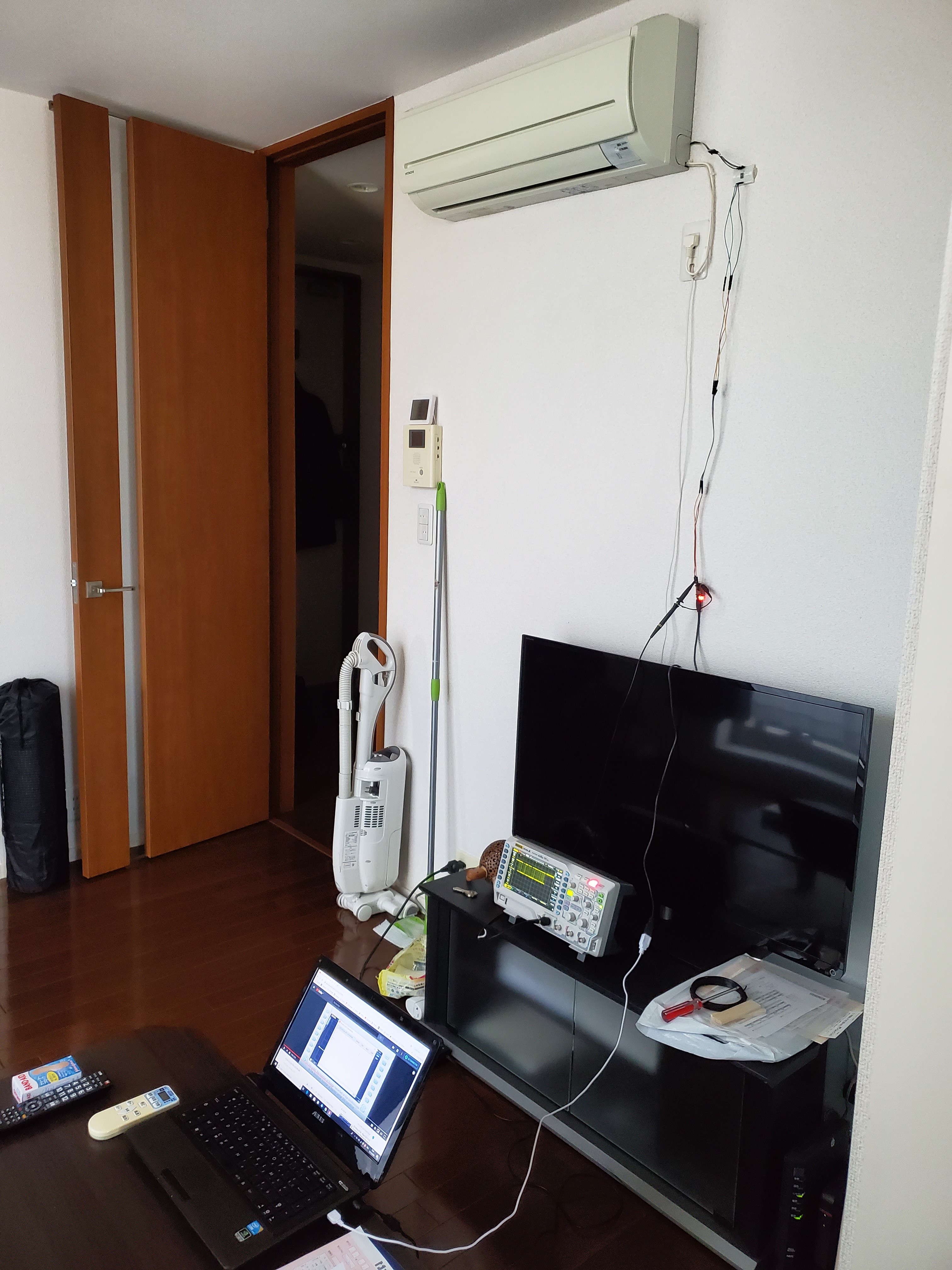
After this miserable failure, I hooked everything up and captured the data between the air conditioner and the RAC adapter, with no controller connected, while adjusting the settings via the remote control.
Here are the results:
- the RAC adapter sends the same message composed of 9 packets, each starting with "MT" and ending with 0D (hex). The time between each packet is about 48ms and the same message is sent every 4376ms. The packet structure is "MT P=xxxx C=yyyy[0D]".
- the air conditioner responds to each packet sent, roughly after 12ms. Each response packet starts with "OK" and ends with the same 0D (hex). The packet structure is "OK P=xxxx C=yyyy[0D]" or "OK P=xx C=yyyy[0D]".You can check the files "Analysis (2020_06_06).xlsx" and "No controller_OFF.sr" for more details.
-
It's alive... It's alive, IT'S ALIVE!
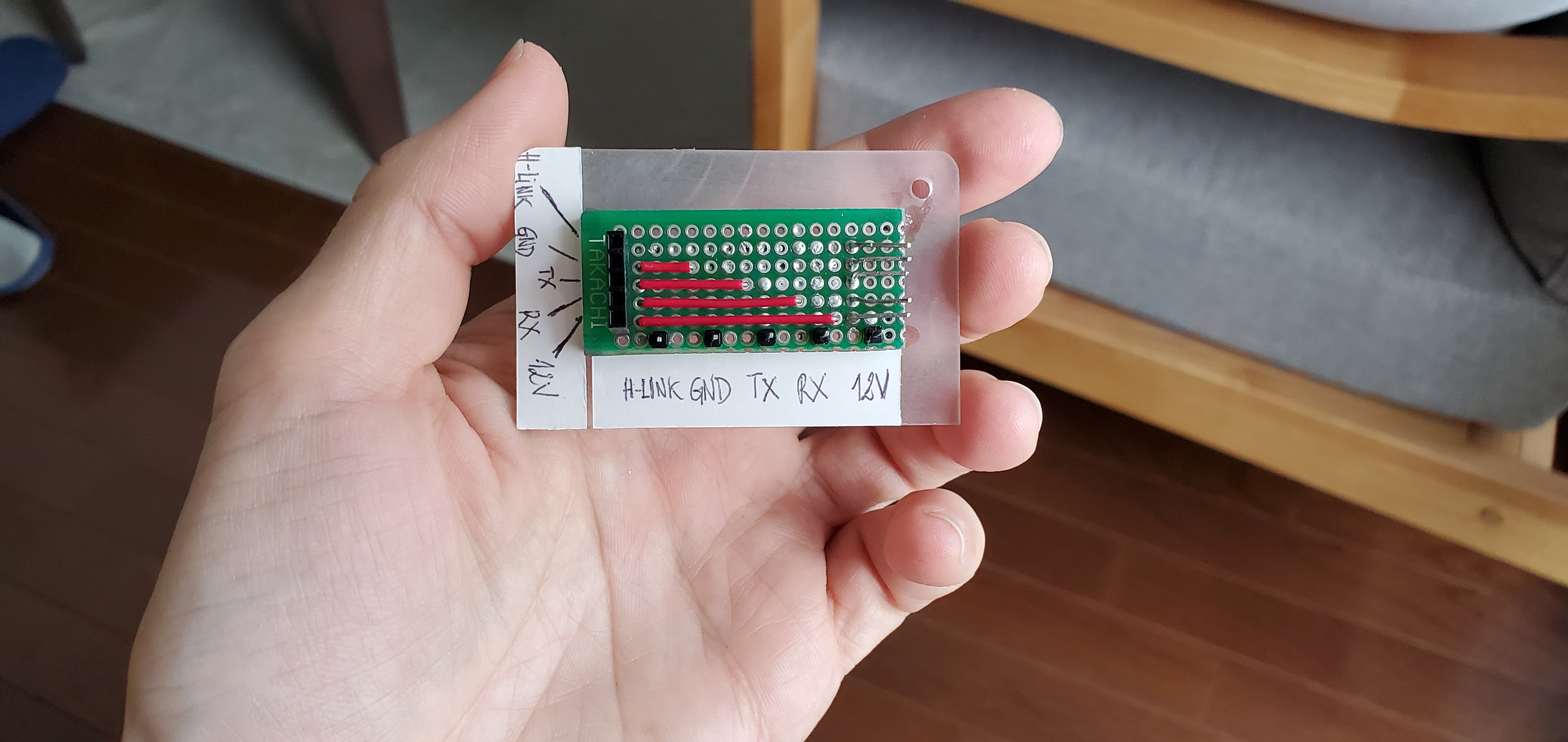
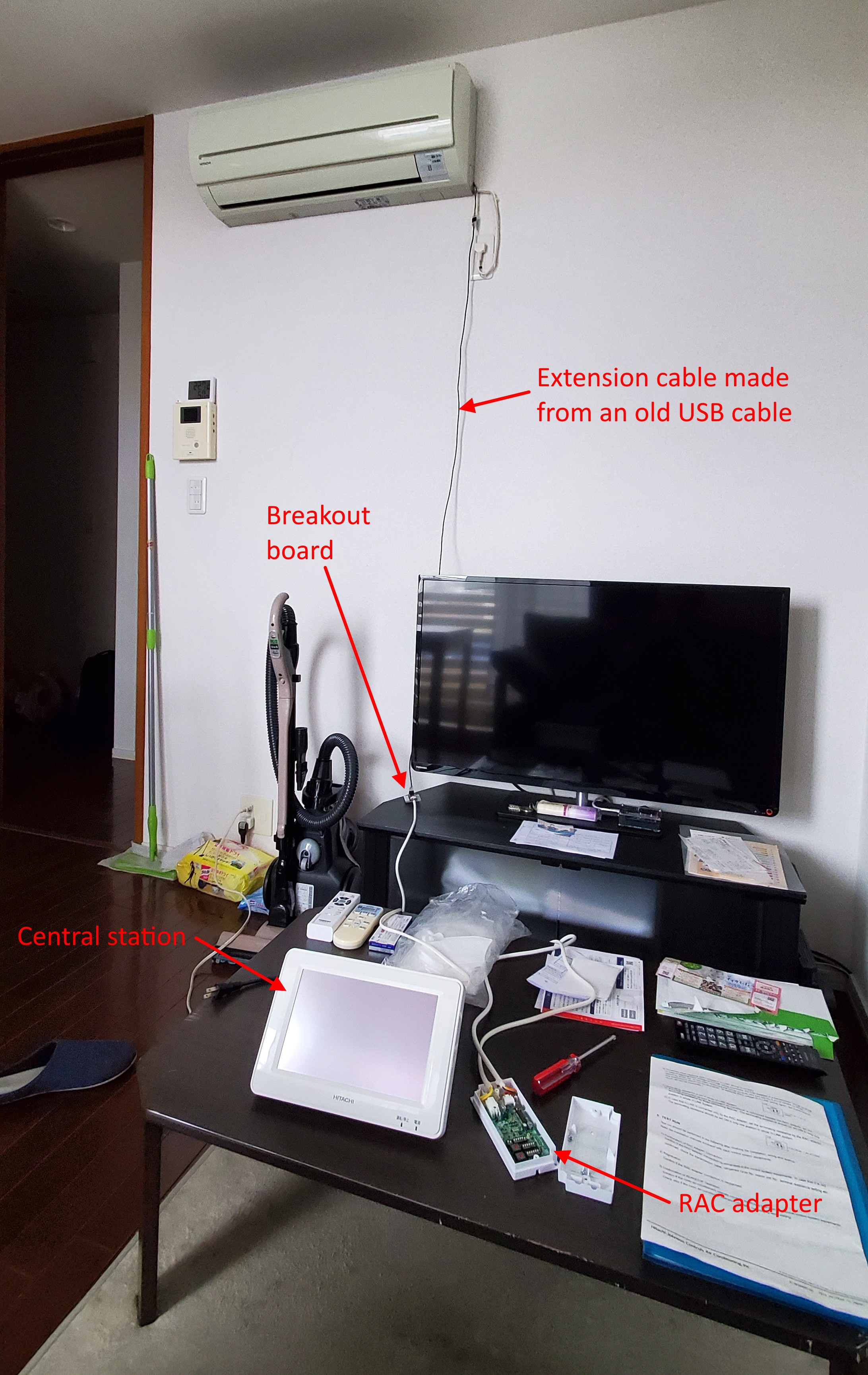
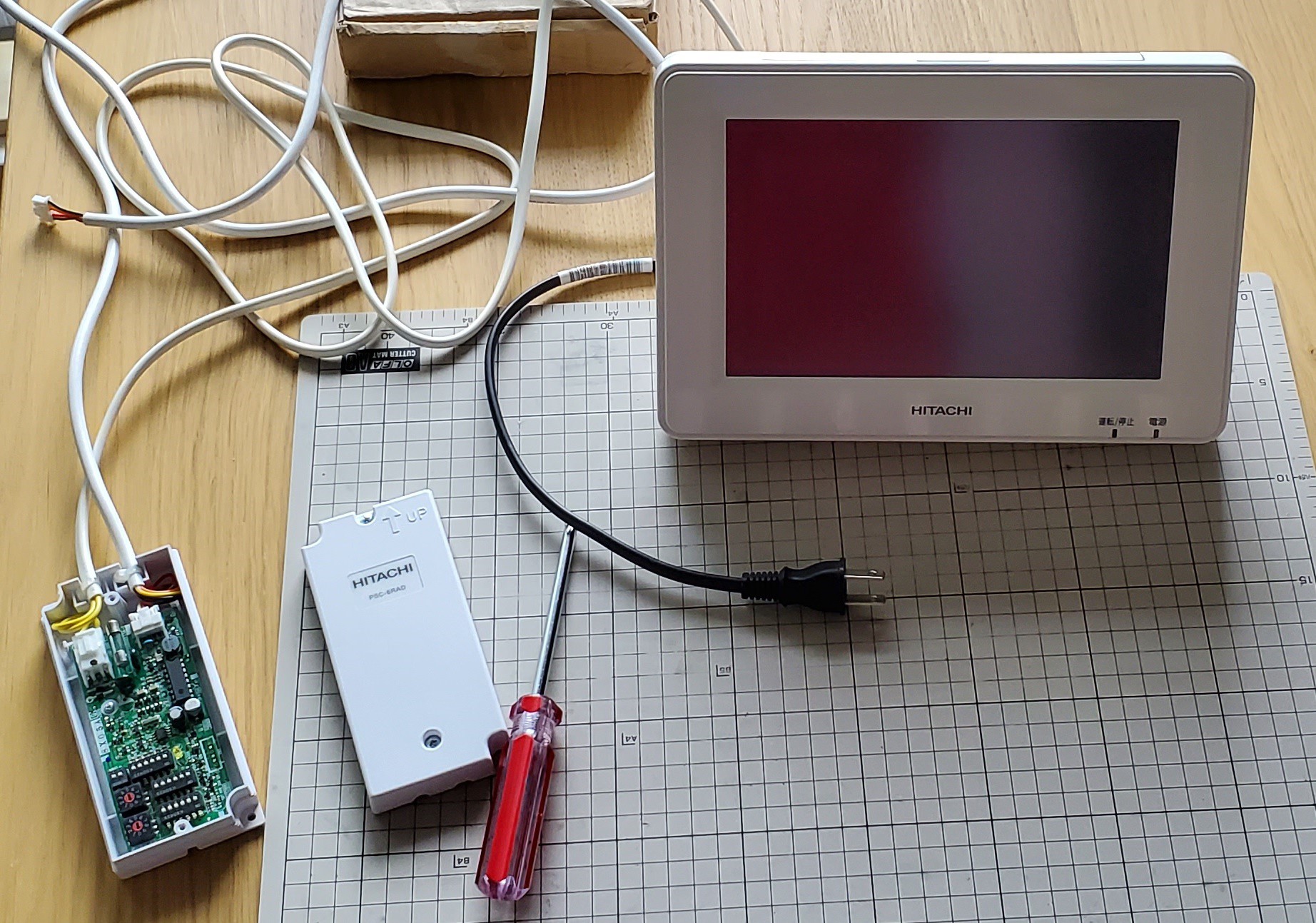
05/07/2020 at 07:55 • 0 commentsNow that I have everything I need, I decided to connect everything and see if it worked. Since my next move is to analyze what’s going on between the RAC adapter and my air conditioner, I made a simple breakout board for easy debugging.
![]()
And here is my full setup, ready for a test:
![]()
After setting up the DIP switches according to the manual, performing a factory reset of the central station, and waiting 10 long minutes for it to finally boot up, here’s the result.
-
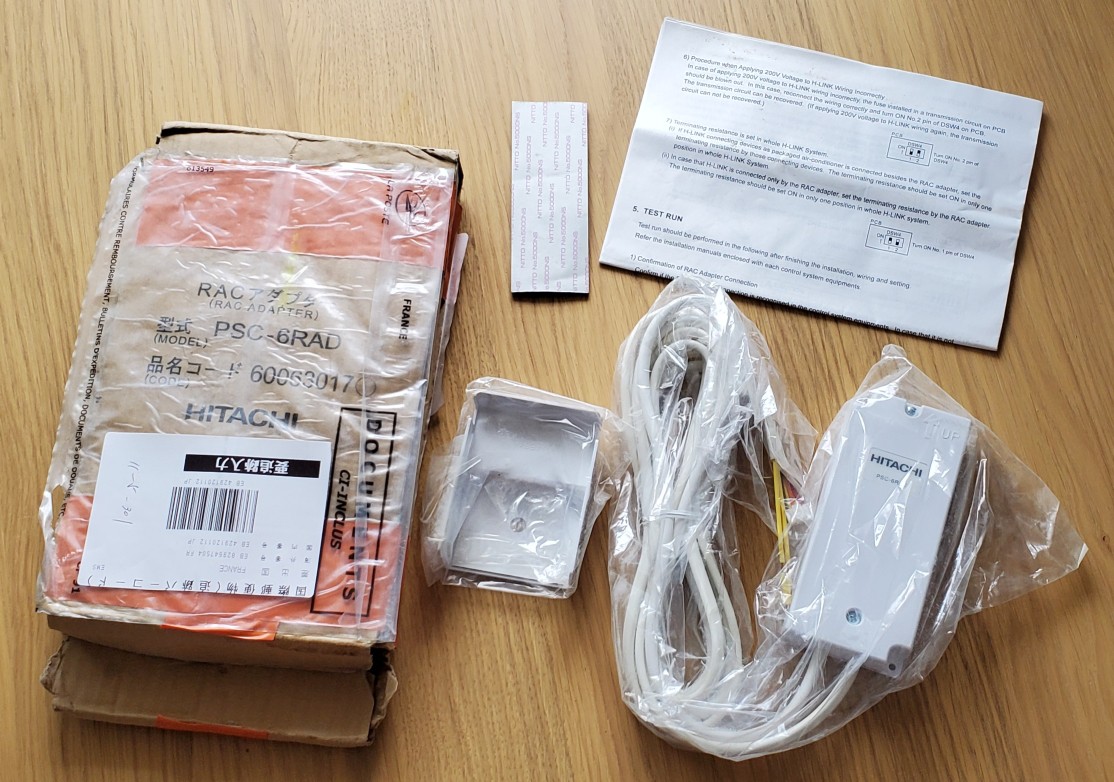
Finally, it's here!
05/06/2020 at 05:18 • 0 comments![]()
After a few months of patience, I managed to buy the only RAC adapter that was for sale on eBay. Thanks to a slightly favorable exchange rate and a seller who accepted my offer, I managed to get it for less than 12,000 yen (shipping included).
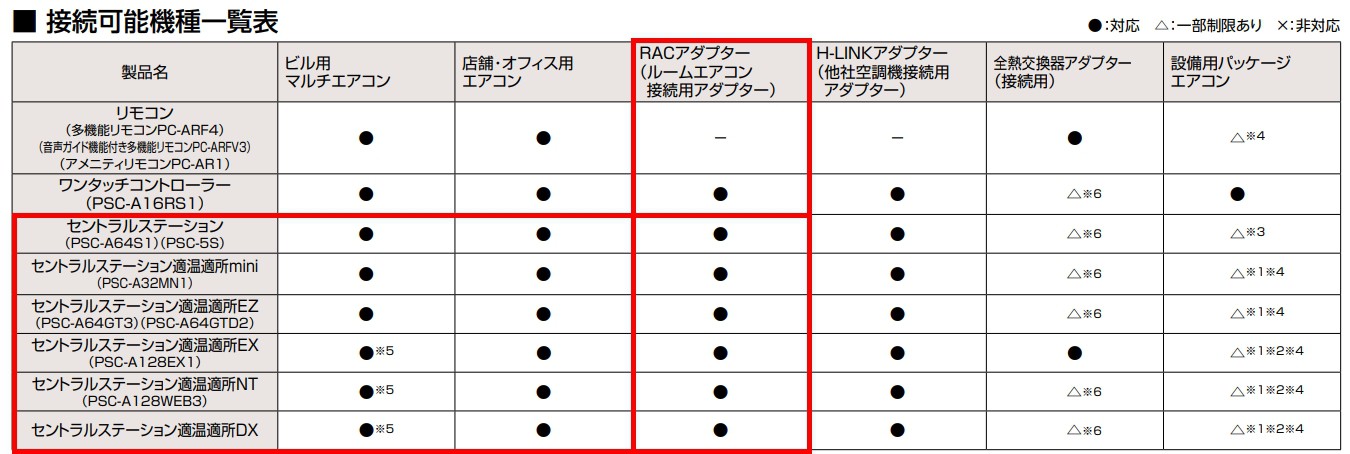
While I was waiting for it to arrive, I also looked into H-LINK compatible wired remote controls. However, after some digging, I discovered that the RAC adapter can only be connected to what Hitachi calls a "central station," as shown in this products connectivity table:
![]()
(the "ワンタッチコントローラー (PSC-A16RS1)" only allows to turn the air conditioner ON and OFF)
While searching for those model numbers on Google, I discovered that even the simple PSC-5S central station retails for 70,000 yen and is a built-to-order product. The cheapest touch-screen type central station goes for 135,000 yen... Nevertheless, I checked Yahoo Auctions and eBay for a second-hand central station and found one PSC-A64S (which seems to be the English version of PSC-A64S1) for roughly 11,000 yen, excluding delivery costs.
With some more digging, I learnt from this PDF that products starting with "PSC-" are only compatible with other products in the "PSC-" series. It makes a lot of sense now, but with this new information, I looked for PSC products on Mercari (the Japanese equivalent of Leboncoin, Craigslist, or Gumtree) and found two PSC-A64GT2 units for sale for less than 4,000 yen each. Could this be an older version of the PSC-A64GT3? A quick search confirmed that indeed it was! I immediately made a 3,500 yen offer to the seller, and now here I am with both a RAC adapter and a central remote.
![]()
-
No much luck...
02/07/2020 at 13:01 • 0 commentsSince my last update, I’ve tried searching for sites or specialized shops where I could buy a RAC adapter, but I’ve had no luck. So, I turned my attention to second-hand websites like eBay and Yahoo Auction, as well as classified ads sites. I’ve been checking them every day for the past month.
I did find one brand-new RAC adapter on sale on eBay France for about 110 euros, but it doesn’t seem like it’s possible to have it shipped to Japan...
Last week, I reached out to people around me, and a former work acquaintance put me in touch with someone from a small company that supplies LED lighting fixtures and air conditioning systems to corporate clients. The quotation I received from them was quite expensive: around 25,000 yen.
I’ll try contacting that French seller on eBay, and I’m also planning to reach out to Hitachi directly to see what they can offer.
-
Not yet at the end of the tunnel...
01/11/2020 at 05:38 • 0 commentsNow that I know the exact pinout of CN7, I decided to do a little test this morning: tie pin 6 to GND and see if any serial data would show up on pin 4 (TX) when powering the air conditioner, switching it on/off, or pressing a button on the remote control.
To my surprise, and sadly, not data showed up on pin 4. I repeated the test a few several times, checked my connections 3 or 4 times but still nothing. I had hoped that by putting pin 6 low to enable H-LINK connectivity function, the air conditioner would start sending data on pin 4 whenever its state or settings were changed...So, I decided to try to send data on pin 2 (RX) and see if anything appeared on pin 4 before wrapping things up. I connected my FTDI USB to TTL Serial Adapter, hooked up my oscilloscope and launched Termite.
![]()
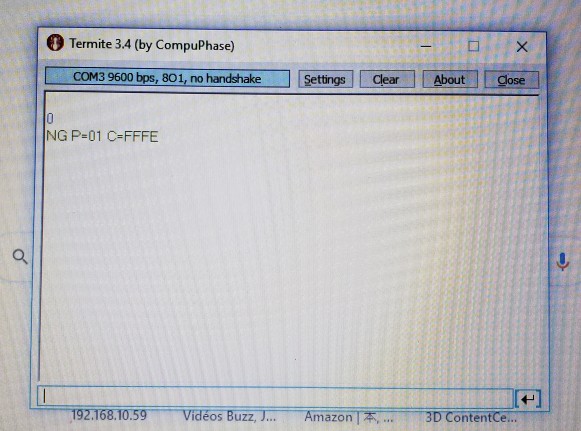
I didn't adjust Termite settings and simply sent a "0". And as you can see in the photo above, something showed up on pin 2!
So I tweaked my oscilloscope settings to measure a full frame, resent a "0" via Termite, captured data and exported as a CSV. After spending some time in Excel, I discovered it's a simple serial communication (see file Measurement (2020_01_11).xlsx for details).- 9600 bauds
- 8 bits
- odd parity
- 1 start bit
- 1 stop bit
What I received from the air conditioner after sending a "0" was "NG P=01 C=FFFE " (the last character after E is 0x0D, Carriage Return). I then went back to Termite, changed the settings, and I got the same result.
![]()
I tried sending other random commands and whatever I got from the air conditioner, but I always received the same result. Interestingly, even when pin 6 isn't tied to GND, the behavior remains the same.
I've kind of reached a dead end here, so I guess my next move will be to get my hands on a RAC adapter and a wall remote control to do some deeper reverse engineering.
-
The light at the end of the tunnel?
01/05/2020 at 10:16 • 1 commentAfter more than five days of intense search on the internet, whether in Japanese, English or even French, and using Google, Yahoo, Baidu and Bing (shame on me), I didn't find any more information regarding that RAC adapter or the CN7 connector. It's almost as if I'm the first person ever to investigate a Hitachi air conditioner! Giving it a second thought, that might actually be the case...
Let's start again with a different approach. I realized my air conditioner is a Japanese-market-only model because no matter what, I couldn't find even a single document in English. Since I also couldn't find a service manual in Japanese, I thought, "Maybe I should look for a similar model intended for international market, or at least for English-speaking-countries".
So here I am, back to my old friend Google, and I searched for "Hitachi air conditioner service manual". First result seemed to promising: HITACHI RAS-60YH5 SERVICE MANUAL Pdf Download.
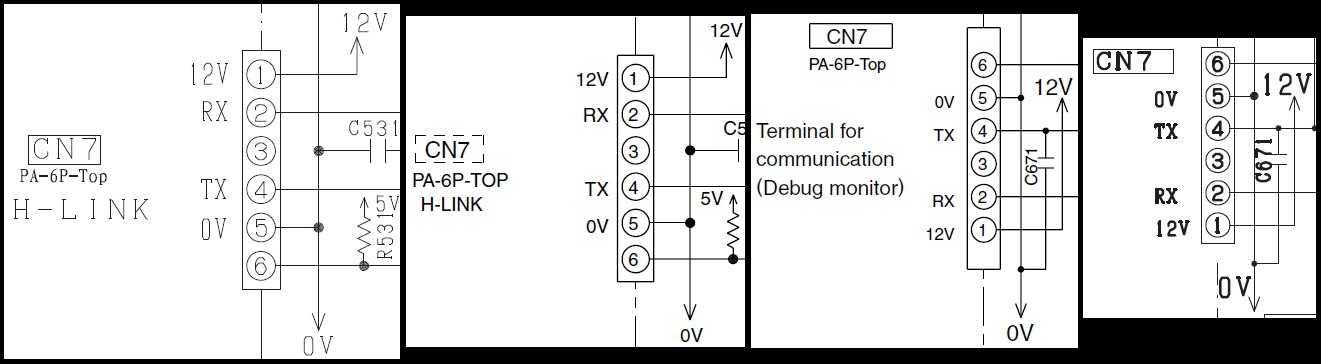
I opened it and started reading. December 2005, so it's older than mine but still... and them, by page 35, I'm like, "Are you kidding me?! That's a f***ing circuit diagram of the remote control!". I quickly flipped through the following pages and here it was, the circuit diagram of the air conditioner's mainboard. Unfortunately, no CN7 for this model, just a CN9 labeled HA. Okay, let's go crazy and download as many service manuals for Hitachi air conditioners as I can find.Well, there are nearly 2000 entries for Hitachi air conditioners on that site, so I just downloaded 30 service manuals. After going through all of them, I found that 20 of them included a circuit diagram with CN7. Among those 20, 13 are for models from 2008 to 2010, and 2 are for models almost identical to mine (same specifications and the same remote control).
![]()
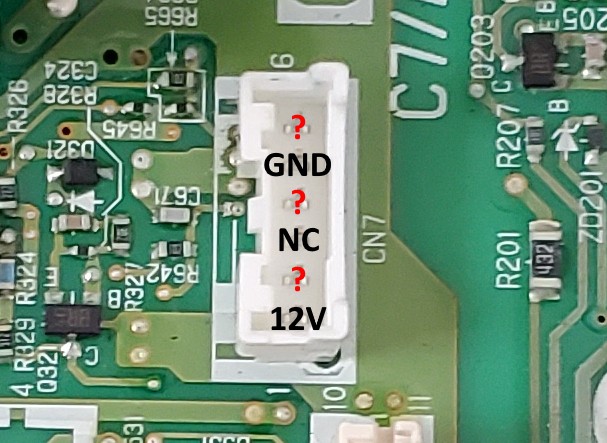
Exactly as I confirmed earlier: pin 1 is 12V, pin 3 is unused and pin 5 is GND. There's no label for pin 6, but CN7connector is a 6-pin PA connector from JST (datasheet).
All that's left is to figure out pin number 6...![]()
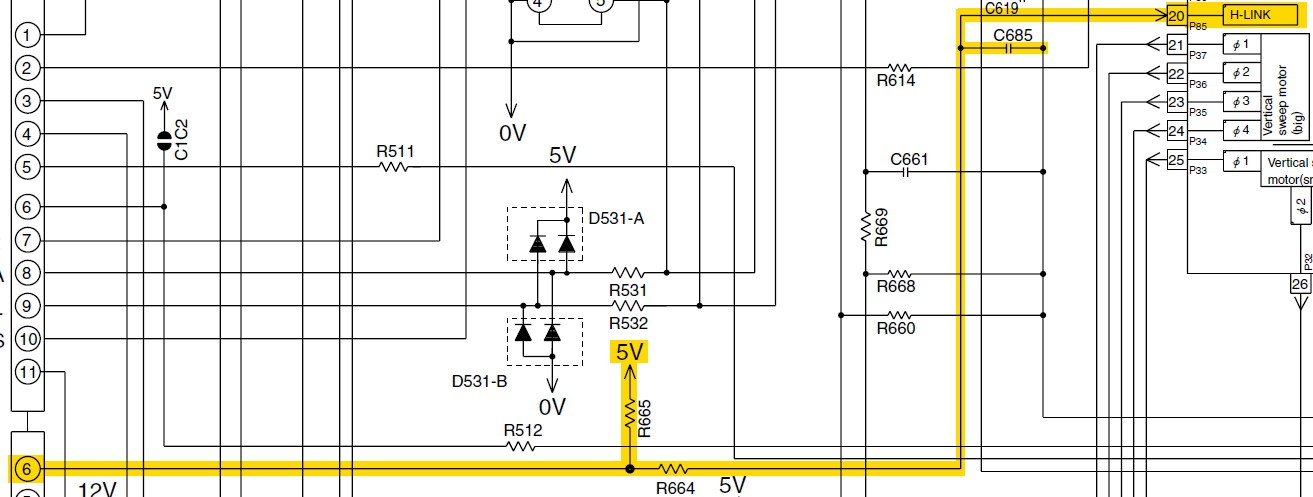
Well, it's an input with a 5V pull-up resistor directly connected to the microcontroller. I'm willing to bet that the state of this input enables or disables the air conditioner's H-LINK connectivity function. And then, the final clue appearead.
![]() That's not Japanese but Chinese. The character "有" is the same in both languages and means "active/present/valid". However, I didn't recognize the other character so I opened www.qhanzi.com and input the unknown character. It turned out to be "无" which means ”no/not/nothing". So pin 6, the H-LINK pin, is active LOW (inactive HIGH)!
That's not Japanese but Chinese. The character "有" is the same in both languages and means "active/present/valid". However, I didn't recognize the other character so I opened www.qhanzi.com and input the unknown character. It turned out to be "无" which means ”no/not/nothing". So pin 6, the H-LINK pin, is active LOW (inactive HIGH)!What a great detective job that was! I found the exact pinout of the CN7 connector, and now know it must use serial communication. The last pin is an input that is active LOW to enable H-LINK connectivity function.
-
Seems it won't be that simple
01/03/2020 at 01:22 • 0 commentsSince I now have an easy access to the CN7 connector, I decided to hook up my oscilloscope to check if there's any signals on pins 2, 4 and 6.
![]()
I connected my Rigol DS1054Z and checked for any possible signal or voltage changes when:
- connecting the air conditioner to main AC
- turning the air conditioner on
- turning the air conditioner off
- pressing a button on the IR remote control
Sadly, this test didn't yield me any results. Once the air conditioner is connected to the main AC, these 3 pins stay at a constant 5V don't change. I also probe the 12V and NC pins, but as expected, the 12V pin remains constant once the air conditioner is powered up, and there's absolutely nothing on the NC pin.
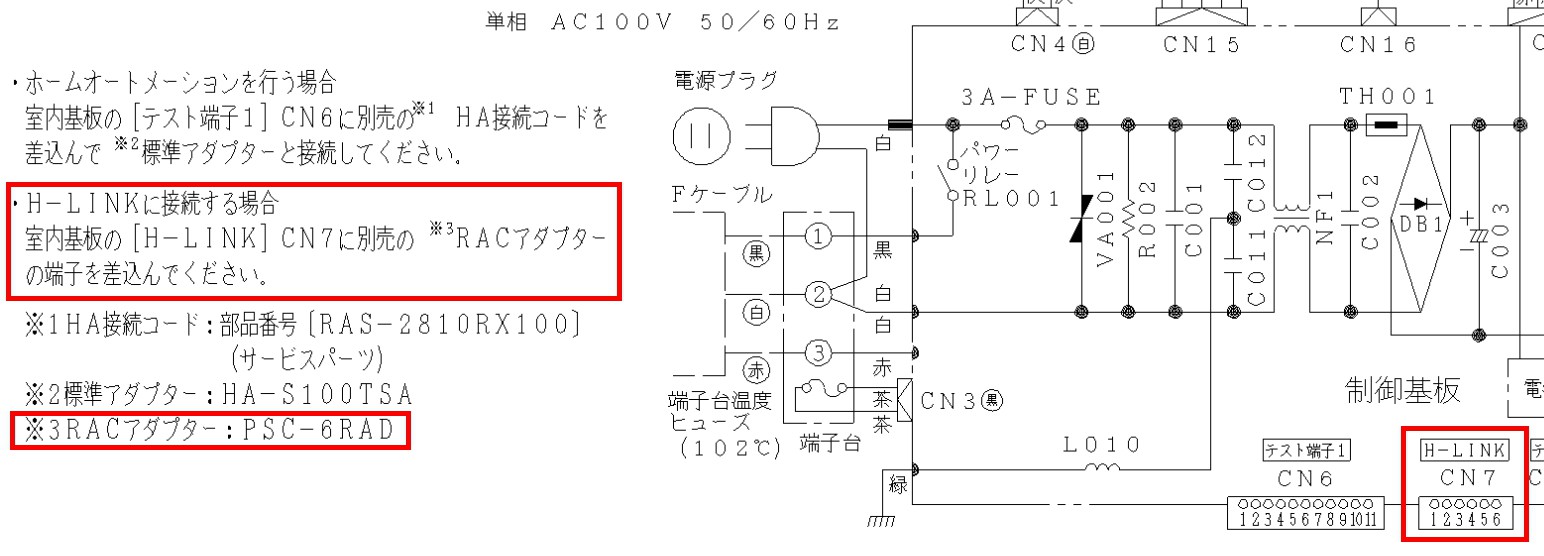
I began to doubt whether this old air conditioner could really be connected to CS-NET via H-LINK, but after digging through that site I found earlier, I came across this schematic/wiring diagram.
![]()
It's clear that this air conditioner can be connected to CS-NET via H-LINK. I will just have to keep playing detective for a bit longer and continue looking for clues.
-
More research (not so easy now)
12/27/2019 at 11:26 • 0 commentsNow, let's look for information regarding the RAC adapter. Thanks to the pdf file I found the other day, I at least know its product number: PSC-6RAD.
I initially searched for a high-resolution image so I could try to identify the connector that plugs into the air conditioner mainboard, along with its pinout.
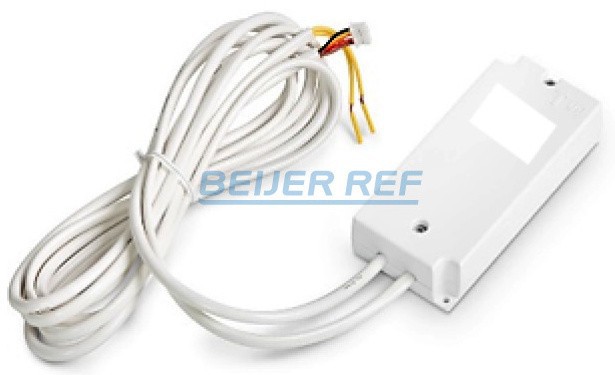
But even after a few hours on Google, all I could find is this (credit to https://shop.charles-hasler.ch):![]()
It looks like a 4-pin connector, and from left to right: black, yellow, red, brown?
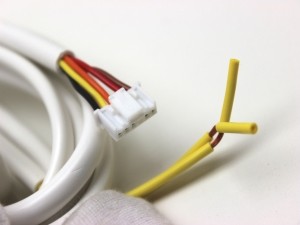
I tried again to find a better image by searching through listings on Ebay and others sites, and I managed to find this auction listing on a site that archives past ads from Yahoo Auction. The selling price of 1000 yens for 3 units really surprised me, but most importantly, there was the following close-up photo of the connector.![]()
I'm glad I found a better image because it turns out it's actually a 6-pin connector (with only 5 pins being used): black - yellow - orange - red and brown. This reminds me of this Hackaday project, and since my air conditioner is also designed by a Japanese company, I'm hoping this connector has a similar pinout (12V - GND - 5V - TX - RX).
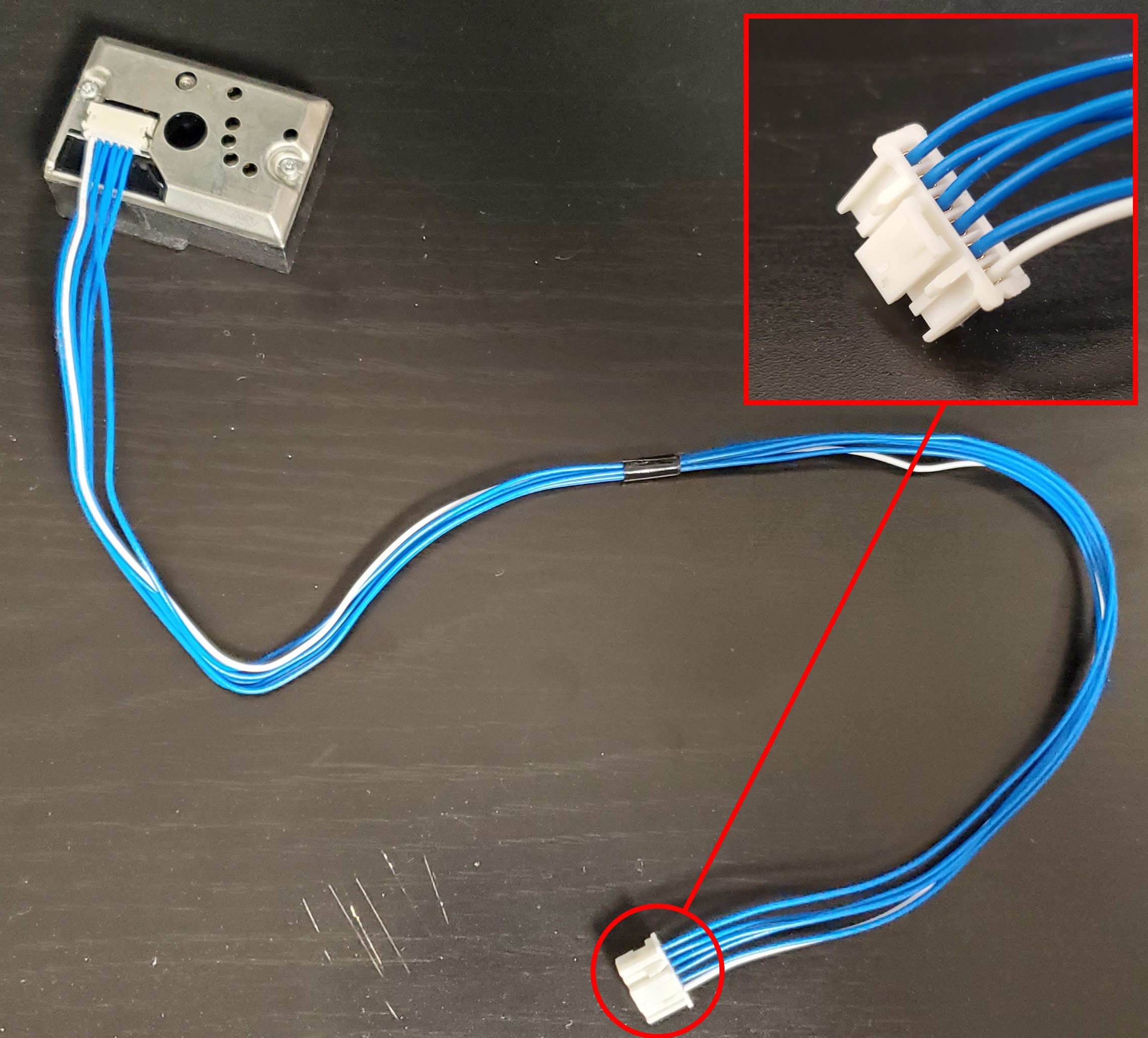
However, after looking at this photo numerous time, I realized that I might have the exact same connector on a dust detector I salvaged from my old air purifier and humidifier combo. If so, I could plug that in the air conditioner mainboard and poke at it with a multimeter to figure out the pinout.
![]()
Yes, it's the same connector! Let's just cut that cable, open the air conditioner, locate the CN7 connector, plug it in, and use a multimeter to poke around. I removed the top cover of the air conditioner following the manual's instructions, and after removing a metal cover enclosing the mainboard, here we are.
![]()
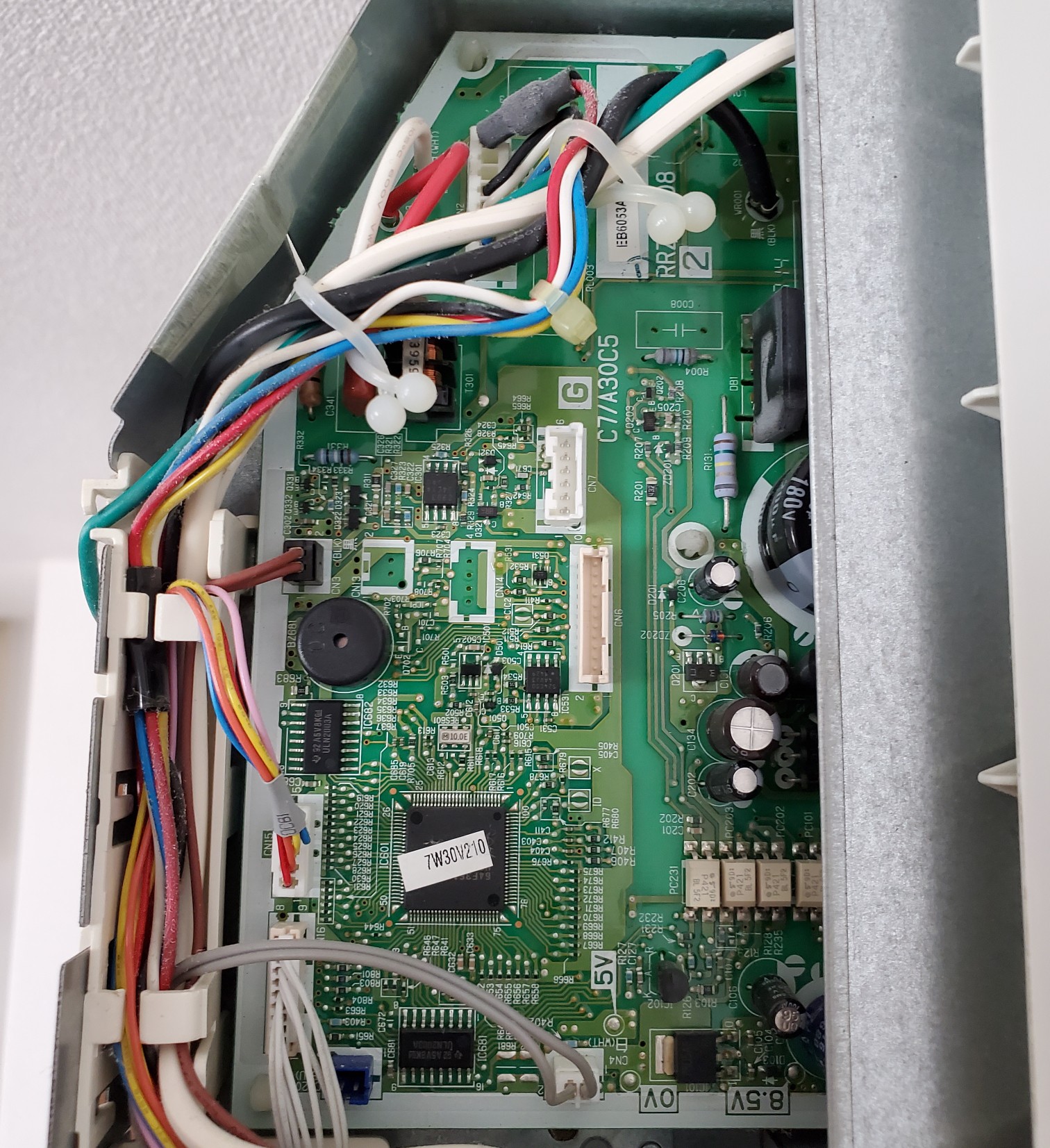
At first glance, I easily identified the CN7 connector, but also noticed these four test points: 5V, 0V, 8.5V and 12V (the 12V test point was hidden to the right of the 8.5V one). So, I connected my cable and, without powering anything on, I checked for continuity between each pin and each test point. The result turned out a little bit different than what I expected: from top to bottom, I got X - GND - X - X - X - 12V. This means that, based on the connector photo I found, yellow is GND and brown is 12V... "Things are not always what they seem". Under power, I indeed had 12V on that last pin and all remaining pins showed 5V, except that 4th pin which seems to be unused.
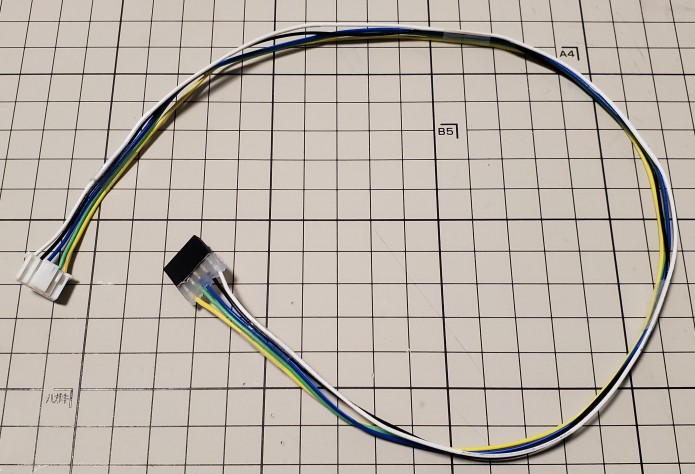
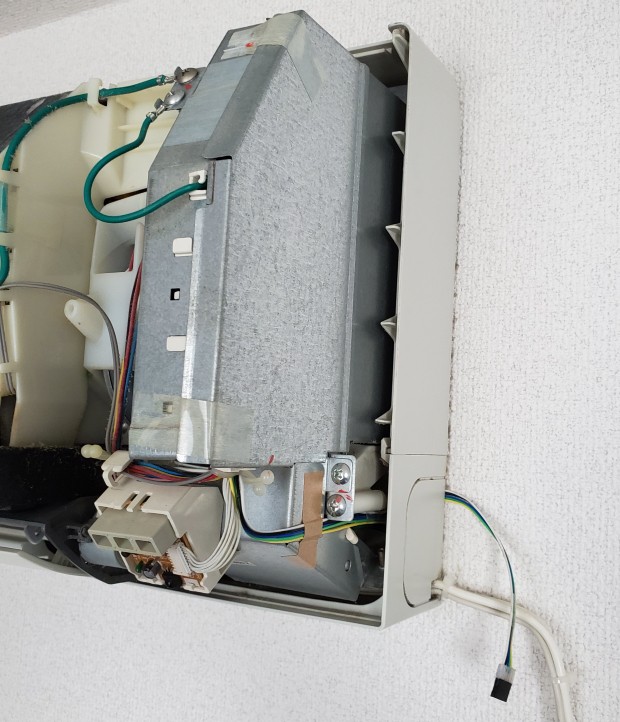
Since I had already opened the air conditioner and had a proper connector, and the all-blue wire cable was really difficult to work with I made my own cable and plugged it in. This way, I'll be able to easily poking around in the future.
![]()
![]()
This time, I managed to identify the connector that plugs into CN7 and a part of its pinout. I also now have a cable hanging out of my air conditioner, allowing me to easily probe it. All that's left to do is keep looking for more information and figure out or find the rest of the pinout.
-
Identification and some research
12/17/2019 at 09:41 • 0 commentsTo begin with, what am I dealing with?
It's an air conditioner made by Hitachi, model RAS-LJ22Y, manufactured in 2009.
First, let's have a look at the manual and see if:- there is any mention of connectivity options
- there are accessories that can connect to it (like a wall remote control, for example)
- there is any details regarding its electronics (I highly doubt that but who knows!)
With the help of my friend Google and the magic keywords "取扱説明書" and "RAS-LJ22Y", here is the manual.
→ https://kadenfan.hitachi.co.jp/support/raj/item/docs/ras-lj22y_b.pdfAfter thorough reading, I found something quite interesting on page 26.
![]()
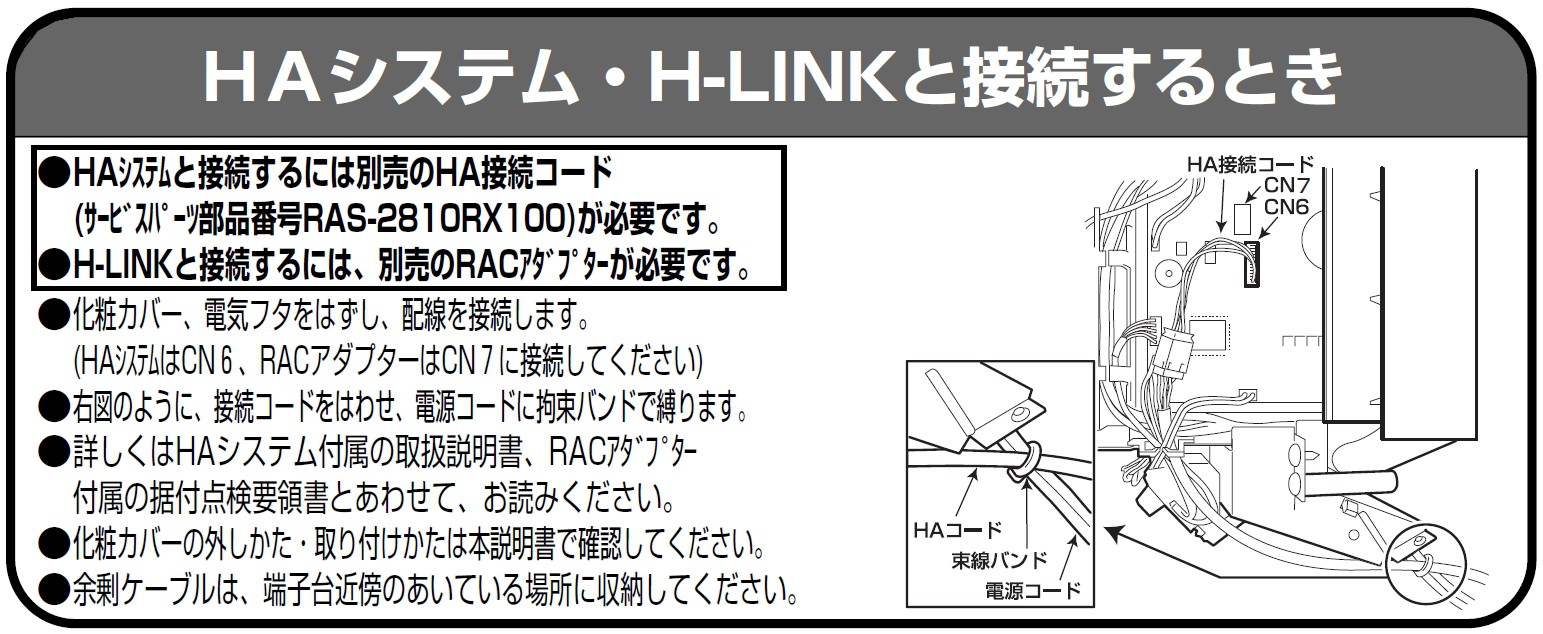
The text in bold enclosed in the small black rectangle says:
●To connect to HA system, the HA connection cord sold separately is required (service part number RAS-2810RX100).
●To connect to H-LINK system the RAC adapter sold separately is required.
It also mentions that HA system connects to CN6 connector and the RAC adapter to CN7 on the mainboard.That's a promising result!
Despite being quite old, this model supports two types of wired connectivity.Next step is to look for what the HA and H-LINK system are and what kind of functionality they offer. Again, with the help of Google, I found this PDF from Hitachi explaining what HA system is and how it works. HA stands for "Home Automation" and it is a system for controlling the power operation and monitoring the power status of home appliances equipped with an HA terminal. In other words, it allows you to remotely turn a device on or off, and know at any time whether it's on or off.
That's not bad but very limited, so let's have a look into H-LINK system.
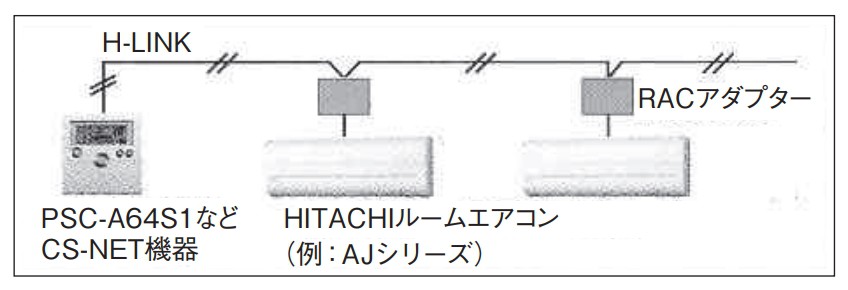
After a brief search, I found another PDF from Hitachi specifically about H-LINK and the RAC adapter. Google search engine power? Just some luck? After a closer look, I realized that PDF is hosted on the same site where I found the previous one about HA system... I'll need to look deeper into it, as I might find more useful information. Anyway, H-LINK is a Hitachi proprietary two-wires communication system for connecting air conditioners to Hitachi's building air conditioning management system called CS-NET. Here's the best part so far:
●From CS-NET, you can control and monitor not only the power mode (ON/OFF) but also the set temperature, operation mode and air flow mode.This small explanatory diagram shows how a remote control is connected through H-LINK to the RAC adapter, which then connects to the air conditioner.
![]()
As a conclusion, this model has two types of wired connectivity, one of which is for connecting to a commercial management system that allows to remote control of its various settings. The next step will be to gather more information about the RAC adapter in order to figure out what kind of communication protocol is implemented between it and the air conditioner.
Let me control you: Hitachi air conditioner
An attempt to wirelessly control an old Hitachi air conditioner
 That's not Japanese but Chinese. The character "有" is the same in both languages and means "active/present/valid". However, I didn't recognize the other character so I opened