lion mclionhead
-
VPN on a dynamic host
10/03/2025 at 23:32 • 0 commentsTorrents inside a VPN don't always work inside a container or with masquerading. Sometimes adjusting the MTU works, but not always & they have to run directly on a host on the ISP. The trick with this is we're bringing down the default route when starting the VPN & bringing up the default route when stopping the VPN. Since it's now a dynamic address, it needs to get it from the DHCP cache.
Fortunately there are now tools which translate natural language into a shell script which parses spaghetti text. When the VPN goes down, we run
#!/bin/sh
systemctl stop transmission-daemon
cat > /etc/resolv.conf << EOF
nameserver 75.75.75.75
EOF
DEFAULT_ROUTE=$(grep "option routers" /var/lib/dhcp/dhclient.leases |tail -n 1 | awk '{print $NF}' | tr -d ';')
route add $DEFAULT_ROUTE
When the VPN goes up, we extract the DNS from spaghetti text
#!/bin/sh
#echo sinon env variables:
echo foreign_option_1=$foreign_option_1
#echo foreign_option_2=$foreign_option_2
#echo foreign_option_3=$foreign_option_3
DNS=$(echo $foreign_option_1 | awk '{print $NF}')
echo got DNS = $DNS

route del default
systemctl start transmission-daemon
cat > /etc/resolv.conf << EOF
nameserver $DNS
EOF
The VPN command is
openvpn --script-security 2 --config <.ovpn file> --auth-user-pass <userpass file> --up-delay --up /root/sinon --down-pre --down /root/sinoff
Helas, there is a conflict between dhclient trying to manetain the wifi & openvpn trying to manetain the VPN. Dhclient has to keep going when the VPN is on, trying to overwrite everything. It only succeeds in overwriting the DNS, fortunately. It seems to be a anachronism of dhclient that it only updates resolv.conf. The easiest solution ended up being polling & rewriting of the right /etc/resolv.conf variation based on whether the VPN is on. Openvpn needs to write the 2 resolv.conf variations to temporary files.
------------------------------------------------------------------------------------------------------------------------------------
![]()
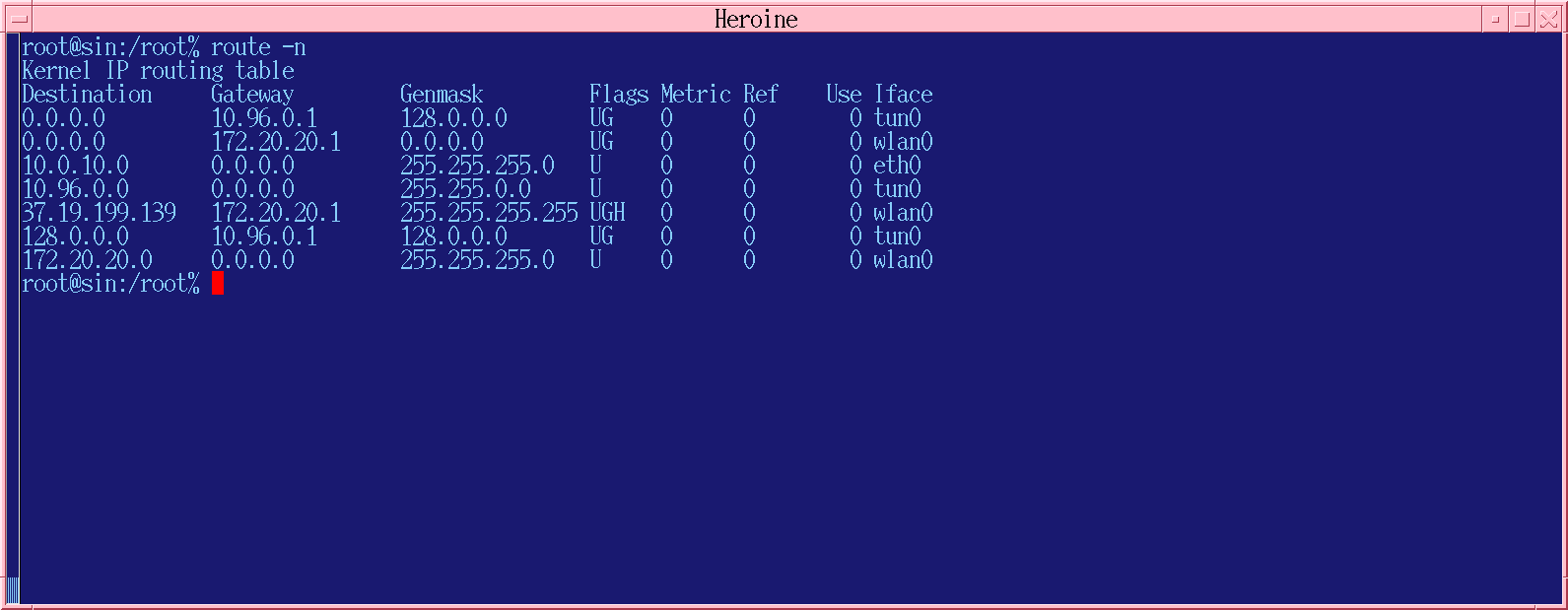
Dhclient occasionally steps on openvpn's default route setting. You get 2 default gateways, the openvpn gateway stays on top & a route bypassing the VPN goes into #2. After observing this for a few years, it seems to continue using the VPN. It's possible a VPN issue could make it leak but normally the VPN just goes down & kills transmission-daemon.
Another problem is sometimes the access point goes down & no longer associates until the raspberry pi is rebooted twice.
-
Torrents in a VPN
10/26/2023 at 23:18 • 1 commentLions contend that most containers are only used for downloading torrents in a VPN. Most ISP's these days disable your account for nefarious downloading.
The mane VPN program is openvpn. The mane command line torrent program these days is transmission-cli.
apt install openvpn transmission-daemon transmission-cli
Getting it going in a VPN container is a long & hard process.
The daemon is a systemd service. It immediately gives "unauthorized" for all commands. You have to systemctl stop transmission-daemon, edit /etc/transmission-daemon/settings.json, set
rpc-authentication-required to false,
rpc-whitelist-enabled to false
& systemctl start transmission-daemon to get around this.
Another new dance is the download-queue-enabled, queue-stalled-enabled options have to be set to false or it'll set every new torrent to queued while waiting forever for the unseeded torrents.
You must disable the automatic transmission-daemon by running systemctl disable transmission-daemon
Generally, there's an openvpn command which configures the VPN. It runs a command after the VPN starts & another command before the VPN dies, to ensure no data intended for the VPN goes to the insecure network.
openvpn --script-security 2 --config [.ovpn file] --auth-user-pass [userpass file] --comp-lzo --up-delay --up [startup script] --down-pre --down [shutdown script]
For some reason, the --comp-lzo option may have to be taken out if it can't access anything from inside the VPN.
The VPN nameserver is contained in a foreign_option_1 environment variable passed to the startup script.
At minimum, the startup & shutdown scripts have to manage the torrent daemon, default route, & set resolv.conf.
startup script:
#!/bin/sh
route del default
systemctl start transmission-daemon
cat > /etc/resolv.conf << EOF
nameserver THE_VPN_NAMESERVER
EOFshutdown script:
#!/bin/sh
systemctl stop transmission-daemon
cat > /etc/resolv.conf << EOF
nameserver THE_ISP_NAMESERVER
EOFroute add default gw 10.0.10.1
All the transmission downloads go in /var/lib/transmission-daemon/downloads. The lion kingdom made this a mount point pointing to a host directory in the lxc config.
lxc.mount.entry = /home/mov/sin /var/lib/lxc/sin/rootfs/var/lib/transmission-daemon/downloads none bind 0 0
The permission has to be 777 since transmission-daemon runs as a normal user.
The torrents are all in /var/lib/transmission-daemon/.config/transmission-daemon/torrents & /var/lib/transmission-daemon/.config/transmission-daemon/resume
New containers have to be routinely created as VPN's migrate to new ubuntu releases. To transfer all the torrents between containers, you have to copy the 2 torrent directories, make sure the permissions are 777, & the user exists.
-------------------------------------------------------------------------------------------------------------------------
Key commands:
Start downloading a torrent:
transmission-remote -a "magnet link"
List status & ID's of all torrents:
transmission-remote -l
Sort by a column:
transmission-remote -l -k <column number starting with 1>
Stop a torrent by ID:
transmission-remote -t [ID] -S
Resume a torrent by ID:
transmission-remote -t [ID] -s
Remove a torrent by ID:
transmission-remote -t [ID] -r
There is no easy way to select individual files for downloading. The general idea is to poll the torrent contents by torrent ID.
transmission-remote -t [ID] -f
Once it downloads the file list, stop all the files from downloading
transmission-remote -t [ID] -G all
Then resume 1 file at a time by passing its ID
transmission-remote -t [ID] -g [file ID]
-
Dangling virtual eth devices
05/24/2023 at 23:36 • 0 commentsNoted every time you lxc-stop & lxc-start a certain container, it creates a new virtual eth device. Eventually ifconfig & brctl show fill with dead virtual eth devices. These dead devices cause networking in the container to fail with TLS errors, dropped connections, while DNS & ping continue to work.
The leading theory is these containers start processes which aren't killed by lxc-stop. kill -9 instead of lxc-stop doesn't release the devices.
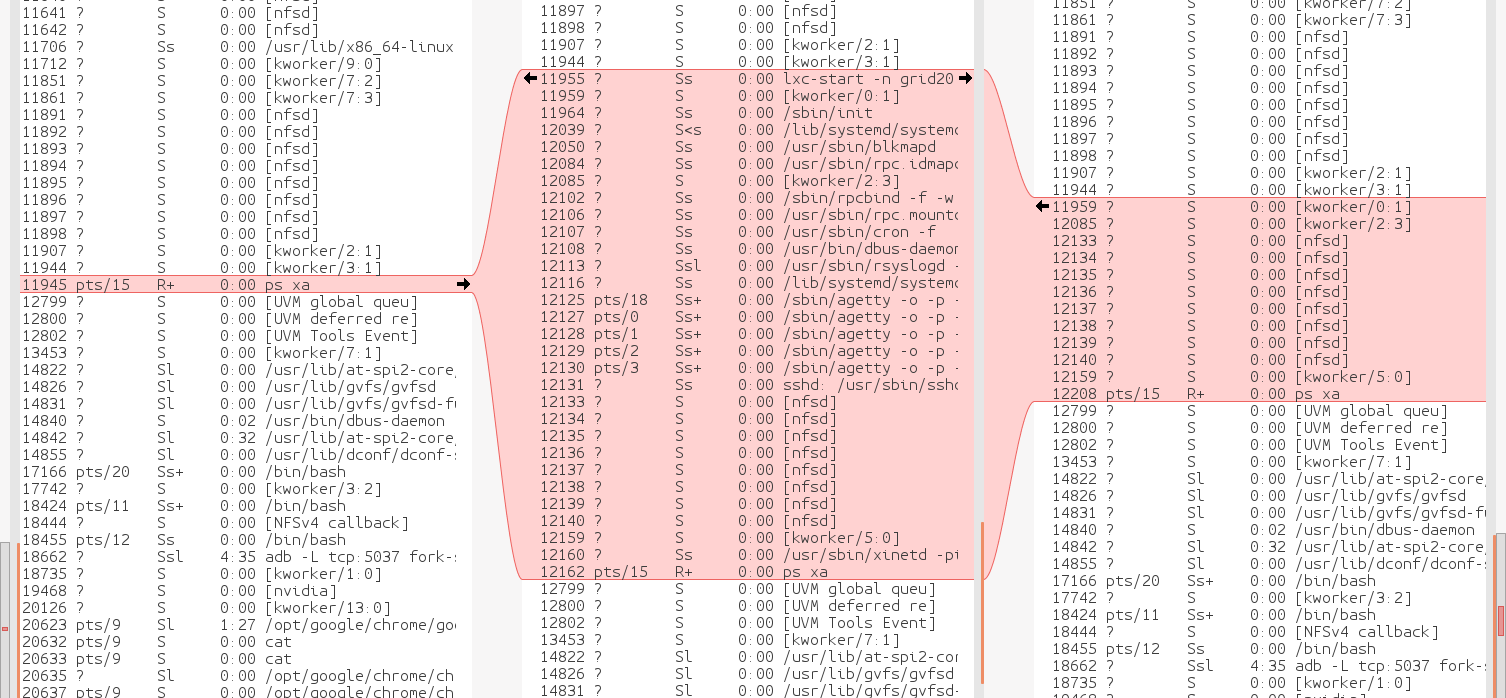
meld shows an interesting evolution of the process table during the lifecycle of the container.
![]()
The container creates a bunch of nfsd & kworker which aren't visible inside the container. These are left behind after lxc-stop or kill -9
killall -9 nfsd gets rid of all the dangling eth devices & processes.
The nfsds are all created outside of the container by lxc-start & bound to the virtual eth.
For some reason, the offending container has a bunch of rpc programs running inside the container & these cause nfsd to run outside the container. There's no reason to use nfsd in a container since the filesystem is a subdirectory on the host. A quick disabling of RPC solves the dangling network interfaces.
mv /usr/sbin/rpc.idmapd /usr/sbin/rpc.idmapd.bak
mv /usr/sbin/rpc.mountd /usr/sbin/rpc.mountd.bak
mv /usr/sbin/rpcbind /usr/sbin/rpcbind.bak
That fixed the connection errors. As in all things, containers introduce many new problems in exchange for solving old problems with virtual machines. The hope is the new problems are less debilitating than the old problems but there can never be a perfect solution.
-
X clients in a container
05/23/2023 at 21:14 • 0 commentsThe goog spits out many hits for running an X11 program in a container by creating a new container from scratch. Buried in this list was 1 hit for reconfiguring an existing container.
https://blog.simos.info/running-x11-software-in-lxd-containers/
The general idea is to add 1 line to your /var/lib/lxc/*/config file
lxc.mount.entry = /tmp/.X11-unix tmp/.X11-unix none bind,optional,create=dir,ro
Then restart the container.
This creates a path which redirects the X server sockets of display :0 to the X server sockets of the host display.