Close
0%
0%

eZ80 CPU for RC2014 and other backplanes

An eZ80 CPU Module that works within the RC2014 ecosystem and other similar backplanes

Similar projects worth following
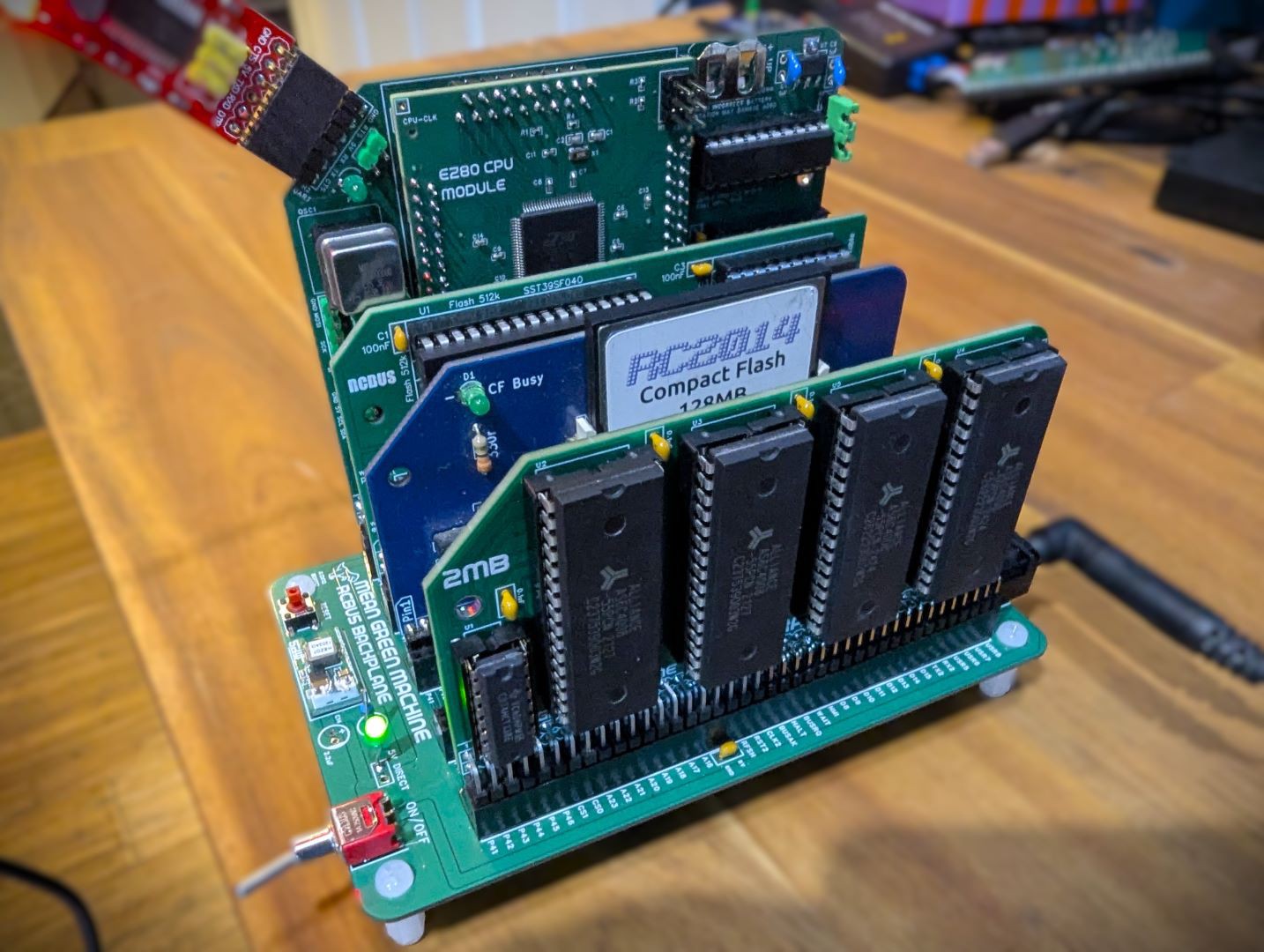
The goal of this project is to design and build a module for the RC2014™/RCBus and my Yelllow MSX Series, that can operate as a complete CPU module and drive the various available modules.

The eZ80 Zilog CPU is an updated version of Z80 CPU. It comes in a few variations with many on chip facilities in addition to the basic CPU, such as flash ROM, RAM, GPIO and other IO services. See the Wikipedia page for basic overview of the CPU (https://en.wikipedia.org/wiki/Zilog_eZ80)

I have combined my project journals into a single site - check it out at: https://www.dinoboards.com.au/

Project Objectives

  • Interface an eZ80 CPU to drive the various TTL 5V modules for the RC2014 and other similar backplanes.
  • Operate in a Dual-CPU mode - so that the original Z80 CPU and eZ80 can alternate access to the address/control and data buses.
  • Figure out how to get software working easy in the system.  Look at RomWBW and my Yellow MSX series. cross compiler tools etc.
  • Utilise some extra pins on the 80 pin backplanes to support a direct 24 bit address range for a possible 'Large Linear Memory Module'.
  • Make it work with RomWBW and my Yellow MSX configurations.
  • Learn SMD and how to hand solder surface mounted components.

Design Details

I have journaled some of my thinking around the design and learnings in the project log.  If this is the your first viewing of the project, you may want to read through these journal entries sorted by 'Oldest' first. Click here: Journal Log

Which eZ80?

The eZ80 was originally released around the turn of the century.  There are a number of variants available today.  They all comes with additional features within the chip, such as Flash ROM, RAM, GPIO, UART, I2C and timers.  Some can run at up to 20Mhz and other up to 50Mhz.  

The key feature of the CPU above the original Z80, is its ability to address a full 16MB of memory.  It has 24 address lines (8 more then the 16 for the Z80).  Its has features built in to help run existing Z80 software in 'compatible' mode on this chip.  

I choose the eZ80F92 variant for my designed.  It can operate at up to 20Mhz, has 128K of on-chip Flash ROM and 8K of RAM.  And lots of other features: UARTS, GPIO, timers, SPI and i2c.  I may not be able to use all these features in my design though.

Surface Mount Device challenge

I have never worked with SMD stuff before.  The eZ80F92 comes in a 100 pin LQFP package.  Its pins are very tiny - and with my aging eyes, might be a challenge for me to hand assemble.  Of course, the PCB fabricator can assemble these things relativity cheaply - that may be an option.  

But I don't want to make an all SMD module.  So I intend to place the eZ80F92 on an adapter board, with pins, that can be inserted into a conventional module PCB.

Inspiration

Of course, this is not the first hobby, DIY, retro solution using the eZ80 CPU.  There are a few out there that inspired me.

  • Agon - a cool little single board retro machine, with large following and lots of open source material available.
  • eZ-Tiny - it might be small, but it is still very capable.
  • The  Z20X computer - this seems to be abandon now and the original website is gone - but it gave me the inspiration for a CPU breakout module. 
  • RC2014- where it all began for me.
  • And my own Yellow MSX project.

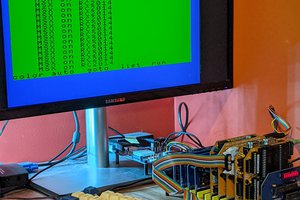
Below is a 10 second demo of the first operating prototype, driving the RC2014 Digital IO module.  It just flashes the LEDS, so nothing very impressive - just confirms that the eZ80 is able to do I/O operations to another module.  Lots of updates and software required to enable full operation.  Eg: running CP/M, Basic, and eventually getting it to work in my Yellow MSX configuration.
ez80-interface-v1.5.pdf

EZ80 Interface for RC2014 backplane Schematic (V1.5)

Adobe Portable Document Format - 801.51 kB - 07/21/2024 at 11:37

Preview

ez80-interface-v1.4.pdf

EZ80 Interface for RC2014 backplane Schematic (V1.4)

Adobe Portable Document Format - 772.44 kB - 07/07/2024 at 06:40

Preview

EZ80-V2.pdf

EZ80 CPU Module Schematic

Adobe Portable Document Format - 501.04 kB - 06/01/2024 at 00:16

Preview

EZ80-INTERFACE.pdf

EZ80 Interface for RC2014 backplane Schematic (V1.0)

Adobe Portable Document Format - 797.89 kB - 06/01/2024 at 00:13

Preview

  • Q3VM for the eZ80 Part 2

    Dean Netherton08/29/2025 at 00:19 0 comments

    As per my previous post, I have been working on porting and exploring q3vm for use within the eZ80’s firmware.

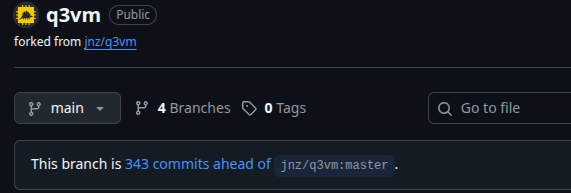
    I have a new repo hosting the code at https://github.com/dinoboards/q3vm

    And, oh my - I seemed to have created a lot of commits!

    343 commits added to upstream

    a few steps back, and a few more forward. No artificial colours, artificial flavours or artificial intelligence included.

    At this stage, I have manage to host a small piece of test code within the vm, interpreted by the eZ80’s firmware. The vm consumes about 5.5K of ROM storage - not bad. Not sure yet of performance nor about how large the actual bytecode images will end up being.

    It has taken quite a bit of effort to port the code base, as I didn’t want to just use the q3vm as is, but change a few specific things.

    First let me just recap a bit about the q3vm and how it works.

    So what is q3vm? Here is how the upstream project describes it:

    Q3VM is a lightweight embeddable interpreter/Virtual Machine (VM) for compiled bytecode files .qvm based on good old C-language input files (.c). A complete C compiler to generate (.qvm) files is included (LCC). The interpreter is based on the Quake III Arena virtual machine (hence the name q3vm) but the interpreter is not tied to Quake III Arena.

    So its a way to compile code and produce a binary file - like most compilers. But the binary file is not an executable or machine code image, ready for execution on your favourite CPU, but rather, a machine code for a virtual CPU - a Virtual Machine if you like.

    This bytecode needs to be ‘interpreted’ by our favourite CPU - so its not going to be the fastest way to execute code. So why do it this way? There are many reasons for this model. For me, the bytecode has the potential to use less actual memory for a given piece of code. This could help as I try to squeeze more code into my favourite CPU’s on chip 128K flash ROM.

    ‘Virtual Machines’ have been used for quite some time to solve memory, portability and other issues. Discussion of vm in general and their history is a topic for another day.

    As part of the porting process, I have made a few changes to the implementation, including:

    1. The default int type change from a traditional 32 bits to 24 bits; aligning with eZ80’s CPU 24 bit registers.
    2. Lots of new and many changed opcodes within the VM – the bytecode is not compatible with the original q3vm - but thats ok.
    3. Optimisation of vm.c and vm.h for Zilog’s ZDS eZ80 compiler.
    4. 4 byte alignment removed and all code and data defaults to single byte alignment - the advantage of 8bit CPUs!
    5. c pointer widths are now 24 bits.
    6. The code and readonly memory is no longer copied to RAM. Reads are directed to the ROM image.
    7. Refinements to the trace output when debugging mode is enabled.
    8. New conditional compile define, MEMORY_SAFE, to enable memory access safety checks.
    9. New command line option q3asm -l to produce a listing file.

    Producing a bytecode image file

    Creating the bytecode image to feed to the q3vm interpreter is achieve with the following process:

    1. Use lcc to compile C89 .c code files to IL text representation .vmasm files.
    2. Use q3asm to translate and link a set of .vmasm files to a binary bytecode .qvm file.
    3. Embed vm.c and vm.h into a host C application to interpret/execute the bytecode.

    Executing the bytecode

    Once the bytecode binary data has been produced, it can then be executed by the q3vm interpreter. The process for executing code within the q3vm is:

    1. Embed the binary data into the eZ80’s firmware ROM image.
    2. Reserve a small amount of on-chip RAM
    3. Incorporate the vm.c and vm.h source files into the firmware’s code base.
    4. Updated the firmware to initialise the q3vm
    5. And then direct calls to vm.c to load and execute functions within q3vm.

    Next step

    The next step is to port some real useful code to run within the VM. I have graphics driver code...

    Read more »

  • Q3VM for the eZ80

    Dean Netherton08/18/2025 at 09:18 0 comments

    Recently, I watched some videos on the YouTube channel, Tariq10x, specifically his reviews of Wolfenstein, Doom, and Quake code. It’s an excellent code analysis trilogy. I have included links to the videos at the bottom of this post.

    His review of Quake, in particular, mentioned something I was only vaguely aware of before – ID’s development of a Virtual Machine system within the game platform.

    I started to think about how a VM within my eZ80’s firmware might be an interesting thing to develop. With only 128K ROM and 4K RAM – there is only so much we can fit in there. Could a VM help memory usage?

    A VM for some of the code might be able to achieve better memory usage than full native code. (The assembly code generated by the C compiler is not very efficient.) Could I move my USB driver code (all written in C) to a VM environment?

    So when I found the q3vm fork by Jan Zwiener at https://github.com/jnz/q3vm, I started to think about using this VM for my eZ80 firmware.

    The q3vm project contains three main parts:

    • LCC - Retargetable C (C89) compiler thats I believe was modified by the ID guys to target their VM.
    • Q3ASM - Program to take the output of LCC and produce the binary bytecode image for the VM.
    • vm.c/vm.h - C89 compliant C code to host and execute the virtual machine.
    Q3VM’s main goal was portability - to enable game devs to create mods that will run on all platforms. It’s not trying to be super performant - as it will call out to the host for all performance critical operations.

    With the hosting code (vm.c) written in C89 version of C - same as Zilog’s C compiler - it seemed like it may be possible to host the VM on the eZ80.

    The Q3VM solution is quite small - compared to other so called small VM. (I have previously considered things like Lua - which I might revisit - but its smallest size is still larger than the 128K ROM.)

    There were a few things I noticed, that needed further consideration:

    1. vm.c/vm.h are quite small, but its current process is to copy all of the bytecode image into RAM - even readonly segments for code and constant data. As our eZ80 only has 8K of RAM, with some of that already allocated, the memory model of the VM would need to be modified.
    2. The LCC compiler is only C89 compliant - that’s ok - so is the Zilog ZDS compiler!
    3. The LCC compiler’s int type is 32bits - it has no support for eZ80’s unusual 24bit integer.
    4. Addresses/pointers are also 32 bits wide - a bit of an overkill for this little CPU with only a 24 bit address bus.
    5. The memory layout of the segments is not what I would have expected - it is CODE -> DATA -> LIT -> BSS (BSS includes space for the stack). DATA is the initialised variables that need to be copied to RAM. LIT are the readonly bits (string constants etc). As mentioned in point 1, this needs to be rejigged.
    6. The CODE and DATA segments have their own address spaces. The code can not be mutated (despite being copied into RAM) – data writes are always directed to the DATA/BSS segments address space.
    7. I am not so interested in the portability capability - I would prefer a solution that supports 24bit integer - as this would make integrating with native code much easier.

    I have been hacking at this for a bit - and so far have managed to get a highly modified version of the VM Host running within the eZ80’s firmware.

    Some key points of the solution so far are:

    • The precompiled bytecode image is baked into the firmware. No need to ‘allocate’ memory at runtime.
    • The CODE and LIT segments are now not copied to RAM - and are referenced from the embedded ROM image.
    • Have updated LCC/Q3ASM and the VM to support a 24 bit integer - still a work-in-progress - this is quite a challenge.
    • Have abandoned ‘compatibility’ with the original q3vm instruction set - to support 24 bit integers new opcodes are needed and assumptions of data sizes have changed.

    My ultimate goals are:

    1. Move some of the USB driver code to run within the VM.
    2. Port some of the V99x8/HDMI driver code to...
    Read more »

  • Green And Gold

    Dean Netherton06/08/2025 at 04:12 0 comments

    I have not had the privilege of a lot of free time over the last few months, which limited my ability to explore and experiment with the eZ80 RC2014/RCBus system.  And with so many things on the backlog....

    But recently I have come into the possession of a little more time.  And did manage to at least get one idea moving forward.

    eZ80 CPU on Yellow MSX

    Zilog turtles all the way down

    One of the original inspiration for developing the eZ80 CPU module was to potentially use it as a 2nd CPU for the Yellow MSX system -- something similar to how the Turbo MSX used the Zilog R800 CPU.  The Turbo MSX would switch between the 2 processors - using the faster processor for newer software, but switching to the Z80 for compatibility with older software and games.

    The eZ80 and the R800 are not compatible processors though.  And further, to modify the hardware design of the Yellow MSX and eZ80 Module to enable the cpu switching, via software, is certainly doable, but requires a fair bit of work (and time).

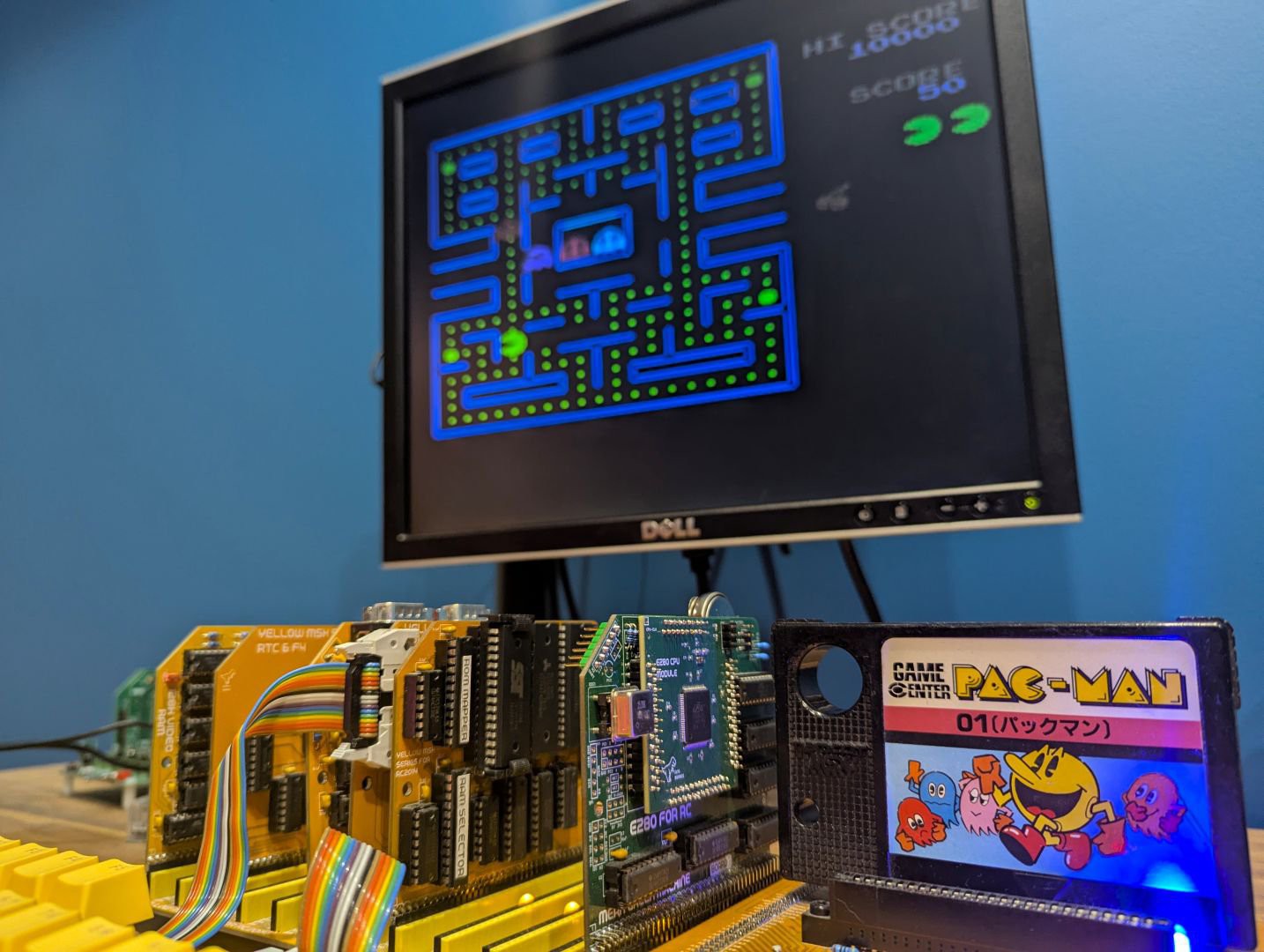
    But then I had a brainwave!  I wondered - is the eZ80 fast enough to 'emulate' a Z80?  Could it interpret all the Z80 opcodes fast enough (assuming a Z80 running around the 3.5Mhz mark) and achieve the required level of compatibility.  Could it run MSX game cartridges using this interpretation approach?  Could I get the original PACMAN game to run using the eZ80 as the CPU?

    The eZ80 is much faster than the R800, although certainly not as fast as modern 32/64Bit CPUs.  (Modern PC can easily emulate Z80 based system in your browser).  The eZ80 is still an 8bit CPU -- it's not super fast at all.  Could it work?  Would an emulator be able to achieve the equivalent performance of a 3.5MHz Z80 CPU?

    What about the eZ80's Z80 compatibility mode?

    You may be wondering why I did not utilise the eZ80's Z80 compatibility mode, to just run the code natively.  Well there are a few 'buts' with this option:

    1. It's much faster - so if we attempt to run any original MSX code, it will run way too fast.  It may be possible to configure it to run 'slow' - not sure - but there are still other buts!
    2. The eZ80 has some extra op-codes that the Z80 does not have.  If the Z80 encounters an opcode it does not recognise - it typically just ignores it and moves on.  Most software written for the Z80 would likely not have any such opcodes, but if any such opcode did exist in the software, through intention or not, the eZ80 will generate a RST 00 (kind of like an exception) and effectively reboot itself.
    3. Some Z80 'dud' instructions have been repurposed for the eZ80.  For example the instruction ld d,d - which is rather pointless - a kind of no-op - if encountered by the eZ80 will cause it to handle the next instruction differently.  So if some coder left such no-op instructions like these in their code, then the eZ80 will likely crash.
    4. The eZ80 is not just a CPU - its a (SOC) system on chip.  It has ROM/RAM and its own hardware ports.  The I/O ports from $0000 to $00FF are reserved for these on-chip systems.  Original MSX (and most other Z80 code) - assumes a different configuration for I/O access.  This is the biggest hurdle with having the eZ80 run Z80 code.  Any I/O (that is access to the Video, Sound and other hardware) will invariably not work.  The code would need to be modified to run successfully on an eZ80 CPU directly.  So no PACMAN on the eZ80 natively.

    eZ80 driving the Yellow MSX system

    Just this weekend, I finally managed to get my Yellow MSX system to boot with the eZ80 CPU emulating a Z80.

    Perhaps a more accurate way to describe the developed solution is not so much as 'emulating', but rather as 'interpreting'.

    I will need to write another post describing how the code works - and the tricks employed.  But it was quite a cool thing to have my MSX system boot up with the eZ80.  I have yet to do any performance measurements...

    Read more »

  • Belated Progress Report

    Dean Netherton01/22/2025 at 00:03 0 comments

    Ok, so its been quite a while since I provided an update for the *eZ80 For RC* module. What can I say, I am easily distracted.

    Despite this lack of communicating, I have nonetheless, still found some time to make progress on various ventures related to the *ez80 For RC* module. There are quite a few things I am working on,
    because, I get easily distracted. I keep starting a little project, but then I think - oh - what about this 'other' thing. (So unlike me!)

    I will try and summarise all that I have been working on over the last few months:


    SRAM Memory Module

    As per my last entry, I developed the Memory Module to give the system access to 2MB of linear addressable memory. Nothing changed here, other than the development of software to run on this memory.


    CLang Compiler & runtime

    To build applications for the system that can run in ADL mode on the memory module, I need a way to write such code easily and quickly.

    The Options for writing code for the eZ80 (ADL):

    1. Write in assembler. If I write my code in assembler, I can target ADL mode, using the 24 bit logic of the CPU. But its certainly a time consuming and error prone process. Fine for time critical code sections and low level logic, but for general application development - its rather slow.

    2. Write C code with Zilog's ZDS IDE. Zilog's official C compiler can target the eZ80's ADL mode, allowing for full 24bit addressing and logic. But the C compiler is an older version of C (C99), so has some nice features missing. But more impactful, is the fact that its very much a Windows Application, tuned to the idea of firmware development, not general application development.

    3. Z88DK. The Z88DK system is an amazing cross-platform Z80 solution. It can target the eZ80 CPU, unfortunately though, only for the standard Z80 mode. So its a no-go for me as it can't produce eZ80 ADL code.

    4. CLang Port. The CLang port, developed for the TI-84 Plus CE/TI-83 calculator, and then later ported for the Agon, does indeed provide a modern C language compiler that can target the full ADL mode feature of the eZ80. But....

    There were some challenges with the CLang tool chain for use within the RCBus/RC2014 ecosystems. The runtime for the *CE* calculator and the updated runtime for the *Agon* are developed for their respective Operating Systems. The question arose, how to make it work on my CP/M based RCBus/RC2014 system?

    I have done a fair bit to convert/port the Clang compiler to my platform - probably too much to cover in this posting - I will try and post a separate entry detailing all the work.

    Suffice it to say, I now have a cross-compiler that I can run on my PC and build CP/M 'executables' that can be copied to my kit and run - taking full advantage of the eZ80 processor.

    The repo for the tool chain is at: https://github.com/dinoboards/ez80-clang

    And within my main repo, I have a number of sample applications, that are compiled as ADL mode applications: https://github.com/dinoboards/ez80-for-rc/tree/main/apps

    CH376 True USB Module

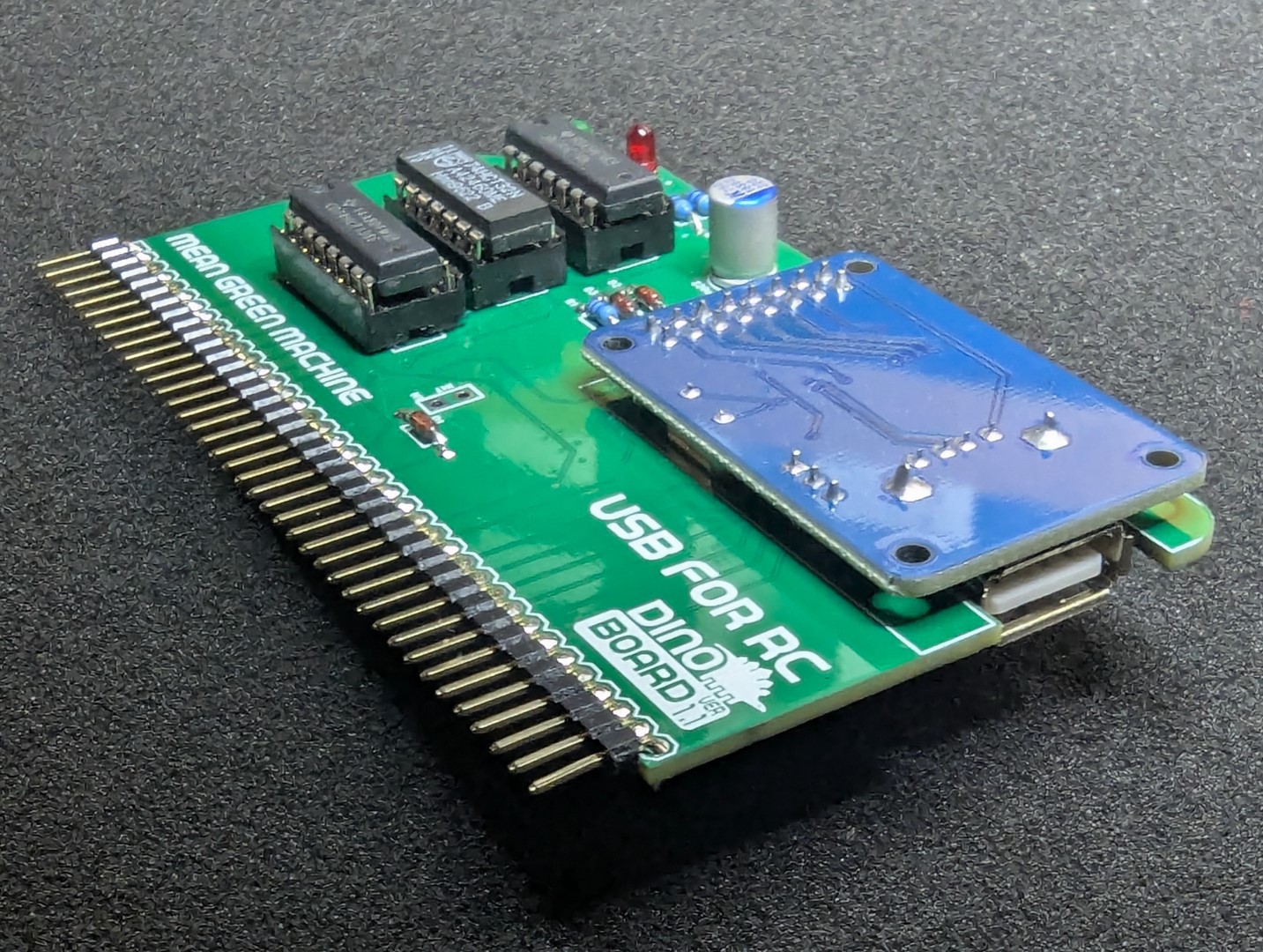
    When I developed the Yellow MSX Cassette+USB module for my MSX series, I also wrote the code required to fully access the USB protocol. It is able to enumerate devices over USB Hubs, Mass Storage devices, USB Floppy drives, Printers, Keyboards, etc. All the code written for this USB logic, was developed using the Z88DK and SDCC C compiler.

    I have wanted for a while now, to port this code into RomWBW to enable true USB support within the RCBus/RC2014 platform.

    And I have done that. The code is not yet official yet... But its ready for merging into Wayne Warthen RomWBW's repo. I will submit it to Wayne, once he completes his current release's beta phase. In the meantime, the code is available on my fork of RomWBW.

    My patch of RomWBW with full USB support is available at: https://github.com/dinoboards/RomWBW/tree/dean-ch376-usb-native-5

    I will have this as a kit on my Tindie store shortly.


    BBCBasic port...

    Read more »

  • 2MB Flat SRAM Linear Memory Module

    Dean Netherton12/10/2024 at 23:24 0 comments

    In a typical Z80 RC2014/RCBus configuration, the Z80 processor, which is limited to a 16 bit address bus, can only directly access 64k.  The RC2014 Modules such as the 512K RAM/ROM modules use bank switching to allow the Z80 to access more memory. 

    Although this works, it is a bit restrictive.  If you attempt to write a program that is larger than 64k, or needs to access more memory, its got to figure out how to access the various banks, and switch them in and out as required.  It can get complicated.

    The eZ80 has a 24bit address bus, and when running in ADL mode, can directly address up to 16Mb of memory, enabling the ability to write larger programs much easier.

    So for the eZ80 to shine, we need a new memory module that works with the 24bit address and not use any bank switching.

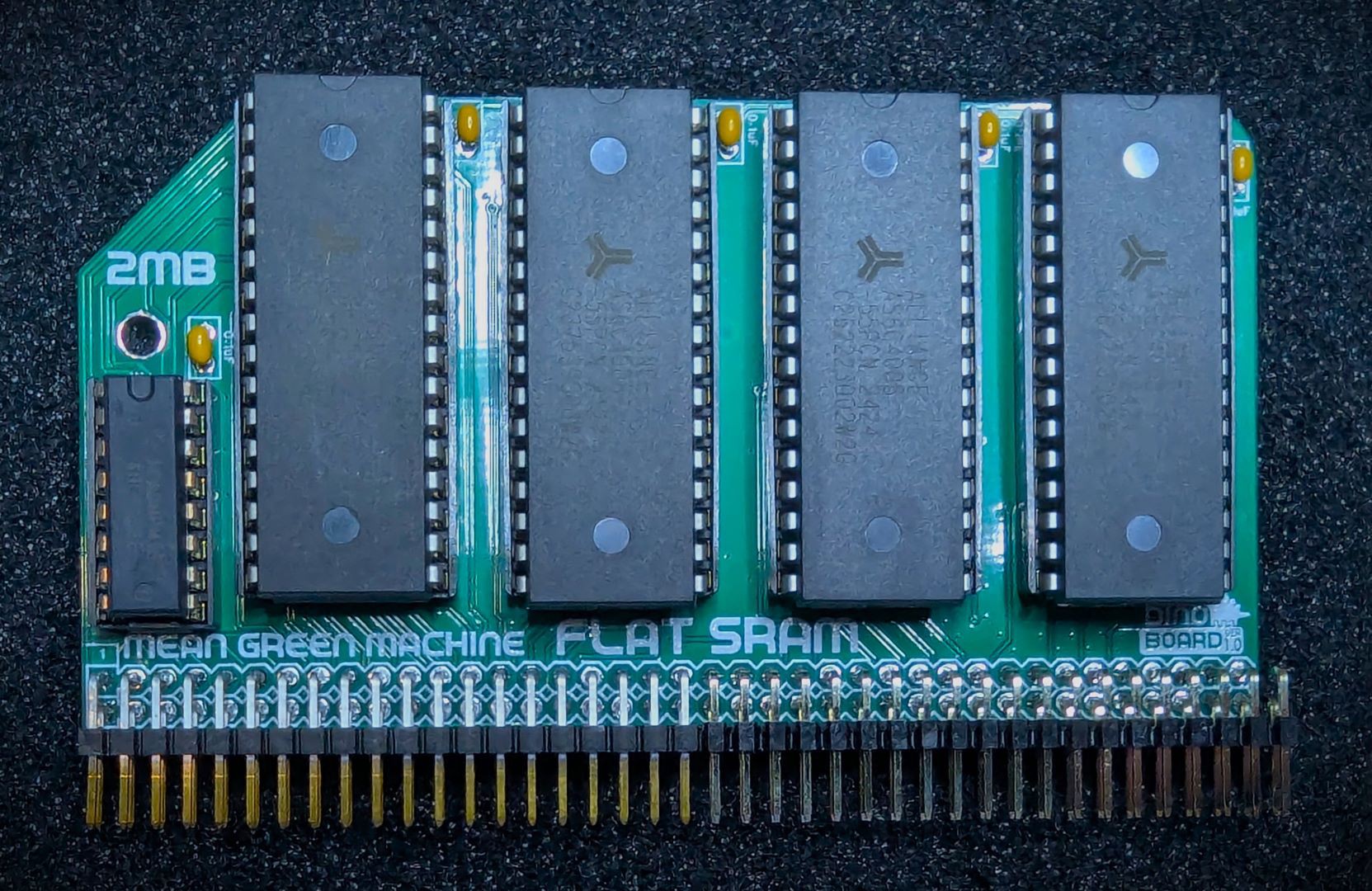
    Therefore, I  developed a new Module for the eZ80 for RC CPU system.  The **2MB Flat SRAM module**.  It allows the eZ80 to see up to 2MB of linear RAM.  The module has sockets for up to 4 AS6C4008 (512k) SRAM chips.

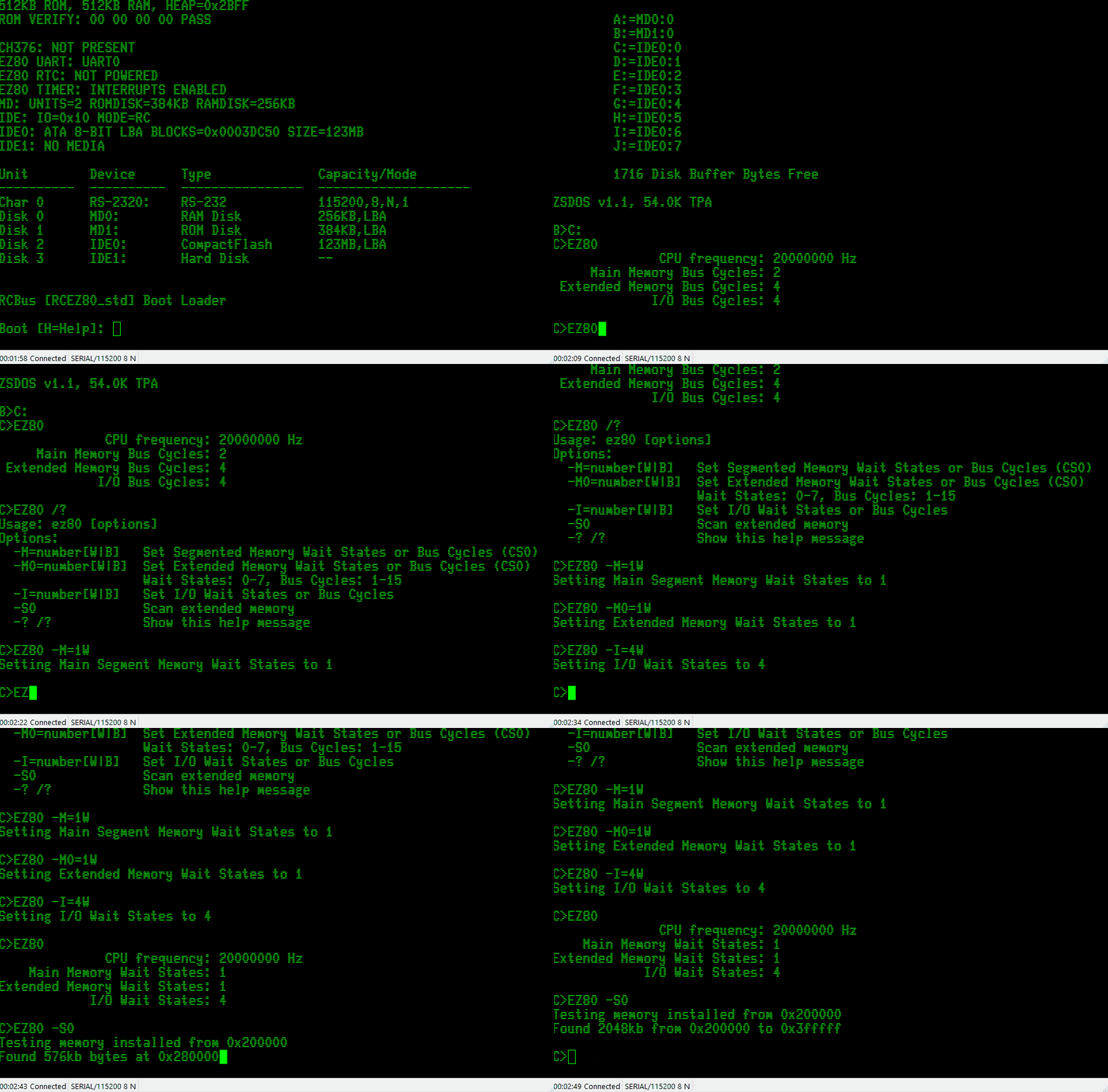
    I wrote a little CP/M utility (EZ80.COM) to help with managing and testing the memory and (I/O) systems.

    The firmware has been updated to enable the extended linear memory:

                  +-------------+
       0x00 0000  |             | On Chip 128k flash ROM
                  |             | (boot up firmware)
                  |             |
                  +-------------+
       0x02 0000  |  ~ ..... ~  | Unused
                  +-------------+
       0x02 E000  |             | On Chip 8K Fast RAM
                  +-------------+
       0x03 0000  |             | External Banked Switch
                  |             | 64K ROM/RAM
                  +-------------+
       0x04 0000  |             |
                  |  ~ ..... ~  | Unused
                  |             |
                  +-------------+
       0x20 0000  |             |
                  |             | External 2MB Linear
                  |             | SRAM
                  |             |
                  +-------------+
       0x40 0000  |             |
                  |  ~ ..... ~  | Unused
                  |             |
                  +-------------+
       0xFF FFFF

    Now all I need is a figure out a way to write applications that can run from within this linear address space and take full advantage of the eZ80!

  • Kit available on Tindie

    Dean Netherton10/06/2024 at 10:04 0 comments

    The eZ80 for RC kit is now available from my Tindie store.

    A super easy kit to build with everything needed to explore the most advanced Z80 based CPU available.

    Click here to purchase your own eZ80 for RC kit.

    I have also started to build up a new website detailing all my kits: www.dinoboards.com.au

    It includes a page for the new eZ80 for RC kit: www.dinoboards.com.au/ez80-for-rc

    The plan is to consolidate all supporting materials for all kits and projects on this new site.

  • Pi Pico Programmer

    Dean Netherton09/29/2024 at 08:38 0 comments

    This weekend, I made significant progress in making a PI Pico module connect to the eZ80. Enabling the ability to erase and write to the on-chip flash ROM. This will be an alternative and cheaper way to program the eZ80 compared to Zilog’s Smart Programmer.

    The Pi Pico Programmer connects to the eZ80’s ZDI interface, a 2 pin (similar to i2c) serial interface. The Programmer can transmit commands to halt, inspect, debug, erase and write to the on-chip 128K Flash ROM.

    Getting it operational was quite challenging. My first challenge, that took way longer than I had expected, was to install the compiler/build tool chain for the Pico. Once that was done, I had the ability to write C code for the Pico that can drive some GPIO pins. So it was just a matter of discovering the ZDI signalling protocol to command the eZ80 to erase and write to its flash (and do a few other operational things)

    This proprietary interface is a bit like I2C, but not quite… Its documented by Zilog in the eZ80 manual. I did find though, that the documentation is sometimes a little brief or confusing.

    The development process mostly entailed me flashing some code on the Pi Pico - verifying that the GPIOs are toggling as expected - then connecting it for real to my eZ80 and see if that’s actually what Zilog wants! A lot of head scratching and trying over and over.

    The Pi Pico Programmer is now able to to program/flash the eZ80 - it still needs some polish - but is sufficient for now.

    I intend to detail the solution, with appropriate pictures in the main repo. I have also designed a small PCB to mount the Pi Pico and a 6 pin header. Should make for a very neat solution.

    I am not the first to use a cheap modern Microcontroller to program an eZ80. There are some projects for the Agon using its onboard ESP32

  • RomWBW Integration

    Dean Netherton09/22/2024 at 09:24 0 comments

    I am very excited to announce that Wayne Warthen has accepted my pull requests for the eZ80 module into his mega RomWBW project. The eZ80 support is now part of the mainline code base. Still very much under development and early alpha - but official!

    I am very thankful to Wayne for his assistance in the development of the eZ80 for RC2014/RCBus.

    Wayne has also received a kit and will soon be able to personally validate the eZ80 operation.

    And in other news, I started experimenting with a Pi Pico this weekend to see if I could make a programmer for the eZ80 (as a possible replacement for the very expensive Zilog programmer). I thought to myself, surely this cant be too hard to do. When will I learn not to call myself Shirley!

  • Benchmarking

    Dean Netherton09/15/2024 at 10:36 0 comments

    My primary goal with the eZ80 module is to achieve maximum compatibility with RC2014/RCBus modules and configurations. The eZ80 is a significantly faster processor. However, to ensure communication with older, slower retro modules, appropriate wait states must be introduced, which means some performance will be sacrificed. Despite this, the system remains much faster than a standard Z80 running at 7MHz.

    I ported some benchmarking software from the z88dk library, which includes the classic Dhrystone and Whetstone benchmarks to give me some insights on the degree of performance this system operates at, compared to a stock RC2014 build.

    I ran these benchmarks on various configurations and at different CPU frequencies, and the results were quite interesting.

    When the eZ80 boots up, it detects the current CPU frequency and adjusts the timing for accessing the external ROM/RAM module and its own on-chip flash ROM. I chose conservative settings and calculations. As a faster oscillator is installed, the boot-up firmware will increase the extra wait states required when accessing memory and I/O devices.

    The purpose of this benchmarking was not to showcase raw speed. Other eZ80 systems can achieve higher speeds by using fast RAM chips, typically SMD RAM chips soldered next to the CPU. The fast RAM chips allow the eZ80 to run at its full potential. But I tend to think, if I wanted a faster solution, I could probably achieve orders of magnitude increases by running everything in JavaScript within my main PC’s browser.

    The Results

    Stock RC2014 System @ 7.372Mhz

    First, I ran the two benchmarking utilities using a stock RC2014 system with a standard Z80 CPU running at 7.372MHz, an SIO/2 module for serial communication, and a V9958 VDP module to generate a 50Hz timer tick for time reference.

    • Dhrystone score: 556.2
    • Whetston score: 8

    Stock RC2014 System @ 20Mhz*

    I then conducted the same tests, using my Turbo CPU module - the fastest standard Z80 I have. This is a CPU module for the RC2014/RCBus systems, that can run a standard Z80 at 20Mhz. (If you are not familiar with this module, check it out over in my Tindie Store https://www.tindie.com/stores/dinotron/)

    • Dhrystone score: 1144.2
    • Whetston score: 16.5
    * The Turbo CPU does not run its Z80 at a constant 20Mhz - it will, if any I/O operations are performed, briefly slowdown to a more typical speed (7.372Mhz). The interrupt timer tick from the V9958 will cause the CPU to do some I/O operations, thus down clocking the CPU for short bursts.

    eZ80 System @ various clock frequencies

    Below is the result of running the benchmark applications for the eZ80 at different CPU Frequencies. Note how the wait states increase as the clock goes up.

    Cpu FrequencyMemory
    W/S
    I/O
    W/S
    Flash
    W/S
    Dhrystone
    Score
    Whetstone
    Score
    7.371601149.714.4
    14.751612301.128.9
    16.002611680.421.1
    18.432611938.924.3
    20.002612103.126.4
    24.002512520.331.7
    25.002512625.633.0 *
    32.003722536.131.8
    35.004722226.028.0
    40.004922544.032.0

    Paradoxically, it does seem that sometimes, a faster CPU frequency, actually results in slower performance. For example, the 14.74MHz CPU outperforms the 18.43MHz CPU because the latter is heavily impacted by the need for an extra wait state.

    I know that some configuration are perhaps overly conservative (eg: 32Mhz will run at 2 W/S just fine) - and with some more time to experiment, more ‘performance’ can be achieved.

    Despite this, the current solution is still significantly faster than the stock RC2014. Additionally, the solution remains highly compatible, even when overclocking the eZ80.

    And yes, I have successfully overclocked my eZ80 to 40MHz, even though Zilog rates it for a maximum speed of 20MHz. I am eager to test even higher frequencies, but I lack the necessary oscillators to generate higher clock rates.

    Next, I need to start generating some Mandelbrot sets!

  • Hot Flashing

    Dean Netherton09/15/2024 at 09:36 0 comments

    Been working on understanding and writing code to re-flash the on-chip ROM from a CP/M application.

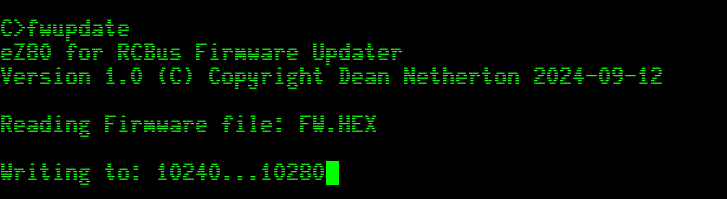
    I have written an application that allows for the ‘updating’ of the on-chip ROM without the need for the Zilog Programmer.

    Designed a system, where I can install dual firmwares. A default/fallback bootable firmware and an ‘alternative’ firmware.

    The first firmware is flashed, using the Zilog programmer, within the first 64K page of the 128K on-chip ROM.

    The CP/M application FWUPDATE.COM can then be executed within CP/M, to flash an ‘alternative’ firmware in the 2nd 64K page.

    On reboot, the system sees this new ‘alternative’ image and boots using that version. Should this new ‘alt’ firmware fail to launch HBIOS/CPM successfully, the main boot loader will switch back to the main ‘firmware’.

    A future goal will be to develop, using something like a PI Pico, to create my own external programmer. A Pi Pico, or other similar cheap microcontroller, will be a lot cheaper than the Zilog Programmer

View all 33 project logs

Enjoy this project?

Share

Discussions

mustower wrote 10/01/2024 at 17:54 point

Hi Dean,
thanks for your answer. I've looked closely at everything on https://github.com/dinoboards/ez80-for-rc/, but I just don't understand the boot sequence.
Is the HBIOS ROM plugged into the 512K RAM/ROM module and can then be accessed at address 0x03xxxx?
I noticed that the schematics were not in sync with the software.
e.g. ez80-cpu-1.7.pld shows that EZ_X0 and EZ_X1 are no longer needed.
However, these signals can still be found in the schematics.
Likewise, EZ_XRD and EZ_RD are no longer needed as EZ_RD is probably mapped directly to the Bus.
You write in your answer that CS3 is mapped directly to MREQ, but in the schematics CS3 is mapped to EZ16_MREQ and EZ_MREQ from the eZ80 is mapped to 24MREQ via U6 and then placed on the Bus on User signal D8. It's difficult for me to understand and it confuses me.
I find the project really interesting. I've already written that I would like to recreate it.
I think it's good that you want to offer it on Tindie, but some Tindie sets cannot be delivered to Germany, but that's where I live.
I will have to be patient and wait for your update.

Cheers

Hajo

  Are you sure? yes | no

Dean Netherton wrote 10/01/2024 at 22:07 point

Hi Hajo,

I am very sorry - I had some old versions of the schematics on the site - apologies.  I have since updated them - now i understand some of the confusion i was creating...

Latest versions available at: https://github.com/dinoboards/ez80-for-rc/tree/main/hardware

In that version you can see the CS3 for the eZ80 (EZ_CS3) is directed to one of the buffers (U6), and from there mapped to the MREQ.

> ...but I just don't understand the boot sequence.Is the HBIOS ROM plugged into the 512K RAM/ROM module and can then be accessed at address 0x03xxxx?

Essentially yes ..


When power is first applied, the eZ80 boots up, and starts from address 0x000000 - the code for that is in vectors16.asm (line 51, `reset:`)

It then jumps to __init.  This routine will initialise all the internal on-chip ports and configure CS2 and CS3 to their initial configuration.  CS3 is configured to activate for any memory access in range 0x03xxxx.

__init then passes to __main (in file main.s) where further initialisation is performed.  Things like internal timers are configured, the UART and its buffers are setup etc.

Then it eventually get to the code on line 30 of `main.s`


        LD      A, Z80_ADDR_MBASE               ; set MBASE to $03
        LD      MB, A
        JP.SIS  0

This is where we jump to RomWBW code.  The eZ80 is configured to run code at address 0x030000 in Z80 Mode.  RomWBW will not "see" the 0x03 upper byte of the address, as we are in Z80 mode.  The MBASE register is used for the upper byte of the address.  So now, normal 16bit Z80 code can executed.  All 16 bit jumps and calls within RomWBW will say within the 0x03xxxx address range.

---

In regards to sending kits to Germany, I have delievered some of my Tindie products to Gemany.  I cant say if the receiptants needed to pay any duties on receipt of the goods - but they got them.

I am looking also at list (no time frame yet) also on lectronz.com, where the corect processing of VAT is done.

Hope this helps

Dean

  Are you sure? yes | no

mustower wrote 09/30/2024 at 15:12 point

I am very interested in this project. I would like to build such a system. However, I don't understand the memory mapping of the entire system. /CS0, /CS1 and /CS3 are also applied to user signals of the RC2014 bus. But I can't find any information on how to address the RC2014 512K RAM/ROM card. I think the Memory-Card has to be modified somehow. Where in the eZ80 address space is the ROMWBW ROM  and RAM mapped ?
I would appreciate an answer.
Hajo

PS. Mail contact would be great.

  Are you sure? yes | no

Dean Netherton wrote 10/01/2024 at 04:49 point

Sorry think reply got posted incorrectly....
----

Hello,

Thanks for the interest in my little project.

You may be interested in the github repo that contains much of the project code (and schematics).  https://github.com/dinoboards/ez80-for-rc/tree/main/hardware

I am in the process of documenting the solution and build steps. etc.

For my design, no need to change the 512K RAM/ROM Module - or any other module.

CS3 is mapped to memory MREQ on the RC2014 bus, and is configured for addresses 0x03xxxx (with appropriate wait states applied)

The IORQ eZ80 line is mapped to the RC2014 bus's IORQ -- and CS2 is configured for IO - and is mapped to address range 0xFFxx

CS1 and CS0 are mapped to some spare RCBus lines - in expectation of a future module that can support 24 bit memory addressing.

I intend to list this as a kit on my Tindie store as soon as I can.

Cheers

Dean

  Are you sure? yes | no

Does this project spark your interest?

Become a member to follow this project and never miss any updates