Close
0%
0%

SigCore UC - Universal Controller

Universal industrial I/O controller with relays, analog/digital I/O, Modbus & OPC-UA support. Powered by Raspberry Pi.

Similar projects worth following
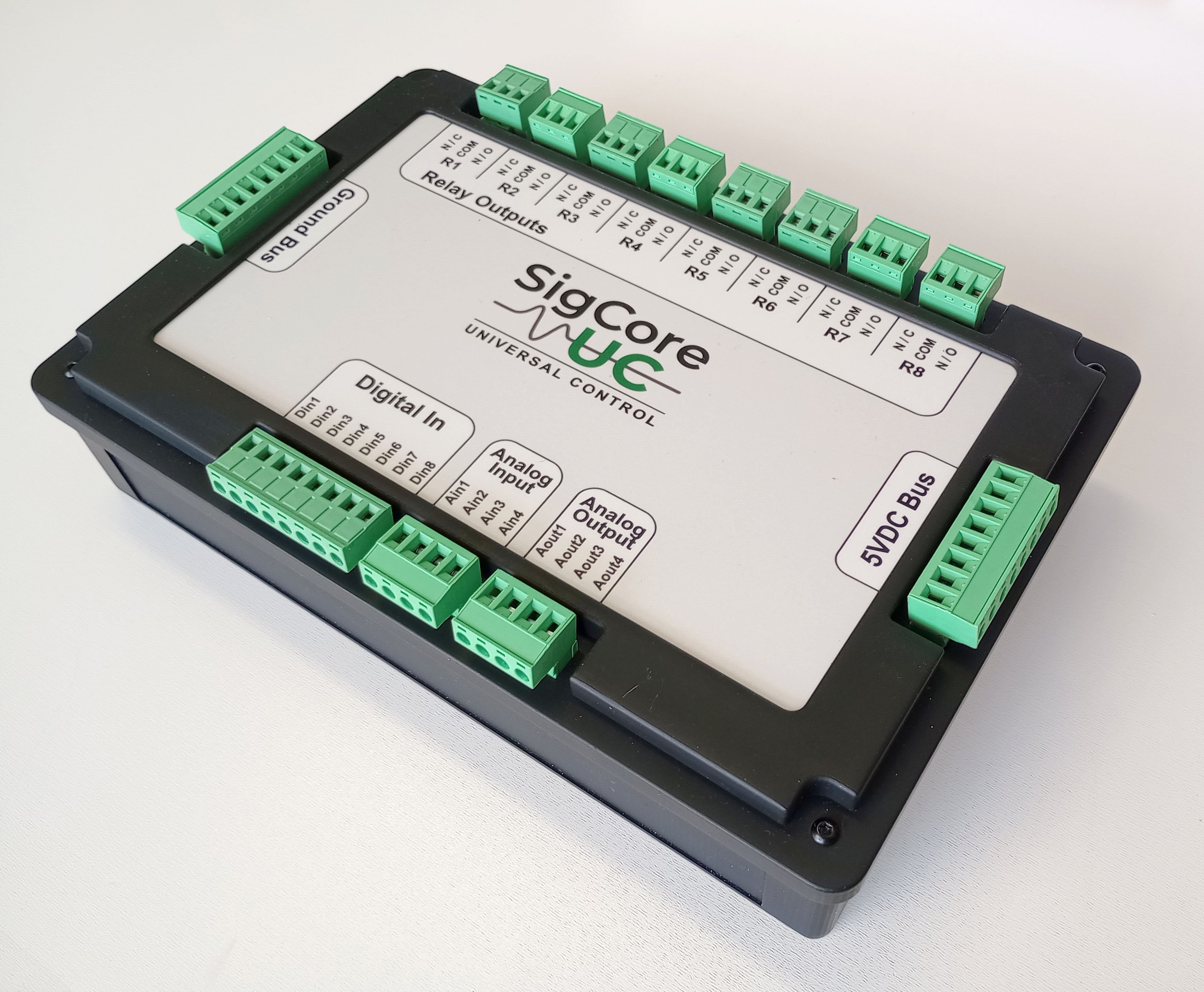
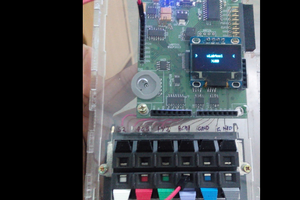
SigCore UC is a compact, universal I/O controller designed for industrial, lab, and automation applications. It combines relay outputs, digital inputs, analog inputs/outputs, and flexible firmware to support a wide range of sensors and actuators. Powered by a Raspberry Pi 4B running .NET Core, SigCore UC supports Modbus protocols out of the box, enabling easy integration into SCADA systems and custom software.

Designed for rapid deployment, open development, and robust performance in edge control environments.

Features include:

 - 8 digital inputs (3–30V)
 - 8 relay outputs (SPDT)
 - 4 analog inputs with calibration and filtering (mV to 10V, 4-20mA)
 - 4 analog outputs (0-5V, PWM)
 - Ethernet connectivity
 - CE-ready enclosure with professional-grade labeling and documentation

Designed for rapid deployment, open development, and robust performance in edge control environments.

Please follow my project on Crowd Supply

BOM_Main_PCB17_2025-09-09.xlsx

Bill of Materials

sheet - 9.83 kB - 09/26/2025 at 21:34

Download

Gerber_BottomSilkscreenLayer.GBO

gbo - 32.38 kB - 09/26/2025 at 21:34

Download

Gerber_InnerLayer2.G2

g2 - 230.31 kB - 09/26/2025 at 21:34

Download

Gerber_InnerLayer1.G1

g1 - 195.16 kB - 09/26/2025 at 21:34

Download

Gerber_TopSilkscreenLayer.GTO

gto - 337.07 kB - 09/26/2025 at 21:34

Download

View all 19 files

  • Media Coverage and Evaluation Units Moving Forward

    Edward12/18/2025 at 23:00 0 comments

    Over the past few weeks, SigCore UC has started to appear in a few different corners of the internet, ranging from long form articles to video and podcast mentions. None of this was driven by a formal launch push, which makes the coverage especially encouraging.

    LinuxGizmos recently published an overview of SigCore UC in the context of its upcoming Crowd Supply launch, focusing on the system’s ability to bridge industrial I/O, open source firmware, and a software driven control model. Hackster also highlighted the project’s open approach to industrial PID control and modular I/O design.

    In parallel, the project has been discussed on Coder Radio, and short capability overview videos are now live, showing the system running as a complete control and data acquisition platform rather than a collection of individual features.

    At this stage, the hardware, firmware, and Control Panel software are all operating in near release form. The system has been running continuously in real environments for extended periods, and the core functionality is stable. No additional development is required to put a unit into service. Configuration, monitoring, PID tuning, and data logging are handled entirely in firmware on the device, with the remote Control Panel serving solely as the user interface.

    Evaluation units are now available and beginning to move out. The current focus is on getting hardware into the hands of people who will actually use it, stress it, and apply it to real problems, not just look at spec sheets.

    As coverage continues to accumulate, this log will remain focused on the technical side of the project, design decisions, real world behavior, and lessons learned along the way.

    More soon, with data rather than adjectives.

  • Video Overview

    Edward12/10/2025 at 21:44 0 comments

  • SigCore UC Source Code Now Public on GitHub

    Edward12/04/2025 at 05:38 0 comments

    The SigCore UC repo is now officially live on GitHub.

    GitHub Repository

    This is the full codebase for the SigCore UC platform — firmware, server, Control Panel application, drivers, update tools, and all the supporting hardware documentation. If you wanted to dig into how this thing actually works behind the panels, it’s all there now.

    A quick breakdown of what’s in the repo:

    • .NET 8 Device Server running on Raspberry Pi OS (64-bit)

    • WPF Control Panel for Windows with full UI support for analog/digital I/O, relays, PID loops, calibration, and configuration

    • FRAM-backed persistent configs

    • Complete I²C device drivers (ADS1115, MCP4728, PCA9685, MCP23008/017, etc.)

    • SigCore messaging protocol

    • Update builder + launcher (automatic firmware/app updates)

    • Hardware drawings and documentation

    • Website assets and WebBridge backend for the device’s built-in web interface

    The repo’s still marked as early-stage (revA hardware, pre-production software), but everything is functional and running on the current prototype boards. As work continues, all updates will push directly to GitHub so the history stays transparent.

    What’s next?

    • Cleaning up the documentation now that the code is public

    • More detailed breakdowns of the hardware subsystem architecture

    • A demo video of the analog and relay subsystems in action

    • Preparing revB board fixes

    • Adding example automation scripts (Python + C#)

    If you’ve been following along and wanted to see “under the hood,” now’s the time. Feedback, issue reports, forks — all welcome.

    SigCore UC is built to be both powerful and open, so making the repo public is a big step toward that.

  • Control Panel Progress Report

    Edward11/02/2025 at 04:57 0 comments

    Overview

    This week was all about getting the SigCore UC Control Panel into a shape that feels like a finished product — not just a test harness.

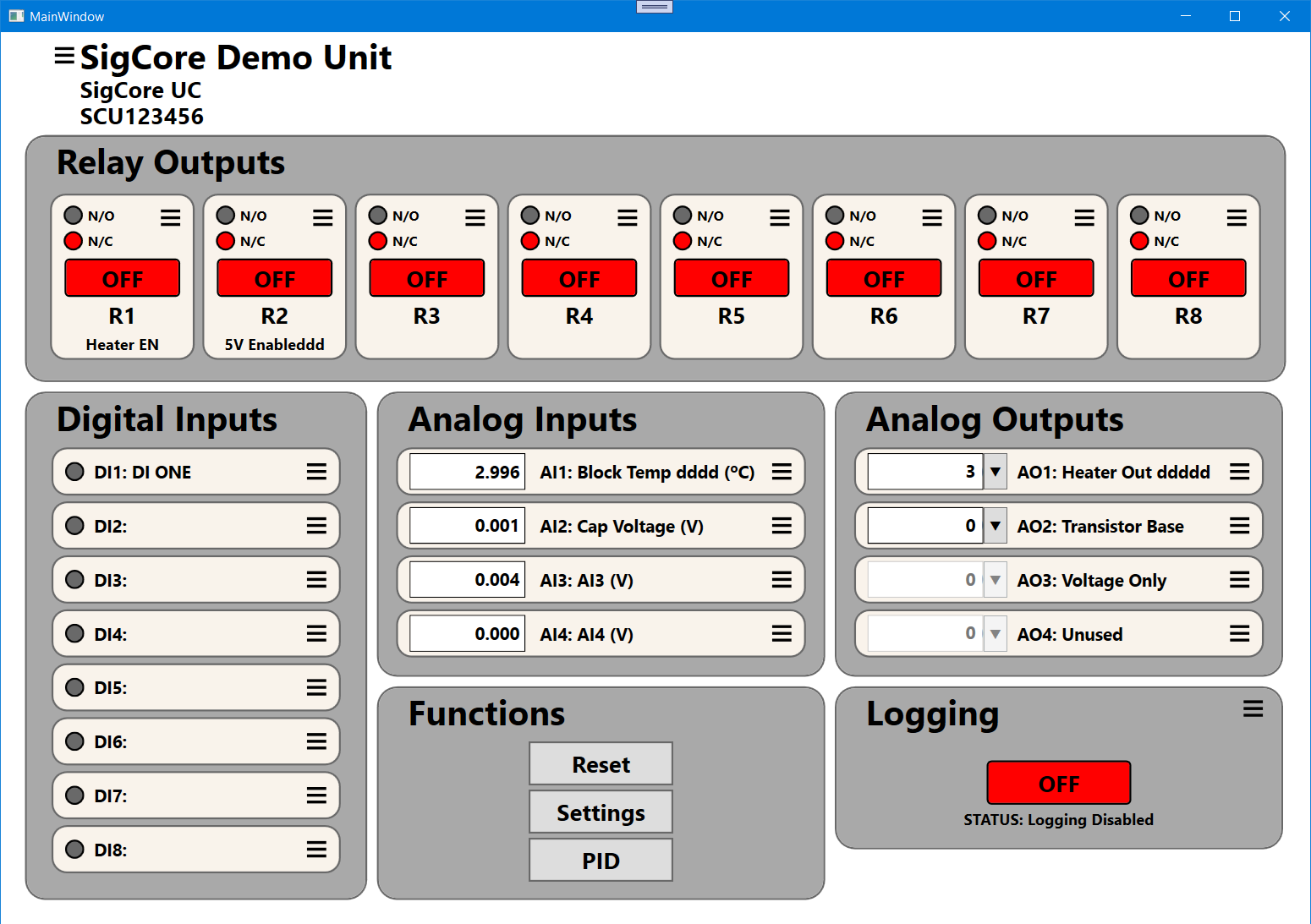
    The interface is now a clean, touch-friendly dashboard that mirrors the hardware layout: relays, inputs, outputs, and live system functions all visible at a glance.

    The software communicates directly with the SigCore UC hardware over TCP, automatically discovering the device, loading its FRAM-stored properties, and updating all I/O channels in real time.

    What It Can Do

    Full control of I/O

    • Toggle all 8 relays with independent Normally Open / Normally Closed settings.

    • Monitor 8 digital inputs and 4 analog inputs with live voltage or sensor readings.

    • Adjust 4 analog outputs for voltage or PWM operation, including per-channel scaling and calibration.

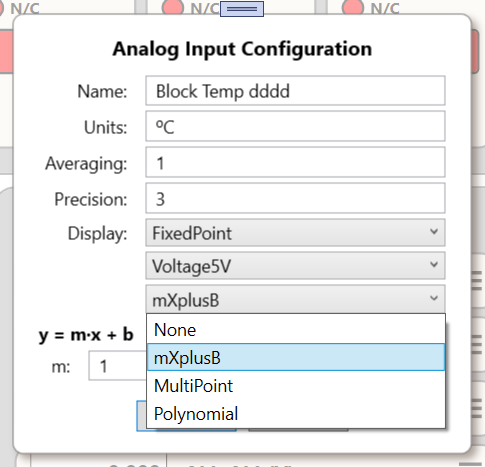
    Property dialogs

    • Each input, output, and relay has its own dialog with editable names, units, and parameters.

    • Properties are stored persistently in FRAM and reloaded automatically at startup.

    Live operation

    • Changes take effect instantly — no restarts needed.

    • The Control Panel continuously polls and updates at user-defined sample intervals while remaining smooth and responsive.

    PID control support

    • Direct access to PID loop properties.

    • Each loop has independent tuning parameters and setpoints.

    • Designed for heater control, feedback regulation, and automation loops.

    Logging system 

    • Integration with a MySQL backend to continuously log all channel data with precise timestamps.

    • Will enable long-term trend plotting and experiment archiving.

    How It Works

    The Control Panel is written in C# (WPF) and communicates with the SigCore UC server over a JSON-based TCP protocol.
    When launched, it:

    1. Connects to the device (auto-discovery via mDNS).

    2. Retrieves device properties and populates all channel groups.

    3. Begins asynchronous polling and live updates.

    Each group — relays, digital inputs, analog inputs, and analog outputs — runs in its own lightweight update loop, keeping the interface responsive even during heavy communication. All cross-thread updates are marshaled through the UI Dispatcher to prevent race conditions.

    The architecture cleanly separates hardware control from presentation:

    • SigCore Server handles all device control and communications with the outside world.

    • SigCore Control Panel provides the user interface to monitor and control the server’s behavior.

    Dialogs and property windows follow an MVVM pattern, making it easy to expand the system with new channel types or logging features later.

    Challenges This Week

    Decimal input bug
    A stubborn issue blocked typing decimal points and commas in analog input dialogs. The culprit turned out to be an overzealous input validation filter. Fixed by handling input through double.TryParse() and bypassing locale restrictions.

    Modal dialog behavior
    Some dialogs occasionally dropped behind the main window. This was fixed by ensuring all dialogs are application-modal and always stay on top of the parent window.

    Async initialization
    The initial property load caused occasional UI freezes. Reworked to use background tasks (Task.Run) with Dispatcher.Invoke for updates.

    Logging integration
    The MySQL logger now runs independently but isn’t yet tied into the UI toggle. Batched insert handling is next.

    Closing Thoughts

    The Control Panel has evolved from a prototype test tool into a professional-grade front end for the SigCore UC hardware.

    It’s stable, visually clear, and fast — exactly what you want when you’re monitoring a live control system.

    The really cool thing about the Control Panel Software is that it provides complete control of the device, just like a physical front panel. Every relay, input, output, and property is right at your fingertips.
    You can operate it exactly as you would a hardware console — toggling relays, adjusting analog outputs, tuning PID loops, and watching live feedback in real time.

    It makes...

    Read more »

  • Podcast Interview

    Edward10/10/2025 at 17:03 0 comments

    SigCore UC on Coder.Show — Episode 630

    In this episode, I talk with Michael Dominick about the goals and design philosophy behind SigCore UC — making industrial-grade control accessible and easy to integrate without the cloud

  • SigCore UC Hardware Release v1.0

    Edward09/26/2025 at 21:42 0 comments

    This release includes everything needed to manufacture and evaluate the SigCore UC board.

    Included Files:

    • SCH_Schematic1_2025-09-26.pdf – Schematic exported from EasyEDA Pro

    • BOM_Main_PCB17_2025-09-09.xlsx – Bill of Materials

    • PickAndPlace_PCB17_2025-09-09.xlsx – Pick and place (XY) file for assembly

    • Gerber_*.gbr – Full Gerber layers for PCB fabrication

    • Drill_*.drl – NC drill files

    • FlyingProbeTesting.json – Netlist used for automated electrical testing

    License: [MIT / CERN OHL]
    Release Date: September 2025

  • Holy Hot Tweezers, Batman !! – Rescuing the MCP23017 with Swapped SCL/SDA

    Edward09/21/2025 at 21:59 0 comments

    The Silent Chip: MCP23017 @ 0x22

    During initial testing of the SigCore UC board, all I²C devices came up clean — except for one. The MCP23017 intended for address 0x22 refused to respond.

    Bus health was solid. Pull-ups were in place. Other devices (ADS1115, PCA9685, MCP4728, FRAM) were chatting happily.
    But this one… radio silence.

    The Root Cause: SCL and SDA Were Swapped

    After confirming that power and address pins were correct, I scoped the signals at the chip itself.

    And that’s when it hit me like a like a splash of molten solder !!
    SCL and SDA were reversed at the MCP23017.

    That’s a brutal mistake for a device that only speaks I²C. With clock and data flipped, it's essentially deaf and blind on the bus. And there's no recovery from this one without physical intervention.

    The Fix: Pin-Swap Surgery

    This was going to require precision:

    1. Mapped the pinout:

      • Pin 12 = SCL

      • Pin 13 = SDA

      • On my board: reversed. Perfectly wrong.

    2. Mask removed:

      • Used a fiberglass pen to expose copper on each pin's trace before the via.

    3. Cut traces:

      • Clean slice just beyond the pads to isolate the misrouted lines.

    4. Patch wires installed:

      • Swapped SCL and SDA using 30 AWG using motor winding wire.

      • Looks ugly but it was a clean fix.

    5. Verified routing:

      • Continuity test between MCU and MCP23017 verified clean swaps.

      • No shorts, no cross-talk.

    6. Power-up test:

      • Reconnected power, ran i2cdetect on the Pi…

      0x20 0x21 0x22 0x40 0x48 0x50 0x70
      

    Hallelujah !!

    It worked.....

    Lesson Burned into My Retinas

    Swapping SCL and SDA kills your afternoon.

    This was one of those errors that slips right past the first check, the follow up, the triple check.... Easy to make. Hard to catch. Painful to fix.

    But now the whole I²C bus is online and functioning. Lesson learned.

  • Board Checkout Begins – SigCore UC PCB First Look

    Edward09/21/2025 at 21:37 0 comments

    We’ve Got Boards!

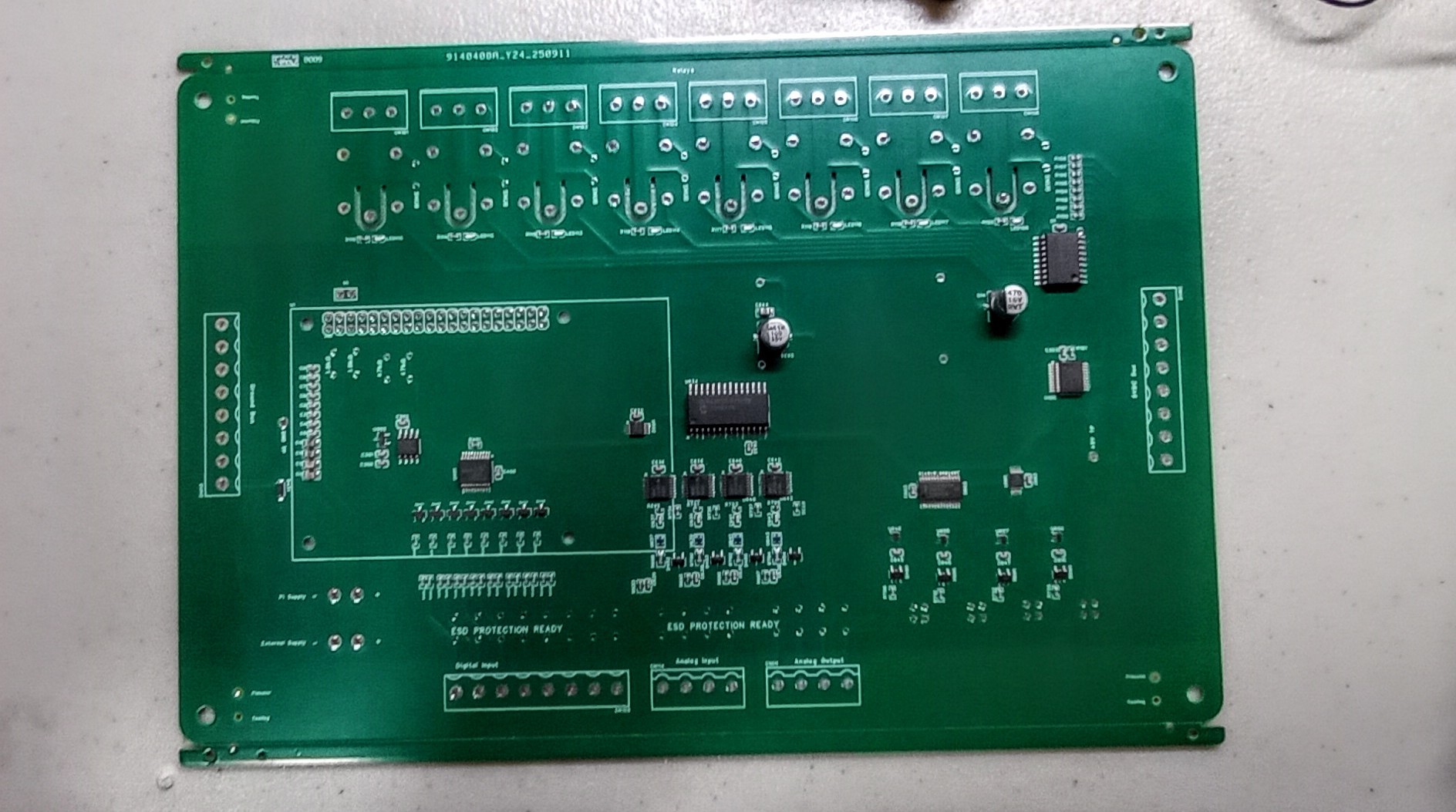
    After months of circuit design, layout tweaks, and a few too many late nights staring at datasheets, the first batch of SigCore UC boards is here. Fresh from JLCPCB, they look clean. No visible defects, silkscreen is sharp, and all vias passed a visual inspection.

    But we all know: the pretty green board is just the beginning.

    Initial Power-Up and Inspection

    Power traces were first on the checklist. With the Pi disconnected, I verified:

    • 5V input to GND: ~2.5kΩ.
      Realistic? Possibly. Low enough to triple-check, but high enough not to panic.

    • Current draw at startup (Pi powered through the board):

      • Brief spike to 0.7A, then settled at 0.31A idle.

      • Sounds about right. Nothing hot. No smoke. That’s a win.

    Next up: relays and analog subsystems.
    The mechanicals are ready, but I’m staggering component installation. This pass includes just enough population to begin bus testing and digital I/O verification.

    I²C Bus Health Check

    I have seven devices mapped across the bus:

    0x20, 0x21, 0x22, 0x40, 0x48, 0x50, 0x70

    Everything responded except 0x22 — the MCP23017.
    Could be:

    • Incorrect address pin wiring

    • Solder issue (checked, looks fine)

    • Damaged chip (possible)

    • Conflicting address (unlikely, but I’ll scope the lines)

    The bus itself looks healthy. All other devices are talking and not throwing errors, even during extended run time.

    Burn-In and Next Steps

    Since the system is stable at idle, I’ve decided to let it burn in under light load overnight. I’ll monitor temp, current draw, and device response.

    Next up on the checkout list:

    • Full relay bank test

    • Analog output verification (via MCP4728)

    • Digital input debounce behavior

    • High-frequency PWM generation test

    • Firmware handshake using SigCore protocol stack

    And yes... I still need to fix that one non-responsive I²C chip. But the rest of the gang showed up to work.

    Preview:

    Final Thoughts

    You never really know your board until you’ve stared at it under a magnifying glass with a multimeter in hand and a faint sense of dread in your heart.

    But this one? This one looks like it’s going to be something special.

  • PWM Driver Verified on Scope

    Edward09/17/2025 at 02:21 0 comments

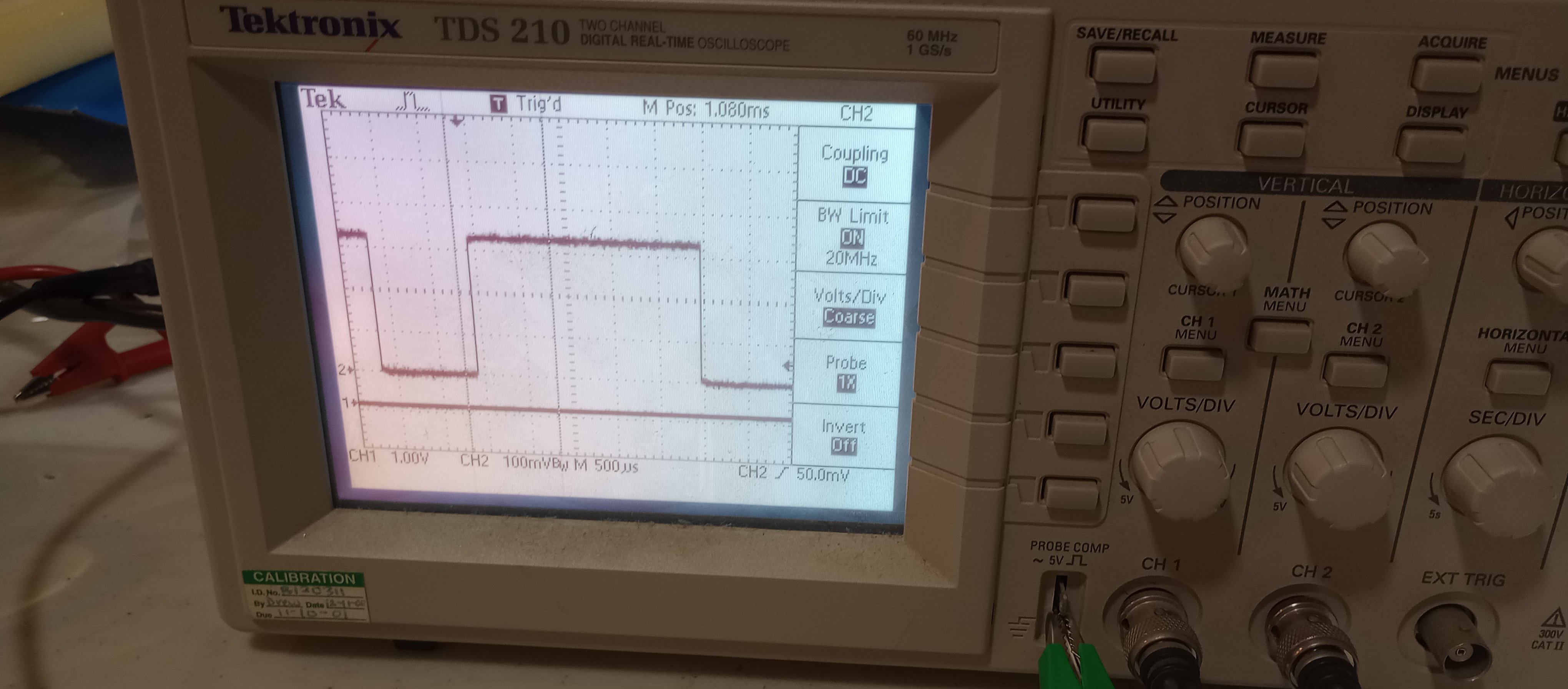
    Another milestone down. My PCA9685-based PWM driver is now outputting a clean 250 Hz signal — and here it is on the scope:

    This trace, captured on a Tektronix TDS 210, confirms that my PWM output is steady and accurate at 250 Hz with ~70% duty cycle. Each division is 500 µs, so we’re looking at a 4 ms period — and the high pulse lasts just under 3 ms, right on target.

    ⚙️ System Details:

    • Host: Raspberry Pi 4

    • PWM Driver: PCA9685 @ 0x40 (I²C)

    • PWM Output: 250 Hz, 70% duty

    • Scope: Tektronix TDS 210

    • Probe: 10x (CH2: 50 mV/div)

    • Coupling: DC

    • Trigger: Channel 2, rising edge

    • Bandwidth Limit: 20 MHz

    This signal will ultimately drive an analog output stage via low-pass filtering — a lightweight DAC solution for the SigCore UC platform. Scope confirms it's rock-solid. Next step: verify analog voltage after filtering.


  • PCB Layout Nearly Complete — Top and Bottom Views

    Edward08/22/2025 at 06:02 0 comments

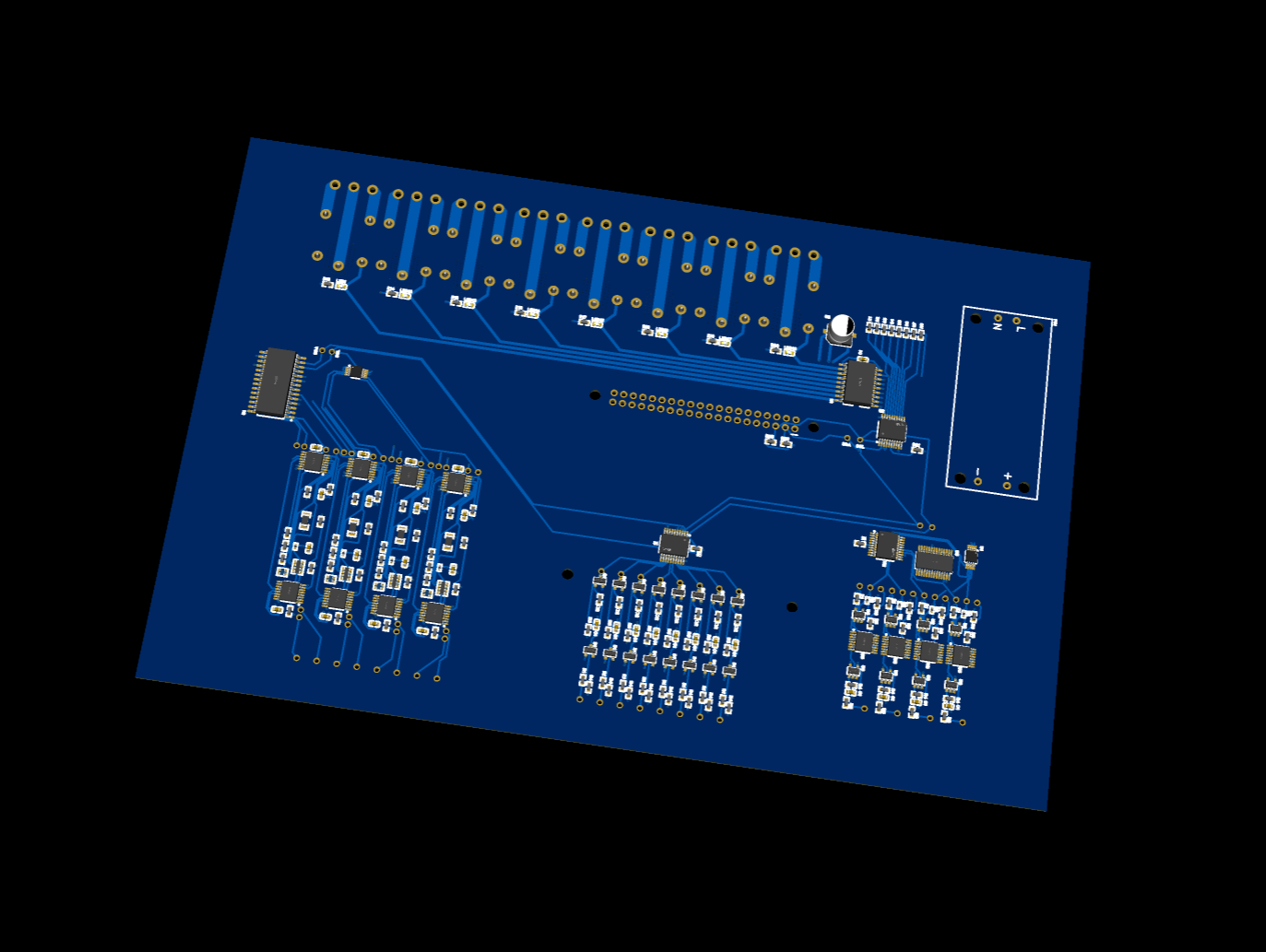
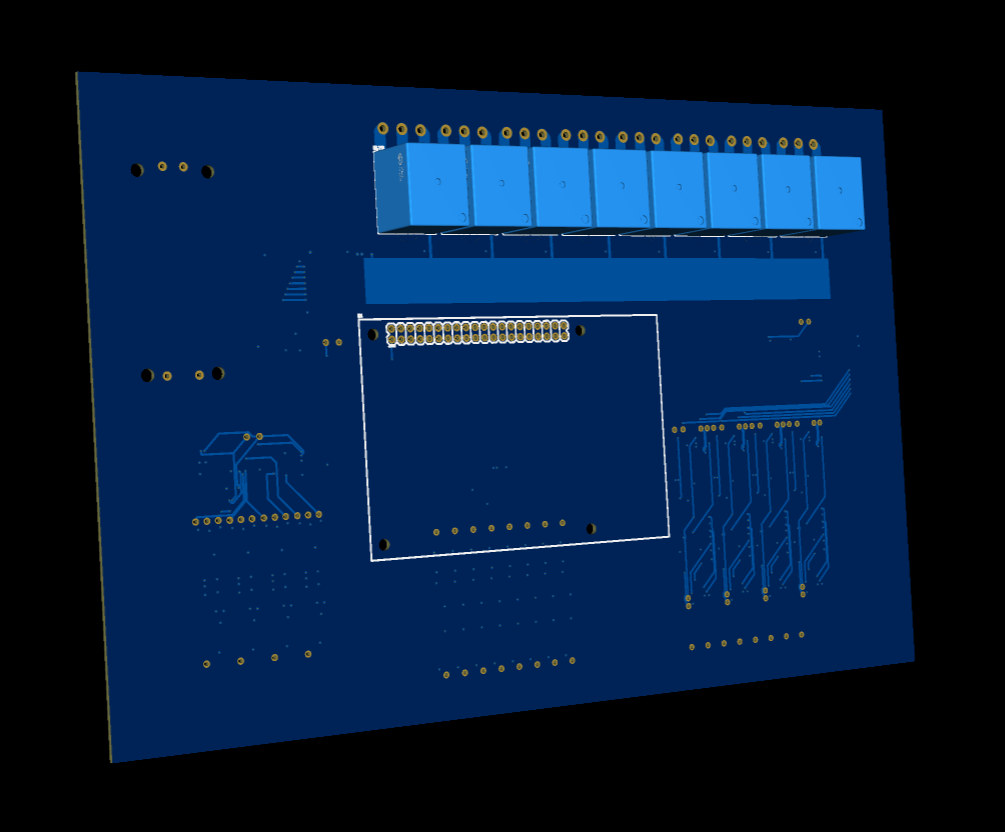
    The layout for the SigCore UC main board is nearly finished. Most of the routing is in place, and the board is finally starting to take its final form. Here’s a look at both sides as it stands now.

    Top View (Connector + Component Side)

    This is the top side of the board — it faces upward inside the enclosure and contains most of the active circuitry, as well as the external signal connectors. Features include:

    • Screw terminals for:

      • Relay outputs

      • Digital inputs

      • Analog inputs and outputs

      • Ground and 5V bus

    • Analog signal conditioning

    • Digital input protection and buffers

    • Relay drivers and flyback diodes

    • Voltage regulators and I2C expansion

    • 40-pin header for the Raspberry Pi 4B, mounted through to the bottom

    • Mounting holes for enclosure alignment and Pi support

    This is the working face of the board. All external wiring enters here, and components are grouped by function to reduce interference and simplify testing. The silkscreen is designed to align with the enclosure overlay for a clean, professional look.

    Bottom View (Relay, Pi, and Power Supply Side)

    The bottom side of the board faces downward inside the enclosure and carries:

    • Mechanical relays

    • Raspberry Pi 4B, mounted upside-down beneath the board

    • AC-DC power supply module

    • Mounting holes for board support and standoff clearance

    The Pi's USB, Ethernet, and HDMI ports are not exposed directly through the enclosure. Instead, short patch cables will connect the Pi to panel-mounted connectors. This keeps the enclosure clean while maintaining full functionality.

    The AC-DC supply (5V/10A) is mounted here as well, isolated from signal circuitry and well-positioned for airflow. Clearance, thermal, and safety spacing are being carefully checked as part of the final layout pass.

    What’s Left

    • Complete routing of remaining analog and control lines

    • Review copper weight and trace widths for power handling

    • Confirm Pi port clearance and patch routing

    • Finalize relay trace layout and thermal reliefs

    • Add test points, label tuning, and silkscreen cleanup

    • Final DRC pass and export for fabrication

    This is the most complete version yet — mechanical, electrical, and layout elements are finally lining up. I’m getting close to ordering the first round of boards for assembly and bench testing.

View all 17 project logs

Enjoy this project?

Share

Discussions

Similar Projects

Does this project spark your interest?

Become a member to follow this project and never miss any updates