Close
0%
0%

Dr. PD USB-PD protocol analyzer

A fully featured, open-source USB Power Delivery protocol/power analyzer and programmable sink for testing, logging, and debug.

Similar projects worth following
If you’ve ever used USB Power Delivery in one of your projects, you know how useful it can be. USB-C power supplies are flexible, cheap, and easy to source, and adding PD support to a design is often as simple as dropping in a controller that negotiates the profile you need.

The problem is that these controllers are usually black boxes. When something goes wrong, or when you want to characterize a charger or source, you often get almost no visibility into the negotiation itself. Until now, the usual alternative has been analyzers that cost thousands of dollars.

Dr. PD is an open-source USB-C Power Delivery analyzer and programmable sink built to close that gap. It lets you inspect PD traffic in real time, correlate it with VBUS voltage and current, and test supplies by requesting specific profiles, including SPR, EPR, PPS, and AVS up to 48 V, 5 A, and 240 W.

Dr. PD is an open-source USB-C Power Delivery analyzer and programmable sink. It can sit inline between a USB-PD source and sink to show you the communication between them, or connect directly to a source and emulate a sink so you can characterize chargers and power supplies.

The goal of the project is to make serious USB-PD analysis more accessible. The hardware, firmware, and host software are all open source. The control software runs locally in Chrome or Edge with no drivers or installation required, and the platform also provides Python, JavaScript, SCPI, and USBTMC interfaces for automation.


Want your own? Dr. PD will be crowdfunding soon. Follow the project page on Crowd Supply and sign up for updates!


What it does

  • Captures and decodes USB Power Delivery traffic in real time

  • Measures and plots VBUS voltage and current alongside protocol events

  • Correlates PD messages with live power behavior

  • Supports SPR, EPR, PPS, and AVS modes up to 48 V / 5 A / 240 W

  • Acts as a programmable sink for source characterization and fault injection

  • Provides triggering, search, annotation, and export tools for long captures

  • Works with a browser-based UI, terminal tools, and industry-standard automation libraries (USBTMC, SCPI, Python)

Why it exists

USB-C Power Delivery is powerful, but debugging it is often painful. The chips used to add USB-PD support to products usually expose very little about what is happening internally. Many power supplies also support capabilities beyond what common interface chips make easy to access, and characterizing source behavior, especially with battery-powered supplies, can be difficult.

The usual alternatives are either sniffing traffic with an oscilloscope or logic analyzer, or using a dedicated USB-PD analyzer. The first approach is fiddly and makes it hard to correlate protocol activity with analog behavior like voltage and current. The second often means buying tools that cost hundreds or thousands of dollars.

Dr. PD is meant to fill that gap by providing professional-grade USB-PD analysis in a fully open-source instrument that is capable, transparent, repairable, and free from proprietary lock-in.

Highlights

  • Inline USB-C analysis with synchronized power measurements

  • Programmable sink mode for charger and source testing

  • Support for modern USB-PD revisions, including EPR

  • Browser-based control software with no installation required

  • Automation-friendly interfaces including SCPI, USBTMC, Python, and JavaScript

  • Open-source hardware, firmware, and software

Current status

Dr. PD is currently at the DVT stage. The hardware and software are working, and the system is now undergoing testing and verification. Follow the project for updates as the design progresses and we start sharing demos, and don't forget to sign up for our upcoming crowdfunding campaign!
  • Some Windows-related updates

    Marco Tabini04/24/2026 at 14:30 0 comments

    Every operating system has its quirks and flaws—you just get used to dealing with them when you have to face them every day. It’s only when you switch to another OS that things suddenly start to look weird.

    Most of my daily work happens in macOS, with the occasional dip into Linux or BSD to maintain some server-side components. Dr. PD, however, needs to run well on Windows, where most of its users are going to be. Therefore, I make sure to test all major changes on my PC as well.

    The most recent round of updates has added two important features that had long been on my to-do list: log persistence and over-the-air firmware updates directly from the web app.

    A bit of background

    Dr. PD’s firmware is written entirely in C++ and resides on the device itself. It uses TinyUSB to expose several USB interfaces for different purposes: USBTMC for device operation, CDC for debugging over serial, and a vendor reset interface used to place the device in DFU mode for flashing new firmware onto it. 

    The web app then uses the WebUSB API to access the device’s USB interfaces and communicate with it. WebUSB is only supported in Chrome and Chromium-based browsers, but it is nonetheless a very convenient way of providing an essentially instant-on experience for the user: there are no drivers to install, no apps to set up, no accounts to create, and so forth. You just plug the device into your computer, and Chrome helpfully pops up a notification that directs you to the client app.

    On Mac and Linux-based OSs, this is all seamless. No drivers need to be installed, and things “just work” (plus or minus the inevitable bugs). Reflashing the firmware requires a bit of extra work to avoid having to ask to reconnect to the device manually when you put it in DFU mode, but it's relatively easy to come up with a fully seamless experience without too much trouble.

    On Windows… well, Windows is a bit more complicated.

    First of all, Windows has very limited USB support without installing additional drivers. This means, for example, that WebUSB cannot talk directly to the USBTMC interface on Dr. PD unless you install dedicated software. This software is widely available, but I view the ability to just “plug-and-play” Dr. PD into your computer as a defining feature, and having to install a third-party driver completely undermines that.

    Luckily, Windows does come with a default library, called WinUSB, that can be used to provide what Microsoft calls “simple” functionality over USB without dedicated drivers. It does have several limitations (such as the fact that only one client can be connected at any one time), but they do not affect Dr. PD.

    Unfortunately, I can’t just move all the functionality under WinUSB, because the USBTMC interface would no longer be compatible with systems that depend on it, such as LabVIEW. That would make Dr. PD useless to anyone who wants to use it with an automated setup.

    Thus, the solution I landed on was to implement both a traditional USBTMC interface and a WinUSB-based interface. The web app preferentially uses WinUSB so that it works properly under Windows, while Dr. PD remains compatible with every other piece of software that requires USBTMC.

    Enter firmware updates

    As you may know, the RP2350 MCU that runs Dr. PD's hardware comes with its own DFU implementation that allows flashing new firmware over USB. If you've ever uploaded firmware to a Raspberry Pi Pico, you've seen this interface at work.

    Sadly, we can’t use this interface from the web app, because the RP2350 changes its product identifier when it enters DFU mode. This causes WebUSB to see it as a new, unpaired device that it has never encountered before and that, therefore, the user has not authorized Chrome to connect to. To make it possible to upload new firmware from inside the web app, we would have to require the user to pair with the device again, which would be confusing and likely error-prone.

    The solution...

    Read more »

  • So you want to design a USB-C pass-through

    Marco Tabini04/16/2026 at 03:34 0 comments

    In my previous project update, I mentioned that the CC lines in a USB-C connection are used to determine the orientation of the plug within the receptacle. Let’s explore how that works and why it poses a particular challenge for a device like Dr. PD, which needs to interpose itself between two USB-C devices.

    The double life of the CC lines

    Despite the fact that there are two CC pins, only one is used for USB-PD communication between the two ports. The other may be used to supply VCONN, and in a passive cable it typically does not continue through to the far-end CC pin. Instead, VCONN is primarily used to power electronics inside the cable, such as an e-marker, or electronics in certain captive-cable devices such as docks designed to attach to laptops or tablets.

    When you plug a cable into a device, then, from the device's perspective, one of the CC lines will be floating, while the other will be able to carry a signal across to the other device.

    The problem is, which of the two CC lines do you use for transmission? Because the USB-C plug is mechanically—but not electrically—reversible, either CC pin may end up being the active one, depending on how the user inserts the cable. Thus, a device must be prepared to communicate on either pin, and the very first thing it needs to do is to figure out which one is actually connected through.

    Analog signaling

    The way the USB-PD designers have solved this challenge is to first define what a valid CC connection must look like.

    At one end, there is a downstream-facing port, or DFP. The DFP is typically a host or power supply and is responsible for sourcing current on VBUS.

    At the other end, there is an upstream-facing port, or UFP, that wants to sink current from a UFP.

    (Sometimes, a device can act as both a UFP and a DFP, in which case it is called a dual-role port. For simplicity's sake, we will ignore this for now, but we'll come back to it in a future post.)

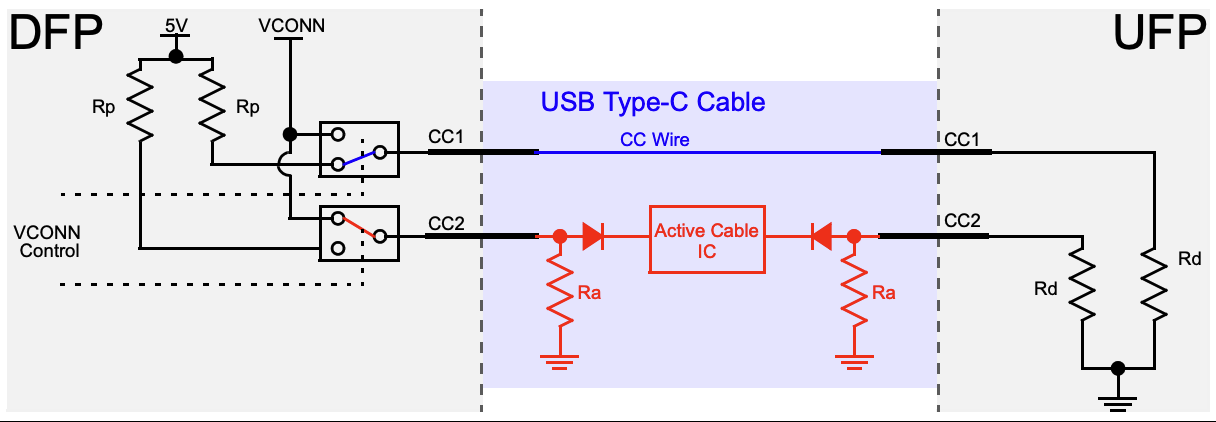
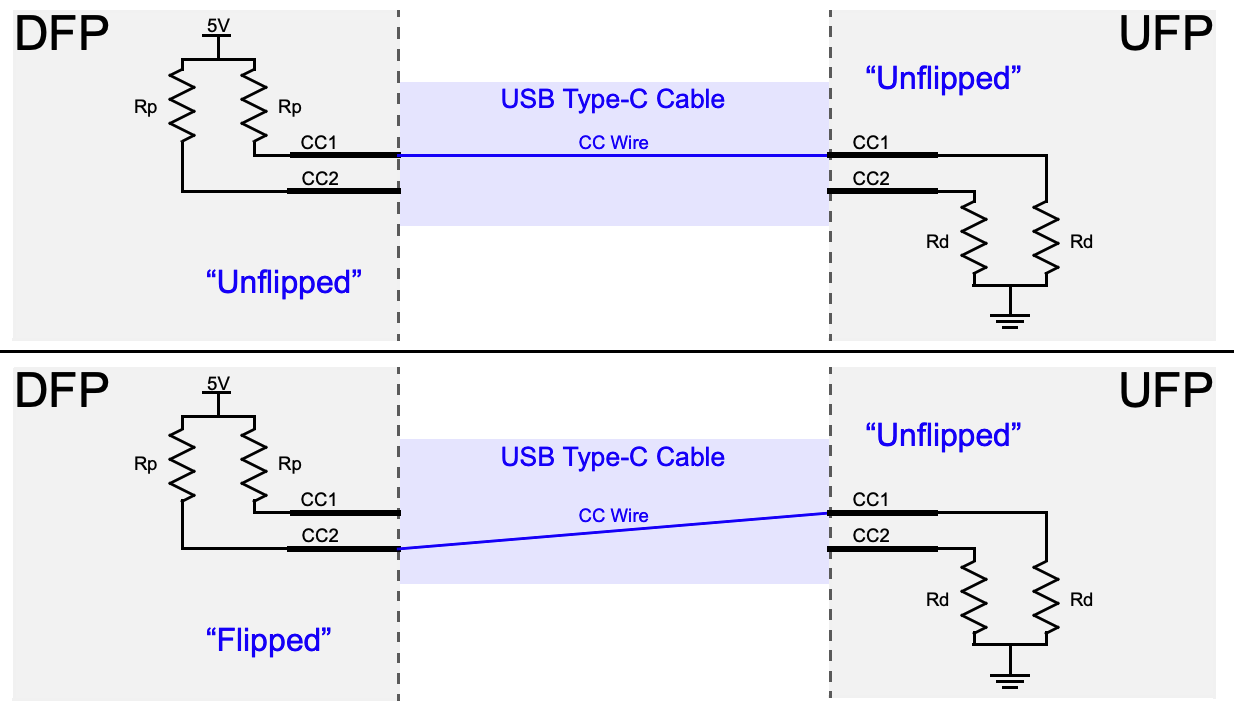
    When they are connected, the UFP and DFP must form a complete circuit, with the DFP pulling both its CC lines to either 5V or 3.3V (the latter being much more common these days), and the UFP pulling both its CC lines down to ground, as you can see in the diagram below, borrowed from this very informative Microchip application note:

    When a connection is successfully established, one of the two CC pins will complete a circuit between the two devices; all the devices need to do is monitor both pins for a valid CC voltage and, when they detect one on either pin, select that pin as the communication channel for USB-PD data. In the diagram above, CC1 is connected at both ends, but either CC pin could end up being the connected one on each device depending on the cable’s orientation.

    Well, this complicates things…

    Having to deal with two possible cable orientations is a bit of a pain, but most devices never have to worry about this problem because someone else has already solved it for them. Even the most basic USB Type-C or USB-PD port controller can monitor both CC lines and automatically communicate over the one that is connected through to the other side, and more advanced chips may even provide a dedicated pin that changes state depending on which CC line is detected as active and can be fed directly into other controllers that reroute the signals on the high-speed lines accordingly.

    Dr. PD, on the other hand, is not a “traditional” USB-C device. In some cases, it must interpose itself between two devices while appearing electrically transparent to both, so that it can “listen” to and decode the USB-PD data being exchanged between them. In other cases, Dr. PD will be the UFP and will have to communicate with a DFP connected to one of its ports.

    Traditionally, this kind of interconnectivity can be managed using a crossbar switch that is capable of connecting either of the CC lines on one port to either of the CC lines on the other. Analog crossbar...

    Read more »

  • The curiously complex taxonomy of USB plugs

    Marco Tabini04/14/2026 at 02:17 0 comments

    Dr. PD is crowdfunding soon! Sign up at our prelaunch page on Crowd Supply to receive product updates.


    In the last decade or so, USB-C has become the dominant standard for power and data transmission. Despite the occasional attempt at proprietary formats (Lightning, anyone?), practically every device these days comes with the ubiquitous rounded port.

    Without a doubt, this success is well deserved: USB-C cables are easy to acquire and inexpensive, compatible power supplies can be had for less than the cost of an espresso beverage, and inserting a plug into a receptacle does not require a degree in quantum physics.

    These capabilities, however, come at a cost. USB-C receptacles and cables are surprisingly complex, and designing hardware around them can be challenging even if you decide to use off-the-shelf parts.

    Anatomy of a USB-C port

    Let's start by looking at a “full” USB-C port and its signals:

    Let's go through these in detail:

    • GND and VBUS carry power to and from a device. By default, only 5V is available, with analog signaling on CC1 and CC2 used to advertise or detect up to 3A of current. By using Power Delivery, however, devices can negotiate various voltage and current combinations up to 48V and 5A—a whopping 240W of power.
    • CC1 and CC2 can be used for four (!) purposes:
      • By manipulating the analog characteristics of these lines, a device can advertise 5V at either 500mA, 1.5A, or 3A without the need for more advanced digital negotiation. Default USB current corresponds to the legacy USB current level, typically 500 mA for USB 2.0 or 900 mA for USB 3.x.
      • One of the two lines can be used to provide VCONN, a special 5V power rail capable of providing up to 1W of power that can be used to power accessories independently of VBUS. This is useful because an accessory may need 5V to function, but then request a higher (or lower) voltage to be delivered on VBUS to power some of its peripherals or another device. Notably, VCONN does not normally pass through the cable end-to-end; it is used to power circuitry in the cable or plug assembly and is typically not presented as a usable rail at the far end.
      • The other line can be used for Power Delivery signaling. By using a dedicated serial protocol, devices can exchange information, negotiate a power contract to deliver a voltage different from the standard 5V alongside specific power and current capabilities, or enter Alternate Modes that repurpose some of the data lines in the cable for something other than ordinary USB communication. For example, monitors use an Alternate Modes to receive video data from a host device.
      • Because each line takes on a different role, their relative position is used to determine the orientation of the cable in the receptacle.
    • The SBU pins are used for “sideband” data. They provide an independent low-speed (up to 1MHz) channel that can be used for custom out-of-band communication between compatible devices. For example, DisplayMode Alternate Mode uses them for AUX signaling, and USB4 can also use them for sideband functions during link management and initialization.
    • D+ and D- are traditional USB 2.0 data lines. These represent a single differential pair and run as a twisted pair inside the physical cable, and are capable of serial speeds up to 480Mbps.
    • TX+, TX-, RX+, and RX- are SuperSpeed differential pairs. In a full-featured USB-C connection, these high-speed pairs can be used for protocols such as USB 3.x, USB4, Thunderbolt, or Alternate Modes. In the newest USB4 mode, the total link rate can reach 80 Gb/s symmetrically or 120 Gb/s in one direction with reduced bandwidth in the other. As I mentioned above, these lines can also be repurposed to carry non-USB data through Alternate Modes.

    If this seems complicated… well, it is. A good, if somewhat reductionist, way of looking at how all these lines relate to each other is:

    • D+ and D− are legacy USB 2.0 data lines. They are...
    Read more »

View all 3 project logs

Enjoy this project?

Share

Discussions

Similar Projects

Does this project spark your interest?

Become a member to follow this project and never miss any updates