Edward Viaene
-
Making a Solar Simulator
07/30/2026 at 22:45 • 0 commentsWorking on another demo that uses BenchPod's ADC/DAC capabilities. This time, a solar panel simulator!
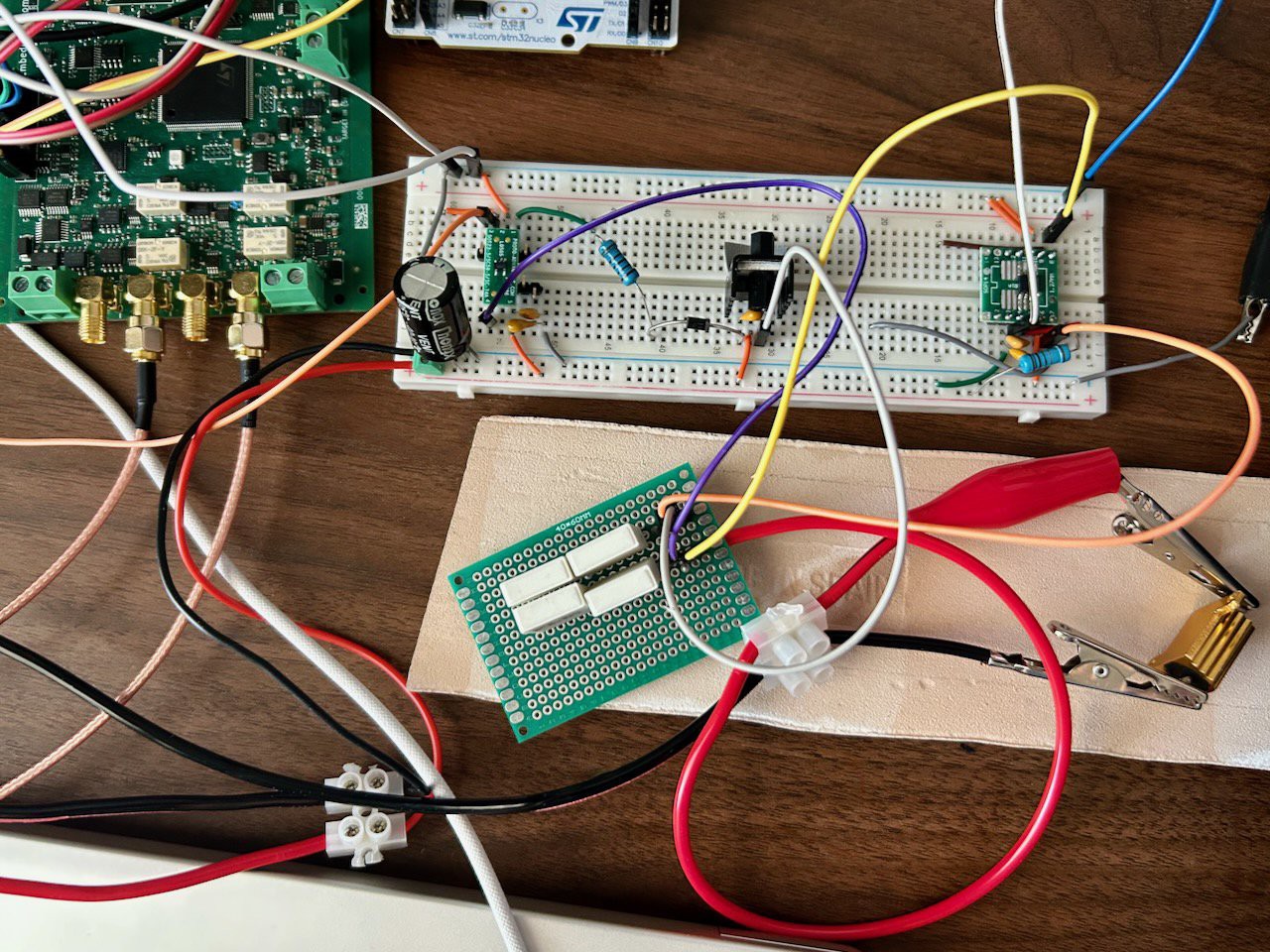
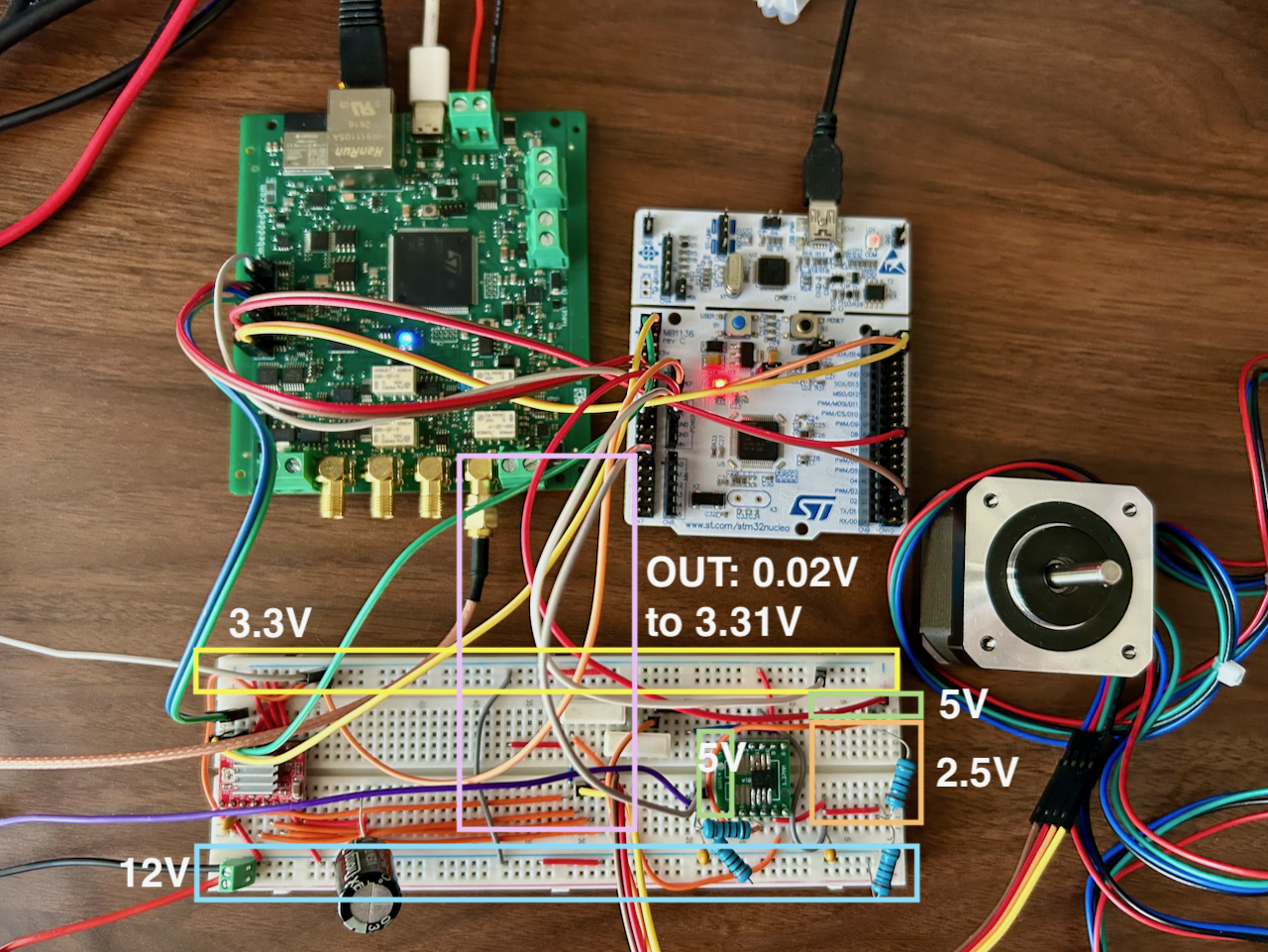
Our DAC can replay voltages to simulate a solar panel, but it can't be a current source. For that, we need to hook up our DAC to an opamp and a MOSFET. To read the current back in our ADC, I added 4 x 0.01-ohm shunt resistors and an INA282 to amplify the current reading (which is output in mV). Here's a photo of the solution. On breadboard: TLV9152 (left), IRLZ44N with heatsink (middle), INA282 (right) + 4 shunts on a perfboard. INA282 OUT goes to BenchPod ADC. DAC goes to TLV9152.
![]()
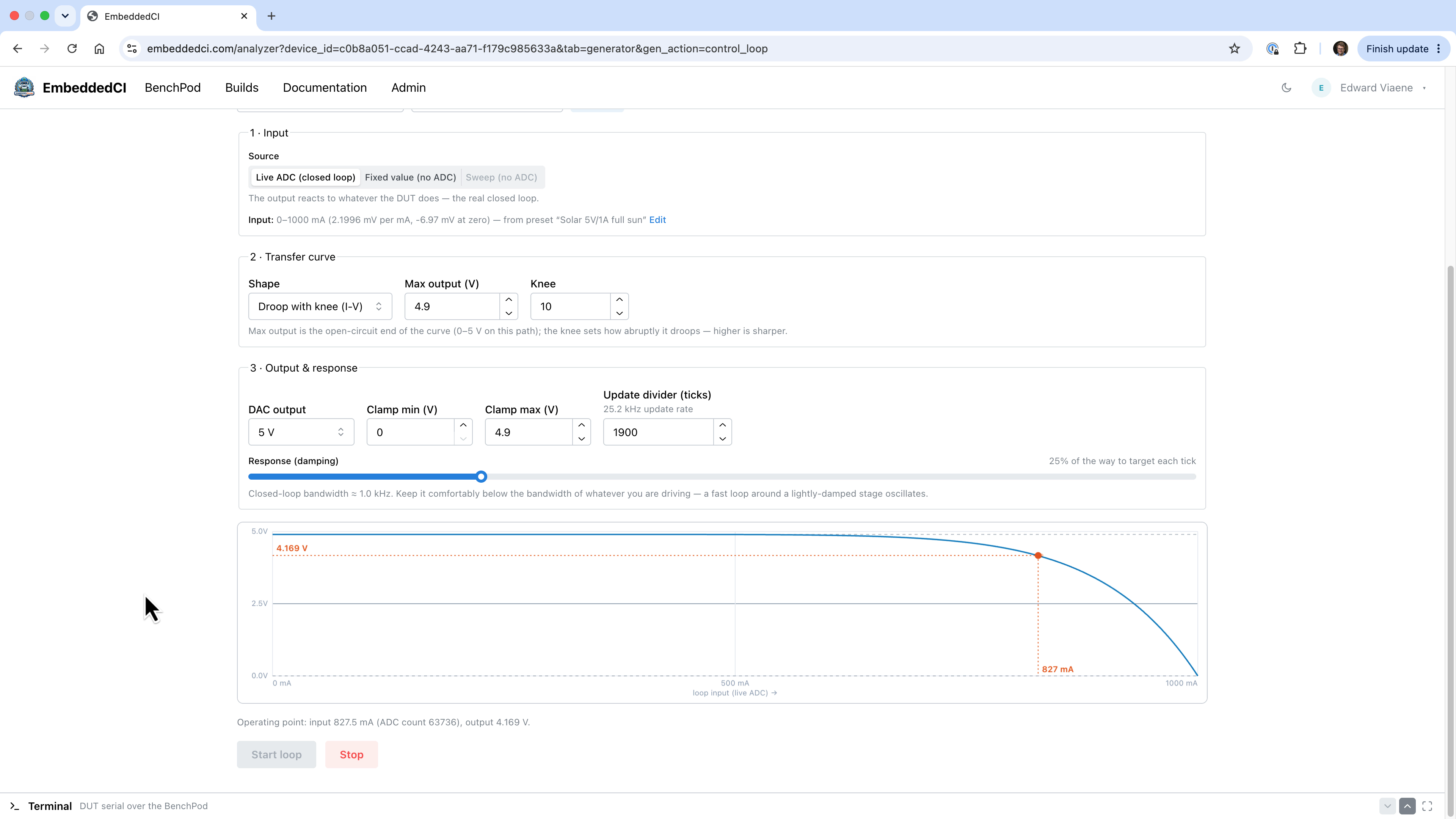
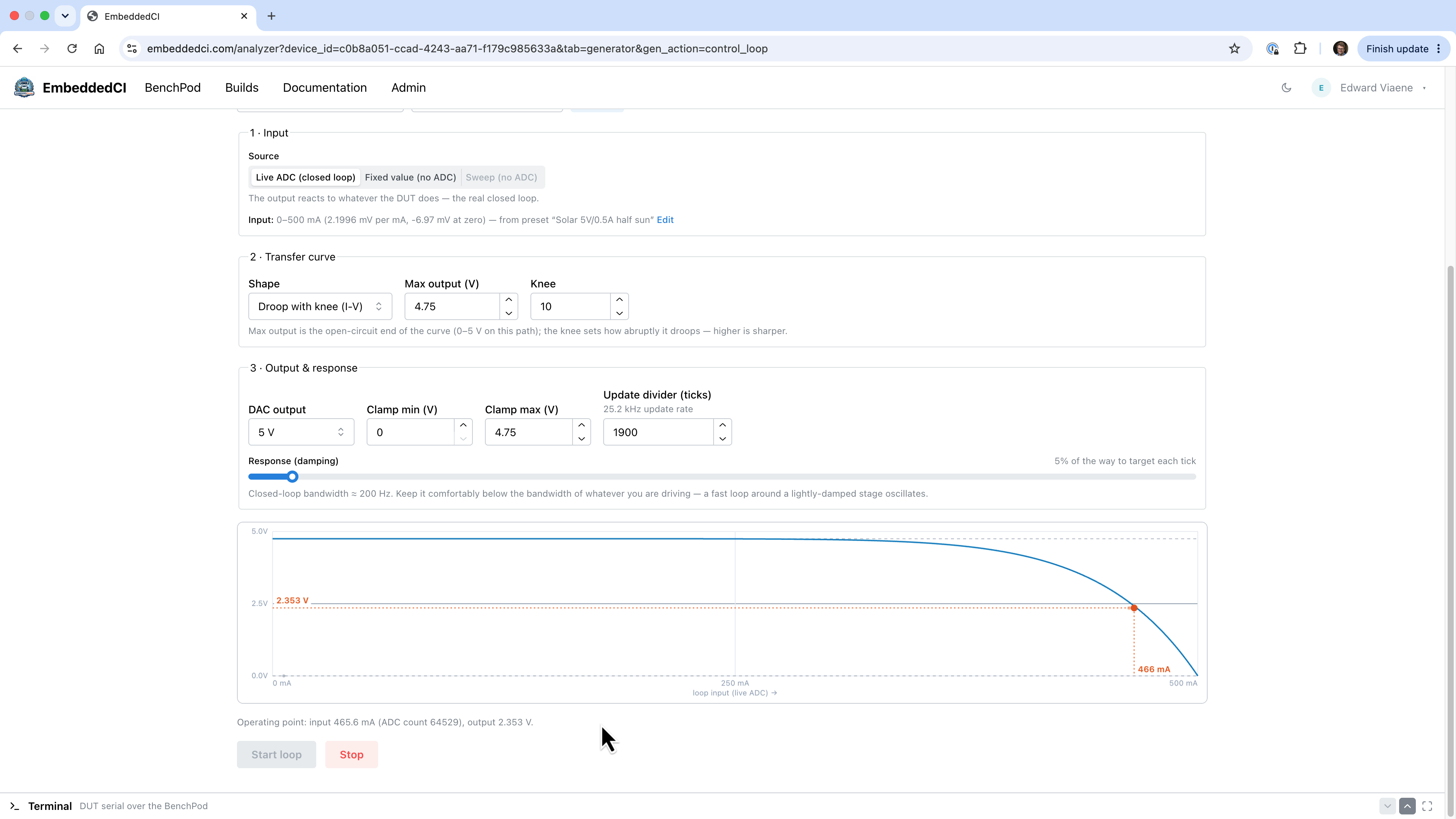
Here are a few screenshots of the result. With the DAC outputting and ADC inputting, we created a control loop. We have an I-V transfer curve to let the voltage sag at a specified current, just like a real panel. The load here is a 5 Ω (10W) resistor (the golden colored rectangle in the photo above).
![]()
![]()
The same 5 Ω resistor is wired up in both screenshots; only the transfer curve changes. Under full sun (4.9 V, 1A panel), it settles at 827 mA @ 4.169 V, a sag of just 731 mV, because the load is only drawing 83% of the panel's short-circuit current. Drop to half sun (same panel, Isc halved) and the identical load now demands 93% of what's left, pushing it well over the knee: 466 mA @ 2.353 V, a 2.4 V sag (same panel, Isc halved and Voc down slightly, as it goes in reality).
That disproportion is the knee: ten more points of current draw (83% → 93% of Isc) costs the panel thirty-five points of voltage (15% → 50% sag).
The I-V curve is what a panel can physically deliver: the light falling on it sets how much current is available (Isc in our demo). A real cell sets how much voltage survives once you start drawing that current, and the load (not the panel) decides which point on the I-V curve you end up at.
-
Simultaneously Capture with DAC, ADC, and Logic Analyzer with FPGA
07/22/2026 at 19:13 • 0 commentsFinalized the ice40 Verilog code to have the capability to run DAC, ADC, and Logic Analyzer at the same time. You can create a waveform and watch the target react on the same timeline, rather than three loosely synced captures.
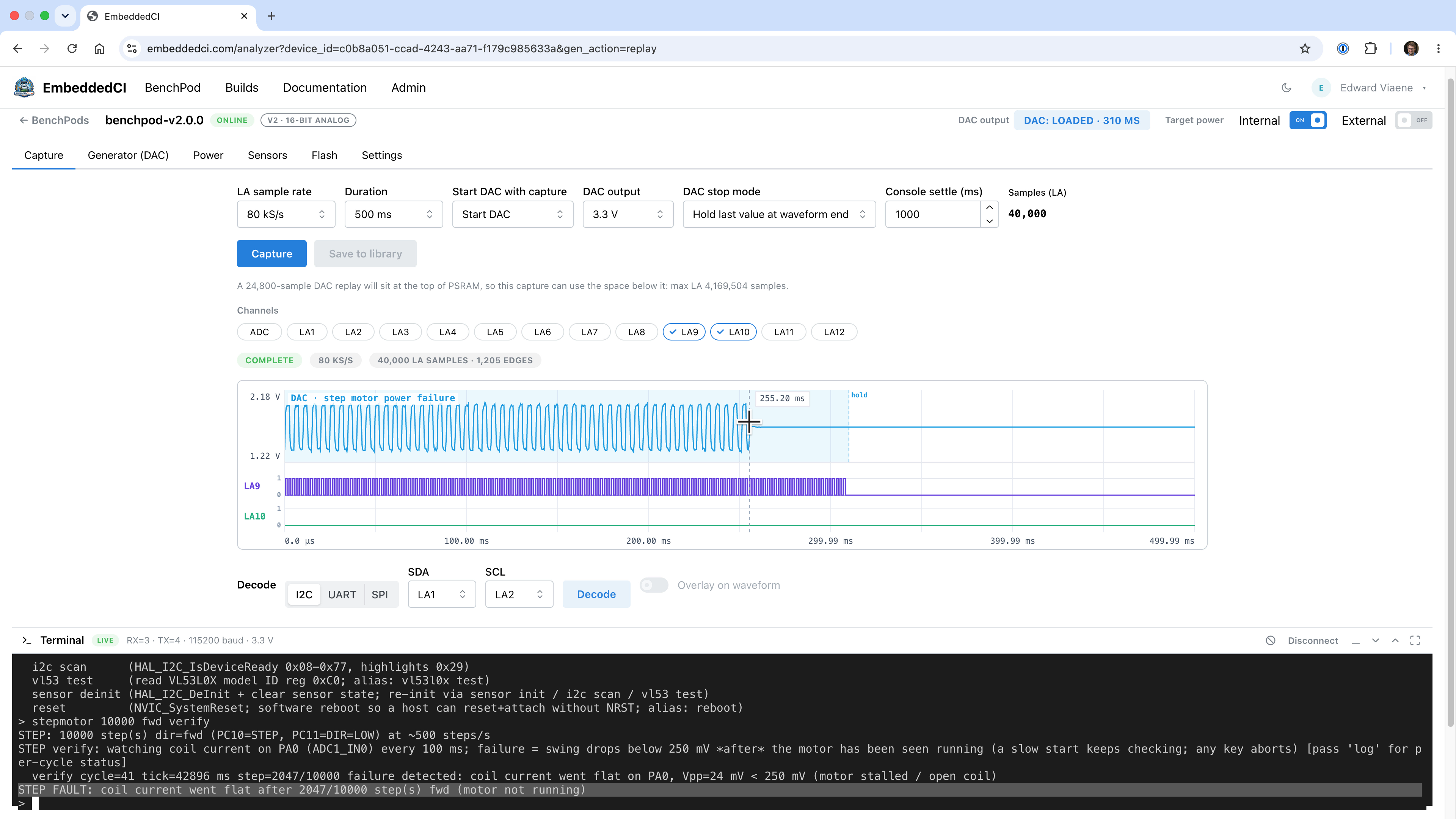
Moving the trigger into the ice40 fabric is ~1000× tighter than if we'd do it in the server software. We're using an API call to store the data in the 8 MB PSRAM IC, then fire up the DAC/ADC/LA process, which in turn also writes its data back to the PSRAM (we divide the PSRAM for DAC/ADC/LA).
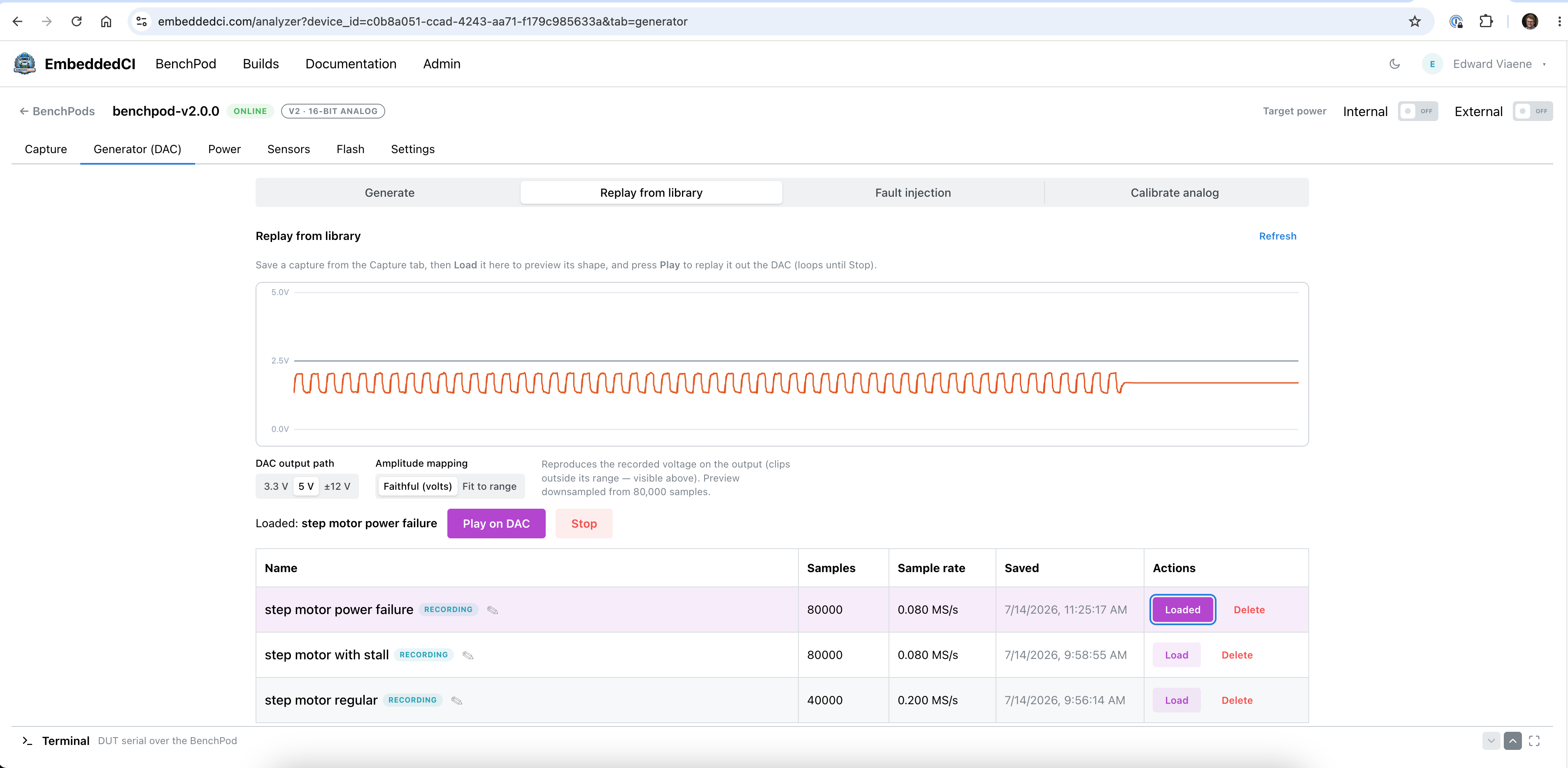
The result is shown in the screenshot below. It's a Logic Analyzer capture with the DAC active, replaying a step motor with a fault. We can see with the logic analyzer at what timing the Device Under Test responds. Pretty good for a $6-8 FPGA chip (it's the ICE40UP5K-SG48I)
![]()
-
ADC And DAC Capabilities
07/16/2026 at 16:14 • 0 commentsUpdate this week: mainly working on the firmware part: validating ADC & DAC, and running test cases with a Device Under Test, controlling and monitoring a Step Motor.
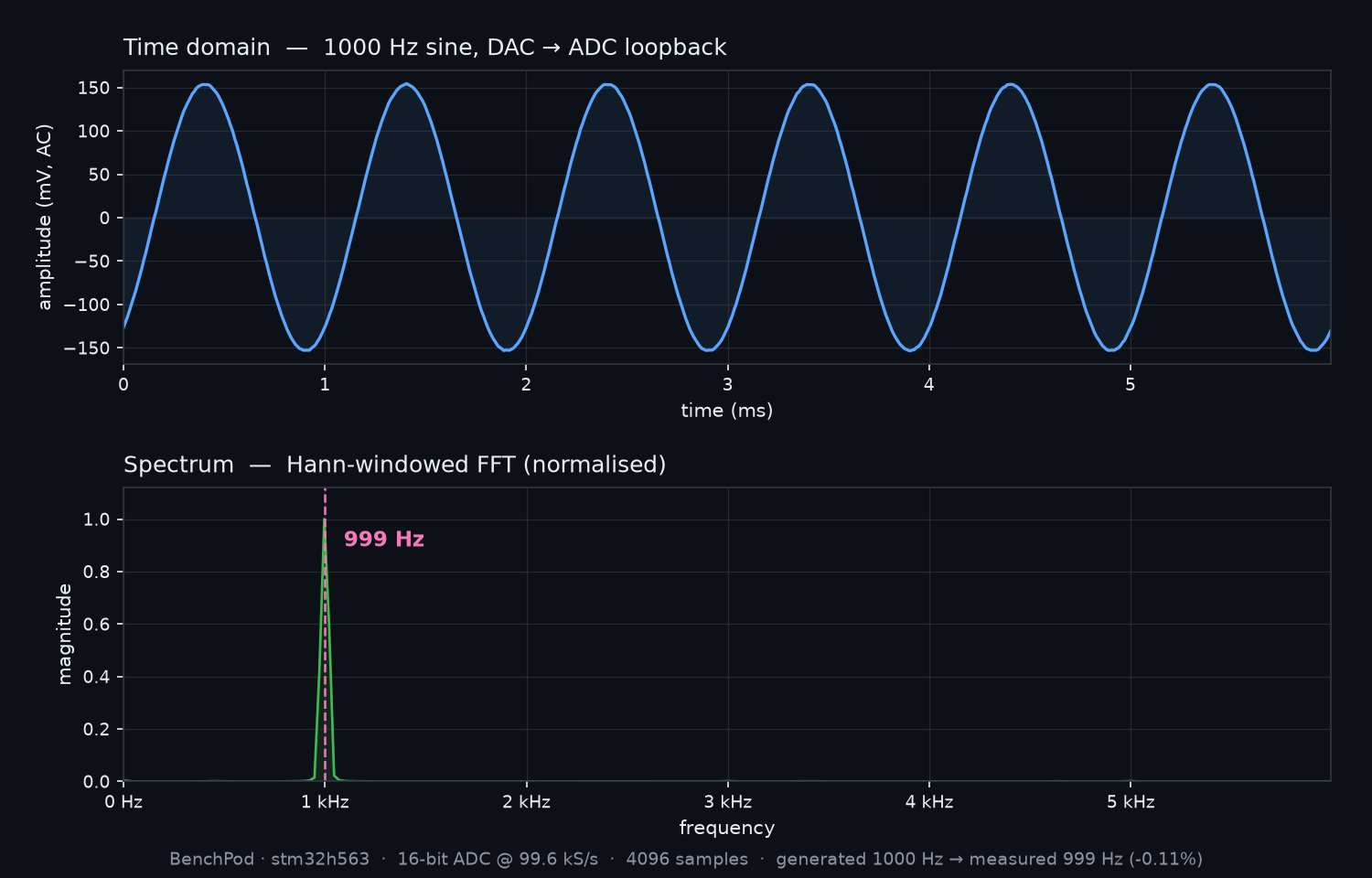
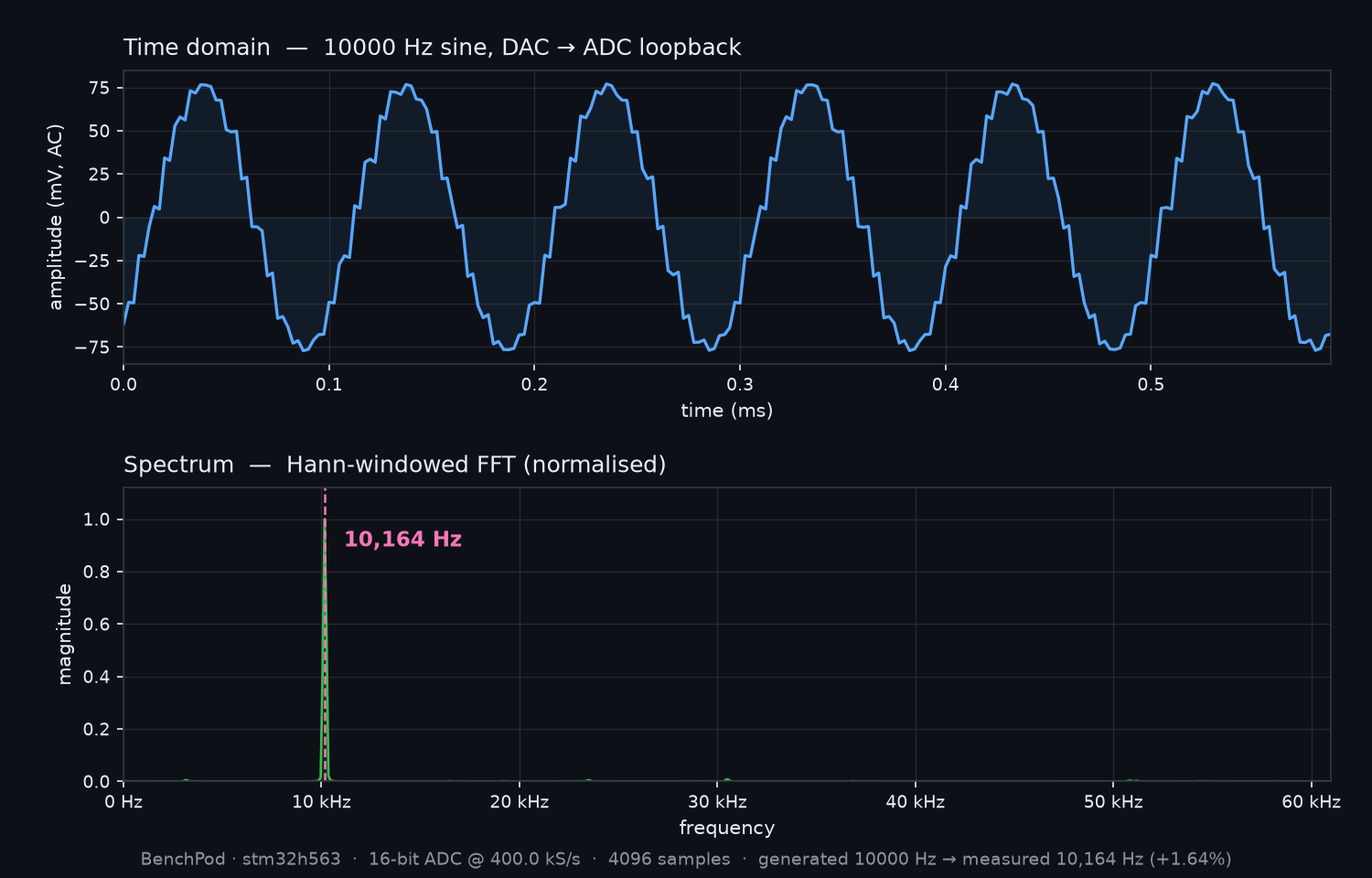
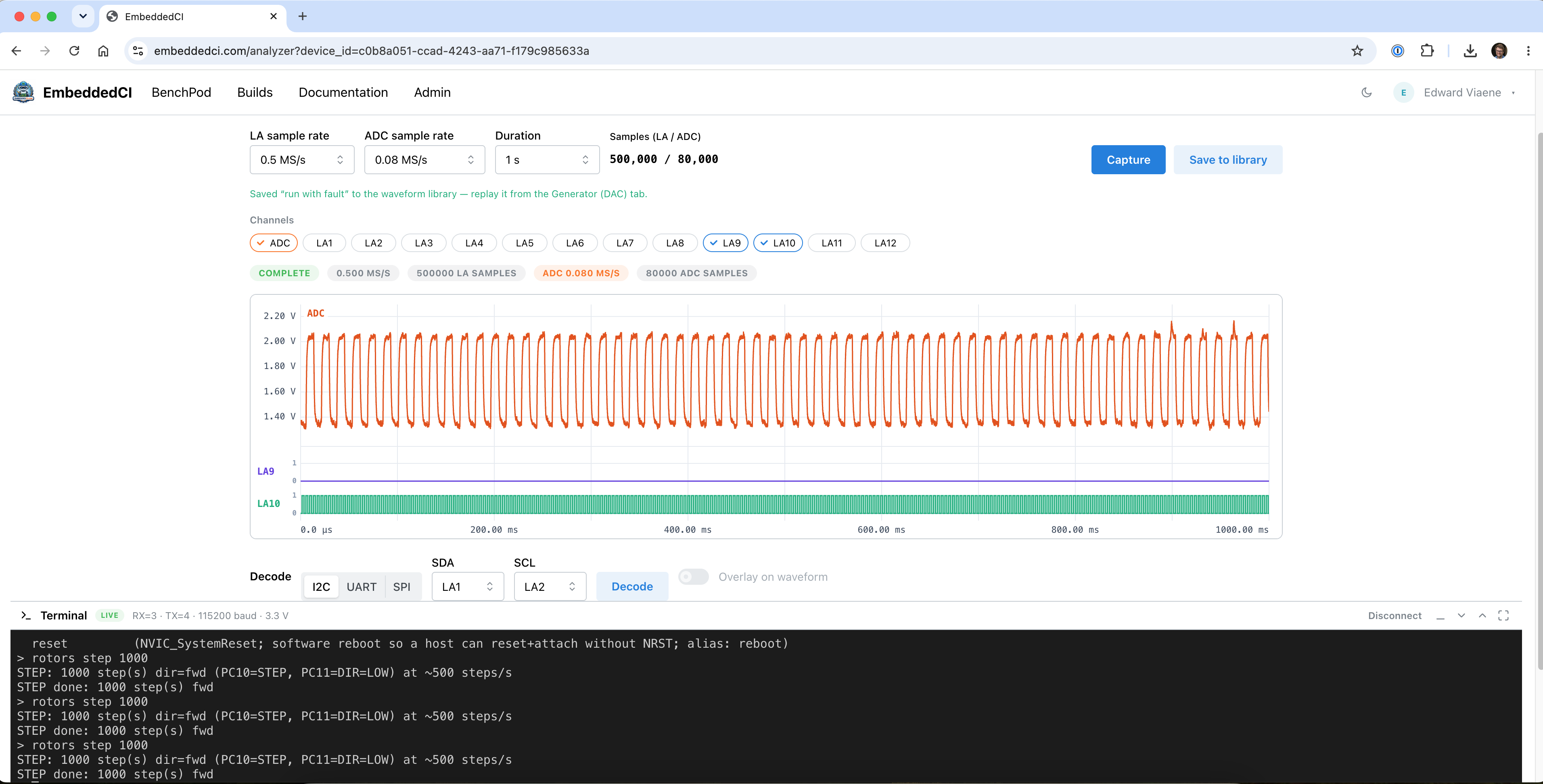
First of all, ran a FFT analysis using the calibration path (DAC -> ADC) and also did some noise analysis with some near field probes (amplifier from gpio.com: https://gpio.com/collections/low-noise-amplifiers/products/ultra-low-noise-amplifier-pga-103-2-ghz-unconditionally-stable-gain-20db). Everything looks pretty clear. Here's the results of the calibration path:
![]()
![]()
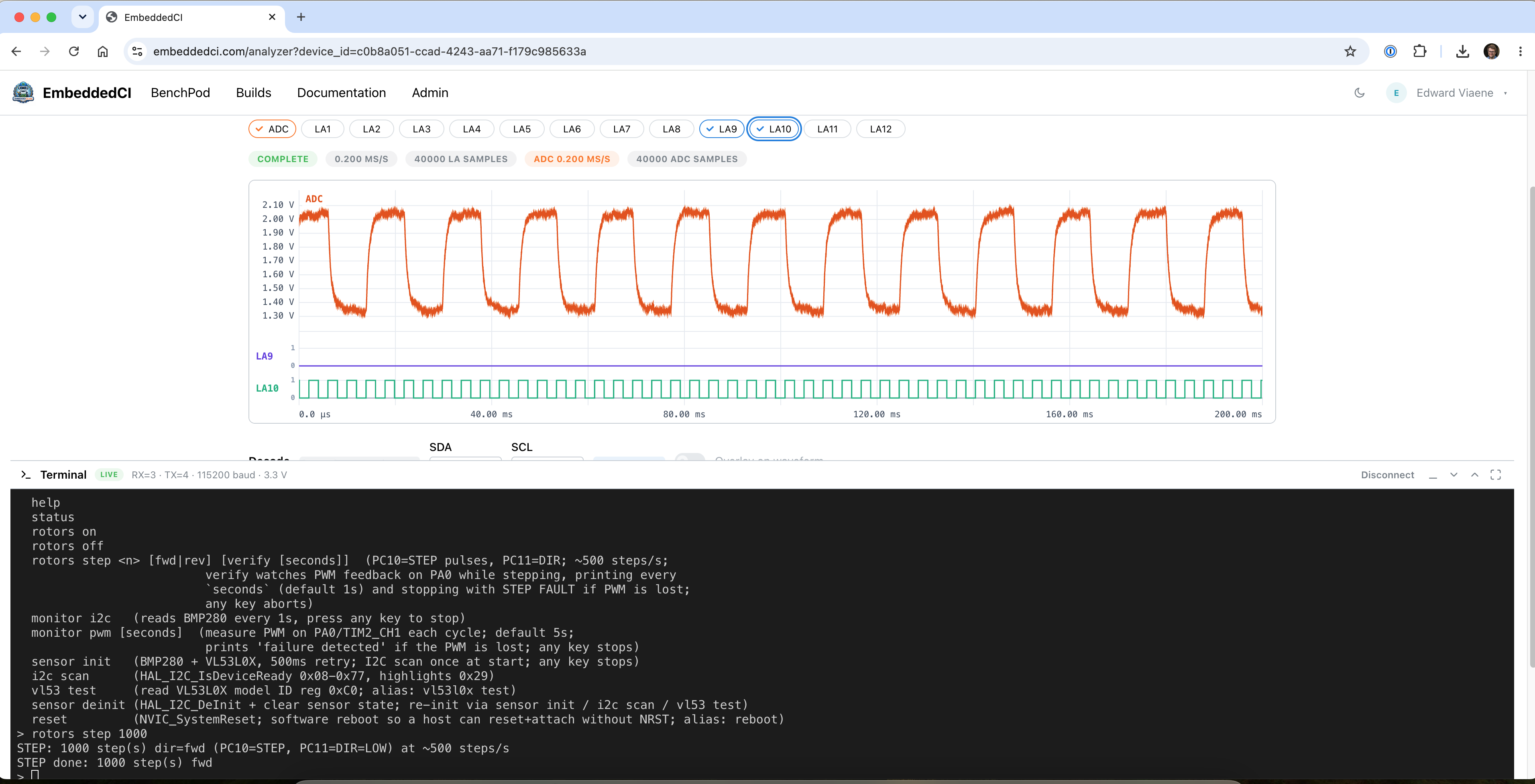
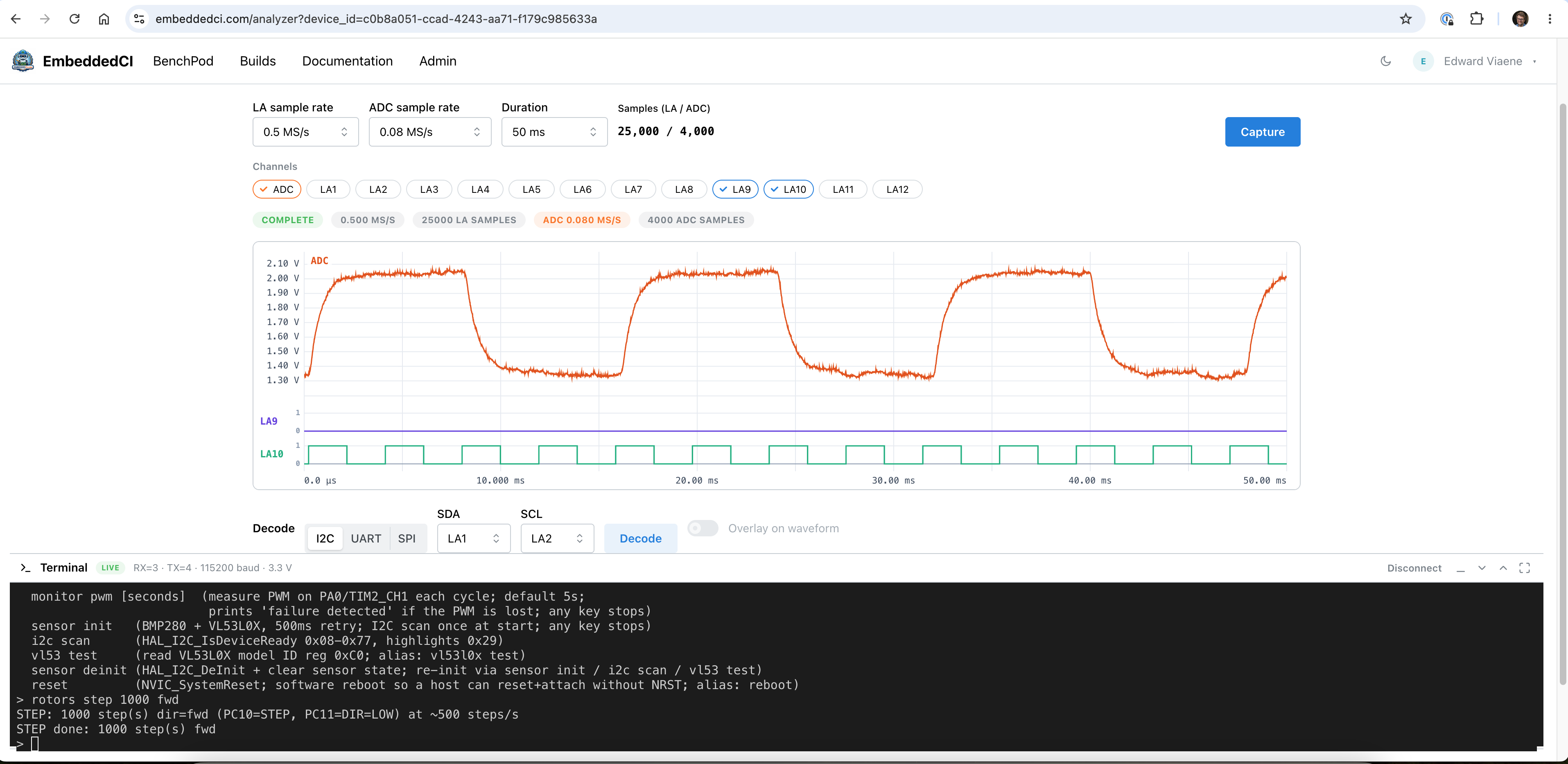
Then, a few tests to capture the step motor output in our web UI (embeddedci.com)
Normal scenario:![]()
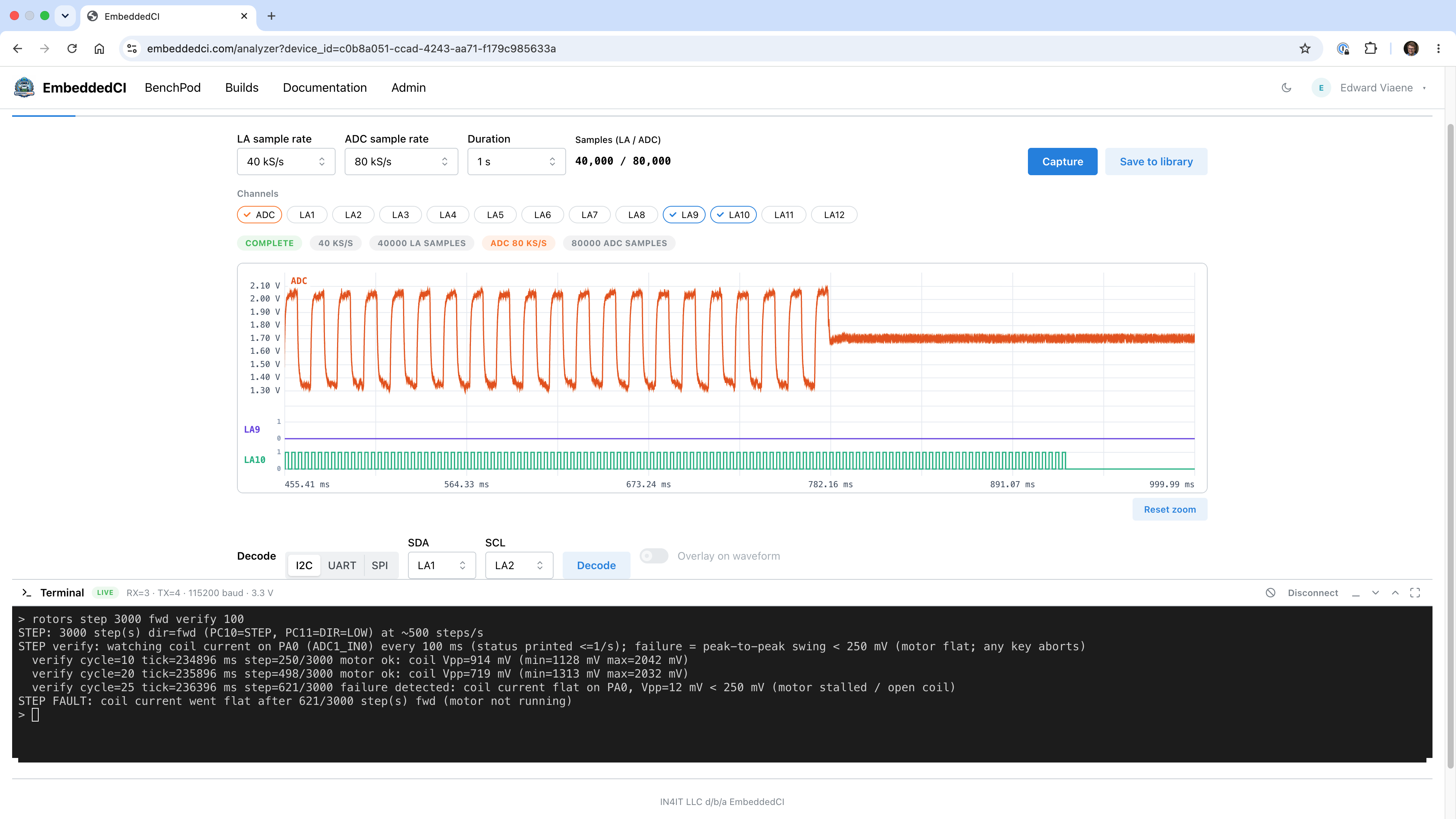
Power cut-off scenario (including timings of the step pulsing so we can verify the difference between actual cut-off and DUT noticing):
![]()
Stall scenario:
![]()
They are stored in our library as well, so we can replay them without the actual step motor (simulating the step motor for the DUT):
![]()
-
Correlating digital and analog on a single trigger
07/09/2026 at 20:44 • 0 commentsThe goal: show digital and analog in a single view.
The test: to show how to verify stepper motor timing on a Device Under Test (an STM32F446RE). Logic and analog are sampled off the same clock (using an iCE40 FPGA on the BenchPod).
We have a 48MHz oscillator on the board. Unfortunately, I didn't get all the code running at 48 MHz immediately, so we're split between 24 MHz and 48 MHz in the deployed ICE40 code. Mainly, the SPI interface for receiving commands would need a serious rewrite if we wanted to run that at 48Mhz, and it doesn't need to, so those parts are running at 24Mhz.
There are 14 Logic Analyzer pins available to either output timing or to use for a specific protocol, such as UART. This is all at runtime, so you can say pin 3 and 4 are now RX and TX for UART, and I want to see the output on pins 9 & 10, because that's where I have my step direction and step input connected.
To monitor the current of the coils (or 1 coil in this example), we use a shunt resistor and an INA282 to amplify the analog signal. That way, we can see the analog data from the coil and match it with our digital signal from the step motor.The captured data is written over quad SPI to the PSRAM, where the STM32 can read it. The iCE40 is driving a signal on a pin for the STM32 to read, to ensure they're not both talking to the PSRAM at the same time, so the STM32 has to wait until the writes are complete. The data is then sent from the stm32 to the dashboard via a WebSocket over Ethernet. As described earlier in the previous log, we're using lwIP for all this.
![]()
![]()
-
Networking with ESP32 and STM32H563 without ESP-AT
07/03/2026 at 16:49 • 0 commentsThe BenchPod v1.0.0 setup was pretty simple: RP2350B with AT commands over UART to the ESP32 module for WiFi. In v2.0.0, I needed a different approach because we added Ethernet and wanted a streamlined solution.
The STM32H563 has an Ethernet MAC, so the obvious solution would be to do lwIP in the firmware. That's all pretty well-documented, so it's easy to implement. We communicate over RMII to the LAN8742 PHY, and from that point, it's all physical layer. Doing AT at this point with the ESP32 sounds like maintaining 2 different approaches to networking.
This brings us to esp-hosted-mcu (). Using this, we can keep lwIP, use 2 interfaces, and maintain 1 codebase for both WiFi and wired Ethernet. The lwIP interface for WiFi flattens the packet, wraps it in the esp-hosted framing, and puts it on the SPI bus to the ESP32, which then sends it out over WiFi. This gives us 1 IP layer inside the STM32, with the ESP32 just forwarding the packets. The AT protocol is no longer needed (esp-hosted has its own binary control channel for scan/connect instead), and the WiFi link shows up as just another native netif to lwIP.
Still had to chase down some non-obvious bugs. IP packets have checksums, and in lwIP, checksum generation was disabled because it'd be handled by the STM32's Ethernet MAC in hardware. The catch is that lwIP's checksum setting is global by default, so when I brought up WiFi, those packets went out with zero checksums too. The ESP32 side of the SPI link has no hardware to generate them. I had to sniff the DHCP packets to figure out why nothing was coming back (a missing checksum on the outgoing frame):
e8:3d:c1:21:2e:70 ... length 336, bad cksum 0 (->ba75)!
That "bad cksum" is the IP header checksum, which is mandatory, so the frame is dropped, and no DHCP offer ever comes back. The fix was to enable per-netif checksum control (LWIP_CHECKSUM_CTRL_PER_NETIF): the Ethernet netif keeps offloading to the MAC, while the WiFi netif computes IP/UDP/TCP checksums in software. That solved it.
Also worth mentioning: the ESP32-C3 ships blank, and we only wire UART, EN, and BOOT lines to reach the STM32, because we want to flash over USB (which is connected to the STM32). That means the STM32 has to flash the ESP-hosted slave firmware into the ESP32 itself over its ROM bootloader before any of this networking works. The MCU bootstraps its own WiFi chip by loading the ESP32 binary from its flash and flashing it over UART.
-
Analog Calibration With Agilent 34401A
07/02/2026 at 15:33 • 0 commentsThis has been quite a journey. Measurement instruments can be very expensive, and I didn't want to immediately go there for our prototype. The solution was to buy a calibrated Agilent 34401A on eBay with a certificate and figure out how to hook it up to my machine so I could use it to calibrate the BenchPod.
I bought a GPIB-USB-HS to connect the Digital Multimeter to my MacBook, but quickly realized there's no macOS support, so I connected it to my Raspberry Pi 4 instead. I tried using Linux-GPIB to read the voltages, but couldn't get it working because the bytestream I was getting wasn't what the library expected. Almost ready to buy another adapter, I plugged it back into my MacBook and asked Claude Opus 4.8 if it could get it to work on macOS. To my surprise, after a few minutes, it had written a Python module using pyusb that used the correct sequence to get it to work. There we go! Cheap solutions that work are the best! I put the repo online for anyone who wants to use the Agilent 34401A or similar cross-platform using Python. It's available at https://github.com/embeddedci-com/ni-gpib-usb-hs
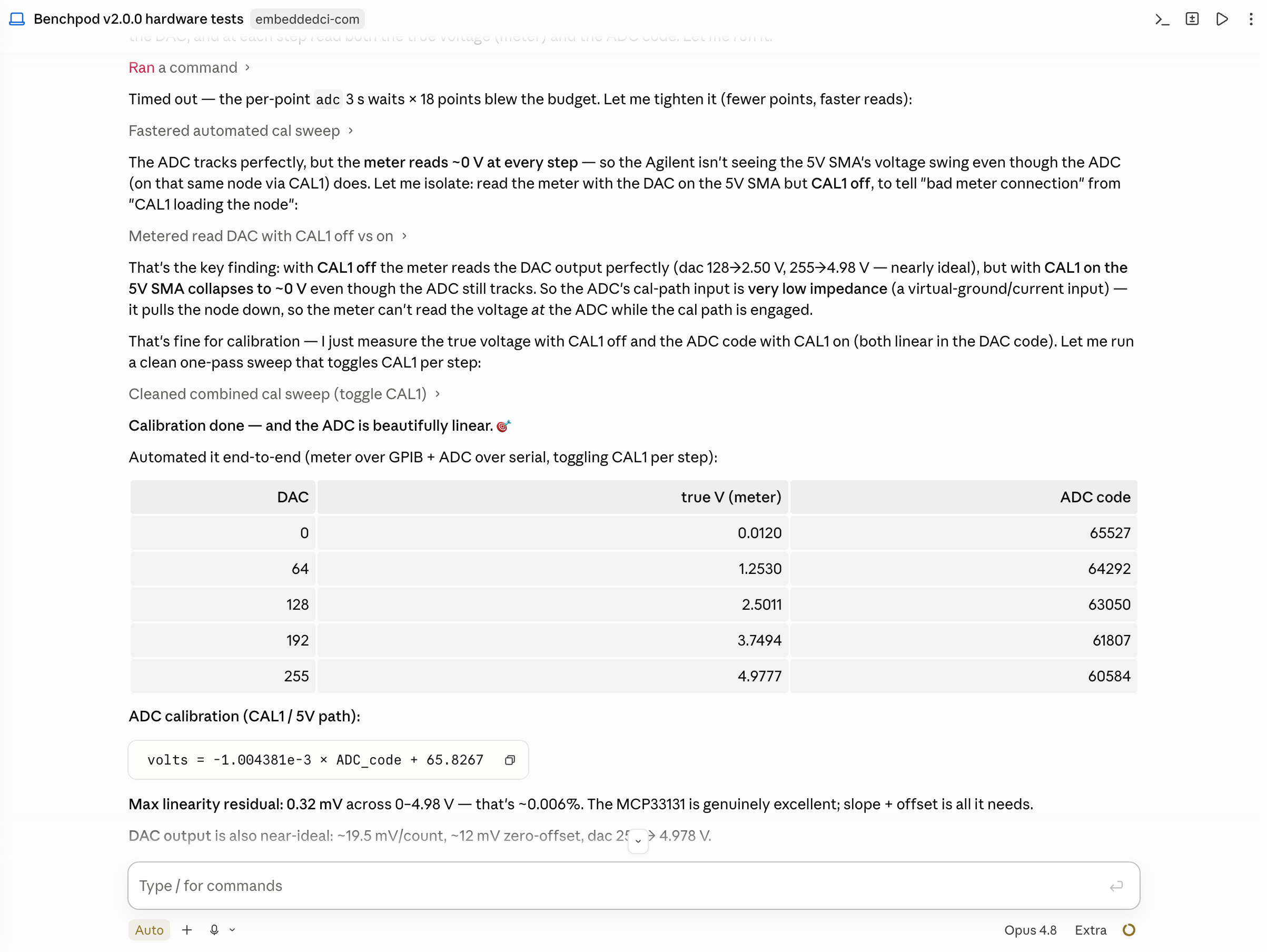
Back to the calibration part of BenchPod: with the Agilent connected via USB and the BenchPod online, I could manually execute the commands and compare them to the data from the Multimeter, but couldn't give Claude a go at it. I explained in the prompt how to access both tools, and it did the calibration for me, quickly switching the relays and doing a DAC sweep to get me the outputs. Here's a screenshot of the end result in Claude Code:
![]()
-
TVS, Connector Spacing
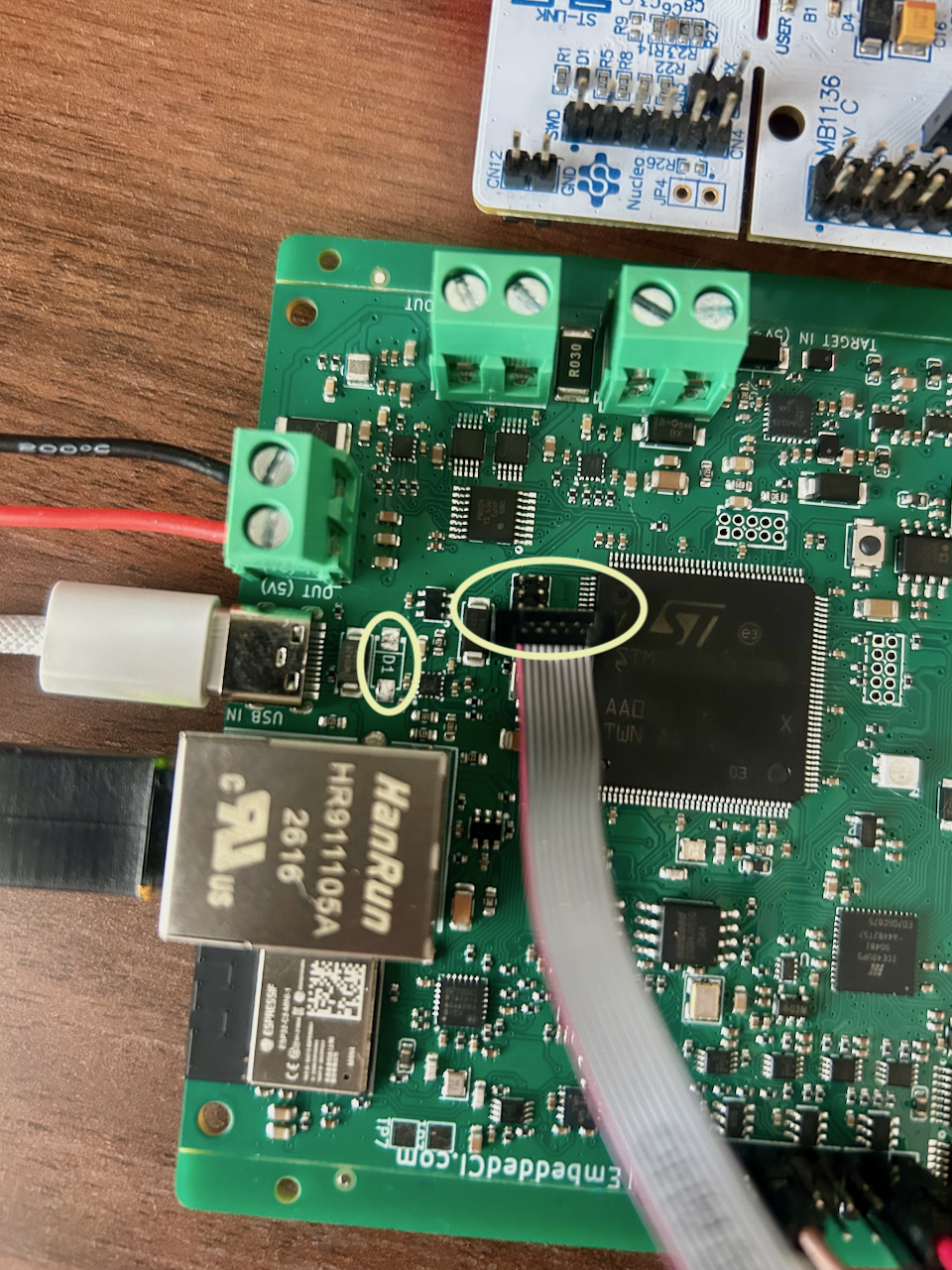
07/02/2026 at 14:29 • 0 commentsAs promised in the previous log, the TVS diode and the cable connector "fix" because the button is too close to it:
![]()
![]()
-
v2.0.0 Arrived
07/01/2026 at 03:05 • 0 commentsYesterday, v2.0.0 arrived. I decided to boot it up right away, which made me realize there was something wrong. After plugging the USB cable from my PSU in, it went straight into constant current mode, and the voltage dropped to 1A (the limit).
My mistakes are often concentrated in the last additions just before shipping it off to the manufacturer, so that's where I went to look. I decided at the last minute that I needed an extra eFuse on the incoming USB, along with a DVS diode. The eFuse was all wired OK, but the SMAJ5.0 TVS pins were flipped. After removing the TVS diode with a hot air gun, the board came up. I was a bit concerned about the 0402 passives around the TVS, but luckily, they decided to stay put (kept the airflow low).
Next, I actually managed to flash the STM32 with the new firmware. I used dfu-util, as I'm pretty much allergic to the standard tooling and IDEs. The open source tooling works very well, and I manage to do everything using the console.
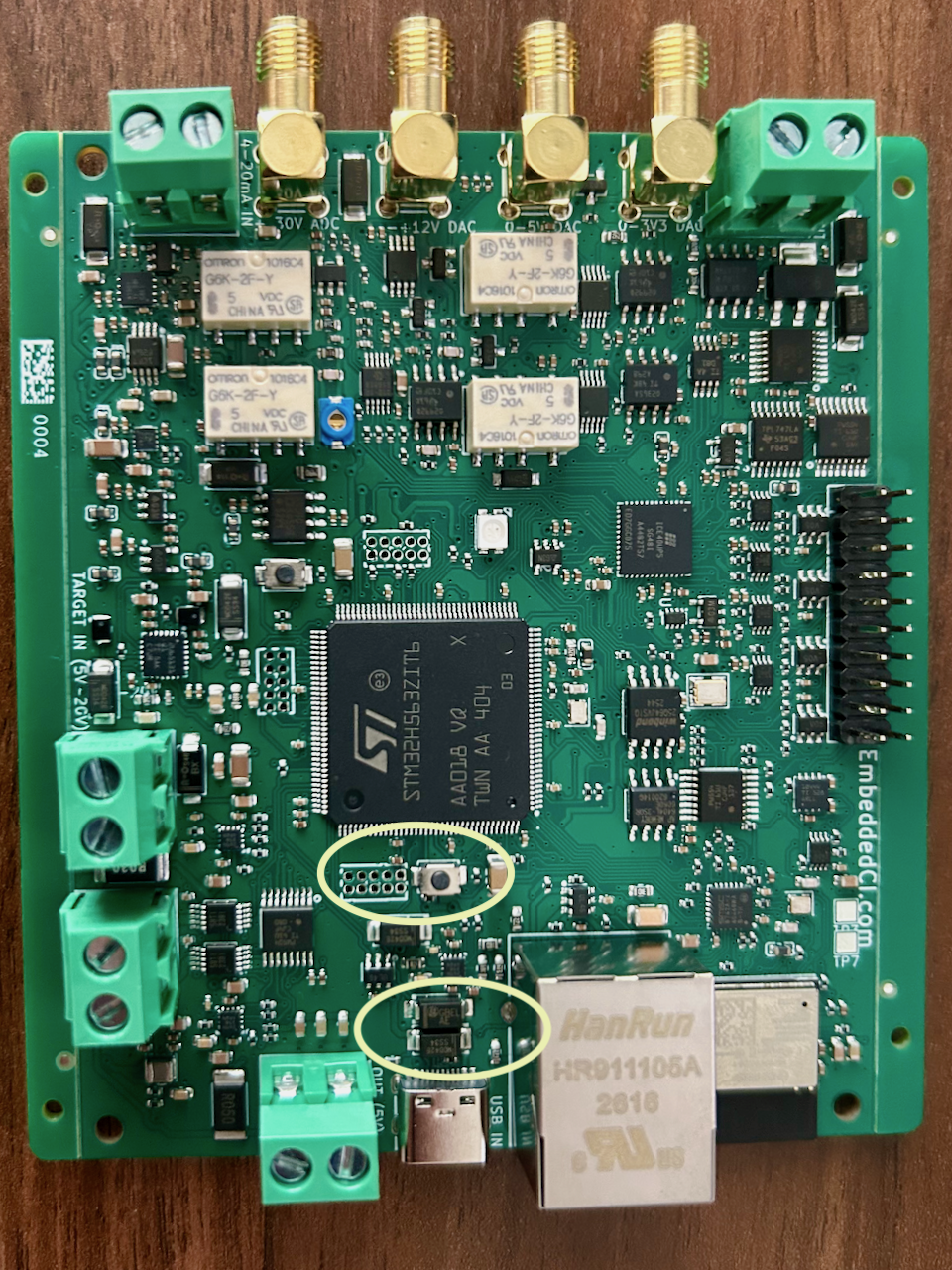
The USB serial console didn't come up, though, so I needed to use SWD to have a peek. The downside was that the pins were not yet in place, and since I had chosen a 1.27mm pin header, I had to work carefully to get them in. That revealed another issue I should've anticipated: the reset button is in the way of the 10-pin cable fitting over it. Well, I managed to resolve it. I'll post a picture later so you can see how to creatively connect a cable when there's a button in the way.
After gaining access to SWD, I managed to get the firmware on it. USB serial came online, and the benchpod used DHCP via its ethernet port, so we're pretty much set up now!
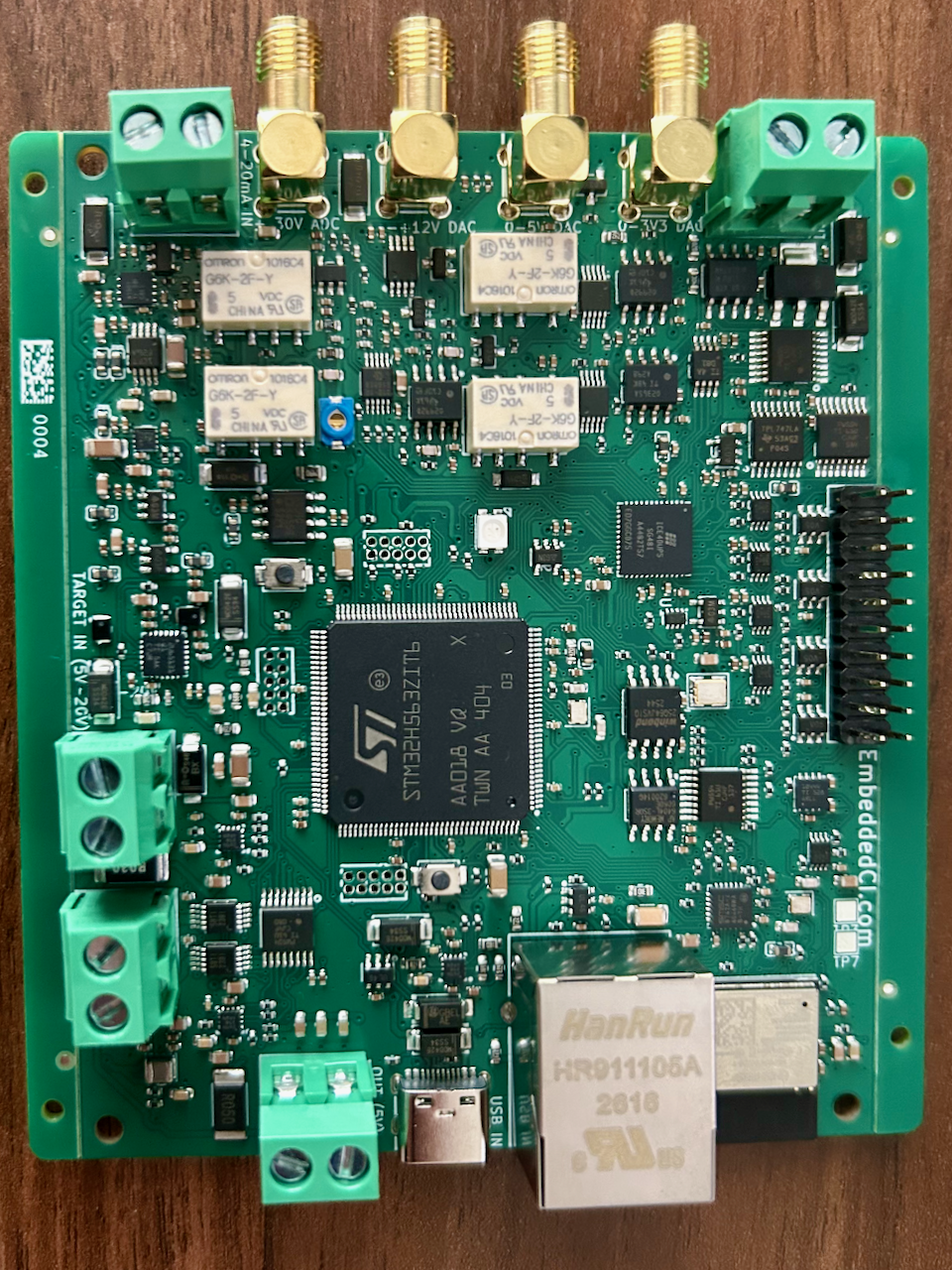
Below is a picture of benchpod v2.0.0. The decent-sized boxes are the relays for the analog path (to enable the calibration paths):
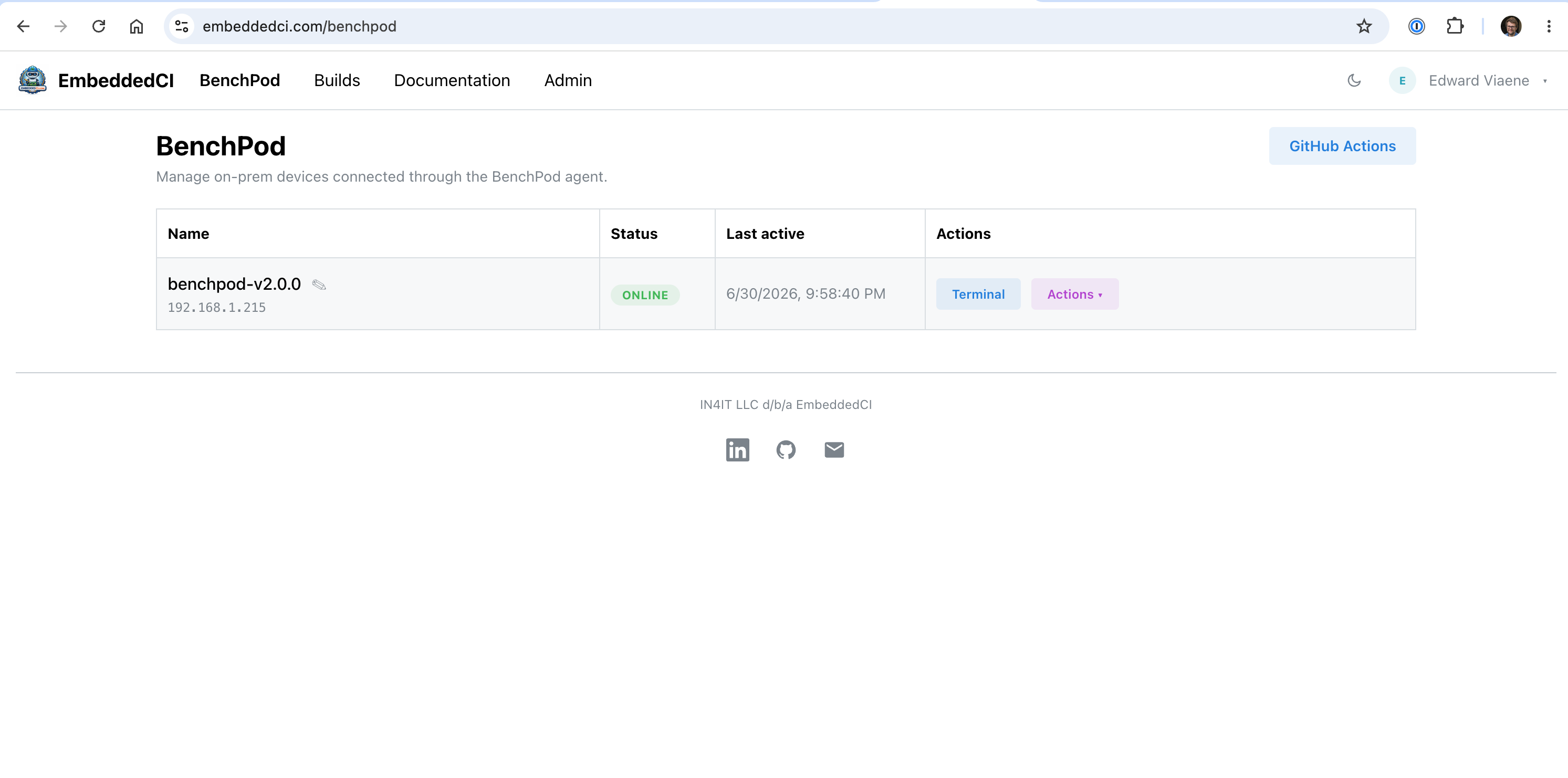
Here's the pod online in the UI:
![]()
And here's what BenchPod V2.0.0 looks like (and V2.0.1 will have the TVS diode fixed):
![]()
-
The Switch From RP2350B To STM32H563
06/25/2026 at 16:14 • 0 commentsA few notes on the switch from RP2350B to STM32H563:
v1 of the board had the RP2350B, which had dual-core, 2x SPI, 2x UART, 2x I2C, and PIO support, which was genuinely useful for the deterministic timings we needed. The issues we hit, though:
- No Ethernet support, which would mean an external PHY/MAC chip like the W5500. That'd work, but you'd also need an extra SPI bus for that
- That brings us to the lack of peripherals in RP2350B. You can use PIO, but PIO state machines are also not unlimited, and if you have to use it for SPI/I2C/UART, you can't use it for something else anymore
- The RP2350B has no internal flash, so you need an external flash, which adds floorspace on the PCB, an extra BOM item, extra feeder fees on low volume, etc
- The RP2350B doesn't have built-in wireless. If you want to build the pico2 (RP2350B + wireless) architecture yourself, you would need to recertify the Wi-Fi. If you want your MCU on your pcb to be RP2350B, you'd still need an ESP32 or Pico2 module on your PCB separately if you want WiFi without having to recertify the WiFi module
That's why we moved to the STM32H563ZIT6. It's a big step up, but the gap is smaller than it looks once you count the full architecture:
RP2350B + boot flash + inductor is around 3 USD (low volume, during prototyping). You also have to account for extra feeder fees for the components you need, specifically the RP2350B, including resistors for the USB pins that other chips have internally. This disappears, of course, at volume, but a unique part count in a BOM can bump you to higher fabrication tiers.STM32H563ZIT6 with its internal flash and no external parts: 7.70 USD (prototype quantities) and around 5 USD at volume. That's a big jump, but you get a lot in return for external parts that you don't need. You now have MAC support for Ethernet, and you don't need the W5500 (which is ~2.7 USD at low volume). You have the extra SPIs/I2C/UARTs, but you lose the PIO.
Conclusion: the RP2350B is great at the low price level, but you might outgrow it quickly if you need Ethernet, more SPIs/UARTs/I2Cs, and the external components make the price difference smaller than you think, especially if you take into account that there are a lot of other MCUs in between the price point of an RP2350B and an STM32H563ZIT6.
-
CMSIS-DAP over TCP
06/24/2026 at 15:01 • 0 commentsBenchPod is a tool that'll plug into CI, for example, GitHub actions. I spent some time building CMSIS-DAP over TCP in the firmware so we can run pytest flash commands within GitHub Actions over TCP. BenchPod opens a WebSocket connection to our Cloud Platform, and we encapsulate DAP packets as JSON messages between pytest (GitHub Actions), the Cloud Platform, and BenchPod.
Our example repo with a GitHub workflow and the pytest code can be found here: https://github.com/embeddedci-com/examples/
Also, an interesting fact: the GitHub Actions workflow doesn't need any credentials. It can fetch an OIDC token that the server can verify. We only need to know the repository owner and name (the IDs actually, as those are unique). The server can then validate ownership without having to put credentials in CI. On the firmware side, we generate a private key that stays on the device, authenticate with the cloud server, and establish an outgoing WebSocket over TCP to the cloud platform.
BenchPod
An open hardware bench tool that plugs into your CI: sensor sim, CAN, analog I/O, power control, and a Python SDK with pytest integration