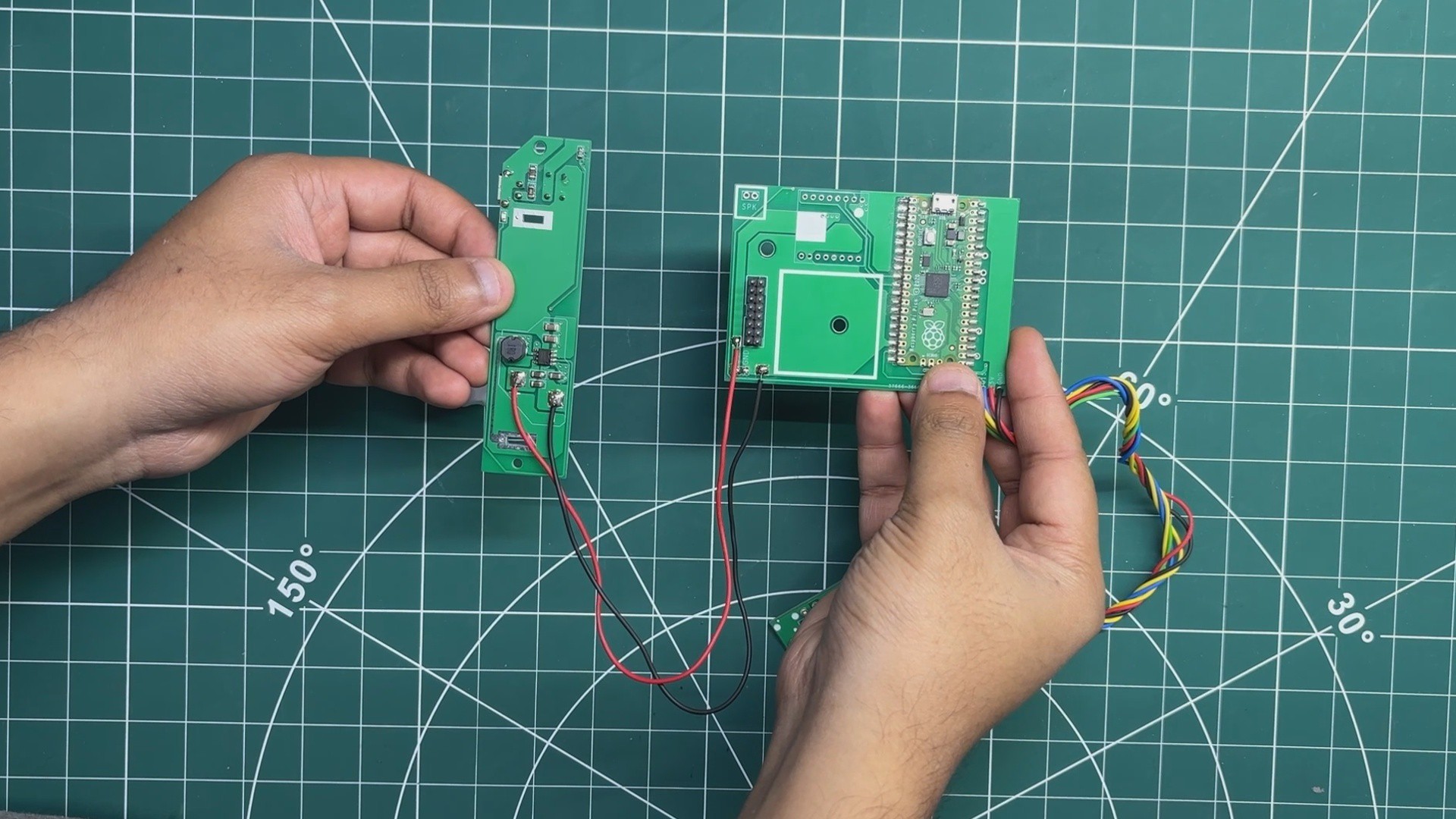
We begin the Pico Driver Board assembly process by applying solder paste to all the Pico pads using a solder paste dispensing needle. Here, we are using Sn/Pb 63/37 solder paste, which has a melting temperature of 200°C.
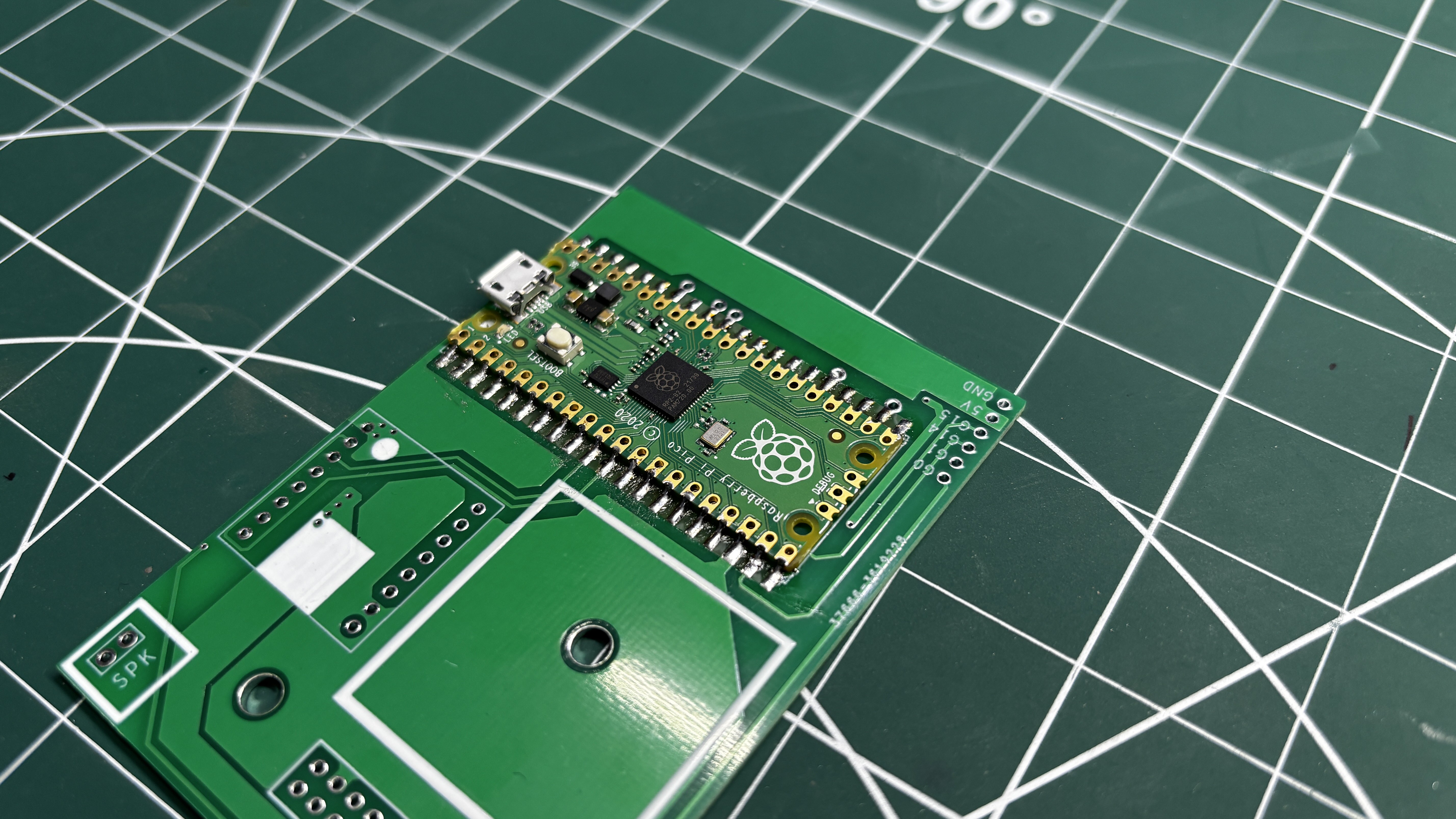
Next, we pick and place the Raspberry Pi Pico onto the PCB, making sure all of its pins align correctly with the corresponding pads.
The PCB is then placed on a reflow hotplate. Here, we are using the Miniware MH50, a compact reflow hotplate that is perfect for assembling the Pico Driver Board.
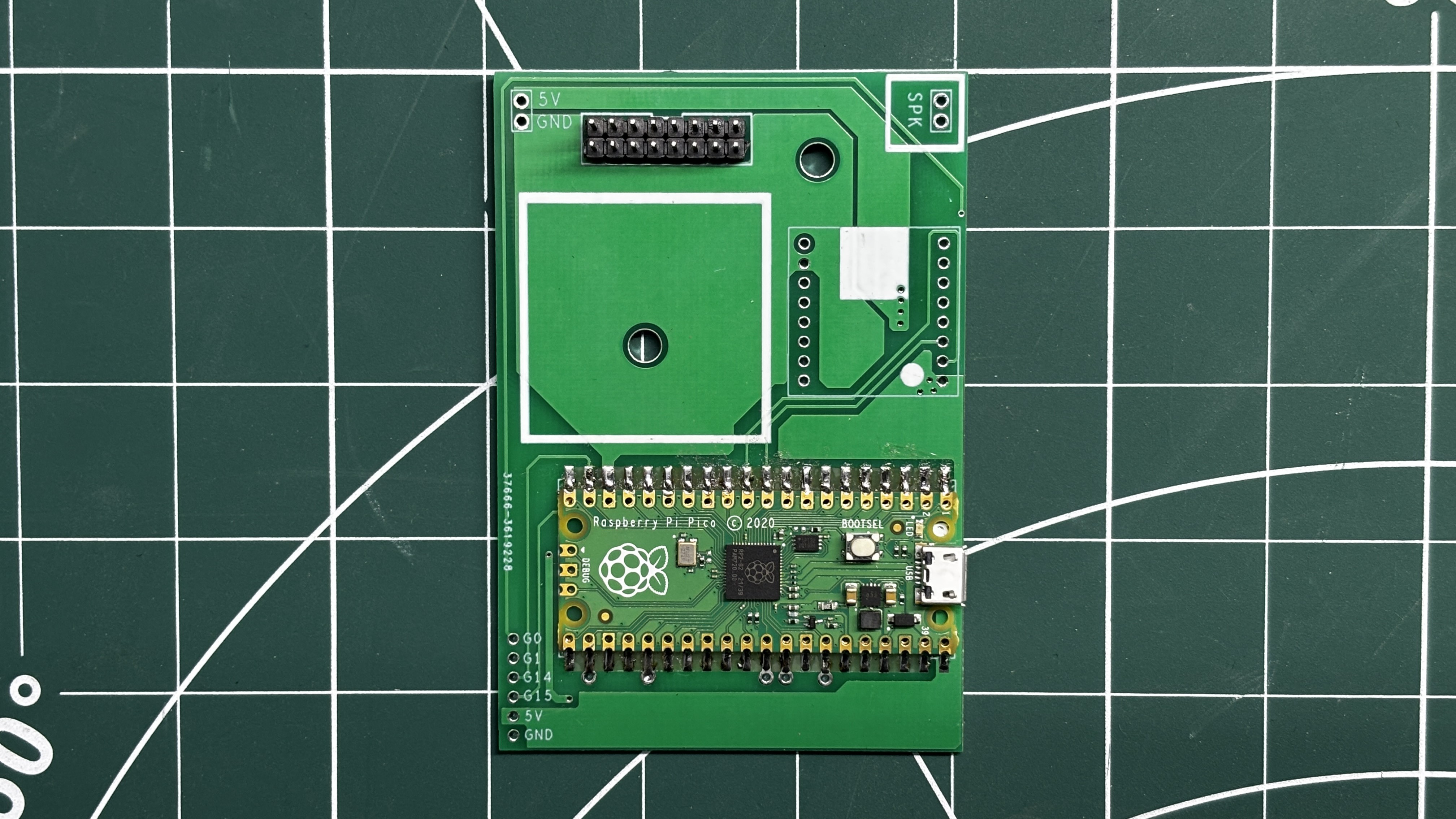
Finally, two CON8 male header connectors are installed on the HUB75 connector pads. We flip the board over and solder the header pins in place using a soldering iron, completing the assembly of the Pico Driver Board.
2
PCB ASSEMBLY - SWITCH BOARD
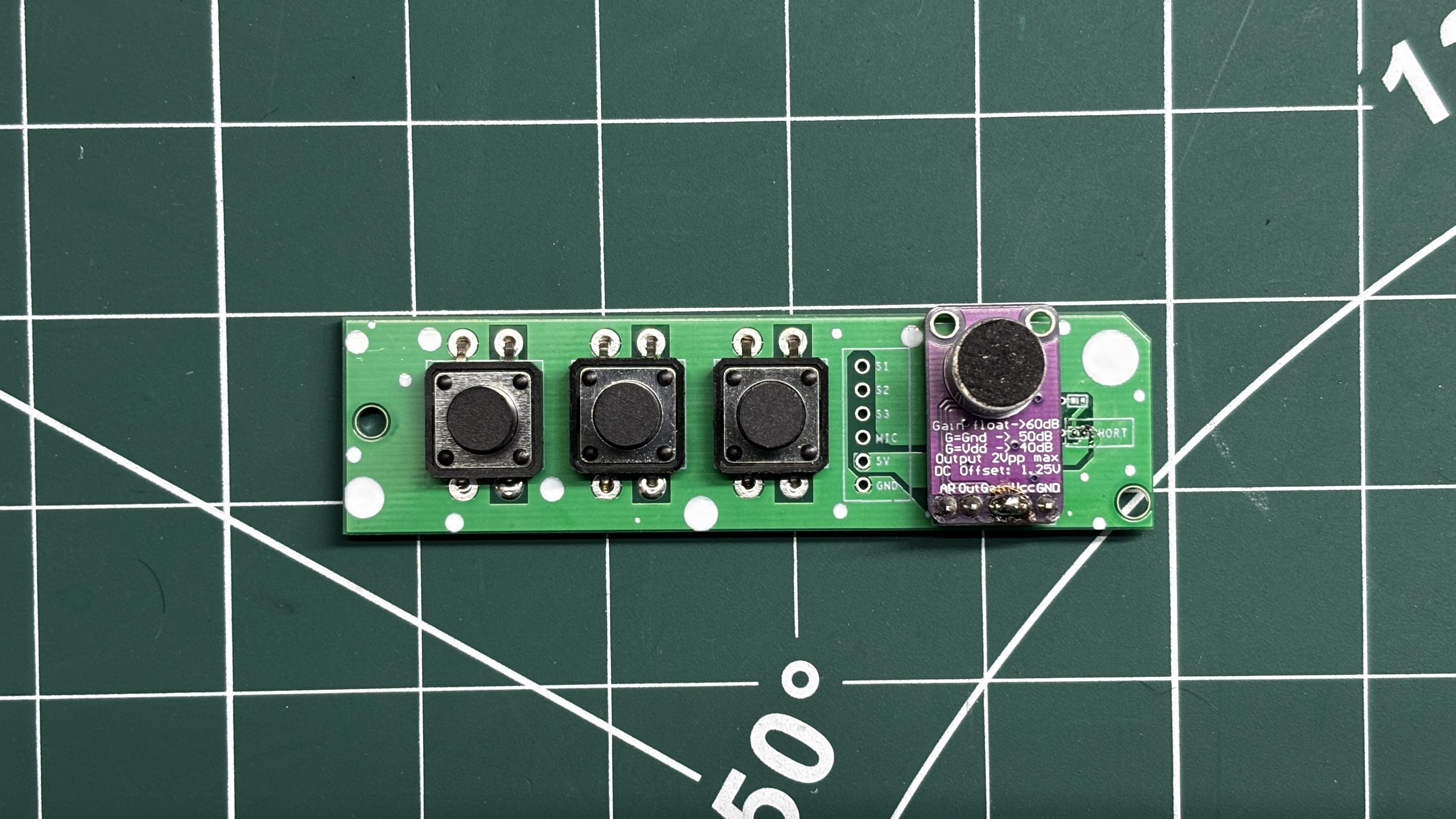
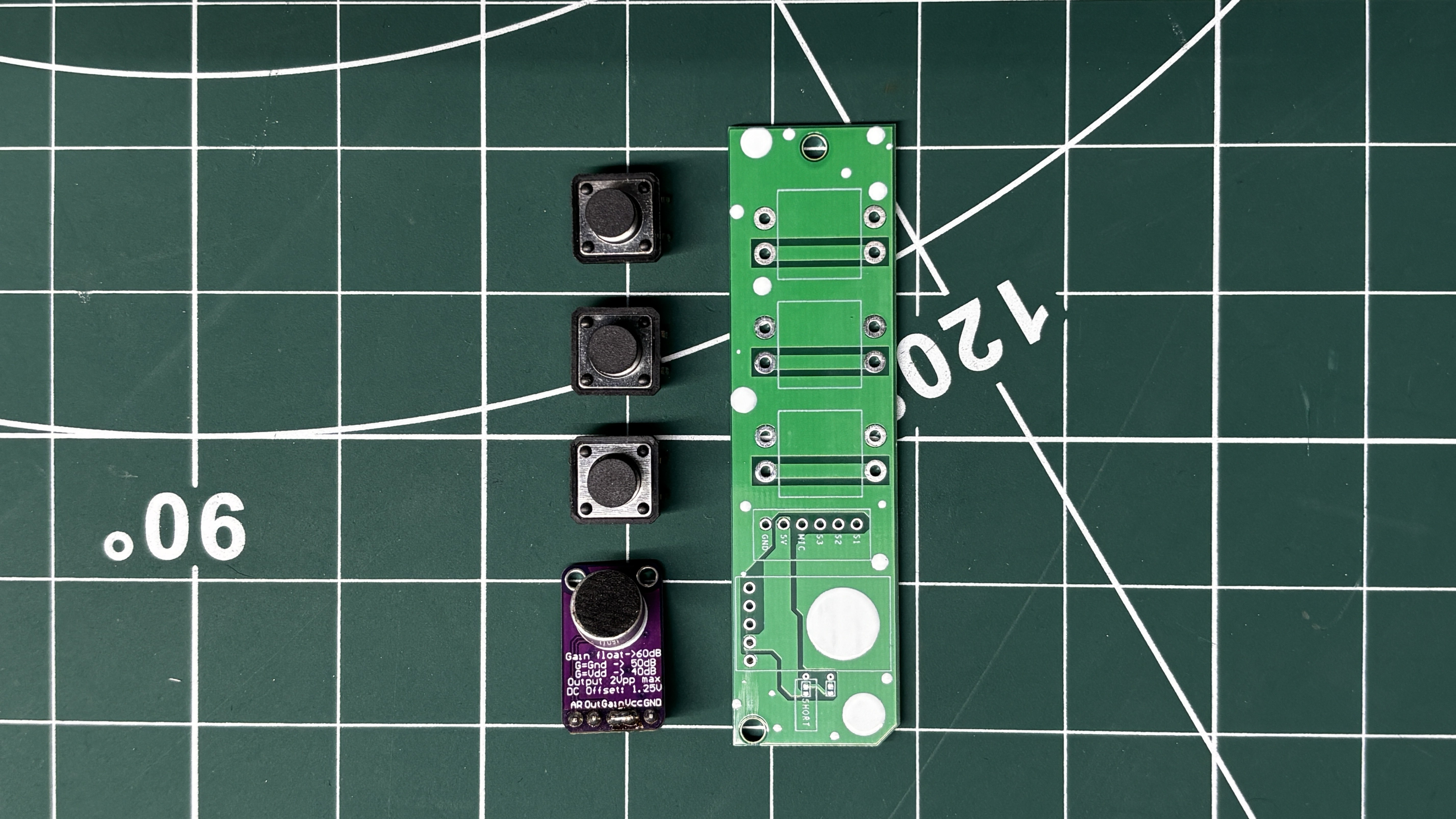
Next comes the PCB assembly process for the Switch Board, which begins by placing the MAX9814 microphone module and all three push buttons in their respective positions.
The board is then flipped over, and all the leads are soldered using a soldering iron, securing each component firmly in place.
3
PCB ASSEMBLY - POWER BOARD
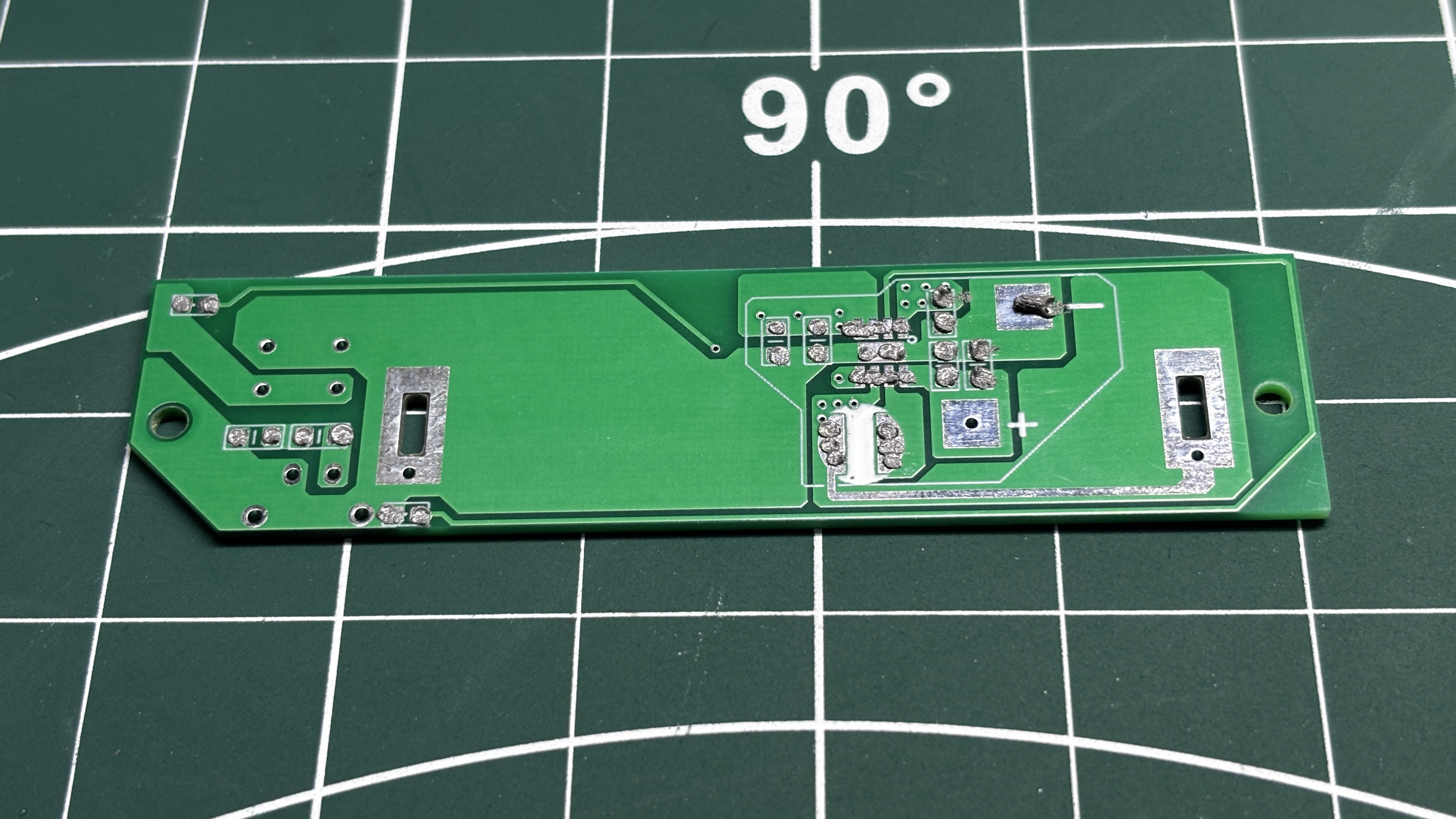
We begin by applying solder paste to all the component pads using the same solder paste dispenser as before.
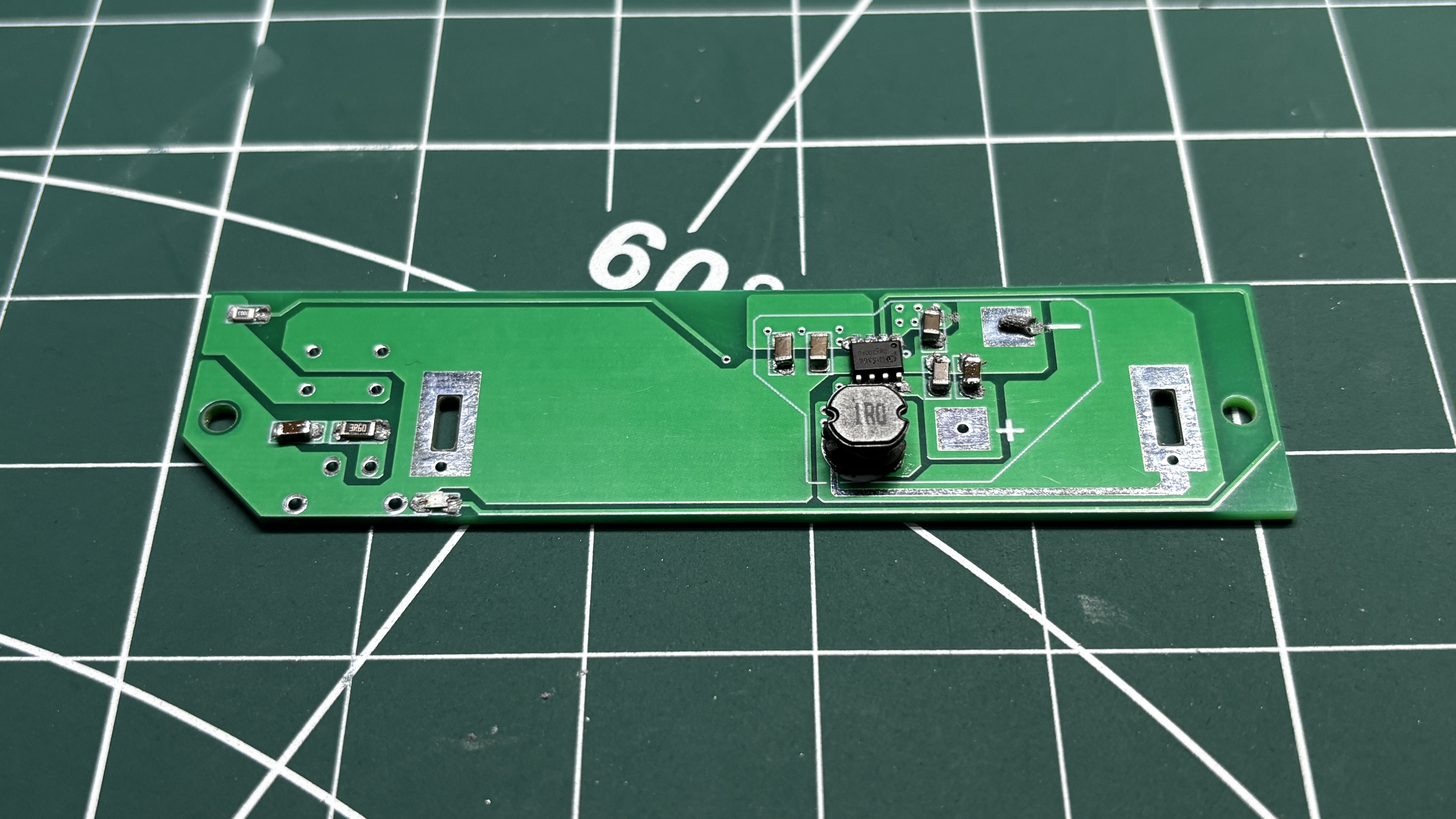
Next, all the SMD components are picked and placed in their respective positions.
The entire PCB is then placed on a reflow hotplate. This time, we use a slightly larger hotplate since the Power Board is larger than the previous PCBs.
Once the reflow process is complete and all the SMD components are secured, we install the push button, followed by the USB Type-C connector.
The board is then flipped over, and the leads of the through-hole components are soldered using a soldering iron, securing them in place.
Next, we connect the positive terminal of a 3.7V, 2600mAh lithium-ion cell to the B+ terminal of the Power Board and the negative terminal to the B- terminal using a soldering iron.
To verify that everything is working correctly, we press the power button. The status LED lights up, indicating that the board has powered on. We then use a multimeter to measure the output voltage and obtain a stable 5V, confirming that the Power Board is functioning as expected.
4
PICO DRIVER & MATRIX ASSEMBLY
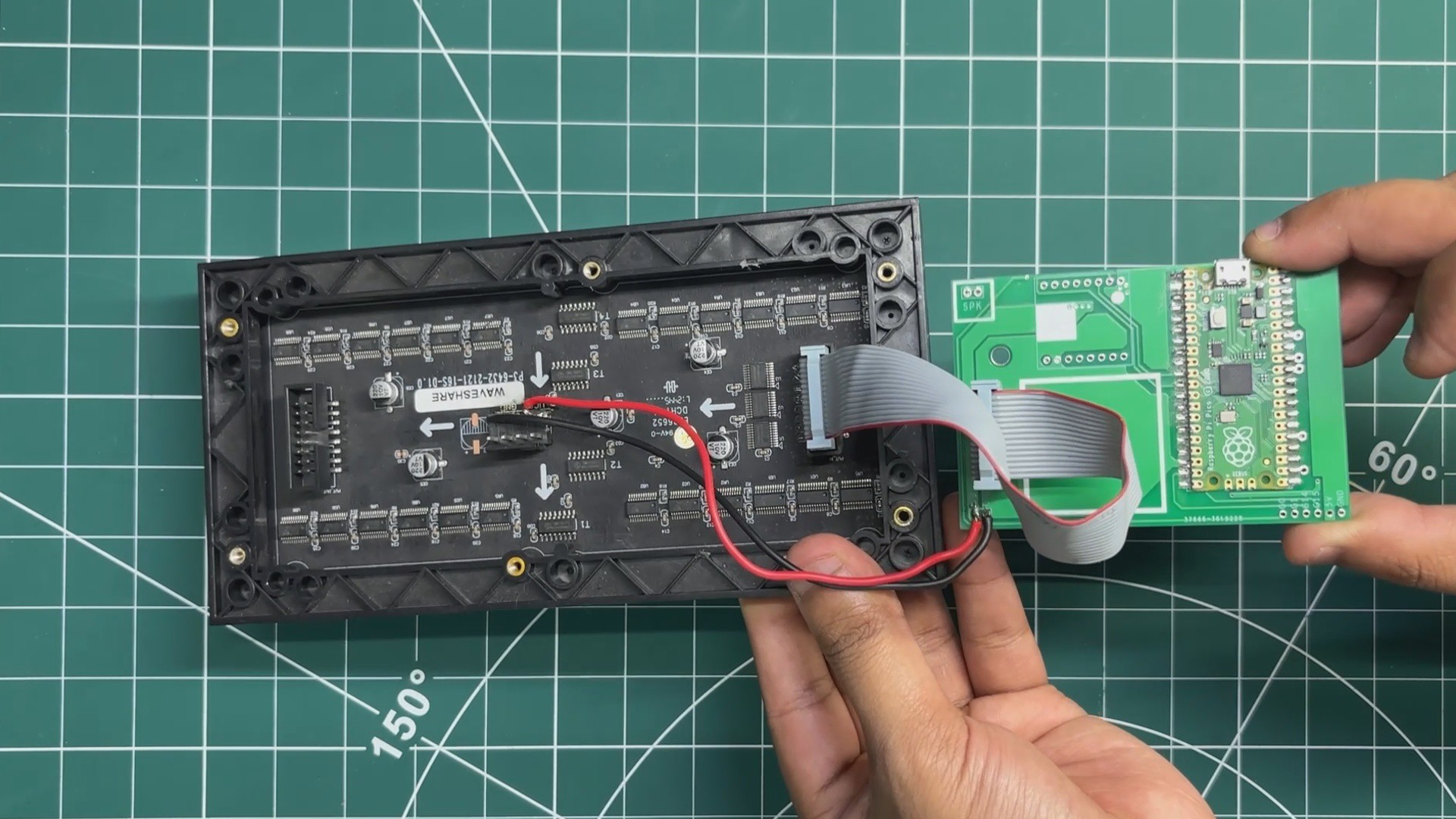
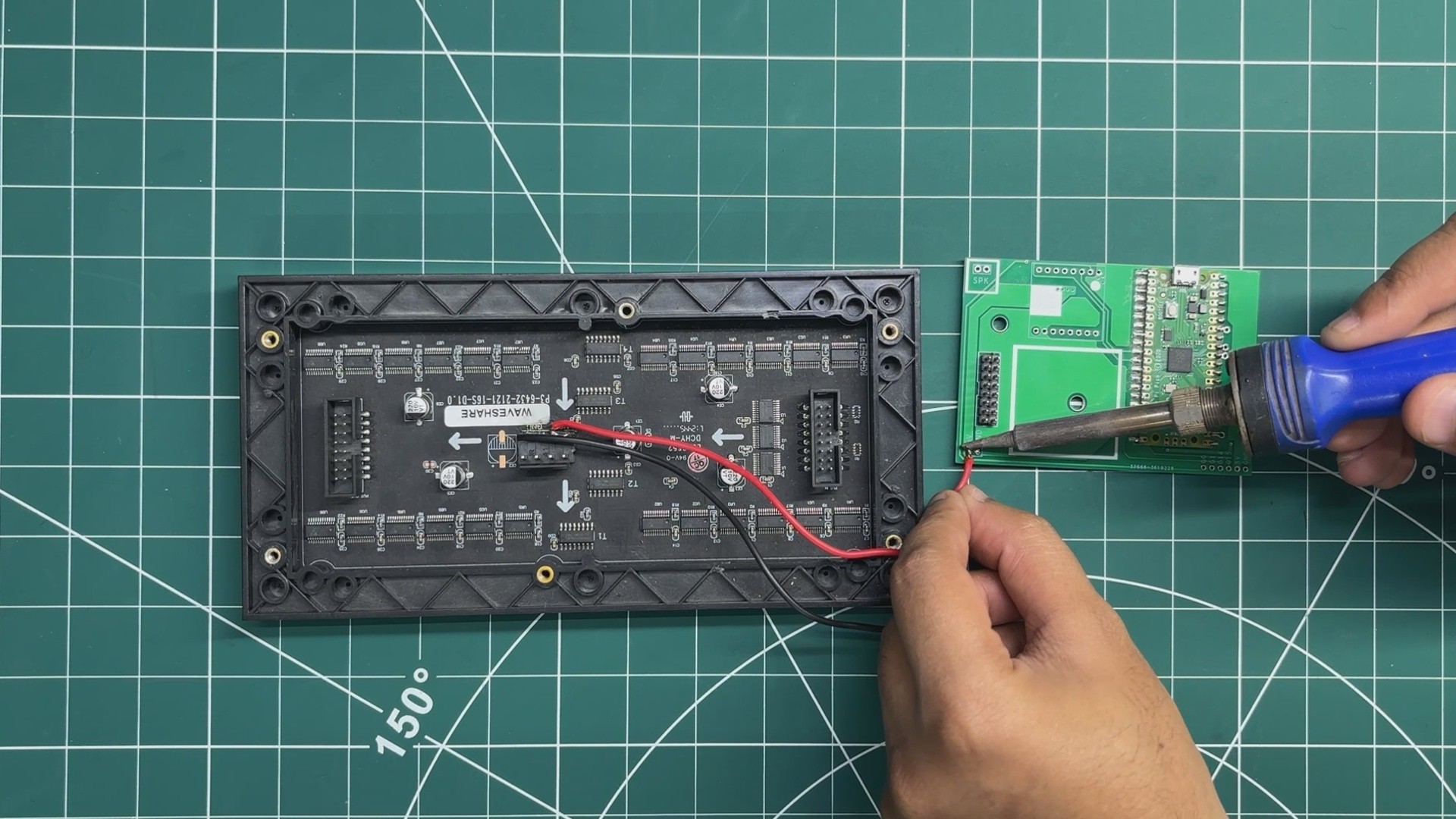
We begin by connecting the VCC and GND terminals of the RGB matrix to the 5V and GND outputs of the Pico Driver Board using a soldering iron.
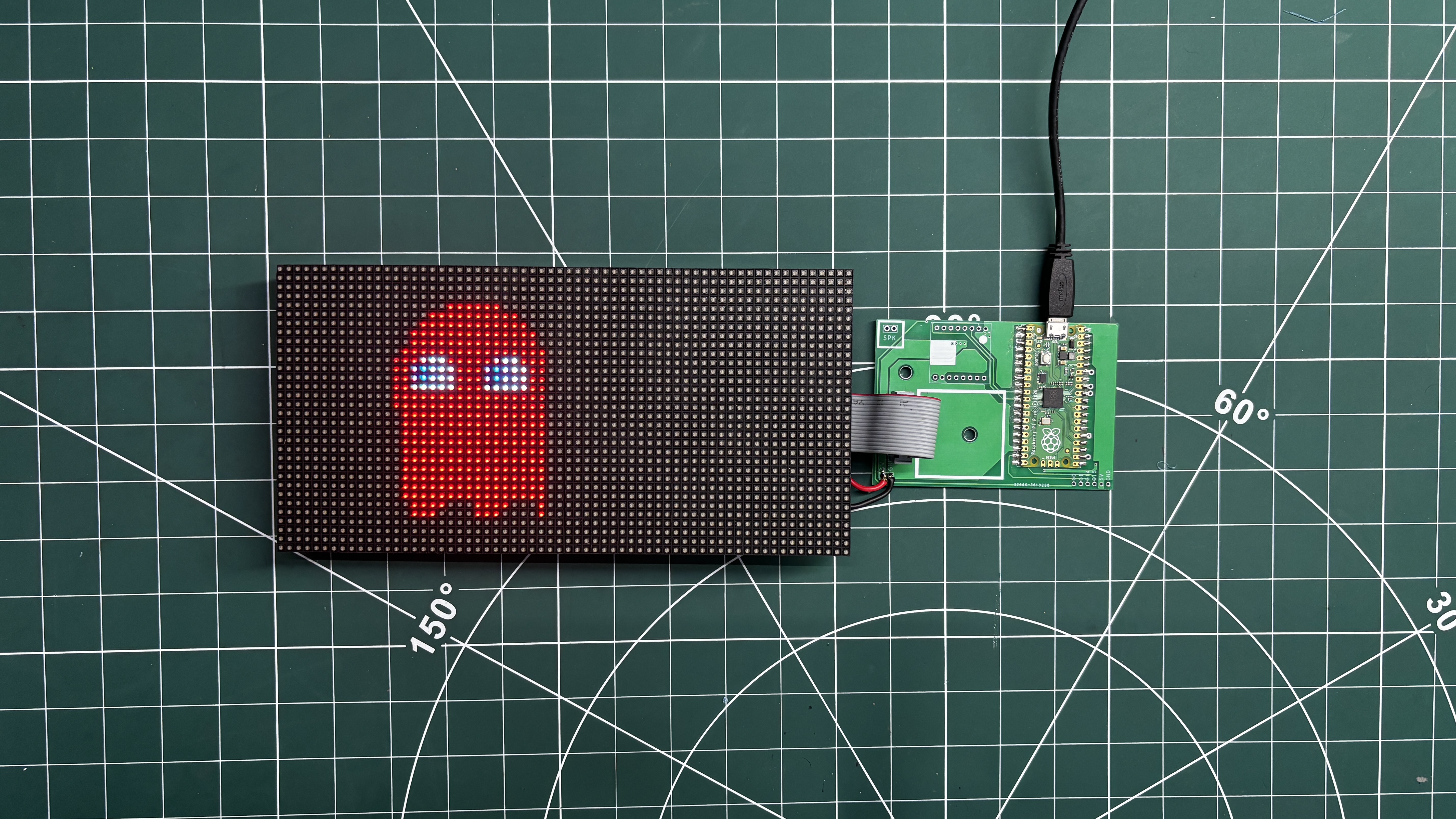
Next, we connect the matrix's HUB75 interface to the CON16 connector on the Pico Driver Board using a 16-pin ribbon cable.
5
MATRIX DEMO
We then upload the demo code below, which displays Cyber Ghost, a Pac-Man-inspired ghost featuring animated feet and continuously shifting RGB colors.
Here's the complete code
#include<Adafruit_Protomatter.h>#include<math.h>// ── Pins (Raspberry Pi Pico GPIO) ─────────────────────────────────#define R1 2#define G1 3#define B1 4#define R2 5#define G2 6 // Using GPIO 6#define B2 9#define PIN_A 10#define PIN_B 16#define PIN_C 18#define PIN_D 20#define CLK 11#define LAT 12#define OE 13// ── Resolution for a SINGLE 64x32 Panel ───────────────────────────#define W 64#define H 32uint8_t rgbPins[] = { R1, G1, B1, R2, G2, B2 };
uint8_t addrPins[] = { PIN_A, PIN_B, PIN_C, PIN_D };
// ── Constructor ───────────────────────────────────────────────────// Bit Depth = 3 (Maximum refresh speed, zero flicker!)// Double Buffer = true// Tiling = 1 (Single matrix)Adafruit_Protomatter matrix(
W, 3, 1, rgbPins,
4, addrPins,
CLK, LAT, OE,
true,
1
);
// ── Global Variables & Timing ─────────────────────────────────────uint32_t frameCount = 0;
float ghostHue = 360.0f; // Start at Red (360 degrees)// Fast RGB565 color helperinline uint16_t rgb(uint8_t r, uint8_t g, uint8_t b){
return matrix.color565(r, g, b);
}
// ── Smooth HSV to RGB Converter ───────────────────────────────────// Translates a Hue angle (0.0 to 360.0) into a smooth RGB565 color.// Decrementing the hue cycles: Red -> Blue -> Green -> Reduint16_t getSmoothHue(float h) {
while (h < 0.0f) h += 360.0f;
while (h >= 360.0f) h -= 360.0f;
float c = 1.0f; // Full saturation & valuefloat x = c * (1.0f - fabsf(fmodf(h / 60.0f, 2.0f) - 1.0f));
float r = 0, g = 0, b = 0;
if (h < 60) { r = c; g = x; b = 0; }
elseif (h < 120) { r = x; g = c; b = 0; }
elseif (h < 180) { r = 0; g = c; b = x; }
elseif (h < 240) { r = 0; g = x; b = c; }
elseif (h < 300) { r = x; g = 0; b = c; }
else { r = c; g = 0; b = x; }
return rgb((uint8_t)(r * 255), (uint8_t)(g * 255), (uint8_t)(b * 255));
}
// ══════════════════════════════════════════════════════════════════// SCENE: Scaled Rainbow Cyber-Ghost (Smooth Sine Physics for 64x32)// ══════════════════════════════════════════════════════════════════voiddrawPacGhost(){
matrix.fillScreen(0);
float t = frameCount * 0.06f;
// 1. Color Evolution: Smoothly rotate hue backwards (Red -> Blue -> Green -> Red)
ghostHue -= 0.6f; // Adjust this number to make the color cycle faster or slower!if (ghostHue < 0.0f) ghostHue += 360.0f;
uint16_t GHOST_COLOR = getSmoothHue(ghostHue);
uint16_t EYE_WHITE = rgb(240, 240, 240);
uint16_t PUPIL_BLUE = rgb(0, 50, 255);
// 2. Spatial Movement: Center X drifts side to side, Center Y hovers gentlyfloat base_cx = 32.0f + sinf(t * 1.2f) * 18.0f;
float hover_y = sinf(t * 3.0f) * 1.5f;
// Render body bounding box tailored for 32px heightfor (int y = 4; y < 28; y++) {
for (int x = base_cx - 10; x < base_cx + 10; x++) {
if(x < 0 || x >= W || y < 0 || y >= H) continue;
float relX = x - base_cx;
float relY = (y - 5) + hover_y;
float headRadius = 8.0f;
float bodyHeight = 12.0f;
bool drawPixel = false;
// Semi-circular dome headif (relY < headRadius) {
float dx = relX;
float dy = relY - headRadius;
if (sqrtf(dx*dx + dy*dy) < headRadius) {
drawPixel = true;
}
}
// Solid mid-bodyelseif (relY >= headRadius && relY < bodyHeight + headRadius) {
if (relX >= -8.0f && relX <= 8.0f) {
drawPixel = true;
}
}
// Animated rippling feetelseif (relY >= bodyHeight + headRadius) {
float footRipple = 1.5f * sinf(relX * 0.9f - t * 4.0f);
if (relY < (bodyHeight + headRadius + 3.0f + footRipple) && relX >= -8.0f && relX <= 8.0f) {
drawPixel = true;
}
}
if (drawPixel) {
matrix.drawPixel(x, y, GHOST_COLOR);
}
}
}
// 3. Dynamic Eye Trackingfloat lookX = sinf(t * 1.2f) * 2.0f;
float lookY = cosf(t * 1.5f) * 1.0f;
auto drawEye = [&](float ex, float ey) {
for (int y = ey - 3; y < ey + 3; y++) {
for (int x = ex - 2; x < ex + 2; x++) {
if(x < 0 || x >= W || y < 0 || y >= H) continue;
float dx = x - ex;
float dy = y - (ey + hover_y);
if((dx*dx / 4.0f) + (dy*dy / 9.0f) < 1.0f) {
matrix.drawPixel(x, y, EYE_WHITE);
}
}
}
// Blue Pupilsint px = ex + lookX;
int py = (ey + hover_y) + lookY;
matrix.fillRect(px, py, 2, 2, PUPIL_BLUE);
};
drawEye(base_cx - 4.0f, 11.0f);
drawEye(base_cx + 4.0f, 11.0f);
}
// ── Setup & Loop ───────────────────────────────────────────────────voidsetup(){
Serial.begin(115200);
ProtomatterStatus s = matrix.begin();
if (s != PROTOMATTER_OK) {
Serial.print("Protomatter Init Error: ");
Serial.println((int)s);
while(1);
}
}
voidloop(){
drawPacGhost();
matrix.show();
frameCount++;
// 15ms delay yields a rock-solid ~60 FPS animation loop
delay(15);
}
6
DUAL MATRIX ASSEMBLY
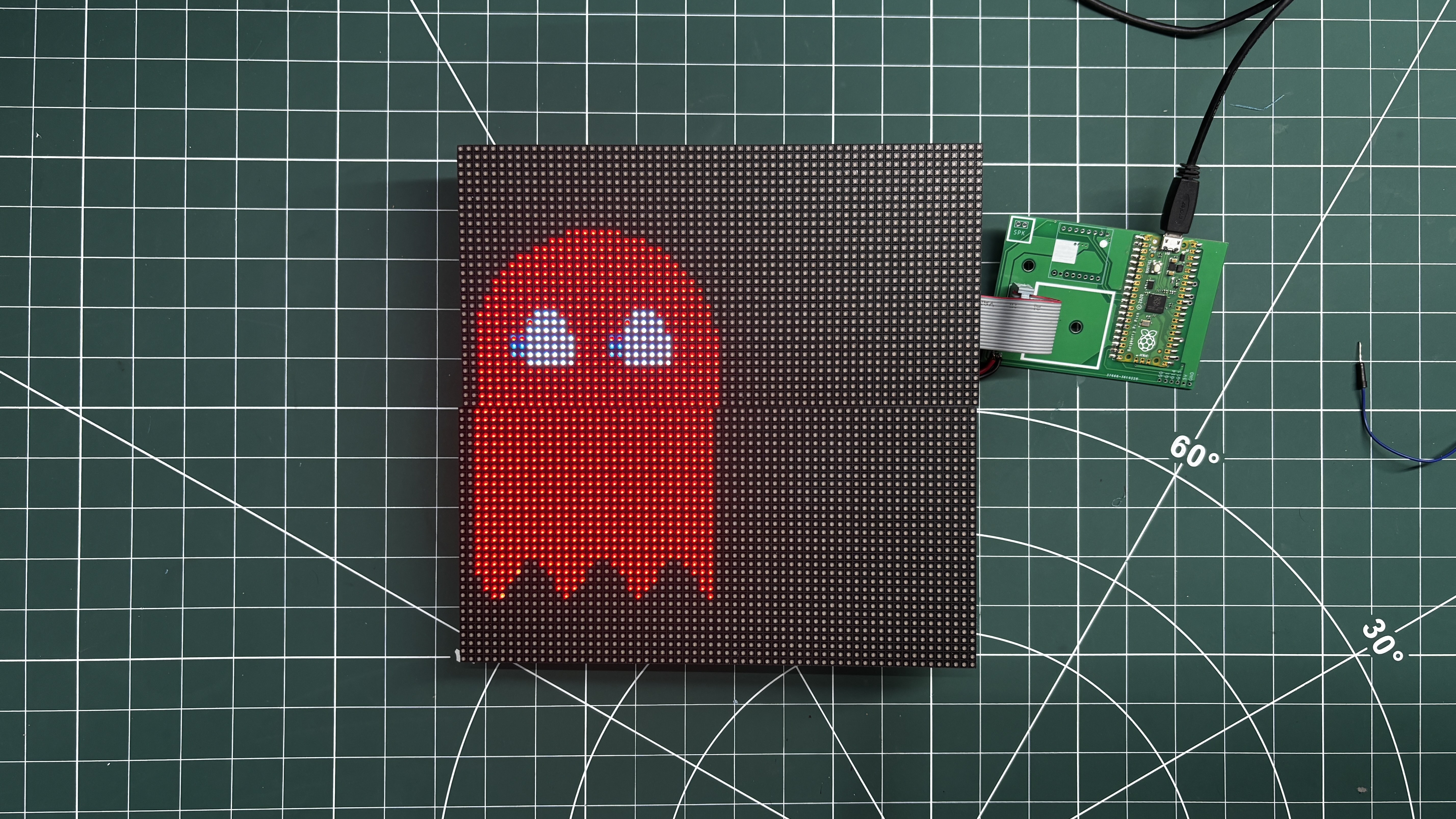
After testing the single-matrix setup, we added the second RGB matrix by connecting its VCC and GND lines in parallel with those of the first matrix.
Next, we used a slightly longer 16-pin ribbon cable to connect the HUB75 DOUT connector of the first matrix to the HUB75 DIN connector of the second matrix. This daisy-chains the two 64×32 matrices together, allowing them to operate as a single 64×64 RGB matrix display.
7
DUAL MATRIX DEMO
Just like the single-matrix demo code, we prepared the same Cyber-Ghost animation for the dual-matrix setup, which has a total resolution of 64×64 pixels.
We uploaded the code below to the Raspberry Pi Pico, and the setup worked perfectly, with both RGB matrix operating together as a single 64×64 display.
Updated Code
#include<Adafruit_Protomatter.h>#include<math.h>// ── Pins (Raspberry Pi Pico GPIO) ─────────────────────────────────#define R1 2#define G1 3#define B1 4#define R2 5#define G2 6 // Confirmed GPIO 6#define B2 9#define PIN_A 10#define PIN_B 16#define PIN_C 18#define PIN_D 20#define CLK 11#define LAT 12#define OE 13// ── Resolution for TWO Chained 64x32 Panels (64x64 total) ─────────#define W 64#define H 64uint8_t rgbPins[] = { R1, G1, B1, R2, G2, B2 };
uint8_t addrPins[] = { PIN_A, PIN_B, PIN_C, PIN_D };
// ── Constructor ───────────────────────────────────────────────────// Bit Depth = 3 (Maximum refresh speed, zero flicker!)// Double Buffer = true// Tiling = 2 (Change to -2 if your second chained panel displays upside down)Adafruit_Protomatter matrix(
W, 3, 1, rgbPins,
4, addrPins,
CLK, LAT, OE,
true,
2
);
// ── Global Variables & Timing ─────────────────────────────────────uint32_t frameCount = 0;
// Fast RGB565 color helperinline uint16_t rgb(uint8_t r, uint8_t g, uint8_t b){
return matrix.color565(r, g, b);
}
// ══════════════════════════════════════════════════════════════════// SCENE: Scaled Rainbow Cyber-Ghost (Smooth Sine Physics for 64x64)// ══════════════════════════════════════════════════════════════════voiddrawPacGhost(){
matrix.fillScreen(0);
float t = frameCount * 0.05f;
// ── Blazing-Fast Integer Color Cycle: Red -> Purple -> Blue -> Green -> Red ──// Using pure 8-bit integer math prevents CPU float stalling and eliminates top-to-bottom scan lag!uint8_t wheelPos = (frameCount >> 1) & 0xFF; // Change (>> 1) to (>> 2) for a slower color transitionuint8_t r, g, b;
if (wheelPos < 85) {
r = 255 - wheelPos * 3;
g = 0;
b = wheelPos * 3;
} elseif (wheelPos < 170) {
wheelPos -= 85;
r = 0;
g = wheelPos * 3;
b = 255 - wheelPos * 3;
} else {
wheelPos -= 170;
r = wheelPos * 3;
g = 255 - wheelPos * 3;
b = 0;
}
uint16_t GHOST_COLOR = rgb(r, g, b);
uint16_t EYE_WHITE = rgb(240, 240, 240);
uint16_t PUPIL_BLUE = rgb(0, 50, 255);
// ── Spatial Movement: Center X drifts side to side, Center Y hovers gently ──float base_cx = 32.0f + sinf(t * 1.2f) * 16.0f;
float hover_y = sinf(t * 3.0f) * 2.5f;
// Render body bounding box scaled specifically for the 64px vertical canvasfor (int y = 8; y < 58; y++) {
for (int x = base_cx - 18; x < base_cx + 18; x++) {
if(x < 0 || x >= W || y < 0 || y >= H) continue;
float relX = x - base_cx;
float relY = (y - 12) + hover_y;
// Upscaled proportions to fill the 64x64 gridfloat headRadius = 15.0f;
float bodyHeight = 24.0f;
bool drawPixel = false;
// 1. Semi-circular dome headif (relY < headRadius) {
float dx = relX;
float dy = relY - headRadius;
if (sqrtf(dx*dx + dy*dy) < headRadius) {
drawPixel = true;
}
}
// 2. Solid mid-bodyelseif (relY >= headRadius && relY < bodyHeight + headRadius) {
if (relX >= -15.0f && relX <= 15.0f) {
drawPixel = true;
}
}
// 3. Animated rippling feet (fluid sinusoidal waves across the bottom edge)elseif (relY >= bodyHeight + headRadius) {
float footRipple = 2.5f * sinf(relX * 0.7f - t * 4.0f);
if (relY < (bodyHeight + headRadius + 4.0f + footRipple) && relX >= -15.0f && relX <= 15.0f) {
drawPixel = true;
}
}
if (drawPixel) {
matrix.drawPixel(x, y, GHOST_COLOR);
}
}
}
// ── Dynamic Eye Tracking (Eyes shift naturally as the ghost moves) ──float lookX = sinf(t * 1.2f) * 3.0f;
float lookY = cosf(t * 1.5f) * 1.5f;
auto drawEye = [&](float ex, float ey) {
// Large vertical oval eyes (6x10 pixels)for (int y = ey - 5; y < ey + 5; y++) {
for (int x = ex - 3; x < ex + 3; x++) {
if(x < 0 || x >= W || y < 0 || y >= H) continue;
float dx = x - ex;
float dy = y - (ey + hover_y);
if((dx*dx / 9.0f) + (dy*dy / 25.0f) < 1.0f) {
matrix.drawPixel(x, y, EYE_WHITE);
}
}
}
// 2x2 Blue Pupilsint px = ex + lookX;
int py = (ey + hover_y) + lookY;
matrix.fillRect(px - 1, py - 1, 2, 2, PUPIL_BLUE);
};
// Position left and right eyes symmetrically on the larger head
drawEye(base_cx - 6.0f, 22.0f);
drawEye(base_cx + 6.0f, 22.0f);
}
// ── Setup & Loop ───────────────────────────────────────────────────voidsetup(){
Serial.begin(115200);
ProtomatterStatus s = matrix.begin();
if (s != PROTOMATTER_OK) {
Serial.print("Protomatter Init Error: ");
Serial.println((int)s);
while(1);
}
}
voidloop(){
drawPacGhost();
matrix.show();
frameCount++;
// 15ms delay yields a rock-solid ~60 FPS animation loop
delay(15);
}
8
WIRING - PICO DRIVER & SWITCH BOARD
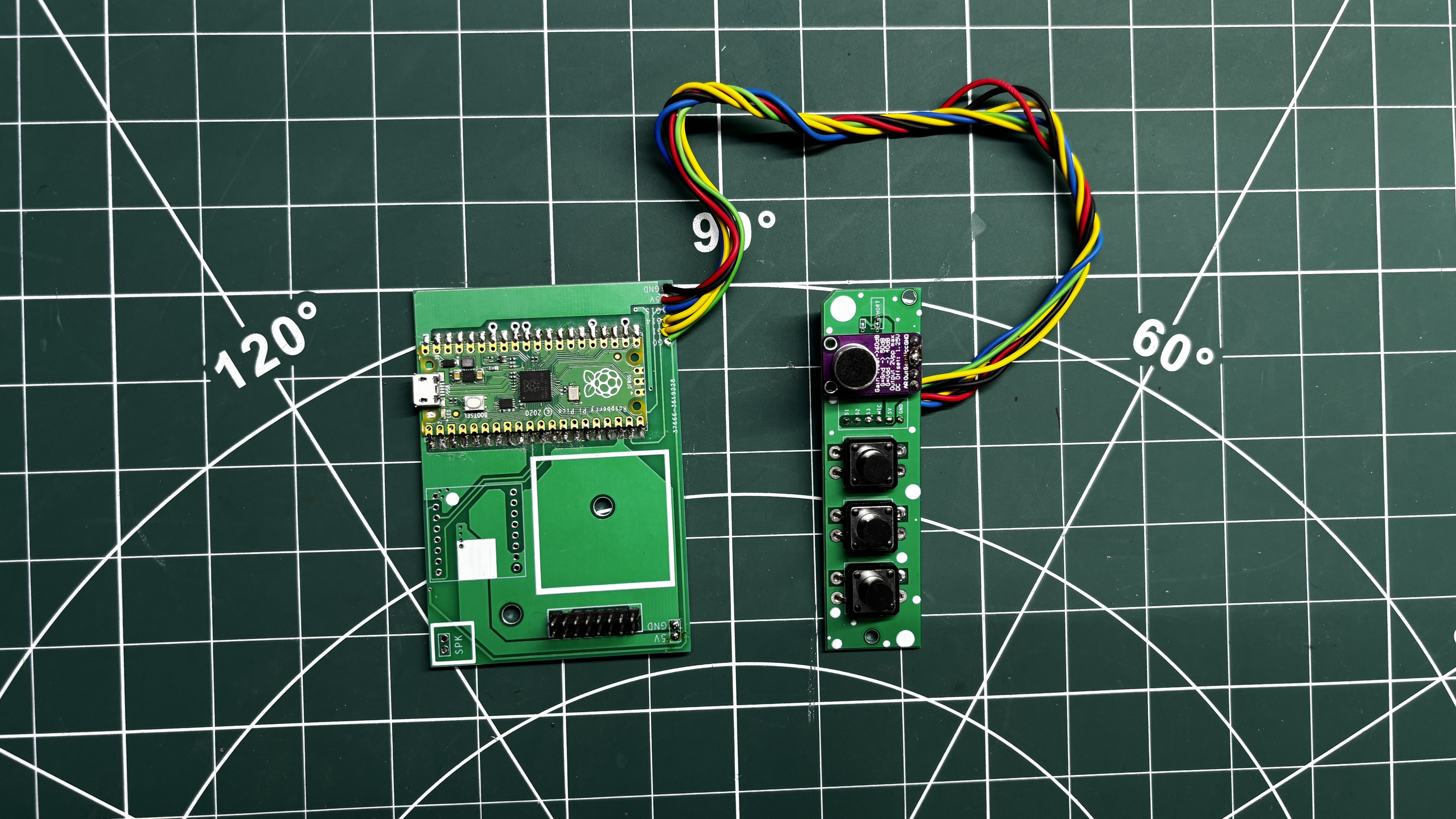
The Pico Driver Board is first disconnected from the RGB matrix and connected to the Switch Board.
We begin by connecting the GND of the Pico Driver Board to the GND of the Switch Board, followed by connecting the 5V output of the Pico Driver Board to the VCC input of the Switch Board.
Next, Switch 1 (PREV) is connected to GPIO0, Switch 2 (NEXT) is connected to GPIO14, and Switch 3 (WAVEFORM MODE) is connected to GPIO1. Finally, the microphone output pin on the Switch Board is connected to GPIO28 of the Pico.
For all these connections, we use single-core silver-plated copper wire.
9
WIRING - PICO DRIVER SWITCH BOARD WITH POWER BOARD
The 5V and GND outputs of the Power Board are connected to the 5V and GND terminals of the Pico Driver Board using two connecting wires
10
CODE
Before beginning the matrix assembly process, I uploaded the main code to the Raspberry Pi Pico.
#include<Adafruit_Protomatter.h>#include<math.h>// ── Pins (Raspberry Pi Pico GPIO) ─────────────────────────────────#define R1 2#define G1 3#define B1 4#define R2 5#define G2 6#define B2 9#define PIN_A 10#define PIN_B 16#define PIN_C 18#define PIN_D 20#define CLK 11#define LAT 12#define OE 13// ── Buttons ───────────────────────────────────────────────────────#define BTN_PREV 0#define BTN_NEXT 14#define BTN_WAVE 1// ── Resolution for TWO Chained 64x32 Panels (64x64 total) ─────────#define W 64#define H 64uint8_t rgbPins[] = { R1, G1, B1, R2, G2, B2 };
uint8_t addrPins[] = { PIN_A, PIN_B, PIN_C, PIN_D };
Adafruit_Protomatter matrix(
W, 3, 1, rgbPins, 4, addrPins, CLK, LAT, OE, true, 2
);
// ── Global Variables & Timing ─────────────────────────────────────uint32_t frameCount = 0;
int currentAnim = 0;
constint NUM_ANIMS = 9;
unsignedlong previousMillis = 0;
constint frameInterval = 16;
bool lastBtnPrev = HIGH;
bool lastBtnNext = HIGH;
bool lastBtnWave = HIGH;
unsignedlong lastDebounceTime = 0;
constunsignedlong debounceDelay = 50;
// ── Audio / Waveform Settings ─────────────────────────────────────constint MIC_PIN = 28; // Using GPIO 28 (ADC2)constint OVERSAMP = 128;
constint X_STEP = 2;
constint NUM_POINTS = W / X_STEP;
constfloat MAX_WAVE_FRACTION = 0.5f;
float rmsPeak = 200.0f;
float loudSmooth = 0.0f;
bool noiseInit = false;
float noiseFloor = 100.0f;
constfloat LOUD_GATE = 0.08f;
float waveY[NUM_POINTS];
bool waveMode = false;
inline uint16_t rgb(uint8_t r, uint8_t g, uint8_t b){
return matrix.color565(r, g, b);
}
// ══════════════════════════════════════════════════════════════════// ANIMATION 0: The Original Cyber-Ghost// ══════════════════════════════════════════════════════════════════voiddrawPacGhost(){
matrix.fillScreen(0);
float t = frameCount * 0.05f;
uint8_t wheelPos = (frameCount >> 1) & 0xFF;
uint8_t r, g, b;
if (wheelPos < 85) { r = 255 - wheelPos * 3; g = 0; b = wheelPos * 3; }
elseif (wheelPos < 170) { wheelPos -= 85; r = 0; g = wheelPos * 3; b = 255 - wheelPos * 3; }
else { wheelPos -= 170; r = wheelPos * 3; g = 255 - wheelPos * 3; b = 0; }
uint16_t GHOST_COLOR = rgb(r, g, b);
float base_cx = 32.0f + sinf(t * 1.2f) * 16.0f;
float hover_y = sinf(t * 3.0f) * 2.5f;
for (int y = 8; y < 58; y++) {
for (int x = base_cx - 18; x < base_cx + 18; x++) {
if(x < 0 || x >= W || y < 0 || y >= H) continue;
float relX = x - base_cx; float relY = (y - 12) + hover_y;
bool drawPixel = false;
if (relY < 15.0f) {
if (sqrtf(relX*relX + (relY - 15.0f)*(relY - 15.0f)) < 15.0f) drawPixel = true;
} elseif (relY >= 15.0f && relY < 39.0f) {
if (relX >= -15.0f && relX <= 15.0f) drawPixel = true;
} elseif (relY >= 39.0f) {
float footRipple = 2.5f * sinf(relX * 0.7f - t * 4.0f);
if (relY < (43.0f + footRipple) && relX >= -15.0f && relX <= 15.0f) drawPixel = true;
}
if (drawPixel) matrix.drawPixel(x, y, GHOST_COLOR);
}
}
float lookX = sinf(t * 1.2f) * 3.0f; float lookY = cosf(t * 1.5f) * 1.5f;
auto drawEye = [&](float ex, float ey) {
for (int y = ey - 5; y < ey + 5; y++) {
for (int x = ex - 3; x < ex + 3; x++) {
if(x < 0 || x >= W || y < 0 || y >= H) continue;
float dx = x - ex; float dy = y - (ey + hover_y);
if((dx*dx / 9.0f) + (dy*dy / 25.0f) < 1.0f) matrix.drawPixel(x, y, rgb(240, 240, 240));
}
}
matrix.fillRect(ex + lookX - 1, (ey + hover_y) + lookY - 1, 2, 2, rgb(0, 50, 255));
};
drawEye(base_cx - 6.0f, 22.0f); drawEye(base_cx + 6.0f, 22.0f);
}
// ══════════════════════════════════════════════════════════════════// ANIMATION 1: Cyberpunk 2077 Relic Glitch// ══════════════════════════════════════════════════════════════════voiddrawCyberpunkRelic(){
matrix.fillScreen(rgb(10, 0, 15)); // Dark corporate backgrounduint16_t neonCyan = rgb(0, 255, 255);
uint16_t neonYellow = rgb(255, 240, 0);
uint16_t neonRed = rgb(255, 0, 50);
// Intentional X-axis tearing/glitching for the entire logoint glitchX = (random(100) > 85) ? random(-6, 6) : 0;
// Base coordinates for the logoint x = 16 + glitchX;
int y = 8;
// ── Draw the Custom Relic Logo Geometry ──// Outer Frame
matrix.fillRect(x, y, 32, 6, neonRed); // Top horizontal
matrix.fillRect(x + 26, y, 6, 32, neonRed); // Right vertical
matrix.fillRect(x + 14, y + 26, 18, 6, neonRed); // Bottom horizontal (partial)
matrix.fillRect(x, y, 6, 22, neonRed); // Left vertical// Inner 'R' Mechanism
matrix.fillRect(x, y + 12, 16, 6, neonRed); // Middle horizontal
matrix.fillRect(x + 14, y + 12, 6, 9, neonRed); // Inner right vertical// The iconic 45-degree angle cut
matrix.fillRect(x, y + 22, 10, 6, neonRed); // Bottom-left inward turnfor(int i = 0; i < 6; i++) {
matrix.drawLine(x + 8 + i, y + 27, x + 16 + i, y + 19, neonRed); // Thick diagonal line
}
// Draw "RELIC" Text below the logo
matrix.setCursor(17 + glitchX, 44);
matrix.setTextColor(neonRed);
matrix.print("RELIC");
// Glitching core data block inside the logo
matrix.fillRect(x + 12, y + 16, 4, 4, neonYellow);
// ── Glitch & Artifact Effects ──// Digital barcode / hacking lines cutting acrossfor(int i = 0; i < 7; i++) {
int lineY = random(0, 64);
matrix.drawFastHLine(random(0, 32), lineY, random(10, 45), neonCyan);
}
// Occasional full-screen EMP tear (Yellow flash with a black void)if (random(100) > 92) {
int tearY = random(10, 50);
matrix.fillRect(0, tearY, 64, random(2, 6), neonYellow);
matrix.fillRect(0, tearY + 2, 64, random(2, 5), 0); // Black tear slicing the screen
}
}
// ══════════════════════════════════════════════════════════════════// ANIMATION 2: Retro Doom Fire (Integer Cellular Automata)// ══════════════════════════════════════════════════════════════════uint8_t firePixels[W * (H + 1)]; // 1D array for speedvoiddrawRetroFire(){
// Feed the bottom row with random bright intensityfor (int x = 0; x < W; x++) {
firePixels[(H - 1) * W + x] = random(160, 255);
}
// Propagate upwardsfor (int y = 0; y < H - 1; y++) {
for (int x = 0; x < W; x++) {
int src = (y + 1) * W + x;
int decay = random(0, 3);
int dstX = x - decay + 1;
if (dstX < 0) dstX = 0; if (dstX > W - 1) dstX = W - 1;
int dst = y * W + dstX;
int val = firePixels[src] - decay * 2;
firePixels[dst] = (val > 0) ? val : 0;
// Fast color mapping (Black -> Red -> Orange -> Yellow -> White)uint8_t intensity = firePixels[dst];
uint8_t r = (intensity > 128) ? 255 : intensity * 2;
uint8_t g = (intensity > 128) ? (intensity - 128) * 2 : 0;
uint8_t b = (intensity > 192) ? (intensity - 192) * 4 : 0;
matrix.drawPixel(x, y, rgb(r, g, b));
}
}
}
// ══════════════════════════════════════════════════════════════════// ANIMATION 3: XOR Cyber-Fractal (Fast Integer Hypnosis)// ══════════════════════════════════════════════════════════════════voiddrawXORFractal(){
matrix.fillScreen(0);
uint16_t t = frameCount * 2;
for (int y = 0; y < H; y++) {
for (int x = 0; x < W; x++) {
// Pure mathematical bitwise alien patternuint8_t c = ((x * 4) ^ (y * 4)) - t;
uint8_t r = (c * 2) % 255;
uint8_t g = (c * 4) % 255;
uint8_t b = 255 - c;
matrix.drawPixel(x, y, rgb(r, g, b));
}
}
}
// ══════════════════════════════════════════════════════════════════// ANIMATION 4: Synthwave Outrun Grid// ══════════════════════════════════════════════════════════════════voiddrawSynthwave(){
matrix.fillScreen(rgb(5, 0, 15)); // Dark retro-purple sky// 1. Synthwave Sun (with scrolling scanline cutouts)int sunY = 24;
for (int y = 10; y < 38; y++) {
int slice = (y - (frameCount >> 1)) % 6;
if (y > 24 && slice < 2) continue; // Scanline gapsint dy = y - sunY;
if (dy * dy <= 196) { // Circle radius 14 (14^2 = 196)int dx = sqrt(196 - dy * dy);
uint8_t g = (38 - y) * 7; // Gradient: Yellow top, Red bottom
matrix.drawFastHLine(32 - dx, y, dx * 2, rgb(255, g, 0));
}
}
// 2. Glowing Cyan Horizon
matrix.drawFastHLine(0, 38, W, rgb(0, 255, 255));
// 3. Perspective Grid (Floor)// Radiating vertical linesfor (int x = -100; x < 164; x += 18) {
matrix.drawLine(32, 38, x, 63, rgb(200, 0, 255));
}
// Moving horizontal perspective lines (speed controlled by frameCount offset)int offset = (frameCount >> 1) % 6;
for (int y = 39; y < H; y++) {
int depth = y - 38;
if ((depth + offset) % (depth / 3 + 2) == 0) {
matrix.drawFastHLine(0, y, W, rgb(255, 0, 255));
}
}
}
// ══════════════════════════════════════════════════════════════════// ANIMATION 5: Neon Qix Trails (Mystify)// ══════════════════════════════════════════════════════════════════staticfloat qx[4] = {10, 54, 10, 54};
staticfloat qy[4] = {10, 10, 54, 54};
staticfloat qvx[4] = {1.5, -1.2, 1.3, -1.6};
staticfloat qvy[4] = {1.2, 1.7, -1.1, 1.4};
#define TAIL 8staticint hx[4][TAIL] = {0};
staticint hy[4][TAIL] = {0};
voiddrawNeonQix(){
matrix.fillScreen(0);
// Shift trail historyfor(int i = 0; i < 4; i++) {
for(int t = TAIL - 1; t > 0; t--) {
hx[i][t] = hx[i][t-1];
hy[i][t] = hy[i][t-1];
}
hx[i][0] = (int)qx[i];
hy[i][0] = (int)qy[i];
}
// Move head points and bounce off edgesfor(int i = 0; i < 4; i++) {
qx[i] += qvx[i];
qy[i] += qvy[i];
if(qx[i] <= 0 || qx[i] >= W - 1) qvx[i] = -qvx[i];
if(qy[i] <= 0 || qy[i] >= H - 1) qvy[i] = -qvy[i];
}
// Draw fading geometric connecting linesfor(int t = 0; t < TAIL; t++) {
if (hx[0][t] == 0 && hy[0][t] == 0) continue; // Skip first frameuint8_t fade = 255 - (t * (255 / TAIL));
uint16_t c1 = rgb(fade, 0, fade / 2); // Neon Pinkuint16_t c2 = rgb(0, fade, fade); // Neon Cyan
matrix.drawLine(hx[0][t], hy[0][t], hx[1][t], hy[1][t], c1);
matrix.drawLine(hx[1][t], hy[1][t], hx[2][t], hy[2][t], c2);
matrix.drawLine(hx[2][t], hy[2][t], hx[3][t], hy[3][t], c1);
matrix.drawLine(hx[3][t], hy[3][t], hx[0][t], hy[0][t], c2);
}
}
// ══════════════════════════════════════════════════════════════════// ANIMATION 6: Pikachu "Pika Pika!"// ══════════════════════════════════════════════════════════════════voiddrawPikachu(){
matrix.fillScreen(rgb(50, 150, 255)); // Bright Pokémon-sky blue background// "Pika Pika" speech cadence: open mouth twice quickly, then pauseint talkCycle = frameCount % 60;
bool mouthOpen = (talkCycle > 0 && talkCycle < 10) || (talkCycle > 15 && talkCycle < 25);
// Head bobs down slightly when talking to give it energyint hover = (mouthOpen) ? 2 : 0;
int cx = 32;
int cy = 34 + hover;
uint16_t yellow = rgb(255, 235, 20);
uint16_t black = rgb(0, 0, 0);
uint16_t red = rgb(255, 30, 30);
uint16_t white = rgb(255, 255, 255);
uint16_t tongue = rgb(255, 100, 100);
// ── 1. Outlines & Black Ear Tips ──// We draw slightly larger black shapes in the background to act as thick 8-bit outlines!
matrix.fillTriangle(cx - 10, cy - 8, cx - 2, cy - 18, cx - 28, cy - 32, black); // Left Ear
matrix.fillTriangle(cx + 10, cy - 8, cx + 2, cy - 18, cx + 28, cy - 32, black); // Right Ear
matrix.fillRoundRect(cx - 23, cy - 15, 46, 32, 15, black); // Head Outline// ── 2. Yellow Body ──// The yellow triangles stop shorter than the black ones to naturally create the black ear tips!
matrix.fillTriangle(cx - 10, cy - 8, cx - 4, cy - 16, cx - 18, cy - 20, yellow); // Left Ear
matrix.fillTriangle(cx + 10, cy - 8, cx + 4, cy - 16, cx + 18, cy - 20, yellow); // Right Ear
matrix.fillRoundRect(cx - 21, cy - 14, 42, 30, 14, yellow); // Head// ── 3. Face Details ──// Cheeks
matrix.fillCircle(cx - 15, cy + 5, 5, red);
matrix.fillCircle(cx + 15, cy + 5, 5, red);
// Eyes (Black base, white glint)
matrix.fillCircle(cx - 9, cy - 2, 4, black);
matrix.fillCircle(cx + 9, cy - 2, 4, black);
matrix.fillCircle(cx - 10, cy - 3, 1, white);
matrix.fillCircle(cx + 8, cy - 3, 1, white);
// Nose
matrix.fillRect(cx - 1, cy + 2, 3, 2, black);
// ── 4. Animated Mouth ──if (mouthOpen) {
// Open Mouth "Pika!"
matrix.fillCircle(cx, cy + 7, 4, black);
matrix.fillCircle(cx, cy + 8, 2, tongue); // Red tongue// Hide top half of the circle with yellow to make it a 'D' shape
matrix.fillRect(cx - 5, cy + 3, 10, 4, yellow);
} else {
// Closed Mouth 'w' shape// Left curve
matrix.drawLine(cx - 4, cy + 5, cx - 2, cy + 7, black);
matrix.drawLine(cx - 2, cy + 7, cx, cy + 5, black);
// Right curve
matrix.drawLine(cx, cy + 5, cx + 2, cy + 7, black);
matrix.drawLine(cx + 2, cy + 7, cx + 4, cy + 5, black);
}
}
// ══════════════════════════════════════════════════════════════════// ANIMATION 7: Exact 8-Bit Mario Block Jump// ══════════════════════════════════════════════════════════════════// Perfect 16x16 Pixel Map of the "?" Blockconstchar* blockSprite[16] = {
"KKKKKKKKKKKKKKKK",
"KYYYYYYYYYYYYYDK",
"KYYYYYYYYYYYYYDK",
"KYYYKKKKKKYYYYDK",
"KYYYKWWWWKYYYYDK",
"KYYKWWKKWWKYYYDK",
"KYYKWKYYKWWKKYDK",
"KYYYKKYYKWWKKYDK",
"KYYYYYYKWWKKYDKK",
"KYYYYYYKWWKKYDKK",
"KYYYYYYYKKYYYYDK",
"KYYYYYKWWKYYYYDK",
"KYYYYYKWWKYYYYDK",
"KYYYYYYKKYYYYYDK",
"KDDDDDDDDDDDDDDK",
"KKKKKKKKKKKKKKKK"
};
// Perfect 16x16 Pixel Map of Mario (Modern 8-Bit Style)constchar* marioSprite[16] = {
".....KKKKK......",
"....KRRRRRK.....",
"...KRRRRRRRRK...",
"...KBBBSKSK.K...",
"..KBSBSSSBSSSK..",
"..KBSBSSSSSSSK..",
"..KBBSSSSSSBBK..",
"...KSSSSSSS.K...",
"..KKKRLRRRKKK...",
".KSSKLLRLLRKSSK.",
".KSSKLLRLLRKSSK.",
".KSSKLLYLLRKSSK.",
"..KKKLLLLLLKKK..",
"...KKLLLLLLKK...",
"..KBBBK..KBBBK..",
".KBBBBK..KBBBBK."
};
// Extremely fast sprite renderer reading the character mapvoiddrawSprite(int ox, int oy, constchar* sprite[], int scale){
for (int y = 0; y < 16; y++) {
for (int x = 0; x < 16; x++) {
char c = sprite[y][x];
if (c == '.') continue; // Skip transparencyuint16_t color = 0;
if (c == 'K') color = rgb(0,0,0); // Black Outlineelseif (c == 'Y') color = rgb(255,255,0); // Yellowelseif (c == 'D') color = rgb(200,120,0); // Dark Orange Shadingelseif (c == 'W') color = rgb(255,255,255); // Whiteelseif (c == 'R') color = rgb(255,0,0); // Mario Redelseif (c == 'B') color = rgb(120,60,0); // Mario Brownelseif (c == 'S') color = rgb(255,200,140); // Mario Skinelseif (c == 'L') color = rgb(0,80,255); // Mario Blue
matrix.fillRect(ox + (x * scale), oy + (y * scale), scale, scale, color);
}
}
}
voiddrawMarioBlock(){
matrix.fillScreen(rgb(100, 180, 255)); // Super Mario Sky Blue// Ground Base
matrix.fillRect(0, 56, 64, 8, rgb(200, 76, 12)); // Brick Red Ground
matrix.drawFastHLine(0, 56, 64, rgb(0,0,0)); // Ground Outlineint cycle = frameCount % 80;
int mY = 24; // Base Mario Y (Resting on the ground)int bY = 8; // Base Block Y// Mario Jump Physics (Sine Wave)if (cycle >= 10 && cycle <= 40) {
float t = (cycle - 10) / 30.0f; // Arc from 0.0 to 1.0
mY = 24 - (int)(sinf(t * 3.14159f) * 16.0f); // 16px high jump
}
// Block Bump Collisionif (cycle >= 23 && cycle <= 27) {
bY = 4; // Block jumps up when hit by Mario's head!
}
// Coin Pop-up!if (cycle >= 24 && cycle <= 36) {
float ct = (cycle - 24) / 12.0f;
int cY = 8 - (int)(sinf(ct * 3.14159f) * 16.0f);
matrix.fillRect(28, cY, 8, 12, rgb(255, 255, 0)); // Coin Body
matrix.drawRect(28, cY, 8, 12, rgb(200, 120, 0)); // Coin Outline
}
// Draw the entities (Scale = 2 makes them nice and chunky!)
drawSprite(16, bY, blockSprite, 2);
drawSprite(16, mY, marioSprite, 2);
}
// ══════════════════════════════════════════════════════════════════// ANIMATION 8: The Matrix Digital Rain// ══════════════════════════════════════════════════════════════════int rainY[W];
voiddrawMatrixRain(){
// Setup arrays on the very first frame of the animationif (frameCount == 0) {
for(int i=0; i<W; i++) rainY[i] = random(-60, 0);
}
matrix.fillScreen(0);
for (int x = 0; x < W; x++) {
rainY[x] += random(1, 3); // Fall speedif (rainY[x] > H + 15) rainY[x] = random(-20, 0);
// Draw trailfor (int t = 0; t < 15; t++) {
int y = rainY[x] - t;
if (y >= 0 && y < H) {
if (t == 0) matrix.drawPixel(x, y, rgb(200, 255, 200)); // Bright headelse matrix.drawPixel(x, y, rgb(0, 255 - (t * 15), 0)); // Fading tail
}
}
}
}
// ══════════════════════════════════════════════════════════════════// MODE: Audio Reactive Waveform (Standalone)// ══════════════════════════════════════════════════════════════════voiddrawWaveform(){
staticfloat samples[OVERSAMP];
uint32_t sum = 0;
for (int i = 0; i < OVERSAMP; i++) {
int v = analogRead(MIC_PIN);
samples[i] = (float)v;
sum += v;
delayMicroseconds(100); // Slight speed up for better sampling
}
// DEBUG: Uncomment this line to check values in Serial Monitor (115200)// Serial.println(sum / OVERSAMP);float dc = (float)sum / (float)OVERSAMP;
float rmsSum = 0.0f;
for (int i = 0; i < OVERSAMP; i++) {
float centered = samples[i] - dc;
rmsSum += centered * centered;
}
float rms = sqrtf(rmsSum / (float)OVERSAMP);
if (!noiseInit) { noiseFloor = rms; noiseInit = true; }
noiseFloor = (0.95f * noiseFloor) + (0.05f * rms);
float rmsEffective = rms - (noiseFloor * 1.2f); // Slightly higher gateif (rmsEffective < 0.0f) rmsEffective = 0.0f;
rmsPeak = (0.99f * rmsPeak) + (0.01f * rmsEffective);
float loud = (rmsPeak > 5.0f) ? (rmsEffective / rmsPeak) : 0.0f;
loudSmooth = (0.7f * loudSmooth) + (0.3f * loud);
// Build pointsfor (int i = 0; i < NUM_POINTS; i++) {
 Arnov Sharma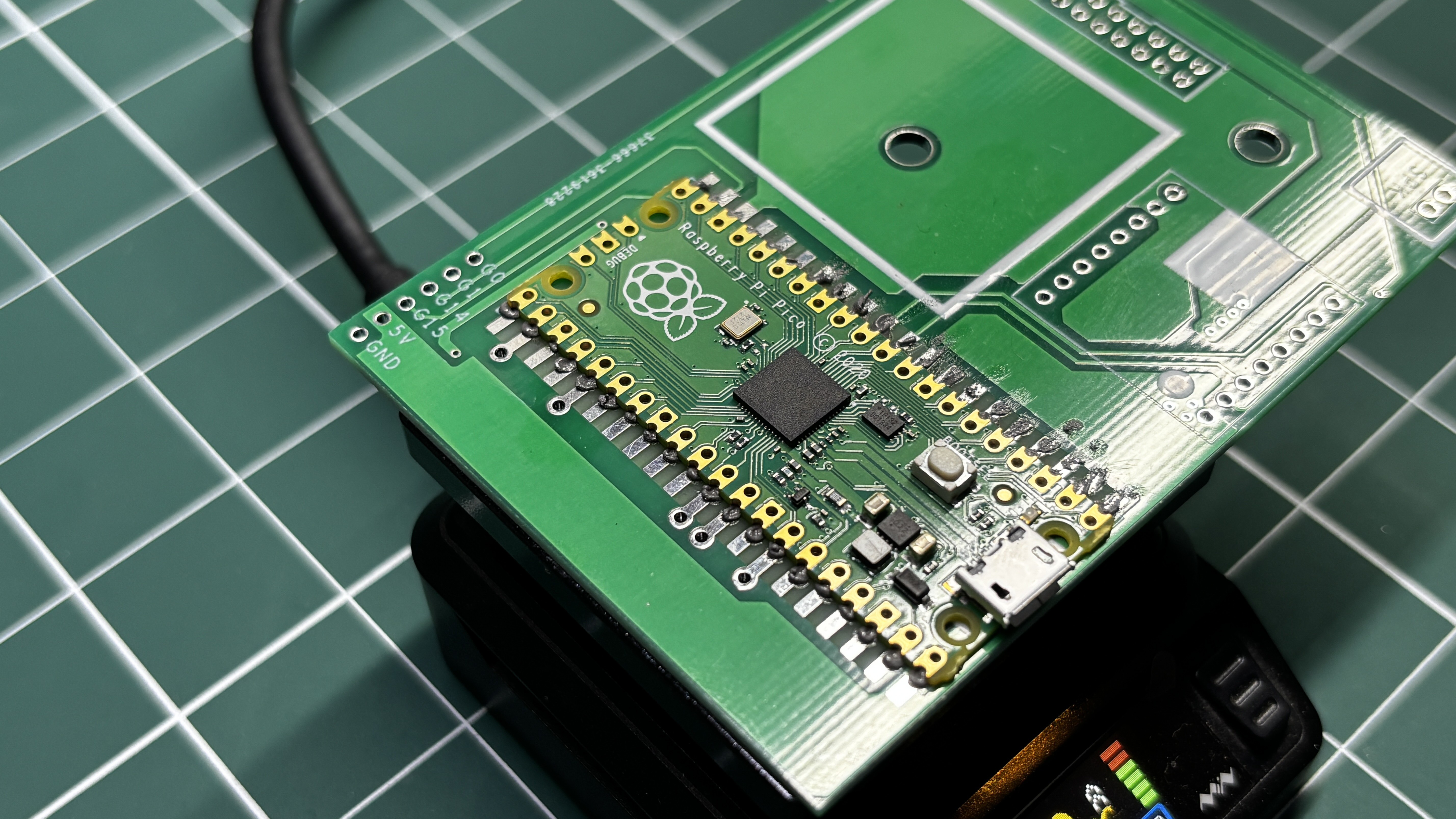
Discussions
Become a Hackaday.io Member
Create an account to leave a comment. Already have an account? Log In.