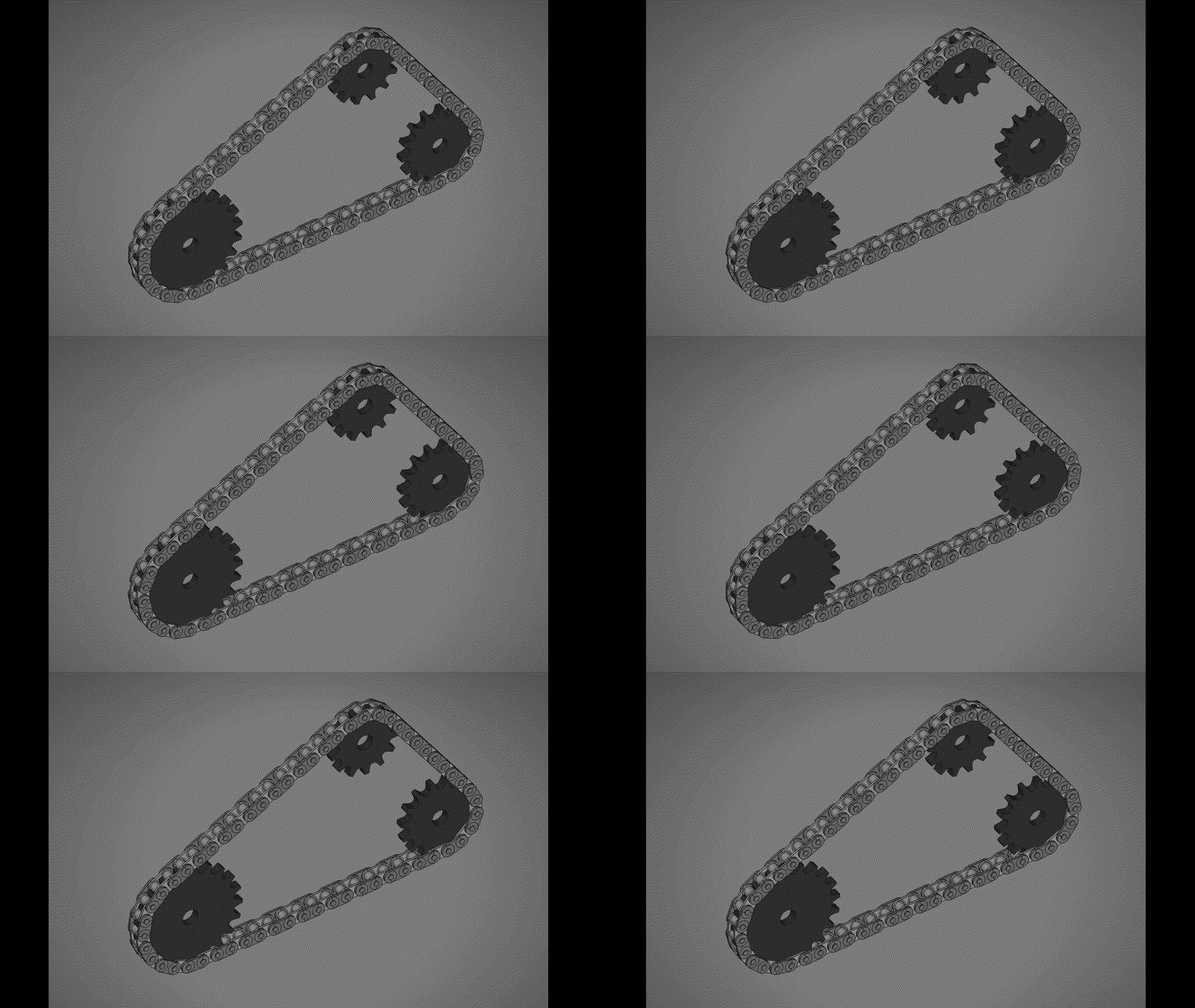
The plan is to create a simulated FreeCAD model so that all the geometry can be checked before going ahead into the fabrication stage. Parts will be made and arranged by means of Python macros created with the help of an LLM. So far so good.
Every weeding machine needs a PLANTINATOR
To make the experience fit your profile, pick a username and tell us what interests you.
We found and based on your interests.
The plan is to create a simulated FreeCAD model so that all the geometry can be checked before going ahead into the fabrication stage. Parts will be made and arranged by means of Python macros created with the help of an LLM. So far so good.
First Macro drawing for FreeCad is just to check it can be done easily. It works. Here is the first Macro:
import FreeCAD as App
import Part
import math
try:
from PySide import QtCore
except ImportError:
from PySide6 import QtCore
doc_name = "Chain_Sprocket_13T_15T_Simulation"
doc = App.newDocument(doc_name)
# --- 1. System Parameters ---
t1 = 13 # Left Sprocket Teeth
t2 = 15 # Right Sprocket Teeth
pitch = 9.525
roller_diameter = 6.35
bore_diameter = 10.0
plate_thickness = 5.3
num_links = 32 # Increased chain length to accommodate larger sprocket
# Chain Link Specs
inner_width = 5.72
pin_diameter = 3.28
link_plate_thickness = 1.3
# Calculated Radii
R1 = pitch / (2 * math.sin(math.pi / t1))
R2 = pitch / (2 * math.sin(math.pi / t2))
root1 = R1 - (roller_diameter / 2.0)
root2 = R2 - (roller_diameter / 2.0)
# --- 2. Iterative Solver for Exact Center Distance (C) ---
# A closed chain requires a geometrically perfect loop length.
L_target = num_links * pitch
C = 85.0 # Initial guess
for _ in range(50): # Newton-Raphson method for exact distance
theta = math.asin((R2 - R1) / C)
L_calc = 2 * C * math.cos(theta) + R1 * (math.pi - 2*theta) + R2 * (math.pi + 2*theta)
C -= (L_calc - L_target) / (2 * math.cos(theta))
# Final Path Geometry Variables
theta = math.asin((R2 - R1) / C)
L_str = C * math.cos(theta)
L_arc1 = R1 * (math.pi - 2 * theta)
L_arc2 = R2 * (math.pi + 2 * theta)
L_total = L_arc1 + L_arc2 + 2 * L_str
# Tangent Points defining the path layout
T1top = App.Vector(-R1 * math.sin(theta), R1 * math.cos(theta), 0)
T1bot = App.Vector(-R1 * math.sin(theta), -R1 * math.cos(theta), 0)
T2top = App.Vector(C - R2 * math.sin(theta), R2 * math.cos(theta), 0)
T2bot = App.Vector(C - R2 * math.sin(theta), -R2 * math.cos(theta), 0)
# --- 3. Dynamic Sprocket Generator ---
def create_sprocket(name, teeth, R_pitch, R_root):
R_outer = R_pitch + 2.3 # Scaled OD
base_cylinder = Part.makeCylinder(R_outer, plate_thickness)
scale_y = 0.85
# Parameterized Wedge Cutter to adapt to different radii
p_root = App.Vector(R_root, 0, 0)
p_A = App.Vector(R_pitch - 1.6, 2.77 * scale_y, 0)
p_B = App.Vector(R_pitch - 1.6, -2.77 * scale_y, 0)
p_M_up = App.Vector(R_pitch + 1.75, 4.5 * scale_y, 0)
p_M_low = App.Vector(R_pitch + 1.75, -4.5 * scale_y, 0)
p_3 = App.Vector(R_pitch + 5.1, 5.5 * scale_y, 0)
p_4 = App.Vector(R_pitch + 5.1, -5.5 * scale_y, 0)
arc_root = Part.Arc(p_B, p_root, p_A).toShape()
arc_up = Part.Arc(p_A, p_M_up, p_3).toShape()
arc_low = Part.Arc(p_4, p_M_low, p_B).toShape()
line_out = Part.LineSegment(p_3, p_4).toShape()
wedge_wire = Part.Wire([arc_root, arc_up, line_out, arc_low])
wedge_solid = Part.Face(wedge_wire).extrude(App.Vector(0, 0, plate_thickness + 2.0))
wedge_solid.translate(App.Vector(0, 0, -1.0))
sprocket = base_cylinder
for i in range(teeth):
cutter = wedge_solid.copy()
cutter.rotate(App.Vector(0, 0, 0), App.Vector(0, 0, 1), i * (360.0 / teeth))
sprocket = sprocket.cut(cutter)
bore = Part.makeCylinder(bore_diameter / 2.0, plate_thickness + 2.0)
bore.translate(App.Vector(0, 0, -1.0))
obj = doc.addObject("Part::Feature", name)
obj.Shape = sprocket.cut(bore)
obj.ViewObject.ShapeColor = (0.2, 0.2, 0.2)
return obj
sprocket_1 = create_sprocket("Sprocket_13T", t1, R1, root1)
sprocket_2 = create_sprocket("Sprocket_15T", t2, R2, root2)
sprocket_2.Placement.Base = App.Vector(C, 0, 0)
# --- 4. Chain Link Geometry ---
def create_link_plate(thickness, z_offset):
r = 4.0
cyl1 = Part.makeCylinder(r, thickness, App.Vector(0,0,z_offset))
cyl2 = Part.makeCylinder(r, thickness, App.Vector(pitch,0,z_offset))
box = Part.makeBox(pitch, r*2, thickness, App.Vector(0, -r, z_offset))
return cyl1.fuse(cyl2).fuse(box)
inner_plate_z1 = plate_thickness/2 + inner_width/2
inner_plate_z2 = plate_thickness/2 - inner_width/2 - link_plate_thickness
p1 = create_link_plate(link_plate_thickness, inner_plate_z1)
p2 = create_link_plate(link_plate_thickness, inner_plate_z2)
r1 = Part.makeCylinder(roller_diameter/2, inner_width,...
Read more »
Create an account to leave a comment. Already have an account? Log In.
Become a member to follow this project and never miss any updates