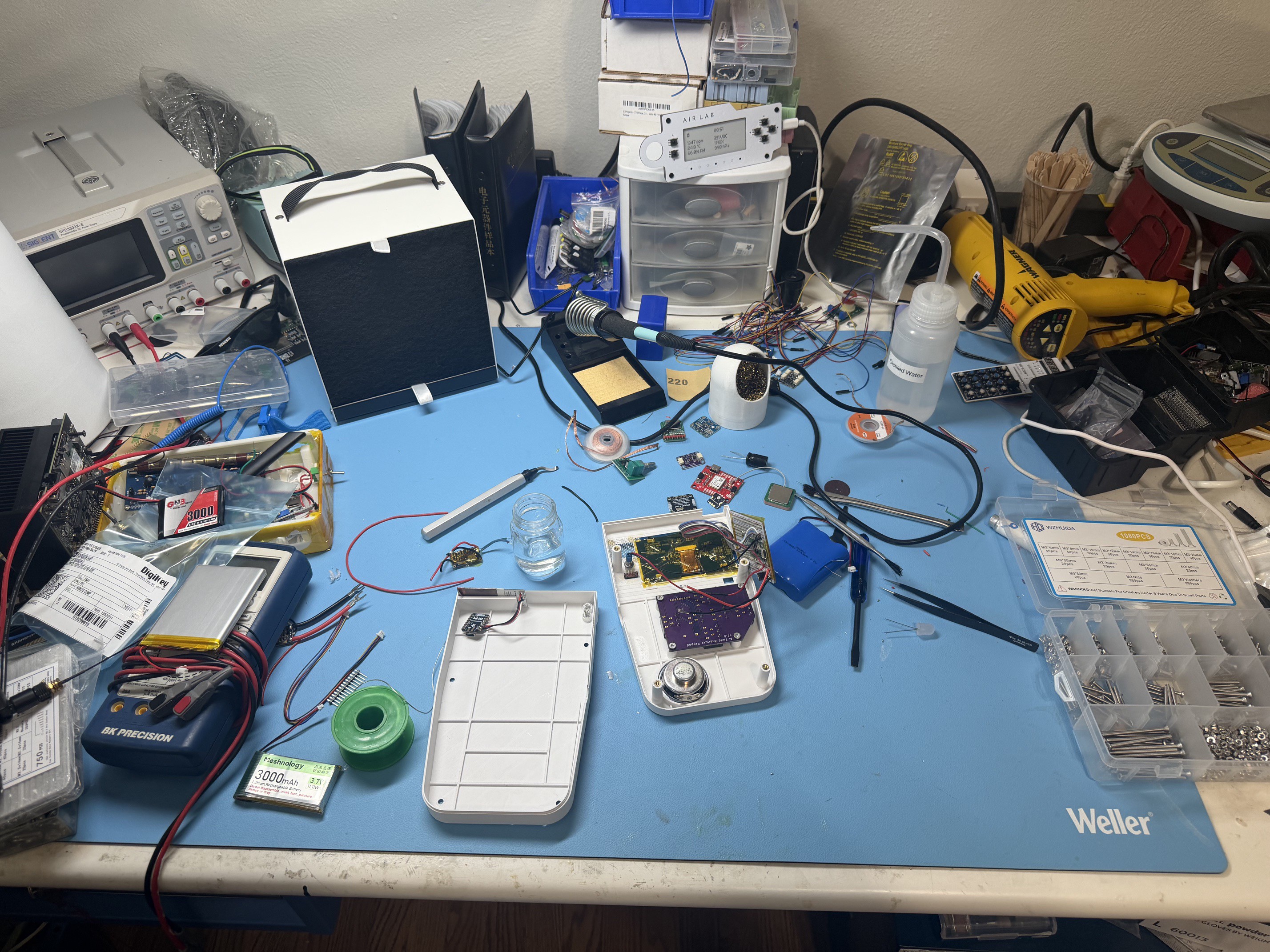
Built the tricorder I actually wanted in the field: one that warns, not just measures.
To make the experience fit your profile, pick a username and tell us what interests you.
We found and based on your interests.
Top Enclosure.stepstep - 1.27 MB - 07/13/2025 at 21:58 |
|
|
Bottom Enclosure.stepstep - 298.76 kB - 07/13/2025 at 21:58 |
|
|
AI_Field_Analyzer_Risk_Thresholds.xlsxsheet - 9.48 kB - 06/10/2025 at 13:19 |
|
|
AI Field Analyzer.xlsxInitial BOM, do not use as there will be changessheet - 10.74 kB - 06/09/2025 at 00:55 |
|
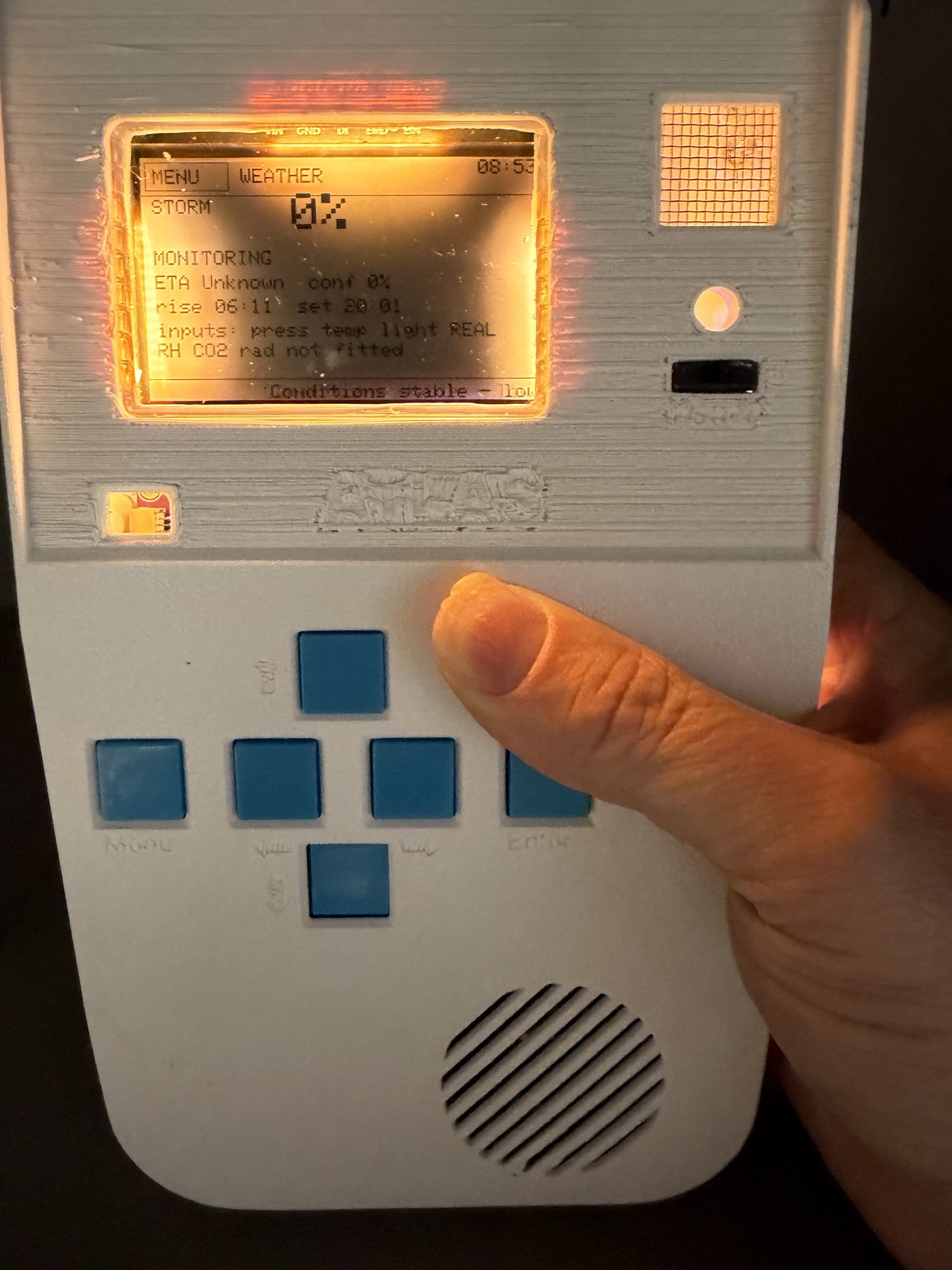
Still don't have all the buttons installed, but I wasn't going to let that stop me from building out the menu systems.
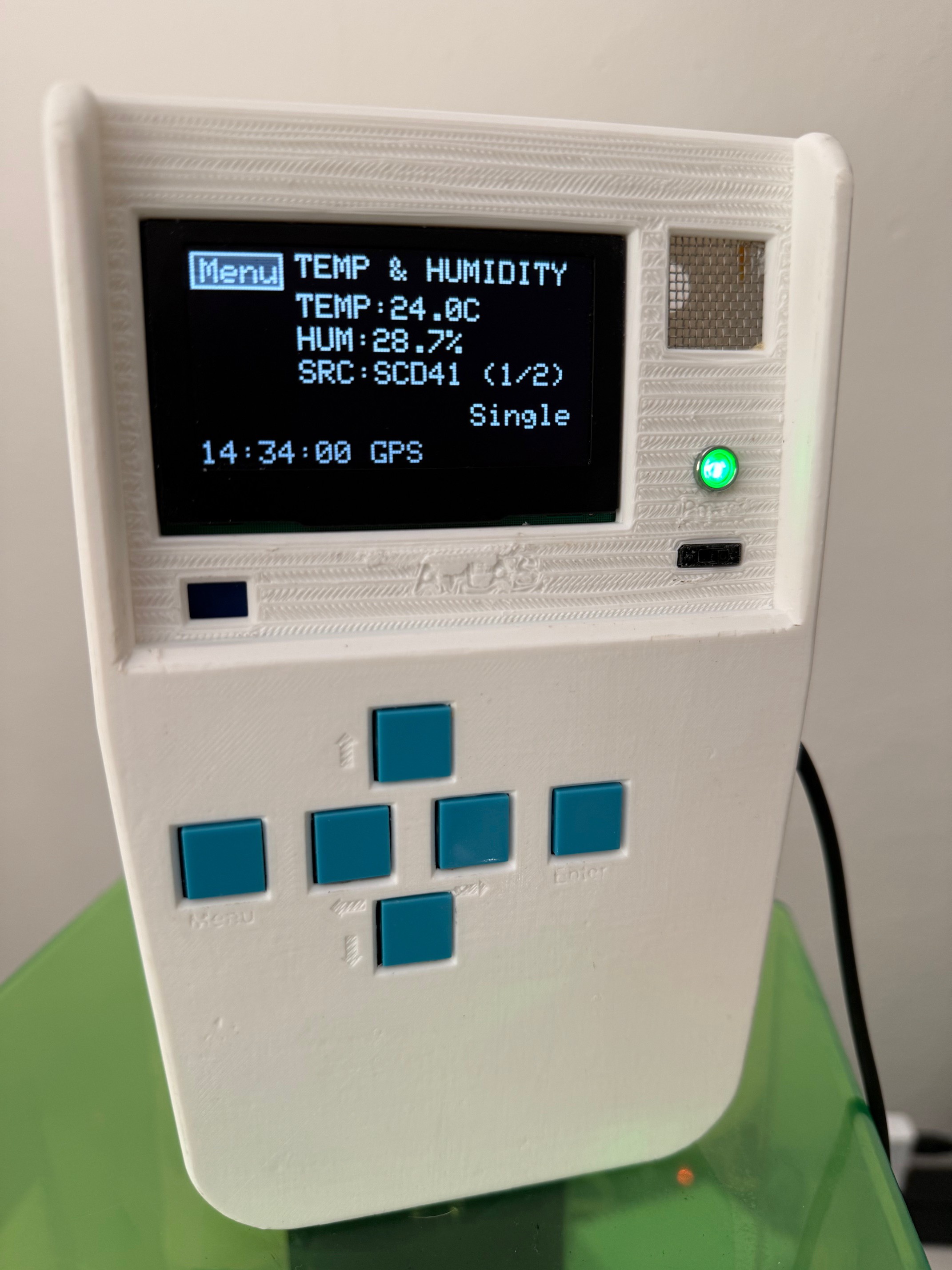
Currently I'm controlling everything from the serial interface using WASD and E and M for Up, Down, Left, Right, Menu and Enter. The menu system is quite functional - first, the menu button stays on screen at all times, then you can press E or M to enter the menu system. From there you can access:
1. Screens: Load individual static screens to lock them in place. The system continues monitoring all sensors but only displays what you're asking for - Thermal, System, Compass, Weather, and so forth.
2. Settings: Two options here - Brightness (which does nothing yet) and Units, which switches all sensor data from Metric to Freedom units.
3. Imager: Just a placeholder for when I reintegrate the thermal imaging camera.
4. Mode: Normal mode cycles through all screens, while Low Power mode actually does something useful - it refreshes the screen less frequently and polls sensors less often too. I was thinking about adding a deep sleep mode, but then I thought... just turn it off?
5. Mark: Records your current location via GPS along with all sensor data to the SD card.
6. About: An auto-scrolling section with info about me, current firmware level, and a brief description.
7. Reboot: Asks for confirmation (yes/no) then reboots the MCU. Sure, you could turn it off and on again, but why not have this feature? It's cool and it just works.
Below is a video of it in action.
So here’s the thing. I went through the painstaking process of converting the entire codebase to C++. All of it. Beautifully brutal. (10,000 lines yep...) Then I noticed it was running slower than CircuitPython. Which, for the record, is like being outpaced by a kid on a tricycle while you're driving a sports car with the parking brake on.
Turns out Python, bless its interpreted little heart, automatically spreads the workload across both cores. Meanwhile, my glorious C++ code was partying hard on just one core like it was 2002.
And yes, in case you're wondering, the RP2350 in the Pico 2 has two cores. Two whole floating point capable cores just sitting there, sipping coffee, waiting to be asked to do literally anything. Moral of the story: delegate. Core 1 now handles sensor polling and weather logic, which includes some wonderfully blocking sensor reads. Core 0 sticks to the main loop and display manager like it’s got a purpose again.
Bonus update. I added my favorite feature yet: a working compass using the BNO085 IMU. It’s ridiculously accurate. I compared it to a real compass and was honestly insulted by how well it performed. So yeah, navigation just got a serious upgrade.
Next on the roadmap is breadcrumb mode. Mark your path using sensor fusion, then retrace your steps like a tiny digital Hansel, minus the birds.
Anyway, if you want to see the thing, here’s the teaser site:
Go ahead. Click it. Your browser probably won’t catch fire.
That’s a huge milestone, though not without pain. Here are a few fun (read: painful) lessons from the process.
Yeah, I know. Obvious, right? But getting text to scroll correctly in C++ took way more time than I care to admit. Python lets you get away with things. C++ reminds you that memory is real, types matter, and no, that thing you tried isn't going to compile.
Originally I had a custom GPS parser, but when moving to C++ I switched to the SparkFun's u-blox GNSS library. That came with its own set of problems. CPU usage jumped from 10% to 57–78%. The main issue? GPS was updating way too fast.
Let’s be honest... this isn’t a Tomahawk missile skimming treetops. There's no reason to poll GPS faster than every 3 seconds or so. Once I throttled that, the CPU calmed down.
My custom grayscale OLED display driver worked perfectly after the transition. No edits, no weird quirks. Still rendering clean text and thermal visuals. I’m calling that a win.
The thermal imager is I²C-heavy and CPU-greedy. So now, a long press on button 1 puts ATLAS into thermal mode, shutting down all other sensors and screens. (and back again) A press on button 2 swaps into Medical Mode. It’s not elegant, but it works — and it gives the system enough breathing room to handle the imager properly without data lag or weird interference.
I thought I was building Apollo’s space guidance computer — a clean, practical interface for Earth-bound explorers. What I’ve actually built is starting to resemble HAL 9000.
Somehow, I’m stuffing all of this onto a Raspberry Pi Pico 2: GPS parsing, sensor fusion, thermal imaging, grayscale display rendering, environmental classification logic, and now — soon — speech. I’m in the process of merging in the Talkie speech synthesis library to add voice output: basic warnings, system alerts, and maybe the occasional deadpan comment about an incoming storm or bad air.
It’s not conversational (yet), but it’s veering toward full sci-fi. Let’s just hope it doesn’t start asking who’s in charge of the mission.
Hardware Status
I'm wiring up the two working buttons — the others have been out of stock forever — and I'm finalizing the design for both the main MCU board and a modular sensor board. There's also a teaser website live now. It's nothing fancy, but it helps keep momentum up.
Ten hours of software dev later, ATLAS is operational, switching modes, logging smart GPS reads, and still running under ~30% CPU. Progress. Painful, but real.
– Apollo out.
Ultra-Fast Thermal Imager: 12.5Hz C++ Performance with Medical Detection
Demo video of my thermal imaging module achieving 8Hz sensor/12.5Hz display refresh rates (fall short with all the math in the background however very quick) - a complete rewrite from CircuitPython to C++. While CircuitPython was too slow for the frame rates I needed, the main driver for C++ was integration with my Talky voice interface system, which is C++ only.
Technical Achievements:
Medical Mode Intelligence: The system starts in standard thermal imaging, then auto-switches to medical mode after 30 seconds. In medical mode, it performs human skin detection and applies a 1.5°C offset to estimate core body temperature. This enables real-time classification of hypothermia, normal temperature, and various fever levels (low, moderate, high, critical).
C++ Integration Benefits: The C++ rewrite solved both the performance bottleneck and enables seamless integration with the Talky voice system. The low-level optimizations deliver the fluid performance you see in the demo.
This thermal module will be a key component in the complete Tricorder build, providing both standard imaging and medical-grade temperature screening.
Here's the thing: I really didn't want a separate chip for speech synthesis, and true TTS would be overkill for what I'm building. This uses an Arduino C++ library modified for the Pico, based on the original work by Peter Knight. It's honestly the coolest thing ever.
I spent about 8 hours on this - not really on the conversion itself, but because I initially tried (and failed) to create a phoneme-based true text-to-speech program for the Pico 2. After struggling with that approach, I stumbled upon Peter's library and thought "Perfect! Why shouldn't I have 1980s-style robotic voice on my 2025-era tricorder?"
I created a fun demo to show it off and will be posting the code to the open source GitHub. It has many words pre-loaded and does a nice little demo with the correct vintage lookup tables.
The Integration Challenge Here's the interesting part: I have the thermal imaging module working, but it's in CircuitPython while this Talkie code is C++ only. So I'll be doing what I needed to do anyway - converting all the code from CircuitPython to C++. This should make for a more stable device with higher performance as well.
Once that module is converted, I'll have a medical mode for the imager that will tell you exactly what temperature it sees (in Fahrenheit) and whether there's cause for concern. Yes - a real-life talking medical thermal scanning module.
Smart Voice Alerts I'm planning to expand the speech to other sensor data, but I'm limiting most voice alerts to real concerns like:
The idea is ATLAS can stay in my backpack continuously scanning and only speak up when something important happens. I don't want it to be an annoying chatterbox.
Here's the demo of the talking code: Talkie_Med_Demo https://github.com/thedocdoc/AI-Field-Analyzer/tree/main
When testing ATLAS's medical thermal sensors, I needed reliable test subjects. Enter Walker, my big boned 27-pound French Bulldog who became my most cooperative beta tester, assuming every piece of technology pointed at him will eventually dispense treats.
Consistent Baselines: Dogs maintain steady core temps (38-39°C), perfect for calibrating thermal accuracy.
Real-World Movement: Unlike static human tests, Walker moves naturally while providing the added challenge of sudden "I'm going to investigate that interesting smell" mid-measurement redirections.
Fur Interface Testing: Measuring through fur validates readings through various surface materials - more forgiving than human hair but more challenging than bare skin.
Always Available: Walker never refuses a test session, mostly because he's convinced all technology is treat-adjacent.
Walker's perfectly normal 38.2°C triggered ATLAS's human fever alerts with impressive authority: "FEVER DETECTED - SEEK MEDICAL ATTENTION" to a completely healthy dog more concerned about pocket treats than his apparent medical emergency.
This demonstrated why medical devices need species-specific calibration. My tricorder proved somewhat judgmental about non-human physiology, turning a healthy Frenchie into a "fever patient." Walker showed admirable restraint by not seeking medical attention as instructed, instead continuing his rigorous testing regimen of lying on cool hardwood floors.
Through his tireless dedication to advancing portable medical technology, Walker has earned the distinguished title of Science Hero. His contributions to thermal imaging research, GPS anti-spoofing validation, and cross-species medical device testing have positioned him as a pioneer in the field. Few French Bulldogs can claim their thermal signature helped advance the future of environmental monitoring technology.
Testing on a subject whose only feedback mechanisms are ear positioning, head tilts, and strategic repositioning taught me to design more intuitive sensing methods. Plus, demonstrating cross-species compatibility positions Walker as a pioneer in medical technology validation.
His post-testing recovery protocol involves complete hardwood floor sprawling until normal energy levels return (2-3 hours, depending on treat quality).
Walker may not understand thermal imaging specs, but he's contributed valuable data while maintaining his reputation as the most scientifically accomplished French Bulldog. Good science sometimes comes in furry packages that occasionally snore during data collection.
Walker was appropriately compensated and continues to eye the thermal sensor with what appears to be professional skepticism.
Latest field module just came together and it's pretty solid.
Added thermal imaging capability to the ATLAS system, real-time display, proper decimal temperature readings, CSV data capture, and some custom font work to make everything actually readable on the small screen.
This one was a grind, lots of custom code, hardware tweaks, and plenty of "why won't this buffer render correctly" debugging sessions.
What it does:
On the source: This one's staying closed. It's been pretty R&D intensive and honestly, I'm keeping this module proprietary for now.
Happy to discuss the technical approach though—sensor integration, display optimization, UI design choices, whatever. Just not sharing the implementation.
More modules in the works.
P.S. If you're working on something similar and want to compare notes, feel free to reach out. Always down to talk through the technical challenges.
Went ahead and got a detailed flow chart of the device
https://claude.ai/public/artifacts/a3a5fad0-66f7-4efc-97db-3304e1724863
and also took the most recent video.
Alright, friends. I’m winding down my public posting on ATLAS because I’m taking it into commercial territory (gotta pay the bills and fund version 3.0, right?). But I hate when cool projects vanish with nothing left for people to learn from, so here’s the deal:
I’ll be posting the current design files and a full block diagram for anyone who wants to build their own, learn, or just poke around under the hood. I want ATLAS to keep helping people—whether you’re an explorer, a hacker, or just someone who likes breaking things to see how they work. I will likely post a few more times on hardware/software. If someone is legit trying to build one I'm more than happy to steer you or answer any questions.
Major Case Refinements:
After several iterations, my multi-sensor field device is really starting to take shape. This latest revision addresses ergonomics, component mounting, and adds some exciting new features.
Case Improvements:
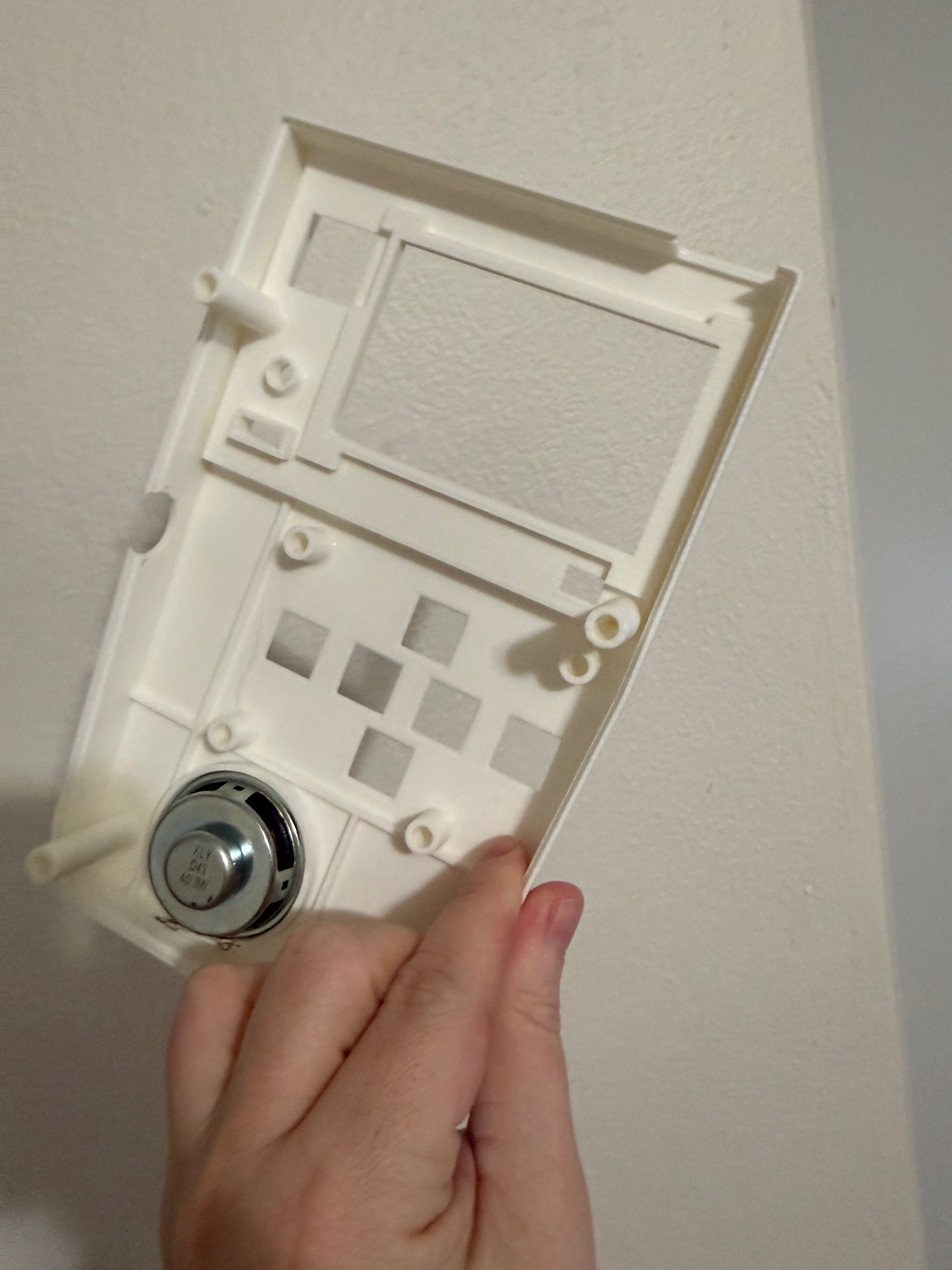
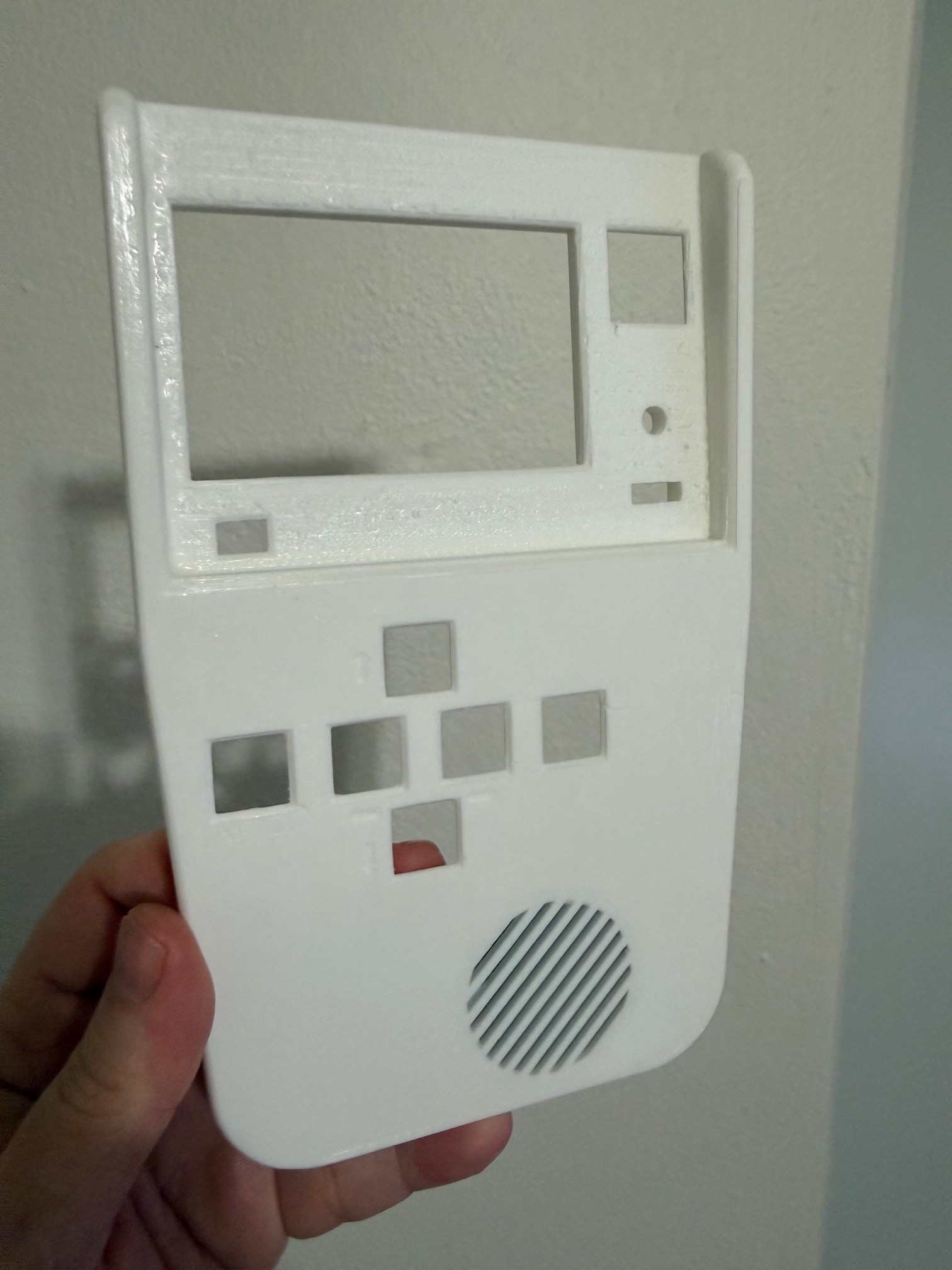
I've made significant improvements to the case design. (v5?) The back now features diagonal grip stripes that provide much better handling. I increased the overall dimensions by about 10mm to accommodate new components, and tightened up the case tolerances significantly - no more rattling parts.
New Features Coming Together:
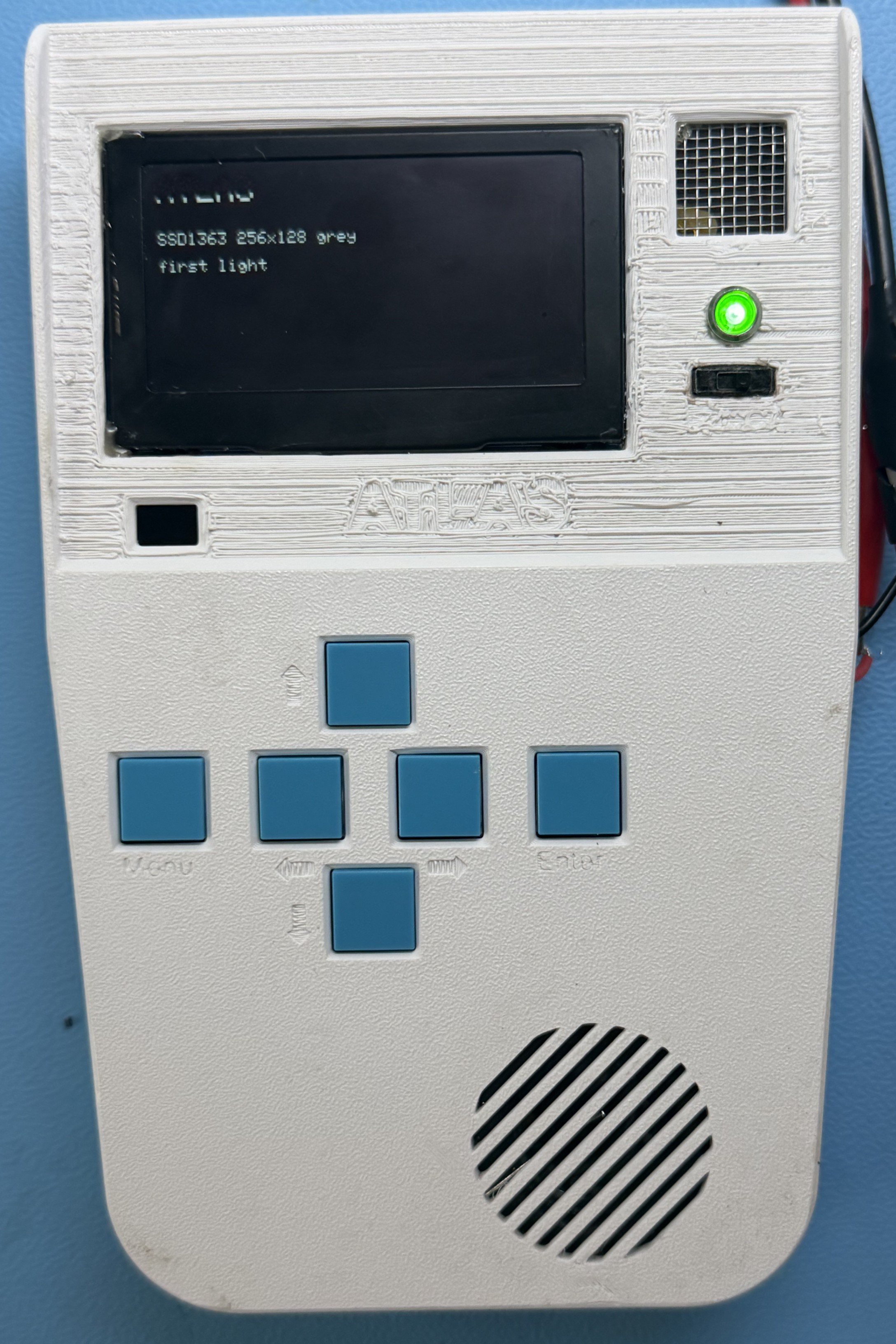
I've integrated the magnetic anemometer mounting, (wind sensor, will need to drill them out) designed for three cups connected to a bearing system with a 3x3x3mm magnet. The front panel now has a proper power LED and mounted switch, plus I've carved out dedicated space for a radiation sensor. (Menu. up, down, left, right, and enter)
The keypad layout shows the foundation for my menu system - just waiting on component availability to complete it.
AI-Powered Object Recognition:
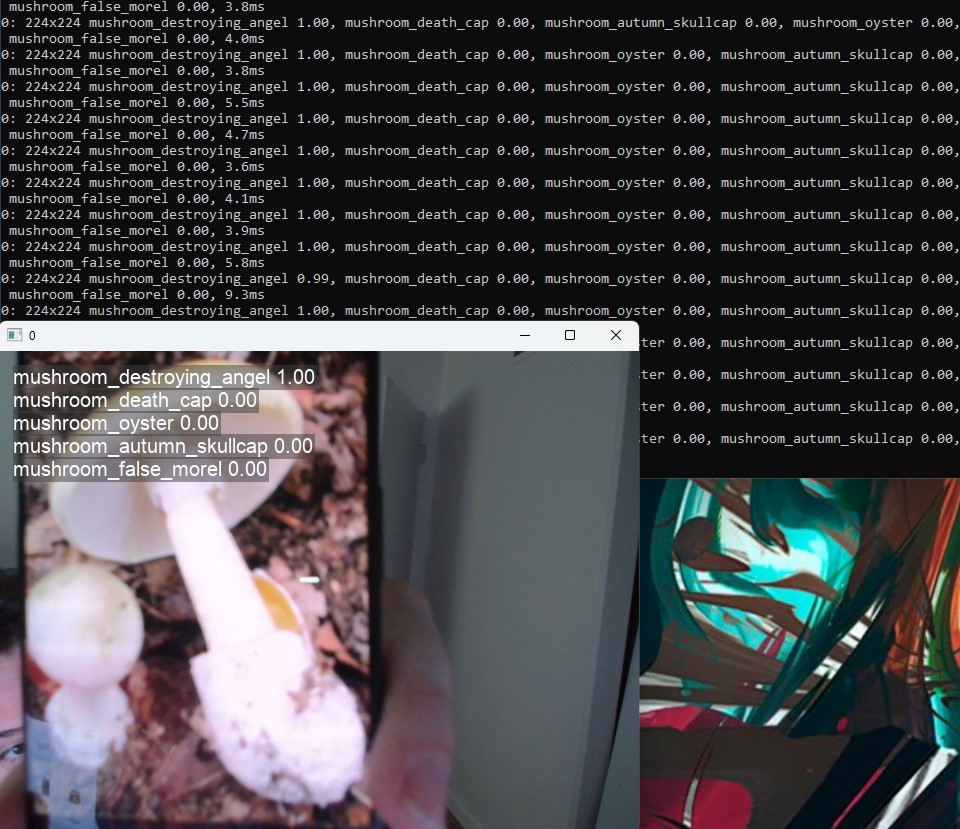
I've added two spots for 5mm super-bright LEDs that will illuminate a 5MP camera running offline AI object recognition. The system can identify rocks, bugs, trees, and other objects entirely locally.
Vision: All-in-One Field Device:
I'm evolving this beyond weather monitoring into a comprehensive field instrument. My plans include a BNO085 9-axis IMU for compass functionality and anomaly detection, creating a navigation device with weather prediction and scientific measurement all rolled into one.
Still Major Work Ahead:
The display shows working sensor data, but I still have significant electronics development remaining:
The case refinement is a big step forward, but I've still got plenty of work to get everything integrated properly.
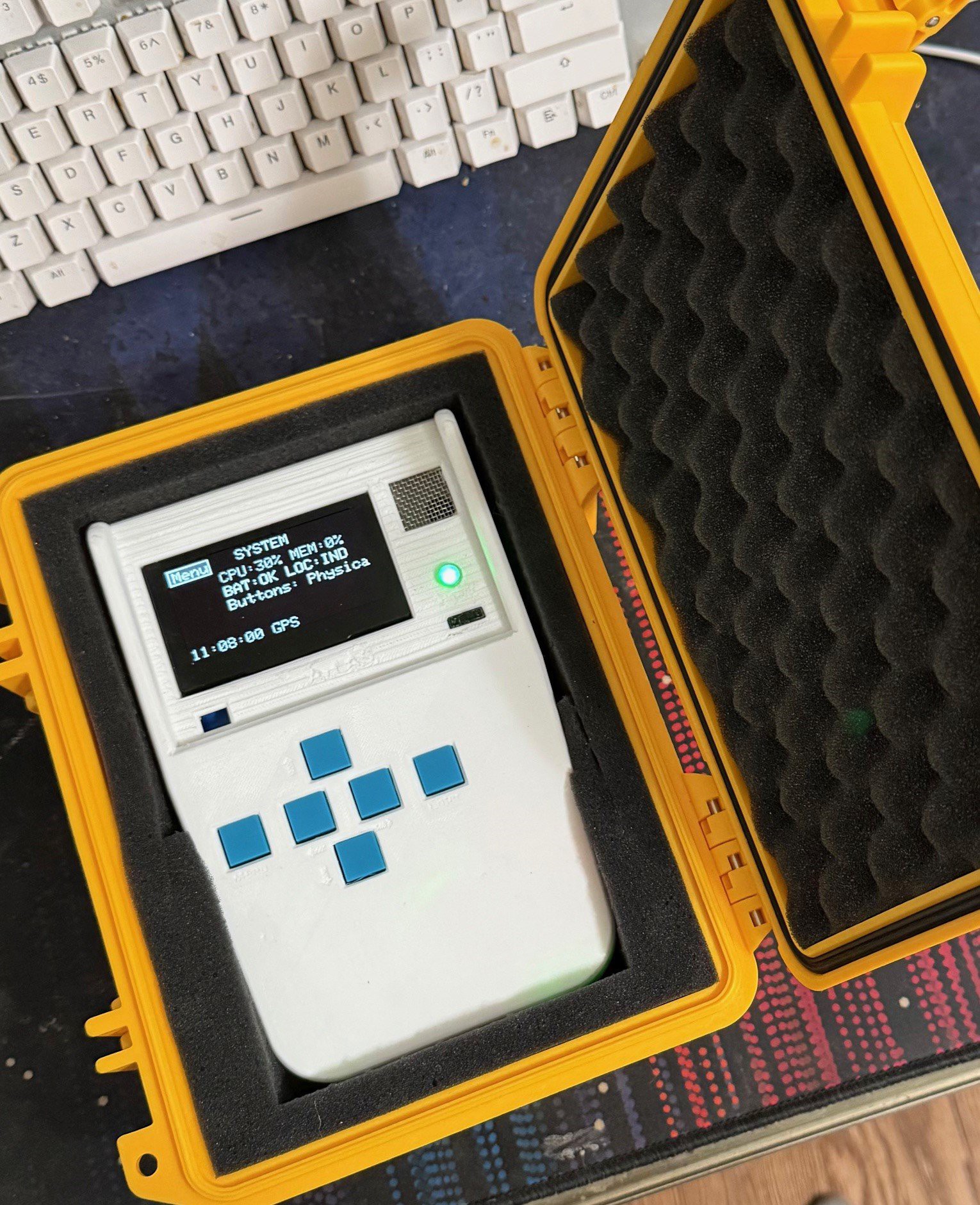
Below the screen shows a rotating triangle in the top left that is a activity indicator that it is running. Nest you see CO2 and VOC readings, the temperature fusion readings and humidity. Also pressure at the bottom you will se the time based on satellite atomic clock and the GPS next to indicates that the IND or INDOORS as it recognizes it is indoor and adjust sensor polling to reduce battery drain . After that the TF is temp fusion so 2 temp sensors.
Create an account to leave a comment. Already have an account? Log In.
Since you said things had moved into commercial territory, I was wondering if you have a time frame(ish) when these might be available? Also how does the size of an ATLAS compare to an iPhone 16 Pro Max?
I do have a question. In general, what are the differences between the 3 tiers? My wife teaches third grade and the Education tier may interest her. I’m interested in one of the other two tiers.
The education tier would not have a select few of the more expensive sensors/smaller battery, as to lower the cost from the pro. I will try to contact you about specifics, however as this is ongoing dev, it will be some time till at that release level.
Thank you for the reply. I'm interested in a pro model for myself, I think. The This would be an edc item for me so I would want the best option available. My wife teaches 2-3 grade and I believe the education one would be good for her.
And I'll be happy to alpha/beta test! ( Just kidding!)
Thanks!, looking into new screens, did get the buttons all working though!
Become a member to follow this project and never miss any updates
electrobob
Vishnu Mohanan
Apollo Timbers
peter jansen
I sent a dm earlier this week. I had missed yours. ☹️