 gitzi
gitzi

Gitzian Display Streaming Hardware
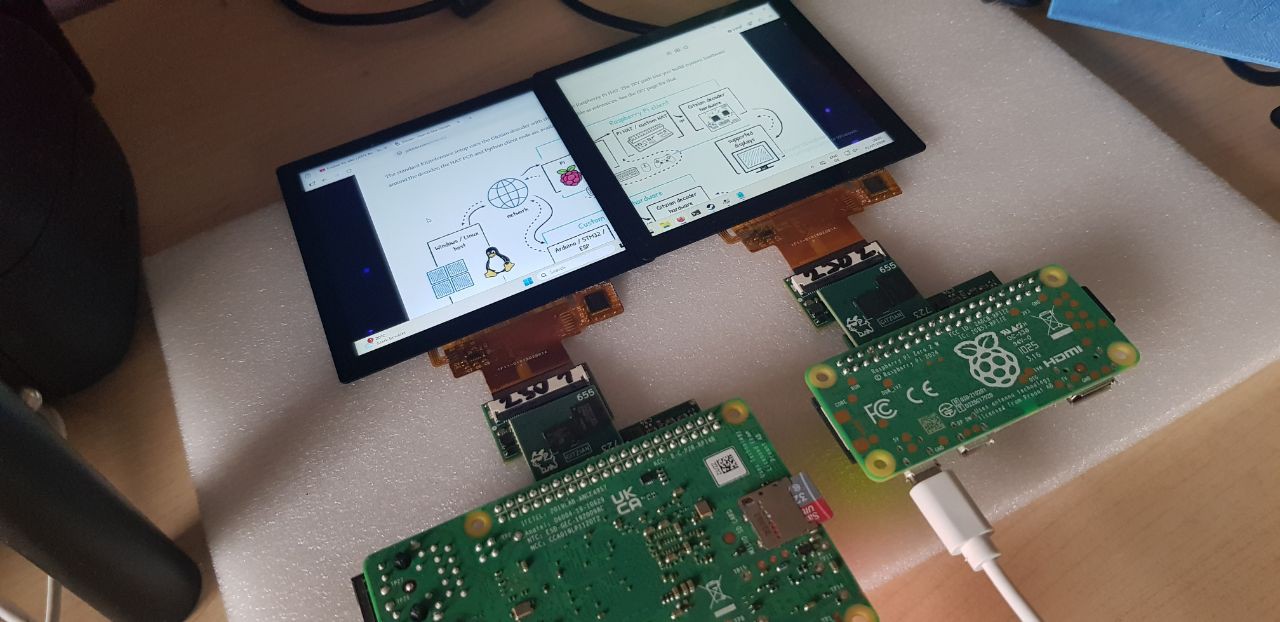
Gitzian streams desktop output to supported small displays.
The host machine renders the image. The Gitzian endpoint receives the stream, passes it through the decoder hardware, and drives the attached display.
This makes small screens useful as compact remote displays, dashboards, control surfaces, communicator panels, handheld experiments, lab tools, embedded UIs, and custom hardware projects.
For DIY builds, the decoder module, reference boards, KiCad files, and Python client give you a base you can modify instead of starting from a blank schematic.
What Makes It Special?
Gitzian is built around low-power, low-latency display streaming in a tiny, hackable hardware stack.
The main computer does the rendering. The endpoint stays small and focused: receive frames, decode them, and drive the panel.
The streaming path is optimized for this job. It avoids dragging a full desktop client stack into the display endpoint and keeps the hardware side compact, predictable, and easier to embed.
The host side is not locked to one GPU vendor. The stream can be encoded on common Intel integrated graphics, NVIDIA or AMD GPUs, or Raspberry Pi video hardware.
Example Setups
These two diagrams show the main hardware paths: a normal Windows / Linux host setup and an alternative local Raspberry Pi setup.
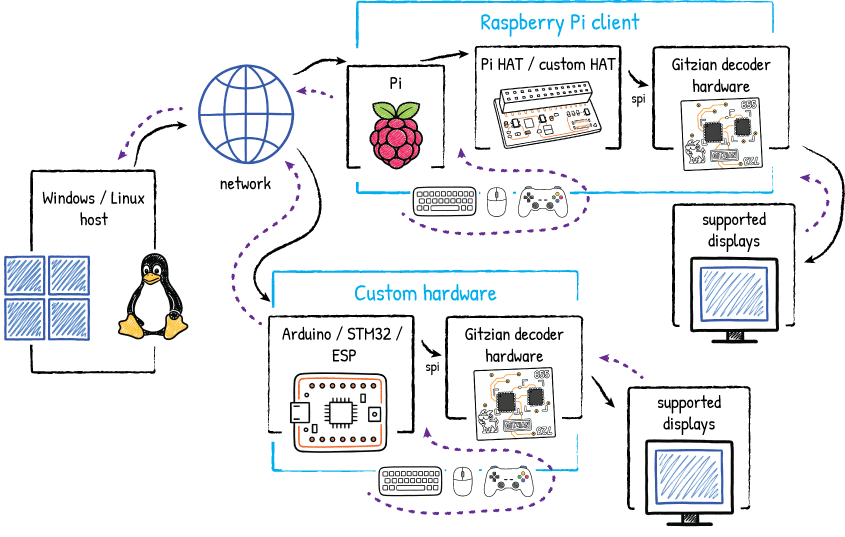
Windows / Linux host setup
A Windows or Linux machine renders the desktop, viewport, or application output. The stream goes over the network to the Gitzian endpoint.
On the endpoint side, a Raspberry Pi can run the Gitzian client. The Pi talks to the Gitzian decoder through the Pi HAT or a custom HAT. The decoder then drives one of the supported displays.
The same decoder path can also be used with custom hardware. Instead of the Raspberry Pi client, an Arduino / STM32 / ESP-style board or another embedded controller can feed the decoder over SPI.
This is the useful split: host and transport on one side, decoder and display output on the other side.
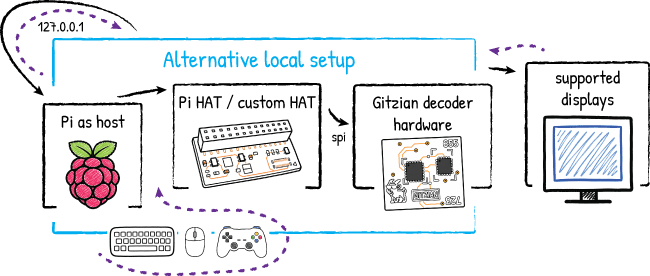
Alternative local Raspberry Pi setup
The Raspberry Pi can also act as the local host. In this setup, the stream does not need to come from another computer on the network.
The Pi renders locally and connects to its own Gitzian client through 127.0.0.1. The rest of the hardware path stays the same: Pi HAT or custom HAT, SPI link, Gitzian decoder hardware, then the supported display.
This setup is useful for compact standalone builds, demos, cyberdeck-style devices, local dashboards, and experiments where one Raspberry Pi should provide both the application side and the display endpoint side.
Gitzian Decoder / Open Hardware
The Gitzian decoder is the tiny 21×19 mm core hardware module.
The standard reference setup uses the decoder with a Raspberry Pi HAT on the input side and a display bridge on the output side.
Custom hardware is still built around this decoder. The boards around it are the part you can replace, merge, or redesign.
The Raspberry Pi HAT reference design and the display bridge reference design are open source KiCad designs. You can use them as-is, modify one side, or build your own board around the decoder for a different controller or display setup.
Some signals are routed from the input connector side to the output connector side. This helps if you want to reuse one existing side of the design and replace only the other side.
Some parts are already fully open source. If there is enough interest, I can make more and more of the project open source. Then we can go fully independent as a community, not bound to one specific vendor, manufacturer, or exact board layout.
DIY Hardware
Gitzian can become a highly customized DIY project around the 21×19 mm decoder module.
The decoder has two board-to-board connector sides. One side is the input/controller side. In the standard reference setup this is the Raspberry Pi HAT. The other side is the output/display side. For...
Read more »
 Arnov Sharma
 Tobias
 Rainer Glaschick
 PixelCircuits