Close
0%
0%

Logic reader

Simple and cheap logic reader for PC with USB

Similar projects worth following
I needed a quick way to read the outputs of a PAL14L4 chip, and compare it with the GAL16V8 replacement I had made, in order to prove the correctness of the latter.
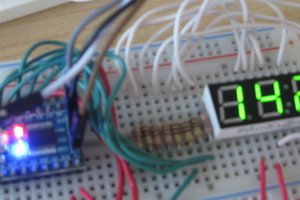
I made this simple project with a couple of ready-made modules mounted on a breadboard.
It worked correctly.
The pins can be individually controlled, so one could toggle a clock pin and observe the before and after states of registered logic.
It can easily be expanded to read bigger logic chips, or even boards of logic.

Simplicity is the key feature here. You don't need to make or buy a PCB, build it, or do much wiring.

Components:

  • USB to I2C module
  • I2C to 16-bit parallel I/O module or chip
  • Two 4k7 resistors to pull up the I2C bus signals

Optional parts:

  • Current limiting resistors where you might connect two outputs
  • LED bar to show output pin activity
  • Switch for VCC to logic chip power

Operation

I had to write some C code, because the demo code from FTDI had the USB-to-I2C module driving a serial EEPROM. The I2C-to-PIO chip is significantly different. I wasted many hours trying to adapt the demo code before asking an AI bot what was wrong with my code. It quickly spotted what I had done, and gave me some working code. This was the most time-consuming task, which won't need to be done again.

I quickly wrote a short routine to test the I/O by driving an LED bar. 

I then wired the port A to the PAL14L4 pins 1 to 8. Port B had the less-significant bits wired to the other PAL input pins and the most significant bits to the four outputs. With 14 inputs and 4 outputs, a single 16-bit IO module can only read 2 outputs at a time. I decided to read just one output at a time, because it was quicker to run the reader program four times (4 x 40 seconds) than to write more code.

My code read the outputs to an ASCII text file, for both the original PAL14L4 and my self-made GAL16V8. Comparing the files using the Linux diff command quickly identified which outputs were identical, and where they were not. 

Then it was a matter of tweaking my logic expressions until the matched. Fortunately I had equations from a similar chip for another machine, which proved a good starting point. With a bit of intuition and several iterations, I successfully duplicated the original logic.

I have a device that should have been able to read the fuse maps directly, but for some reason it was not working for 2 of the four outputs. Hence I had to create this project to figure those out the hard way.

Advantages

  • Off the shelf modules
  • Simple and quick to assemble
  • Input pins can be individually changed
  • Software in C
  • Runs on a desktop PC
  • Easily expandable for more I/O pins
  • Cheap enough to make and send to people who don't want to send their chips to me

Disadvantages

  • About 100 time slower than a device reader, but still only about 10s to cycle through the 16384 possible input combinations. This is trivial compared to all the other time spent. 
    Of the 600 microseconds per address, most of this is due to USB overheads. USB is great for transferring large packets of data, but less efficient for a few bytes at a time.

Cost

UMFT4222EV module about £15 

MCP23017 module (or chip) a few pounds

Comparison with other methods

Reading by using a ROM socket adaptor

This is simple but does need a ROM reading device.

https://dreamjam.co.uk/emuviews/readpal.php

Tony Brewer's PAL14L4 Reader

This uses counters to drive the input pins and is specific to the Memotech

Needs building on prototyping board  

The software is written in Z80 assembler.

http://www.primrosebank.net/computers/mtx/projects/pal_reader/palreader_build.htm

A QBASIC program for reading PAL outputs and automatically deducing the logic equations is mentioned, but I can't find it for downloading.

Ideas for future work

  • Expand design to cope with 24-pin PAL chips
  • Sense when pins are input, output, or disabled
  • Find how to automate equation recovery with Espresso or Logic Friday
  • Remove the USB time overhead by talking directly to the I/O chip from the I2C bus of a Raspberry Pi

There is hobbyist demand for reverse engineering programmable logic from old machines to preserve them. The combinatorial chips are simple, but registered chips are usually harder. For example, the PAL chips in the Applix 1616 machine had their security bits blown and the original inventor has lost/forgotten the original equations. People have discussed trying 'brute force' analysis by bombarding...

Read more »
  • Compiling PAL equations on Linux

    Keith06/09/2026 at 21:36 0 comments

    I use my logic reader to record the behaviour of programmable logic chips, with the aim of making replacements. So I eventually need to write and compile proposed PAL equations.

    I use Linux on my home PC, and don't want to temporarily swap to Windows in the middle of a session.

    There are some Linux programs for compiling PALs but I found them limited in devices compared with the Windows programs written by the chip manufacturers.

    So I use Linux Wine to run the free Opal suite that runs under MSDOS. Nice and simple, no Windows GUI needed. 

    Open your Linux terminal and type the following command:

    wine cmd

    A new prompt will appear inside your terminal that looks like

    Microsoft Windows 10.0.19043
    
    Z:\home\keith>

    This presents my home directory as a virtual DOS/Windows drive.

    I keep my PAL programming work on a USB drive, on a USB expander with the USB dongle for my wireless keyboard and mouse. This is so I can move them all at once to my antique device-programmer and computer. NB I have to do this before switching it on, so Win98 detects them. Win98 will not detect them later on.

    Now I have to make my USB drive look like a DOS drive to wine. The command winecfg will open a GUI. I have previously defined my  MSDOS-formatted USB drive (named USBDOS, appearing as /media/keith/USBDOS) to be drive G: so I simply type G: and I am 'in' that drive.

    I then type

    cd DOS/opal/Applix_1616/logic

     and I'm in a workspace.

    I have had some issues with wine before, so I installed a program called DosBox.

    Now any attempt to run a DOS program from Wine opens a DosBox window, briefly, then closes.

    So I now open DosBox from my Linux Games options, and again a Z drive is shown.

    Type:

    mount [virtual-drive-letter] [path-to-linux-folder]

    which in my case is

    mount d /media/keith/USBDOS/DOS

    DosBox is annoyingly accurate in that it won't handle file/directory names longer than 8 characters.  I can cd to OPAL but not to Applix_1616. It suggests I use Applix~1, and this works. I then cd to the logic directory.

    From there I can run 

    ..\..\eqn2jed.exe -d PAL16R8 1616_U5.EQN

  • Pinouts and connections

    Keith11/17/2025 at 20:19 0 comments

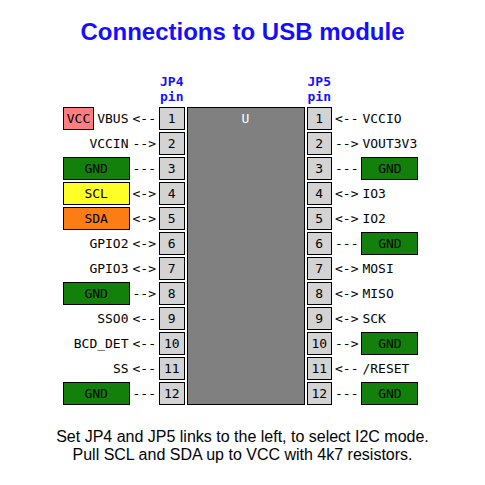
    The USB module just has power, ground and the two I2C signals connecting.

    I used just one MCP23017 chip, with GPB7 connected to D0, D1, D2 and D3 in turn. This needs that pin direction set to input instead of output. For a more general purpose device, use two of these chip and set their slave addresses to be different (using pins 15, 16 17).

    Here are the connections to simple programmable logic chips with all their possible output pins (pale blue cells) set to outputs. Some cells are always inputs (green cells). 

    In practice, some of the possible output cells may be inputs. You may not know their signal directions at first, so current-limiting resistors to those lines are a wise precaution to prevent damage.

    The pin ordering on the right may seem a bit irregular, but it allows the addresses to be cycled from 0 to 2^n where n is the number of address pins minus 1. 

    You can also use the two-chip version to read EPROM chips. The /CS and /OE pins can be tied down for reading. Where pins become VPP or /PGM, simply hold A11, A14, and A15 high as required. Pin 28 can be permanently connected to VCC, but pin 26 will need switching to VCC, or buffered to be able to supply enough current to drive a 24-pin EPROM.

View all 2 project logs

Enjoy this project?

Share

Discussions

Similar Projects

Does this project spark your interest?

Become a member to follow this project and never miss any updates